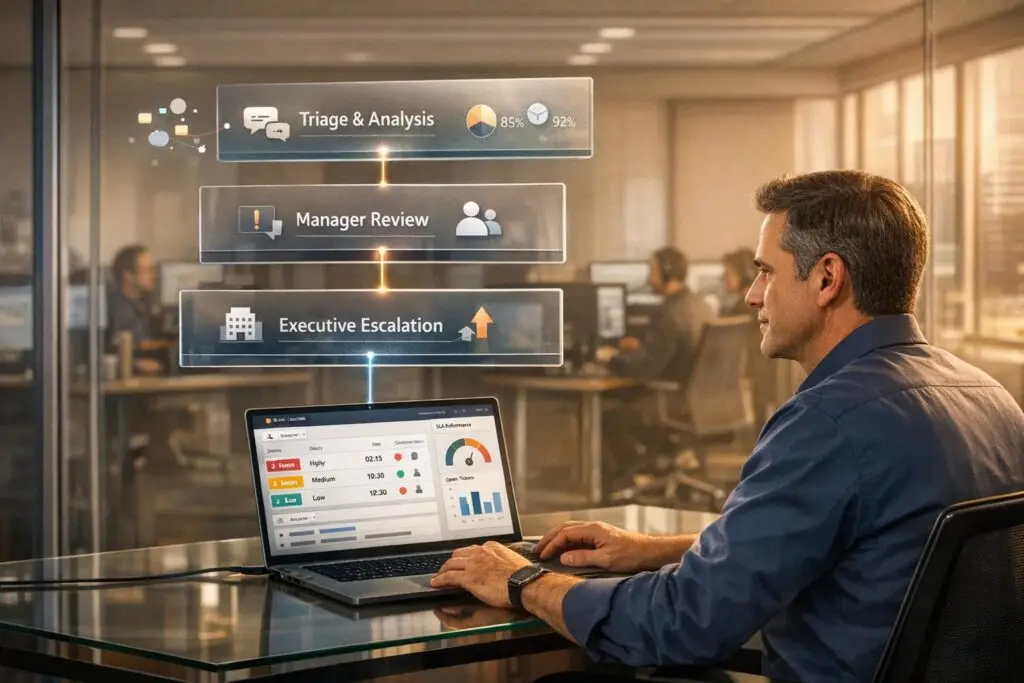
Executive escalations are high-priority customer issues requiring senior leadership’s involvement, often triggered by trust breakdowns, churn threats, or legal disputes. Mishandling them disrupts workflows, lowers team morale, and risks customer loyalty. To manage these escalations effectively:
- Build a 3-tier escalation system: Separate routine issues from critical ones by defining clear roles for frontline support, technical specialists, and subject matter experts. Use "Escalation Briefs" to streamline handoffs.
- Set Clear Triggers: Escalate only when reputation, key relationships, or major revenue is at stake. Monitor customer sentiment, unresolved tickets, and account value.
- Use AI Tools: Automate triage, prioritization, and routing to detect risks early. AI can summarize issues and provide necessary context, reducing delays.
- Focus on Metrics: Track escalation rates, handoff delays, and customer re-contact rates to identify process gaps. Aim for an escalation rate below 15%.
- Ensure Resource Allocation: Cross-train teams, group related escalations, and use AI to manage workload spikes without disrupting daily operations.
What Executive Escalations Are and Why They Matter
Defining Executive Escalations
Executive escalations are high-priority customer issues that require immediate attention from senior leadership, often at the C-level. These situations go beyond standard support tickets because they stem from a breakdown in customer trust, not just technical problems.
The distinction is crucial. Standard escalations typically involve resolving technical issues like bugs, outages, or feature requests. Executive escalations, on the other hand, occur when trust between the customer and the company has been severely damaged. As Andrew Marks, Co-Founder of SuccessHACKER, explains:
"Customers don’t escalate because of problems, they escalate because of broken trust" [2].
A strong relationship with a customer can weather even serious technical challenges. But when a customer feels ignored, misled, or undervalued, even small issues can escalate quickly. This collapse in trust disrupts business operations and often leads to a snowball effect of additional problems.
What Happens When Escalations Go Wrong
Mishandling executive escalations can have serious consequences for both your team and your business. Internally, constant "executive fire drills" drain resources and energy. Teams are forced to divert attention from critical tasks, and senior specialists often waste time redoing discovery work due to poor handoffs, which leads to longer resolution times and lower first-contact resolution rates [1][4].
For customers, a poorly managed escalation process can be equally frustrating. Being asked to repeat their issues multiple times erodes confidence and satisfaction. If trust isn’t rebuilt quickly, these customers are likely to churn – and worse, they may become vocal critics of your company. Considering that 84% of people trust peer recommendations over traditional advertising [5], negative feedback can have a lasting impact on your reputation and future sales pipeline.
The business consequences are steep. Beyond immediate revenue loss from churn, companies risk missing out on potential expansion opportunities and could face SLA penalties. Additionally, insufficient communication during a crisis can create "communication debt", where follow-up inquiries skyrocket. Ameya Deshmukh from EverWorker highlights the stakes:
"Escalations are where your support brand is truly tested… those moments concentrate risk: SLA penalties, churn, executive fire drills, and agent burnout" [4].
These challenges emphasize the importance of having a strong escalation framework in place, which will be explored in the next section.
sbb-itb-e60d259
Managing Customer Escalations Effectively
How to Build an Escalation Framework
Creating an escalation framework helps define roles, timing, and processes, ensuring issues are handled efficiently without unnecessary chaos. Without a structured approach, urgent matters can quickly escalate into executive-level emergencies, often pulling senior leaders into problems that could have been resolved earlier. The trick is to establish clear operational boundaries, with defined triggers and ownership at each level.
Setting Up a 3-Tier Escalation System
A three-tier system is an effective way to separate routine issues from critical crises [6]. Here’s how it works:
- Tier 1 (Frontline Support): This team handles general customer inquiries and common problems, relying on standard procedures and knowledge-centric support solutions.
- Tier 2 (Technical Specialists): These are staff members with deeper expertise who take on complex issues that Tier 1 cannot resolve.
- Tier 3 (SMEs and Engineering): This level involves subject matter experts and engineers who address the most challenging technical problems and high-priority system issues.
This system differentiates between two types of escalation:
- Functional escalation: Shifting a ticket laterally to a specialized team, such as moving a billing dispute to the finance department.
- Hierarchical escalation: Moving an issue up the chain of authority when approvals or sensitive handling are needed.
Instead of relying solely on keyword-based routing, escalation should consider whether the agent has the proper tools, documentation, and context to solve the issue [6].
Whenever a case moves to Tier 2 or Tier 3, it should include an "Escalation Brief", a decision-ready summary as outlined by Ameya Deshmukh. This brief should include:
- Customer environment details
- A timeline of events
- Relevant artifacts (e.g., logs, screenshots)
- Risk indicators
This approach prevents specialists from having to start from scratch, significantly reducing resolution time. As Tina Grubisa, Value Consultant at Mosaic AI, points out:
"Escalations have a much more significant impact than they realize. It’s a bottleneck that can be removed rather easily" [6].
This structured method ensures that escalations are handled efficiently and only move upward when absolutely necessary.
When to Escalate to Executives
Executive involvement should be reserved for issues where the company’s reputation, key business relationships, or significant revenue is at stake – not just for technical challenges. Escalation to Tier 3 is appropriate for scenarios like system outages, security breaches, compliance problems, high-value account cancellations, or potential legal disputes [1][4].
Strategic accounts – those representing major revenue streams or industry visibility – often require more sensitive handling, with lower thresholds for escalation.
To identify when escalation is necessary, use multi-signal detection rather than relying on a single criterion. For example, monitor customer sentiment, unresolved tickets, and customer value metrics. A billing issue from a $500,000 annual contract client mentioning "talking to our legal team" should immediately trigger executive involvement. However, the same issue from a smaller account might remain at Tier 2.
With clear triggers in place, the next step is ensuring these processes integrate seamlessly into daily workflows without causing disruptions.
Managing Escalations Without Disrupting Daily Operations
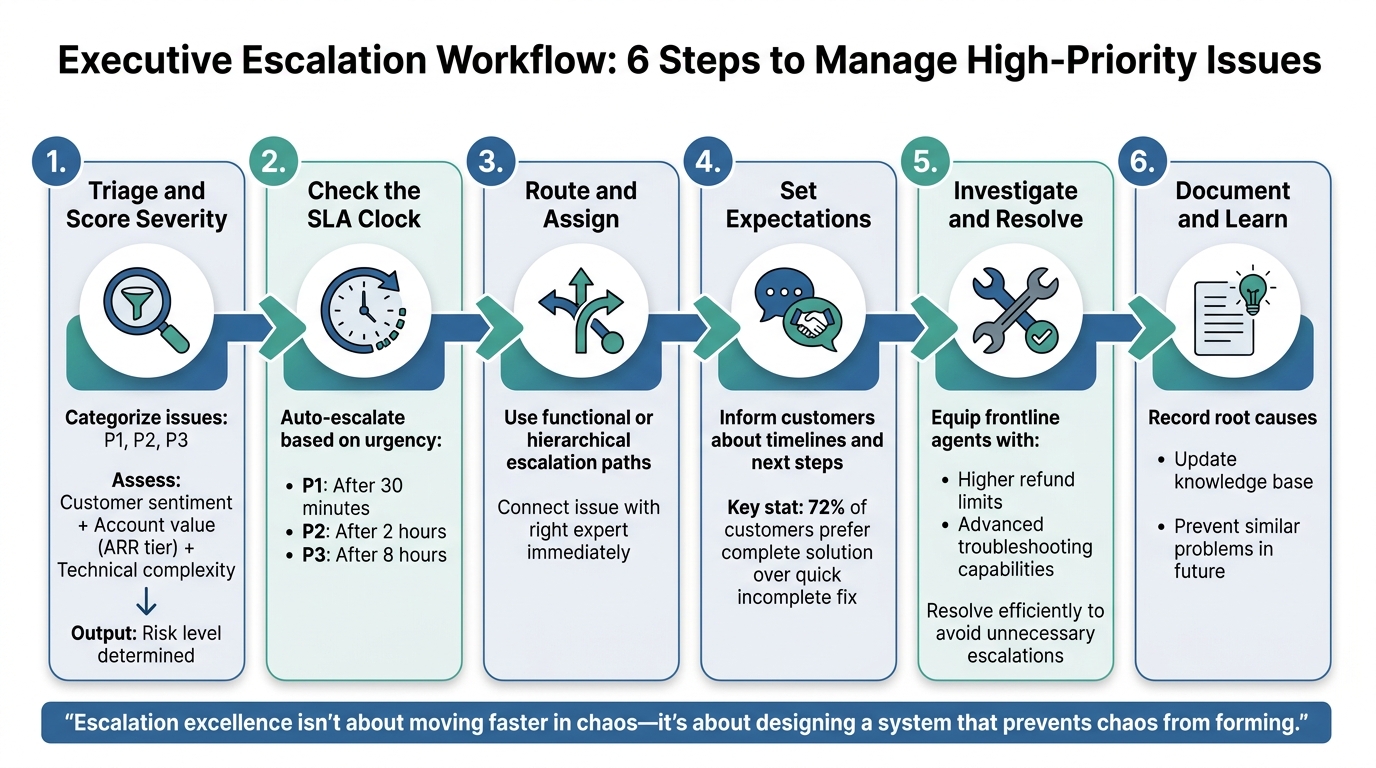
6-Step Executive Escalation Workflow Process
Handling escalations while keeping daily operations on track can feel like walking a tightrope. When high-level issues demand immediate attention, your team still needs to support a steady stream of customers. The solution? Build workflows that isolate urgent tasks without throwing the rest of your team off balance. Here’s a streamlined workflow to complement your existing escalation framework.
Step-by-Step Escalation Workflow
A well-structured escalation process follows six key stages to keep disruptions under control:
- Triage and Score Severity: Start by categorizing issues based on their impact (P1–P3). Factor in customer sentiment, account value (ARR tier), and technical complexity to assess the level of risk [3].
- Check the SLA Clock: Automate escalation triggers based on urgency: P1 after 30 minutes, P2 after 2 hours, and P3 after 8 hours [3].
- Route and Assign: Use functional or hierarchical escalation paths to connect the issue with the right expert immediately [3].
- Set Expectations: Keep customers informed about timelines and next steps. Research shows that 72% of customers are willing to wait longer for a complete solution rather than receive a quick but incomplete fix [3].
- Investigate and Resolve: Equip frontline agents with the tools and authority they need – like higher refund limits or advanced troubleshooting capabilities – to resolve issues efficiently and avoid unnecessary escalations [3].
- Document and Learn: Record the root causes of escalations and update your knowledge base to prevent similar problems in the future [3].
This clear process strengthens your overall escalation framework.
"Escalation excellence isn’t about moving faster in chaos – it’s about designing a system that prevents chaos from forming." [4]
How to Allocate Resources During Escalation Spikes
Even with a solid workflow, resource allocation is critical when escalation spikes occur. These strategies can help balance urgent needs with routine operations:
- Group Similar Escalations: Combine related escalations to highlight their collective business impact, reducing the number of interruptions for engineering teams [2].
- Cross-Training for Flexibility: Train Tier 1 agents to handle simpler escalations when Tier 2 specialists are overwhelmed. A strong peer support system, such as internal chat for quick advice, can also minimize delays [7].
- Leverage AI for Early Detection: AI-driven triage tools can identify high-risk interactions early and assign them automatically [4]. It’s worth noting that only 14% of customer service issues are resolved through self-service [4].
The foundation for managing escalations effectively is laid well before a crisis hits. Andrew Marks, Co-Founder of SuccessHACKER, puts it succinctly:
"Escalation success depends on your ability to sell urgency internally, not just externally." [2]
Using AI to Streamline Escalation Management
AI is changing the game for managing escalations. Instead of relying on manual processes to sort through tickets, AI steps in to detect high-risk situations early, gathering everything needed for a quick response. The result? Escalations are resolved faster without derailing your entire support team.
This shift moves the responsibility of detection from human agents to automated systems. AI scans every interaction for signals that humans might overlook – like frustrated language, unresolved tickets, or repeated reopenings – and combines these with business context, such as ARR (Annual Recurring Revenue) tiers or strategic support levels [4]. By using this multi-layered approach, AI minimizes the chances of missed escalations while avoiding false alarms that can waste valuable time.
AI for Triage and Prioritization
AI takes triage to the next level by blending sentiment analysis with factors like business impact and time-sensitive signals. For example, a ticket from a $500,000 ARR customer containing words like "legal" or "breach" would trigger a different response compared to a routine question from a smaller account. The system doesn’t just flag the issue – it categorizes the type of escalation (e.g., billing dispute, technical failure, or contract issue) and directs it to the right team, whether that’s a Tier 2 specialist, an on-call engineer, or even executive leadership [4].
To avoid unnecessary escalations, AI systems rely on multiple triggers. For instance, an issue might only be flagged if it involves a high-value customer, negative sentiment, and a looming SLA (Service Level Agreement) risk. As Ameya Deshmukh from EverWorker explains:
"AI escalation handling is the use of AI to detect high-risk customer interactions early, route them to the right people, and orchestrate next steps… so escalations resolve faster and more consistently." [4]
These AI-driven processes not only save time but also cut operational costs when scaled. AI-powered triage naturally leads to automated follow-ups, simplifying the steps that come afterward.
Automated Summarization and Routing
Building on strong triage capabilities, AI takes efficiency a step further with automated summarization and precise routing. Once an escalation is identified, AI provides the responder with all the necessary context. Automated summaries eliminate the need for back-and-forth communication by delivering key details – like the customer’s environment, a timeline of events, relevant artifacts (such as logs or screenshots), and suggested next steps based on established runbooks [4].
This "ready to work" setup is crucial. Instead of spending days gathering diagnostic data, engineers can dive straight into problem-solving, as AI systems automatically compile logs, telemetry, and other essential information [4]. Plus, effective routing ensures escalations are promptly assigned to the right person, with AI monitoring the process to prevent delays or missed handoffs.
Advanced AI tools also help manage workloads dynamically. When escalations arise, these systems can automatically reprioritize tasks, reducing stress and preventing burnout. They handle repetitive tasks like drafting incident updates, opening engineering tickets, and pulling account data – freeing up humans to focus on more critical decisions.
The MIT Sloan Management Review sums it up well:
"Successful AI-powered customer service depends on bots working with humans, not replacing them." [4]
The goal isn’t to take human judgment out of the equation but to eliminate the tedious, manual tasks that slow decision-making. By integrating AI into escalation management, teams can handle spikes in activity without disrupting their day-to-day operations.
Tracking Performance and Improving Your Process
Even the most well-designed escalation framework can falter without proper tracking. High-performing teams succeed by identifying breakpoints – moments when context is lost, delays occur, or trust erodes. While many organizations focus on surface-level stats like ticket volume or average resolution time, these numbers often fail to reveal deeper issues. Richie Aharonian, Head of Customer Experience & Revenue Operations at Unito, explains:
"Your escalation problems are structural, not performance-based. You need metrics that expose breakpoints – the moments when information gets lost, when priority gets mistranslated, when updates don’t reach the other system." [8]
The heart of escalation challenges lies in structural inefficiencies, not individual shortcomings. The goal is to pinpoint where your process loses time, context, or customer trust – not just to document activity.
Metrics to Track for Escalations
Choosing the right metrics is essential for uncovering and addressing weak points in your escalation process.
Start with two key metrics: overall escalation rate and handoff delay time. For mature service desks, an escalation rate between 15–20% is typical. If your rate exceeds 15%, it may signal that your frontline team needs better training or tools [8]. Handoff delay time – how long it takes for the next team to begin working on an escalated ticket – highlights friction in your system. For critical cases, this delay should ideally stay under 30 minutes [8].
Next, track context loss incidents and bounceback rates. Context loss – when details are lost during handoffs – should stay below 10%; exceeding this threshold means critical information is frequently slipping through [8]. Similarly, a bounceback rate above 20% – where tickets are returned for clarification – indicates that initial teams aren’t providing enough detail [8].
For executive-level escalations, monitor the customer re-contact rate. If more than 15% of customers follow up after an escalation, it suggests your team might not be communicating proactively enough [8]. Additionally, keep an eye on the SLA breach rate for escalated tickets. If this rate is more than 10 percentage points higher than your overall SLA breach rate, it could mean your escalation process is undermining efficiency [8].
These metrics provide a foundation for refining your process and addressing recurring problems.
Learning from Past Escalations
Metrics are only useful if they lead to actionable insights. Use the data to identify patterns and make targeted improvements that reduce repeat escalations.
Conduct monthly reviews to analyze escalation trends by issue type, customer segment, and agent. Each escalation offers an opportunity to uncover process gaps. Teams with documented escalation procedures resolve cases 37% faster because they consistently learn from past mistakes [9].
During post-escalation reviews, try the "Five Whys" technique to dig into root causes. For instance, a billing-related escalation might reveal that your invoices are unclear, not that your billing system is faulty. Grouping similar escalations can also help product and engineering teams prioritize fixes more effectively [2].
Finally, don’t assume silence equals satisfaction. Proactively follow up with customers after escalations to confirm the root issue has been resolved [3]. This feedback loop not only reduces the likelihood of repeat escalations but also helps build a stronger help desk knowledge base for your team over time.
Conclusion
At every stage – whether through structured escalation systems or AI-driven triage – the overarching goal is clear: maintain customer trust while keeping your team on track.
Handling executive escalations doesn’t have to throw your team into chaos. The key difference between a disorganized support operation and a well-oiled one lies in having clear frameworks, AI-powered tools, and a focus on continuous refinement. By implementing a 3-tier escalation system, you create predictable workflows that ensure high-priority issues reach the right experts without overwhelming your frontline staff. Escalations become part of a streamlined process, not disruptive exceptions.
AI transforms escalation management from a reactive scramble into a proactive, efficient system. It identifies risks early, automates ticket routing, and enables faster intervention, leading to quicker resolutions and valuable insights from every interaction.
That said, technology alone won’t solve everything. The best teams also focus on tracking meaningful metrics and learning from each escalation. Aim to keep your escalation rate below 10%, watch for delays during handoffs, and conduct monthly reviews to uncover recurring issues [3]. As Andrew Marks, Co-Founder of SuccessHACKER, wisely points out:
"The fastest way to resolve an escalation isn’t to fix the problem, it’s to fix the relationship first." [2]
Ultimately, resolving escalations is about rebuilding trust, not just addressing technical glitches.
If your current tools require expensive add-ons for basic escalation features or lack built-in AI capabilities, you’re likely overpaying for complexity. Supportbench offers enterprise-grade escalation management with features like AI triage, automated routing, and detailed tracking – all starting at just $32 per agent per month. No hidden fees, no feature restrictions, and no need to patch together multiple systems. Whether your team is a small startup or a large enterprise, you’ll have access to the same AI-powered platform from day one.
Don’t let executive escalations derail your team’s productivity. Equip them with smart, AI-driven solutions that safeguard customer trust while keeping operations smooth and efficient.
FAQs
What’s the fastest way to rebuild trust during an escalation?
The fastest way to regain trust during an escalation is to tackle the customer’s concerns head-on and show them their issue matters. Leverage AI tools to spot high-risk interactions early and direct them to the appropriate team members who can resolve them effectively. It’s also important to set clear expectations for the escalation process, maintain open and honest communication, and share timely updates packed with relevant details. This approach not only demonstrates professionalism but also helps rebuild confidence.
How do we decide when an issue truly needs executive involvement?
Deciding when to bring an issue to the attention of executives requires clear guidelines. Escalation is necessary for situations involving high complexity, sensitive matters, breaches of service level agreements (SLAs), or when a customer specifically requests involvement from higher management. Common scenarios that trigger escalation include unresolved cases, issues tied to high-value accounts or security concerns, and notable dissatisfaction from customers. Having well-defined escalation policies and measurable thresholds ensures teams can identify when an issue surpasses their authority and requires executive intervention.
What AI should we use to catch escalations early without over-flagging?
The best AI systems for early escalation detection rely on predictive tools that evaluate over 40 factors, such as customer sentiment, response delays, and case history. By using natural language processing (NLP) and real-time scoring, these tools can pinpoint high-risk tickets while keeping false positives to a minimum. With continuous learning, the AI becomes even more precise, enabling teams to focus on urgent issues without wasting time on routine or low-priority cases.