


When outages happen, fixing the technical issue is just one part of the challenge. The bigger problem? Communication delays that frustrate customers, overwhelm support teams, and pull engineers away from resolving the issue. Here’s how to create an effective outage communication process:
- Define severity levels: Classify incidents (Critical, Major, Minor) based on user impact and urgency.
- Set communication triggers: Decide when updates go out for each severity level (e.g., within 5 minutes for Critical incidents).
- Map roles and approvals: Assign clear responsibilities for drafting, approving, and sending updates.
- Establish timelines: Use strict SLAs to ensure timely updates, like every 15 minutes for critical issues.
- Automate processes: Use pre-approved templates, AI tools, and escalation paths to minimize delays.
A structured process ensures faster resolutions, consistent messaging, and improved customer trust. Clear roles, automation, and defined timelines are key to keeping everyone informed during downtime.
Step 1: Define Outage Severity Levels and Communication Triggers
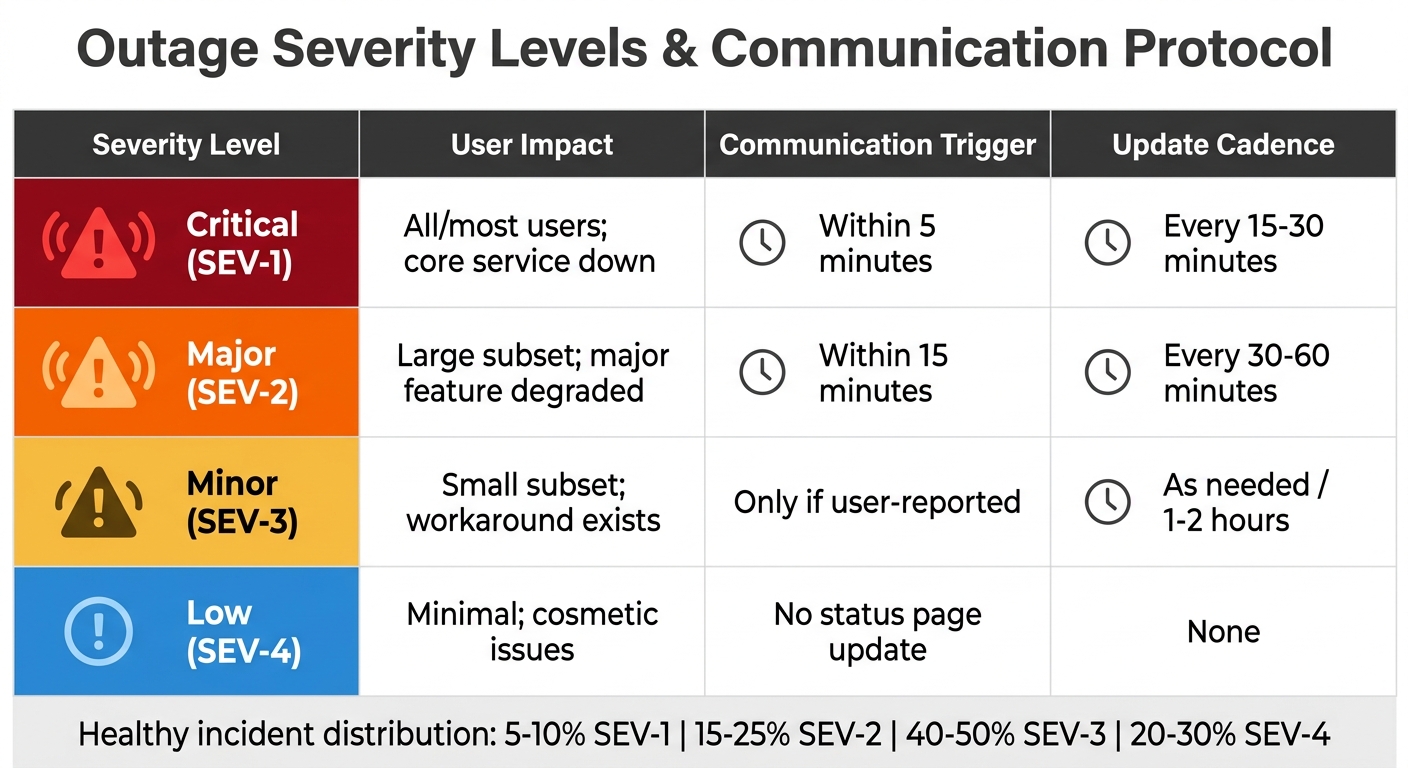
Outage Severity Levels: Communication Triggers and Response Times
Establishing clear severity levels and communication triggers is the backbone of any effective outage communication process. These definitions ensure your team knows when to act and how to manage support escalations promptly. Without this clarity, delays in notifications can worsen the situation as problems escalate.
Determine Impact Metrics
Severity levels are based on two key factors: Impact (how many users are affected) and Urgency (how quickly the issue is worsening) [7][8][12].
- Critical (SEV-1): These are the most severe incidents, involving complete service outages, loss of core functionality (e.g., payment processing), data corruption, or active security breaches [7][8][10].
- Major (SEV-2): Significant degradation of functionality affecting a large number of users. The service is still operational but performs poorly [7][10][11].
- Minor (SEV-3): Partial loss of non-critical functionality impacting a small group of users. Typically, a workaround is available [7][8][10].
"Severity is objective – it measures blast radius: how many users are affected and how badly… Priority is contextual – it reflects how urgently the team should act given business context." – OpenStatus [9]
For SaaS teams, a healthy distribution of incidents might look like this:
- 5-10% SEV-1
- 15-25% SEV-2
- 40-50% SEV-3
- 20-30% SEV-4 [7]
If more than 20% of your incidents are SEV-1, your definitions may be too broad, leading to "alert fatigue." This occurs when frequent critical alerts cause responders to lose urgency [7].
To streamline responses, link your monitoring tools to these severity levels. For example:
- An HTTP 5xx error rate above 50% should trigger a SEV-1 alert.
- Response times exceeding 5 seconds for more than 5 minutes might trigger a SEV-2 alert [7].
Context matters too. A connection pool failure in Production could be SEV-1, while the same issue in Staging might only warrant SEV-3 classification [12].
Once severity levels are in place, the next step is to define the triggers for initiating customer communication.
Set Notification Criteria
Clear notification criteria ensure timely updates to users during outages. Here’s how to approach it:
- For Critical (SEV-1) incidents, update the status page within 5 minutes of detection [7][5][4].
- For Major (SEV-2) incidents, provide an update within 15 minutes [7][5].
- For Minor (SEV-3) incidents, proactive communication is often unnecessary unless users report the issue [7][5].
The duration of the outage also matters. Always notify users if a partial outage lasts more than 5 minutes [5]. If a Major incident isn’t resolved within 4 hours, it should automatically be reviewed for escalation to Critical [9]. Manual updates can delay resolution by 10–15 minutes, so automation is key to minimizing response times [4].
"When every incident gets classified as critical, nothing is critical. Your team gets alert fatigue, response quality drops, and actual SEV-1 incidents get slower responses." – StatusRay [7]
To prevent alert fatigue, reserve high-priority alerts like phone calls for SEV-1 incidents only [12]. Use less intrusive channels like Slack or email for other severity levels. When in doubt, classify on the higher end – it’s better to over-respond and downgrade later than to under-classify and let the problem escalate [9][10].
Here’s a quick summary of severity levels and their communication triggers:
| Severity Level | User Impact | Communication Trigger | Update Cadence |
|---|---|---|---|
| Critical (SEV-1) | All/most users; core service down | Within 5 minutes | Every 15-30 minutes |
| Major (SEV-2) | Large subset; major feature degraded | Within 15 minutes | Every 30-60 minutes |
| Minor (SEV-3) | Small subset; workaround exists | Only if user-reported | As needed / 1-2 hours |
| Low (SEV-4) | Minimal; cosmetic issues | No status page update | None |
Accurate severity classification not only ensures smoother communication but also lays the groundwork for efficient, automated workflows, which will be explored in later steps.
sbb-itb-e60d259
Step 2: Map Roles and Approval Chains
Once you’ve defined severity levels, it’s time to map out approval roles for each stage of an outage. Why is this so important? Because without clear role assignments, teams can get bogged down in confusion, leading to delays that add 10–15 minutes to your Mean Time to Resolution (MTTR) for every incident [4].
Here’s the rule to live by: Engineers solving the problem should not be drafting customer updates [3]. Mixing these responsibilities can distract your team from fixing the issue and compromise the quality of communication. Instead, appoint an Incident Commander (IC) to oversee the response, track the timeline, and approve all external communications [14][13]. For major incidents, the IC can assign a Communications Lead to handle drafting updates and distributing them to stakeholders [14][6].
Pre-approved messaging templates are a game-changer here. They can cut update times from hours to just 15–20 minutes [2]. This matters because 68% of organizations report communication breakdowns during crises due to a lack of pre-approved messaging [2]. Take Boeing‘s 737 MAX crisis as an example: delays caused by internal debates over wording led to long-term reputational harm [2].
Assign Approvers by Outage Stage
To keep messages consistent and timely, align your approval chains with the severity of the incident. A three-tier approval system works well for this:
| Approval Tier | Message Type | Approver Role |
|---|---|---|
| Emergency | Life-safety, immediate threats | Security / Facilities Leads |
| Tactical | Operational updates, support scripts | Crisis Manager / Comms Director |
| Strategic | Media statements, investor updates | C-Suite / Legal Counsel |
For tactical updates during high-severity incidents (SEV-1 and SEV-2), keep the approval process simple. Ideally, one person with authority should handle this to avoid turning a quick technical fix into a lengthy communication delay [13]. On the other hand, strategic communications – like media statements or investor updates – should go through the C-Suite and Legal teams to ensure accuracy and compliance.
To further streamline things, set clear escalation thresholds. For instance, specify that the VP of Engineering or CEO must be informed if a SEV-1 issue lasts more than an hour [6]. Automated notifications can also ensure executives and PR teams are looped in without slowing down the IC [15].
Document Role-Based Responsibilities
Once you’ve assigned approvers, document the responsibilities for each role to avoid confusion. Different roles have different needs, and your documentation should reflect that. For example:
- Executives need updates on business impact and revenue risks.
- Support teams require ready-to-use scripts and clear guidelines for handling customer tickets.
- Engineers need access to technical logs and coordination channels [3][6].
Centralize all updates in a single source of truth, like a status page or a dedicated Slack thread. This ensures everyone is working off the same information and avoids contradictory messaging [3].
For your Support team, create a Support Kit that includes pre-written scripts, a link to the status page, and clear boundaries on what they can and cannot promise (e.g., no guarantees on resolution times or credits) [3]. This eliminates guesswork and keeps customer interactions consistent.
| Stakeholder Role | Primary Information Need | Recommended Communication Channel |
|---|---|---|
| Customers | Impacted services, workarounds, next update time | Status Page / Email |
| Executives | Business impact, revenue/contract risk, timeline | Private Slack / Exec Email |
| Support | Customer-facing scripts, ticket-handling boundaries | Internal Slack (Pinned Kit) |
| Sales/CSMs | Forwardable notes for key accounts, renewal risk | Email / CRM |
| Engineering | Technical scope, ownership, coordination location | Incident-specific Slack Channel |
Assign a Scribe to document the incident timeline in real time [14]. This role is critical for ensuring updates are accurate and forms the basis for a detailed post-incident summary, which should be shared within 24–48 hours [3].
Finally, remember this: retaining an existing customer is 30 times cheaper than acquiring a new one [15]. Clear, timely communication during outages isn’t just operationally smart – it’s a retention strategy. Companies that handle crisis communication well recover their stock value 30% faster than those that don’t [2]. By setting up these roles and responsibilities, you’ll lay the groundwork for the streamlined workflows covered in later steps.
Step 3: Set Timelines for Approvals and Communication
When outages strike, speed is everything. A quick response – say, within 15 minutes – can help preserve customer trust, while a delay of four hours might leave them questioning your reliability. Companies that use pre-approved templates often deliver holding statements in just 15–20 minutes, compared to the 4–6 hours it takes organizations without them [2].
Establish Time-Bound SLAs
To avoid delays, implement strict Service Level Agreements (SLAs) for approvals and communication. These SLAs should align with the severity of the incident and your customers’ expectations. Research shows that 90% of customers expect a response within 10 minutes during service disruptions [17]. Your SLAs must reflect this urgency. Once roles and responsibilities are clearly assigned, ensure that every update adheres to these time-bound commitments.
SLA Timeframes by Severity
Your SLAs should correspond to the severity levels defined in Step 1:
- For SEV0 (critical) incidents, such as total outages affecting revenue or safety, the first update should go out in under 10 minutes [16]. Follow up every 15–20 minutes, even if there’s no new information. Regular updates reassure customers that progress is being made – silence only creates uncertainty.
- For SEV1 (major) incidents, where a workaround exists but the impact is significant, aim for an initial update within 10–15 minutes, with follow-ups every 20–30 minutes [6].
- For SEV2 (minor) incidents, involving limited service degradation, the first update can be sent within 30 minutes, with updates every 60–90 minutes [6].
Here’s a quick reference table for these timelines:
| Severity | Initial Update SLA | Follow-Up Cadence (External) | Follow-Up Cadence (Internal) |
|---|---|---|---|
| SEV0 (Critical) | Under 10 minutes | Every 15–20 minutes | Every 10–15 minutes |
| SEV1 (Major) | 10–15 minutes | Every 20–30 minutes | Every 15–30 minutes |
| SEV2 (Minor) | 30 minutes | Every 60–90 minutes | Every 30–60 minutes |
Timely communication matters. Studies show that companies with fast, consistent updates recover stock value 30% faster after a crisis compared to those that struggle with messaging [2].
Another important habit: always state when the next update will be. For example, if you send an update at 2:15 PM, include a line like, "Next update at 2:45 PM." This simple step reduces the flood of "Is it fixed yet?" inquiries that can overwhelm your support team [13].
Automate Communication Processes
Relying on manual updates during an outage can slow everything down. Automation, paired with pre-approved templates, eliminates delays and ensures your SLAs are met.
Here’s how to streamline your process:
- Pre-approve templates: During downtime, have legal, compliance, and PR teams review and approve message templates. This way, during an incident, all you need to do is fill in the details [2]. For instance, your system can automatically post "Investigating" when an incident is declared and "Resolved" once the issue is fixed [4].
- Centralize messaging: Designate a single source of truth – like your status page – and ensure all other channels (email, Slack, social media) direct users back to it [3]. This avoids conflicting information, a problem that 68% of organizations encounter during crises [2].
- Automate internal reminders: Use scheduled prompts to nudge your Incident Commander to post updates on time [4]. These reminders keep everyone aligned, even during high-pressure SEV0 incidents.
For industries like finance or healthcare, automation also provides time-stamped audit trails of when messages were approved and sent – essential for regulatory compliance [2].
The takeaway? Automation doesn’t just make your response faster; it ensures your communication is consistent and dependable. And when things go wrong, being dependable is what keeps your customers loyal.
Step 4: Build Escalation Paths and Fallback Protocols
Even with strict SLAs, there’s always a chance that someone might miss a notification or be tied up in a meeting. That’s why it’s critical to design your outage communication system with automatic escalation paths and fallback protocols to guarantee messages are approved and delivered promptly.
Design Multi-Level Escalations
A multi-level escalation system works like a chain reaction. If the first person doesn’t respond within a set timeframe, the system automatically notifies the next person in line. Teams with clear escalation policies tend to resolve incidents 40% faster than those relying on ad-hoc coordination [18].
Here’s an example of a four-tier hierarchy you can implement:
- Level 1: The primary on-call responder.
- Level 2: A senior engineer if no response within 3–5 minutes.
- Level 3: The team lead if still unresponsive after 10 minutes.
- Level 4: An executive or Incident Commander as the last resort.
Your system should use time-based triggers in a "notify → wait → escalate" sequence. For instance, if a SEV1 outage happens at 2:15 PM and the primary approver hasn’t responded by 2:20 PM, the system automatically notifies the next level. This eliminates delays caused by something as simple as a missed notification or a phone on silent [19].
For critical incidents, you can also skip levels based on severity. For example, if a SEV1 outage occurs at 3:00 AM, the system might bypass Level 1 entirely and notify Level 2 or even executives immediately. This ensures the right people are involved from the start, saving valuable time [20].
Plan After-Hours and Emergency Protocols
After-hours incidents present their own challenges. A critical issue at 11:00 PM on a Saturday needs the same urgency as one at 11:00 AM on a weekday, but your team’s availability will look very different.
To handle this, you can adjust escalation settings for after-hours coverage. For example, extend response windows by 1.5× to account for slower reaction times at night. If your daytime timeout is 5 minutes, make it 7–8 minutes during overnight shifts [20]. This strikes a balance between avoiding unnecessary escalations and ensuring timely responses.
For after-hours notifications, rely on high-priority channels like phone calls and SMS, which are harder to miss than push notifications or Slack messages. If the primary on-call doesn’t answer their phone after two attempts, the system should escalate to a backup or notify the entire on-call team at once [1].
For global teams, a "follow-the-sun" rotation can be a game-changer. Split on-call duties across time zones – Americas, EMEA, and APAC – with clear handoff protocols and some overlap to ensure smooth transitions. This approach keeps someone alert and ready to act without exhausting a single team [18].
And don’t forget to test your system. Run monthly drills to confirm that escalation paths work, contact details are accurate, and acknowledgments stop the escalation process as intended [19]. The worst time to discover outdated contact information is during an actual outage.
Step 5: Use AI-Driven Automation for Efficiency
Manual processes like approval routing and message delivery can delay Mean Time to Resolution (MTTR) by 10–15 minutes per incident, as mentioned earlier [4]. When dealing with critical outages, every minute matters. AI-driven automation tackles these delays by taking over repetitive tasks – such as routing, drafting, and escalating – allowing your team to focus on resolving the issue at hand.
Automate Approval Workflows
AI-driven automation takes escalation paths to the next level by optimizing approval workflows. By analyzing factors like machine criticality, alert severity, and historical failure patterns, AI can automatically route incidents to the appropriate approvers based on their urgency and scope [21][22]. For instance, if a SEV2 outage impacts a customer with a renewal approaching in 30 days, the system can tighten the SLA and notify both the support lead and the account manager simultaneously. This kind of intelligent triage reduces false positives by 50%-80%, ensuring that only the right stakeholders are alerted [22].
Platforms such as Supportbench offer built-in features like dynamic SLA adjustments. When a case escalates or a customer’s health score drops, the system recalculates timelines and notifies the next approver automatically. This eliminates manual steps and keeps your team agile, even when juggling multiple incidents.
Use AI for Sentiment-Based Routing
Outages don’t affect all customers equally, and AI-powered sentiment analysis can help prioritize the most critical ones. By scanning incoming support tickets, AI can identify frustrated customers and escalate their cases immediately [17]. This adds another layer to the approval and routing process by highlighting high-priority signals.
Take SECO Energy, for example. In September 2025, this Central Florida electric cooperative used Capacity‘s AI-powered virtual agents to handle outage communications. The system automated customer verification and pinpointed outage areas, leading to a 66% reduction in cost per call and enabling 32% of all calls to be resolved entirely by AI without human intervention [17].
"AI-driven systems can scale instantly to reach thousands of customers with no additional agent burden." – Capacity [17]
This approach is particularly effective for global B2B teams managing enterprise accounts. If a high-value customer submits a ticket with urgent or frustrated language, AI can flag it for executive review, bypassing standard approval chains.
Integrate AI-Powered Activity Summaries
During an outage, decision-makers don’t have the luxury of combing through lengthy technical logs. AI can step in by generating plain-language summaries of incident data, providing actionable insights in seconds [23]. What used to take 90 minutes can now be condensed into a 15-minute review [4].
"AI tools now draft communications by reading your technical timeline and generating human-readable summaries… transforming a 90-minute reconstruction exercise into a 15-minute editing task." – Tom Wentworth, Chief Marketing Officer, incident.io [4]
For example, Supportbench offers AI-powered activity summaries that automatically generate updates when new tickets are created, summarize activities as they unfold, and compile a full case summary upon closure. This minimizes the need for manual documentation, freeing up engineers to focus on resolving the incident instead of taking notes.
However, always keep a human in the loop for external communications. AI should assist in drafting messages, not send them automatically. Given that Large Language Models have hallucination rates ranging from 3% (GPT-4) to as high as 27% [4], reviewing AI-generated content before it goes public is critical to maintaining your brand’s reputation and ensuring accuracy. These AI tools work seamlessly with earlier strategies to create a more efficient and cohesive incident management process.
Conclusion
Having a structured outage communication system is essential for protecting your brand and keeping customers calm during disruptions. Staying silent during an outage often leads to speculation and a flood of social media complaints. On the other hand, proactive communication shows your company as transparent and dependable, which can help minimize customer churn [4]. In fact, investing in proactive outage communication delivers strong returns by reducing the likelihood of losing customers [15].
The five-step framework – defining severity levels, mapping approvals, setting timelines, building escalation paths, and using AI tools – streamlines communication and can reduce Mean Time to Resolution (MTTR) by up to 15 minutes per incident [4]. By automating these workflows, teams can focus on resolving issues faster without being bogged down by manual communication tasks.
"The solution isn’t ‘better discipline’ or ‘remember to update more often.’ The solution is treating communication like code: automated, templated, and reliable." – Tom Wentworth, Chief Marketing Officer, incident.io [4]
Automation, however, isn’t a "set it and forget it" solution. To keep the system effective, it’s important to regularly review and update templates and routing processes – ideally every quarter. Tracking metrics like escalation rates (aiming for 10–30%) and acknowledgment times can help fine-tune the system [1][2].
As you refine your outage response strategy, remember these critical best practices: always keep a human in the loop for external communications. While AI can draft messages to save time, a human should verify the content before it’s sent out. Nawaz Dhandala, Author at OneUptime, emphasizes this point:
"Technical excellence means nothing if customers feel ignored while your team scrambles silently" [6]
A well-organized routing system ensures everyone – whether it’s engineers, executives, or customers – has clear information about what’s happening, when updates will come, and who’s responsible for resolving the issue. This clarity builds trust and keeps all stakeholders aligned.
FAQs
Who owns customer-facing outage updates during an incident?
During an incident, it’s common for a designated person or team – often referred to as the Incident Commander – to take charge of sharing outage updates with customers. Their main responsibility is to ensure these updates are timely, accurate, and consistent.
This role involves working closely with technical teams to gather the necessary details. Using pre-approved templates or communication channels, they share updates in a way that maintains a single, reliable source of information. This approach helps avoid confusion caused by conflicting messages.
How do we prevent approvals from slowing down outage communication?
To keep outage communication running smoothly and without delays, set up automated workflows that route updates according to the severity of the incident. This ensures notifications are sent out promptly. Use pre-approved message templates to save time and maintain a consistent tone. Assign specific roles, such as an incident owner, so everyone knows their responsibilities during the process.
By automating communication with AI-driven tools, you can reduce manual effort. This gives your team more time to focus on resolving the issue, all while keeping updates timely and efficient.
What should we automate first in outage communication routing?
Automating outage communication starts with detecting outages and assigning critical tickets. By implementing automated detection and rule-based routing, urgent issues are immediately directed to the correct on-call team. This approach shortens response times, speeds up resolutions, and ensures incidents are handled promptly – helping you meet SLAs and maintain customer confidence during disruptions.






