


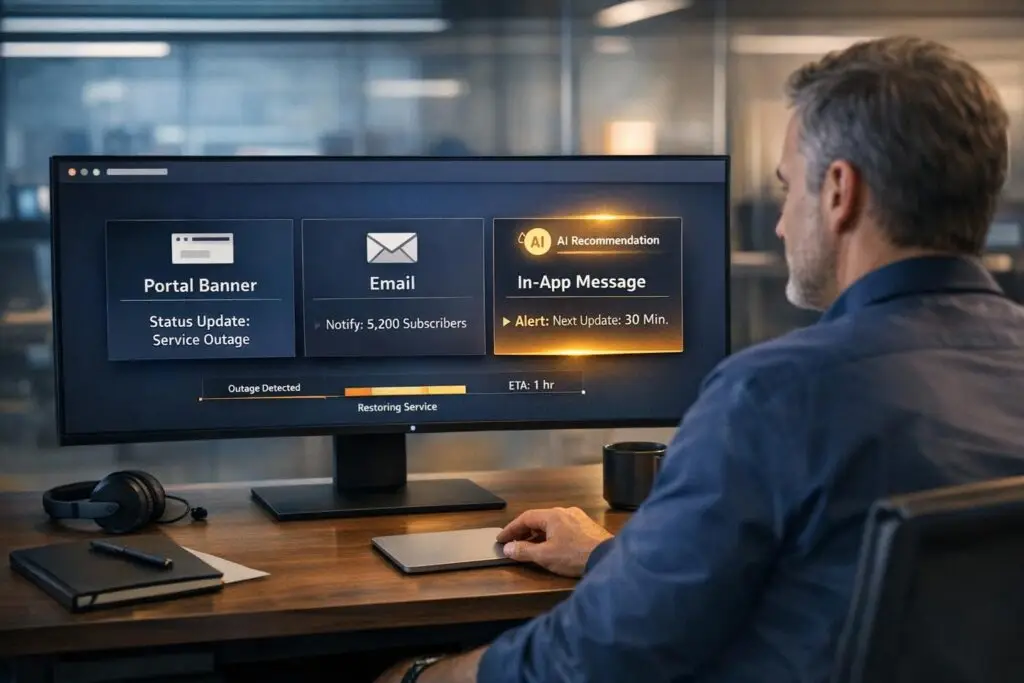
When outages happen, clear communication is the difference between keeping or losing customer trust. The goal is to keep users informed, reduce support tickets, and maintain transparency. You have three main tools for this:
- Portal Banners: Best for reaching active users quickly with updates directly in the app.
- Email: Ideal for detailed updates and reaching offline users, though it may be delayed or overlooked.
- In-App Messaging: Provides real-time alerts to users actively using your platform.
Each has strengths and weaknesses, so the best approach is combining them based on the situation’s severity and your audience’s needs.
Quick Comparison
| Channel | Best Use Case | Limitations |
|---|---|---|
| Portal Banner | Notify active users immediately | Doesn’t reach offline users |
| Share detailed updates widely | May be delayed or missed in inboxes | |
| In-App Message | Real-time alerts for active users | Limited to logged-in users |
For major outages, use all three channels together to ensure full coverage. Always update users every 15–30 minutes during critical incidents, and link to a centralized status page for consistency. Communication matters more than the outage itself – make it count.
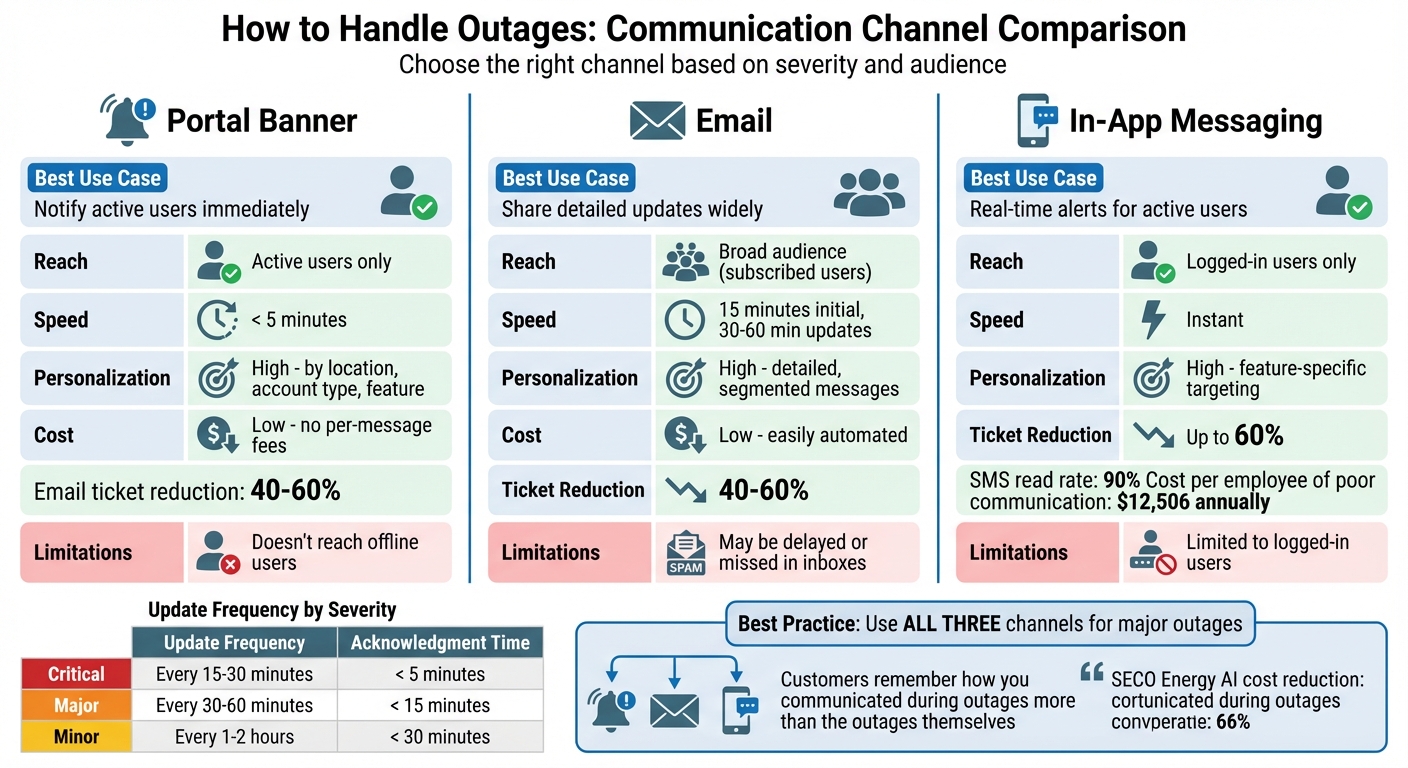
Outage Communication Channels Comparison: Portal Banners vs Email vs In-App Messaging
Status Pages Explained: Incident Management & Clear Outage Communication
sbb-itb-e60d259
1. Portal Banner
A portal banner is an in-app notification that pops up directly on a user’s screen when they’re logged into your application. It’s a quick way to reach active users who are likely to submit support tickets.
Reach
Portal banners are highly effective for reaching users who are currently logged in. However, they won’t reach offline users, making them ideal for B2B teams where active users can see updates instantly. For those offline, email or other notifications are necessary [1][10].
Speed
One of the biggest advantages of portal banners is how fast they can be updated. Acknowledging an issue within five minutes can build trust and reduce the number of support tickets. For critical outages, providing updates every 15–30 minutes keeps users informed and reassured [1].
Personalization
Portal banners can be tailored using user metadata, such as location, account type, or product permissions. This is especially useful during regional outages or when bugs affect specific features. By targeting only the impacted users, you minimize notification fatigue [6][10]. Some AI-powered tools can even trigger banners automatically when users engage with a broken feature, ensuring the message is delivered at the right moment [10].
Cost/Effort
Portal banners are cost-effective since there are no per-message fees. They’re easy to set up using pre-made templates like "Investigating", "Identified", and "Resolved" [5][6]. Once the issue is resolved, banners can be removed instantly [11]. The real value lies in the reduction of support tickets – proactive communication prevents duplicate reports, saving your team valuable time [5][6].
"Raising awareness around outages will save the IT team time and effort in responding to multiple service requests." – SnapComms [6]
B2B Suitability
For B2B settings, portal banners are a non-intrusive way to keep users informed without disrupting their workflow. Including a link to a centralized status page gives users access to more detailed updates [1][5]. While banners shine for in-app updates, email remains a better option for reaching offline users or sharing more in-depth information.
2. Email
Email is a widely accessible tool for outage communications [9]. However, it does come with its own set of challenges, such as dealing with corporate spam filters and competing for attention in crowded inboxes [1].
Reach
Email is effective for reaching a broad audience, especially when notifying customers who have opted in for status updates. However, it’s limited to users who have explicitly subscribed, and there’s always the chance that your message could be filtered out or buried in an overflowing inbox [1].
Another limitation arises if your email infrastructure relies on the same servers as your primary service. In such cases, you might lose the ability to send updates during outages. For this reason, many teams keep SMS as a backup communication channel.
"When your email server fails, you can’t send email updates. But SMS works regardless of which internal systems are compromised." – Sarel, Director of Digital Marketing at 5W Public Relations [4]
Speed
When it comes to urgency, email isn’t the fastest option. While text messages are read almost immediately – 90% within three minutes [8] – emails can face delays or be overlooked, especially outside of business hours. For critical incidents in B2B settings, aim to send the first email update within 15 minutes of detecting the issue [2]. Follow up with regular updates – every 30 minutes for severe outages [2].
"A 30-minute outage with no communication can generate more support load than the engineering effort to fix it." – StatusRay [1]
Personalization
Email stands out for its ability to deliver detailed, tailored messages. You can include links to status pages and even segment updates based on the specific services or regions affected. This ensures that only impacted users receive the relevant information [7][9]. Unlike banners or in-app messages that only reach active users, email ensures even offline customers stay informed.
For example, in 2025, SECO Energy used AI-powered virtual agents during power outages. These agents automated customer verification, pinpointed specific buildings affected, and predicted call intent. This system reduced the cost per call by 66%, with AI handling 32% of inquiries without human involvement [14].
Cost/Effort
Compared to SMS or voice alerts, email is a more affordable option and is easily automated using status page tools [1]. Predefined templates for different outage stages – like investigating, identified, and resolved – can save significant effort during high-pressure situations [2]. Proactive email communication can reduce support ticket volumes by 40% to 60% during incidents [2]. With ineffective communication costing businesses an average of $12,506 per employee annually [13], the financial advantages of timely email updates are hard to ignore.
B2B Suitability
Email is particularly well-suited for B2B communication, where detailed updates and formal documentation are often required [7]. Enterprise clients rely on email to track service disruptions against Service Level Agreements (SLAs), making it a critical tool for maintaining accountability [2].
Use the ALERT Framework to structure your updates effectively:
- Application affected
- Location/tools impacted
- Event type (planned or unplanned)
- Return estimate
- Talk-to (where to find updates) [12]
Always address key concerns like data security. For instance, include statements such as, "Your data remains secure and no information has been lost" to reassure customers during outages [2]. To maintain trust, follow up within 24–48 hours with a post-mortem email that explains what happened, why it occurred, and what steps are being taken to prevent future issues [1].
| Severity Level | Email Update Frequency | B2B Impact Description |
|---|---|---|
| Critical | Every 15–30 minutes | Full service unavailability; data access impaired [1][2] |
| Major | Every 30–60 minutes | Major functionality broken; most users affected [1][9] |
| Minor/Degraded | Every 1–2 hours | Partial feature degradation; slow loading times [1][2] |
3. In-App Messaging
In-app messaging sends outage updates directly to users who are actively using your app during an outage. This ensures they get real-time updates without needing to leave the platform [9]. It works well alongside portal banners and email updates, engaging users where they already are.
Reach
This method is limited to users logged into your platform at the time of the outage [9]. If someone isn’t actively using the app, they won’t see the message. While this makes it a great tool for immediate notifications, it’s not a replacement for broader channels like email or public status pages.
Speed and Personalization
For users currently active, these messages appear instantly and can be tailored to address only the affected features. This approach minimizes unnecessary troubleshooting and reduces strain on your support team. By triggering notifications within five minutes, you can cut down support tickets by as much as 60% [15].
"Every minute they [customers] waste troubleshooting increases their frustration exponentially." – StatusRay [15]
Messages can be customized based on the specific features or regions a user is accessing [9]. For example, banners can be used for minor issues, while modal dialogs are better suited for critical outages. Always include a link to your status page and offer workarounds when applicable to keep users informed and engaged.
Cost/Effort
Setting up in-app messaging requires collaboration with your development team to ensure these updates don’t disrupt core functionality [9]. Hosting the messaging system separately from your main service ensures it remains functional even during widespread outages. Automating in-app updates with your status page can simplify communication across multiple channels [1].
B2B Suitability
In-app messaging is especially effective for B2B platforms, as it allows users to stay informed without interrupting their workflow [3]. It reinforces transparency and ensures timely updates, both of which are critical for enterprise customers. For outages, update in-app messages every 15–30 minutes, even if there’s no new information, to maintain trust [1]. Once the issue is resolved, update the banner to confirm the fix before removing it [12].
| Severity Level | In-App Update Frequency | Target Acknowledgment Time |
|---|---|---|
| Critical | Every 15–30 minutes | < 5 minutes |
| Major | Every 30–60 minutes | < 15 minutes |
| Minor | Every 1–2 hours | < 30 minutes |
Advantages and Disadvantages
Different notification channels come with their own strengths and weaknesses, making it essential to choose the right one for each situation.
Portal banners are great for quickly reducing support tickets by displaying important updates directly on your site. However, they only work for users actively visiting your site and can become useless during a complete service outage [1][4].
Email is perfect for reaching your entire audience, sharing detailed incident updates, and keeping a permanent record of communications [2]. That said, delivery can be delayed by server issues, emails might get caught in spam filters, or simply be overlooked in crowded inboxes.
In-app messaging excels at delivering immediate, relevant alerts to users currently engaged with your application [1]. While this can guide users during disruptions, it only reaches those who are logged in. Overusing this channel or sending alerts at the wrong time could also disrupt workflows.
Here’s a quick comparison of these channels:
| Channel | Pros | Cons |
|---|---|---|
| Portal Banner | Reduces ticket volume quickly; easy to update | Limited to active users; lacks space for detailed info; fails during full outages [4] |
| Broad audience reach; great for detailed updates; permanent record | Risk of delays, spam filtering, and inbox clutter; shared infrastructure issues [4] | |
| In-App Messaging | Immediate, relevant alerts for active users | Limited to logged-in users; can disrupt workflows; unavailable during full outages [4] |
The best approach? Combine these channels into a multi-channel strategy. Tailor your communication based on the severity of the outage and your users’ activity.
"Customers remember how you communicated during outages more than they remember the outages themselves" [2].
Conclusion
Managing outages effectively hinges on choosing the right communication channels. Portal banners are ideal for instantly notifying on-site users, emails work well for sharing detailed updates with a wide audience, and in-app messaging ensures active users receive immediate alerts. For major outages impacting your entire service, deploying all three channels together is the best way to ensure full coverage [6][16].
Centralizing these efforts with a status page keeps information consistent. This approach eliminates conflicting updates and gives customers a single, reliable source for the latest information. Using ALERT-based templates (Application, Location, Event type, Return estimate, Talk-to) further ensures uniform messaging across every platform [16].
Modern tools simplify the process by automating incident detection, generating concise summaries, and triggering notifications across multiple channels – all within minutes. For instance, in 2025, SECO Energy implemented AI-powered virtual agents to manage power outage inquiries, significantly cutting costs. Likewise, Württembergische Versicherung AG reduced call wait times by 33% within just four weeks of deploying AI-driven agents for incident responses.
FAQs
How do I choose the right channel based on outage severity?
When choosing a communication channel during an outage, the severity of the issue should guide your decision. For smaller, localized disruptions, in-app messaging or portal banners work well. These methods quickly notify users without flooding your support team with unnecessary inquiries.
For larger outages that impact a wide range of users or critical services, email is a better choice for broad updates, while status pages provide a centralized place for ongoing information. By aligning your communication method with the scale of the issue, you can set clear expectations and keep user trust intact.
What should I include in a good outage update message?
A well-crafted outage update message needs to be clear, straightforward, and reassuring. Here’s what it should include:
- Acknowledgment of the issue: Let users know you’re aware of the outage, even if you don’t have all the details yet.
- Details on the impact: Specify which services or applications are affected so users know what to expect.
- Current progress: Share what steps are being taken to address the problem.
- Timelines or updates: Provide an estimated resolution time or commit to keeping users informed as new information arises.
- Support information: Offer ways to reach out for help, showing empathy and a commitment to transparency.
These elements help build trust and keep users informed during a disruption.
How can AI help automate and personalize outage communications?
AI helps streamline outage communication by automating updates and customizing messages for each customer. It ensures notifications are sent promptly and consistently while tailoring updates to match individual customer profiles or specific incident details. This approach makes the messages more relevant and empathetic.
On top of that, AI analyzes incident data and customer feedback to anticipate communication needs. This allows companies to reach out proactively, addressing concerns before they escalate. By doing so, AI plays a key role in maintaining customer trust and easing the burden on support teams during service interruptions.






