


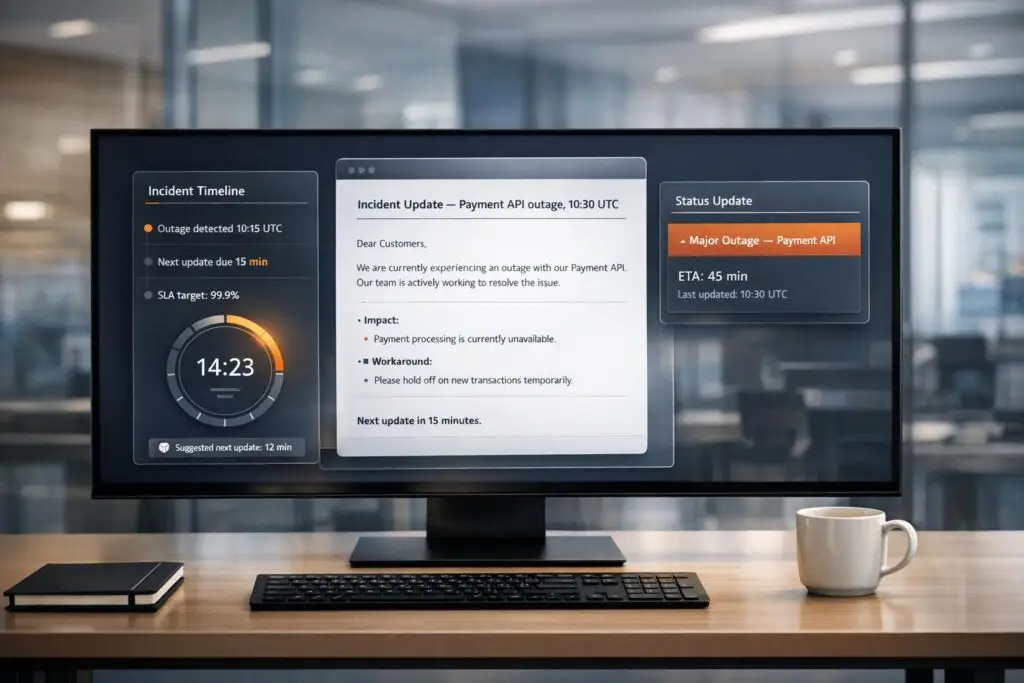
When a service outage occurs, clear communication is just as important as resolving the issue. Without it, businesses risk losing trust, increasing support tickets, and creating confusion. This guide provides ready-to-use templates for B2B support teams to streamline incident communication across customer portals and emails. Here’s what you’ll learn:
- Why communication matters during incidents: Poor communication can lead to a 40%-60% surge in support tickets.
- Key principles for effective updates: Clarity, consistency, and timely updates build trust.
- Templates for every stage: From initial notifications to post-incident summaries, these templates ensure your team communicates effectively and within SLA guidelines.
- Tailoring for complex accounts: Customize updates for enterprise clients, mid-market customers, or standard-tier users based on their needs.
- Automation tips: Use AI tools to save time, reduce errors, and maintain SLA compliance and ticket prioritization.
This guide equips your team with structured templates and strategies to handle incidents professionally, reduce confusion, and maintain customer confidence.
Incident Communication Best Practices Guide
sbb-itb-e60d259
Core Principles for Incident Communication
Effective incident communication hinges on three key elements: clarity, alignment, and trust. Whether you’re sharing updates on a customer portal or sending out a mass email, these principles ensure your messages resonate with your audience. They also serve as the backbone for the incident templates discussed later.
Write Clear, Transparent Messages
In B2B support, your messaging should focus on how the incident affects customers, not on internal technical jargon. For instance, instead of saying "database replication lag detected", explain the real-world impact: "customers may face payment processing delays." This approach allows clients to quickly understand the issue’s relevance to them.
Every message should include the following:
- The scope of the problem
- Confirmation of data security
- Current actions being taken
- A clear timeline for the next update
If certain details – like a resolution time – are uncertain, it’s better to say "currently unknown" than to provide inaccurate estimates. As Farouk Ben from Odown points out, "Users appreciate honesty, even if the news isn’t great."
Keep Messages Consistent Across Channels
Choose a single primary platform, such as a status page, to act as your official source of truth. Ensure all other communication channels – emails, social media updates, or support responses – direct users back to this central hub. For example, if your status page says the issue is under investigation, your support team shouldn’t send emails implying a resolution is imminent. Consistency like this helps maintain trust and avoids confusion.
To streamline communication, assign an Incident Commander to oversee all outbound updates. This allows engineers to stay focused on resolving the issue. Additionally, use automated syncing to ensure updates on the status page are reflected across all other communication channels.
Set Expectations for Update Timing
Instead of promising a resolution by a specific time, commit to providing updates at regular intervals. For example, say "Next update: 2:00 PM EST" instead of "We’ll fix this by 2:00 PM." Even if there’s no major progress, providing updates at predictable times reassures customers that the issue is being actively addressed. As Runframe aptly states, "Predictable updates beat ‘big updates when we feel like it.’"
Adjust your update frequency based on the severity of the incident:
- SEV0 (Critical Outage): Every 15–30 minutes
- SEV1 (Degraded Performance): Every 30–60 minutes
- SEV2 (Minor Issues): Every 60–120 minutes
Frequent updates not only demonstrate that your team is working diligently but also reduce the volume of repetitive inquiries from concerned customers. Following these practices ensures that your incident communications are timely, consistent, and transparent across all channels.
Incident Communication Templates for Portals and Email
These templates are designed to deliver clear, concise updates during each phase of an incident. They follow a consistent structure: a straightforward headline, current status, impact details, actions being taken, and a commitment for the next update. By customizing the bracketed sections, you can adapt them to your specific incident. Always direct customers to your status page as the central source of truth.
Initial Outage Notification
This is the first message sent when an incident is detected. The objective is to acknowledge the issue promptly – within 10–15 minutes of detection – and reassure customers that your team is actively working on it. For B2B clients, emphasizing that data remains secure is crucial, as this is often their primary concern.
Email Subject: Service Disruption: [Product/Feature Name]
We are investigating an issue impacting [specific feature/service].
Current Status: Investigating
Impact: Customers may experience [describe symptoms, e.g., "inability to process payments" or "slow dashboard loading times"]. [Region/tier affected, if applicable].
Data Security: All customer data remains secure and backed up.
What We’re Doing: Our engineering team has been notified and is actively investigating the root cause.
Next Update: [Time, e.g., "3:30 PM EST" or "in 30 minutes"]
For real-time updates, please visit our status page: [link]
Investigation Progress Update
This update is sent when new information becomes available, even if the issue is not yet resolved. Regular updates – every 15–30 minutes for critical outages – help maintain transparency and reduce customer concerns, preventing a surge in support tickets.
Email Subject: Update: Service Disruption – [Product/Feature Name]
Update on [Product/Feature Name] disruption
Current Status: Identified / Still Investigating
What We’ve Found: [Brief explanation in plain language, e.g., "We’ve identified an issue with our payment gateway integration that is preventing transactions from completing."]
Actions Taken: [List specific steps, e.g., "We’ve rolled back the recent deployment and are monitoring system performance."]
Temporary Workaround (if available): [e.g., "You can process payments using the mobile app while we restore web portal functionality."]
Next Update: [Time, e.g., "4:00 PM EST"]
Resolution and Mitigation Update
Once the issue is resolved, this message confirms service restoration. Include the total duration of the incident and assure customers that monitoring will continue. This step is critical for rebuilding trust before releasing a detailed post-mortem.
Email Subject: Resolved: [Product/Feature Name] Service Restored
The issue affecting [Product/Feature Name] has been resolved.
Current Status: Resolved
Duration: [Start time] to [End time] ([total duration, e.g., "2 hours 15 minutes"])
What Happened: [Brief explanation in plain language, e.g., "A configuration error caused payment requests to fail. We’ve corrected the configuration and verified that all systems are operating normally."]
Monitoring: We are continuing to monitor system performance closely to ensure stability.
Next Steps: A detailed post-incident summary will be shared within 24–48 hours.
If you continue to experience issues, please contact support at [email/phone].
Post-Incident Summary
This follow-up, sent within 24–48 hours, provides transparency about the incident. It explains what went wrong, how it was resolved, and what measures are being implemented to prevent future occurrences. This is particularly important for enterprise clients who may need to report the event internally.
Email Subject: Post-Incident Summary: [Product/Feature Name] – [Date]
Post-Incident Summary: [Product/Feature Name]
Incident Date: [Date and time range]
Duration: [Total duration]
Impact: [Number of customers affected, features impacted, e.g., "Approximately 1,200 customers experienced payment processing failures."]
Root Cause: [Clear, non-technical explanation, e.g., "A recent code deployment introduced a bug that caused our payment validation service to reject legitimate transactions."]
Resolution: [What was done to fix it, e.g., "We rolled back the deployment, implemented additional validation checks, and verified that all payment processing resumed normally."]
Preventative Actions: [Specific actions, e.g., "We are implementing enhanced pre-deployment testing protocols and adding automated monitoring for payment gateway health checks."]
We apologize for the disruption and appreciate your patience. If you have questions or concerns, please reach out to your account manager or contact support at [email/phone].
Escalation Acknowledgment
This template is used when a customer’s issue has been escalated to senior engineers or management. For high-priority B2B clients, it confirms that their concern is being addressed at the proper level.
Email Subject: Your Issue Has Been Escalated – [Ticket ID]
Your support request has been escalated to our incident response team.
Ticket ID: [Number]
Issue: [Brief description]
Escalation Level: [e.g., "Senior Engineering Team" or "Dedicated Response Team"]
Assigned To: [Name and title, if appropriate], who will work to resolve it as quickly as possible.
Next Update: You will receive an update by [specific time, e.g., "5:00 PM EST today"].
If you need immediate assistance, please contact [escalation contact name] directly at [email/phone].
Thank you for bringing this to our attention.
| Incident Phase | Key Message Elements | Recommended Timing |
|---|---|---|
| Initial Notification | Acknowledge issue, describe symptoms, state data is secure | Within 10–15 minutes |
| Investigation Update | Share findings, list actions taken, provide workaround if available | Every 15–30 min (SEV0) |
| Resolution | Confirm restoration, provide duration, commit to post-mortem | Immediately upon fix |
| Post-Incident | Explain root cause, prevention steps, business impact | Within 24–48 hours |
| Escalation | Confirm priority, assign owner, set next update time | Within 1 hour of escalation |
Up next: Learn how to adapt these templates for complex B2B accounts and stakeholder-specific communications.
Adapting Templates for Complex B2B Accounts
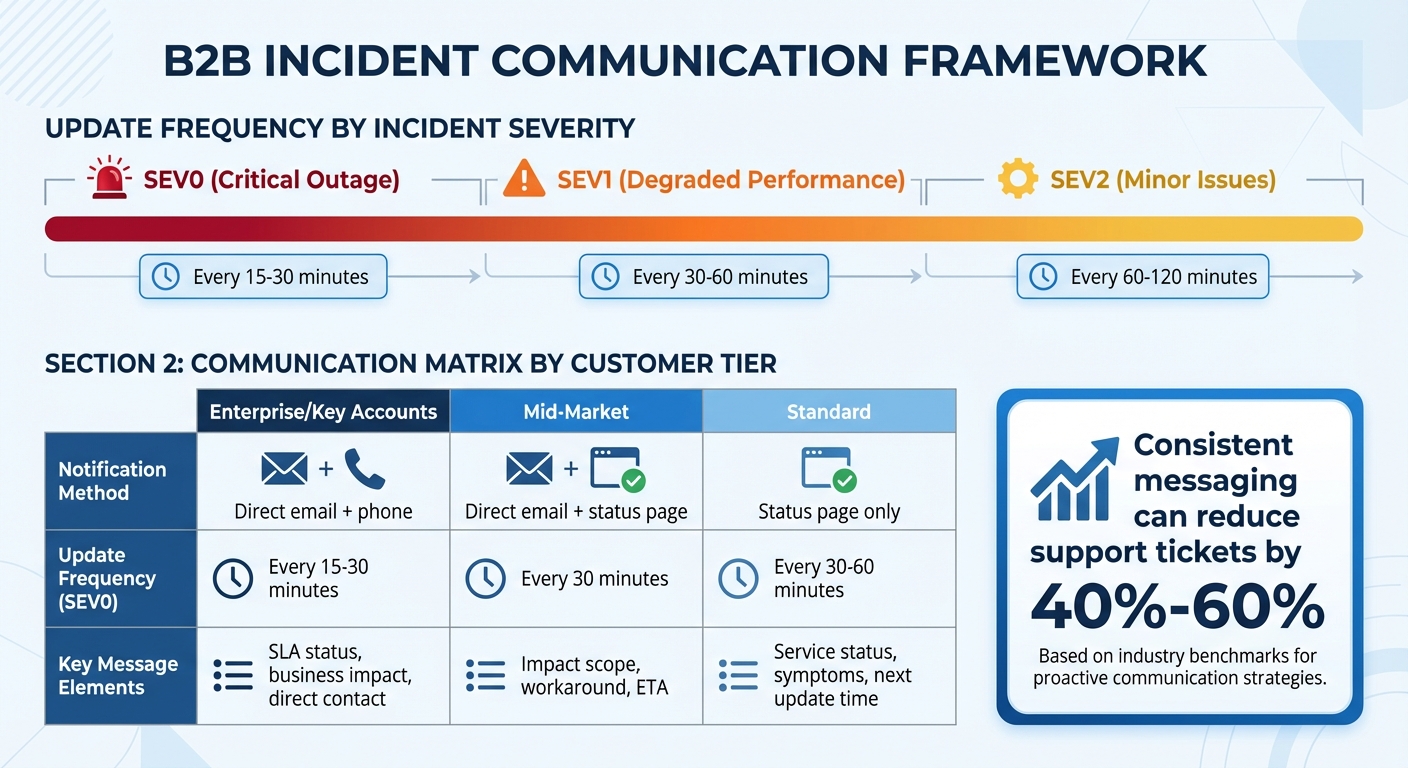
Incident Communication Guidelines by Severity Level and Customer Tier
When working with complex B2B accounts, it’s crucial to adjust communication templates to fit the unique needs of each customer tier. A one-size-fits-all approach won’t work here. Enterprise accounts demand personalized updates due to their complexity and multiple stakeholders, while standard-tier customers typically rely on updates from a public status page. These communication differences often stem from varying contractual obligations, renewal risks, and the number of decision-makers involved.
Adjust Messaging by Customer Tier
For enterprise and high-touch accounts, direct email notifications are essential when a SEV0 incident extends beyond 30 minutes. In contrast, standard accounts might only receive updates through a public status page [4]. Premium-tier templates should include specific SLA references. For instance, instead of saying, "We’re working on it", use precise language like, "This incident has been classified as P1 status per your SLA terms, and our response time obligation of 15 minutes has been met" [5].
To reassure key accounts during incidents, create a "Sales/CSM Note" template. This should be concise, free of technical jargon, and focused on providing reassurance. It should confirm that the issue is being actively addressed and include clear details on when the next update will be shared [4].
Communicate Based on Stakeholder Role
Enterprise accounts often have diverse stakeholders, each with different information needs. Executives, for example, need concise updates highlighting revenue risks and business impacts, while technical teams look for actionable details about symptoms and potential workarounds [4][2]. For instance, a technical contact would find "Checkout is failing" more useful than a detailed error explanation like "Database replication lag on shard 3." On the other hand, executive communications should include metrics such as the number of affected customers, estimated revenue impact, and potential SLA credit exposure. This gives leadership a clear understanding of the business implications [1].
Align Templates with SLA and Contract Terms
Your templates should always align with customer-specific SLA and contract terms. For example, if an enterprise SLA requires updates every 30 minutes during critical incidents, set up workflows to automatically trigger reminders before the deadline to ensure timely communication [4][1]. If an SLA threshold is missed, use a template that acknowledges the breach and outlines the steps being taken to resolve it. This approach ensures consistent and clear communication while maintaining compliance with contractual obligations.
| Customer Tier | Notification Method | Update Frequency (SEV0) | Key Message Elements |
|---|---|---|---|
| Enterprise/Key Accounts | Direct email + phone | Every 15–30 minutes | SLA status, business impact, direct contact |
| Mid-Market | Direct email + status page | Every 30 minutes | Impact scope, workaround, ETA |
| Standard | Status page only | Every 30–60 minutes | Service status, symptoms, next update time |
Implementing Templates in Your Support Workflow
Once you’ve tailored templates for complex accounts, the next step is incorporating them seamlessly into your daily support operations. Templates are only effective if agents can deploy them quickly and consistently, especially during high-pressure situations.
Create a Template Library
Centralize all your templates within your support platform. Most systems allow agents to access these directly from their ticket interface, making it easier to respond promptly. Organize templates by severity level – such as Minor, Major, and Critical – so agents can quickly choose the appropriate tone and update frequency. For instance, a Critical template might include updates every 30 minutes, while a Minor template may only require a resolution notice.
Don’t stop there – create role-specific variations. For example, have separate templates ready for technical contacts, executives, and customer success managers. This saves agents from having to rewrite messages for different audiences. Once your library is set, use technology to ensure these templates are instantly accessible when needed.
Use AI to Automate Template Deployment
AI tools can simplify and speed up how templates are used. Modern platforms can auto-fill templates with details like ticket IDs, affected services, and timestamps, eliminating manual errors. Additionally, AI writing tools can refine grammar and tone, ensuring that messages sound professional and empathetic without feeling robotic. For example, AI can transform technical jargon like "PostgreSQL connection pool exhausted" into clearer customer-facing updates like "Payment processing is currently unavailable" [2][6].
Automated triggers tied to incident severity can help ensure SLA compliance. For instance, if a Critical incident goes 15 minutes without an update, the system can automatically prompt the assigned agent to send the next communication [2].
Train Teams and Monitor Template Usage
Templates are only effective if your team knows how to use them well. Regular incident drills can help agents practice crafting customer-friendly updates. Monitor ticket reopenings to gauge whether templates are clear and effective [2][5]. As Léo Baecker, Founder of Hyperping, wisely points out:
"Templates are just the starting point – their effectiveness depends on how well you implement and maintain them" [3].
Keep an eye on follow-up messages and customer replies. If customers frequently ask for clarification, it’s a sign the template needs tweaking. Regularly review sent communications to ensure agents personalize templates appropriately and adhere to promised update schedules. Post-incident reviews are also critical – use them to evaluate whether SLA timeframes were met and whether update cadences aligned with what customers were promised [2][6].
Conclusion
Using standardized incident communication templates can make all the difference during critical outages. Clear communication not only helps reduce confusion but also builds lasting trust with your customers. In fact, consistent messaging can reduce support tickets by as much as 40%–60% [2], freeing up your team to focus on resolving the issue at hand.
By combining standardization with a touch of customization, you can ensure your messages resonate with different audiences. Templates give you the structure and speed needed during high-pressure moments, while tailoring them for specific customer tiers and stakeholder roles ensures every message is relevant. For instance, a technical contact may need in-depth details about the issue, while an executive might only require insights on how it impacts the business.
To enhance this process, AI automation can step in to handle repetitive tasks like inserting ticket IDs, timestamps, and details about affected services. This not only eliminates manual errors but also helps your team stick to a predictable update schedule – something B2B customers value. As Tom Wentworth from incident.io puts it:
"The solution is treating communication like code: automated, templated, and reliable" [7].
This approach transforms incident communication into a system that is repeatable and dependable, removing the reliance on individual skills or improvisation.
Runframe captures this idea perfectly:
"Incident communication is a system, not a talent" [4].
With well-designed templates, clear processes, and the support of automation, your team can turn even the most stressful outages into opportunities to showcase professionalism and accountability. These qualities are key to maintaining strong B2B relationships, even during challenging times. By adopting these tools and strategies, you ensure that your incident communication remains professional, consistent, and reliable every single time.
FAQs
What’s the fastest way to roll these templates out across portal and email?
To get incident communication templates ready quickly, create standardized versions for typical situations like service outages or updates. Save these templates in your incident management system and include placeholders for details that can change. Automate workflows to make it easier to customize and send them out fast. Train your team on how to use these templates effectively, and you might also want to explore AI tools to help with personalization and distribution. This approach ensures your communication during incidents stays clear, consistent, and efficient.
How do we tailor incident updates for enterprise vs. standard-tier customers?
To make incident updates more effective, it’s important to adjust communication according to the type of customer. Enterprise customers usually require more in-depth updates, such as detailed impact analyses, specific timelines for resolution, and sometimes direct communication from senior support staff. On the other hand, standard-tier customers benefit from shorter, straightforward updates that focus on the issue’s status and estimated resolution time. This approach helps enterprise clients feel valued and prioritized, while ensuring standard customers receive clear and consistent information without being overwhelmed by unnecessary details.
How can AI automate incident updates without risking wrong details?
AI can streamline incident updates by leveraging models trained on real-time data, historical incidents, and postmortems. By continuously analyzing updated logs, AI improves its ability to identify and respond to issues effectively. Using structured communication templates adds another layer of reliability, allowing AI to automatically fill in critical details. This approach minimizes errors and ensures clear, consistent updates, even in high-pressure situations.






