
Running an executive escalation program without encouraging customers to overuse it requires a clear, structured approach. The key is to ensure only critical issues reach leadership while empowering frontline teams to handle most problems effectively. Here’s how you can achieve that:
- Set Clear Escalation Triggers: Define measurable criteria, like SLA breaches or system outages, to ensure escalations are warranted.
- Leverage AI for Risk Detection: Use AI tools to predict potential escalations by analyzing customer sentiment and flagging high-risk cases early.
- Empower Frontline Teams: Equip agents with the authority and resources to resolve issues quickly, reducing the need for escalations.
- Communicate Policies Transparently: Educate customers on escalation processes through clear documentation and proactive updates.
- Optimize Processes Continuously: Monitor escalation data to identify root causes, improve training, and refine workflows.
Managing Customer Escalations Effectively
Set Clear Escalation Thresholds and Expectations
Establishing clear escalation triggers is essential. Without them, customers might escalate issues out of frustration, and agents could delay asking for help, leading to leadership being overwhelmed with problems that could have been handled earlier. Meanwhile, critical issues may slip through the cracks. Below, we’ll explore how to define criteria, communicate policies, and use automation to streamline escalations.
Create Measurable Escalation Criteria
Escalation criteria should be specific and measurable. For example, if Tier 1 support cannot resolve an issue within 24 hours, it should automatically escalate to Tier 2. Similarly, if a customer doesn’t receive an update within four hours, the ticket should be flagged for management review. However, time alone isn’t enough – factors like severity and business impact are equally crucial. A major system outage affecting multiple users at a high-value client, for instance, should escalate immediately regardless of the ticket’s age.
Proximity to SLA breaches is another key trigger. Tickets nearing or exceeding their response deadlines should automatically move up the chain. Functional escalations are necessary when all troubleshooting steps have been exhausted or senior access is required. AI tools can also help by analyzing customer sentiment. For example, if a customer’s "attention score" hits 90 out of 100 – indicating high frustration – the case should be flagged for urgent action. Escalations are also required for issues involving refunds, large discounts, or policy exceptions that exceed an agent’s authority.
| Escalation Level | Typical Criteria/Trigger | Primary Responsibility |
|---|---|---|
| Tier 1 | Initial contact; common issues; basic troubleshooting | Frontline Support Agents |
| Tier 2 | Complex technical issues; specialized product knowledge | Subject Matter Experts (SMEs) |
| Tier 3 | Bugs requiring code-level fixes; deep system architectural problems | Engineering / Developers |
| Management | Severe dissatisfaction; policy exceptions; SLA breaches | Support Managers / Executives |
Once these criteria are in place, it’s important to communicate them effectively to customers.
Share Escalation Policies with Customers
Customers need to understand how escalation works to feel reassured and avoid bypassing frontline support unnecessarily. Use onboarding materials and customer-facing documentation to explain what triggers an escalation and what qualifies as a valid escalation. This proactive communication helps set clear expectations and reduces frustration.
Instead of vague promises like "We’ll get back to you soon", offer specific, time-bound commitments such as a 30-minute acknowledgment or a two-hour response window. These micro-commitments reassure customers that their case is progressing, lessening the perceived need to escalate further. Regular updates – whether automated or manual – help prevent the silence that often drives emotional escalations. Research shows that 67% of customer churn could be avoided if issues are resolved during the first interaction.
Use Dynamic SLAs for Automatic Escalation
Relying on manual escalation decisions can lead to inconsistencies and delays. Dynamic SLAs take the guesswork out of the process by automatically escalating tickets when deadlines are approaching or breached. Modern systems equipped with AI can monitor SLA timers, predict potential breaches, and trigger proactive interventions before they happen. This ensures critical issues get addressed quickly while keeping leadership focused on true emergencies.
Set alerts at 75% of the SLA time to give the next tier a head start rather than waiting for an actual breach. Tools like Supportbench allow teams to adjust thresholds in real time, prioritizing cases based on factors like upcoming renewals or high-value customers. AI-powered automation not only improves efficiency but also helps prevent crises. Companies using AI for escalation prediction report a 28% faster Mean Time to Resolution (MTTR) and a 32% reduction in overall escalation rates.
When automating escalations, it’s essential to account for agent availability. For example, after-hours escalations can be routed to an email queue or an on-call team instead of live messaging channels. Additionally, agents should complete a standardized handoff template before escalating, ensuring the next tier has all the necessary context without requiring the customer to repeat their issue. This approach keeps the process smooth and customer-focused.
Resolve Issues Early to Prevent Escalations
The best way to avoid escalations? Address issues before they snowball. Many executive escalations arise from problems that could have been resolved earlier in the customer support process. By leveraging AI to detect risks, empowering frontline agents with the right tools and authority, and tackling root causes, teams can keep issues from escalating to higher levels. The goal is simple: handle problems early and equip agents to resolve them effectively.
Use AI for Sentiment Analysis and Risk Detection
AI can spot potential escalations before a customer even asks to speak with a manager. Advanced systems analyze shifts in sentiment, delays in responses, and historical trends to assign a risk score to each ticket. For example, if a customer’s tone becomes negative or they use terms like "outage" or "cannot log in", the system flags the case immediately.
Companies using AI for escalation prediction have reported impressive results: a 32% drop in escalation rates and a 28% faster Mean Time to Resolution (MTTR). With historical data, AI models achieve around 88% accuracy in identifying tickets likely to escalate. On top of that, AI reduces manual review time by 86%, cutting it from 9–13 hours per cycle to just 1–2 hours.
Supportbench takes this a step further by integrating sentiment analysis directly into case management. It can automatically route high-risk tickets to specialized teams or trigger proactive measures, like outreach from customer success managers or goodwill credits. These AI-driven actions have boosted customer satisfaction (CSAT) for high-risk tickets by 18%.
While AI is a powerful tool for spotting potential problems, empowering agents is what truly keeps escalations in check.
Give Frontline Agents Knowledge and Authority
Frontline agents need more than just a script – they need the tools and authority to solve problems on the spot. This includes access to detailed knowledge bases, clear workflows, and troubleshooting resources. Agents should also have the power to make decisions, such as approving small refunds, granting policy exceptions within limits, or scheduling follow-ups without manager approval. When agents are equipped to act independently, customers experience faster resolutions and feel their concerns are genuinely addressed.
Research shows that 72.5% of customers prioritize speedy resolutions, while 80% value knowledgeable and friendly service. When agents have both the information and the authority to act, 81% of customers are more likely to return after a positive service experience. And when escalation is unavoidable, a warm handoff can make all the difference. The frontline agent should introduce the specialist and summarize the steps already taken, so the customer doesn’t have to repeat their story.
Empowered agents not only resolve problems more efficiently but also provide critical insights into recurring issues that need broader solutions.
Review Escalation Trends to Fix Root Causes
Escalation data is a goldmine for uncovering systemic issues. By tracking escalation rates by issue type, teams can identify underlying problems like product defects or gaps in the knowledge base. Monitoring escalations by agent or team can also highlight training gaps – frequent ticket reopens or multiple handoffs often signal that initial resolutions are falling short.
"Analyzing why tickets are escalated can reveal needs for better L1 training, improved documentation, or product fixes."
- Nooshin Alibhai, Founder and CEO, Supportbench
Post-escalation reviews are another crucial step. After resolving high-priority cases, assess whether the escalation trigger was necessary and if the issue could have been handled at a lower level with better tools or training. This feedback loop between support and product teams is invaluable. If escalations keep pointing to the same feature or workflow, it’s a clear sign that product improvements are needed – not just better support training. Addressing these root causes helps minimize escalations and reserves executive involvement for truly critical situations.
Train Support Teams to De-escalate Situations
Even with AI handling many routine issues, human empathy remains irreplaceable. Training support teams in de-escalation techniques ensures that only critical cases demand higher-level attention, aligning with cost-effective, AI-driven support strategies. The ability to calm an upset customer, acknowledge their frustration, and guide them toward a solution is what distinguishes a good support team from an outstanding one. With 90% of CX Trendsetters predicting AI will soon resolve 8 out of 10 issues without human involvement, the remaining cases will likely be the most emotionally charged. That’s why equipping teams with effective de-escalation skills is absolutely essential.
Build Emotional Intelligence and Active Listening Skills
Empowering frontline agents with emotional intelligence is key to defusing tense situations. This goes beyond following scripts – it’s about recognizing subtle emotional cues like changes in tone, sarcasm, or repeated questions, and responding with genuine empathy. For example, an agent who can pick up on a frustrated tone and validate the customer’s concerns can immediately ease tension. This builds trust during high-pressure moments, such as service outages or billing disputes.
The data is clear: 73% of customers expect companies to understand their needs right away, and 78% are willing to return to a business that delivers excellent service, even after a mistake. Role-playing exercises can help agents practice these skills, while training them to identify escalation triggers – like urgent language or frequent contact within a short timeframe – enables them to act before things spiral.
Create Standardized De-escalation Protocols
Consistency matters when handling escalations. Agents need clear, flexible frameworks that guide their responses. For example, a standardized handoff template ensures that when escalation is unavoidable, the next tier of support has all the context – what was attempted, what didn’t work, and why the case is being escalated. This prevents customers from having to repeat their story and maintains professionalism across the team.
Protocols should also define decision-making boundaries. Agents should know what they’re empowered to do – such as issuing refunds, making policy exceptions, or scheduling callbacks – so they can resolve issues quickly without waiting for managerial approval. At the same time, they should have the judgment to adapt when a unique situation calls for it. With clear guidelines in place, ongoing coaching helps fine-tune these processes.
Monitor and Coach for Continuous Improvement
Training doesn’t stop after onboarding. Regular Quality Assurance (QA) reviews and post-escalation analyses are vital for identifying areas where agents shine and where they need additional support. Tracking escalation rates for individual agents can uncover patterns, highlighting skill gaps that may require further training in technical knowledge or de-escalation techniques. AI tools can also support this process by providing real-time feedback, flagging shifts in sentiment, and suggesting ways to adjust the approach before a situation worsens.
Zappos offers a great example of how quality-focused interactions can lead to meaningful results. While not every call needs to be lengthy, the takeaway is clear: coaching should prioritize the quality of the interaction over rushing to resolve it. Monthly reviews with stakeholders can help analyze escalation metrics, CSAT scores, and SLA trends. These insights can then refine training programs and protocols, ensuring a consistent approach across all levels of support. This ongoing coaching reinforces a culture of continuous improvement and ensures teams are always prepared to handle challenging situations.
sbb-itb-e60d259
Build a Multi-Level Escalation Framework
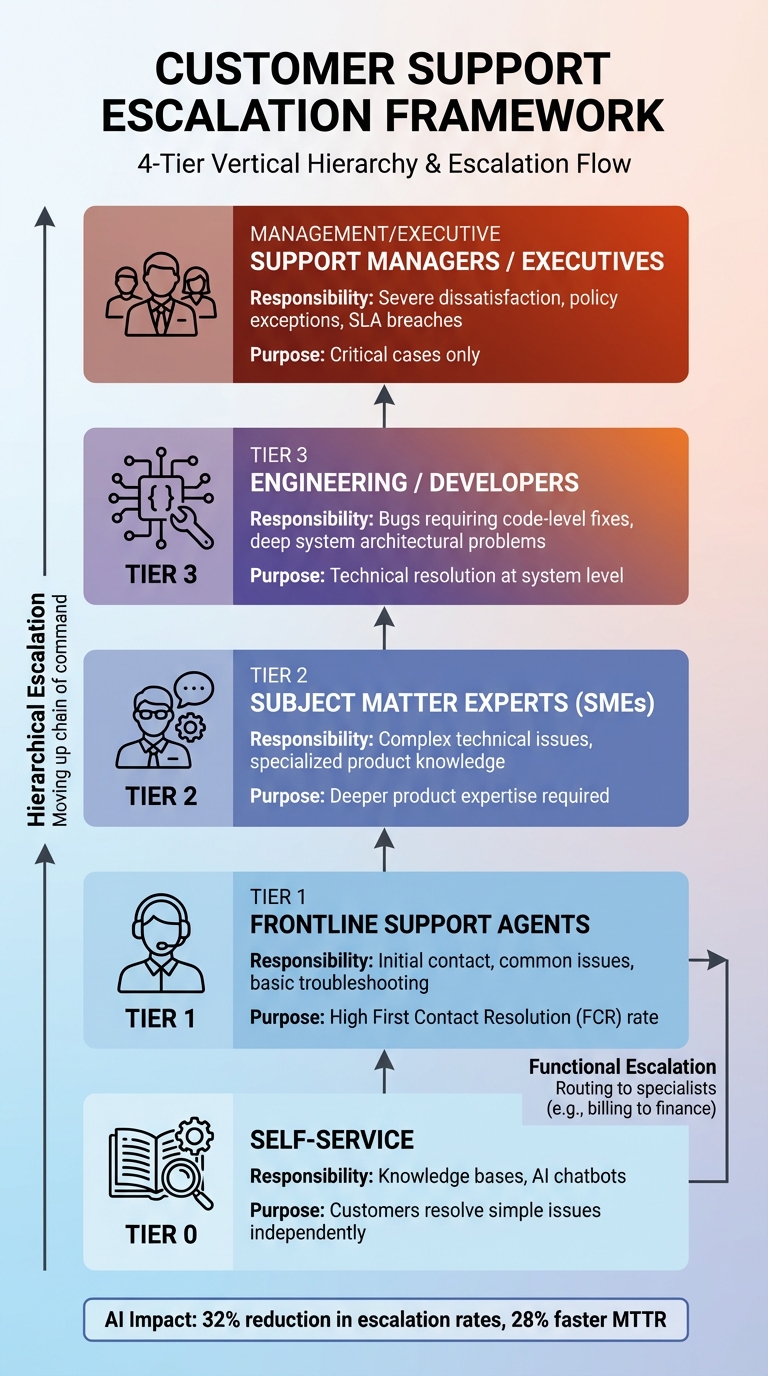
Customer Support Escalation Framework: 4-Tier Structure and Responsibilities
A well-structured escalation system ensures that issues are resolved efficiently without bouncing between teams unnecessarily. It also helps prioritize only the most critical cases for executive involvement. This framework works hand-in-hand with proactive AI detection and empowered frontline teams, streamlining the process and reserving leadership attention for genuine crises. The key is to define clear boundaries for each level of escalation – from self-service tools to engineering intervention – so customers are directed to the right expertise. Without these boundaries, cases often get passed around multiple times before landing with someone capable of solving the problem. A thoughtful framework eliminates that kind of friction.
Define Roles and Responsibilities at Each Escalation Level
Each level in the escalation framework should have a clearly defined scope. This includes the types of issues they handle, the tools at their disposal, and their decision-making authority.
- Tier 0: Self-service options, such as knowledge bases and AI chatbots, allow customers to resolve simple issues independently.
- Tier 1: Frontline support handles initial contact and routine troubleshooting, aiming for a high First Contact Resolution (FCR) rate.
- Tier 2: Specialists or technical support teams handle more complex issues that require deeper product knowledge.
- Tier 3: Engineering or development teams address the most critical problems, such as bugs requiring code-level fixes or system-level adjustments.
For severe cases, management or executive escalation is reserved. These situations often involve significant customer dissatisfaction, policy exceptions, or high-priority issues that other tiers couldn’t resolve. It’s also essential to differentiate between functional escalation (routing issues to specialists, like billing questions to finance) and hierarchical escalation (escalating issues up the chain of command for higher-level decisions). Once roles are clearly defined, automation can speed up the routing process.
Automate Escalation Routing with AI
Manual routing can slow things down and lead to errors, especially when agents aren’t sure which specialist to involve. AI tools step in by analyzing ticket content, urgency, and sentiment to route cases directly to the appropriate team. This reduces unnecessary transfers and speeds up resolutions.
AI also monitors Service Level Agreements (SLAs) in real time, triggering escalations automatically if deadlines are approaching. For example, a Priority 1 issue might escalate after 30 minutes if unresolved. Companies leveraging AI for escalation prediction report a 28% faster Mean Time to Resolution (MTTR) and a 32% reduction in escalation rates. Tools like Supportbench use AI to prioritize tickets, auto-assign cases, and tag issues, freeing up agents to focus on solving problems rather than sorting through tickets.
Preserve Context Across Channels and Teams
Efficient escalation isn’t just about routing – it’s also about maintaining context to ensure a seamless handoff. A unified platform is essential for storing case history and escalation details across all communication channels, including email, chat, and phone. When a Tier 2 specialist takes over a case, they should immediately see what Tier 1 attempted, what failed, and why the case was escalated – without making the customer repeat themselves.
To achieve this, use a "minimum essential information" template. This template should include details like troubleshooting steps already taken, error logs, and specific reasons for escalation. Internal notes and shared inboxes also play a crucial role, allowing agents to collaborate and track progress without losing context. AI can further enhance this process by automatically adding notes during handoffs, providing agents with immediate context and suggested solutions.
Monitor and Optimize the Escalation Process
A well-structured escalation framework is just the beginning – continuous monitoring ensures it evolves and prevents recurring problems. Regular reviews and adjustments are essential to keep the process effective. Without ongoing oversight, you risk missing patterns that could improve outcomes. By tracking the right metrics, you can assess whether escalations are happening for valid reasons and if your team is learning from each case.
Track Key Metrics to Measure Escalation Performance
Start by monitoring the escalation rate, which shows the percentage of tickets being escalated. If this number is climbing, it might point to gaps in frontline agent training, unclear documentation, or recurring product issues. For example, companies utilizing tiered support and AI diagnostics have seen significant improvements in First Contact Resolution (FCR) rates.
Another important metric is time to escalation, which measures how quickly a ticket moves from creation to escalation. Delays here might suggest agents are uncertain about when to escalate or that bottlenecks exist in the triage process. Similarly, post-escalation resolution time tracks how long it takes to resolve a ticket after it’s escalated. IBM’s Global Technology Services, for instance, reduced their Mean Time to Resolution (MTTR) by 40% with AI-driven automated routing.
Customer satisfaction (CSAT) for escalated tickets is another critical measure. It focuses on the customer’s experience during the escalation process, not just the final outcome. Segmenting MTTR by priority level can help identify outliers and ensure resolution targets align with the severity of the issue.
| Metric | What It Reveals | Improvement Action |
|---|---|---|
| Escalation Rate | Frontline training or product issues | Enhance Level 1 training or fix product bugs |
| Time to Escalation | Triage efficiency | Automate routing or clarify escalation triggers |
| Post-Escalation Resolution Time | Senior tier capacity | Add more experts or upgrade L2/L3 tools |
| CSAT (Escalated) | Handoff and communication quality | Improve internal notes and customer updates |
| RCA Frequency | Process improvement maturity | Use findings to guide product updates |
Conduct Post-Escalation Analysis
Tracking metrics is just the first step – analyzing each escalation provides actionable insights. Ask whether the escalation was necessary or if it could have been avoided. Documenting the escalation path can help uncover systemic issues. A strong indicator of a mature support system is how often Root Cause Analysis (RCA) leads to meaningful fixes.
AI can streamline this process, cutting manual analysis time by as much as 86%, reducing a 9–13 hour task to just 1–2 hours. For example, a B2B software company with a 23% escalation rate conducted 52 post-escalation interviews. They discovered that 78% of customers had to re-explain their issues, and 67% felt forgotten. By introducing "Warm Handoffs" and a "Context Preservation System", they reduced resolution time by 31% and boosted customer retention for escalated cases by 34% within eight months.
Using a standard postmortem template that includes customer impact, evidence accuracy, and preventive steps can formalize the learning process. Reviewing a small sample – such as three accepted and three deferred escalations – each month helps ensure the escalation criteria remain relevant. Linking specific actions, like expert routing or goodwill credits, to outcomes can also shed light on what’s working.
Use Escalation Data to Improve Products and Processes
Escalation data is a goldmine for identifying recurring issues. When properly analyzed, it can guide product updates, policy changes, or targeted training efforts – shifting your team from reactive problem-solving to proactive prevention. AI tools can tag and categorize high-priority tickets automatically, making it easier to identify recurring problems and implement solutions.
Regular review meetings with team leads, product managers, and engineers – whether monthly or quarterly – are vital for discussing escalation metrics and refining processes. Sentiment analysis can also track customer mood in real time, allowing managers to act before issues escalate further. AI-driven escalation prediction has been shown to lower overall escalation rates by 32%.
Incorporating resolved escalations into AI models and knowledge bases prevents recurring issues. Maintaining a changelog of updates to escalation criteria ensures the process evolves effectively. Tracking CSAT for escalated tickets helps gauge whether the process is fostering customer trust or adding friction, keeping the focus on minimizing unnecessary escalations while maintaining efficiency.
Conclusion
Running an executive escalation program without teaching customers how to escalate requires a careful balance. Clear, objective triggers – like unresolved issues persisting for over 24 hours or major system outages – help ensure escalations happen for legitimate reasons, not as a shortcut to bypass standard processes or clear an agent’s workload. Pairing these triggers with a strong support structure and AI-powered sentiment analysis allows teams to detect potential problems early and address them before they escalate further.
Establishing clear escalation criteria is just the start. Empowering frontline agents with the right tools, knowledge, and authority to solve problems on the spot reduces unnecessary escalations and boosts First Contact Resolution rates. Research shows that companies leveraging AI for managing escalations experience notable drops in escalation rates. This highlights how proactive detection and swift intervention can make a measurable impact.
"Someone must own the problem – there’s no room for multiple departments shuffling responsibility." – Craig Stoss, PartnerHero
Continuous improvement is essential. Track metrics like escalation rates (aiming for less than 10%), time to escalation, and Customer Satisfaction (CSAT) scores. Post-escalation analyses are crucial for uncovering root causes, which can then inform updates to training materials, knowledge bases, and even the product itself. With 90% of customers expecting a quick response – and 60% wanting one within 10 minutes – addressing systemic issues is non-negotiable.
When these strategies come together, they create an escalation framework that is proactive, efficient, and customer-focused. The ultimate goal of a strong escalation program is to prevent escalations rather than merely manage them. By setting clear expectations, resolving issues early, equipping your team to de-escalate effectively, and using data to refine processes, you’ll build a support system that earns customer trust. This approach, rooted in AI-driven insights and operational precision, not only enhances efficiency but also strengthens relationships with your customers.
FAQs
How can AI help prevent customer escalations before they happen?
AI plays a key role in heading off customer escalations by diving into data from support interactions. It looks at things like customer sentiment, how quickly responses are sent, issue history, and even product usage patterns. By spotting subtle warning signs, AI assigns risk scores to tickets, helping teams zero in on potential problems before they snowball.
What’s more, these systems keep refining risk assessments as new data rolls in. This means support teams can prioritize the most critical cases and deliver targeted solutions. The result? Fewer costly escalations, happier customers, and smoother operations overall.
What are the advantages of giving frontline agents more authority in the escalation process?
Empowering frontline agents with greater authority in the escalation process brings several advantages. For starters, it enables agents to tackle issues more quickly and confidently, cutting down on unnecessary escalations that can leave customers feeling frustrated. By giving agents clear guidelines, along with the right tools and information, they’re better equipped to handle complex problems on the spot, resulting in a smoother and more enjoyable support experience.
This approach also boosts operational efficiency by reducing delays that come with escalating cases to higher-tier teams. When agents are trained and trusted to make well-informed decisions, they can often resolve issues during the first interaction. This lightens the load on specialized teams, speeds up resolution times, and builds customer trust. Plus, it fosters a motivated, proactive support environment where resources are used wisely, all while maintaining top-notch service quality.
How can companies improve their escalation processes without encouraging unnecessary escalations?
To make escalation processes more efficient while avoiding unnecessary escalations, it’s crucial for companies to establish clear guidelines and thresholds. These should outline exactly when and how issues need to be escalated. By doing this, teams can focus on truly critical matters, easing operational pressure and maintaining customer confidence.
Analyzing trends in escalations regularly and digging into root causes can help fine-tune these processes over time. Incorporating AI-powered tools and predictive analytics can also be a game-changer. These technologies can flag potential problems early, giving teams the chance to address them before they spiral into larger issues.
Additionally, ongoing training for support teams and collecting feedback from both agents and customers are essential. This ensures the process remains relevant and capable of addressing everyday challenges effectively, allowing it to grow and adapt alongside your organization.