


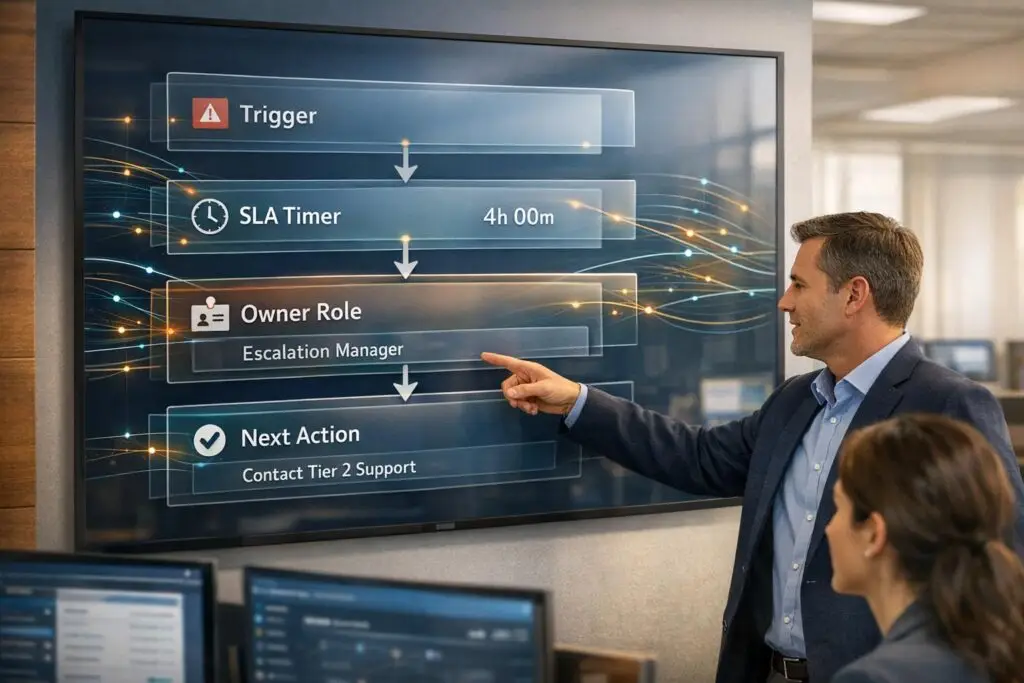
When support issues aren’t resolved promptly, customers can quickly lose patience. A clear escalation process ensures:
- Smooth transitions: Customers don’t repeat themselves; agents have full context.
- Efficient prioritization: Routine issues go to general support; complex cases to specialists.
- Transparency: Customers know who’s handling their issue and expected timelines.
Key takeaways:
- Set escalation triggers: Use time, severity, or customer sentiment to decide when to escalate.
- Define service levels: Set clear response and resolution targets for different priorities.
- Assign roles: Ensure agents know who handles what at each escalation stage.
- Leverage AI: Automate routing, sentiment detection, and customer updates for faster resolutions.
- Avoid pitfalls: Simplify workflows and train agents to minimize unnecessary escalations.
For example, AI tools like Mosaic AI have helped companies reduce ticket handling time by 30% and boost CSAT scores to 95%. The goal? Clear processes that make escalations painless for both customers and agents.
What Is An Escalation Matrix? – Customer Support Coach
sbb-itb-e60d259
Set Up Escalation Triggers and Service Levels
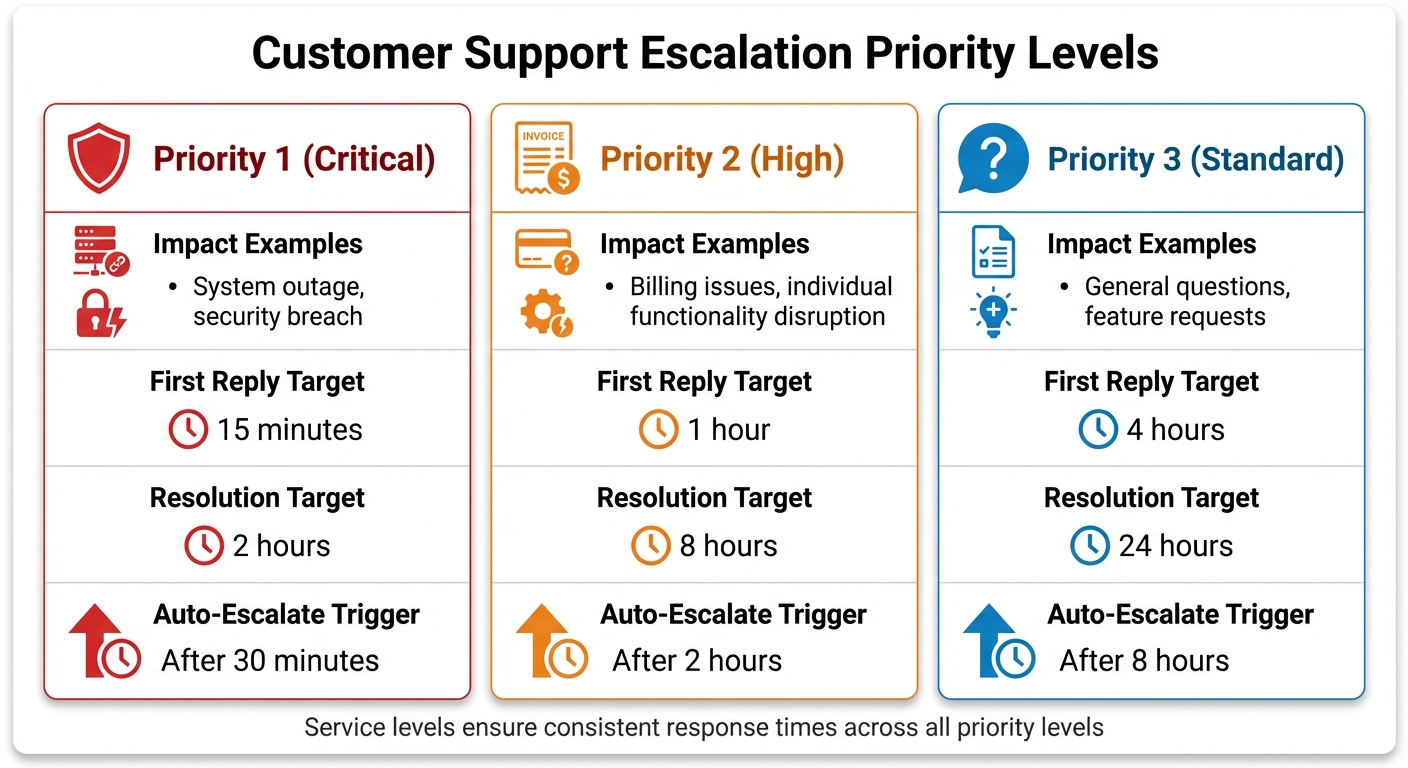
Customer Support Escalation Priority Levels and Response Time Targets
Establish clear guidelines for when and how to escalate issues. Without well-defined triggers and service levels, your team may waste precious time debating whether a ticket needs escalation, leaving customers waiting for answers.
Identify When to Escalate
Escalation should only happen when specific conditions are met, particularly those requiring specialized attention. Time-based triggers are a common approach: if a ticket remains unresolved beyond a set timeframe – such as 30 minutes for a critical issue – it should escalate automatically to avoid harming customer relationships. Severity and business impact also play a crucial role. For example, a system outage affecting many users (Priority 1) requires immediate attention, while a feature request (Priority 3) can be addressed later. Escalate cases that go beyond frontline expertise, like software bugs needing developer involvement. Similarly, hierarchical authority is necessary for decisions outside standard protocols, such as high-value refunds or contract amendments. Lastly, negative customer sentiment – detected through words like "furious" or "unacceptable" – should trigger prompt escalation to higher-level support.
Modern help desk tools can automate these triggers. For instance, sentiment analysis can detect when a customer’s tone shifts from frustration to anger, triggering an immediate escalation. The key is to pair these triggers with clear service levels to ensure timely and consistent responses.
Connect Triggers to Service Levels
Each trigger should align with a specific service level, complete with defined response and resolution targets. This ensures that all Priority 1 issues, for instance, are handled with the same urgency, no matter which agent handles them first. For example, a critical system outage (P1) might require a 15-minute first response and a 2-hour resolution deadline, with automatic escalation after 30 minutes of inactivity. A billing question (P2), on the other hand, might allow for a 1-hour first response and an 8-hour resolution window, escalating only after 2 hours.
| Priority Level | Impact Example | First Reply Target | Resolution Target | Auto-Escalate Trigger |
|---|---|---|---|---|
| P1 (Critical) | System outage, security breach | 15 minutes | 2 hours | After 30 minutes |
| P2 (High) | Billing issues, individual functionality disruption | 1 hour | 8 hours | After 2 hours |
| P3 (Standard) | General questions, feature requests | 4 hours | 24 hours | After 8 hours |
These targets can be fine-tuned based on industry needs. For instance, legal firms might require acknowledgments within 5 minutes, while healthcare providers might demand instant escalation for safety-related reports [2]. The ultimate goal is to align triggers with service levels so your team knows when to act, and customers have clear expectations for response times.
Build Your Escalation Path Structure
Once you’ve outlined triggers and service levels, it’s time to create a framework for how issues will progress. This framework should serve both your team and your customers. Agents need to know exactly who to contact at every stage, while customers should be kept informed about the status of their case.
Assign Roles and Responsibilities
The first step is to assign clear ownership based on the type of issue. For example, technical issues should go directly to engineering, billing disputes to the finance team, and policy-related concerns to management. This approach eliminates unnecessary back-and-forth between departments [2]. If a customer reports a software bug, the issue should skip general support managers and head straight to a developer who can dive into the code.
Tier 1 agents should also have clearly defined authority levels. For instance, they might be allowed to approve refunds up to $500 or use advanced troubleshooting tools. This reduces the need for escalations, as undertrained teams often experience escalation rates exceeding 15% [2]. Additionally, every escalation should include a complete interaction history to ensure faster, more efficient resolutions. These steps lay the groundwork for a visual escalation map.
Create a Visual Escalation Map
A visual escalation map helps ensure consistency by mapping roles to triggers and service levels. This type of flowchart eliminates confusion about responsibilities and escalation paths. The map should clearly outline which departments and individuals handle specific issues, along with the order in which they’re contacted [5]. Include key details like issue type, severity level, response times, escalation triggers (e.g., time or complexity), and the next point of contact [5].
| Tier Level | Role | Typical Issues | Escalation Trigger |
|---|---|---|---|
| Tier 0 | Self-Service | FAQs, basic troubleshooting | Bot cannot find answer |
| Tier 1 | General Support | Account setup, basic queries | Not resolved in 15 minutes |
| Tier 2 | Technical Support | Software bugs, configurations | High customer impact |
| Tier 3 | Expert/Engineering | Deep technical issues, code fixes | SLA breach or repeat cases |
In some cases, it makes sense to use domain-specific routing instead of following a strict hierarchy. For instance, if a junior expert has the specialized skills to resolve a technical issue faster than a senior generalist, they should take the lead [5]. This expertise-first approach often results in quicker resolutions.
Make Escalations Clear for Customers
Transparency is key to building trust during escalations. Automated messages can notify customers when their case is being escalated to a specialist or higher-tier team member [1]. These updates should also explain any delays. For example, if an agent needs to consult a developer or technical expert, let the customer know why the process might take longer [1].
If an issue requires additional time to resolve, provide clear instructions and updates. For instance, you could send an automated message like: "Your case has been escalated to our senior billing specialist, Sarah Martinez. She’ll reach out within 2 hours with a resolution plan. You can check your case status anytime at [support portal link]." This kind of clarity helps avoid the frustrating "black hole" feeling customers dread and sets realistic expectations. It’s worth noting that 72% of customers are willing to wait longer for a thorough and accurate solution rather than receiving a quick but incomplete response [2].
Use AI to Improve Escalation Workflows
AI tools can streamline escalation workflows by speeding up how cases are routed, prioritized, and resolved. By analyzing historical ticket data, AI identifies the best routing paths and ensures tickets are sent directly to the right specialist or system. This eliminates delays caused by unnecessary handoffs and misrouting [6].
AI Routing and Sentiment Detection
Modern AI platforms excel at predictive routing, matching cases with the most qualified expert based on the context of the issue. For example, if a customer reports an API integration error, AI can bypass general support and send the ticket straight to engineering [6]. On top of that, AI tools can assess customer sentiment in real time. This means they can detect when a customer is frustrated – even before the customer explicitly asks for escalation – allowing teams to step in and address concerns before dissatisfaction escalates into churn.
Take Rapid7, a global cybersecurity company managing over 7,000 tickets monthly. In 2025, they adopted Mosaic AI to improve their escalation process. By encouraging agents to "Ask Mosaic first" and using AI to summarize and route tickets, they cut ticket handling time by 30%, boosted agent capacity by 35%, and achieved a stellar 95% CSAT score [6]. Similarly, Cynet saw its CSAT score jump from 79 to 93 points after integrating AI-driven support, with a 47% ticket deflection rate at Tier 1 and fewer escalations reaching senior engineers [6].
Beyond just routing, AI also transforms customer communication, ensuring updates are timely and consistent.
Automate Customer Updates
AI automation keeps customers in the loop during the escalation process. For instance, when a case is escalated, the system can send an automatic notification such as: "Your issue has been routed to a specialist who will review your case shortly and provide an update within the expected time frame." If agents are unavailable, AI can seamlessly switch to email, creating a ticket for follow-up and sharing a reference number along with an estimated response time.
This approach stands in stark contrast to traditional manual escalations, which are often slower and less consistent.
Manual vs. AI-Driven Escalations
Manual escalations rely on agents to identify triggers, leading to potential delays and inconsistencies. AI-driven escalations, on the other hand, use predictive tools like CSAT forecasting and SLA management and breach detection to trigger handoffs instantly and route cases to the correct team every time [6].
| Method | Triggers | Response Time Impact | Customer Transparency Benefits |
|---|---|---|---|
| Manual Escalation | SLA breaches, manual checks | Slower, prone to delays | Limited; relies on agent communication |
| AI-Driven Escalation | Predictive CSAT, SLA breaches | Faster, proactive | High; consistent, automated updates |
AI-powered platforms can slash resolution times by up to 52%, and businesses report an average return of $3.50 for every $1 invested in AI-driven customer service [7]. To maximize AI’s potential, centralize key data sources like Slack, Confluence, and internal wikis [6].
Avoid Common Escalation Design Mistakes
Even the best escalation paths can stumble if they fall into common traps. One major issue is making the workflow too complex. When escalation paths have too many levels or unclear criteria, agents waste valuable time figuring out where to send tickets, while customers end up being shuffled between teams. Nawaz Dhandala, an author at OneUptime, highlights this point:
"If you need more [than 3–4 levels], your initial routing is probably wrong." [4]
The takeaway? Keep things straightforward and automated. Use simple escalation tiers and rely on automated ticket routing to move tickets forward when SLA clocks expire, ensuring a smoother process for everyone involved.
Another common misstep is neglecting proper documentation and training. Without clear guidelines, frontline agents might escalate issues unnecessarily, pulling managers into operational chaos instead of allowing them to focus on strategic decisions. Maddy Martin, SVP of Growth at Smith.ai, emphasizes this:
"The difference between chaos and control often comes down to having clear guidelines." [2]
To avoid this, create visual escalation maps and standardize communication templates. Equip your agents with tools like higher refund limits or advanced troubleshooting capabilities so they can resolve more issues on their own, reducing unnecessary escalations.
Finally, improving your process means keeping an eye on the numbers. Track metrics like escalation rate, time to acknowledge, and escalation depth to identify trends. If the same problems keep getting escalated, dig deeper with root cause analysis – whether it’s a product defect, a training gap, or flawed routing logic. AI tools can also help by analyzing ticket data to spot recurring issues. And don’t forget: 96% of customers who have a bad service experience won’t return [3]. Regularly refining your process isn’t just a good idea – it’s critical to keeping your customers happy and loyal.
Conclusion
To design smooth escalation paths, rely on the strategies outlined earlier: use automatic routing based on factors like sentiment, complexity, and SLA thresholds; create clear role assignments with visual maps; and integrate AI-powered sentiment detection to identify frustration early. These steps ensure seamless context transfer, which can cut agent handle time by 40–60% [9].
This method not only simplifies operations but also leads to measurable improvements. For instance, a major telecom provider fine-tuned their handoff timing to deliver human assistance exactly when needed, boosting CSAT scores by 25% [8]. Keep in mind that 80% of customers are willing to use chatbots only if they know they can easily escalate to a human, while 63% of customers may abandon a brand after just one poor bot experience [8].
"An AI agent that handles 90% of interactions brilliantly but botches the handoff for the other 10% will damage your brand more than if you’d never deployed AI at all" [9].
This quote underlines the critical importance of flawless handoffs. The real issue isn’t the transfer itself – it’s when the process is poorly executed, leaving customers to repeat their concerns and forcing agents to piece together context from scratch.
Keep things straightforward by refining escalation metrics and agent training regularly. Watch for red flags like escalation rates or time-to-acknowledge exceeding 15% – these indicate a need for better frontline training or AI adjustments [2]. Leverage AI to spot trends, empower tier-1 agents with more decision-making authority, and fine-tune processes based on direct customer feedback.
When escalation paths are well-designed, customers move effortlessly from AI to human support, agents resolve issues faster with full context, and your support system becomes more efficient and satisfying for everyone involved.
FAQs
How do I choose the right escalation triggers for my team?
To choose the right escalation triggers, start by establishing clear and measurable criteria, such as SLA breaches or system outages. It’s essential to set thresholds that help differentiate between problems that frontline agents can handle and those that require intervention from leadership or specialized teams. A well-structured escalation strategy built around these triggers ensures consistency and prevents unnecessary escalations. Incorporating tools like AI-driven risk detection and sentiment analysis can further streamline workflows and make the process more efficient.
What metrics should I track to know escalations are working?
Key metrics to keep an eye on are escalation rate, time to escalate, and resolution success rate. The escalation rate indicates how frequently issues are passed up the chain, giving you insight into recurring challenges. Time to escalate measures how quickly issues are escalated, ensuring prompt action without unnecessary delays. Finally, the resolution success rate tracks how well escalated tickets are being resolved. When analyzed together, these metrics provide a clear picture of how effective your escalation process is and whether it’s boosting overall customer support performance.
How can AI reduce escalations without hurting the customer experience?
AI plays a key role in reducing escalations while keeping customer satisfaction high. By employing context-aware strategies like sentiment analysis and escalation signals, it can proactively route cases to the right channels. When escalation is necessary, AI ensures smooth handoffs by transferring the complete customer context, sparing customers from repeating themselves.
It also takes care of routine issues independently, escalating only the more complex cases. This approach cuts down on unnecessary transfers, speeds up resolutions, and ensures escalations are timely and impactful. The result? A more efficient support process and a better overall customer experience.






