



Runbooks are essential tools for handling rare, complex issues in support operations. Unlike static articles, runbooks provide step-by-step instructions tailored to high-stakes scenarios. They help reduce resolution times, prevent errors, and ensure consistency, especially when workflows evolve or team members change. This guide explains how to:
- Identify and prioritize edge cases using ticket history and business impact metrics.
- Structure runbooks with clear headers, triggers, steps, and escalation paths.
- Use AI to draft, update, and integrate runbooks into workflows.
- Test and maintain runbooks to keep them reliable and up-to-date.
- Embed runbooks into daily operations for easy access and automation.
Key takeaway: Effective runbooks save time, reduce errors, and improve team efficiency. Start by documenting your top five recurring edge cases, then continuously refine and integrate runbooks into your support processes.
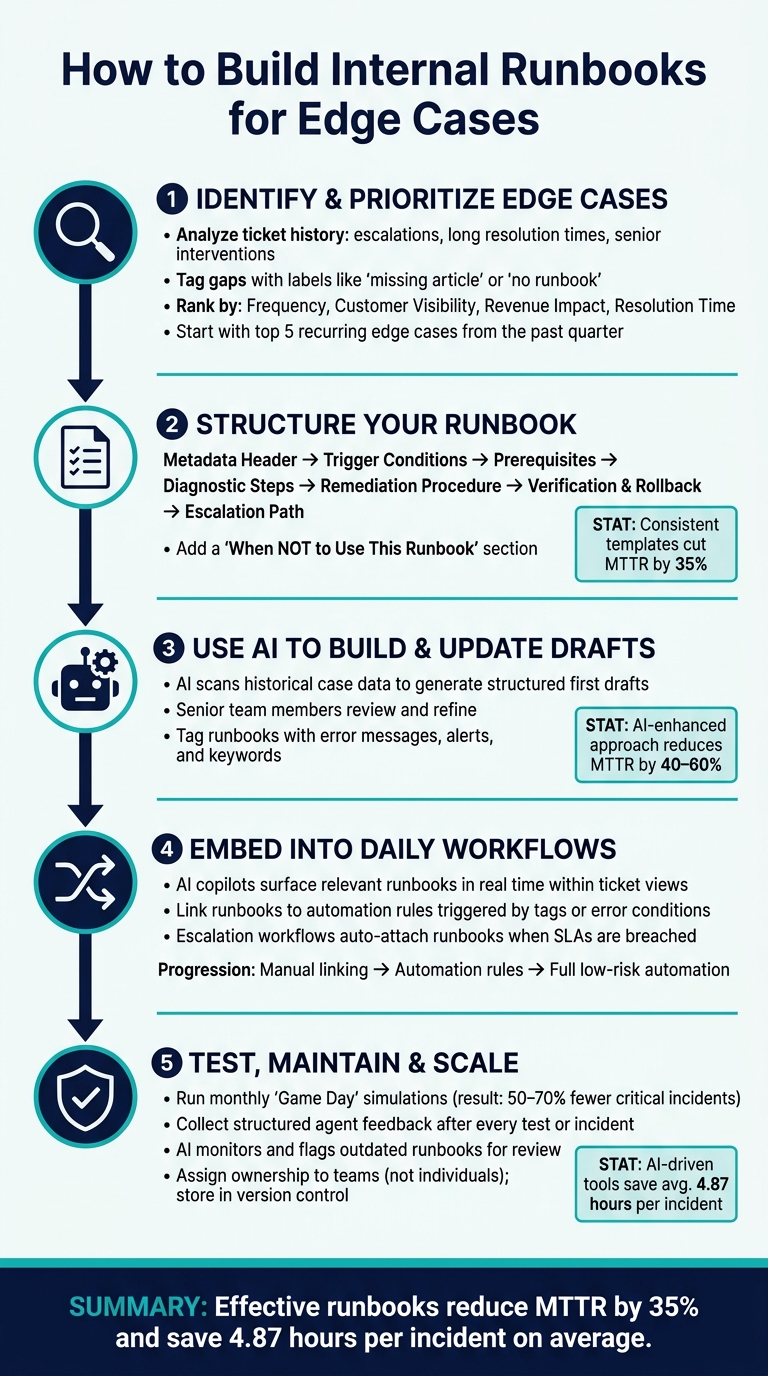
How to Build Internal Runbooks for Edge Cases: 5-Step Process
Episode 81 – Runbooks: turning architecture into repeatable operations
sbb-itb-e60d259
Step 1: Identifying and Prioritizing Edge Cases
Before diving into creating a runbook, it’s crucial to figure out which edge cases deserve to be documented first. Start by thoroughly analyzing your ticket history to pinpoint areas that need attention.
Using Historical Data to Find Edge Cases
Take a close look at closed tickets from the past quarter. Pay special attention to escalations, cases with unusually long resolution times, and those requiring senior staff intervention. For example, if senior agents consistently resolve a specific issue in 8 minutes while junior agents take 45 minutes, you’ve likely uncovered a high-priority edge case [5].
To streamline this process, implement tagging during live interactions. Tags like "missing article" or "no runbook" can help identify gaps in documentation. Review these tags weekly to stay on top of recurring issues [5]. Additionally, AI tools can be a game-changer here, analyzing recent tickets to detect patterns that might otherwise go unnoticed.
"The best on-call teams are not the ones that debug fastest. They are the ones that documented the fix last time." – Webalert Team [2]
Ranking Edge Cases by Business Impact
Once you’ve identified potential edge cases, prioritize them based on their impact on the business. Not every rare scenario demands immediate action. Focus on cases that rank high across four key dimensions: frequency, customer visibility, revenue impact, and resolution time. Here’s how these criteria align with key B2B support metrics:
| Ranking Criterion | Key Metric | Why It Matters |
|---|---|---|
| Frequency | CES / Agent efficiency | High-frequency edge cases can quickly drain team resources. |
| Customer visibility | CSAT | Issues like failed transactions or 5xx errors can directly harm satisfaction scores. |
| Revenue impact | Renewal risk | Unresolved issues near critical renewal windows could result in financial losses. |
| Resolution time | MTTR / CSAT | Long or inconsistent resolution times highlight gaps in existing processes. |
Platforms like Supportbench can simplify this process by providing AI-driven Predictive CSAT and CES scores at the individual case level. These insights help identify unresolved edge cases that could be negatively affecting your metrics, making prioritization much more manageable.
As a practical first step, focus on documenting the five most frequent edge cases from the past quarter [7]. Trying to tackle every scenario at once can lead to inefficiencies and incomplete solutions.
Once you’ve identified and ranked your edge cases, the next step is to structure runbooks that provide clear and actionable guidance.
Step 2: Structuring Runbooks for Clear Action
A runbook needs to be straightforward enough for anyone to use effectively, even in high-pressure situations. If it requires the original author to explain it, it’s not a true runbook. Once you’ve identified the key edge cases, the next step is creating a structure that transforms analysis into quick, actionable steps.
Core Components of a Working Runbook
A well-designed runbook follows a clear structure that removes any guesswork during critical moments.
"If a runbook cannot be executed by a capable engineer who was not involved in writing it, it is not finished." – Daniel Mercer, Senior Technical Editor, Helps.website [8]
Start with a metadata header that includes essential details like the title, the owning team (not an individual), severity level, and a "Last Verified" date. If a runbook hasn’t been verified in the past six months, treat it as potentially outdated [2][3]. Next, define trigger conditions, specifying the alerts or symptoms that signal when to use the runbook. Avoid vague instructions like "use when something seems wrong." Instead, be precise, such as: "5xx error rate exceeds 2% for three consecutive minutes."
Include prerequisites like required system access, tools, and permissions. Then, outline diagnostic steps with branching logic to rule out false positives. Follow this with a remediation procedure written in clear, direct language (e.g., "Restart the service"). Pair each command with examples of normal and abnormal outputs to allow immediate self-verification. Conclude with verification criteria, a rollback procedure in case the fix doesn’t work or worsens the issue, and an escalation path detailing when and how to get additional help.
Using a standardized structure has measurable benefits. Studies show that consistent templates can cut Mean Time to Resolve (MTTR) by 35% by eliminating ambiguity during the response process [6]. This approach ensures runbooks are easy to create and even easier to follow.
Runbook Templates for Consistent Formatting
A runbook template doesn’t need to be fancy – it just needs to be consistent. Here’s a simple template your team can start using right away:
| Section | What to Include |
|---|---|
| Header | Title, owning team, severity level, last reviewed date, and current status |
| Context | Purpose, scope, and specific trigger conditions or symptoms |
| Preparation | Prerequisites, required tools or access, and any risks or warnings |
| Action | Diagnostic steps followed by remediation steps, with expected outputs |
| Post-Action | Verification criteria and rollback steps if the fix doesn’t work |
| Escalation | When to escalate, time thresholds, and contact information |
To make the template even more effective, emphasize critical steps. For instance, use bold warnings before irreversible actions, like restarting a production database. Keep headings, numbered steps, and code blocks clear and ready for copy-pasting. Define all necessary variables upfront so responders can act quickly without searching for missing details.
"A runbook is only as good as its structure. Without a consistent template, runbooks become scattered notes that nobody trusts during incidents." – Stew [9]
Adding a "When NOT to Use This Runbook" section can also prevent missteps. Edge cases often share symptoms with other issues, so flagging look-alike scenarios upfront helps responders avoid applying the wrong fix.
Step 3: Using AI to Build and Update Runbooks
AI takes the tediousness out of creating and maintaining runbooks, especially for those tricky edge cases that only a few team members have dealt with. Instead of starting from scratch, AI can handle the groundwork by drafting the first version. Let’s look at how AI turns past case data into actionable drafts.
Generating Runbook Drafts from Case Histories
AI tools can comb through historical case data, spot recurring resolution patterns, and produce a structured draft in minutes. By using semantic matching, AI breaks down case notes into actionable steps, complete with clear success and failure criteria [12][11].
"Runbook generation is an even much more tractable task for GenAI… Generating this in an accurate, bug-free and hallucination-free manner for GenAI is much more feasible than generating longer application code." – Gaurav Manglik, General Partner, WestWave Capital [11]
These drafts aren’t final. Senior team members review and fine-tune them before they’re ready to use. AI can also tweak an existing runbook for similar scenarios – like adapting a resolution process for one product version to suit a related variant – saving time compared to starting over [12].
Tools like Supportbench’s AI KB Article Creation tap into case histories to churn out structured documentation, cutting down the need to begin from scratch.
Once the drafts are ready, integrating them into your knowledge system ensures they’re accessible and up-to-date when needed.
Connecting Runbooks to Your Knowledge Base
Runbooks are far more useful when linked to your broader knowledge base. This integration ensures the right guidance pops up during incidents or live support cases.
A smart way to manage this is by treating runbooks as dynamic documents stored in version control alongside the systems they support. When infrastructure or configurations change, AI-integrated CI/CD workflows can flag related runbooks for review [7][6], reducing the risk of outdated documentation.
For effective retrieval, tag each runbook with relevant error messages, alerts, and keywords. This tagging allows AI to pull up the most appropriate document during investigations instead of a generic list of results [6][7]. Companies using this structured, AI-enhanced approach have seen MTTR drop by 40–60% [6], a major win as their runbook libraries expand.
To maintain control, implement a three-tier permission model for any AI agent executing runbook steps. Commands can either run automatically, require human approval, or be blocked entirely [13]. This keeps your team in charge while ensuring quick responses for low-risk actions.
Step 4: Embedding Runbooks into Daily Support Work
Once your runbooks are ready, the next step is integrating them seamlessly into your team’s daily workflows. A runbook is only useful if it’s easily accessible when your team needs it most. Stashing it in a forgotten folder? That’s a missed opportunity. The key is making sure agents can quickly find the right information without wasting valuable time.
Surfacing Runbooks with AI Tools
AI tools can revolutionize how runbooks are used by dynamically bringing them into play. These AI copilots analyze active cases in real time – reviewing incident descriptions, error messages, and impacted services – to instantly present the most relevant runbook. No more manual searching or guesswork. This kind of precision can save agents hours and dramatically improve response times [13].
To make this process even smoother, be sure to optimize your runbooks with clear and specific keywords. These keywords act as signals that help AI tools pinpoint and suggest the right documentation when it’s needed [7].
Some AI copilots go a step further by performing basic diagnostic checks automatically. For instance, they might collect logs or query API statuses even before an agent starts troubleshooting. This eliminates the need for agents to manually track down this information, giving them a head start [8][10].
Supportbench’s AI Agent-Copilot is a great example of this system in action. It scans past cases and your knowledge-centric solutions to deliver runbook-style guidance directly within the ticket view. This ensures agents always have the right resources at their fingertips.
Linking Runbooks to Automation Rules
AI surfacing is just the beginning. You can take it a step further by linking runbooks directly to automation rules. This means runbooks can automatically appear when specific conditions are met. For example, if a case is tagged with “DatabasePrimaryUnreachable” or error messages point to connection timeouts, automation rules can attach the relevant runbook to the case and notify the assigned agent immediately.
Escalation workflows also benefit from this approach. When a case reaches a certain severity level or breaches an SLA, automation can attach the appropriate escalation runbook and route the case to the right team. This eliminates guesswork and ensures the response is both timely and accurate. Similarly, linking runbooks to prioritization rules ensures that high-priority cases surface with the proper response procedures already in place.
For teams handling complex systems, this process often evolves over time. Start by manually linking runbooks to alerts and tags. Then, move toward automation rules that deliver runbooks based on observable triggers. Eventually, you can automate low-risk remediation steps entirely, while reserving higher-risk actions for human approval [7][13].
"Teams with standardized runbook templates reduce MTTR by 35% by removing ambiguity from incident response." – Stew.so [6]
Step 5: Testing, Maintaining, and Scaling Runbooks
Building runbooks is just the beginning. The real challenge is making sure they perform when it matters most.
Testing Runbooks and Collecting Agent Feedback
The best way to validate a runbook is to test it exactly as written. This is often done through a "Game Day" simulation, where an agent works step by step through the runbook in a controlled environment. These exercises are designed to uncover any gaps, unclear instructions, or missing details – before you’re in the middle of a real crisis.
"A runbook you’ve never used is a runbook you don’t trust." – Incident Copilot [1]
Another helpful approach is to have a team member who’s unfamiliar with the system try to follow the runbook independently. If they encounter problems, it’s a sign the instructions need better clarity – not more training. Teams that run monthly Game Day simulations have reported 50% to 70% fewer critical incidents caused by runbook failures [1].
After every test – or even after a real incident – gather structured feedback from agents. Ask about any confusing steps, missing details, or discrepancies between what the runbook outlined and what actually happened. This feedback is what turns a static document into a reliable tool for the field.
Using AI to Keep Runbooks Up to Date
Runbooks can quickly become outdated, which poses its own risks.
"Outdated runbooks are worse than no runbooks because they give operators false confidence in procedures that no longer work." – Docsio [6]
AI tools are now stepping in to help keep runbooks current. These tools can monitor how often agents modify steps or flag commands that consistently fail. When patterns emerge, AI can automatically identify runbooks that need updating [14]. Beyond just flagging issues, AI can even draft updated content by analyzing the steps and commands that successfully resolved past incidents [1].
To make this process seamless, every runbook should include Last Updated and Last Validated dates. Without these, it’s hard to know whether you’re working with reliable guidance or outdated information [14][4].
With AI handling updates, the next step is ensuring your runbooks are easy to find when needed.
Organizing Runbooks as Your Team Grows
Once your runbooks are regularly updated, the focus shifts to organizing them effectively. A centralized, searchable knowledge base is key. Agents should be able to locate the right runbook quickly by searching for symptoms, error messages, or alert names [7].
Consistent naming conventions can make a big difference. For example, using a format like {service}-{action}-{scope}.md (e.g., billing-refund-partial.md) keeps your library structured as it grows. Adding a Keywords section to each runbook with common error strings can further speed up searches.
Ownership is another critical factor. Assign runbooks to teams rather than individuals. When one person owns a runbook and leaves the organization, valuable knowledge can be lost. Team-level ownership ensures continuity, even with staff changes [2][7].
Finally, treat your runbooks like code. Store them in a version-controlled system, require peer reviews for major updates, and maintain an audit trail. This way, you’ll always know what changed and why.
Conclusion: Building a Knowledge System That Handles Edge Cases
Edge cases tend to show up when you least expect them – like when key team members are unavailable, or customers are already frustrated, and there’s no time to sift through a cluttered wiki. That’s where runbooks come in, offering straightforward, actionable steps to handle these surprise scenarios.
By following the process outlined here, you can create a system that’s not only well-organized but also prepared for the unexpected. This guide walks you through everything – from pinpointing the most critical edge cases to leveraging AI for real-time updates to your runbooks.
The key to success lies in consistent ownership and regular updates. Runbooks shouldn’t be static documents gathering dust. Assign them to teams rather than individuals, and make version control, peer reviews, and scheduled updates a priority. The results speak for themselves: standardized runbook templates cut down Mean Time to Recovery (MTTR) by 35%, while AI-driven incident management tools save an average of 4.87 hours per incident [6].
FAQs
What makes a runbook different from a knowledge base article?
A runbook is a detailed, step-by-step guide designed to handle specific operational scenarios or incidents. It lays out clear, actionable tasks like commands to execute, success criteria to verify, and escalation paths to follow if needed. On the other hand, a knowledge base article offers broader information or troubleshooting advice, often aimed at general use cases. While runbooks focus on quick and consistent incident response, knowledge base articles act as reference materials for a wider range of ongoing support needs.
How do I pick which edge cases to turn into runbooks first?
When building your knowledge base, start by focusing on edge cases that occur frequently, have a big impact, or demand specific technical solutions. These might include:
- Recurring issues that pop up often
- Problems leading to major downtime or expensive mistakes
- Complicated scenarios that need detailed, step-by-step instructions
Tackling these first ensures your knowledge base addresses the most pressing challenges. This approach not only improves response times but also helps maintain smoother, more consistent operations.
How can I use AI to keep runbooks accurate without risking wrong fixes?
AI can help keep runbooks accurate and reduce mistakes by automating routine fixes based on predefined conditions while learning from past incidents. To make this work effectively, it’s important to combine AI with well-organized and regularly updated runbooks. Adding validation steps and manual review checkpoints ensures reliability. Over time, continuous learning from outcomes makes AI-driven recommendations smarter and more tailored to specific situations, cutting down the chances of errors in the long run.






