


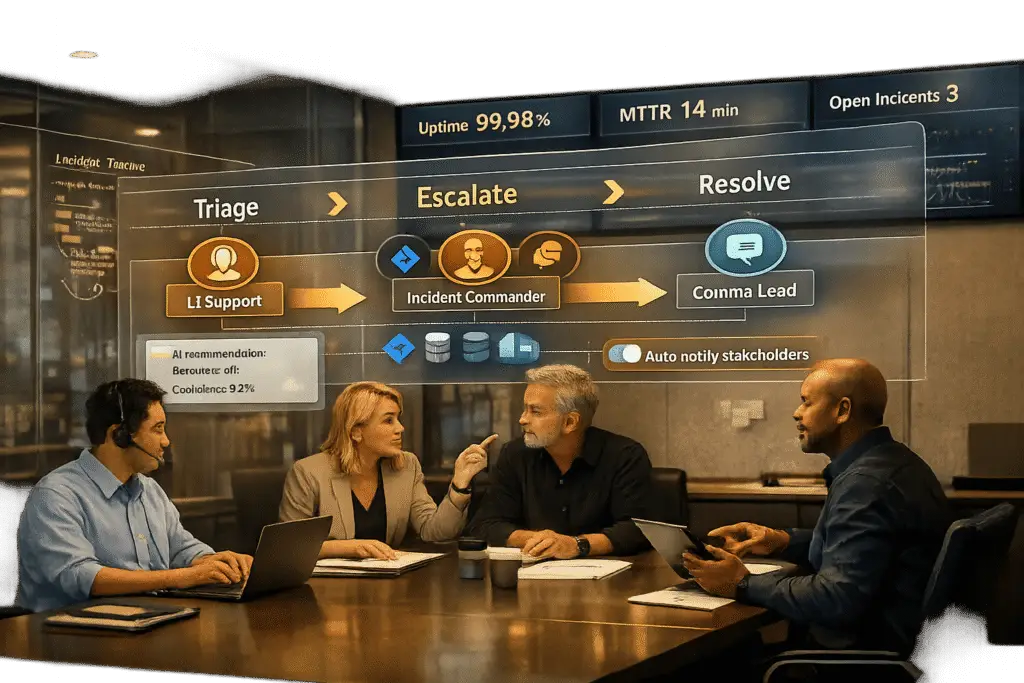
When a new product release hits the market, the first few hours can make or break customer trust – especially in B2B environments where downtime affects high-value clients. A well-structured war room process ensures your team is ready to respond quickly and effectively to critical issues. Here’s the essence of creating a workflow that minimizes chaos and strengthens your incident response:
- Set clear goals: Focus on restoring service quickly, not diving into root cause analysis during the crisis. Track metrics like Mean Time to Resolution (MTTR).
- Assign roles upfront: Designate key positions such as an Incident Commander (to lead), Assigned Engineers (to troubleshoot), a Communications Lead (for updates), and a Scribe (to document events).
- Use the right tools: Centralize operations with platforms offering real-time visibility and AI automation to prioritize, assign, and track incidents.
- Define escalation paths: Categorize issues by severity (e.g., SEV0 to SEV3) and establish clear timelines for paging backups and managers.
- Create incident playbooks: Prepare step-by-step guides for handling outages, including escalation triggers and communication schedules.
- Monitor and refine: Use AI to track performance metrics, identify gaps, and improve processes after every incident.
This guide walks you through setting up a war room workflow that reduces downtime, maintains customer confidence, and keeps your team organized under pressure.
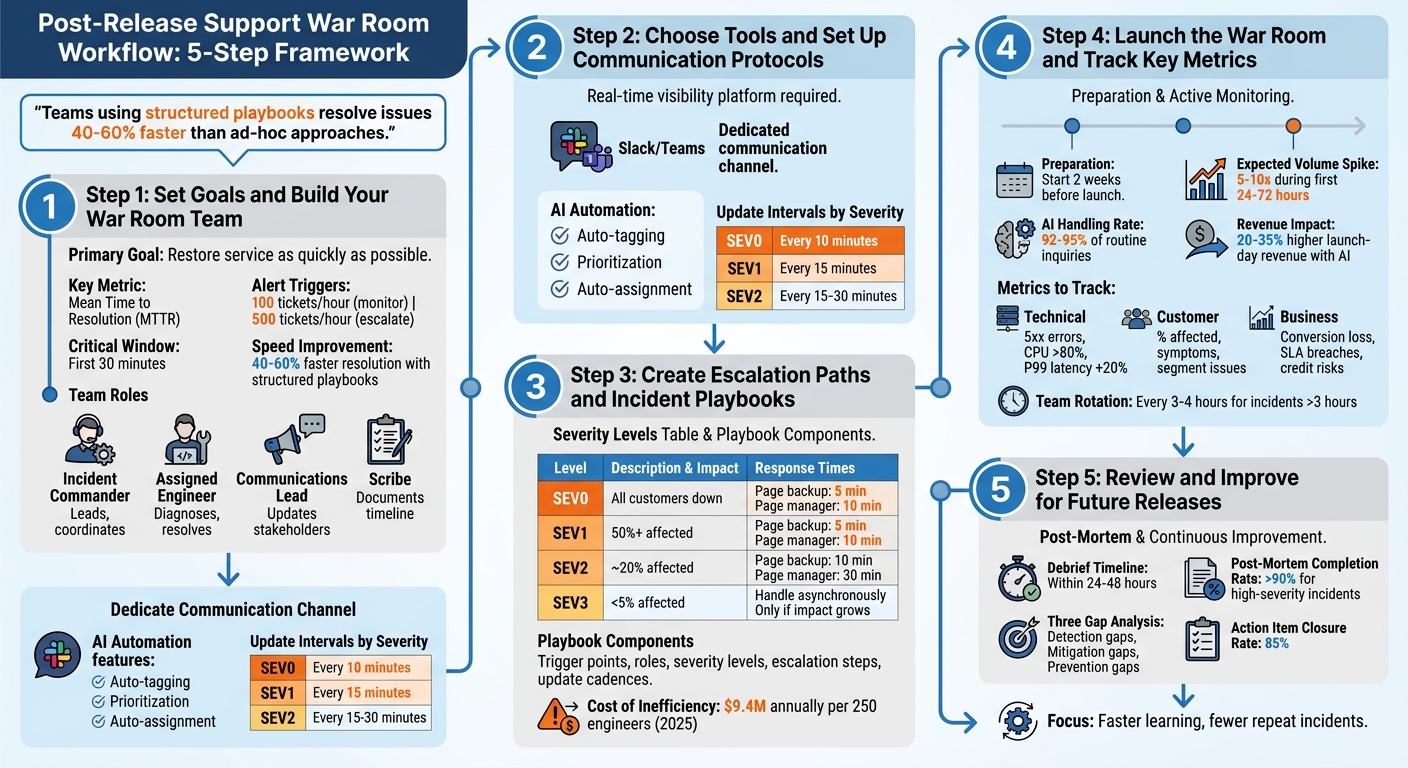
Post-Release Support War Room Workflow: 5-Step Framework
Step 1: Set Goals and Build Your War Room Team
1.1 Set Clear Goals
The primary mission of a war room is straightforward: restore service as quickly as possible [2]. Once stability is achieved, you can shift focus to analyzing the root causes during downtime [3]. To stay on track, set measurable targets like monitoring Mean Time to Resolution (MTTR), triggering alerts when ticket volumes hit 100 per hour, and escalating at 500 tickets [1]. The first 30 minutes are critical for controlling the narrative and minimizing customer frustration [1].
For customer retention, especially in B2B scenarios, having clear metrics is essential. Teams that rely on structured incident playbooks can resolve issues 40–60% faster than those using unorganized, ad-hoc approaches [3]. The immediate focus should be stabilization – deploy rollbacks or activate kill switches rather than diving into full root cause analysis. This avoids unnecessary delays caused by excessive coordination [2][3].
Once goals are in place, the next step is assigning roles to ensure a smooth and efficient response.
1.2 Assign Roles and Responsibilities
Defining roles at the outset is critical [3]. The Incident Commander leads the response, making final decisions without getting involved in technical debugging. As Upstat explains:
The incident commander focuses exclusively on coordination. When they start debugging, coordination suffers [2].
The Assigned Engineer handles diagnosing and resolving the issue, while the Communications Lead manages updates across status pages and communication channels. A Scribe documents the timeline of events and decisions, which is invaluable for post-mortem analysis [2].
AI tools can simplify triage and role assignment. For instance, Supportbench‘s AI Agent-Copilot automatically prioritizes tickets by severity and routes them to the right technical team, ensuring urgent issues are addressed immediately instead of getting lost in the shuffle.
Keep the team lean. Assign an Incident Commander, one Technical Responder per system, a Communications Lead, and a Scribe. Bring in specialists only when necessary, and have them step out once their input is no longer required [2].
With roles defined, it’s time to set clear expectations to keep everyone aligned.
1.3 Set Team Expectations
Establishing ground rules ahead of time is crucial. The Incident Commander has the final say to prevent "analysis paralysis." During active incidents, prioritize speed over perfection – an imperfect rollback is acceptable if it minimizes customer impact [2]. Team members who aren’t assigned a specific role should avoid contributing unnecessary noise, such as messaging engineers directly or offering unsolicited suggestions [3].
Set strict update intervals based on severity levels: every 10 minutes for SEV0, 15 minutes for SEV1, and 15–30 minutes for SEV2 [3]. Even if there’s no new information, stick to this cadence. Pin key details – such as severity, roles, current status, and the next update time – to the top of the communication channel so latecomers don’t derail progress by asking for context [2][3].
The war room should be focused solely on solutions. As Runframe puts it:
We don’t care who deployed this. We care about: 1. What broke 2. Why it broke 3. How to fix it 4. How to prevent it [3].
This blame-free approach fosters psychological safety, which is essential for avoiding chaos and ensuring a coordinated response. Without this mindset, a short outage can quickly spiral into a prolonged crisis [3]. For incidents that stretch beyond three hours, rotate team members to prevent mental fatigue and maintain performance [1].
sbb-itb-e60d259
Step 2: Choose Tools and Set Up Communication Protocols
2.1 Choose Tools That Provide Full Visibility
Having the right tools is critical for a smooth and efficient war room operation. You need a platform that offers real-time, comprehensive visibility into every customer interaction, case status, and system metric – all in one place. Switching between disconnected tools wastes time and creates confusion. Tools like Supportbench solve this by offering real-time dashboards, AI-driven case summaries, and dynamic SLAs that adapt to the specific context, such as tightening response times when a contract renewal is near.
Supportbench goes a step further by integrating historical case data with live metrics. Its AI Agent-Copilot can instantly pull up relevant solutions from past cases and the knowledge base, saving your team from sifting through data manually [5]. With features like customer history access, infrastructure notes stored in custom datatables, and real-time Salesforce synchronization, teams can work with complete and accurate information. This eliminates the "finger-pointing" that often arises when teams rely on incomplete or conflicting data [5]. The result? Less downtime and stronger customer confidence.
2.2 Set Up Communication Channels
Clear and structured communication channels are non-negotiable to maintain order during incidents. Create a dedicated Slack or Microsoft Teams channel where all team members can stay connected [4]. This channel should act as a real-time log, recording every decision, action, and artifact. This way, anyone joining mid-incident can quickly catch up without interrupting the flow of work [6].
Supportbench enhances this process with AI-driven activity feeds that automatically update communication channels with real-time case updates and status changes. This spares your Communications Lead from having to manually transfer information between systems. To keep things efficient, limit active participation in the channel to essential roles, while giving observers view-only access to minimize distractions [4]. With these channels in place, automating routine tasks becomes the next logical step to streamline operations.
2.3 Automate Routine Tasks with AI
Automation, powered by AI, takes structured communications to the next level by reducing repetitive, time-consuming tasks. Supportbench’s AI Automation features can handle AI-powered ticket routing and prioritization of issues, allowing agents to focus on solving problems rather than administrative work. For critical cases, the system automatically routes them to the appropriate technical team based on severity and content, ensuring no issue falls through the cracks. This AI-driven strategy not only speeds up responses but also improves accuracy while cutting operational costs.
AI can also handle routine queries and synthesize complex information. For example, in March 2026, Dassault Systèmes introduced AI virtual companions that replaced traditional "war rooms", which often relied on Excel spreadsheets. In one impressive instance, the AI calculated a €3.3 billion tariff impact within seconds by analyzing product configurations and supplier relationships – a task that previously took days of manual effort [8]. Modern war rooms now use multi-agent architectures, where a central AI orchestrator assigns tasks to specialized agents (e.g., Database, Kubernetes, or Network agents) to investigate different layers of the system simultaneously [7]. Similarly, Supportbench’s AI can pull together data from disconnected systems, providing a unified view of even the most complex problems and significantly cutting down resolution times.
War Room: Coordinate Major Incidents Effectively
Step 3: Create Escalation Paths and Incident Playbooks
Once team roles and communication protocols are set, the next step is to establish clear escalation paths and structured incident playbooks. These tools ensure a smooth and efficient response when incidents occur.
3.1 Design Tiered Escalation Paths
To avoid confusion during outages, define escalation paths based on four severity levels, each tied to customer impact:
- SEV0: Total business stoppage, such as a broken checkout system.
- SEV1: Major features disrupted, impacting 50% or more of users.
- SEV2: Partial outages affecting around 20% of customers or revenue.
- SEV3: Minor issues affecting fewer than 5% of users [3].
Severity should be determined within 30 seconds, and automated timers should be in place to escalate quickly. For example, a backup engineer should be paged within 5 minutes, and an Engineering Manager within 10 minutes for SEV0 and SEV1 incidents. Roles are clearly separated to streamline response: the Incident Lead oversees decisions and communication, while the Assigned Engineer focuses entirely on resolving the issue [3].
Supportbench’s AI Automation simplifies this process by auto-tagging cases based on severity, prioritizing them according to customer ARR or renewal dates, and routing critical issues to the appropriate technical teams. Additionally, its dynamic SLAs adjust response times for high-value customers, especially during renewal periods.
| Severity | Impact Example | Time to Page Backup | Time to Page Manager |
|---|---|---|---|
| SEV0 | All customers down; business stopped | 5 minutes | 10 minutes |
| SEV1 | Major feature broken; 50%+ affected | 5 minutes | 10 minutes |
| SEV2 | Partial outage; ~20% affected | 10 minutes | 30 minutes |
| SEV3 | Minor issues; <5% affected | Handle asynchronously | Only if impact grows |
With these escalation paths in place, the next step is to formalize response procedures using incident playbooks.
3.2 Build Incident Playbooks
Incident playbooks act as a guide for handling issues efficiently. They should include:
- Clear trigger points
- Defined roles and responsibilities
- Severity levels
- Time-based escalation steps
- Update cadences tailored to severity
For example, stabilization actions like rollbacks or failovers should take priority over root cause analysis. Research shows that teams using detailed playbooks resolve issues 40% to 60% faster than those relying on ad-hoc approaches [3]. This efficiency matters, especially considering that operational inefficiencies cost companies an average of $9.4 million annually per 250 engineers in 2025 [3].
"Incident response isn’t debugging. Debugging happens after. Incident response is what happens the second after the alert fires." – Runframe [3]
Supportbench’s AI Agent-Copilot enhances these playbooks by auto-generating escalation briefs. These briefs include customer environment details, case timelines, and reproduction steps pulled from historical data. This ensures that Tier 2 and Tier 3 specialists don’t waste time rediscovering information. The AI can also craft playbooks by analyzing past cases, identifying effective rollback procedures, and recommending communication templates that worked well with customers during previous incidents.
Once playbooks are in place, it’s essential to monitor and refine them in real time.
3.3 Monitor and Adjust in Real Time
Real-time monitoring shifts escalation from being reactive to proactive. AI-driven systems can analyze factors like sentiment, urgency, customer value (ARR), and the likelihood of SLA breaches to identify high-risk interactions before they escalate [9]. Since only 14% of customer service issues are fully resolved through self-service, the remaining 86% require well-designed escalation workflows [9].
"Every minute saved in the first 15 minutes of an escalation typically returns hours of saved work across engineering and support later in the resolution process." – Ameya Deshmukh, EverWorker [9]
Closed-loop monitoring and predictive analytics help prevent cases from falling through the cracks. Supportbench’s predictive tools identify potential issues by tracking stalled tickets, multiple agent touches, and queue loads. Real-time dashboards provide instant visibility into case status, SLA risks, and customer health scores, all in one place. When SLA breaches are imminent, the system sends alerts based on ticket age and queue capacity, enabling proactive intervention before customers feel the impact [9].
Step 4: Launch the War Room and Track Key Metrics
With your escalation paths and playbooks in place, it’s time to activate the war room and track performance in real time. This step is where all the preparation is tested, determining whether everything runs smoothly or turns into a rush to fix issues under pressure.
4.1 Prepare for Launch Day
Start preparing for launch day at least two weeks ahead. Update your AI training data with the latest product specs, compatibility details, and potential FAQs. Why? Because product launches often lead to a 5–10x spike in support volume during the first 24–72 hours [10]. Equipping your AI with updated data ensures it can handle common questions autonomously, aligning with an AI-native strategy.
The war room should be activated for critical events like complete service outages, serious performance degradation, or security incidents [2]. On launch day, make sure every team member knows their responsibilities and has access to the tools they need. Pin essential details – like severity levels, affected services, hypotheses, and next steps – to the top of your war room channel (e.g., #incident-04-21-2026). This ensures that anyone joining mid-incident can catch up quickly [2][1].
Here’s a real-world example: In February 2026, RTR Vehicles adopted an AI-first support model for their product launches. By preloading product data into their AI agent, they enabled the AI to handle 92–95% of fitment inquiries on its own. This freed up their human support team to focus on the remaining 5–8% of complex cases, turning what used to be a "support crisis" into an opportunity for higher revenue [10]. In fact, businesses report 20–35% higher launch-day revenue when AI instantly answers pre-sale questions, compared to traditional response queues [10].
"The moment when customer demand is highest is the same moment when support capacity is most strained." – Gabe Campbell, AI Genesis [10]
Tools like Supportbench’s AI Automation make launch prep easier by auto-tagging cases based on severity, prioritizing them by customer ARR or renewal dates, and routing critical issues to the right teams. Its AI Agent-Copilot can also pull historical data to create case summaries, saving time and eliminating redundant tasks.
Once you’ve completed your preparations, the next step is to keep a close eye on performance metrics to spot any issues early.
4.2 Track Performance Metrics
Use AI-driven guardrails to monitor key technical, customer, and business metrics. These guardrails act like tripwires, automatically pausing rollouts or triggering rollbacks if certain thresholds are breached [13]. While manual oversight of minor bugs can take over an hour, automated guardrails can address the same issues in just minutes [13].
| Impact Layer | Metrics to Track |
|---|---|
| Technical | 5xx error rates, CPU usage (>80%), P99 latency increases (>20% over baseline) [13] |
| Customer | Percentage of users affected, symptoms, segment-specific issues [11] |
| Business | Conversion/revenue loss, SLA/SLO breaches, credit risks [11] |
Operational metrics like Time to Detection (TTD), Time to Acknowledgement (TTA), First Response Time (FRT), and Mean Time to Resolution (MTTR) are also crucial [12][14]. AI sentiment analysis can identify frustrated or angry language in customer tickets, escalating them for faster resolution before a human agent steps in [14]. This kind of proactive tracking ensures the escalation paths you’ve set up are used effectively.
"An SLA you cannot keep is worse than no SLA. If your team consistently misses a 1-hour first response target, you are training customers to expect broken promises." – Jonathan Bar, Founder, Corebee [14]
Supportbench’s predictive tools can identify potential issues by tracking stalled tickets, multiple agent touches, and queue loads. Real-time dashboards provide insights into case status, SLA risks, and customer health scores. Features like AI Predictive CSAT and AI First Contact Resolution detection offer forward-looking insights, so you’re not waiting for customer surveys to detect problems. Alerts based on ticket age and queue capacity help prevent SLA breaches before they happen.
4.3 Keep Customers Informed
Once metrics reveal the status of an incident, keeping customers in the loop becomes critical. Set a structured update schedule to manage expectations and avoid frustration: send updates every 15 minutes for SEV0/SEV1 incidents and every 30 minutes for SEV2 [2]. Stick to this cadence even if there’s no new information to share [2][1].
"The first 30 minutes determine whether you control the story or become its victim." – Sarel Doglu, Director of Digital Marketing, 5W Public Relations [1]
Delays in communication during launch windows can reduce purchase intent by about 5% per hour [10]. Slow responses not only frustrate customers but can also hurt revenue. Use AI to automate status updates and sentiment analysis, allowing your Communications Lead to focus on more personal, high-priority interactions.
Supportbench’s AI can capture war room conversations (both chat and audio), create minute-by-minute timelines, extract action items, and draft updates for executives or support teams [11]. This prevents "memory drift" during shift changes and ensures that customer communications remain accurate and consistent. The AI also monitors customer sentiment in incoming tickets, flagging accounts that need immediate attention before frustration escalates.
Research shows that cognitive performance drops significantly after about three hours of high-stress decision-making [1]. For incidents lasting longer than four hours, rotate team members to reduce errors caused by fatigue [2][1]. Unlike humans, your AI tools don’t get tired – they provide consistent monitoring and reporting throughout the incident.
Step 5: Review and Improve for Future Releases
The real strength of a war room lies in its ability to capture incident details and use them to prevent future issues. Without a structured review process, your team risks repeating the same mistakes during the next launch. Building on the war room workflow, a structured review process sharpens your responses for the future.
5.1 Hold Debrief Sessions
Debrief sessions should happen within 48 hours to ensure accuracy. Leading organizations like Google often publish post-mortems within 24–48 hours of an outage to stop misinformation from spreading [15]. High-performing teams aim for a post-mortem completion rate of over 90% for high-severity incidents [15].
AI tools can make this process smoother by recording and structuring war room conversations. Acting as an "incident memory system", AI captures discussions from platforms like Zoom, Meet, and Teams, converting scattered responses into well-organized post-mortem documents [11]. This prevents important details from being lost during shift changes and ensures your timeline is based on facts, not guesswork.
"A good postmortem is not a narrative. It’s a timeline, evidence, causal chain, and prevention actions that actually get done."
During the debrief, focus on identifying three key gaps: detection gaps (why wasn’t the issue caught sooner?), mitigation gaps (why did it take this long to recover?), and prevention gaps (how can this be avoided in the future?) [11]. Input from QA, support, operations, and engineering teams can reveal overlooked areas, such as gaps in monitoring or customer impact [15].
Supportbench’s AI can transcribe debrief meetings and automatically extract key takeaways for your post-mortem document. This allows the team to focus on the discussion rather than scrambling to take notes. The AI also consolidates data from Slack or Teams conversations, pull requests, and meeting transcripts to create a detailed first draft [16][11]. These insights can then feed directly into updated playbooks and knowledge bases.
5.2 Update Playbooks and Knowledge Base
Once the root causes are identified, update your incident playbooks and knowledge base to reflect the lessons learned. AI tools can use post-mortem templates to extract tasks, timelines, and to-dos from recorded conversations [11]. This ensures your team has a clear, tested plan ready when similar issues arise.
Operational metrics like Mean Time to Recovery (MTTR) and initial response times should also be reviewed to evaluate the team’s performance [15]. For example, if it took longer than 5 minutes to mobilize the team, escalation paths may need clearer triggers or faster notification methods [15]. If parts of the playbook were skipped or unclear, add more detail or examples to improve usability.
AI can also streamline documentation. Supportbench’s AI, for instance, can create knowledge base articles from case histories, automatically filling in the subject, summary, and keywords based on the problem and solution [11]. This turns resolved cases into searchable resources for both your team and customers.
Tag incidents by failure mode (e.g., deploy regression, database saturation) and symptom signature (e.g., "5xx spike at edge") to build a searchable library [11]. This allows future teams to quickly ask the AI, "What fixed this last time?" and get immediate answers backed by historical evidence [11].
5.3 Implement Improvements
Lessons only matter if they lead to action. Use the data and patterns identified earlier to focus on specific improvements. Assign clear, time-bound action items with defined priorities and verification plans, and track them to achieve an 85% closure rate [11][15]. To ensure accountability, assign tasks to individuals rather than teams [11].
"The win is not ‘more documentation.’ The win is faster learning and fewer repeat incidents."
– Aarav Garg, COO, omi.me [11]
Link action items directly to project management tools like Jira or Linear right after extracting them with AI. This prevents tasks from being forgotten or delayed [11][15].
To prioritize fixes, use a Risk Priority Number (RPN) system. Multiply Severity × Occurrence × Detection difficulty to determine which issues to address first [15]. This way, you focus on the most critical problems instead of just the most recent ones.
AI tools like Supportbench can also identify recurring patterns during quarterly trend analyses. These insights can highlight systemic needs, such as refactoring a microservice or adding new monitoring alerts [15]. By separating confirmed facts from assumptions, AI ensures your post-mortem remains a reliable and auditable record [11].
Common Mistakes to Avoid in Post-Release War Rooms
Even with a solid framework in place, post-release war rooms can stumble if certain pitfalls aren’t addressed. Three of the most common issues include neglecting remote team needs, relying on outdated information, and failing to set up clear collaboration protocols. Here’s how to avoid these challenges.
Ignoring Remote Team Needs
Physical war rooms often leave remote team members out of the loop. Whether they’re traveling, working from home, or in different time zones, these individuals can miss critical updates. This often leads to duplicated efforts or, worse, tasks falling through the cracks. Without a seamless virtual system, communication becomes fragmented instead of unified [1].
To address this, set up a dedicated virtual channel with a clear name, like #war-room-release-v2, to separate urgent updates from everyday discussions [2]. Pin key information – incident severity, hypotheses, next steps, and metrics – so new participants can catch up quickly without interrupting ongoing work. Recording virtual meetings also ensures there’s a permanent record of decisions made [1].
"When we transitioned to using a digital war room, our productivity skyrocketed. The ability to work remotely and access real-time updates has revolutionized how we collaborate on projects."
– Sarah Thompson, Project Manager, XYZ Corporation [17]
To avoid burnout, rotate team members every 3 to 4 hours during long support sessions. Studies show that decision-making ability declines after three hours of high-stress work [1]. Additionally, run quarterly crisis simulations that include remote participants to ensure smooth coordination and test the compatibility of mobile tools across networks.
Relying on Outdated Data
Delaying documentation until after an incident can lead to "memory drift", where facts get muddled, and debates over what actually happened take center stage [11]. Without access to real-time data, decisions often rely on guesswork, which can derail recovery efforts and create unnecessary confusion [1].
"Memory fails under pressure. Real-time documentation prevents post-incident confusion about what actually occurred."
– Upstat.io [2]
To counter this, assign a dedicated scribe to document findings, decisions, and key events in real time [2]. Use shared dashboards that pull live data – like media mentions, website traffic, social sentiment, and support ticket activity – so everyone works from the same information [1]. AI tools can also help by differentiating between confirmed facts and hypotheses while generating detailed, minute-by-minute timelines from discussions [11]. Real-time documentation ensures clarity and reduces post-incident confusion.
Lack of Clear Collaboration Protocols
"The fastest way to derail a war room is inviting everyone. Observers, stakeholders wanting updates, and engineers ‘just listening’ create noise without adding value."
– Upstat.io [2]
A crowded war room filled with nonessential participants often leads to chaos. To maintain focus, limit attendees to essential roles: the Incident Commander, key technical responders, a communications lead, and a scribe [2]. Clear role definitions are crucial. For instance, the Incident Commander should focus on coordination and stakeholder updates, not technical troubleshooting. When they get involved in code, it disrupts their ability to oversee the broader effort [2][7].
Encourage a "blameless" culture by avoiding accusatory questions like "who deployed this?" during incidents. Instead, focus on problem-solving with questions like "how do we fix this?" Clearly labeling facts and hypotheses in the war room also prevents assumptions from clouding later root cause analysis. By sticking to defined roles and fostering a solution-oriented mindset, you can keep the war room effective and focused.
Conclusion
This guide lays out the key steps – from defining team roles to setting up escalation paths – that can transform support challenges into manageable, structured processes. Creating an effective support war room workflow hinges on preparation, clarity, and consistent refinement. Start by assigning roles before any crisis arises: an Incident Commander to lead, Technical Responders to investigate, a Communications Lead to handle updates, and a Scribe to document everything in real time [1][2]. Clear role assignments help prevent confusion, ensuring a product issue doesn’t spiral into a larger organizational problem.
Keep your war room lean and efficient. Include only those whose expertise is critical, and let participants exit once their role is fulfilled [2]. Leverage AI tools to log conversations, create accurate timelines, and separate facts from assumptions. This reduces the risk of memory errors when piecing together the sequence of events [11]. As Aarav Garg, COO at omi.me, aptly states:
"The win is not ‘more documentation.’ The win is faster learning and fewer repeat incidents" [11].
Alongside clear roles, set specific escalation criteria. Use measurable triggers – like a spike in support tickets – to avoid subjective decision-making under pressure. Regular updates (every 15 minutes for critical issues and every 30 minutes for less severe ones) ensure stakeholders stay informed, even if there’s no new progress [1][2].
After an incident, hold a debrief within 24 hours while details are still fresh [1][11]. Turn insights into actionable steps, assigning owners, deadlines, and follow-ups to prevent repeat issues [11]. Conduct quarterly tabletop exercises to test your processes and reinforce team readiness before the next real emergency [1]. Remember, decision-making under stress deteriorates after three hours, so plan for team rotations during prolonged incidents [1]. These practices not only address immediate problems but also strengthen your team for future challenges.
The gap between chaos and control isn’t a matter of chance – it’s about structure, automation, and a commitment to learning from every incident. Start building your AI-driven support workflow now, so you’re ready to take charge when the unexpected happens.
FAQs
When should we activate a war room after a release?
When critical issues jeopardize product stability, performance, or the customer experience after a release, it’s time to activate a war room. Typical triggers include service outages, major incidents, or significant disruptions that demand swift coordination. Additionally, high-pressure product launches that overwhelm support teams – like a 5–10x surge in support tickets – may also call for a war room to ensure customer satisfaction and keep business operations on track.
What’s the minimum set of war room roles we need?
The core roles in a war room are designed to ensure smooth and effective incident management. These typically include:
- Incident Lead: Oversees the entire response process and makes key decisions.
- Technical Experts: Focus on diagnosing and resolving the technical issues at hand.
- Communication Lead: Keeps stakeholders informed with timely updates.
- Support Representatives: Address customer inquiries and concerns during the incident.
While these roles form the backbone of the team, additional positions, like a logistics manager, can be brought in to handle specific needs. However, the main priorities remain clear: leadership, technical problem-solving, and clear communication.
How do we decide severity and escalation triggers fast?
To handle incidents effectively, it’s crucial to establish clear criteria for each severity level – such as Critical, High, or Medium. Pair this with an escalation matrix that outlines assigned roles and SLA timers.
For example, a Critical issue like a system outage might demand a response within 15 minutes and escalation within 30 minutes. The escalation matrix plays a key role by ensuring accountability, defining strict timeframes, and detailing the necessary information for seamless handoffs. This structure helps teams make quick, informed decisions under pressure.






