



Your support tickets are your roadmap to better training. By analyzing recurring ticket categories, you can identify the most common issues your customers face and create targeted self-serve training paths. This approach reduces ticket volume, improves resolution times, and empowers both customers and agents.
Here’s the process in a nutshell:
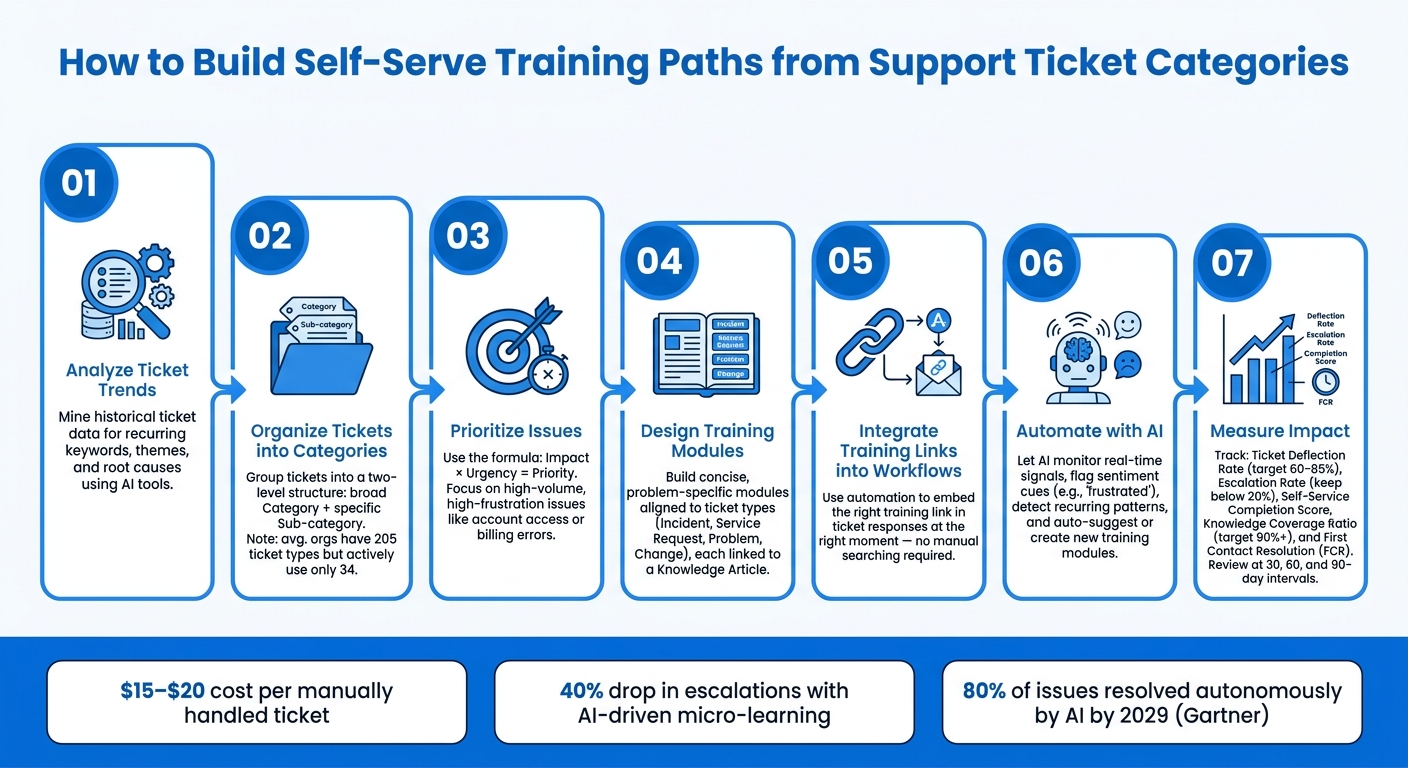
- Analyze ticket trends: Identify recurring problems using historical data and AI tools.
- Organize tickets: Group them into simple categories and sub-categories for clarity.
- Prioritize issues: Focus on high-impact, high-frequency problems first.
- Design training modules: Create concise, problem-specific guides tied to ticket categories.
- Integrate into workflows: Use automation to embed training links directly into ticket responses.
- Leverage AI: Automate recommendations and updates to training materials based on real-time ticket data.
- Measure impact: Track metrics like ticket deflection, escalation rates, and first-contact resolution to refine your training paths.
This method transforms your support process into a proactive, efficient system that addresses customer pain points while saving time and resources.
How to Build Self-Serve Training Paths from Support Ticket Categories
Mapping Ticket Categories to Common Issues
To turn recurring support issues into actionable training, you first need to uncover patterns in your ticket data. While most support teams focus on metrics like ticket volume and response times, the real insights lie in identifying recurring themes – those questions that keep popping up from different customers week after week.
Analyzing Ticket Trends
Start by diving into your historical ticket data. Look for repeated keywords, similar resolution notes, or instances where agents sent the same response multiple times. These are clear indicators of issues that could benefit from a long-term self-service solution. [4]
"Support tickets are where users tell you what’s actually broken. Not what they say in surveys… but what they couldn’t do, what frustrated them, and what went wrong." – Usercall [2]
Using AI tools can take this analysis to the next level. These tools group unstructured ticket data into themes and help identify root causes, going beyond surface-level symptoms. For example, a ticket labeled "login issue" might actually stem from a poorly designed onboarding process, a missing permission setting, or an uncommunicated UI update. While ticket categories tell you what happened, root cause analysis reveals why it happened – and that’s the insight you need to create effective training. Laying this analytical groundwork ensures a smoother categorization process.
To make your data actionable, standardize ticket labels. For instance, "pw reset", "password help", and "can’t log in" should all be grouped under a single, unified term. [3]
Grouping Tickets by Categories
Once your data is cleaned up, organize tickets into a straightforward two-level structure: a broad Category and a more specific Sub-category. Keeping it simple with just two levels avoids unnecessary complexity. Interestingly, while organizations often maintain an average of 205 ticket types in their systems, they actively use only 34 – a clear sign that overcomplication hurts efficiency. [5]
"Poor ticket categorisation leads to confusion in the team, inefficient ticket handling, crappy reports and an increased cost per ticket." – Alan Parker, Founder, Iseo Blue [5]
A streamlined category structure not only improves efficiency but also helps prioritize training efforts. Use the formula Impact × Urgency = Priority to rank categories based on the pain they cause customers and how frequently they occur. High-volume, high-frustration issues – like account access problems or billing errors – are ideal starting points for creating training content. With a clear set of priorities, you can focus on building training modules that directly tackle your customers’ most pressing pain points.
sbb-itb-e60d259
Designing Targeted Training Modules
After ranking your ticket categories by priority, the next step is to create training content that directly tackles the issues you’ve identified. Generic courses often fail to make a meaningful impact – your training needs to focus specifically on the problems highlighted during your ticket analysis. With your priorities in place, the goal now is to design modules that address these issues head-on.
Key Components of a Training Module
Each training module should align with its specific ticket type. The content will vary depending on whether you’re addressing an incident, a service request, a recurring problem, or a change. For example, if account access issues are a frequent concern, your module should include troubleshooting steps and instructions for confirming resolution. For recurring problems, incorporate root cause analysis and preventive strategies to help learners understand both how to resolve the issue and why it occurs [5].
| Ticket Category | Essential Training Components |
|---|---|
| Incident | Step-by-step troubleshooting, how-to guides, resolution confirmation |
| Service Request | Fulfillment procedures, access setup instructions, policy guidelines |
| Problem | Root Cause Analysis (RCA), workarounds, prevention strategies |
| Change | Risk assessment, implementation plans, backout procedures |
Each module should also link to a Knowledge Article. These articles act as living documents that provide detailed resolution steps and gather user feedback. This feedback loop is invaluable for keeping your training relevant as your processes and products evolve [5].
Once you’ve identified the critical components, the next step is to organize the content in a way that makes it easy to use and understand.
Best Practices for Structuring Training Content
Simplicity is key when structuring your training. Stick to a straightforward hierarchy with just two levels – a main topic and a sub-topic – so users can quickly locate the information they need without confusion [5]. Avoid building a knowledge base with overly complex courses when focused, precise modules will be more effective [1].
Use the language your customers actually use in their tickets. For instance, if users frequently say, "I can’t get into my account", your module should reflect that exact phrasing in its title and introduction. Avoid using internal jargon like "Authentication Failure Resolution", which may feel disconnected from the user’s experience [1].
Focus your efforts on the areas with the most impact. Prioritize training for issues with high ticket volumes, long resolution times, or those that contribute to customer churn. These are the areas where self-serve training can make the biggest difference [1].
Integrating Training Links into Ticket Workflows
Once your training modules are ready, the next step is to make them easily accessible during ticket interactions. A resource tucked away in a shared drive or external portal isn’t practical when time is of the essence. The key is to ensure the right link appears at the right moment, seamlessly integrated into your ticket responses. This approach allows agents and customers to access the necessary training resources instantly, right when they need them.
Embedding Training Links in Ticket Responses
Automation is your ally here. For example, if a ticket is categorized as a "Service Request" for something like access setup, the system can automatically send an acknowledgment email with a direct link to the appropriate training module. This eliminates unnecessary back-and-forth and speeds up issue resolution by providing actionable resources upfront.
Using Supportbench for Workflow Integration
Supportbench makes this process straightforward. Its AI Automation feature categorizes incoming tickets and triggers automated workflows that include the relevant training links. Agents can also use the AI Co-Pilot to interact with the internal knowledge base directly within the ticketing system. If the automated response doesn’t fully resolve the issue, the agent can quickly ask the Co-Pilot to locate the most relevant training module and embed it into their reply.
As Jonathan Pasquel, Personnel Manager, puts it: "Since everything is one platform, we have a clear overview of all client and team interaction." [6]
Automating Training Recommendations with AI
Manually reviewing ticket trends can be a slow, reactive process. AI, on the other hand, monitors real-time signals and suggests relevant resources before minor issues snowball into larger problems. This proactive approach sets the stage for integrating AI into every aspect of support, as we’ll explore further in the upcoming discussion on workflow integration.
For instance, when tickets include words like "frustrated" or "unacceptable", it’s a clear sign that current support resources aren’t meeting customer expectations. AI flags these high-priority interactions, signaling the need for immediate attention and potential updates to training materials. In May 2025, a 12,000-employee organization adopted an AI-driven ticket management system to handle HR, payroll, and IT queries. Using sentiment analysis and predictive analytics, they discovered that sales teams were frequently submitting questions about expense policies. By deploying targeted micro-learning modules to address this issue, they saw a 40% drop in escalations and a 15% improvement in CSAT scores [7].
AI doesn’t stop at identifying emotional cues. It also detects recurring patterns in queries, making training updates even more efficient. For example, if billing-related tickets spike every time there’s a pricing update, AI can recognize this trend and automatically deliver targeted training to both agents and customers ahead of the next rollout. Organizations using this method have reported a 25% increase in first-contact resolution rates and a 20% decrease in average resolution times [7].
"AI isn’t here to replace your people – it’s here to empower them." – Abhinandan M, Talent Synergy [7]
This sentiment highlights how AI complements support teams by helping them address common issues before they escalate.
Supportbench takes this a step further by integrating AI-powered article suggestions directly into the agent console. The system analyzes incoming ticket content and surfaces relevant knowledge base articles, eliminating the need for agents to search manually. If no matching article exists for a frequently occurring ticket category, AI can prompt the creation of a new training module. This ensures that training materials stay updated without requiring a dedicated review cycle.
To maximize the potential of AI, configure it to treat unresolved or escalated tickets as data points for refining training paths. These insights help pinpoint exactly where new training, updates, or better promotion of existing resources are needed.
Tracking Engagement and Measuring Impact
Once you’ve implemented AI to automate training recommendations, the next step is figuring out how well it’s working. Tracking the right metrics can help you see whether your training paths are actually reducing ticket volume or just creating extra noise.
Key Metrics to Track
Start by focusing on the most telling numbers. One of the best indicators is the ticket deflection rate – the percentage of user requests resolved through self-service before a ticket is even logged. Advanced teams often achieve deflection rates between 60–85% [8]. Another key metric is the escalation rate. If more than 20% of self-service attempts still require human intervention, it might mean your training paths need improvement [8].
Other metrics to keep an eye on include the Self-Service Completion Score (the percentage of training sessions that resolve without resulting in a ticket) and the Knowledge Coverage Ratio (how many of the top 50 ticket types are fully addressed by your content). Hitting a 90% or higher coverage ratio ensures fewer gaps for users [8]. Lastly, monitor First Contact Resolution (FCR) as a way to check whether AI is genuinely solving problems or just closing tickets prematurely.
"If the deflection rate is climbing but FCR is flat or falling, it’s a signal that your AI is closing conversations without fully solving them." – Mathangi Srinivasan, DevRev [8]
Why does all this matter? The numbers make it clear. Handling a support ticket manually costs around $15–$20 [8]. Even small improvements in deflection rates can lead to noticeable cost savings. Regularly monitoring these metrics allows you to fine-tune your training paths as needed.
Using Data to Refine Training Paths
Metrics are only useful if you act on them. A practical way to assess the impact of new training content is by comparing ticket volume and resolution data at 30, 60, and 90-day intervals after launch [1].
"Completions tell you someone opened the content. Ticket reduction tells you the content worked. One is activity. The other is evidence." – eLearning Industry [1]
Supportbench’s AI tools, as mentioned earlier, simplify this process. By linking ticket trends to knowledge base usage, the platform highlights which training modules are working and which ones users are ignoring. A high ticket re-open rate after users access training content is a red flag – it suggests the material is unclear or incomplete. Instead of overhauling the entire training path, this data helps you zero in on specific modules that need improvement. Pair these insights with feature adoption data to confirm whether a drop in ticket volume means users are learning or just giving up [1].
The aim is to treat your training paths like a product: track their performance, refine them regularly, and adjust based on user behavior [8].
Common Pitfalls and How to Avoid Them
Steering clear of these common mistakes can help you turn real ticket issues into effective, user-friendly training modules.
One frequent misstep is organizing training content by product features rather than the actual problems users report in their tickets [1]. For example, categorizing content under headings like "Billing Module" or "Dashboard Settings" reflects a developer’s mindset, not a user’s. Users don’t search for help by feature names – they look for solutions to their specific issues. Shifting your categories to focus on problems like "can’t export reports" or "invoice not generating" makes it much easier for users to find the help they need.
Another issue arises from overly complex ticket classification systems. Did you know the average organization uses 205 different ticket types, but only 34 of them are actively utilized [5]? This kind of clutter slows down workflows and makes it harder to spot recurring issues. Simplify your structure by limiting categories to just two levels. This keeps navigation straightforward and ensures your data is clean and actionable.
"Poor ticket categorisation leads to confusion in the team, inefficient ticket handling, crappy reports and an increased cost per ticket." – Alan Parker, Founder, Iseo Blue Limited [5]
Disconnected teams also pose a major challenge. When support staff – the people who deal with customer problems daily – aren’t collaborating with those creating training content, the result is fragmented communication [1]. This often leads to training modules based on assumptions rather than real data. The solution? Schedule regular syncs between support leads and content creators. Use ticket trend reports to guide these meetings, ensuring that training materials address actual customer pain points.
Lastly, avoid creating long, overly broad training modules. When users click on a training link, they want concise, focused content that directly addresses their issue [1]. Keep modules short and tightly aligned with the ticket category that prompted them. This approach respects users’ time and improves their learning experience.
Conclusion: Building Efficient Self-Serve Training Paths
Linking ticket categories to self-serve training paths isn’t just about convenience – it directly impacts your bottom line. Resolving tickets through self-service instead of manual intervention can lead to substantial savings. Industry estimates suggest that each manually handled ticket costs between $15 and $20 [8]. Multiply that by hundreds or even thousands of tickets each month, and the cost difference becomes hard to ignore.
AI takes this efficiency to the next level. Instead of relying on manual efforts to curate training recommendations, AI steps in to analyze ticket intent, pinpoint knowledge gaps, and surface the right content automatically. According to Gartner, AI is expected to autonomously resolve 80% of common customer service issues by 2029 [8]. Teams that start integrating AI-driven workflows today will be well-prepared for this shift.
"Self-service done well feels like a feature, not a workaround." – Team Cireson, Tikit [9]
Supportbench brings all these elements together in one platform. From AI-powered ticket categorization and automated workflows to a knowledge-centric support solutions for agents and customers, it offers a complete solution. At $32 per agent/month, it’s designed for B2B teams seeking enterprise-level functionality without the hassle of juggling multiple disconnected tools.
FAQs
How do I choose which ticket categories to build training for first?
Start by creating ticket categories that tackle the most common or pressing issues your team faces. Take a look at past tickets to spot recurring problems, and collaborate with your team to make sure these categories align with both customer expectations and your team’s priorities. By digging into ticket data, you can identify areas with the highest volume or greatest impact. This approach helps you focus on training that boosts both efficiency and customer satisfaction.
How do I link the right training module to each ticket automatically?
Using AI-driven ticket classification, you can automatically link training modules to support tickets. Here’s how it works: the AI analyzes ticket content and sorts it into predefined categories. Each category is then connected to a specific training module. By syncing this classification system with your training platform, the appropriate module is recommended as soon as a ticket is categorized. This approach simplifies training delivery and ensures agents receive the exact resources they need to address the issues they’re working on.
How do I prove self-serve training is reducing tickets and costs?
Keep an eye on key metrics before and after rolling out self-serve training paths linked to specific ticket categories. Pay close attention to shifts in ticket volume, resolution time, and support costs. Look for trends such as fewer reopened tickets, quicker resolutions, and a drop in escalations.
Leverage AI tools to streamline training recommendations and track progress over time. These insights will highlight how self-serve training can cut down on tickets while boosting overall cost efficiency.






