


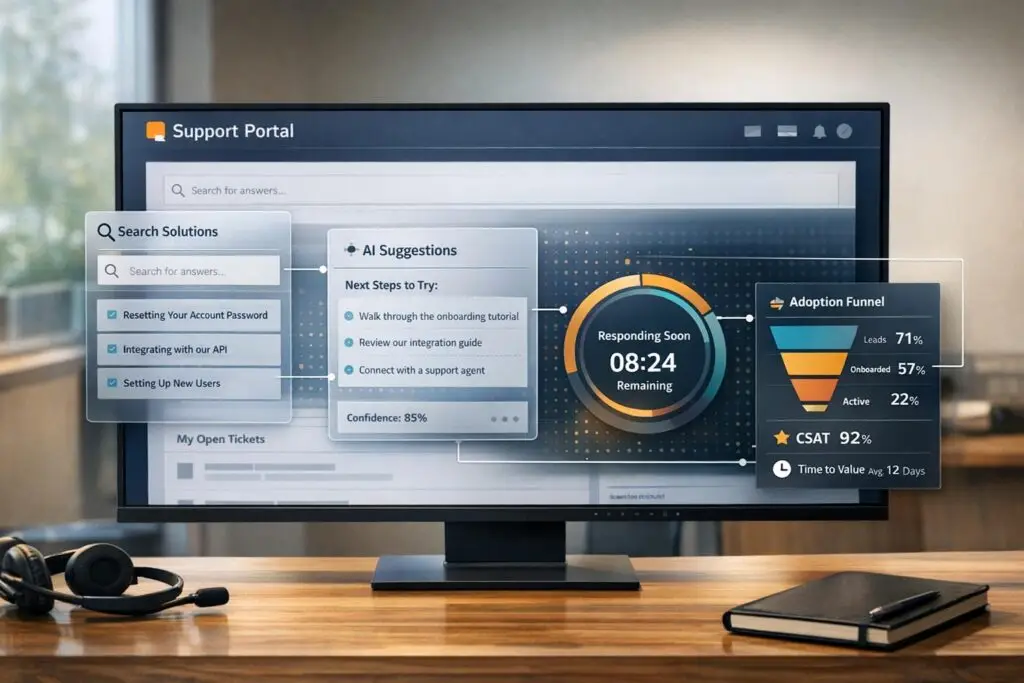
Building an adoption help workflow is all about ensuring customers understand and use your product effectively. This reduces frustration, improves retention, and minimizes support tickets. The process involves:
- Analyzing pain points: Use support data and team feedback to identify where customers struggle most.
- Designing a structured workflow: Break it into phases like onboarding, feature use, and advanced tasks, with clear milestones and tasks.
- Adding self-service tools: Provide resources like guides and automated solutions at critical moments.
- Leveraging AI: Use AI for personalized guidance, triage, and spotting risks early.
- Setting smart notifications and SLA management: Ensure timely, relevant communication and prioritize critical cases.
- Training teams and improving documentation: Train support teams thoroughly and keep resources up-to-date.
- Measuring results: Track metrics like ticket deflection and time to first value to refine the workflow continuously.
This approach ensures customers achieve success with minimal friction, while support teams work more efficiently.
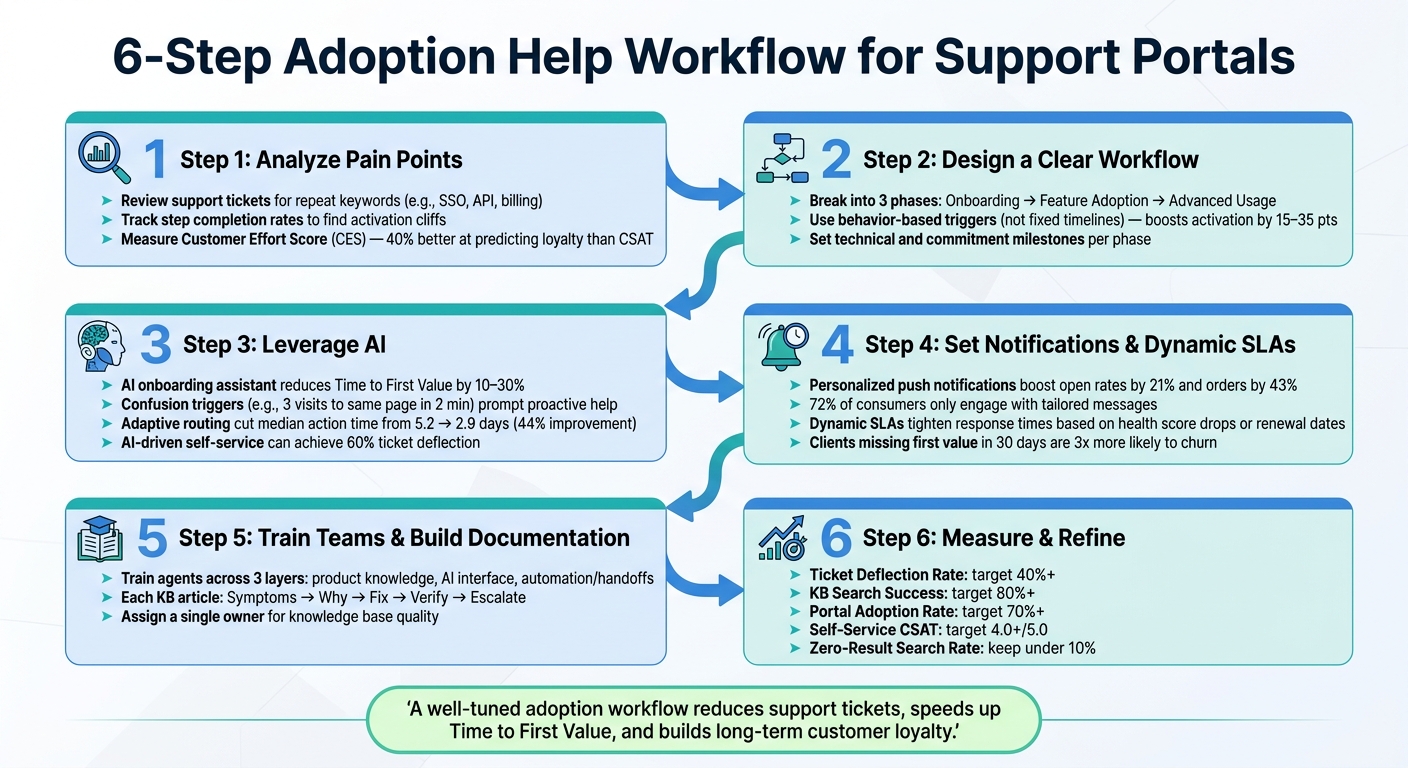
6-Step Adoption Help Workflow for Support Portals
Scalable Adoption Strategies to BOOST Customer Success in 2025
sbb-itb-e60d259
Step 1: Analyze Current Adoption Processes and Find Pain Points
To improve your adoption process, start by identifying where things often go wrong. This involves reviewing support data and gathering insights from frontline teams.
Review Support Data to Spot Trends
Your support tickets are a goldmine of information. Look for repeated keywords in early-stage tickets – terms like "integration", "SSO", "billing", or "API setup." These recurring themes often highlight areas where users face the most friction.
Another key indicator? The length of ticket threads. If resolving an issue takes multiple back-and-forth messages, it could mean customers aren’t providing enough context – or your team lacks the information needed to address the problem efficiently. As Apptension notes:
"If a human agent needs three messages to get enough context, your bot will fail too unless you fix context collection first." [1]
In addition to ticket content, monitor step completion rates during onboarding. For example, if many users drop off after account setup but before their first integration, you’ve likely hit an "activation cliff" that needs attention. Combine this with search data from your knowledge base – if users are searching for answers but not finding them, you might have gaps in your self-service resources.
| Signal | What It Indicates | Metric to Track |
|---|---|---|
| Repeat Keywords | Common friction points | Ticket volume by topic (e.g., SSO, APIs) |
| Long Back-and-Forth | Lack of context or unclear instructions | Messages per ticket |
| Activation Cliff | Drop-off at specific steps | Step completion rate |
| Stale KB Pages | Outdated or unhelpful documentation | Last review date vs. recent UI changes |
Once you’ve identified these patterns, validate your findings by gathering input directly from your teams and customers.
Gather Input from Teams and Customers
While data highlights the symptoms, your frontline teams can help uncover the root causes. Support agents and customer success managers interact with these issues daily and often know where customers struggle – even if it hasn’t been formally documented.
Use structured interviews with the "three whys" technique: ask "why" at least three times when a pain point arises to dig deeper into its root cause [4]. Pair this with direct customer feedback through short post-onboarding surveys or targeted NPS check-ins, ideally within the first 30 days. Consider measuring Customer Effort Score (CES), which is 40% better at predicting customer loyalty than CSAT scores [5]. This can give you a clearer picture of where your workflows need improvement.
The goal here isn’t to fix everything at once. Instead, focus on identifying the two or three biggest pain points that are causing the most trouble. These insights will guide the design of your improved, AI-powered workflow.
Step 2: Design a Clear and Actionable Workflow
Turn your insights into a structured workflow that leaves no room for confusion. This step is all about creating a roadmap that guides both your teams and customers seamlessly. A well-designed workflow lays the groundwork for adding actionable triggers and automation in later stages.
Break the Workflow into Phases
Divide the workflow into clear phases that directly address the challenges uncovered during your data review and team feedback. Typically, adoption workflows consist of three main phases: onboarding, feature adoption, and advanced usage. The key to an effective workflow lies in how you guide users from one phase to the next. Instead of relying on a fixed timeline, let user behavior determine these transitions.
Why does this matter? Jimo explains it best: [2]
"A user who clicks through a five-step checklist without performing the core workflow has navigated your UI, not adopted your product."
Shifting from static timelines to behavior-based triggers can boost activation rates by 15 to 35 percentage points [2]. That’s a big improvement from making this one adjustment.
Once you’ve outlined the phases, assign specific tasks to ensure progress.
Assign Tasks and Milestones to Each Phase
For each phase, set clear and measurable milestones. These milestones should revolve around Success Events – key in-product actions that are strong indicators of long-term retention. For example, instead of tracking "completed onboarding tour", focus on milestones like "first integration connected" or "first automated workflow triggered."
A helpful way to structure this is by using an achievement level model, such as Level 1 through Level 3. Each level should have a straightforward checklist of tasks. As Nathan Curtis, Founder of EightShapes, puts it: [6]
"A model should progress from simple to complex, from most to least important so that teams can achieve levels with an unambiguous checklist."
Track two types of milestones: technical milestones (e.g., connecting an API, completing a configuration step) and commitment milestones (e.g., adding tasks to a team’s backlog). If a milestone becomes outdated – like when an integration version is no longer current – adjust the user’s level and prompt corrective action. This keeps your workflow dynamic and prevents it from becoming just another static checklist.
Add Self-Service Resources to the Workflow
Self-service resources are most effective when they’re delivered at the exact moment users need them. Place these resources where users are likely to feel stuck or make repeated navigation attempts [2].
For your knowledge base, stick to a consistent format for every article: what the user sees (symptoms), why it’s happening (root cause), how to fix it (steps), and how to confirm it worked (verification). This "one problem per page" approach not only helps users but also makes AI-driven retrieval more accurate [1]. Pair these written guides with automated self-service flows for high-volume issues like re-sending invite emails, validating integration credentials, or rotating API keys. Teams using AI-driven support in this way have reported up to a 60% increase in ticket deflection [3].
Lastly, every self-service resource should include a clear escalation path. If users can’t resolve their issue, ensure the handoff to a support agent includes all the context of their prior attempts. This way, your team can pick up right where the user left off, saving time and reducing frustration.
Step 3: Use AI to Strengthen the Workflow
Once your workflow structure is in place, AI can transform it from a static process into one that actively responds to customer behavior. Instead of waiting for users to encounter a problem and submit a ticket, AI can identify potential issues early and step in to prevent frustration.
Use AI to Guide Customers Early
An AI-powered onboarding assistant can monitor real-time product signals and suggest the next best action based on where the user is in their journey. For example, if a user hasn’t connected an integration or started their first automated workflow, the AI can provide a targeted prompt instead of a generic tip [1].
For this to work effectively, collecting context is essential. Without it, both agents and AI bots struggle to provide meaningful help [1]. Gathering details like workspace ID, user role, and defined goals ensures that guidance is relevant. This approach can reduce the time it takes users to achieve their first value by 10%–30% [1].
Automate Triage, Routing, and Content Suggestions
Once early guidance is in place, AI can take on triage and content delivery to create a smoother support experience. AI-powered triage and ticket routing work best when using behavioral signals instead of relying only on ticket categories. For instance, setting up confusion triggers – like a user revisiting the same settings page three times in two minutes – can prompt targeted help before frustration sets in [7]. A B2B SaaS analytics company showed how adaptive routing based on user role and first-click behavior reduced the median time to complete a key action from 5.2 days to 2.9 days (a 44% improvement), increased the 7-day activation rate by 18 percentage points, and cut onboarding-related support tickets by 28% [7].
On the content side, AI can suggest articles and guides tailored to the user’s current step. Tools like Supportbench’s AI Agent-Copilot help by searching internal and external knowledge bases to find relevant answers and even draft responses. This reduces the time agents spend searching for context. If the AI isn’t confident in its response, it should clearly communicate this and seamlessly transfer the session to a human agent, complete with a full transcript [1].
With triage and content suggestions handled by AI, predictive analytics can shift your team’s focus from fixing problems to proactively engaging customers.
Apply Predictive Analytics to Spot Adoption Risks
AI can also help your team identify and address potential risks before they lead to disengagement. Instead of reacting to churn after the fact, predictive analytics can flag users who are likely to drop off by monitoring key points in the activation funnel [1].
Features like Supportbench’s AI Predictive CSAT and CES take this even further by identifying cases where customers might be dissatisfied – even before they submit a survey. Paired with customer health scoring, these tools give your team real-time insights into which accounts need attention and why. As BCG notes:
"AI supports risk-based decision making that’s built on the right tradeoffs between risk and business benefit." [8]
It’s worth noting that predictive alerts are only as good as the data they rely on. Clean, consistent data collection across all systems is a must before implementing predictive tools [8].
Step 4: Set Up Notifications and Dynamic SLAs for Better Engagement
Leverage AI’s predictive capabilities to address adoption risks by configuring targeted notifications and flexible SLAs. This ensures timely, relevant communication with the right audience.
Personalize Notifications to Keep Customers on Track
Generic reminders often fall flat, while tailored notifications inspire action. Instead of sending a vague "Don’t forget to finish setup!" message, use a rules engine to monitor key signals – like login activity, feature usage, or health score changes – and trigger messages only when specific thresholds are met [10].
For example, a 2025 study of a Paris-based online grocer found that personalized push notifications boosted open rates by 21% and increased total orders by 43% [9]. To replicate this success:
- Use deep links to guide users directly to the specific task or setup step.
- Space out messages to avoid overwhelming users.
- Keep an eye on opt-out rates to identify notification fatigue.
Personalization matters. A striking 72% of consumers engage only with messages tailored to their interests [9]. This makes personalized outreach not just effective but essential.
While targeted notifications help maintain proactive engagement, dynamic SLAs ensure that critical cases receive the attention they deserve.
Use Dynamic SLAs to Prioritize High-Impact Cases
Not all customer issues carry the same urgency. For example, stalled onboarding, unaddressed feature adoption, or pending renewals often signal higher-risk situations. Dynamic SLAs let you adjust response priorities based on real-time account activity.
Take Supportbench as an example. Their dynamic SLA system automatically tightens response times when specific triggers – like a drop in health scores or an approaching renewal date – are detected. These SLAs can also notify account managers, ensuring key stakeholders are involved before issues escalate [11].
| Alert Type | Trigger Condition | Response Protocol |
|---|---|---|
| High-Value Risk | Enterprise account sentiment < -40 | CSM review within 2 hours; reach out within 24 hours |
| Onboarding Stall | Milestone overdue by >24 hours | Automated nudge to client; internal alert to manager |
| Critical Product Gap | Multiple customers reporting the issue | Immediate escalation to Product/Engineering |
One critical insight? Clients who fail to hit their first value milestone within 30 days are three times more likely to churn within the first year [11]. Dynamic SLAs allow teams to intervene quickly, helping at-risk accounts before they reach the point of no return.
Step 5: Train Teams and Build Clear Documentation
Dynamic SLAs and smart notifications only work as intended when agents are well-trained and fully understand the tools and processes they’ll be using.
Train Agents on Workflow Steps and AI Tools
Once your AI systems are in place, the next step is to ensure your team has the skills to use them effectively. A structured training approach works best, dividing agent knowledge into three layers:
- Understanding the product and its governing policies
- Learning how to interact with customers using the AI chat interface
- Mastering how automations and human handoffs function in real-world scenarios
Skipping any of these layers can lead to challenges. For example, agents who don’t fully grasp the middle layer often struggle with knowing when the AI should admit uncertainty instead of guessing.
Training and building a knowledge base are key to making your AI-powered support workflow run smoothly. As Apptension explains:
"The fastest way to lose trust is a bot that sounds sure and is wrong. The fastest way to earn trust is a bot that is honest about uncertainty and hands off cleanly." [1]
Agents should also adopt a proactive mindset that aligns with your AI-enhanced processes. Instead of waiting for tickets to pile up, they should monitor in-product behavior signals – like stalled onboarding flows or repeated failed actions. Ami Heitner from Worknet.ai sums it up well:
"The team that understands the onboarding problem is the team that configures the solution – directly and immediately." [12]
This approach empowers customer service and support teams to design onboarding triggers and intervention logic in straightforward terms, without relying on engineering. When teams take ownership of configurations, proactive support systems can be implemented in days, not months [12].
Build Accessible Documentation for Teams and Customers
Documentation should be easy to locate and even easier to use. Each article should tackle a single friction point, following a clear and consistent structure:
- Symptoms: What the user experiences (specific UI labels, error messages, etc.)
- Why it happens: Common root causes explained in simple terms
- Fix: Step-by-step instructions for resolving the issue
- Verify: Criteria to confirm the solution worked
- Escalate: What information to include if the issue persists [1]
This format helps both customers looking for answers and AI systems retrieving accurate content quickly.
Two habits can greatly improve the effectiveness of your knowledge base over time:
- Add a "last reviewed" date to every article. Tie updates to your product release schedule, so any changes to the UI automatically trigger a review of related articles [1].
- Assign a single owner for knowledge base quality. Without someone responsible, your documentation can become outdated, forcing agents to rely on incomplete or incorrect information.
| KB Component | What It Covers |
|---|---|
| Symptoms | Specific UI labels and error messages users encounter |
| Why it happens | 2–3 common root causes with technical insights |
| Fix | Detailed, numbered steps with expected results |
| Verify | Clear criteria to confirm the issue is resolved |
| Escalate | Key data to include when escalating to human support |
Finally, make sure that handoffs between AI and human agents capture all the vital user context. When done right, this documentation not only supports agent training but also enhances the self-service experience for customers.
Step 6: Measure Results and Refine the Workflow Over Time
To keep an AI-driven support system running smoothly, measurement and feedback are non-negotiable. Without them, you’re essentially flying blind, which can lead to delays and expensive corrections. The key lies in defining clear metrics and using them to guide continuous improvement.
Define and Track Key Adoption Metrics
When measuring adoption, go beyond surface-level metrics like logins. Instead, focus on more meaningful markers. For example, you might define "active" as all incoming emails routed through the helpdesk by day 7 or managing at least 20 tickets within the first 30 days [13]. These detailed thresholds give you actionable insights.
Here are some key metrics to monitor, along with their benchmarks and why they matter:
| Metric | Target Benchmark | Why It Matters |
|---|---|---|
| Ticket Deflection Rate | 40%+ | Indicates if self-service tools are reducing the workload on agents |
| Knowledge Base Search Success | 80%+ | Shows how effectively customers find answers |
| Portal Adoption Rate | 70%+ | Confirms whether customers are using the system as intended |
| Self-Service CSAT | 4.0+ / 5.0 | Reflects the quality of the automated support experience |
| Zero-Result Search Rate | Under 10% | Highlights missing or incomplete documentation |
Metrics like these allow you to make data-driven decisions. One standout metric to watch is Time to First Value (TTFV) – the time it takes for a customer to achieve their first meaningful outcome after signing up. AI-powered onboarding can cut TTFV by 10% to 30%, especially for complex setups [1]. Faster TTFV directly influences whether customers stay engaged long enough to see the product’s benefits.
"If you cannot measure it, you cannot improve it." – Apptension [1]
With these benchmarks in place, the next step is to use feedback to fine-tune your workflow.
Use Feedback to Improve the Workflow
Once you’ve established your metrics, feedback becomes your tool for ongoing improvement. For instance, reviewing zero-result searches can help you identify gaps in your content – missing information that customers are actively looking for [14]. By addressing these gaps with targeted updates, you can reduce ticket volumes over time.
Your support team is another valuable source of feedback. Agents are often the first to notice when documentation becomes outdated or irrelevant. A quick monthly check-in to review recurring ticket topics – like "API keys" or "integration issues" – can reveal weak points in the workflow or even signal the need for a product update [1]. If a specific automation is repeatedly triggered for the same issue, it might indicate a deeper problem that needs to be addressed at the product level rather than with another help article.
For AI-driven workflows, keep an eye on metrics like wrong answer reports per 1,000 chats. This will show you where the AI is falling short and where your knowledge base might need additional content [1]. Pair this with reopen rates on bot-to-human handoffs to get a clearer picture of where the system is working and where it’s not.
Conclusion: Building an Adoption Workflow That Drives Customer Success
Creating a robust adoption workflow requires a blend of thoughtful analysis, strategic design, AI integration, and consistent feedback. The steps outlined in this guide – identifying pain points, structuring clear phases, incorporating AI, setting up notifications and SLAs, training teams, and tracking meaningful metrics – work together as a unified system. This combination forms the backbone of ongoing customer success.
A strong workflow is built on three essential layers: a solid knowledge base, conversational AI with well-defined guardrails, and automated task management. By leveraging real product signals – like whether a user completes a critical step, connects an integration, or gets stuck on a specific screen – a finely tuned AI onboarding assistant can dramatically cut down Time to First Value. This, in turn, plays a major role in keeping customers engaged during those crucial first 30 days. As Apptension aptly notes:
"A good assistant is not the one that answers everything. It is the one that gets the user to a correct outcome with the least drama." [1]
This idea extends beyond AI to the entire workflow.
To keep the system effective, continuous improvement is key. Behavioral triggers and regular reviews of automation frequency help ensure the workflow stays aligned with your evolving product. If the same automation keeps firing due to a recurring issue, it’s a clear sign to address the root problem within the product rather than simply adding more support content [1].
When done right, this kind of workflow doesn’t just reduce support tickets – it speeds up customer value and builds the trust needed for long-term loyalty.
FAQs
What are the first product signals I should track to identify adoption friction?
When it comes to spotting adoption friction, certain key product signals can provide valuable insights. These metrics help you understand where users might be struggling and how to refine their experience.
Start by focusing on KPIs tied to onboarding success, such as:
- Ticket deflection: A lower number of support tickets often indicates users are finding answers independently.
- Time-to-value: This measures how quickly users experience the benefits of your product.
- Customer satisfaction: Feedback from users can highlight whether the onboarding process meets their expectations.
Beyond these, keep an eye on task completion rates, search success, and user feedback. Together, these metrics can point to areas where users might be hitting roadblocks.
Another important area is early engagement. Metrics like feature usage frequency, navigation patterns, and drop-off points can reveal where users encounter challenges. Identifying these friction points allows support teams to step in proactively, addressing issues before they escalate and improving the overall adoption experience.
How do I choose the right “first value” milestone for my portal workflow?
To choose the best "first value" milestone, aim for a moment that offers immediate, measurable benefits to users. This milestone should encourage early engagement by focusing on simple, essential tasks – like completing setup steps or solving common user challenges – that directly align with their main goals. Incorporate AI-driven tools to streamline these tasks, making it easier for users to achieve quick wins. This early success will inspire them to explore your portal further.
What data and context does AI need to route and answer adoption issues accurately?
AI thrives on detailed contextual data to tackle adoption challenges effectively. This means it needs a deep understanding of the situation, specific requirements unique to the enterprise, and real-time insights into how users are interacting with it. These factors enable AI to route queries accurately and deliver relevant answers, creating a more tailored and efficient support experience for users.






