


Policy changes can upset customers if not communicated well. Whether it’s pricing, usage limits, or terms of service, the key to success lies in how you deliver the message. A clear, structured communication plan can reduce churn, build trust, and even strengthen customer relationships. Here’s how to do it:
- Understand the Change: Document what’s changing, why, and who it impacts. Segment customers based on factors like usage and account value.
- Set Clear Goals: Focus on reducing churn and building trust. Ensure messaging answers three questions: Why is this happening? What’s changing? How will you help?
- Choose Channels Wisely: Use email, in-app notifications, or personal outreach depending on the audience. Layer multiple channels for better reach.
- Create a Timeline: Notify customers early – 30–45 days for major changes. Use reminders to reinforce the message.
- Leverage AI Tools: Personalize messages, monitor sentiment, and automate support processes to handle customer concerns efficiently.
Key takeaway: Customers are less likely to leave when they feel informed and supported. A well-executed plan ensures clarity, minimizes confusion, and keeps trust intact.
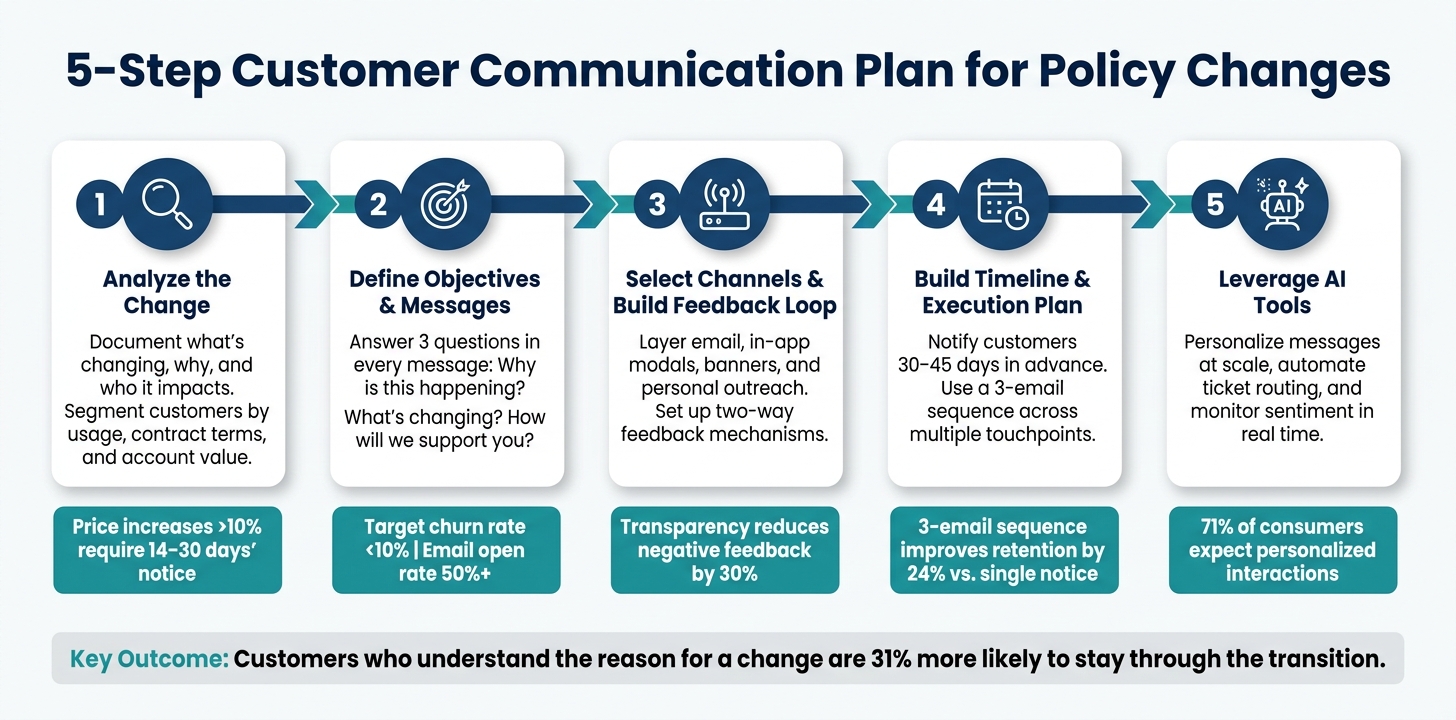
5-Step Customer Communication Plan for Policy Changes
How To Communicate Change To Customers
sbb-itb-e60d259
Step 1: Analyze the Policy Change and Its Customer Impact
Before crafting any message for customers, it’s essential to fully understand the policy change. Skipping this step can result in vague communication that leaves customers with more questions than answers.
Breaking Down the Policy Change
Start by clearly documenting the details: what is changing (pricing, terms, limits), by how much, when, and why. The scope of the change will shape your communication strategy. For instance:
- Price increases under 10% typically require 7–14 days’ notice, with messaging focused on the value customers continue to receive.
- Price increases above 10% demand 14–30 days’ notice, along with a more detailed explanation. Use concrete examples to show what customers gain in return. [5]
Identify 3–4 key reasons for the change – these will serve as the foundation of your messaging across all channels and ensure consistency in what your team communicates to customers.
"When tariffs force changes to your pricing, product availability, or delivery timelines, how you communicate with customers can mean the difference between loyalty and abandonment." – Anthony Sardain, Founder, Cavela [5]
Next, pinpoint which customer groups will feel the impact most strongly.
Identifying Affected Customer Segments
Divide your customer base into segments based on usage, contract terms, and account value. This segmentation helps determine who needs the most attention and what type of outreach will work best.
A helpful approach is to align your analysis with the cost drivers behind the change. For example, if you’re adjusting API pricing, focus on high-volume users who will see the biggest impact on their bills. Google Cloud applied this kind of segmented approach during its infrastructure pricing updates in 2022 and 2023. Changes were introduced to new products first, while existing customers were given until April to adjust. [1]
Here’s a simple segmentation framework to guide your outreach:
| Segment | Impact Level | Outreach |
|---|---|---|
| High-value strategic accounts | High | Personalized executive outreach; consider phased rollouts or grandfathering [6] |
| Mid-tier accounts | Moderate | Emails from dedicated account managers; offer extended timelines [6] |
| Standard/mass market | Low to moderate | Automated emails with clear FAQ links [6] |
| Legacy or grandfathered plans | High (perceived) | Direct emails with side-by-side comparisons of old vs. new value [1] |
Mapping Out Customer Concerns
Once you’ve identified who is affected, put yourself in the shoes of your most concerned customer. Anticipate their questions: Why wasn’t there more notice? Can I stay on my current plan? What if I can’t afford this? Preparing answers to these "hardball" questions in advance will help your support team respond consistently, reducing support escalations.
A good example of what happens when this step is skipped is Wendy’s 2024 "dynamic pricing" rollout. The company failed to address a predictable concern – that prices would only increase under the new system. They didn’t clarify upfront that prices could also drop during off-peak hours, leading to immediate backlash and a public correction. [1] A simple exercise to map customer concerns beforehand could have prevented this issue. Reviewing past customer support tickets is another effective way to identify recurring questions and areas of confusion.
This thorough analysis lays the groundwork for creating clear, targeted communication in Step 2.
Step 2: Define Objectives, Key Messages, and Success Metrics
Once you’ve identified who is impacted, the next step is deciding what you want to achieve and how you’ll communicate with each group.
Setting Clear Objectives
Every effective communication plan starts with a focused set of goals. These might include reducing churn, maintaining customer trust, or ensuring customers fully understand the changes. Without clear objectives, your messaging risks becoming unfocused and ineffective.
Here’s a useful reference point: aim for a churn rate below 10% during the transition phase and an email open rate of 50% or higher for policy change announcements [8]. These benchmarks aren’t random – they provide a tangible way to measure success and adjust your approach if needed.
Crafting Core and Audience-Specific Messages
To keep your communication clear and consistent, every message – no matter the channel or audience – should address three key questions: Why is this change happening? What exactly is changing for the customer? How will we support them through it? [2]. This approach prevents vague messaging, which can lead to confusion and an influx of support tickets.
Focus on the benefits customers will gain rather than just listing the changes. Stripe provides a great example of this when they framed a price increase by highlighting the value they’d already delivered:
"Over the past five years, we’ve added over 135 features to our core payments platform while keeping our pricing the same. This update will help us deliver even more value to your business in the years ahead." – Stripe [7]
This type of messaging works because it’s transparent and specific. It doesn’t downplay the change but places it in a broader context of value. Compare this to Netflix’s 2011 price hike, where the lack of upfront reasoning resulted in 800,000 lost subscribers. Even Netflix CEO Reed Hastings later admitted, "I messed up. I owe you an explanation" [1].
Tailor your delivery method to fit the audience. For enterprise clients, a personal call from an account executive might be appropriate. Mid-market customers may respond better to a personalized email sequence, while SMBs can be reached effectively through automated campaigns paired with a detailed FAQ page [6][7]. The core message remains consistent, but the tone and format should match the relationship.
Choosing Success Metrics
Tracking the right metrics ensures you can identify issues early and make adjustments before they escalate – especially in AI-driven support systems where real-time data is critical. Focus on these four categories:
| Metric Category | What to Track | Target |
|---|---|---|
| Engagement | Open and click-through rates | Open rate 50%+ [8] |
| Response | Reply and feedback rates | 10–20% response rate [8] |
| Sentiment | Negative feedback, CSAT, CES, and NPS | Negative responses under 15% [8] |
| Adoption | Upgrade rate, plan changes, churn | Churn under 10%; upgrades 5–10% [8] |
Support ticket volume is another critical indicator. If you notice a surge of questions about the same issue, it might mean your message wasn’t clear enough or didn’t reach a specific audience. Use this feedback to refine your communication strategy.
This structure sets the stage for selecting effective communication channels and building a feedback loop in the next step.
Step 3: Select Channels and Build a Feedback Loop
Once your objectives and key messages are in place, it’s time to decide how and where to share them – and more importantly, how to listen to what your audience has to say in return.
Choosing the Right Communication Channels
The choice of communication channel should align with the customer’s relationship with your business and the urgency of the message.
- Email works well for formal updates like billing notices.
- In-app modals are ideal for actions that require immediate attention, such as accepting new terms.
- In-app banners can be used for less urgent updates, like creating awareness during a gradual rollout [2][9].
Rather than relying on a single channel, layer multiple methods to ensure your message reaches its target.
Tailor your approach further by segmenting your audience and assigning primary and secondary outreach channels:
| Segment | Primary Channel | Secondary Channel |
|---|---|---|
| Enterprise | Account manager call | Personalized email |
| Mid-Market | Personalized email | Check-in call |
| SMB | Email campaign | In-app notification |
| High-Risk | Email + SMS | Push notification |
For particularly sensitive changes, consider hosting a live Q&A session or office hours. This real-time interaction can ease concerns, reduce churn, and demonstrate accountability [2].
Determine the Appropriate Sender
Who delivers the message can be just as important as the message itself. For enterprise clients, a personal touch from an account manager is often more effective than an automated email. This approach fosters trust and allows for direct conversations about concerns or adjustments [6][7].
For larger audiences, use a recognizable sender name instead of a "no-reply" address. When the change impacts your entire customer base, having a senior leader or executive sign the communication adds weight and credibility. Research shows that companies providing clear explanations for changes retained 31% more customers than those that didn’t, and a three-email sequence outperformed a single notification by 24% in retention rates [6].
Pairing the right sender with a strong feedback process ensures your communication strategy stays responsive and customer-focused.
Setting Up a Two-Way Feedback Mechanism
Sending out the announcement is just the beginning. To truly connect with your audience, you need to create opportunities for feedback and act on it.
Immediately after the announcement, establish dedicated support channels for policy-related inquiries. Equip your front-line teams with FAQs and empower them to make decisions, such as offering concessions to customers at risk of leaving [7]. Pay close attention to support ticket trends in the first 48–72 hours – a surge in similar questions often indicates unclear messaging.
"View the announcement as the start of a conversation – follow up promptly, learn from customer feedback, and adjust as needed." – Alex Mercer, Senior Editor, Buffer.live [2]
Beyond tracking ticket volume, monitor metrics like NPS and sentiment trends in the days following the announcement. Transparent communication can reduce negative feedback by 30% [7], but this only works if customers feel their voices are heard. To close the loop, follow up with an update that acknowledges customer feedback and outlines any adjustments made in response [2][9].
With your communication channels and feedback system ready, the next step is to map out your timeline and execution plan.
Step 4: Build a Timeline and Execution Plan
Now that you’ve established your channels and feedback systems, the next step is to organize everything into a clear sequence. A well-planned timeline ensures your internal teams stay on the same page and helps customers feel informed, not surprised, by upcoming changes.
Creating an Editorial Calendar
An editorial calendar is your roadmap for every message, milestone, and communication channel from start to finish. It ensures a smooth rollout by aligning all team members and customer touchpoints with your communication strategy.
Here’s an example of what a practical calendar might look like:
| Phase | Timing | Activity | Channel |
|---|---|---|---|
| Pre-Launch | D-60 | Primary notice | Email (billing/finance contact) |
| Education | D-21 | Reminder + options | Email + in-app modal |
| Urgency | D-7 | Final reminder | Email + in-app banner |
| Execution | D-0 | Call-to-action message | Email (receipt tone) + push |
| Retention | D+7 | Optimization check-in | CSM/AM outreach |
To maximize effectiveness, schedule global emails to arrive during local business hours. Timezone-aware delivery improves open rates and helps reduce negative reactions.
Aligning Communication with Rollout Milestones
Your external communication should match what’s happening internally. If your billing systems aren’t ready or your support teams aren’t fully briefed, even the clearest email could lead to customer frustration.
Before sending any customer-facing messages, make sure everything is in place:
- Legal approvals are finalized.
- Support scripts are ready.
- Billing systems, including proration logic, webhooks, and plan transitions, have been thoroughly tested [4][2].
Additionally, account managers and support staff should be fully trained on the differences between the old and new structures so they can provide consistent answers from the start. For customers on annual plans, give 45–60 days of notice to account for their longer renewal cycles [4]. This extra time helps prevent customers from feeling caught off guard [10].
Once your internal teams are fully prepared, delivering consistent and effective external messaging becomes much easier.
Using Repetition to Reinforce Key Messages
One announcement is never enough.
"One email isn’t a rollout." – Prospeo Team [10]
Data supports this: a three-email sequence improves customer retention by 24% during pricing changes compared to a single notification [6]. Tailor the number of touchpoints to the size of the change: smaller adjustments (5–10%) may need 2–3 messages, while larger changes (30% or more) might require 5–7 touchpoints [10].
Each communication isn’t just a reminder – it’s a chance to emphasize the reasons behind the change. Customers who understand the rationale are 31% more likely to stay through a transition [6]. Spread these messages across multiple channels – email, in-app banners, or personal outreach – to ensure customers see them where they’re most active.
Finally, in the first 72 hours after launch, closely monitor support tickets. The most common customer questions will highlight where your messaging needs to be clarified for future reminders [3].
This structured approach lays the groundwork for using AI tools in the next phase to fine-tune your execution plan.
Step 5: Use AI Tools to Improve Communication and Outcomes
With your timeline in place and feedback channels ready, the next step is to leverage AI to make your communication sharper and more effective.
Using AI for Message Personalization and Sentiment Monitoring
AI can analyze customer data to deliver personalized communication on a large scale. Research highlights that 71% of consumers expect tailored interactions from the companies they engage with, while 67% feel frustrated when their experiences lack personalization[11]. By using AI, you can segment customers based on risk or usage patterns, triggering customized message flows for each group. For instance, a high-usage customer approaching a usage limit would require a different message than a low-usage customer who might not even notice the change.
Sentiment monitoring takes this a step further by providing a deeper understanding of customer reactions. Tools using aspect-based sentiment analysis can pinpoint how customers feel about specific aspects – like pricing, response times, or feature changes – instead of broadly labeling feedback as negative[15]. Real-time sentiment scoring allows support teams to identify and address issues before they escalate. A great example is Delta Airlines, which saw a 20% boost in first-call resolution and a 15% increase in customer satisfaction after implementing AI-driven sentiment detection that helped agents adjust their responses during calls[14].
"AI is revolutionizing customer engagement by enabling personalization at a scale." – Forbes[12]
From here, you can further enhance efficiency by automating workflows and improving case management.
Automating Workflows and Case Summaries with Supportbench
Policy rollouts can face delays when ticket triage is done manually. Supportbench eliminates this bottleneck by automatically routing tickets tagged with terms like "pricing" or "policy" to the appropriate team members as soon as they arrive[16]. Escalation rules are also automated, ensuring that urgent cases are prioritized when SLA thresholds are at risk.
Supportbench’s AI Case Summaries give agents the context they need when customers inquire about policy changes, saving them from digging through lengthy case histories. The platform’s AI Agent-Copilot goes further by pulling insights from previous cases and the internal knowledge base to suggest the best response. If a recurring question about a new pricing tier arises, Supportbench can even generate a knowledge base article automatically, reducing future ticket volume[16].
"The right tool keeps your team focused, your customers satisfied, and your change management processes efficient and effective." – Nooshin Alibhai, Founder and CEO of Supportbench[16]
This level of automation ensures consistency and efficiency, paving the way for ongoing improvements.
Tracking Results and Refining the Plan
Once your personalized messaging and automation are in place, the focus shifts to measuring outcomes and refining your approach. After launching a new policy, use AI-powered tools to measure CSAT and CES and assess customer perceptions in real time. Monitoring sentiment changes during the critical first two weeks allows you to tweak future communications[16]. These AI-driven insights provide a more accurate picture of customer experience than traditional surveys alone.
If a specific message or channel is causing frustration, adjust the tone or timing before the next communication wave. Companies that embrace iterative refinement often achieve 10% higher compound annual growth rates compared to those that don’t[13]. The insights you gather not only help resolve current issues but also build a stronger foundation for future communication strategies during policy changes.
Conclusion: Key Takeaways for Building a Customer Communication Plan
Recap of the Five-Step Framework
Let’s revisit the five-step framework that forms the backbone of effective communication during policy changes. This structured approach ensures clarity and consistency. Here’s a quick breakdown:
- Audit the change: Start by analyzing the impact and identifying exactly which customer segments will be affected. This ensures your messaging is targeted and relevant.
- Define your objectives: Craft messages that address three critical questions: Why is this happening? What does it mean for the customer? How will you support them through the transition?
- Select the right channels: Begin with direct communication methods like email or account notifications. Then, expand visibility using in-app banners or social media posts. Always include a feedback loop to capture customer reactions.
- Build a timeline: Allow enough lead time for customers to process the change. For example, giving 30–45 days’ notice before a pricing adjustment can reduce cancellation rates by as much as 50% [7].
- Leverage AI tools: Use AI to personalize messages, automate ticket routing, and monitor customer sentiment. This helps you address potential issues early and streamline the process.
Here’s a quick table to summarize the steps:
| Step | Core Action | Key Outcome |
|---|---|---|
| 1 | Analyze impact | Segment affected customers for targeted messaging |
| 2 | Define objectives | Build trust with clear answers to why, what, and how |
| 3 | Select channels | Start with direct methods, then expand reach |
| 4 | Build timeline | Provide 30–45 days’ notice to reduce cancellations |
| 5 | Use AI tools | Personalize communication and resolve issues faster |
These steps serve as a practical guide, helping you navigate customer communications with confidence and precision.
Final Tips for Getting It Right
Here are some additional pointers to help fine-tune your approach:
- Lead with value: Before diving into the details of the change, emphasize its benefits. For instance, Stripe frames updates as investments in future improvements, which helps soften potential backlash [7].
- Be transparent and data-driven: Clear explanations backed by data foster trust. When customers understand the reasoning behind a change, they’re more likely to accept it. In fact, transparency about price increases can result in 30% less negative feedback [7].
- Treat the announcement as a conversation: Think of your initial communication as the start of an ongoing dialogue. AI tools can play a key role here by enabling AI-driven sentiment analysis, automating responses, and refining your messaging strategy based on customer feedback.
- Prepare for the first 72 hours: Ensure your team is ready to handle increased inquiries during this critical period. Respond quickly and adapt your messaging as needed to maintain trust and goodwill.
Companies that prioritize dialogue over one-way announcements are better positioned to maintain strong customer relationships, even during challenging transitions. By iterating on feedback and staying responsive, you’re not just communicating a change – you’re reinforcing your commitment to your customers.
FAQs
How do I decide who needs a call vs. an email?
Deciding whether to make a call or send an email often comes down to how complex or sensitive the policy change is. Go with email for simple updates or minor changes, as long as the message is clear and includes ways for recipients to get help if needed. Opt for a call when dealing with more complicated, sensitive, or impactful changes – like substantial price increases – where a personal touch can ease concerns, clarify details, and help preserve trust.
What notice period is enough to avoid churn?
There’s no single rule for the ideal notice period when rolling out policy changes. But one thing is clear: timing and proactive communication make all the difference. Share updates as early as possible – preferably before customers experience the changes firsthand – and adjust the notice period based on how significant the changes are.
It’s also smart to align announcements with natural renewal periods or when market conditions are more favorable. This approach helps strengthen trust and reduces the risk of losing customers. Remember, clear communication and giving ample time to prepare are crucial for keeping customer confidence intact.
How can AI reduce policy-change support tickets?
AI helps cut down on policy-change support tickets by automating communication and addressing customer questions before they even need to ask. Chatbots, for instance, can instantly and consistently respond to common inquiries, reducing the number of tickets coming through.
On top of that, AI can craft personalized, empathetic messages on a large scale, which helps clear up confusion and ease frustration. This proactive communication not only enhances the customer experience but also lightens the load for support teams, making policy updates much smoother for everyone involved.






