


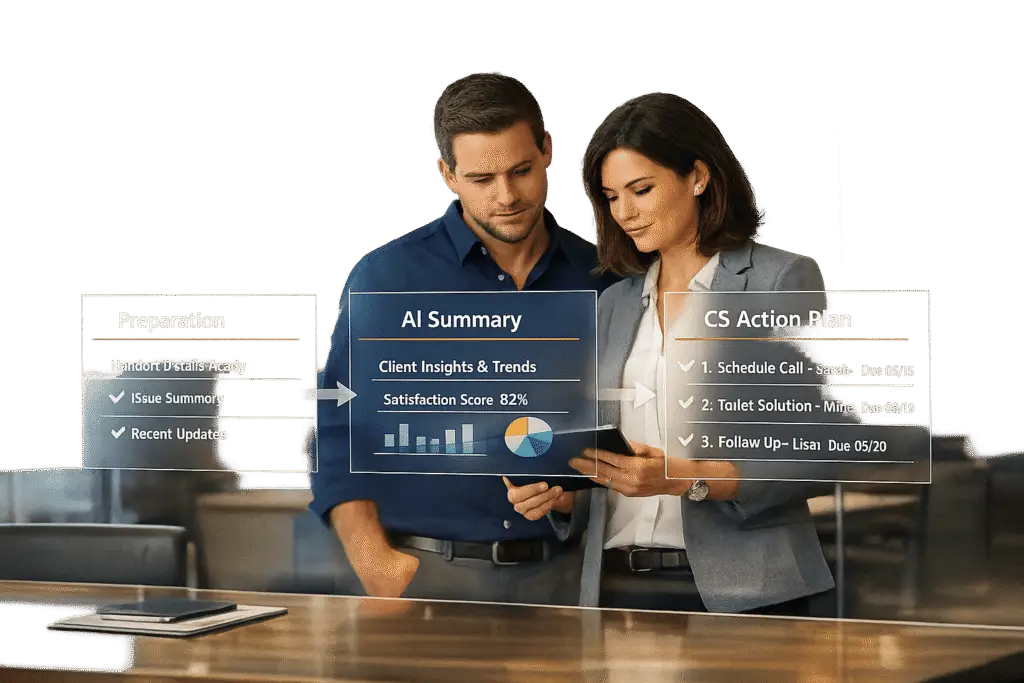
In B2B customer support, mishandled escalations can harm trust, damage team reputation, and even lead to customer churn. The key to successful escalations lies in preparation, clear communication, and leveraging AI for smooth handoffs. Here’s what you need to know:
- Why escalations matter: Poorly managed escalations frustrate customers and cost U.S. companies over $136 billion annually in avoidable churn.
- Support vs. Customer Success: Support resolves immediate issues, while Customer Success focuses on long-term goals like retention and growth. Escalations often bridge these roles.
- Common mistakes: Lack of context, misrouted cases, unclear ownership, and bad timing are frequent pitfalls that erode trust.
- AI’s role: Sentiment analysis, confidence scoring, and structured case summaries ensure seamless handoffs and faster resolutions.
- Best practices: Document all efforts, prepare detailed case briefs, and maintain transparent communication with customers and internal teams.
Managing Customer Escalations Effectively
sbb-itb-e60d259
Preparing the Case: How to Set Up a Successful Escalation
The difference between a smooth escalation and a chaotic one often boils down to preparation. When Customer Success teams receive cases without proper documentation, they may have to start from scratch, forcing customers to repeat themselves. This wastes time, erodes trust, and makes your support team look unorganized. The key is to approach every escalation as a structured, intentional handoff. Below, we’ll explore how AI tools and thorough documentation can help create a solid foundation for successful escalations.
Use AI Sentiment Analysis and Case Summaries
AI sentiment analysis can act as an early warning system, spotting changes in customer tone and flagging language that signals anger, legal threats, or mentions of "chargebacks." It can also identify when conversations are stuck in loops, signaling the need for human intervention, and highlight risks in high-value accounts. These tools allow teams to trigger proactive escalations.
For example, Deliverr (now part of Shopify Logistics) used AI sentiment analysis to prioritize resources and cut response times by over 90%. This not only improved CSAT scores but also strengthened collaboration between product and support teams [6]. Ameya Deshmukh from EverWorker sums it up well:
Escalation should not be a "dump into Tier 2." It should be a handoff with intent – reducing handle time and increasing first-contact resolution for escalated cases. [5]
Document All Support Efforts and Customer Impact
A successful escalation brief requires more than a problem summary – it needs to outline what’s already been tried, why those steps didn’t work, and how the issue has impacted the customer. This avoids repeating failed troubleshooting and speeds up resolution. At a minimum, include:
- Customer name and contact details
- Account information, subscription plan, and ARR tier
- Region and existing risk flags
- Specific issue type and suspected root cause
- Affected product area
- Any technical artifacts or relevant logs
- Emotional signals from the customer, such as frustration or churn threats [3][5]
Severity and impact should also be clearly defined. For instance, a Priority 1 (Critical) case might require a 15-minute first reply and a 2-hour resolution, with auto-escalation after 30 minutes. A Priority 2 (High) case might allow for a 1-hour first reply and an 8-hour resolution, with auto-escalation after 2 hours [4]. Interestingly, 72% of customers say they’d rather wait longer for a complete solution than receive a rushed but incomplete response [4]. Incomplete documentation can lead to poorly executed escalations that only add to customer frustration.
Create a Complete Case Brief
Once you’ve gathered all the necessary details, compile them into a clear, actionable case brief. This should include a concise summary (1–3 sentences) of the issue, the customer’s desired outcome, recommended next steps, and the appropriate team or department to handle it (e.g., Tier 2, Billing, or Engineering) [5]. Properly prepared briefs reduce routing errors and help avoid delays.
For example, Scandinavian Biolabs used AI-generated tags to consistently identify customer pain points. This allowed them to adjust their product roadmap and address key drivers of dissatisfaction, significantly improving resolution times [6]. Modern tools like Supportbench can also help by generating AI-powered ticket summaries and predictive CSAT scores. These tools analyze case history, customer sentiment, and resolution patterns to create detailed handoff documents automatically.
According to Anders Reckendorff, CEO of Scandinavian Biolabs:
Support tickets are incredibly important for qualitative data, providing what you can almost view as pre-churn information. SentiSum allows us to view this data in an easy-to-understand format… leading to better initiatives and a better experience for our customers. [6]
Finally, set up required fields – such as order IDs, environment details, or reproduction steps – that agents or AI must complete before escalating a case. This simple safeguard ensures that Customer Success teams have everything they need to address the issue effectively on the first attempt [5].
Communicating the Escalation: How to Build Trust Through Transparency
Transparent communication is a critical step in maintaining customer trust during escalations. Even with thorough preparation, unclear or poorly managed communication can erode confidence in your support team. The aim is to clearly explain why the escalation is happening, who will handle it, and what the next steps are. This level of openness helps transition from preparation to execution while keeping customers reassured.
Write Customer-Focused Messages
How you frame an escalation can shape the customer’s perception – either as a sign of attentive care or a breakdown in service. A smooth handoff is key. Introduce the person or team taking over by name, explain why they’re suited to resolve the issue (e.g., "I’m involving our product team to ensure this gets resolved completely"), and share all relevant context with the customer [2]. Be sure to include an estimated wait time and offer alternatives, like callbacks or scheduled calls, especially during busy periods, to avoid frustrating delays [2].
Here’s an example of a clear and reassuring handoff message:
"I’m connecting you with Sarah from our Customer Success team. I’ve shared our conversation so she has full context. She should be with you in about 30 minutes." [2]
This kind of message shows the customer they’re being prioritized. In fact, studies show that 39% of customers value proactive support that anticipates and addresses issues before they escalate [1].
When AI sentiment analysis detects negative sentiment – such as profanity, all caps, or threats to leave – respond with empathetic and solution-focused language:
"I can hear that this is frustrating, and I want to make sure you get the help you need. Would you like me to connect you with a team member who can look into this directly?" [2]
This approach acknowledges the customer’s emotions while presenting the escalation as a constructive step forward. As Front emphasizes:
Escalation should include checkpoints for clear, timely communication so customers stay informed at every stage [1].
Share Internal Notes for Better Team Collaboration
Once the customer is informed, it’s just as important to ensure internal teams are equipped with the right details. Using a centralized platform, share concise, actionable notes that include conversation history, troubleshooting logs, and customer sentiment. This allows the next team member to pick up seamlessly, avoiding the frustration of starting over [5].
When passing information to Customer Success or other teams, provide a brief, plain-language summary (1–3 sentences), a log of attempted solutions, and a clear "Recommended Next Step." This reduces handle time and unnecessary back-and-forth [5]. For instance, instead of vague ticket data, you could write:
"Enterprise customer (ARR: $50,000) experiencing login failures after a recent update. Cache clearing and password reset were attempted without resolution. Recommend involving engineering to check server-side logs."
This level of clarity speeds up resolution and minimizes follow-up questions. As Ameya Deshmukh from EverWorker explains:
The KPI win is not only in deflection. It’s in escalation quality – the speed and accuracy of the human resolution once the baton is passed [5].
For larger issues, such as outages, having an internal status page is invaluable. It ensures all departments – Support, Customer Success, and Sales – are aligned on messaging and timelines before communicating with customers [9]. This avoids conflicting messages and strengthens trust across the board. After all, B2B teams spend an average of 3 hours coordinating for every 1 hour spent resolving issues [1].
Executing a Structured Handoff: Step-by-Step Process
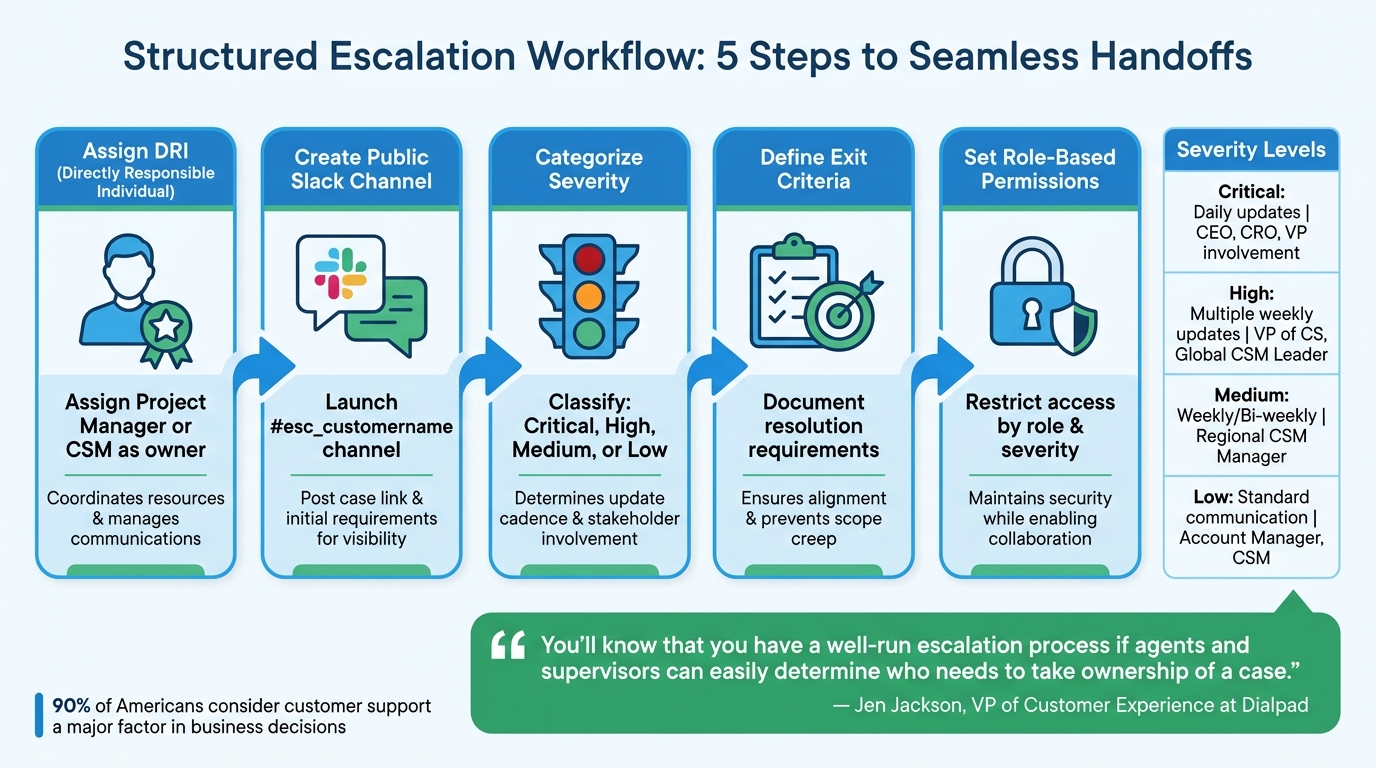
5-Step Customer Success Escalation Workflow Process
When it’s time to execute a handoff, having a structured escalation process in place can make all the difference. A clear workflow ensures smooth transitions, prevents confusion about responsibilities, and keeps everyone on the same page regarding timelines. Without defined steps, escalations can easily stall, leaving teams unsure of who’s driving the resolution forward.
Follow a Step-by-Step Escalation Workflow
Start by assigning a Directly Responsible Individual (DRI). This could be a Project Manager for specific issues or a Customer Success Manager (CSM) or regional leader for broader cases. The DRI’s job is to coordinate resources, manage communications (both internal and external), and ensure the case moves toward resolution. Jen Jackson, VP of Customer Experience at Dialpad, underscores the importance of this role:
"You’ll know that you have a well-run escalation process if agents and supervisors can easily determine who needs to take ownership of a case." [9]
Next, create a public Slack channel (e.g., #esc_customername) to centralize communication. Post an opening message with the escalation case link and initial requirements to give stakeholders immediate context. Public channels work better than private ones because they allow for seamless transitions if the DRI changes, ensuring historical context isn’t lost.
Categorize the escalation by its severity – Critical, High, Medium, or Low. This classification determines how often updates are needed and who should be involved. For instance:
- Critical issues may require daily updates and the involvement of executives like the CEO or VP of Customer Success.
- Medium issues might only need bi-weekly meetings with regional managers.
For high-severity cases, daily standups can help maintain momentum. Automate Slack reminders before these meetings, including links to the case and customer notes, so everyone is prepared.
Clearly define exit criteria to specify what actions are required to resolve the escalation. Document these criteria to ensure alignment between Support and Customer Success teams, avoiding scope creep. This step is crucial, especially since research shows that 90% of Americans consider customer support a major factor in deciding whether to continue doing business with a company [10].
| Severity Level | Impact Description | Communication Cadence | Internal Involvement |
|---|---|---|---|
| Critical | Major impact on deployment; high risk of customer loss. | Daily | CEO, CRO, VP of CS, VP of Sales |
| High | Significant impact on adoption; risk of contraction. | Multiple times per week | VP of CS, Global CSM Leader |
| Medium | Impacts ability to use product; risks renewal. | Weekly to Bi-weekly | Regional CSM Manager |
| Low | Impacts timeline or satisfaction; risks value realization. | Standard Communication | Account Manager, CSM |
Once roles and timelines are set, ensure secure access to data for all parties involved to maintain confidentiality.
Use Role-Based Permissions and Data Security
To protect sensitive information during collaboration, enforce role-based permissions. These permissions limit access to escalation details based on each individual’s role and the severity of the case. For example, critical escalations may only involve the executive team and the DRI, while medium and low-severity cases can include broader teams like Account Managers or Regional CSM Managers.
Modern tools, like Supportbench, make this process easier by offering built-in role-based security features. These tools help restrict access to customer data, case notes, and internal discussions, ensuring that only authorized individuals can view sensitive information. This balance between security and collaboration is essential for resolving cases efficiently while maintaining compliance.
Post-Escalation Involvement: How to Stay Aligned for Resolution
Escalating a case to Customer Success doesn’t mean Support’s role ends. Staying involved after escalation is crucial for maintaining customer trust and ensuring the issue is fully resolved. When support teams step back too soon, customers may feel neglected, and important context can slip through the cracks. In fact, 70% of customers expect different departments within a company to work together on their behalf [12]. By staying engaged, Support helps bridge the gap between the initial handoff and the ultimate resolution.
Collaborate with Customer Success During Resolution
Support agents should remain actively involved, even when a Customer Success Manager (CSM) takes over [11]. This doesn’t mean micromanaging; it’s about being available to provide context, answer technical questions, and participate in updates. Laura Bedoya, Founding Technical Support Manager at Vitally, puts it perfectly:
"My mantra is simple: If it concerns the customers, it concerns Support." [13]
Leverage AI tools to quickly retrieve historical context, ensuring the CSM has accurate information during the resolution process. Advanced platforms can summarize lengthy ticket threads, enabling CSMs to get up to speed in seconds [13]. This approach reinforces Support’s role in driving continuous improvement and accountability.
Once the issue is resolved, schedule a post-escalation debrief with the CS team. This isn’t just about closing the ticket – it’s a chance to align the resolution with the customer’s long-term goals [8]. Companies that align their Customer Success and Support teams report a 36% boost in customer satisfaction and a 20% increase in retention rates [12].
Monitor Case Outcomes with AI Metrics
Effective collaboration doesn’t stop at resolution. Continuously track case performance using AI-driven predictive metrics instead of relying on instincts. Modern support platforms can analyze sentiment to flag high-risk cases – detecting frustration through signals like profanity, ALL CAPS, or terms such as "unacceptable" – and ensure they’re escalated promptly to CS [2].
After escalation, monitor key metrics like CSAT, CES, and NPS (aim for >4.2/5.0) to assess how well the handoff and resolution were handled [2]. AI tools can also track Escalation Resolution rates (target >95%) to evaluate how efficiently cross-functional teams are addressing issues [2]. Falling below this benchmark might signal delays between teams or inappropriate escalations.
AI dashboards can help identify problem areas and track Mean Time to Resolution (MTTR) trends. Teams using AI-powered incident management platforms report an average MTTR reduction of 17.8%, with top-performing implementations achieving reductions of 30% to 70% through advanced automation [14].
Finally, automate post-mortems with AI to quickly draft timelines and identify contributing factors once an escalation is resolved. These automated processes not only save time but also encourage teams to complete post-mortems consistently. When a post-mortem takes just 10 minutes instead of 90, teams are more likely to follow through, creating a learning loop that reduces future escalations [14].
Common Escalation Mistakes to Avoid
Even with structured handoff processes, certain escalation mistakes can disrupt workflows and damage a support team’s credibility. Poorly defined escalation triggers often lead to inconsistent decisions – minor issues might get escalated unnecessarily, while major problems are overlooked entirely [1]. Similarly, confusion over ticket ownership can cause delays, as teams mistakenly defer responsibility, leaving issues unresolved [1][15].
Mistakes to Avoid During Escalation
One of the most common pitfalls is transferring unstructured transcript dumps. These force the next team to sift through raw data, wasting time and frustrating customers. As Twig puts it:
A bad handoff is arguably worse than no AI at all. [16]
Another mistake is the "Silent Drop", where AI provides vague responses like "I hope that helps!" instead of escalating when it’s unable to resolve an issue. This inflates deflection metrics but leaves customers without real solutions [16]. Similarly, "Bot Loops" occur when AI repeatedly asks irrelevant clarifying questions or suggests unhelpful resources, further eroding trust [16].
Automation can also backfire if built on flawed processes. For example, automating workflows with unclear decision logic or disorganized CRM data can amplify existing inefficiencies rather than fix them [15].
Use AI Automation to Prevent Errors
AI can play a crucial role in minimizing these mistakes by automating escalation triggers and improving decision-making. Modern AI systems use risk-based detection to identify subtle warning signs, such as repeated loops, negative sentiment from high-value customers, or risks of SLA breaches [7]. Instead of relying on rigid manual rules, these systems employ confidence gating – automatically escalating cases when confidence scores drop or frustration signals (like mentions of "supervisor" or legal threats) arise [7][16].
To ensure seamless handoffs, configure AI to deliver "ready-to-finish" cases. This means providing structured summaries that include the customer’s goal, completed diagnostics, environment details, and suggested next steps. Such preparation saves time and ensures that escalated cases are handled efficiently [7]. Additionally, AI-driven routing and prioritization can assign cases – like billing disputes or security issues – to the appropriate team with the necessary background information and priority level [7][1].
Implementing progressive fallback workflows can also prevent escalation overload. For example, AI can first attempt to clarify the issue, then guide the customer through steps, schedule a callback if needed, and escalate to a live agent only as a last resort. This layered approach avoids overwhelming human agents while keeping the customer experience intact [7]. Regularly reviewing the top reasons for escalations allows teams to refine AI triggers and improve knowledge bases over time [7].
With 90% of support teams facing challenges in AI-to-human handoffs [16], these automated safeguards are critical for maintaining a smooth customer experience and preserving the team’s credibility.
How to Implement AI-Native Escalation Workflows
Creating an AI-native escalation workflow isn’t about scrapping your current process – it’s about strengthening it. By integrating automation, you can identify issues earlier, route them more effectively, and ensure seamless handoffs. The aim? Shift from reactive escalations (based solely on customer complaints) to proactive ones, triggered by early warning signs. This way, your team can address problems before they chip away at customer confidence.
Build Workflows for Smooth Escalations
To start, establish clear escalation "lanes" that divide issues into three categories:
- Autonomous: AI handles low-risk issues entirely.
- Guardrailed: AI drafts responses for human review before sending.
- Human-first: AI gathers background for complex, high-stakes cases.
This structure keeps routine problems from clogging your system while ensuring critical cases – like security breaches or high-value disputes – get immediate attention with the necessary context. This setup makes it easier to compare traditional manual processes with AI-driven solutions.
Take the example of Rapid7, a cybersecurity company managing over 7,000 support tickets monthly for 11,000+ customers. In 2025, they integrated Mosaic AI into their workflow, adopting an "Ask Mosaic first" protocol. By embedding AI into Slack and other systems, they reduced ticket handling time by 30% and increased agent capacity by 35%, all while maintaining a 95% CSAT score. Their secret? Automating triage and routing with Natural Language Processing (NLP) to analyze intent, urgency, and sentiment. Tickets were then routed to the right specialist or Customer Success Manager based on account tier or issue complexity. This demonstrates how AI-native workflows can deliver measurable improvements.
To prevent escalation bottlenecks, consider using progressive fallback workflows. For example, program the AI to first guide customers through basic troubleshooting. If unresolved after three exchanges, escalate to a live agent. You can also set confidence thresholds – if the AI’s confidence in resolving an issue drops below a certain level, it automatically hands the case off to a human.
Platforms like Supportbench simplify this process with built-in AI automation. Features like auto-tagging based on sentiment, dynamic SLAs (which tighten for high-value accounts or approaching renewals), and automated issue assignment help ensure escalations arrive fully prepped. The AI also generates concise case briefs, sparing customers from repeating themselves and speeding up resolution.
Manual vs. AI-Driven Escalations: A Comparison
To highlight the differences, here’s how manual and AI-native escalation workflows stack up:
| Aspect | Manual Escalation | AI-Native Escalation |
|---|---|---|
| Trigger Speed | Reactive – relies on customer complaints | Proactive – detects early sentiment or risk signals |
| Context Transfer | Incomplete – often requires customers to repeat info | Complete – AI provides case summaries with diagnostics |
| Routing Logic | Based on experience or scattered macros | Data-driven – uses account details for precise routing |
| Customer Effort | High – customers often re-explain issues | Low – agents receive full context upfront |
| Resolution Time | Can take days | Often resolved in minutes |
Ameya Deshmukh from EverWorker AI notes: "Escalation is not a limitation of AI agents – it’s one of their most valuable capabilities when designed well."
Conclusion
Escalating to Customer Success doesn’t have to damage your support team’s reputation. By equipping Customer Success with a detailed case history, thorough documentation of troubleshooting steps, and AI-generated structured case briefs, you create a seamless escalation process. This approach not only safeguards your team’s credibility but also speeds up resolutions and improves accuracy. It sets the stage for a more proactive system, where AI helps detect early warning signs and ensures smooth transitions.
Shifting from reactive to proactive escalations changes everything. AI-powered systems can pick up on subtle signals – like negative sentiment or recurring issues – before they turn into major problems. This allows your team to step in early, armed with all the necessary context. Escalations no longer happen just because a customer complains; they happen at the right time, with the right preparation. As Ameya Deshmukh explains:
The KPI win is not only in deflection. It’s in escalation quality – the speed and accuracy of the human resolution once the baton is passed. [5]
Preparation is only part of the equation – transparency is just as crucial. Sharing internal notes, technical findings, and clear, customer-friendly updates builds trust between teams and prevents customers from having to repeat themselves. With these processes in place, AI’s evolving capabilities promise even greater efficiency in the future.
Structured handoffs, guided by role-based permissions and well-defined escalation paths, ensure that cases are routed to the right people at the right time. By 2029, autonomous AI is projected to handle 80% of common customer service issues and reduce operational costs by 30% [5][7]. But the real advantage isn’t just in deflecting cases – it’s in ensuring escalations are handled with care, precision, and professionalism.
This streamlined, collaborative approach ensures your support team looks prepared, your Customer Success team has the full context they need, and your customers feel valued throughout the process. Every escalation becomes an opportunity to strengthen relationships and improve operations, turning potential weak points into moments that build trust and loyalty.
FAQs
When should Support escalate to Customer Success?
When a case touches on strategic, long-term objectives – like reducing churn, boosting product adoption, or building stronger relationships – it’s time for Support to escalate to Customer Success. These scenarios often require more than reactive problem-solving; they demand proactive engagement and tailored guidance.
For complex issues, especially those with significant or high-stakes outcomes, a seamless handoff is crucial. Make sure to provide the Customer Success team with complete context to avoid frustrating the customer with repeated explanations. This not only saves time but also reinforces trust and confidence in your team’s ability to handle critical challenges effectively.
What should an escalation brief include to avoid rework?
An effective escalation brief covers the essentials: the issue’s history, the customer’s sentiment, the level of urgency, and the potential business impact. Including these details ensures the next team or individual stepping in has everything they need to act quickly and accurately.
Using tools like AI-generated summaries, standardized fields, and a unified timeline can make this process even smoother. These methods ensure all critical information is passed along without gaps, cutting down on repetitive explanations. The result? Faster resolutions, preserved context, and happier customers.
How can AI trigger escalations without creating noise?
AI helps reduce noise during escalations by using smart filtering and automation. It evaluates key signals such as sentiment, risk factors, and patterns to pinpoint critical issues while filtering out less important alerts. Through automated triage, cases are routed with all relevant context, cutting down on false positives. By anticipating potential issues and enabling proactive responses, AI ensures escalations are both timely and effective, preserving the support team’s reputation and minimizing unnecessary interruptions.






