


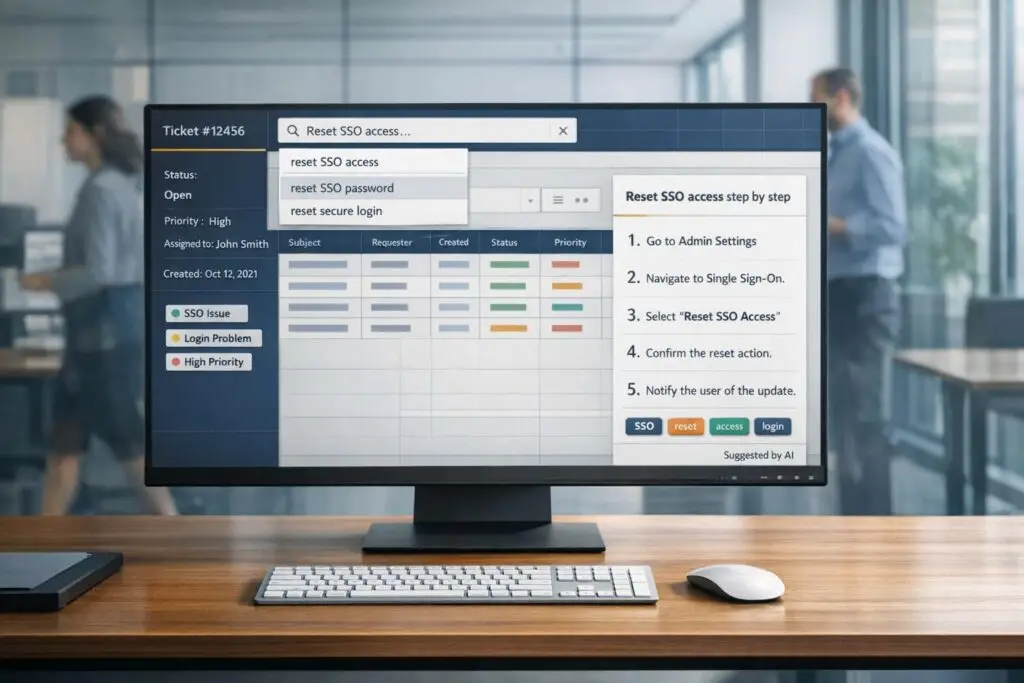
When agents help customers, finding the right solution fast is critical. Poorly structured content wastes time, frustrates agents, and reduces efficiency. Here’s the key: organize your how-to articles so they’re easy to find and use. This improves both agent performance and AI search accuracy.
Key Takeaways:
- Titles matter: Use clear, keyword-rich titles that match how agents search (e.g., "How to reset your password" instead of "User settings").
- Formatting is crucial: Use numbered steps for processes, bullet points for lists, and clear headings for fast scanning.
- Tags and metadata: Align tags with ticket categories and use metadata to improve search precision.
- Consistency helps: Stick to a uniform structure across all articles to make navigation intuitive.
- AI-ready content: Write concise, single-task articles with clear headings to help AI tools retrieve accurate answers.
Why This Matters:
- Well-structured articles improve first-contact resolution rates by up to 80%.
- Agents can locate answers in under 20 seconds, reducing escalations and errors.
- AI tools perform better with organized content, boosting search accuracy from 72% to 94%.
By focusing on clarity, structure, and discoverability, you can turn your knowledge base into a powerful tool for faster ticket resolution.
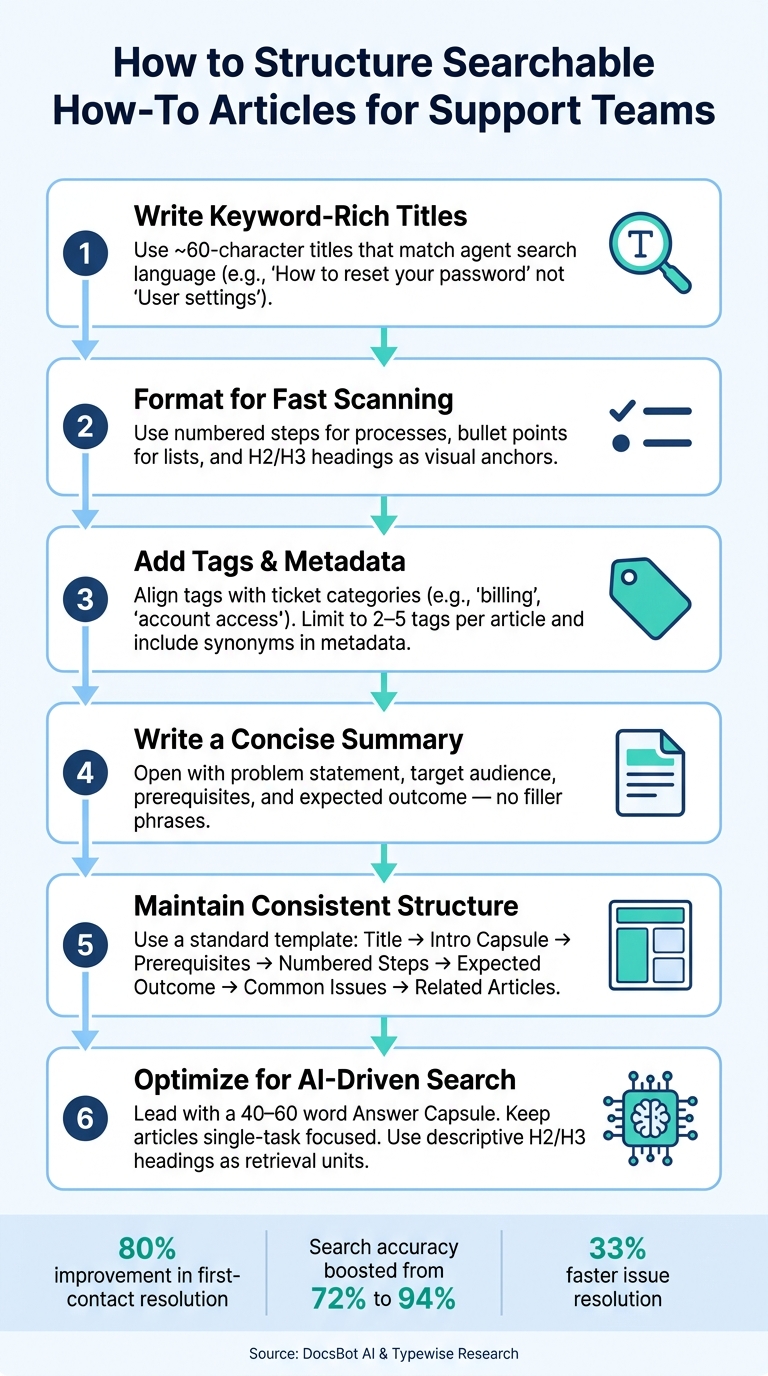
How to Structure Searchable How-To Articles for Support Teams
How Do I Write Effective Knowledge Base Articles? – Customer Support Coach
sbb-itb-e60d259
1. Writing Clear, Keyword-Rich Titles
When agents search through live tickets, the title is the first thing they see. It’s their initial clue to finding the right solution. A well-crafted title acts as a direct path to the answer, making it essential to get it right.
Using Agent-Focused Keywords
To create effective titles, focus on the exact words agents are likely to search for. Pull these keywords from real-world sources like ticket descriptions, search logs, or even sales call notes where customers describe their challenges in their own words [3].
For example, if the user interface (UI) labels a button as "Data Export", make sure the title uses the same phrase [1].
"A support team scales better when answers live in systems, not in the heads of three reliable people." – DocsBot AI [3]
Keep titles concise – around 60 characters – and place the most important details at the beginning. For instance, a title like "How to export your contact data" is far more effective than a vague alternative. It’s clear, descriptive, and easy to find [1].
Avoiding Vague Titles
Generic titles like "Integrations" or "Common Issues" can create unnecessary delays. They force agents to click around for more details, which wastes time in a fast-paced environment. Instead, swap out these broad labels for titles that clearly describe the problem and its solution.
Here’s how you can make titles more specific:
| Vague Title (Avoid) | Specific Title (Use) |
|---|---|
| Integrations | How to connect Stripe to your workspace |
| Common issues | Troubleshooting failed file uploads |
| User settings overview | How to change your notification preferences |
| Exports | Why am I seeing a permission error when exporting reports? |
"Titles must be specific. Agents need immediate confirmation of relevance." – DocsBot AI [3]
Specific titles don’t just make life easier for agents – they also improve AI search capabilities. When a title is framed as a clear question or command, AI tools using retrieval-augmented generation can better match it to the natural language queries agents type in.
2. Formatting Content for Fast Scanning
Effective titling is just the start – how you format content plays a huge role in helping agents quickly find what they need. Studies show that support articles are often abandoned within 20 seconds if the key information isn’t immediately visible [1]. That’s not much time, and long, dense paragraphs can waste those critical seconds. The solution isn’t to make articles shorter but to structure them better. In fact, articles over 400 words are three times more likely to be rated as helpful, but only if they’re designed for scanning instead of reading [3]. The goal? Help agents jump straight to the answer without wading through unnecessary details. Let’s break down how smart formatting makes that happen.
Using Numbered Steps and Bullet Points
Lists are great tools, but mixing different types can confuse readers. Here’s the rule: Numbered steps are for processes where order matters – like troubleshooting instructions or step-by-step fixes. Each step should focus on a single action. For example, instead of “Click Settings, then select Billing,” split it into two steps. Combining multiple actions into one slows agents down because they have to mentally separate the instructions [1].
On the other hand, bullet points are perfect for non-sequential details. Use them for things like prerequisites, required permissions, possible causes, or SLA guidelines. This clear distinction helps agents instantly understand if they’re looking at a checklist or a procedure.
"Consistency here is key: Title: Short, specific, and easily searchable… Resolution steps: Numbered, succinct, and tested." – Typewise [4]
Using Headings and Spacing to Guide Readers
When agents scan support content, they tend to follow a predictable path: title, introductory lines, headings, numbered steps, and bolded text [3]. That’s why H2 and H3 headings are so important – they act as visual markers, allowing agents to quickly jump to the section that addresses their issue. For example, a heading like "If the verification code doesn’t arrive" is immediately actionable. Compare that to a vague heading like "Troubleshooting," which doesn’t tell the agent anything specific [3].
Each section should focus on one problem and one solution. Aim for sections between 150 and 300 words – this keeps things detailed enough to be useful without overwhelming the reader [4]. Break up paragraphs into two or three sentences and use consistent spacing to avoid creating a “wall of text” that can disrupt focus.
"Structure outperforms volume. A smaller, well-structured knowledge base can deliver better results than a larger, disorganized one." – Typewise [4]
3. Using Tags and Metadata to Improve Discoverability
Organizing content effectively is key, but it won’t matter if agents can’t find the right article when they need it. That’s where tags and metadata come in. They help bridge the gap between a ticket’s context and the relevant support article. A well-structured knowledge base can deflect 30%–50% of support tickets – and with AI-driven search, this number can climb to 60%–80% [5]. This approach complements the clear titles and scannable formatting discussed earlier.
Aligning Tags with Ticket Categories
To make your tags effective, align them with the categories used in your ticketing system. For instance, if tickets are labeled as "billing", "account access", or "integration errors", use the same terms for your knowledge base tags. This consistency ensures that when agents search for solutions, the system speaks the same language as the content library.
Tags also allow a single article to appear in multiple contexts. Take a refund-related article – tagging it with both "billing" and "refunds" ensures it shows up whether the query is about billing issues or refund requests [5].
Keep tags focused by limiting them to 2–5 per article. Overloading articles with tags or allowing free-form entries (e.g., "refund", "Refund", "refunds") can lead to duplicates and fragmented search results. Using dropdown menus or taxonomy pickers helps enforce a controlled vocabulary and avoids these pitfalls [6].
Using Metadata Fields for Better Search Results
Tags cover broad categories, but metadata fields add precision. Fields like ticket_type, product_area, or customer_segment help narrow search results to match the exact context of a ticket. Together, tags and metadata ensure agents can locate the right information quickly, directly from the ticket view.
Metadata should also account for synonyms. For example, an article titled "Cancel Subscription" should include metadata terms like "unsubscribe", "stop billing", and "close account", as agents and customers might use different phrases [5]. To keep improving, review search logs weekly for queries that return no results. Adding these terms to metadata fields fills discoverability gaps over time [5].
4. Writing Concise Article Summaries
Crafting a concise summary is just as important as effective titles and formatting. A well-written summary helps agents instantly determine if an article is relevant to their ticket, even when tags and metadata are in place. A poorly written summary, on the other hand, can lead to confusion and wasted time. The first few lines of any how-to article act as a relevance filter, allowing agents to decide in mere seconds if the content fits their needs. This speed is critical when using AI agent copilots to surface knowledge during live interactions.
"The opening matters because many users decide in seconds whether to stay or bounce." – DocsBot AI [3]
Putting Key Details First
A strong summary in the ticket view accomplishes four main goals: it outlines the problem, identifies the audience, lists prerequisites, and defines the expected outcome.
| Summary Component | Purpose |
|---|---|
| Problem Statement | Clearly identifies the issue the article addresses |
| Target Audience | Specifies who the instructions are for (e.g., Admins or End-users) |
| Prerequisites | Highlights permissions or tools needed before starting |
| Expected Outcome | Describes what success looks like after following the steps |
Avoid wasting space with unnecessary phrases like "This guide will walk you through…". Instead, jump straight to the point. For example: "Admins with billing access can issue a full refund directly from the account dashboard without contacting finance." This approach ensures agents immediately understand the article’s relevance and expected results.
Once the summary is clear, the next step is to ensure it appears well-optimized for search results.
Improving Search Result Previews
Most support platforms display the article title along with a short snippet from the body text in search results. If this snippet includes too much background information or filler, agents may need to click through to confirm relevance, slowing down their workflow.
5. Keeping a Consistent Format Across Articles
After optimizing titles, formatting, and metadata, the next step is ensuring a consistent structure across all articles. This approach makes it easier for agents to locate information quickly, enhancing their productivity. A uniform layout ensures that articles are intuitive to navigate, eliminating the need for agents to relearn how each one is organized.
Setting Consistent Formatting Patterns
Creating a standardized article template serves as a reliable guide, helping agents know exactly where to find critical details. Here’s a suggested structure:
| Section | What It Contains |
|---|---|
| Title | Use "How to [Task]" and include exact product feature names. |
| Intro Capsule | A brief 2–3 sentence overview of the answer or article scope. |
| Prerequisites | List permissions or tools needed before getting started. |
| Numbered Steps | Provide one action per step, arranged in chronological order. |
| What to Expect | Include 1–2 sentences describing the outcome of successful completion. |
| Common Issues | Offer troubleshooting tips for frequent problems. |
| Related Articles | Suggest 2–4 links to related workflows or next steps. |
Use clear, action-oriented language throughout. Always reference specific button labels or feature names, like "Click Export", instead of relying on visual indicators like "Click the blue button in the top-right corner." This approach ensures the instructions remain accurate even if the user interface changes.
A consistent format not only makes articles easier to navigate but also reduces the time spent searching for information.
How Consistent Structure Reduces Search Friction
Research shows that well-structured knowledge base articles can speed up issue resolution by 33% when agents need support [3]. Consistent language is equally crucial. For instance, using "download" in one article and "export" in another for the same action can disrupt keyword searches across the knowledge base. A simple house style guide – just a one-page document – can go a long way in ensuring uniform terminology.
Standardizing both structure and language also simplifies updates when products evolve. If UI instructions are always in a dedicated section, updates only require changes to that part of the article, avoiding a complete rewrite.
"A support team scales better when answers live in systems, not in the heads of three reliable people." – DocsBot AI [3]
6. Structuring Content for AI-Driven Search
Clear titles and scannable formatting are just the starting point for making content discoverable. When it comes to AI-driven search, structuring your content becomes even more critical. Unlike humans, tools like agent copilots or case history search systems don’t read articles linearly. Instead, they extract specific segments of text to generate responses. How you organize your content can directly impact whether those responses are accurate or misleading.
Writing Content That AI Tools Can Parse Accurately
Start with the answer upfront. Retrieval-augmented generation (RAG) systems prioritize the beginning of a document when forming responses [2][3]. Including an opening "Answer Capsule" of 40–60 words gives these systems a solid foundation before analyzing the rest of the content.
After the introduction, focus on keeping your article centered on a single task. Articles that cover multiple topics can confuse AI models, as they may extract segments that are only partially relevant to a query. For example, if a 1,200-word article addresses three different workflows, the system might retrieve a section that doesn’t fully address the user’s question, leading to inaccuracies. This reinforces the need for clear, single-purpose sections – each article should excel at one thing.
Additionally, make your H2 and H3 headings specific and descriptive. Instead of vague labels like "Reassignment", opt for something like "How to reassign a ticket to a different queue." These headings act as standalone retrieval units, and unclear titles can weaken search precision. Aim to keep each section between 150 and 300 words. This ensures that the AI retrieves focused, relevant content rather than a mix of unrelated details [4].
"The biggest cause of poor customer self-service experiences isn’t lack of content – it’s content that was once correct but has since become misleading." – Kate Leggett, Vice President and Principal Analyst, Forrester Research [1]
Using AI Insights to Keep Content Current
Even the best-structured articles lose their value the moment a product changes. With 65% of development teams releasing updates weekly or more often [2], quarterly documentation reviews are no longer sufficient for maintaining accuracy. The solution? Shift from calendar-based reviews to trigger-based reviews. Tagging articles by feature area allows teams to initiate reviews only when a specific feature is updated.
Supportbench‘s AI tools are designed to streamline this process. The AI Knowledgebase Bot scans the entire knowledge base and provides real-time answers to agents. Meanwhile, the AI KB Article Creation from Case History feature can generate new articles directly from resolved tickets, automatically filling in details like the subject, summary, and keywords based on real case interactions. Monitoring which queries yield no results or identifying articles frequently cited by the AI without resolving tickets gives teams a clear, actionable list of updates. This kind of feedback loop can significantly improve answer accuracy – from 72% to 94% [3]. By continuously refining AI retrieval systems, you not only improve search accuracy but also create a seamless link between well-structured content and faster ticket resolution.
Conclusion: Key Takeaways for Structuring Searchable How-To Content
Organizing how-to content effectively isn’t just a good idea – it has a measurable impact on support performance. Studies reveal that well-crafted knowledge base articles can reduce ticket resolution time by 33%, while refining AI retrieval systems can boost answer accuracy from 72% to 94% [3].
These improvements come from applying targeted structuring techniques consistently. The strategies discussed here – such as keyword-rich titles, clear numbered steps, and properly aligned tags – help agents find and deliver precise instructions faster. At the same time, single-task articles ensure AI systems can retrieve focused, accurate content. Each method, from concise titles to trigger-based reviews, contributes to creating a smooth and searchable support experience.
Keeping your content up-to-date is just as important. Trigger-based reviews, linked to specific product changes rather than arbitrary timelines, ensure your articles reflect the latest features without overburdening your team. This approach keeps your knowledge base accurate and relevant.
In short, structured content enhances support operations by embedding dependable answers directly into your systems.
FAQs
What’s the best template for a searchable how-to article?
Creating a how-to article that’s easy to find and follow boils down to a clear, structured, and task-oriented approach. Here’s what works best:
- Descriptive Title: Use a title that directly addresses the task or question. It should immediately tell the reader what they’ll learn or solve.
- Numbered Steps: Break down the process into simple, sequential steps. This makes it easy to scan and follow, even for someone in a hurry.
- Action-Oriented Language: Use straightforward wording that highlights specific actions or features. Focus on what the user needs to do.
- Integrated Keywords: Include relevant keywords naturally within the text. This not only helps readers but also improves the article’s visibility in search engines.
This format is designed to make information quick to access, whether by support teams or AI tools, ensuring tasks are completed efficiently.
How do I choose the right tags and metadata for ticket-view search?
To choose effective tags and metadata, aim for labels that are organized, descriptive, and consistent with your support processes. Use criteria such as ticket status, priority level, or issue type, and group tags into well-defined categories. Consistency in terminology is key – it helps improve search accuracy and ensures smoother workflows. Additionally, include tags that support AI-driven search and automation, which can speed up ticket discovery, cut resolution times, and enhance agent productivity.
How can I keep AI-search answers accurate as the product changes?
To keep AI-generated search answers relevant as your product evolves, it’s crucial to keep your knowledge base up-to-date. Make sure the content reflects the latest changes and improvements to your product.
Here’s how you can do that effectively:
- Focus on Stable Language: Use task-specific language that avoids over-relying on UI details, which can change frequently. This approach ensures the content remains useful even as interfaces are updated.
- Leverage Structured Data: Implement tools like FAQ schema to organize information clearly. This helps AI systems process your content more accurately.
- Prioritize Clarity and Brevity: Present information in a straightforward and concise format. This reduces the risk of misinterpretation and makes it easier for users to find what they need.
Additionally, performing regular audits with AI tools can help validate the accuracy of your content. These checks ensure updates are in sync with your product’s current features, minimizing outdated or irrelevant search results.






