


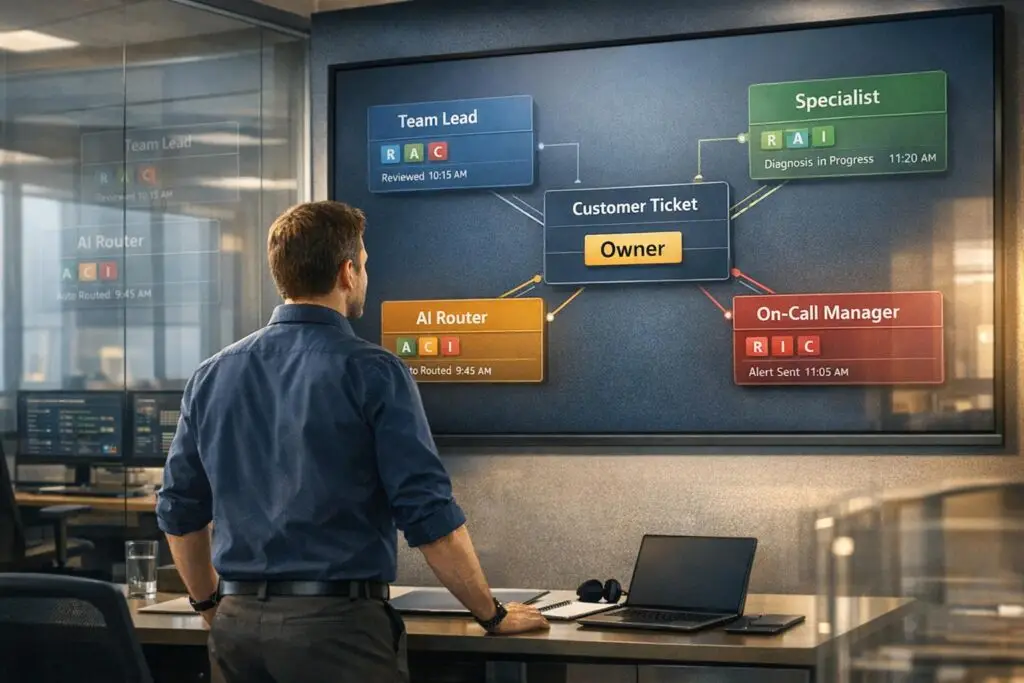
Struggling with ticket ownership during escalations? Here’s the fix:
- Assign clear roles at every stage of a ticket’s journey.
- Use structured escalation paths with defined triggers like issue type, SLA risk, or customer tier.
- Keep ownership tied to roles, not individuals, and ensure the original agent stays connected for customer communication.
- Leverage AI tools to automate routing, maintain context, and differentiate between assist vs. handoff escalations.
- Use RACI frameworks to clarify responsibilities and structured metadata for tracking escalation progress.
The result? Faster resolutions, fewer delays, and happier customers – all without losing accountability.
Internal Escalations and Ownership Challenges
What Are Internal Escalations in B2B Support?
Internal escalations happen when a support agent transfers a ticket because the issue requires specialized knowledge or higher-level decision-making. This process is more than just routing – it’s about coordinating across teams and systems.
There are two main types of escalations in B2B support:
- Functional escalations: These involve transferring tickets to experts like product engineers or billing specialists.
- Hierarchical escalations: These involve moving tickets to decision-makers, such as managers handling contract approvals or urgent refunds.
Both types are common in B2B environments, but they come with their own set of challenges. Understanding these escalation types helps explain why ownership often falters during the process.
Why Ownership Clarity Breaks Down
One of the biggest issues with escalations is the assumption that transferring a ticket ends the original agent’s responsibility. Once escalated, the agent often disengages, and the receiving team may not take immediate action. This creates a gap where tickets can stall indefinitely.
"The ticket gets passed up the chain, but no one person is accountable for resolution. ‘I escalated it’ becomes the end of the sentence instead of the beginning." – Tina Grubisa, Head of Value Consulting, Mosaic AI [1]
Another common issue is the loss of context. Troubleshooting steps and conversation history often fail to accompany the ticket, leaving the next team or individual to start from scratch. Inconsistent escalation triggers further complicate the process, leading to an unpredictable and frustrating experience for both customers and teams.
Addressing these challenges requires implementing clear ownership practices.
What Good Ticket Ownership Looks Like During Escalations
Effective ownership means that someone remains accountable at every stage of the ticket’s journey. This involves:
- Clearly defined roles for contributors.
- SLA tracking tailored to each tier of support.
- Ensuring the complete ticket history moves with the request.
In high-performing support teams, roles are well-defined: the support agent maintains the customer relationship – keeping them updated and simplifying technical updates – while the specialist or engineer focuses on resolving the issue [1]. This clear separation of responsibilities helps streamline escalation paths and ensures accountability.
"The fastest way to improve performance in your support organization is to reduce the mental gymnastics." – Tina Grubisa, Head of Value Consulting, Mosaic AI [1]
sbb-itb-e60d259
How to Map Escalation Paths and Set Ownership Rules
How to Handle Internal Escalations Without Losing Ticket Ownership
Keeping ticket ownership clear is a must for avoiding delays and miscommunication in AI-driven B2B support systems.
Building Tiered and Role-Based Escalation Paths
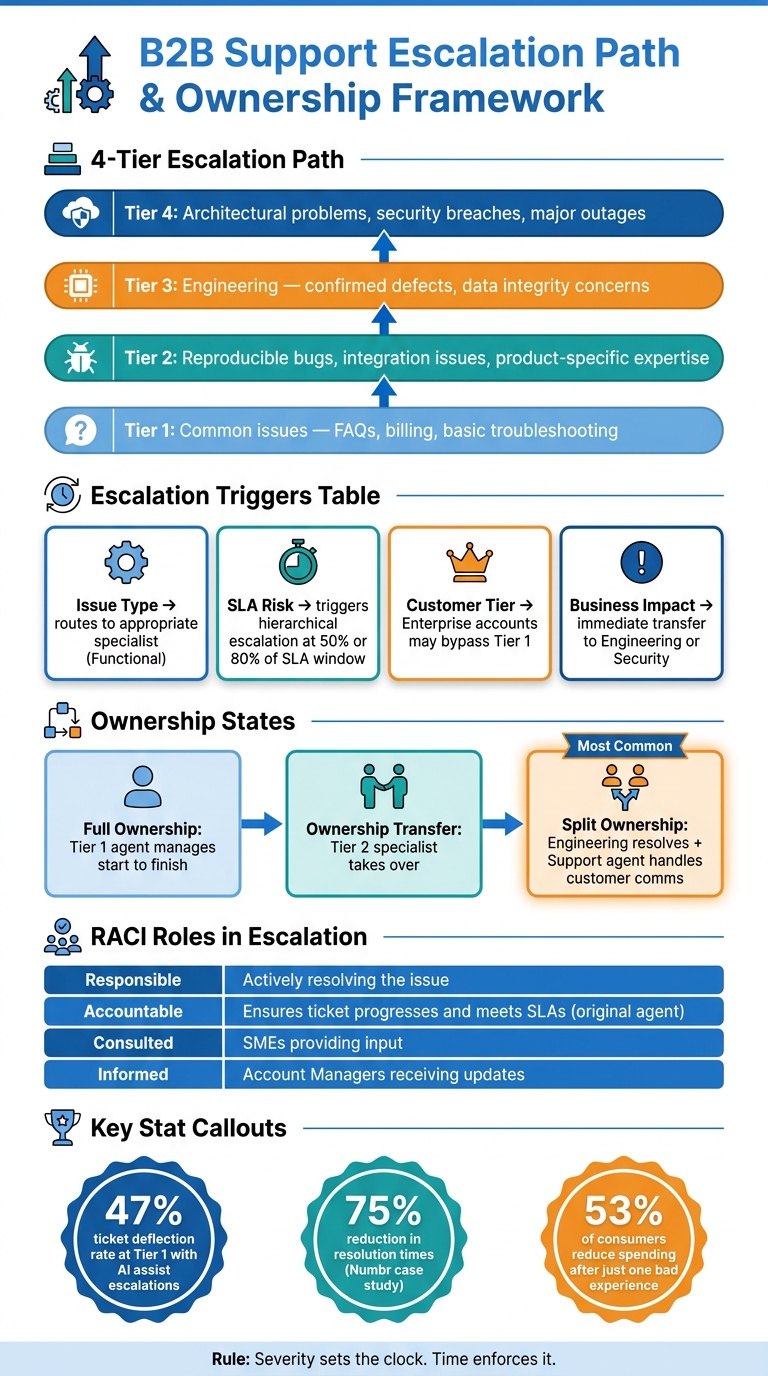
Escalation paths should be predefined so every ticket follows a structured, role-based process. Typically, 3 to 4 tiers work well for most B2B support teams. Here’s an example:
- Tier 1: Handles common issues like FAQs, billing, or basic troubleshooting.
- Tier 2: Tackles reproducible bugs or integration issues that need more product-specific expertise.
- Tier 3: Involves engineering to address confirmed defects or data integrity concerns.
- Tier 4: Reserved for complex architectural problems, security breaches, or major outages [1].
"If you can’t describe the boundary between two tiers in one sentence, they should probably be one tier." – Tina Grubisa, Head of Value Consulting, Mosaic AI [1]
Ownership should always be tied to roles, not individuals. For instance, assigning a ticket to a role like "On-call API Engineer" ensures continuity, even if team members change [1].
Once roles are set, it’s crucial to define clear triggers for moving tickets between tiers.
Setting Clear Escalation Triggers
Triggers are the signals that determine when a ticket should move to the next tier. Relying on subjective cues like an agent feeling stuck can lead to inconsistent handoffs. Instead, use measurable factors such as issue type, customer tier, time-in-queue, and business impact to guide escalation.
A practical rule to follow is: "severity sets the clock, time enforces it." This means the severity of the issue determines its tier, while SLA thresholds dictate when escalation should happen [1]. For instance, triggers set at 50% or 80% of the SLA window can help prevent delays [1].
| Trigger Factor | Description | Ownership Impact |
|---|---|---|
| Issue Type | Technical bugs, billing disputes, or security risks | Routes to the appropriate specialist (Functional) |
| SLA Risk | Approaching the resolution deadline | Triggers hierarchical escalation to speed decisions |
| Customer Tier | High-value or Enterprise accounts | May bypass Tier 1 entirely for high-touch ownership |
| Business Impact | Data loss, outages, or security incidents | Immediate transfer to Engineering or Security teams |
Defining Ownership States and Transition Rules
Each stage of a ticket should have a clearly defined ownership state. A straightforward model might include:
- Full Ownership: The Tier 1 agent manages the issue from start to finish.
- Ownership Transfer: A Tier 2 specialist takes over when deeper expertise is required.
- Split Ownership: Engineering resolves technical problems while the support agent remains the primary customer contact.
Transition rules are just as critical as ownership states. Every transfer should include an internal note summarizing the issue, outlining previous steps, and explaining why escalation is needed [1]. Even when engineering takes over technical tasks, the original support agent should stay in charge of customer communication to avoid the customer feeling shuffled around [1].
With these ownership rules and escalation paths in place, the next step is to integrate AI tools for seamless and efficient ticket routing. Implementing automated ticket routing ensures that these rules are applied consistently without manual intervention.
Using AI to Keep Escalations Clear and on Track
Automating Escalation Routing With AI
AI excels when it operates on clear, specific triggers rather than ambiguous signals. For example, instead of vague rules like "escalate if the issue is serious", use triggers such as "escalate if the customer reports a duplicate charge" or "escalate after two failed resolution attempts." Each AI rule should clearly define the trigger, routing logic, and the response sent to the customer. Including details about follow-up timing – like "a senior engineer will respond within 2 business hours" – helps build customer confidence far more than generic phrases about delays.
"The point of AI customer support escalation is not to defend automation at all costs. It is to make support more reliable under pressure." – Entrepreneur AI Tools [4]
Supportbench‘s AI Automation simplifies this process by prioritizing cases, categorizing issues, and tagging tickets based on their content. This eliminates the need for agents to manually evaluate every ticket, ensuring quicker and more accurate routing. With this kind of precise setup, teams can easily differentiate between assist and handoff escalations.
Telling the Difference Between Assist and Handoff Escalations
Not all escalations involve transferring ownership. In an assist escalation, the original agent remains responsible for the ticket while receiving guidance from a specialist or AI tool. In contrast, a handoff escalation involves transferring the ticket entirely to another agent or team, usually due to the need for specialized expertise or authority.
To streamline this process, platforms should clearly label assist versus handoff escalations. For assist cases, the original agent should remain listed as the primary owner, ensuring visibility for everyone involved – including the customer. One AI-native platform reported a 47% ticket deflection rate, with nearly half of all tickets resolved at Tier 1 without escalation. This success came from AI tools surfacing answers directly to frontline agents, turning many potential handoffs into assist escalations [2]. Maintaining this distinction helps teams collaborate effectively while keeping transitions smooth and transparent.
Keeping Context Intact Across Teams
When a ticket is passed between teams, the receiving agent shouldn’t have to sift through scattered notes to understand the situation. AI-generated summaries solve this problem by consolidating key details like troubleshooting steps, customer sentiment, and SLA status into a concise handoff brief. This ensures the new owner can act immediately without requiring the customer to repeat their story [4].
Losing context can be costly – B2B teams spend 3 hours coordinating for every 1 hour spent solving issues [3]. Platforms like Supportbench tackle this by generating AI-driven case summaries as soon as a ticket is created. These summaries are updated throughout the ticket’s lifecycle and finalized upon closure, giving every team member a complete and up-to-date picture without the need to comb through the entire thread. This approach not only saves time but also ensures a seamless experience for both agents and customers.
Day-to-Day Practices for Keeping Ticket Ownership Clear
Keeping ticket ownership clear on a daily basis ensures that escalation paths work as intended and that every ticket moves smoothly through its journey. By sticking to well-defined escalation rules and ownership practices, teams can avoid confusion and maintain efficiency.
Defining Roles and Responsibilities With a RACI Model
Even with advanced tools like AI routing and automated summaries, unclear roles can disrupt escalations. A RACI framework helps by assigning clear labels to every role involved in an escalated ticket, removing any ambiguity about who does what.
| RACI Role | Responsibility in Escalation |
|---|---|
| Responsible | The individual actively resolving the technical or functional issue. |
| Accountable | The person responsible for ensuring the ticket progresses and meets SLAs – often the original agent. |
| Consulted | Subject matter experts who provide input but are not responsible for the final resolution. |
| Informed | Stakeholders, like Account Managers, who receive updates but are not involved in resolving the issue. |
To avoid update gaps, it’s essential to separate resolution ownership from relationship ownership. For example, at Tier 3 or Tier 4, engineering teams may handle the technical aspects, but the support team should retain responsibility for customer communication. This ensures customers stay informed and don’t feel ignored because everyone assumed someone else was handling updates.
Once roles are clarified, the next priority is establishing clear communication rules during escalations.
Setting Communication Rules During Escalations
Timely updates are critical for maintaining customer trust. Research shows that 53% of consumers reduce or stop spending with a brand after just one bad experience [1]. Often, it’s not the issue itself but the feeling of being ignored that drives dissatisfaction.
To prevent this, set clear update schedules before an escalation begins. For high-priority situations, a standard like "update the customer every 2 hours" removes uncertainty. Consistent language is just as important. For example, saying "We’re involving our product team to get this fully resolved" conveys active management and accountability, while vague phrases like "we’re looking into it" can leave customers feeling unsure about progress.
"Leadership doesn’t understand how much escalations impact the organization. It’s a bottleneck that can be removed rather easily." – Tina Grubisa, Head of Value Consulting, Mosaic AI [1]
Strong communication practices, paired with effective tracking, further enhance escalation management.
Tracking Escalations With Structured Metadata
Clear ownership isn’t just about assigning people – it also requires good data. Without proper tracking, agents are left to rely on memory to know why a ticket was escalated, who owns it, and what tier it’s at. This often leads to missed handoffs and confusion.
Using structured metadata in a modern support CRM solves this problem. Fields like escalation level, escalation reason (e.g., knowledge gap or product bug), and current owner make the ticket’s status visible at a glance. Tools like Supportbench’s escalation management features allow for multi-level tracking with detailed categories and notes, ensuring that the ticket’s path is always clear and easily auditable.
When metadata is consistently applied, teams can shift their focus from simply tracking escalation speed to measuring escalation prevention. For instance, metrics like the percentage of tickets resolved at first contact or the frequency of unnecessary SME involvement reveal deeper insights into operational health [2].
Measuring and Improving Your Escalation Process Over Time
Key Metrics to Monitor Escalation Health
Once you’ve established clear escalation rules and assigned RACI roles, keeping track of specific metrics will help you gauge how well your escalation process is working. These metrics ensure every stage of escalation remains accountable and efficient.
| Metric | What It Tells You |
|---|---|
| Escalation Rate | The percentage of tickets that require higher-level intervention. A high rate could indicate gaps in Tier 1 knowledge or inadequate tools [2]. |
| Time to Resolve (TTR) | The total time from when a ticket is created to when it’s resolved. This metric highlights bottlenecks in specialist queues or during engineering handoffs [1]. |
| First-Contact Resolution (FCR) | Tracks how often frontline agents resolve issues without escalating. High FCR rates show success in preventing unnecessary escalations [2]. |
| Repeat Escalations | Measures tickets that bounce between tiers or need multiple escalations. This often points to unclear ownership or incomplete context during handoffs [4]. |
| SME Interruption Rate | Reflects how often senior experts are pulled into routine tickets. Frequent interruptions may signal a need for better training or documentation for Tier 1 agents [2]. |
It’s crucial to separate time-to-reply from time-to-resolve. A quick initial response but a long resolution time suggests one type of issue, while a slow acknowledgment paired with a fast resolution indicates another [1]. These distinctions give you a clearer picture of where to focus your efforts.
Using AI Insights to Refine Escalation Workflows
While manually tracking these metrics is helpful, AI tools can uncover patterns across large volumes of tickets that might otherwise go unnoticed. For instance, if a specific product feature repeatedly leads to Tier 2 escalations, AI can flag this trend early, allowing you to address training or documentation gaps [2]. Eliminating repetitive, low-value escalations is one of the easiest ways to boost your team’s efficiency.
Some tools, like Supportbench AI, go a step further by automatically converting resolution data into effective knowledge base articles. This creates a feedback loop where today’s escalated ticket becomes tomorrow’s self-service solution. To ensure your escalation process stays aligned with evolving needs, review triggers monthly for the first 90 days and then quarterly as the process matures. Regular reviews help you adapt to product updates, team changes, and shifting customer expectations [1].
Training Teams and Building Escalation Playbooks
Metrics and AI insights are only as effective as the training and playbooks that support them. Without clear playbooks, even the best data can fail to standardize decision-making, leading to confusion about ticket ownership and escalation paths.
The most effective playbooks are built directly into your ticketing system, making the correct escalation path the easiest option for agents [1]. Defining ownership by roles – like assigning an "API Engineer on call" – instead of individual names ensures the process remains stable even when team members change [1].
Every resolved escalation presents a chance to improve. Post-resolution reviews should focus on key areas like whether handoff context was preserved, if customers received clear timelines instead of vague updates, and whether the appropriate tier maintained ownership throughout the process. By capturing these lessons, you turn each escalation into an opportunity for continuous improvement.
Conclusion: Keeping Ownership Clear Without Slowing Down Escalations
Internal escalations don’t have to come at the cost of accountability. The strategies in this guide – like escalation management system, clear ownership states, RACI roles, structured metadata, and AI-assisted routing – are designed to ensure every ticket keeps progressing without confusion about responsibility.
The main takeaway is simple: you don’t have to choose between clarity and speed. When your team knows exactly who owns a ticket at every stage, resolutions happen faster because there’s no downtime caused by uncertainty. As one expert put it: "Escalation itself rarely causes problems. The problems arise because internal processes aren’t built for scale." [3]. This highlights the importance of scalable processes that grow with your ticket volume.
To make this work, it’s critical to fix decision logic before introducing automation. By mapping out triggers, ownership transitions, and communication checkpoints first, you create a solid process that tools can enhance. Once that foundation is in place, AI can handle repetitive tasks like routing and preserving context, allowing agents to focus on the cases that truly need their expertise.
The results speak for themselves. Teams that centralize context and reduce coordination headaches see measurable improvements. For instance, Numbr reduced resolution times by 75% after centralizing communication and context into a single platform. Similarly, Ridepanda handled a 4x increase in ticket volume while keeping customer satisfaction intact [3]. These examples demonstrate how maintaining clarity throughout escalations leads to real operational wins.
Supportbench combines escalation management, AI-powered routing, dynamic SLAs, and complete case context to make ownership transparent and handoffs effortless.
FAQs
Who owns the ticket after it’s escalated?
When a ticket is escalated, it usually shifts ownership to a specific team or individual at the next escalation level. At each step, clear responsibility is assigned to ensure accountability, avoid delays, and keep the customer consistently informed. This structured approach helps ensure that no ticket gets overlooked and resolution stays on course.
When should we use assist vs. handoff escalation?
When dealing with customer support, assist escalation works best for cases where frontline agents can handle the issue with the help of AI tools. These tools might include features like solution recommendations or step-by-step troubleshooting guidance. It’s perfect for straightforward problems where AI helps agents make better decisions quickly.
On the other hand, use handoff escalation for more complex situations. These are cases that demand specialized knowledge, system modifications, or managerial approval. This process involves passing the ticket to a higher tier, ensuring the right team takes ownership and maintains accountability throughout the resolution.
What fields should we track to prevent escalation confusion?
To keep things running smoothly and avoid any mix-ups during escalations, make sure to keep an eye on these key areas:
- Full conversation history: This helps maintain context and ensures any handoffs between team members are seamless.
- Ownership or responsible point-person: Clearly define who’s in charge to avoid accountability issues.
- Communication logs: Keep a record of interactions to maintain transparency and provide updates to stakeholders.
- Decision points and authority levels: Identify who can make decisions to quickly address potential roadblocks.
- Timing and SLA expectations: Stay on top of deadlines and service level agreements to meet customer expectations.
By focusing on these fields, you’ll ensure clarity, accountability, and a smoother resolution process.






