



When handling customer support, assigning a single owner to each case improves accountability and ensures a smoother experience for both customers and teams. The owner stays with the case from start to finish, while collaborators – like engineers or billing specialists – provide input without taking over. This approach minimizes confusion, reduces escalations, and improves metrics like First Contact Resolution (FCR) and Customer Satisfaction (CSAT).
Key takeaways:
- Single Owner Model: One person is responsible for resolution and customer communication.
- Collaborators’ Role: Specialists assist via internal notes or @mentions but don’t contact customers directly.
- AI Integration: Automates case routing, enriches ticket data, and flags SLA risks to keep processes efficient.
- Outcome-Based Metrics: Focus on resolving issues rather than just closing tickets.
Steps to implement:
- Define ownership rules and roles clearly.
- Set up workflows with automation tools to ensure smooth collaboration.
- Pilot the model with a small team, refine processes, and scale gradually.
This method ensures clarity, reduces delays, and creates a consistent support experience for customers.
Core Principles of a Clean Ownership Framework
Balancing Accountability and Collaboration
In a clean ownership framework, the case owner takes full responsibility for the outcome, while collaborators contribute their expertise without taking control. It’s like having a driver at the wheel – focused on steering the process – while passengers provide directions or support when needed.
This approach also shifts how success is evaluated. Traditional support systems often emphasize metrics like speed and volume: how quickly tickets are closed or how many are resolved. In contrast, a clean ownership model prioritizes outcomes over activity.
| Traditional Ticketing Metrics | Outcome-Based Metrics (Clean Ownership) |
|---|---|
| Tickets closed | Issues fully resolved |
| First response time | Mean time to resolution (MTTR) |
| Ticket backlog size | SLA compliance (response and resolution) |
| Average handle time (AHT) | Customer satisfaction (CSAT) |
| Basic deflection rate | Resolved without agent intervention |
By focusing on outcomes, teams can align their efforts toward genuinely resolving issues rather than just ticking boxes. But for this to work, everyone involved needs a clearly defined role.
Defining Roles and Responsibilities
Roles that are well-defined eliminate confusion and ensure smooth collaboration.
- Case Owner: The central figure in the process, responsible for maintaining the case record, managing timelines, and communicating directly with the customer. They make the final decisions on resolving the case.
- Collaborators: Specialists like engineers, billing experts, or account managers who lend their expertise when needed. However, they should not contact the customer directly or alter the case status without the owner’s approval.
- Escalation Managers: These individuals step in when a case goes beyond the owner’s authority or expertise.
- Customer Success Managers: They monitor high-value accounts but only intervene when broader relationship-level decisions are necessary.
A critical guideline here is to limit permissions for each role. For instance, collaborators shouldn’t have the ability to reassign cases, adjust priorities, or close tickets. This ensures the case owner remains accountable and avoids confusion over who is responsible.
Once roles are defined, the next step is establishing clear communication protocols.
Setting Communication Norms
Effective communication is the glue that holds this framework together. Without clear norms, updates can get lost, responsibilities may blur, and customers might receive conflicting information.
The golden rule? All case-related communication should live in the case record. This includes internal notes, @mentions, and status updates. Relying on side emails or separate chat channels creates blind spots and risks missing critical context.
The case owner should handle all customer-facing communication unless they explicitly delegate the task. When a collaborator is brought in, the owner should clearly outline the task, set a timeline, and detail how the work will transition back to them. Including a clear handoff note ensures everyone stays aligned and avoids unnecessary back-and-forth.
sbb-itb-e60d259
How to Set Up the Model in a Support Platform
Configuring Case Fields and Assignment Rules
Start by organizing your data structure effectively. Every case should have a dedicated owner field that assigns it to a single agent – not a team or a shared queue, but one specific person. Additionally, include a collaborators field that allows multiple agents to contribute without changing the case’s ownership. To ensure traceability, add fields for status, priority, category, and SLA tier.
When it comes to assignment rules, tailor them to match the complexity of your cases. For enterprise accounts with long-running cases, a persistent owner model ensures continuity by keeping the same agent on the case. For high-volume, low-complexity requests, a queue-based model might be more effective. Regardless of the method, every case must always have a single, named owner – no shared inboxes or ambiguous assignments.
| Priority | First Response SLA | Resolution SLA | Escalation Action |
|---|---|---|---|
| P1 (Critical) | 15 minutes | 4 hours | Page on-call, create incident bridge |
| P2 (High) | 1 hour | 8 hours | Notify engineering/SRE |
| P3 (Normal) | 4 hours | 48 hours | Assign to senior agent |
| P4 (Low) | 24 hours | 5 business days | Standard queue handling |
Linking assignment rules to this SLA matrix ensures that routing decisions are more than just labels – they carry real operational impact. Once ownership is clear, you can define how collaborators fit into the workflow.
Building Collaboration Workflows
Collaboration should enhance the case resolution process without compromising the owner’s control. A practical setup allows collaborators to add internal notes and access all customer data but restricts them from sending public replies or reassigning the case. This approach maintains a consistent customer experience while enabling specialists to contribute meaningfully.
| Action | Primary Owner | Collaborator |
|---|---|---|
| Public Replies | Yes | No |
| Internal Notes | Yes | Yes |
| View Customer Data | Yes | Yes |
| Edit Ticket Properties | Yes | Limited |
| Primary Assignee | Yes | No |
Using @mentions within the case record is a straightforward way to involve collaborators. The owner can tag the right person, specify their task, and set a deadline – all within the case thread. This keeps the entire interaction transparent and easy to track, even for cases that stretch over several days or require multiple handoffs.
Using AI to Keep Ownership Clean
Manual triage often leads to delays, misjudged priorities, and cases slipping through the cracks without an assigned owner. AI eliminates these issues right at the intake stage.
Modern AI tools can classify cases by intent, urgency, and category in under two seconds [3]. This ensures that critical issues – like a P1 billing problem – are routed directly to the appropriate owner without sitting in a general queue. Platforms like Supportbench excel at this, using AI automation to auto-assign issue types, tag cases, and prioritize queues. This allows agents to focus entirely on resolving cases rather than sorting them.
AI also plays a crucial role in identifying and addressing unassigned cases. If a case remains ownerless beyond a set threshold, automated alerts or reassignment rules kick in to prevent SLA breaches. Additionally, AI-generated case summaries provide instant context to the assigned owner, eliminating the need to sift through email threads or other records. This streamlines the entire process, ensuring no time is wasted.
Step-by-Step Guide to Implementation
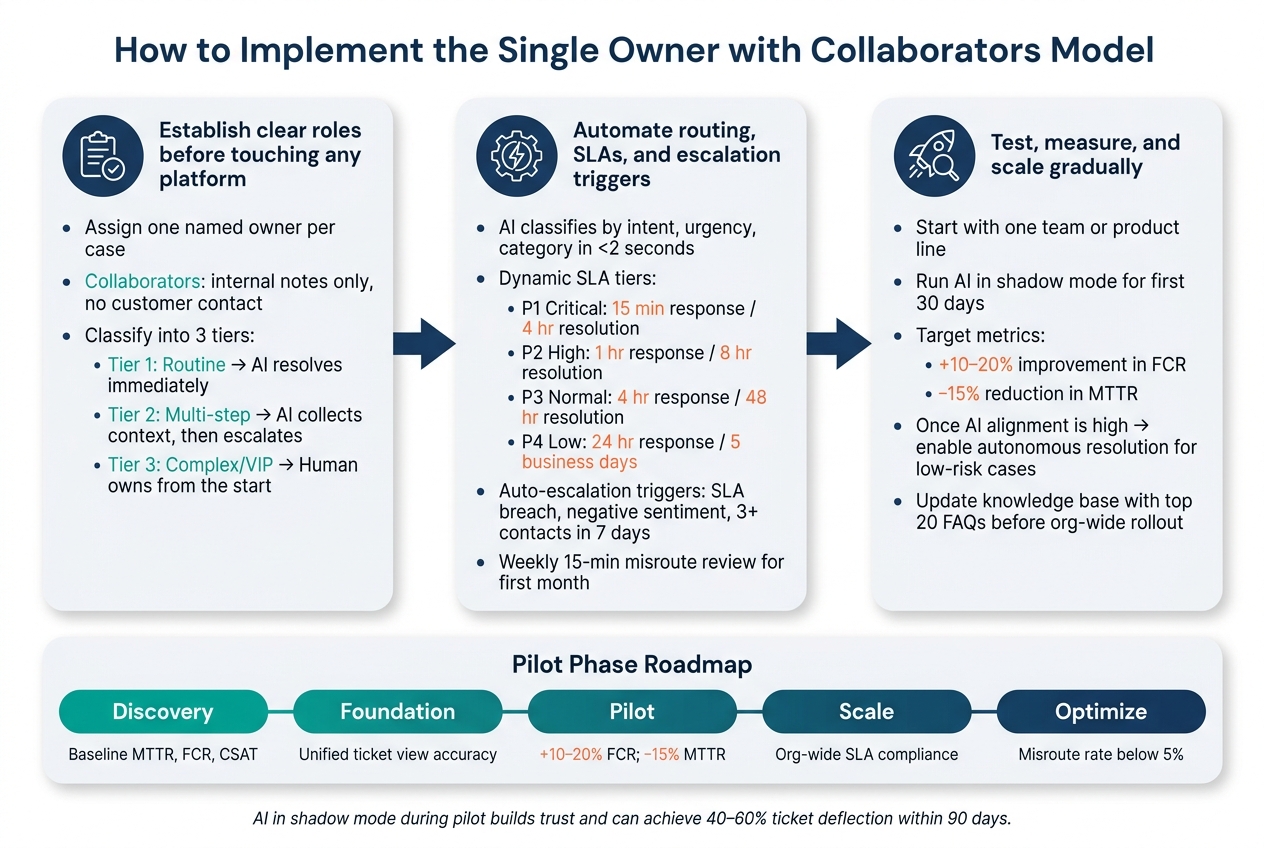
Single Owner with Collaborators: 3-Step Implementation Framework
Step 1: Define Ownership Rules and Responsibilities
Before diving into platform configuration, take the time to outline clear ownership rules. Assign a consistent owner to each case to maintain accountability throughout its lifecycle. This owner will handle resolution and all customer communications. Collaborators can assist by providing internal insights, but the primary decision-making stays with the designated owner.
Classify cases into three tiers for better management:
- Tier 1: Routine issues that AI can resolve immediately.
- Tier 2: Multi-step problems where AI collects context – like account history, previous cases, or product details – before escalating to a human.
- Tier 3: Complex or high-stakes situations, such as outages or VIP escalations, where a human takes charge from the start [4].
"A steward is someone who takes responsibility for something that matters and sees it through. Not a middleman. Not a coordinator. An owner." – Cheryl Chai, Product Marketing Lead, Delight AI [2]
Once roles and responsibilities are defined, you can move forward with automating these processes.
Step 2: Set Up Workflows and Automation
Use your platform to enforce the ownership rules you’ve established. For example, tools like Supportbench allow you to configure AI automation to classify incoming cases based on intent, urgency, and category – ensuring tickets are routed to the right owner in seconds. Features like dynamic SLAs can adapt to factors like account renewals or VIP status, tailoring responses to each case’s context.
Incorporate escalation triggers into your workflows. Automated alerts should activate when:
- A case nears or exceeds its SLA timer.
- Sentiment analysis detects a negative tone.
- A customer contacts support three or more times within seven days [3].
Additionally, configure the system to enrich incoming cases automatically with details like account tier, recent activity, and case history. During the first month, schedule a weekly 15-minute review to identify and correct any misrouted cases, refining your classification rules as needed [3].
Step 3: Run a Pilot and Refine the Model
After setting up automated workflows, test your system with a controlled pilot. Start small – use a single team or product line before expanding across the organization. Begin by establishing baseline metrics such as First Contact Resolution (FCR), Mean Time to Resolve (MTTR), and Customer Satisfaction (CSAT). A successful pilot should aim to improve FCR by 10–20% and reduce MTTR by 15% [1].
To ensure your setup works seamlessly, run AI in shadow mode during the first 30 days. In this mode, AI drafts responses and routing decisions while human handlers review them [4]. Track how often AI recommendations align with human decisions. Once the alignment rate is consistently high, enable autonomous resolution for low-risk cases. Use feedback from the pilot phase to update your knowledge base with the top 20 FAQs [3]. This reduces the workload for case owners and prepares the system for organization-wide deployment.
| Pilot Phase | Key Activity | Success Metric |
|---|---|---|
| Discovery | Inventory channels and set baselines | Baseline MTTR, FCR, CSAT |
| Foundation | Implement schema and core integrations | Unified ticket view accuracy |
| Pilot | Roll out to one team; enable swarming | +10–20% FCR; −15% MTTR |
| Scale | Org-wide rollout; enforce SLA timers | Org-wide SLA compliance |
| Optimize | Tune AI thresholds; refine knowledge base | Misroute rate below 5% |
Common Pitfalls and How to Avoid Them
Unclear Ownership and Duplicate Work
A common issue in support teams is the lack of a mandatory owner_id field for every case. When ownership isn’t clearly defined, multiple agents can end up responding to the same customer, often with conflicting information. This creates confusion and wastes time. In fact, research reveals that 88% of knowledge workers have experienced time-sensitive projects falling apart due to disorganized communication [5]. Support teams are no exception to this trend.
The solution? Make the ticket the single source of truth. All communication related to a case should stay on the ticket – not scattered across personal emails or random chat threads [1]. To reinforce this, implement machine-enforced SLA timers and explicit case statuses. This ensures everyone knows who is responsible for the next step and when action is overdue [1].
"The problem is not just that messages live in different places. It is that context, ownership, and follow-up start to break down between those places." – Inquirly [5]
Too Many Collaborators and Too Much Noise
While collaboration is essential, too many inputs can create unnecessary clutter. Collaborators can add value, but over-notifications often distract the case owner, pulling their focus away from the customer.
Two simple rules can help manage this:
- Set "mention-only" alerts. Collaborators should only be notified when explicitly @mentioned, not for every minor update or routine status change.
- Define clear exit criteria. Once a collaborator has addressed their specific task, they should be removed from the case. Automating this removal when a linked task is completed keeps the workspace organized without relying on manual effort.
A helpful framework here is the RACI model: while many may be Consulted, only the owner should be Accountable for the final response to the customer.
Owners Without Authority or Support
Clear ownership means little if the owner lacks the authority to make decisions. If an owner has to wait for managerial approval for actions like issuing a service credit or implementing a workaround, the entire process slows down. This is a significant problem, especially since 80% of B2B customers expect real-time responses. Delays caused by internal approval processes aren’t just inefficient – they can jeopardize customer retention.
The fix is an empowerment matrix: a documented guide outlining what decisions owners can make independently and what requires escalation. Pair this with a swarming approach, where the owner can bring in subject matter experts as needed but retains final authority. To avoid delays, establish internal SLAs for collaborating teams (like Engineering or Product) to ensure they respond to the owner within a set timeframe [6]. These measures help maintain the integrity of the single-owner model, aligning it with AI-powered ticket routing and prioritization workflows.
| Pitfall | Root Cause | Fix |
|---|---|---|
| Duplicate replies | No enforced owner_id field | Require ownership assignment at case creation |
| Missed follow-ups | No SLA enforcement | Automate timers with escalation triggers |
| Collaboration noise | All-or-nothing notifications | Enable mention-only alerts; automate collaborator removal |
| Owner bottlenecks | No decision authority | Define an empowerment matrix with pre-approved concessions |
Conclusion: Key Takeaways for Effective Implementation
This model strikes a balance between two critical aspects of B2B support: accountability and collaboration. Without a clear owner assigned to each task, support teams can fall into inaction, leaving customers frustrated.
For the model to work effectively, execution is just as important as its design. Key elements like a mandatory owner field, well-defined collaborator permissions, and internal OLAs must be in place. Skipping even one of these can lead to confusion and undermine the system.
AI plays a powerful role in enhancing the process – but only when introduced thoughtfully. Starting with AI in shadow mode helps build trust and can result in an impressive 40%–60% ticket deflection within 90 days[8]. However, the ultimate goal isn’t just reducing ticket numbers. It’s about shifting focus from simply closing tickets to solving real customer problems.
"The winning pattern is not ‘let the AI handle everything,’ but ‘let the AI handle what it can safely own, let humans own what requires judgment, and make the handoff between them unmistakable.’" – Daniel Mercer, Senior AI Content Strategist[7]
FAQs
When should we use a persistent owner vs a queue-based owner?
When a record demands clear accountability, detailed tracking, or escalation over time, using a persistent owner is the way to go. This approach works well for complex cases involving multiple stakeholders, ensuring someone remains responsible throughout the process.
On the other hand, a queue-based owner fits high-volume, shared workloads. These are situations where records remain unclaimed and require triaging or assignment. Queues excel at distributing workloads efficiently, while persistent ownership guarantees continuous oversight for cases that need it.
What permissions should collaborators have (and not have)?
Collaborators usually operate with restricted permissions to ensure both security and control. They can perform tasks like viewing tickets, tagging them, accessing customer data, adding private notes, and forwarding tickets. However, they are not allowed to modify ticket properties, manage workflows, adjust system settings, or access sensitive administrative tools. These limitations help maintain accountability while enabling collaborators to work efficiently within their designated responsibilities.
How do we roll out AI safely without breaking ownership?
To implement AI responsibly while keeping ownership intact, it’s crucial to set up well-defined systems for accountability and control. Start by designating specific individuals or teams to oversee critical aspects such as data management, model operations, and output quality. Implement role-based access controls to ensure that only authorized personnel can access sensitive areas. Regularly monitor for potential issues, such as unsafe outputs, and establish clear protocols for escalation when problems arise.
Additionally, maintain comprehensive audit trails to track actions and decisions within the system. Conduct periodic reviews to ensure everything aligns with compliance standards and to adapt processes as the AI system evolves over time. These measures help create a controlled, transparent, and secure environment for AI deployment.






