


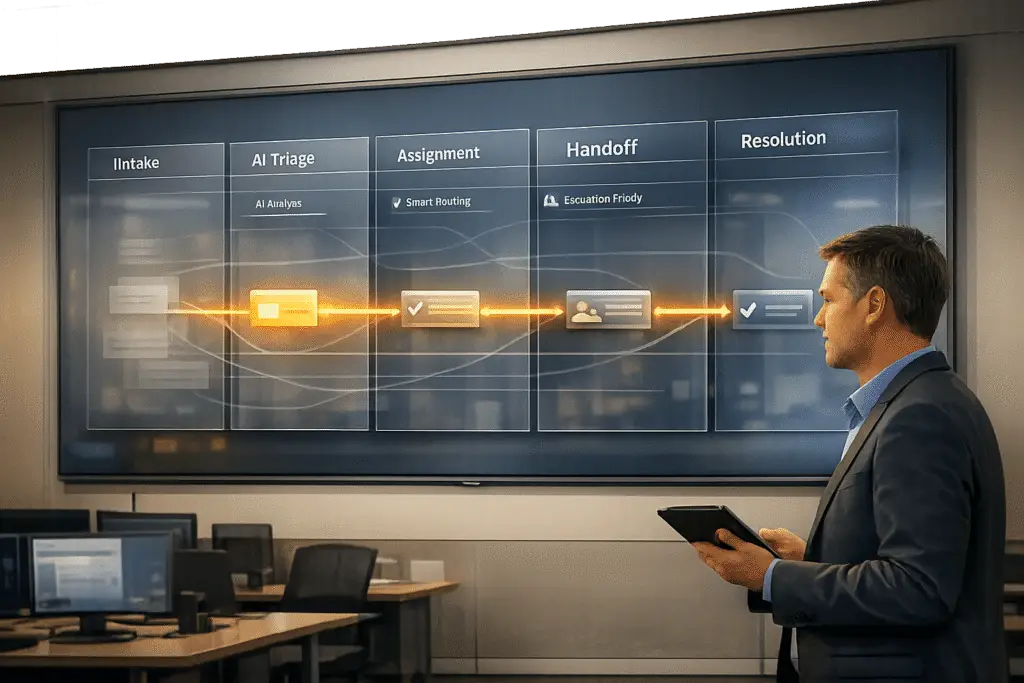
Ticket bouncing occurs when customer support requests are passed between teams without proper resolution or handoff, leading to delays and customer frustration. It wastes time, reduces efficiency, and negatively impacts customer satisfaction. The solution? Fix the root causes: unclear routing, lack of ownership, and incomplete ticket data.
Here’s how to stop it:
- Assign clear ownership: One agent should stay responsible for the ticket, even when collaborating with other teams.
- Improve routing: Use AI-powered triage systems and structured intake forms to ensure tickets go to the right team from the start.
- Standardize handoffs: Require detailed notes for every transfer, including the problem, actions taken, next steps, and customer context.
- Enhance escalation processes: Define clear triggers and roles for functional and hierarchical escalations.
- Leverage automation: AI can predict escalations, generate AI-driven summaries, and recommend resources to reduce unnecessary transfers.
Tracking metrics like reassignment rates and resolution times helps identify problem areas. With structured workflows and AI tools, you can minimize ticket bouncing and improve support outcomes.
Root Causes of Ticket Bouncing
Ticket bouncing often happens because of three main operational gaps:
Misconfigured Intake and Routing Rules
One major issue is overly simplistic routing logic that fails to handle the complexity of real-world support requests. For example, many systems rely on single keywords to route tickets: a ticket mentioning "billing" gets sent to Finance, while one mentioning "API" goes to Engineering. The problem? This approach ignores the full context. A billing issue tied to API authentication errors might require Engineering’s expertise, not Finance’s.
Outdated routing tables make things even worse. When teams reorganize, new products launch, or old services are discontinued, routing rules often don’t get updated. This leads to tickets being sent to the wrong teams – sometimes even to queues that no longer exist. The result? Tickets bounce between teams, agents leave "not my department" notes, and some queues fill up with tickets that always end up reassigned.
A practical way to identify these problems is by tracking first contact misrouting. This metric measures the percentage of tickets reassigned within the first hour of creation. A high rate points to broken intake logic.
These routing failures often lead to deeper issues with ownership.
Unclear Ownership and Escalation Paths
Even when a ticket lands in the right team’s queue, it can still bounce if no one takes responsibility for it. A "toss over the wall" mindset fuels this problem: Tier 1 agents reassign tickets and consider their job done, while the receiving team deprioritizes the ticket. The result? The ticket sits, ignored, in a secondary queue.
A big reason for this is the lack of Operating Level Agreements (OLAs). These internal agreements define how quickly one team must act after receiving a ticket from another. Without OLAs, there’s no accountability, and tickets fall through the cracks. Escalation criteria are often just as unclear. When these criteria aren’t well-defined, tickets may get escalated too early, only to be sent back to Tier 1, creating a frustrating loop.
On top of ownership challenges, incomplete ticket information adds another layer of difficulty.
Incomplete Ticket Data at Submission
When tickets lack critical details, they can’t be properly routed or resolved. Specialized teams like DevOps, Engineering, or product-specific support groups often need specific technical information – logs, version numbers, or steps to reproduce the issue – to even start working. Without this data, tickets are bounced back to the submitter for clarification, causing unnecessary delays.
The problem is often made worse by disconnected tools. If the support platform used by front-line agents doesn’t sync well with back-end tools, the receiving team might only get a stripped-down version of the ticket with no context or history. This forces them to start from scratch, leading to additional back-and-forth and longer resolution times. One way to address this is by enforcing structured, mandatory fields at the time of submission. Requiring complete information upfront can significantly reduce ticket bouncing.
Addressing these causes is key to building effective, AI-driven solutions that streamline ticket handling and improve resolution times.
sbb-itb-e60d259
How to Build a Single Ownership Model
Ticket bouncing often happens when accountability is shared. To address this, assign one owner per ticket who handles it from start to finish – even if multiple teams are involved in resolving the issue.
Separate Ownership from Collaboration
It’s important to differentiate between ownership and collaboration. Ownership means one person is responsible for the ticket, while collaboration involves others contributing to its resolution. For instance, a Tier 1 agent can stay as the ticket owner while a DevOps engineer, billing specialist, or product manager provides the necessary input or fixes. The ticket doesn’t need to be reassigned.
To make this work, use internal notes for requesting help from specialists while keeping ownership intact. This approach ensures the ticket stays active, the SLA timer continues, and the customer has a single point of contact. It also serves as a record of informal agreements – such as those made during a call – that might otherwise be overlooked.
Misrouted tickets are a major source of delays, and every unnecessary transfer adds extra time to the resolution process. By maintaining fixed ownership and encouraging collaboration through structured internal communication, you can minimize these delays. When transfers are unavoidable, having clear handoff protocols in place becomes essential.
Set Handoff and Documentation Standards
Transfers are critical points where information can be lost, work might be duplicated, and customers could end up repeating their concerns. To avoid these issues, implement a standardized four-part handoff note for every reassignment:
| Handoff Component | Purpose | Example |
|---|---|---|
| The Problem | Provides clarity on the issue | "Customer charged for annual instead of monthly." |
| What’s Been Done | Prevents redundant troubleshooting | "Verified Stripe logs; confirmed signup flow error." |
| What’s Needed | Specifies the required action | "Billing team: please refund difference and switch plan." |
| Customer Context | Adds tone and priority for the situation | "Customer is frustrated; 3rd contact; mentioned chargeback." |
After completing the handoff note, the receiving agent should confirm receipt with a brief internal acknowledgment before contacting the customer. This extra step ensures no vital context is missed.
To make this process seamless, enforce it through structural measures. For example, configure your help desk system so the reassign button is disabled until all four handoff fields are completed. By embedding this requirement into the workflow, adherence becomes automatic, reducing the need for cultural enforcement.
Using AI and Automation to Improve Ticket Routing
Even with clear ownership models and well-defined handoff protocols, ticket misrouting can still occur when the intake process is inconsistent or relies too heavily on manual judgment. AI and automation help tackle these challenges by reinforcing the processes already in place.
Standardize Intake Forms and Required Fields
Structured intake forms are key to providing AI with the context it needs for accurate ticket routing. By requiring specific fields – such as the affected product module, environment type, or account tier – teams can supply AI systems with the structured data necessary to make informed decisions.
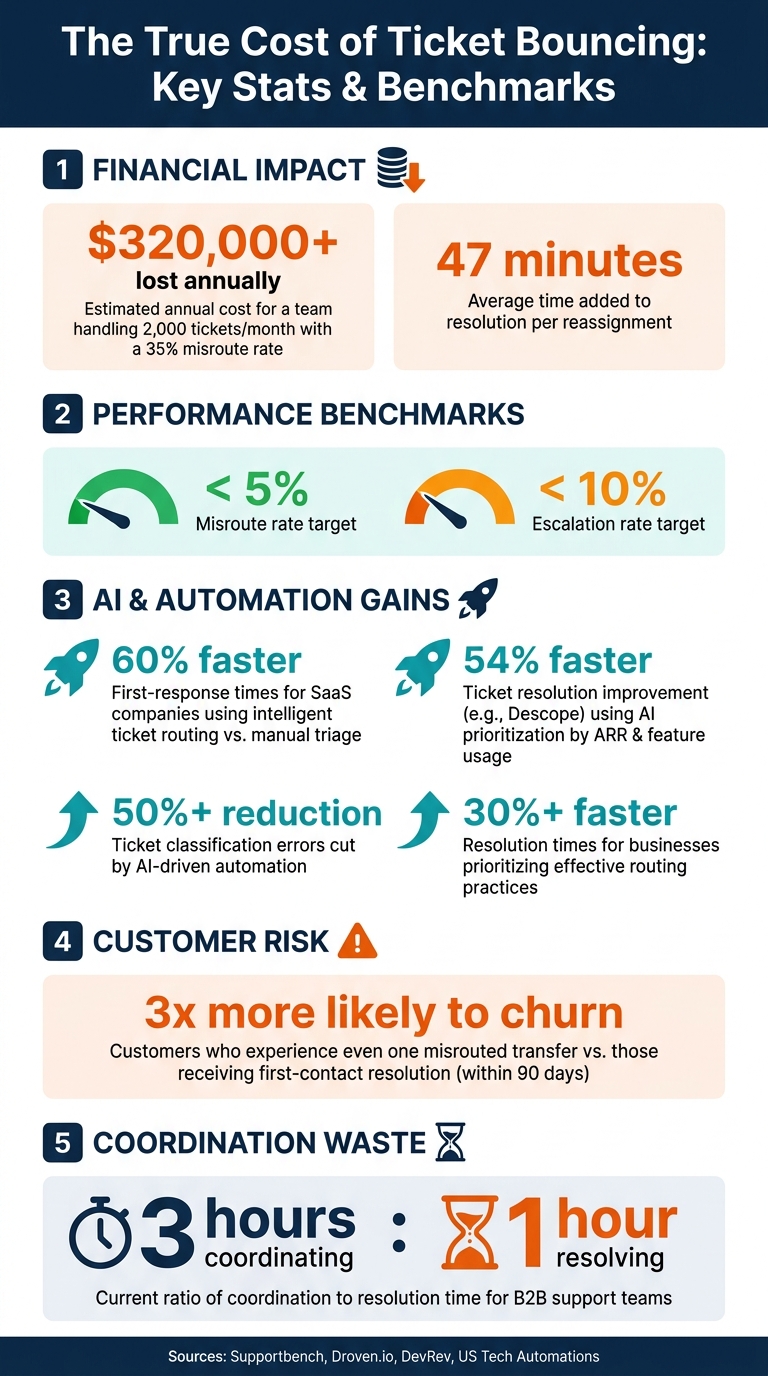
The goal here is to go beyond vague categories like "Technical Issue" and instead capture specific entities: which product, which feature, and which customer segment. This level of detail allows routing logic to assign tickets to the correct resolver group right from the start, rather than relying on a human to interpret an unclear subject line. Skipping this step can lead to what’s often called the "misrouting tax." For example, a team handling 2,000 tickets per month with a 35% misroute rate could lose more than $320,000 annually in wasted agent time. [2] By providing detailed intake data, AI triage systems can classify and prioritize tickets more effectively, taking over the triage process with greater accuracy.
Use AI for Ticket Triage
Traditional rule-based routing often falters when tickets don’t match expected keywords, leading to misrouted cases. AI-powered triage, on the other hand, is better equipped to handle ambiguity. It classifies tickets based on intent, sentiment, and entity relationships, rather than relying solely on surface-level keywords.
Instead of allowing customers to self-select urgency – a method that’s often unreliable – AI can calculate priority using real business metrics like account renewal timelines, ARR (annual recurring revenue), contract stages, and historical satisfaction scores. For example, high-risk enterprise tickets can be routed directly to the appropriate team, bypassing standard queues altogether. The impact is clear: SaaS companies using intelligent ticket routing have achieved first-response times 60% faster compared to those relying on manual triage. [3]
Take Descope as an example – they managed to resolve tickets 54% faster by implementing AI that prioritized cases based on ARR and feature usage, all without increasing headcount. [2] This smarter triage process reduces unnecessary handoffs and minimizes the chance of tickets bouncing between teams.
"Manual support routing is one of the most solvable operational problems in SaaS – and one of the most expensive to leave unsolved." – Garrett Mullins, Workflow Specialist, US Tech Automations [3]
Platforms like Supportbench integrate AI automation to handle these tasks seamlessly, automatically prioritizing cases, assigning issue types, and tagging tickets so agents can focus on solving problems instead of sorting through them.
Apply Escalation Prediction to Catch At-Risk Tickets
AI doesn’t just improve initial routing; it also helps identify tickets at risk of escalation. Sometimes, a ticket initially appears routine but stalls in the process – or worse, the customer follows up before it’s resolved. Escalation prediction helps flag these at-risk tickets before they become major issues.
AI systems monitor various signals, such as negative sentiment trends, repeat contact history, and urgency-related keywords. If a ticket’s classification confidence drops below a certain threshold – say, 70% – it’s flagged for human review rather than being auto-routed to the wrong queue. This step is critical because customers who experience even one misrouted transfer are three times more likely to churn within 90 days compared to those who receive first-contact resolution. [3] Identifying and addressing these tickets early – before they bounce multiple times – is one of the most impactful ways a support team can improve customer retention.
How to Standardize Handoffs and Escalations
Even with the best routing systems, things can fall apart if ticket transfers aren’t handled properly. A ticket might reach the right team, but if the context isn’t clear, it can still get bounced around. To avoid this, it’s crucial to create a standardized process for transfers and escalations that ensures all necessary information stays intact.
Require Handoff Summaries on Every Transfer
Every ticket transfer should follow a clear, structured protocol. This means including a one-sentence summary of the problem, details of attempted solutions, the next steps, and any relevant customer context. Think of it like an Air Traffic Control handoff – when all the details are reviewed upfront, there’s no need for the new team to start from scratch.
"The gap between ‘tickets are lost during transfer’ and ‘handoffs feel invisible’ is a 60-second template and the discipline to use it." [1]
To make this process seamless, integrate the handoff template directly into your help desk system. This ensures every transfer includes consistent summaries, reducing the chances of miscommunication. When combined with clear escalation triggers, it creates a smoother workflow.
Define Escalation Triggers and Service Levels
After standardizing handoffs, the next step is to define escalation triggers. This removes any uncertainty about when and how a ticket should be escalated. Escalations typically fall into two categories:
- Functional escalations: When a ticket needs expertise from a specific department, like engineering or billing.
- Hierarchical escalations: When higher authority is required, such as for approving refunds or making contract exceptions.
Confusing these escalation types often leads to unnecessary delays. To prevent this, clearly outline the triggers for escalation – this could include specific keywords, customer sentiment, priority levels, or other signals. For each escalation path, assign three key roles:
- Someone responsible for resolving the issue.
- Someone tasked with updating the customer.
- Someone monitoring progress to ensure the ticket doesn’t fall through the cracks.
Currently, B2B teams spend three hours coordinating for every hour spent resolving issues [5]. By defining triggers and assigning roles, you can significantly reduce this wasted time.
Automate Notifications and Case History Updates
The final step in streamlining escalations is automation. When a ticket is reassigned, the new team member should automatically receive the full case history. This eliminates the need to dig through records or ask for updates. Automated notifications triggered during transfers, combined with a confirmation step by the receiving agent, ensure nothing gets missed.
Platforms like Supportbench simplify this by updating case histories in real time and providing the new agent with all relevant details without requiring manual input. This keeps the transition smooth and invisible to the customer, cutting down on the back-and-forth that often delays resolution times.
Metrics to Track and Reduce Ticket Bouncing
The True Cost of Ticket Bouncing: Key Stats & Benchmarks
Tracking the right metrics is crucial if you want to fine-tune your ticket routing and handoff processes. Without solid data, you’re essentially working in the dark.
Track Bounce Rates and Resolution Times
Two key metrics to keep an eye on are reassignment count and Time to Resolution (TTR). A high reassignment count paired with long unassigned times – how long a ticket sits before being reassigned – can highlight where delays are piling up.
"Good routing reduces: time wasted on manual triage, incorrect assignments and reassignments, slow first response times, backlog growth, [and] agent burnout." – Droven.io [6]
These metrics should be reviewed weekly. If reassignment rates don’t start to drop within the first few weeks of a workflow change, it might mean your intake process or routing rules need tweaking. Tracking these numbers helps uncover deeper operational issues.
Find Patterns Behind Recurring Bounces
Detailed dashboards are your best friend here. They can help you spot trends, like billing tickets frequently ending up in the technical queue or a surge in escalations tied to a specific product or customer tier. These patterns often point to misconfigured routing rules or areas where agents may need more training.
Pay close attention to tickets categorized as "Other" or "Uncategorized." If this bucket starts growing, it’s a clear sign your intent taxonomy needs work.
"If ‘Other’ becomes large, taxonomy is wrong." – Droven.io [6]
For a well-functioning support system, aim for a misroute rate below 5% and an escalation rate below 10% [4]. If your numbers are above these benchmarks, your data is signaling exactly where to focus your efforts. Spotting these patterns allows for precise adjustments in workflows.
Use Bounce Data to Update Workflows and Knowledge Bases
Bounce data isn’t just numbers – it’s a goldmine of actionable insights. Use flagged misroutes to retrain your AI classifier and fine-tune your routing rules incrementally. Every correction adds to the learning process, helping you refine your system over time.
If certain issues keep triggering escalations, it’s a sign your knowledge base might need an update. Plugging those content gaps can prevent the same problems from cropping up again. The idea is to create a continuous improvement cycle: measure → identify → fix → repeat.
AI-Native Workflows That Reduce Ticket Bouncing
By combining solid metrics with seamless handoffs, AI-native workflows take the effort out of reducing ticket bouncing. These tools go beyond simple ticket classification – they tackle the root causes of bouncing, making the entire process smoother.
Auto-Generate Case Summaries for Rapid Context Delivery
Every time a ticket changes hands, the new owner has to catch up. Without a concise summary, this means digging through lengthy message threads – a time-consuming task. On average, each reassignment adds about 47 minutes to the total resolution time [2].
AI-generated case summaries address this issue by providing a clear, condensed overview of the ticket’s history, customer details, and prior actions. This summary is ready as soon as a new agent opens the ticket, eliminating the need for manual reviews. With everything laid out, the new owner knows exactly where things stand. Tools like Supportbench incorporate AI case summaries directly into their workflows, ensuring agents automatically receive all the context they need.
Once context transfer is streamlined, the next challenge is assigning tickets to the right person from the start.
Surface Suggested Assignees Based on Case Data
After delivering quick context, AI steps in to ensure tickets are assigned to the best person for the job. Misassignments are a major reason for ticket bouncing. AI tackles this by analyzing past resolution data, agent expertise, and the specific product area involved to recommend the most suitable owner – before a human even steps in.
This approach surpasses traditional rule-based routing. Instead of just matching keywords to queues, the AI identifies who has successfully handled similar issues in the past, ensuring tickets land with the right person on the first try.
Deliver Knowledge Base Recommendations to Agents
In addition to precise ticket assignments, AI also empowers agents with instant access to relevant resources, reducing unnecessary escalations. Many escalations occur not because the issue is complex, but because the agent lacks the information to resolve it. AI-driven knowledge base recommendations solve this by providing real-time suggestions, such as relevant articles, macros, or pre-written replies, while the agent works on the ticket.
"The real opportunity isn’t just faster classification. It’s using AI support ticket triaging strategies that eliminate tickets by resolving them at the point of triage." – Neelabja Adkuloo, Member of Marketing Staff, DevRev [2]
This kind of agent assist feature ensures L1 agents can resolve issues without escalating when a simple knowledge article would suffice. For example, Supportbench’s AI Agent-Copilot scans both internal and external knowledge bases to deliver relevant answers and suggestions before an agent considers transferring the ticket. The result? Fewer unnecessary handoffs and quicker resolutions across the board.
Conclusion: Steps to Stop Ticket Bouncing and Improve Support Outcomes
Ticket bouncing isn’t about individual mistakes – it’s a systems issue. When routing rules are unclear, ticket ownership is vague, or requests lack necessary context, bouncing becomes the norm instead of an occasional hiccup.
The solution lies in fixing the foundation. Clear ownership structures, well-defined handoff processes, and standardized intake forms remove the guesswork that leads to tickets being passed around. On top of that, tools like AI-powered triage and escalation prediction ensure tickets land with the right person from the start, reducing reliance on manual decision-making.
As one expert insightfully notes:
"The fix is structural, not cultural. Build the handoff template into your help desk workflow." – Supp [1]
Data is your compass for improvement. Metrics like reassignment rates, resolution times, and CSAT scores pinpoint where your routing logic falters, giving you the direction needed to refine your workflows. For example, businesses that prioritize effective routing practices have reported over 30% faster resolution times [7]. Meanwhile, AI-driven automation can cut ticket classification errors by more than 50% [7].
The goal isn’t to eliminate handoffs entirely – some are unavoidable. Instead, focus on making each handoff purposeful, well-documented, and efficient. By embedding this principle into your workflows, ticket bouncing shifts from being a persistent issue to an occasional anomaly.
FAQs
What’s the fastest way to find where tickets start bouncing?
To figure out where tickets are getting stuck or passed around too often, focus on tracking reassignment patterns. Metrics like reassignment rates and time lost during handoffs can reveal problem areas.
One helpful approach is adding a required "reassignment reason" field in your ticketing system. This allows you to review common causes of ticket bouncebacks regularly – ideally on a weekly basis.
You can also analyze which groups are frequently involved in these reassignments. Identifying these patterns makes it easier to uncover and address the root issues, saving time and improving workflow efficiency.
How do we keep one owner while still involving other teams?
To keep ownership clear while collaborating with other teams, designate one accountable owner – such as a coordinator – who manages communication, follow-ups, and case resolution. Use role-specific fields like "Support Owner" to define responsibilities and avoid misunderstandings. Establish internal SLAs and automate task assignments to streamline handoffs, ensuring ownership remains consistent and well-defined.
Which intake fields reduce misrouting the most?
Key intake fields that significantly cut down on misrouting include issue type, department, priority, and customer category. These fields play a crucial role in classifying and detailing the nature of requests, which helps ensure they are routed to the correct destination. By establishing clear definitions and routing rules tied to these fields, organizations can improve assignment accuracy and reduce errors. Including customer profile details as a priority can also enhance routing precision, resulting in quicker resolutions and fewer misrouted tickets.
Related Blog Posts
- How do you set up case ownership rules for shared inboxes and avoid “unowned tickets”?
- How do you handle “ticket ping-pong” between teams (handoff rules + templates)?
- Reducing “Ticket Ping-Pong”: Strategies for Faster Resolution
- How to handle internal escalations without losing ticket ownership clarity






