



If your support work involves SLAs, handoffs, and account risk, I’d default to ticket-first. Chat-first is best for simple, one-session requests. Hybrid works when I want chat for intake but still need a case record once work spans teams or days.
Here’s the short version:
- Chat-first is best for:
- password resets
- basic onboarding questions
- one-step urgent requests
- in-product help and bot deflection
- Ticket-first is best for:
- multi-team escalations
- contract SLA tracking
- audit trails
- long-running issues
- account-level reporting
- Hybrid is best when:
- I want chat to handle the first touch
- I need harder issues to become tickets with context attached
- I care about both reply speed and case ownership
A few numbers make the tradeoff clear:
- Chatbots can resolve password resets 66x faster
- In-product chat can cut ticket volume by 25%–35%
- Connected helpdesk, CRM, and engineering workflows can improve first-contact resolution by 40%
- Tool switching can cut agent output by up to 40%
- 58% of agents at low-performing teams spend time jumping across screens for context
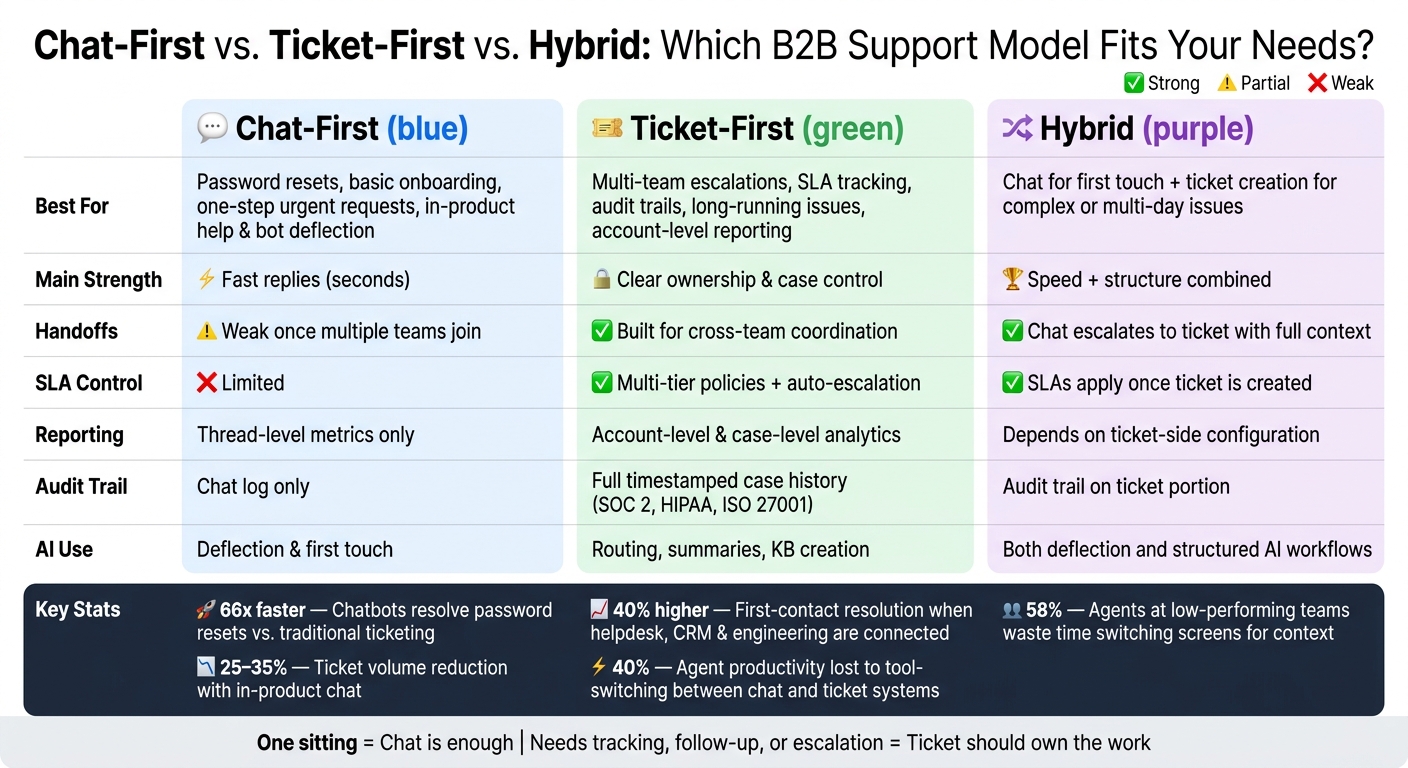
Chat-First vs Ticket-First vs Hybrid: B2B Support Tool Comparison
Chatbot vs Live Chat: Which is Better for Customer Service? 📣
sbb-itb-e60d259
Quick Comparison
| Criteria | Chat-First | Ticket-First |
|---|---|---|
| Best use | Simple, single-session issues | Multi-step B2B support work |
| Main strength | Fast replies | Clear ownership |
| Handoffs | Weak once more teams join | Built for cross-team work |
| SLA control | Limited | Strong case-level rules |
| Reporting | Thread-focused | Account and case-focused |
| Audit trail | Chat log | Full case history |
| AI use | Deflection and first touch | Routing, summaries, knowledge base creation |
| Cost risk | Extra tools for reporting and case control | Add-ons for AI and seat costs |
My rule of thumb is simple: if the issue can be solved in one sitting, chat is often enough. If it needs tracking, follow-up, approvals, or escalation, a ticket should own the work.
Where chat-first tools fit and where they create risk
Where chat-first works: fast answers, simple triage, and single-step urgent issues
Chat-first tools shine when the issue is simple and can be handled in one sitting. In more complex accounts, they work best at the edges of the workflow, not at the core of it. Think password resets, VPN setup, and basic FAQs. That’s exactly the kind of work these tools handle well.
The upside is easy to see. Response times can fall from hours to seconds. Chatbots resolve password resets 66x faster than old-school ticketing systems, and AI can hit a 95% deflection rate for that issue type by itself [4].
In product-led support, chat can also act as a proactive layer inside the product. If you catch onboarding friction before it turns into a support request, ticket volume can drop by 25%–35% [2].
The line is pretty clear: if one agent can solve the issue in a single session, chat is usually the right fit. But once the work needs a second team, follow-up, or outside sign-off, the model starts to creak. And when the issue needs durable ownership, routing, or SLA control, ticket-first tends to work better.
Where chat-first falls short: fragmented context, weak handoffs, and poor long-case control
The main issue with chat-first tools is structural. A conversation thread shows what was said, but it doesn’t hold ownership the way a case does. It logs the exchange, not the status, owner, or SLA clock. For escalations that stretch across days, that gap turns into risk.
You see this most clearly in cross-team handoffs. Once engineering, billing, or another group has to step in, chat-first either loses shape or depends on extra tooling to keep everyone aligned. In B2B, where requests may come from several people inside the same account, that makes it harder to keep one shared source of truth [2].
Reporting is another weak spot. Chat-first analytics usually stay at the thread level. They show conversation volume and response times, but not cross-channel resolution patterns, SLA breach rates, or account-level trends [1][6]. For B2B teams that need to track service quality over time, that missing view makes account health and renewal risk harder to read.
| Dimension | Chat-First Strength | Chat-First Risk in B2B |
|---|---|---|
| Response speed | Seconds for routine issues | Speed doesn’t help if the issue needs multiple steps |
| Simple triage | Effective for FAQs and onboarding | Breaks down when routing requires complex logic |
| Context continuity | Strong within a single session | Fragmented across channels and accounts |
| Handoffs | Fast for single-agent issues | Weak structure for cross-team coordination |
| SLA tracking | Basic at best | No formal breach tracking or escalation automation |
| Audit trail | Conversation logs only | Lacks immutable lifecycle records for compliance |
| Reporting | Thread-level metrics | Missing cross-channel and account-level visibility |
That gap sets up the ticket-first comparison in the next section.
Where ticket-first tools perform better for complex accounts
Better control for routing, SLAs, escalations, and audit trails
Ticket-first tools work better when an account has a lot of moving parts.
Where chat-first setups can lose control during handoffs, ticket-first keeps everything inside one case record. That matters when an issue touches several teams, needs approval, or involves an account tied to a renewal. In those cases, control over ownership and the full case lifecycle keeps work moving and stops context from getting split across separate threads.
Ticket-first systems manage multi-team work with structured fields, internal notes, and ownership rules. Everyone can see what happened and who owns the next step, without digging through side messages or Slack threads. The gap shows up most clearly with SLA enforcement. Ticket-first platforms support multi-tier SLA policies, business-hour rules, and automatic escalations [2][7]. If a Tier 1 enterprise account submits a critical issue at 4:45 PM on a Friday, the system can escalate it before the business day ends. It doesn’t have to wait for an agent to catch it. That’s much harder to match in a chat-first setup, where SLA handling is often more limited.
That same structure also gives teams a clean record for compliance and disputes. Full timestamped case histories support enterprise requirements like SOC 2 and ISO 27001 [4][7]. If a customer asks for the record of a three-week implementation issue, a ticket-first system can pull it up. A chat-first tool usually falls short here.
How AI-native ticket-first workflows cut agent effort without adding complexity
AI takes away much of the manual work in ticket-first operations while keeping the structure that complex accounts need.
At intake, AI can classify intent and sentiment, route the case to the right queue, and apply tags on its own. That helps with a clear pain point: 58% of agents at underperforming organizations spend time switching between multiple screens to find context, compared with 36% at high performers [5]. Less screen switching usually means faster resolution.
For long-running cases, AI-generated summaries are one of the most useful features in the stack. If a case has 40 internal notes and three handoffs, no one wants to read the full thread just to figure out what’s going on. A good summary pulls out the current status, what has already been tried, and what is still open. And it does that in seconds. Supportbench creates these summaries automatically at case creation and at closure, which keeps handoff cost low even during complex escalations.
AI also helps close a common gap between resolved cases and the knowledge base. Plenty of answers live inside closed tickets and never make it into future support content. Ticket-first systems with AI can turn resolved cases into structured KB articles automatically, pulling in the root cause, fix, and environment context at closure [5]. In 2026, the marketing technology company Conductor used this approach to cut agent ramp time by 30%, giving new agents access to structured, version-specific knowledge pulled straight from past cases [5].
The bigger shift is simple: AI moves agent time away from manual handling and toward judgment-heavy work. That means less work per case without giving up control.
Chat-first vs. ticket-first: a direct comparison across the areas that matter most
The cleanest way to compare these models is to look at where ownership, SLA control, and handoffs start to slip when volume goes up. A fast first reply sounds good. But the bigger test is simpler: can the system keep the case moving after that first reply?
Triage, routing, and cross-team collaboration
In complex B2B support, the first thing to break is usually the handoff, not response speed.
Take an onboarding issue that involves support, billing, and engineering. A chat-first setup can give the customer a fast first reply. But once the issue has to move across teams, things get messy. There’s no structured record to pass along, no single owner, and no simple way to check status without digging through the thread.
Ticket-first systems handle the same case in a very different way. The case opens with full account context, routes by skill set or support tier, and lets teams use internal notes plus structured handoffs inside one record. When teams connect the helpdesk, CRM, and engineering stack, first-contact resolution rates are 40% higher than for teams leaning on single-platform automation [2].
Chat-first tools are good at triage when the issue is simple and stays in one lane. Once a request involves multiple people or teams, handoff quality tends to fall off fast.
SLA management, reporting, and auditability
Chat-first tools usually track response timers at the thread level. Ticket-first systems manage SLAs at the case level, with escalation rules and business-hour logic built in.
That gap shows up fast when leadership wants a report on service performance across top accounts for the past quarter. In most cases, a ticket-first system can pull that data without much extra setup. Chat-first reporting is often thinner unless you bolt on more tools or use a separate system of record.
Ticket-first also keeps a case-level audit trail, which matters for disputes and compliance. Platforms built to support standards like SOC 2 Type II, HIPAA, and ISO 27001 [7] matter when a customer challenges a service claim or your team has to show SLA adherence during a renewal conversation.
AI workflows and total operating cost
Chat-first AI is strong at deflecting simple requests. Ticket-first AI does a different job: it routes, summarizes, and turns closed cases into knowledge.
That’s the operating gap the table below brings into view.
| Area | Chat-First | Ticket-First |
|---|---|---|
| Triage | AI bot handles first touch; strong for simple queries | Intent and sentiment classification routes cases automatically |
| Routing | Behavioral triggers and in-app context | Skills-based routing with multi-tier and multi-brand support |
| Handoffs | Smooth bot-to-human within one channel; weak across teams | Structured ownership transfer with full case history intact |
| SLA management | Basic timers; limited escalation logic | Multi-tier policies, business-hour rules, automatic escalation |
| Reporting | Chat-scoped; limited historical depth | Deep analytics across accounts, tiers, and time periods |
| Auditability | Requires backend sync for compliance | Built-in; SOC 2, HIPAA, ISO 27001 support |
| AI strength | Proactive deflection and volume reduction | Routing, summaries, KB creation, and resolution assist |
| Base seat cost | ~$29–$132/agent per month + $0.99/AI resolution [3] | ~$19–$115/agent per month + $50/agent AI add-on [1][6] |
| Hidden cost risk | Separate tools needed for ticketing, KB, and reporting | Add-on fees for AI copilot and per-resolution charges |
There’s also a day-to-day cost that doesn’t always show up in the pricing page. Tool-switching between chat and ticket systems can cut agent productivity by up to 40% [7]. That’s not a small drag. It hits speed, focus, and case continuity all at once.
Decision framework: chat-first, ticket-first, or a hybrid model
These trade-offs help you pick the operating model that fits your support work. Once you strip it down, the choice hinges on issue complexity and service risk.
Choose chat-first only when issue complexity stays low
Use chat-first only for self-contained, low-risk issues with no formal SLAs, audit needs, approvals, or cross-team handoffs. For urgent, one-step requests, chat can handle the first touch well.
But there’s a catch: chat-first holds up only when the rules stay simple. Once that changes, the model starts to wobble. If a case needs clear ownership beyond a single session, it no longer fits a chat-first flow.
Choose ticket-first when service quality directly affects retention and renewal risk
For multi-stakeholder implementation issues and long-running escalations, ticket-first keeps ownership in place. If your accounts have high lifetime value and your team manages volume across several channels, ticket-first is the safer call [2][8].
It keeps escalations visible, SLAs under control, and handoffs from falling through the cracks. That’s why ticket-first makes sense as the default for renewals, escalations, and work that unfolds over several steps.
Supportbench supports this model with dynamic SLAs, AI summaries, predictive CSAT, and escalation tracking – without adding separate tools for core AI functions.
Use a hybrid model when chat speed matters but case control is non-negotiable
When speed alone isn’t enough, and structure alone feels too rigid, a hybrid model gives you both. Chat acts as the front door for every request, handles routine issues on the spot, and pushes harder cases into structured tickets with full context carried over [4].
Escalate when an issue needs another team, a follow-up step, or an approval. That handoff has to happen cleanly. If chat and ticketing don’t share context, you end up right back in the same mess that makes chat-first hard to scale on its own.
Set clear thresholds for when a chat should become a ticket. Then track first-contact resolution, AI deflection, CSAT, and SLA breaches before and after any platform change.
FAQs
When should chat become a ticket?
A chat should become a ticket when it can’t be solved in a single session or when other teams need to step in.
Create a ticket for:
- Long-running escalations
- Multi-day troubleshooting
- Bugs or outages affecting multiple customers
- Any request that needs an audit trail, SLA tracking, approvals, or close tracking for a high-value account or renewal risk
How do I choose a hybrid support model?
Set a clear policy that splits intake from casework based on what it takes to solve the issue. Use chat-first tools for live, transactional, single-session questions. Move issues tied to bugs, outages, VIP accounts, or work that spans shifts or multiple stakeholders into a ticket-first system.
Keep one shared priority model, such as P1 through P4, and automate two-way sync so ticket status and internal notes show up in the chat thread. That cuts context loss and duplicate updates.
Which KPIs matter most in complex B2B support?
In complex B2B support, KPIs need to do more than measure speed. They should show account health, team efficiency, and signs of retention risk. First Response Time (FRT) and CSAT still matter, but the bigger priority is tracking the full case lifecycle from start to finish.
That means paying close attention to backlog volume, case aging, First Contact Resolution (FCR), escalation rates, SLA breach alerts, Customer Effort Score (CES), and predictive health scores.
Related Blog Posts
- Live Chat vs Email Support: Pros and Cons Compared
- What are the best Intercom alternatives for B2B support teams that need ticketing?
- Intercom vs. Supportbench: When to Move from Conversational to Structured Support
- Moving Beyond “Chat”: Why Asynchronous Ticketing Wins for Complex B2B Issues
Evaluating help desks for a B2B team?
Supportbench is all-inclusive from $32 per agent per month, with migration and onboarding included. See pricing or book a 20-minute demo.






