



If Intercom is your only support system, chats can turn into loose threads, unclear ownership, and missed SLA targets. I’d fix that by using Intercom for customer messages and a case system behind it for routing, ownership, escalation, and reporting.
Here’s the short version:
- I’d turn follow-up chats into cases, not leave them as inbox threads.
- I’d map each case type to a queue, owner, priority, and SLA.
- I’d collect the right intake data up front, like account, business impact, plan tier, and churn risk.
- I’d use AI for tagging, summaries, routing, and escalation flags.
- I’d keep support as the customer-facing owner while Billing, Success, or Engineering work linked internal tickets.
- I’d track FRT, NRT, TTC, and TTR with office hours, pause rules, and breach alerts.
- I’d report by account, severity, queue, and team, not just reply speed.
A few numbers stand out. Manual triage can take 2 to 6 minutes per ticket. AI triage can reach about 89% accuracy, while rule-based routing often lands around 40% to 50%. And AI summaries can help teams resolve tickets 15% to 25% faster.
The main point is simple: Intercom works well as the front door, but B2B support needs a case layer behind it.
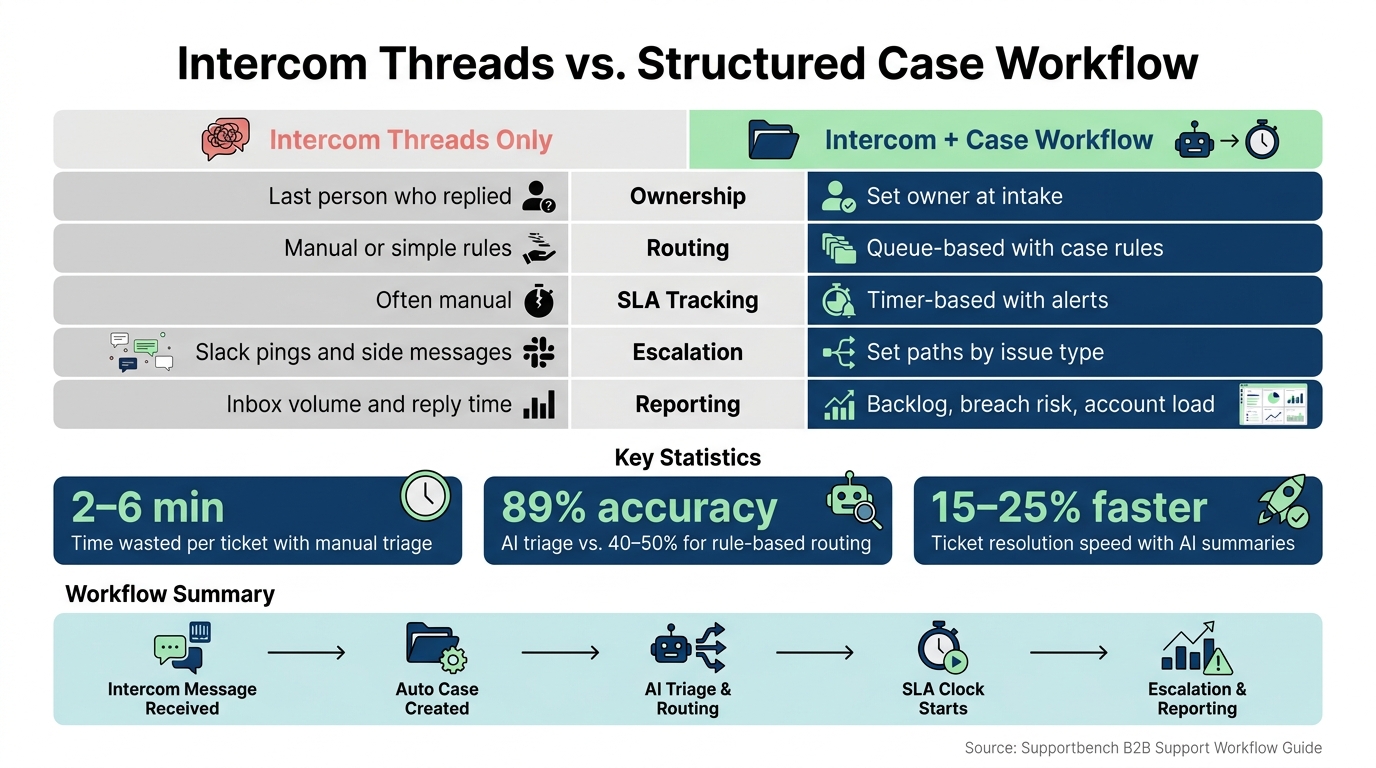
Intercom Threads vs. Structured Case Workflow: Key Differences & Stats
How to streamline customer support with Intercom tickets
sbb-itb-e60d259
Quick comparison
| Area | Intercom threads only | Intercom + case workflow |
|---|---|---|
| Ownership | Last person who replied | Set owner at intake |
| Routing | Manual or simple rules | Queue-based with case rules |
| SLA tracking | Often manual | Timer-based with alerts |
| Escalation | Slack pings and side messages | Set paths by issue type |
| Reporting | Inbox volume and reply time | Backlog, breach risk, account load |
If I were setting this up, I’d start by deciding which conversations should become cases, then build the intake and routing rules around those paths. This ensures you automate ticket routing effectively from day one.
Map Intercom conversation types to queues, fields, and owners
Start with a taxonomy. Define each conversation type, the data it needs, and the team that owns it. That’s the piece that turns scattered threads into a steady case-handling process.
In practice, use Conversations for one-off questions and Tickets for issues that need ownership, investigation, or handoff [3][5].
A simple way to sort the work is into customer tickets, back-office tickets, and tracker tickets. From there, route each one by ownership: Tier 1 for routine questions, Billing for standard disputes, Senior Support for highest-LTV escalations, Engineering for outages and defects, and Customer Success for cancellation risk [2][4][5].
Set required fields and queue rules at intake
Collect the fields you need at intake so the case can be routed, prioritized, and escalated without guesswork. Capture the affected account, business impact, environment, plan tier, lifetime value, and churn risk [2][3]. Use case fields for issue-specific details too, such as incident details for technical issues [1][3].
Once those intake fields are in place, routing can follow account value, issue type, and urgency instead of manual judgment. For example, a highest-LTV account with a billing dispute can go straight to a senior support queue instead of landing in a general queue [2]. Those same fields also make filtered queue views much easier to build, like views for urgent technical issues or high-priority accounts [3].
Comparison table: unstructured Intercom threads vs. structured case intake
| Dimension | Intercom threads only | Structured case intake |
|---|---|---|
| Visibility | Buried in the inbox; no account-level view | Every case tied to account, plan, and history |
| Ownership | Whoever replied last | Assigned at intake with clear handoff rules |
| SLA control | No enforcement; tracked manually if at all | SLA clock starts at case creation |
| Reporting quality | Volume and response time only | Backlog by account, type, severity, and team |
| Risk of missed follow-up | High; no system reminder or escalation trigger | Low; automated escalation when SLA is at risk |
With the taxonomy set, the next move is to turn each type into intake, triage, and routing rules.
Build the intake, triage, and routing workflow
Once your taxonomy and intake fields are set, the next step is to make the flow do the heavy lifting. Qualifying Intercom messages should auto-classify, pull in account context, and land in the right queue without an agent sorting them by hand.
Create cases automatically from Intercom conversations
Set Intercom to create cases for bug reports, refund requests, cancellation intent, and high-risk account activity. That way, the team doesn’t have to spot every issue manually in a busy inbox.
As soon as a case is created, generate an AI briefing. This gives the agent the short version right away, so they can act without reading the whole thread from top to bottom. That matters more than it sounds. AI-routed tickets handled with a summary layer are resolved 15% to 25% faster than those without one [2].
Apply severity, priority, and handoff rules across support, success, and engineering
Triage should follow business impact, not simple queue order. Use severity to measure impact and priority to reflect urgency.
A billing dispute from a high-LTV account shouldn’t be handled the same way as the same issue from a standard account. Same problem, different stakes. In that case, send it to senior support instead of a general queue.
Handoffs also need clear structure by case type:
- Support keeps ownership of customer-facing tickets.
- If engineering or Customer Success needs to do internal work, the customer-facing case should still stay with support.
- When engineering needs to step in, like with a confirmed production bug, create an internal engineering ticket linked to the original case.
- Cancellation-related cases should go to Customer Success or a retention team, not the general support queue.
This setup keeps one team talking to the customer while the other team handles the internal work in parallel. It cuts confusion and avoids the classic "who owns this?" mess.
Use AI for tagging, summarization, routing, and escalation detection
Rule-based routing sounds fine until real customer language shows up. Someone might write, "I was charged twice", and never use the word "refund." A keyword rule can miss that. AI usually won’t. It can still tag the message as a billing issue and send it where it belongs.
In mature setups, AI triage reaches about 89% accuracy, compared with 40% to 50% for rule-based systems [2].
The guardrail here is the confidence threshold. If the AI’s intent classification score drops below 0.7, don’t let it guess. Send the workflow to a clarifying question instead [2].
AI can also spot escalation risk in real time by reading urgency and sentiment. If a case sounds distressed or time-sensitive, it can go straight to senior support or on-call engineering before things get worse. On top of that, AI can surface related cases during handoff, so the next agent isn’t walking in cold.
| Intent | Urgency | Account Tier | Route To |
|---|---|---|---|
| Billing refund | High | Top 10% by LTV | Senior support / Escalation queue |
| Technical outage | High | Any | Engineering on-call |
| Cancellation risk | Any | Top 10% by LTV | Customer Success / Retention team |
| Distressed complaint | Any | Any | Senior agent |
Once routing is stable, add SLAs and escalation rules on top of these queues.
Set SLA, escalation, and reporting controls that scale
Design SLAs and escalation paths for complex B2B cases
Once a case lands in the right queue, the SLA sets the pace. Track four metrics for every case type: FRT, NRT, TTC, and TTR.
Not every case should move on the same clock. Tier SLAs by account value and severity. For example, billing blockers from mid-market accounts may need a 2-hour FRT. Production outages may call for a 15-30 minute engineering response. Routine bugs from lower-tier accounts can sit in the 4-8 hour range [2][4].
Two controls make these timers far more usable: office hours and SLA pausing.
If SLA timers run only during office hours, a message sent at 5:50 PM on Friday won’t look overdue at 9:05 AM on Monday. That keeps your reporting honest. Pausing timers also matters. When a case moves to "Waiting on Customer" or "Snoozed," the clock should stop so your team isn’t blamed for delays on the customer’s side [7]. You can also tighten SLAs as renewal dates get closer.
Escalation paths should be short and plain. No maze, no guesswork.
- A confirmed production outage should go straight to engineering on-call as an SLA trigger, not just a routing rule.
- Billing blockers should go to Billing/Finance, then move up to a finance manager or senior support owner if needed.
- Security and compliance questions should skip standard SLA timers and move to a restricted specialist queue with role-based access controls, so only authorized agents can view the case [2][4].
Track backlog, SLA risk, and account-level support load
Open-ticket counts can look clean while risk builds underneath. SLA views and load views show what’s about to go wrong, not just what’s sitting in the queue.
That only works if leaders can see breach risk as it happens.
Use four core views: an SLA performance report, a queue backlog dashboard, an account load dashboard, and an issue-trend dashboard. The SLA performance report should break out hit, missed, and fixed states by team and account tier [7]. The queue backlog dashboard should show open cases by age bucket and flag anything within 60 minutes of breach, with a separate alert tier for the final 15 minutes [3].
The account load dashboard helps you spot uneven pressure. It should show open cases per account, split by plan, MRR, and VIP flag. That way, you can catch the moment when one enterprise customer is quietly taking up a big share of your queue.
Predictive CSAT/CES and FCR signals can also help. Use them to flag cases that are likely to disappoint before the case is even closed.
Leader alerts should fire when SLA risk drops below 15 minutes, when a critical case goes overdue, or when a tag suddenly spikes. Send those alerts to a dedicated channel so the right person sees them at once [6].
Comparison table: case design by issue type
| Issue Type | Default Queue | Default SLA Metric | Typical Owner | Escalation Path |
|---|---|---|---|---|
| Bug report | Engineering / QA | Time to Resolution (TTR) | Technical support | Engineering on-call |
| Billing issue | Billing / Finance | Time to Close (TTC) | Billing specialist | Finance manager |
| Multi-stakeholder account issue | Customer Success | First Response Time (FRT) | Account manager | CS director / Retention |
| Security / compliance question | Restricted queue | No SLA timer | Specialist queue | Legal counsel |
Conclusion: Turn Intercom into a controlled support operation
Intercom is the customer-facing layer. The helpdesk workflow behind it is what gives B2B teams ownership, SLA control, and account-level visibility. Once that structure is in place, the next step is simple: make it the default path for every Intercom conversation that needs follow-up.
Start by turning bug reports, billing questions, and account issues into fixed queues with required fields. Then automate triage so each case lands in the right queue the first time. That setup gives teams a clear path for routing, ownership, and escalation without constant manual work.
The power of this system doesn’t come from one rule alone. It comes from intake, routing, summaries, SLAs, and reporting all working together. Use transfer summaries, clear SLA tiers, and escalation dashboards to keep work moving without manual follow-up. At that point, the workflow becomes predictable and enforceable.
Supportbench brings AI automation, dynamic SLAs, escalation management, and account-level reporting into one support layer. That means Intercom becomes part of a controlled support operation instead of a shared inbox. The result is faster handoffs, fewer missed follow-ups, and clearer control over every B2B support case.
FAQs
When should a chat become a case?
A chat should turn into a case or ticket when the issue needs more than a quick back-and-forth. That usually means a multi-step fix, help from other teams, or formal SLA tracking.
This matters even more for complex B2B issues. Converting the chat keeps the full conversation history in one place, makes ownership easier to see, and helps make sure follow-ups don’t slip through the cracks.
What fields should we require at intake?
Require the fields that support routing, priority, and context:
- account ID or email address
- subscription or plan tier
- issue category or intent
- urgency signals, such as outages or production-critical issues
- relevant metadata, like channel source
When these fields are standardized, AI systems or rule-based workflows can route conversations to the right team, set the right SLA, and give agents the context they need if the case gets escalated.
How do we keep one owner during handoffs?
Use a helpdesk workflow that splits first-contact intake from deeper issue tracking. When a problem takes more than one step to fix, move it into a persistent ticket so one primary owner stays responsible, even if engineering or finance needs to weigh in.
Automated workflows can send conversations to the right team inboxes, and internal notes make it easier for people to work together behind the scenes. The customer still sees one unified conversation, while ownership stays clear from start to finish.
Related Blog Posts
- Intercom (10) – framed correctly as “chat-first → real helpdesk”
- How do you convert Intercom conversations into tickets and keep ownership + SLAs?
- Intercom vs. Supportbench: When to Move from Conversational to Structured Support
- Intercom is not a helpdesk: how to keep Intercom for chat and run tickets elsewhere
Evaluating help desks for a B2B team?
Supportbench is all-inclusive from $32 per agent per month, with migration and onboarding included. See pricing or book a 20-minute demo.






