For B2B support teams needing structured ticketing and account-level insights, Intercom may not always be the best fit. Its lightweight ticketing system and unpredictable AI pricing can create challenges for managing complex, multi-stakeholder relationships. Here are five alternatives designed to meet the needs of B2B teams:
- Supportbench: Focused on long-term customer relationships with real-time sentiment tracking, SLA management, and transparent pricing ($32/agent/month).
- Zendesk: Known for handling high ticket volumes with advanced AI tools, but its modular pricing can lead to unpredictable costs (starting at $55/agent/month).
- Freshdesk: Offers affordable plans starting at $15/agent/month, with AI tools like Freddy AI for automating up to 80% of routine queries.
- Front: A collaborative shared inbox with AI tools and pricing starting at $25/seat/month, ideal for streamlining communication.
- Pylon: Tailored for Slack and Teams integration, it focuses on account-level support with pricing starting at $59/seat/month.
Quick Comparison
| Platform | Key Features | Starting Price | Best For |
|---|---|---|---|
| Supportbench | SLA management, sentiment tracking, churn detection | $32/agent/month | Long-term customer relationships |
| Zendesk | High-volume ticketing, AI triage, integrations | $55/agent/month | Enterprise-level support |
| Freshdesk | Affordable plans, Freddy AI, SLA policies | $15/agent/month | Small-to-mid-sized businesses |
| Front | Shared inbox, AI drafts, collaboration tools | $25/seat/month | Team collaboration |
| Pylon | Slack/Teams integration, account intelligence | $59/seat/month | B2B teams using messaging platforms |
Each platform offers unique strengths, so choose based on your team’s priorities like pricing transparency, AI capabilities, or integration needs.
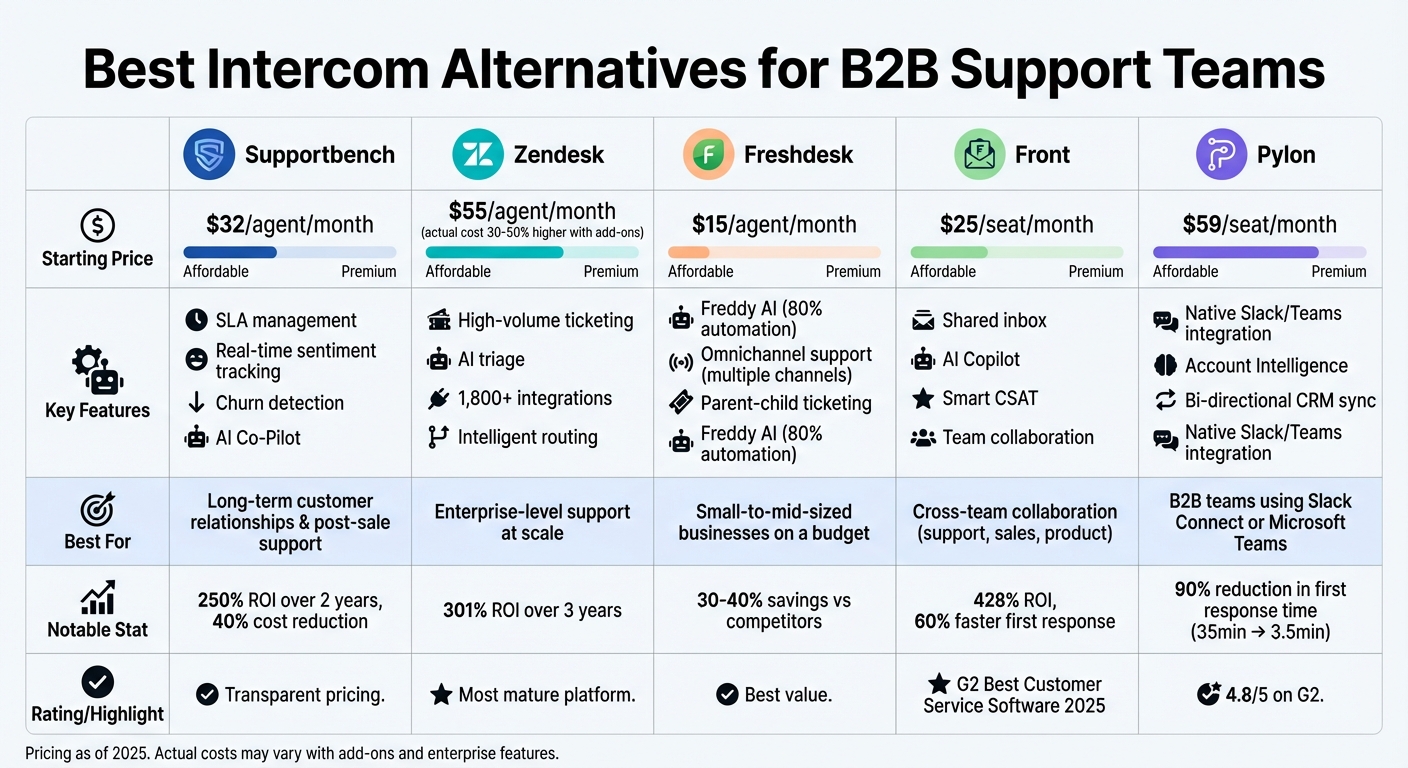
Intercom Alternatives Comparison: Features, Pricing & Best Use Cases for B2B Support Teams
1. Supportbench
Ticket Management
Supportbench takes a contextual ticketing approach, offering a complete view of every customer journey. This is especially important for B2B relationships that often span months or even years. Instead of treating tickets as isolated events, the platform maintains a full account history across all interactions. This approach tackles a key issue with chat-first tools – 73% of B2B companies cite Intercom’s B2C-oriented design as a major reason for seeking alternatives. With features like layered SLA management and entitlement rules, teams can easily meet B2B commitments without relying on manual processes. This solid ticketing framework serves as the backbone for its advanced AI tools.
AI Capabilities
Supportbench features real-time sentiment tracking and an AI Co-Pilot designed to streamline workflows. The Co-Pilot suggests context-aware replies and manages knowledge articles automatically. It can instantly pull relevant information from the knowledge base and even convert resolved tickets into articles with a single click, complete with auto-tagging and summarization. For quality assurance, the system reviews every ticket for empathy, accuracy, and tone, providing agents with instant QA scorecards. These capabilities not only enhance efficiency but also prepare businesses for growth.
Scalability
Whether you’re managing a team of 10 or 1,000 agents, Supportbench adapts effortlessly. Its customizable workflows and intelligent automation eliminate the need for costly migrations as your team grows. The platform includes predictive tools like CSAT and CES scoring, as well as First Contact Resolution (FCR) detection. Dynamic SLA adjustments based on case content and context are another standout feature – for instance, SLAs can be tightened automatically when a renewal is approaching.
Cost-Effectiveness
Supportbench pairs its operational capabilities with transparent pricing, starting at $32 per agent per month. This includes automation, analytics, and reporting from the start, with no hidden fees or gated features. The platform delivers an impressive 250% ROI over two years, and companies report a 40% reduction in operational costs after switching from other providers. On top of that, users achieve an average customer satisfaction rate of 96%.
"Supportbench addresses what Zendesk overlooked: maintaining context across complex B2B customer relationships." – Nooshin Alibhai, Founder and CEO of Supportbench
sbb-itb-e60d259
2. Zendesk
Ticket Management
Zendesk brings together multiple communication channels – email, voice, chat, and social messaging – into a single workspace for agents. This setup helps maintain context in long-term B2B relationships while offering a complete view of customer preferences, past interactions, and activities. Its automated ticket routing system assigns tickets to the most qualified agent using omnichannel, skills-based, and intent-based logic. With over 1,800 pre-built integrations, teams can link Zendesk to CRMs and internal databases. However, standard configurations might lack deeper B2B-specific features like asset tracking, often requiring custom development to fill the gaps. For teams needing more robust contextual integration, additional customization becomes necessary. On top of its unified ticket view, Zendesk leverages AI tools to make support operations more efficient.
AI Capabilities
Zendesk’s AI features include intelligent triage, which categorizes tickets by analyzing intent, language, and sentiment – saving agents an estimated 30–60 seconds per ticket. Its AI-driven routing ensures tickets reach the right agent, while sentiment detection identifies emotional tone, helping teams prioritize customers who may be frustrated. Companies using Zendesk’s AI tools have reported tangible benefits, such as reduced ticket volumes, faster response times, and improved customer satisfaction.
Scalability
Zendesk is designed to grow with businesses, accommodating small teams and large enterprises alike. However, unlocking key B2B features – like SLAs, custom reporting, and HIPAA compliance – often requires upgrading to the Professional or Enterprise tiers. For mid-market B2B companies, scaling Zendesk can lead to unexpected costs and longer implementation timelines. In some cases, managing its complexity may even require a dedicated administrator. While Zendesk can meet enterprise needs, these advanced functionalities often come with a higher price tag.
Cost-Effectiveness
Zendesk’s base plans start at $55 per agent per month, but the actual cost often ends up 30–50% higher when factoring in AI add-ons (approximately $50+ per agent per month), implementation services, and usage fees. Although users report an ROI of 301% over three years, challenges like add-on fatigue and unclear pricing can make budgeting difficult.
"Zendesk remains a powerful, mature customer service platform – but it’s no longer the default choice for every team. The right fit depends on your budget, complexity needs, and whether you’ll actually use its enterprise-grade capabilities."
- Macedona, Independent Reviewer
The ONLY Help Desk You Need (Missive vs Help Scout vs Front vs Zendesk vs vs Intercom vs Superhuman)
3. Freshdesk
Freshdesk is designed to tackle the complexities of B2B customer support, offering a blend of efficient ticket management and smart automation tools.
Ticket Management
Freshdesk brings email, chat, phone, and social media interactions into a single inbox, making it easier for teams to manage communications. Real-time collision detection ensures no two agents respond to the same query. The platform also supports parent-child ticketing, allowing teams to break down complex issues into smaller, more manageable tasks.
To enhance efficiency, Freshdesk integrates seamlessly with CRMs like Salesforce and Freshsales. This integration automatically enriches tickets with key account details such as annual recurring revenue, contract dates, and assigned Customer Success Managers. Teams can also set up multiple SLA policies tailored to different customer tiers – like a 1-hour response time for enterprise accounts or a 4-hour window for growth-tier clients. These tools set the foundation for advanced AI-powered features.
AI Capabilities
Freddy AI Copilot boosts agent productivity with features like one-click ticket summarization, sentiment analysis, and reply suggestions based on the knowledge base and past interactions. For example, Razorpay implemented Freddy AI Copilot in October 2024, achieving impressive results: automating over 70% of routine queries, cutting resolution times by 30%, improving first-contact resolution by 40%, and increasing customer satisfaction scores (CSAT) by 25%.
Freddy AI Agent takes automation even further, handling up to 80% of routine tickets independently. Tasks like processing refunds or cancellations are managed seamlessly. Its sentiment detection feature identifies frustrated customers in real-time, helping teams prioritize those who need immediate attention.
"Freddy AI Copilot has significantly enhanced our organization’s operational efficiency by automating over 70% of routine customer queries. This has led to a 30% reduction in average resolution time, boosting customer satisfaction scores by 25%."
- Lakshmish SS, Senior BA, Razorpay
These AI tools not only reduce manual workloads but also help teams scale their operations effectively.
Scalability
Freshdesk’s Enterprise plan is built for growing organizations. It supports multi-brand setups, allowing teams to manage multiple product lines with their own portals and knowledge bases – all from a single admin view. A sandbox environment is included for testing complex workflows and CRM integrations before they go live, typically within 4–8 weeks.
With over 1,000 pre-built integrations in the Freshworks Marketplace, Freshdesk easily connects with existing tools, ensuring smooth scalability. Key enterprise features like audit logs and sandbox environments are exclusive to the Enterprise tier, which costs $79–$89 per agent per month. These features help organizations maintain efficient operations as they grow.
Cost-Effectiveness
Freshdesk stands out for its affordability, often delivering 30–40% savings compared to similar platforms. Pricing starts at $0 for up to 2 agents on the Free tier. Paid plans include the Growth plan at $15 per agent per month, Pro at $49, and Enterprise at $79–$89. A Pro + AI Copilot bundle is available for $78 per agent per month, including 500 AI Agent sessions. Be mindful of AI session usage, as overages cost around $100 per 1,000 sessions.
The availability of a free tier with basic ticketing for two agents is rare among enterprise-grade helpdesk solutions, making Freshdesk an appealing option for businesses of all sizes.
| Plan | Price (Annual) | Key Features |
|---|---|---|
| Free | $0 | 2 agents, Email/Social ticketing, Knowledge Base |
| Growth | $15/agent | Automation, SLA management, Marketplace apps |
| Pro | $49/agent | Custom reports, Multilingual KB, Round-robin routing |
| Enterprise | $79–$89/agent | Sandbox, Skill-based routing, Audit logs |
4. Front
Front is a platform designed to make high-volume B2B communication feel personal, even in complicated, multi-stakeholder environments. It helps businesses avoid fragmented conversations by offering tools for streamlined collaboration. Over 9,000 companies worldwide rely on Front to manage customer service interactions effectively.
Ticket Management
Front takes a unique approach to ticketing, focusing on creating a seamless customer experience. From the customer’s perspective, messages appear as personal emails – no ticket numbers cluttering the interaction. Behind the scenes, teams handle these messages as tickets in a unified workspace. Features like custom statuses, internal @mentions, and linked discussions make coordination easier. For more complex workflows, Front includes "split tickets" to separate new issues from ongoing threads and tools for mass notifications during incidents.
In late 2025, Bentobox, a hospitality platform, adopted Front to tackle challenges like fragmented conversations and managing add-ons. Erin Forden, their Customer Experience Manager, reported impressive results: a 27% decrease in response times and a 50% improvement in query handling speed, thanks to smart routing and automated tagging.
"Front delivered the best out-of-the-box functionality." – Erin Forden, Customer Experience Manager, Bentobox
Front’s ticketing system integrates seamlessly with its AI tools, making operations even more efficient.
AI Capabilities
Front’s AI tools bring automation and insights to the forefront. Its Topics feature categorizes tickets automatically, while Smart CSAT gauges customer satisfaction in real time, removing the need for traditional post-interaction surveys. AI Copilot drafts responses based on past conversations, and the Summarize feature condenses lengthy threads into clear summaries. These tools have saved users 10,000 hours per quarter, sped up first responses by 60%, and reduced workloads by 10%.
Scalability
The platform’s "Workspaces" feature allows businesses to organize inboxes and workflows efficiently. The Enterprise plan includes unlimited workspaces and automation rules, as well as advanced user management options like SSO, SCIM, and custom roles. Companies using Front have reported productivity gains of 40% and response times up to seven times faster. Front also boasts an average ROI of 428% and a lower total cost of ownership compared to legacy systems, thanks to its quick setup and minimal reliance on third-party consultants or IT specialists.
Cost-Effectiveness
Front’s pricing starts at $25 per user per month for up to 10 seats, with core ticketing features included in the Starter plan. The Professional plan, priced at $65 per seat per month (up to 50 seats), adds features like omnichannel support, up to five workspaces, and 20 automation rules. The Enterprise plan, at $105 per seat per month, offers unlimited workspaces, custom roles, and advanced AI tools like AI Copilot, Smart QA, and Smart CSAT. For lower-tier plans, AI add-ons are available separately: AI Copilot and Smart QA each cost $20 per seat per month, while Smart CSAT is $10 per seat per month.
Front’s reputation is further underscored by being named "Best Customer Service Software" in 2025 by G2.
5. Pylon
Continuing our review, this platform takes account-level support to the next level by integrating directly with business messaging tools. Pylon is designed specifically for B2B teams managing complex accounts through platforms like Slack Connect and Microsoft Teams. Unlike chat-first tools, Pylon organizes data around accounts instead of individual tickets, offering a complete view of conversations, stakeholders, and history.
Ticket Management
Pylon’s conversational ticketing system keeps discussions organized, even across multiple threads, making it easier for support, engineering, and customer success teams to collaborate. The platform syncs seamlessly with Slack Connect, Microsoft Teams, and Discord, allowing customers to resolve issues without leaving their preferred workspace. Behind the scenes, internal threads and @mentions help teams coordinate effectively. Additionally, its bi-directional CRM sync with tools like Salesforce, HubSpot, Pipedrive, and Attio provides agents with direct access to crucial account details – such as deal stages, renewal dates, and account health – right within the ticket view.
AI Capabilities
Pylon leverages AI to streamline ticket handling by analyzing messages for intent, topic, and urgency, then tagging them (e.g., "billing", "technical bug", "feature request"). Its intelligent routing system ensures tickets are assigned to the most qualified agents based on their skills, workload, and past performance. Sentiment analysis identifies frustrated customers by monitoring tone and phrasing, flagging these interactions for proactive follow-up. The AI Copilot assists by drafting responses based on past tickets and even creating knowledge base articles from resolved Slack threads. It also highlights frequently asked questions that lack proper documentation, helping teams address knowledge gaps. Users of Pylon report a staggering 90% reduction in first response time – from 35 minutes to under 3.5 minutes – and nearly half of all inquiries are resolved automatically.
Scalability
Pylon’s account-focused structure is ideal for managing multiple decision-makers and technical contacts under a unified framework. It adheres to enterprise-level security standards, including SOC 2 Type II, GDPR, ISO 27001, and HIPAA compliance. The platform also features SLA alerts and escalation management workflows to prevent breaches before they happen. Impressively, Pylon can be fully deployed in just days or weeks, compared to the months required by traditional systems. Many organizations have reported a 315% ROI over three years, with a payback period of under six months. These efficiencies translate into tangible cost savings.
Cost-Effectiveness
Pricing for Pylon starts at $59 per user per month for the Starter plan, with Professional and Enterprise tiers priced at $89 and $139 per user per month, respectively. Custom pricing is available for larger deployments. The platform boasts a 4.8/5 rating on G2, with users frequently praising its smooth Slack and Teams integration and user-friendly design. Organizations using Pylon report a 25–45% reduction in support costs and a 50% decrease in resolution times. Its unified Account Intelligence feature helps assess account health and reduce churn risks, underscoring its focus on delivering effective, AI-powered support.
Comparison: Strengths and Weaknesses
When it comes to addressing operational inefficiencies and cost unpredictability, each platform brings its own strengths and trade-offs to the table. Here’s a closer look at how these tools stack up for B2B support teams.
Supportbench is tailored for teams focused on retaining long-term customers. Its standout features include real-time sentiment tracking and churn risk detection. These tools make it a strong choice for managing post-sale relationships. However, its specialization in B2B workflows might not meet the needs of teams handling high volumes of transactional support.
Zendesk shines with enterprise-level automation and a capacity to process large ticket volumes efficiently. That said, its modular pricing structure can lead to unpredictable expenses, which could be a concern for some organizations.
Freshdesk is known for being budget-friendly and easy to use. Its Freddy AI can handle up to 80% of routine tickets, making it appealing for smaller teams. However, it struggles with the flexibility required for more complex B2B workflows. Additionally, its AI features come with a steep price tag – $100 per 1,000 sessions.
Front focuses on fostering collaboration across teams with its shared inbox setup. This approach allows support, sales, and product teams to work together seamlessly. For example, Bentobox reported a 27% reduction in response times and nearly 50% faster query handling after adopting Front. However, it lacks the deeper engineering integrations that some more technical platforms offer.
Pylon is designed for teams operating within Slack Connect, Microsoft Teams, and Discord. It offers native bidirectional syncing that legacy tools can’t match, leading to response times that are 40–60% faster. On the downside, its limited API and per-resolution AI fees can make monthly costs unpredictable.
Here’s a quick comparison of these platforms based on key support criteria:
| Platform | Ticket Management & Account Context | AI Features | Scalability | Starting Price |
|---|---|---|---|---|
| Supportbench | B2B Post-Sale/Account Health | Sentiment tracking, AI-powered ticket routing, churn detection | High (B2B relationships) | $32/agent/month |
| Zendesk | Enterprise Volume Handling | Answer Bot, Intelligent Triage | Very High (Enterprise) | $55/agent/month |
| Freshdesk | Omnichannel/SMB | Freddy AI, Visual workflows | Moderate to High | $18/agent/month |
| Front | Collaborative Shared Inbox | AI Drafts, Smart routing | Moderate | $19/seat/month |
| Pylon | Native integrations (Slack, Teams, Discord) | Account Intelligence, AI Agents | High (B2B accounts) | $59/seat/month |
When choosing a platform, it’s important to consider the total cost of ownership, which includes both base pricing and the time required for implementation. For example, traditional tools like Zendesk often demand extensive IT resources and third-party consultants for setup. In contrast, platforms like Supportbench and Pylon can be up and running in days or weeks, making them more efficient for teams with tight timelines. For B2B teams managing complex account structures and extended support cycles, platforms with transparent pricing and built-in integrations can help avoid the escalating costs often associated with modular pricing models.
Conclusion
Choose a platform that aligns with your team’s B2B support priorities. If your organization focuses on post-sale relationships, maintaining account health, and preventing churn, Supportbench stands out with its real-time sentiment analysis and retention-focused analytics. Its transparent pricing model supports quick deployment while helping reduce costs – a practical complement to the ticketing and AI tools discussed earlier.
Beyond features, consider cost efficiency and integration speed. For teams already using tools like Slack Connect or Microsoft Teams, Pylon’s native bidirectional syncing simplifies communication. Be sure to evaluate the total cost of ownership, as pricing structures and consulting needs vary across platforms. Supportbench, for example, offers rapid deployment and can lead to a 15–30% reduction in support costs within the first year of adopting its AI capabilities.
To ensure a smooth transition when migrating platforms, run both systems simultaneously. This allows new conversations to flow into the updated platform while existing tickets are resolved in the legacy system. Document current workflows before upgrading your ticketing platform – this will help identify opportunities to streamline or automate processes.
For B2B teams managing post-sale relationships, prioritize platforms that provide account-level intelligence, not just individual ticket tracking. A complete 360° view – including renewals, assets, and sentiment scores – reduces inefficiencies and eliminates the need to juggle multiple tools. This comprehensive approach is critical for modern B2B support operations. With projections indicating that 95% of customer interactions will involve AI by 2025, platforms offering transparent pricing and integrated AI tools are well-positioned to deliver consistent returns as your team scales.
FAQs
What should a B2B team look for in ticketing beyond live chat?
B2B support teams need platforms equipped with strong ticketing systems that can handle the complexity of customer relationships. Features like intelligent categorization, routing, and prioritization are essential for managing workflows efficiently. Incorporating AI-powered automation can make a big difference by enabling tasks such as auto-assigning tickets and drafting responses, which saves time and reduces manual effort.
It’s also important to choose platforms that support omnichannel communication, allowing teams to interact with customers across multiple channels like email or Slack seamlessly. Tools like sentiment analysis can further refine workflows, helping teams identify customer emotions and address issues more effectively, ultimately boosting satisfaction.
How can we predict total cost when AI pricing is usage-based?
To estimate costs under usage-based AI pricing, start by analyzing your past usage patterns. Look at historical data to understand trends and identify key metrics like API calls or tokens processed, as these directly influence billing. Next, use AI models to forecast future needs, factoring in variables such as average usage per customer, peak demand periods, and potential growth. This method allows you to anticipate expenses more effectively and align them with your operational requirements.
What’s the safest way to migrate without losing ticket history?
The best way to migrate without losing your ticket history is by using a secure, automated data transfer service. Look for a solution that keeps the connections between records intact – like tickets, contacts, and custom fields – and offers dedicated support to safeguard your data’s accuracy. This method reduces risks and helps ensure the transition goes smoothly.