
Clear reproduction steps are the backbone of effective bug resolution. Without them, developers waste time guessing, tickets bounce between teams, and customers grow frustrated. Here’s how you can streamline the process:
- Include essential details like user role, environment, URL, step-by-step actions, expected vs. actual results, and frequency.
- Use a structured template to ensure every report is actionable from the start.
- Test your steps to confirm they work – if you can’t reproduce the issue, developers can’t either.
- Add helpful context like logs or screenshots to speed up investigations.
- Avoid common mistakes like vague descriptions or missing environment details.
Standardizing this process reduces delays, cuts costs, and improves resolution times. Teams using structured workflows have seen up to a 90% reduction in Mean Time to Resolution (MTTR). Want to save time and money? Start with better bug reports.
How To Write Steps To Reproduce (STR) For Bugs? – Learn To Troubleshoot
Core Elements of Effective Reproduction Steps
A well-crafted reproduction report goes beyond just describing the problem – it provides all the necessary details so developers can replicate the issue without needing extra clarification. As ReviseFlow aptly states:
"A bug report is only useful if a developer can reproduce the issue without asking follow-up questions." [1]
This section breaks down the key components required for creating effective reproduction steps.
Required Fields for Reproduction Steps
Every report must include specific fields to ensure clarity and avoid back-and-forth exchanges. Missing even one of these can stall progress.
| Field | What to Include | Example |
|---|---|---|
| User Role/State | Account type and permissions required | Logged in as "Manager" user |
| Environment | OS, browser, version, and device | macOS 15.2, Safari 18.3, MacBook Pro |
| URL / Screen | Exact location of the issue | https://app.example.com/checkout |
| Steps to Reproduce | Numbered sequence of discrete actions | 1. Open cart; 2. Click "Checkout" |
| Expected Result | What should have happened | "Order confirmation page loads" |
| Actual Result | What actually happened | "Button spins for 10 seconds, then nothing" |
| Frequency | How often the bug occurs | 5/5 (100%) or intermittent (2/10) |
For bugs that don’t occur consistently, the Frequency field becomes especially important. Knowing whether an issue happens every time or only occasionally shapes how developers approach the investigation.
Required Details vs. Helpful Context
It’s essential to separate the must-haves from the nice-to-haves. Required details are the absolute minimum needed to reproduce the issue: the initial state, the action sequence, and the expected vs. actual outcomes. If a step can be removed without affecting the appearance of the bug, it’s context, not a requirement.
On the other hand, helpful context – like console logs, network traces, related bug reports, or known workarounds – can significantly speed up diagnosis. However, these are secondary and not essential for confirming the issue’s existence.
Here’s a simple test: follow your own steps exactly, starting from a clean slate. If you can’t reproduce the bug based solely on your documentation, you’re missing a required detail. Screenshots or visuals can move from "helpful" to "required" when they pinpoint the exact failure point.
Formatting Notes for Internal and Customer-Facing Use
Bug reports often need to cater to two distinct audiences: internal teams and customers. Internal teams require technical depth – think build numbers, console errors, network captures, and specific account IDs. In contrast, customer-facing reports need plain language, clear UI references, and annotated visuals to confirm the user’s experience without overwhelming them.
For action sequences, use numbered lists. This approach allows team members to easily reference specific steps – saying "the error occurs at step 4" is far clearer than "somewhere in the middle." Keep steps simple and limit each to a single action unless combining them doesn’t compromise clarity. Importantly, stick to observable facts in the reproduction steps. Any speculation about root causes should go in a separate "Additional Notes" section, not mixed into the main sequence.
Next, we’ll walk through a detailed guide for building a complete reproduction workflow.
Building a Repeatable Reproduction Workflow
Creating a consistent and reliable process for reproducing bugs doesn’t happen by chance. Without a clear workflow, support engineers risk generating inconsistent reports, duplicating efforts, and leaving tickets unresolved when a bug can’t be confirmed. The goal? Develop a system that any team member can follow – no matter who’s handling the ticket.
Step-by-Step Guide to Collecting Reproduction Steps
Before documenting any steps, make sure the bug is reproducible and identify the minimum path needed to trigger it. Cutting unnecessary actions – like reducing twenty steps down to five – not only simplifies the report but also makes verification quicker and automation easier [2].
Once the minimum path is established, the workflow unfolds in a structured sequence: Report → Triage → Fix → Verify → Close [1]. Each phase has a designated owner:
- Reporter: Submits the issue using a standardized template.
- Triage Owner: Reviews the report within 24 hours, assigns severity and priority, and merges duplicate tickets.
- Fix Owner: Reproduces the bug, implements a solution, and updates the ticket’s status.
- Verify Owner: Tests the fix under the original conditions before closing the ticket.
A critical component of this workflow is the Submission Gate. If a report lacks required details – like a clear title, severity level, reproduction steps, or screenshots – it’s sent back to the reporter before entering the triage queue [1]. This gate ensures smooth progress and avoids bottlenecks.
With a defined workflow in place, having clear, step-by-step documentation becomes essential. Well-written steps help streamline verification and resolution.
How to Write Reproduction Steps Clearly
Once your workflow is standardized, writing clear reproduction steps becomes the next priority. Document each action on its own line. Avoid combining multiple actions in one step (e.g., "log in and navigate to the billing page"), as this can obscure the exact point where the issue occurs [2].
Use the product’s terminology when describing actions. For instance, instead of saying "click the button", specify with something like "click ‘Continue to Shipping’ on the checkout page." If the bug occurs intermittently, include the reproduction rate (e.g., "reproduced 3 out of 10 attempts") to set clear expectations for developers [2].
"Reproducibility determines fixability. If developers cannot reproduce the bug, they cannot confirm it, identify the root cause, or verify that the fix works." – Marker.io [2]
Balancing Detail and Speed in Support Workflows
More detail isn’t always helpful. Overloading reports with unnecessary information can slow down triage and frustrate developers just as much as vague reports do. Focus on describing what happened, not why it happened. Any theories about the root cause should be logged in a separate notes section, not in the reproduction steps.
When time is tight, auto-capturing environment details – like operating system, browser version, URL, and console logs – can save the day. This practice, common in AI-driven support tools, eliminates the need for manual input from reporters and reduces delays caused by incomplete submissions [2]. That way, teams can spend their energy solving problems instead of chasing down missing information.
Common Mistakes and How to Avoid Them
Even with a well-structured outline of required fields and formatting, certain recurring mistakes can still compromise the quality of bug reports. Often, the problem isn’t a lack of effort but rather habits in documentation that hinder efficient resolution.
Why Reproduction Steps Often Fall Short
Titles like "Button broken" or reports missing critical details – such as the environment or starting state – leave developers guessing and slow down the resolution process. When key information like operating system, browser version, device type, or app build is omitted, it becomes much harder to pinpoint the issue [1][5]. Similarly, failing to describe the starting state forces developers to make assumptions, which can lead to unnecessary troubleshooting cycles [2][4].
Another common issue is inflating severity levels. Marking every ticket as "Critical" reduces the effectiveness of prioritization and disrupts sprint planning [1][5].
Non-reproducible reports create iterative delays.
Additional pitfalls include combining unrelated issues into a single report and focusing on what’s missing rather than what’s observed. For example, saying "the button doesn’t work" provides little actionable insight. On the other hand, describing the behavior – like "the button displays a loading spinner for 10 seconds, then returns to idle without submitting" – gives developers a clear starting point for investigation [1][5].
Using a Checklist to Verify Completeness
A simple checklist can help ensure that bug reports include everything needed for efficient troubleshooting. Here’s a quick reference to verify completeness before escalating an issue:
| Checklist Item | What to Verify |
|---|---|
| Title | Clearly states: What happened? Where? Under what conditions? |
| Environment | Includes operating system, browser (and version), device, and app/build version |
| Preconditions | Details the starting state, such as user role, login status, or specific test data |
| Visual Evidence | Provides annotated screenshots or screen recordings |
Using a checklist like this can streamline the reproduction workflow and prevent errors. It also highlights the importance of standardized, detailed documentation. Approximately 17% of support tickets are closed as "cannot reproduce" [3]. By ensuring reports are thorough and complete, teams can significantly reduce these avoidable delays.
sbb-itb-e60d259
Using AI to Improve Reproduction Step Documentation
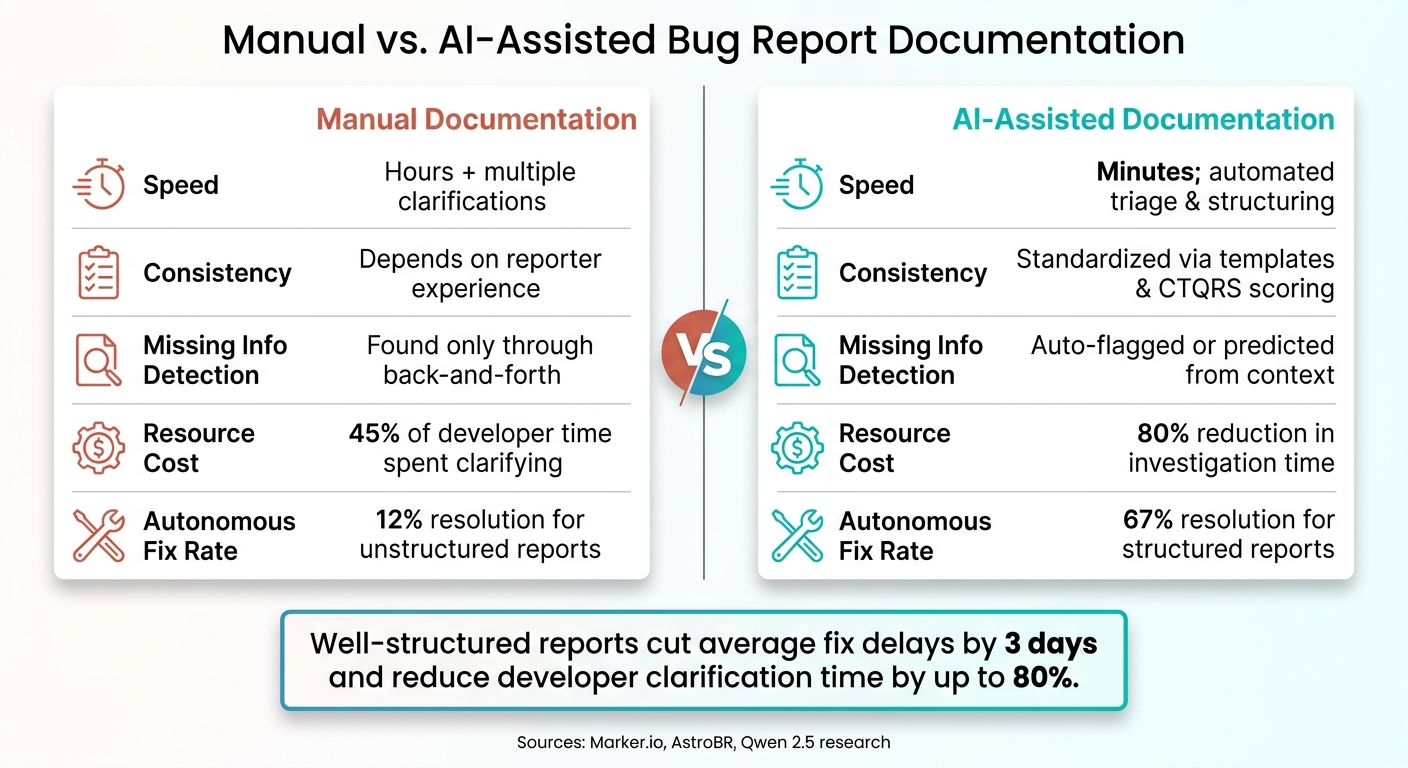
Manual vs. AI-Assisted Bug Documentation: Key Metrics Compared
Automated workflows are already a game-changer, but adding AI into the mix takes reproduction step documentation to a whole new level. By identifying gaps and missing details, AI helps streamline the entire process, making documentation more efficient and reliable.
AI Features That Support Reproduction Step Documentation
Modern AI tools can do more than just predict text – they can transform free-form descriptions into clear, actionable steps. For example, AstroBR uses natural language input to map out specific GUI interactions and program states. This approach improves annotation accuracy by 25.2% and identifies missing steps 71.4% more effectively [8].
AI also steps in to flag missing details, like browser versions or prerequisite steps, and either prompts users to fill in the gaps or infers the missing information itself. Fine-tuned models such as Qwen 2.5 excel at this, achieving a 76% F1 score when extracting "Steps to Reproduce" from unstructured text [7]. These capabilities not only speed up triage but also lead to more precise issue resolution.
How AI Reduces Manual Effort and Costs
AI’s ability to detail reproduction steps doesn’t just improve accuracy – it also slashes the need for manual follow-ups. Poor documentation can be costly: developers spend up to 45% of their bug-fixing time clarifying incomplete reports, which delays fixes by an average of 3 days [6]. On the flip side, well-structured reports enable AI coding assistants to autonomously resolve 67% of issues on the first try – a huge leap from the 12% success rate with poorly structured reports. They also cut investigation time by 80% by removing the need for an initial search phase [10].
As Nova Elvaris, an AI Automation Specialist, puts it:
"The biggest upgrade you can make to AI-assisted debugging isn’t a better model. It’s better artifacts." [9]
Tools like Supportbench back this up with built-in AI features like case summaries, activity summaries, and AI-assisted response generation. These tools reduce the time agents spend piecing together context, making issue resolution faster and more scalable.
Comparison: Manual versus AI-Assisted Documentation
The advantages of AI-assisted workflows become clear when you compare them to manual processes across several key areas:
| Dimension | Manual Documentation | AI-Assisted Documentation |
|---|---|---|
| Speed | Takes hours with multiple clarifications | Minutes; automates triage and structuring [3] |
| Consistency | Depends on the reporter’s experience | Standardized with templates and CTQRS scoring [6][7] |
| Missing Info | Found only through back-and-forth communication | Automatically flagged or predicted from context [8][7] |
| Resource Cost | High; 45% of developer time spent clarifying | Low; reduces investigation time by 80% [10] |
| Fix Rate | 12% autonomous resolution for unstructured reports | 67% autonomous resolution for structured reports [10] |
At the heart of these improvements is the quality of the report itself. Clear and complete reproduction steps provide both developers and AI tools with the solid foundation they need to fix issues quickly and with fewer complications.
Building a Standardized Issue Template
A standardized issue template ensures that every report is clear, actionable, and consistent across teams.
Recommended Template Structure
To make issue reports effective and avoid unnecessary back-and-forth, templates should include the following key fields:
| Field | Details to Include |
|---|---|
| Summary/Title | Use a structured format like [Feature/Page]: [What broke] on [Condition] to ensure clarity and easy searchability. |
| Environment | Specify details such as OS, browser version, device type, and app build number. |
| Preconditions | Describe the exact starting state before reproducing the issue (e.g., "Logged in as Admin with two active projects"). |
| Steps to Reproduce | Provide numbered steps, with one action per step, so developers can pinpoint the exact step where the issue occurs. |
| Expected Result | Clearly state what the software should do according to its design. |
| Actual Result | Describe what actually happened, including any error messages or crash details. |
| Frequency | Indicate how often the issue occurs (e.g., "5 out of 5 attempts" or "intermittent, 3 out of 10"). |
| Evidence | Attach screenshots, screen recordings, or console/network logs to support the report. |
| Severity | Rate the technical impact using a 4-level scale: Critical, High, Medium, or Low. |
For backend or API-related issues, include extra fields like the full HTTP request (method, URL, headers, body) and the response (status code, body). For particularly complex problems, add a Repro Script field containing a minimal code snippet that reproduces the issue in under 60 seconds.
To enforce quality, consider rejecting reports that are incomplete – for example, missing environment details or reproduction steps.
"A ticket without clear steps_to_reproduce is not actionable. Treat repro as a binary gate for engineering acceptance." – beefed.ai
How a Shared Template Helps Teams Work Better
Using a shared, structured template significantly reduces clarification cycles, cutting down escalations by as much as 80–90%. It also ensures that reports are searchable and patterns are easier to identify, which is vital for managing issues proactively. This structure is particularly useful for AI-driven workflows, as it supports automated validation and prioritization.
"Little information is equal to no information when it comes to bug fixing." – Arnab Roy Chowdhury, Senior Consultant, Capgemini
Keeping Documentation Standards Current
A template is only as effective as its upkeep. Without consistent ownership and updates, even the most well-crafted documentation can quickly become outdated and confusing.
Assigning Ownership and Setting a Review Schedule
Every documentation system needs a clear owner. Without one, updates often fall through the cracks, leaving the documentation obsolete. Assign a Knowledge Base Owner – typically a Support Lead or Senior Agent – who will oversee the template library, handle update requests, and review flagged content on a weekly basis.
In addition to assigning ownership, accountability can be shared with a trigger-based review system. This system flags updates whenever a product feature changes. Following the Knowledge-Centered Service (KCS) approach, every agent contributes by checking the accuracy of existing reproduction steps when resolving tickets. If something is incorrect, they flag it for review.
"Knowledge creation should happen in the flow of work, not separate from it. When an agent resolves a ticket, they shouldn’t handoff a note to the knowledge team to document later." – Tina Grubisa, Mosaic AI [11]
Trigger-based reviews are often more effective than fixed quarterly review cycles. By tagging each template or article with its related product feature, documentation is flagged for review as soon as a feature changes. This proactive approach ensures customers don’t encounter outdated instructions.
"Quarterly review calendars miss the point: trigger-based review (tagging articles by feature area, reviewing when that feature ships changes) catches the articles that need updating before customers hit them." – Henrik Roth, HappySupport [12]
A well-structured review schedule sets the stage for effective version control, which we’ll dive into next.
Version Control and Ongoing Improvement
For teams working in fast-paced environments, manual updates can’t keep up. Adopting a documentation-as-code approach – where reproduction templates are stored in the same Git repository as the application code – helps teams track changes, review updates via pull requests, and maintain a clear audit trail [13][14].
Without regular updates, inaccuracies in documentation can pile up, leading to more support tickets and diminishing customer trust. To combat this, track key metrics like:
- Documentation lag: The time between a product update and the corresponding documentation change. Aim to keep this under 48 hours.
- Article staleness rate: The percentage of templates that are more than 30 days behind the current product state. Keep this below 5% [13].
"A longer gap between product change and documentation update raises the cost of that discrepancy in support tickets, customer confusion, and eroded trust." – Henrik Roth, Co-Founder & CMO, HappySupport [13]
Monitoring these metrics ensures your documentation stays current and reliable, reducing confusion and maintaining trust with your users.
Conclusion: Building a Scalable, AI-Optimized Support Workflow
Streamlining how reproduction steps are documented can dramatically improve resolution times, lower costs, and enable support teams to function effectively without relying on constant input from developers. When every agent collects and presents information in a consistent, structured way, issues can move quickly from initial report to resolution – avoiding unnecessary back-and-forth delays.
Research highlights the costs of incomplete documentation [3]. Addressing this inefficiency starts with a standardized, reproducible process where AI plays a key role in automating triage and assigning issues to the right team.
"In Support Engineering, cannot reproduce is the most expensive phrase we can hear. It represents exhausted capacity, frustrated customers, and shattered developer focus." – Maor Yaffe, R&D Team Lead, Lightrun [3]
This philosophy ties directly into the structured templates and AI-powered workflows discussed earlier. By adopting these strategies, companies have seen real results. For example, enterprise organizations like Taboola and AT&T, which implemented AI-driven runtime observation and standardized workflows, reported up to a 90% reduction in Mean Time to Resolution (MTTR) [3]. Investigations that once took over 8 hours now take just minutes.
Bringing these approaches together creates a unified support system. Tools like Supportbench make this possible by offering features such as AI-generated case summaries, automated knowledge base creation from resolved tickets, and intelligent triage built into the workflow from the start. The result? Support teams can focus less on chasing missing details and more on resolving customer issues efficiently.
FAQs
What’s the minimum info a bug report must include?
When writing a bug report, it’s important to provide enough detail so developers can pinpoint and fix the issue efficiently. Here’s what to include:
- A clear, descriptive title: Summarize the problem in a way that quickly conveys the issue.
- Steps to reproduce: List the steps, in order, starting from a known state. Make sure they are easy to follow.
- Expected vs. actual results: Explain what you expected to happen and what actually happened instead.
- Environment details: Include relevant information like the browser, operating system, application version, or test setup.
Providing these details ensures developers can understand and address the problem without unnecessary back-and-forth.
How do we handle bugs that happen intermittently?
To tackle intermittent bugs, start by documenting how often they occur (e.g., "2 out of 5 attempts"). Include supporting evidence like logs, screenshots, or session replays. Pay attention to any patterns – does the issue happen at a specific time, on certain devices, or under particular network conditions? Having another tester attempt to reproduce the bug can provide a fresh perspective. If you can, record a video showing the steps to reproduce it along with details about the environment. Thorough documentation makes it easier to reproduce the bug and figure out what’s causing it.
How can AI fill in missing reproduction details automatically?
AI has the ability to examine incomplete bug reports and generate detailed, structured information to address missing elements like reproduction steps, environment configurations, or expected results. Using large language models, tools can automatically produce test cases, reproduction scripts, and environment setups by drawing on templates and domain-specific knowledge. This streamlines the process, minimizes manual work, ensures thorough documentation, and enhances the precision of issue reporting.
Related Blog Posts
- How do you create an “Engineering handoff” template that speeds up bug fixes?
- How to triage bug reports via portal forms (steps, logs, environment capture)
- Bug report intake checklist: what to require from customers to speed resolution
- How to write bug reports engineers love (support-to-engineering template)