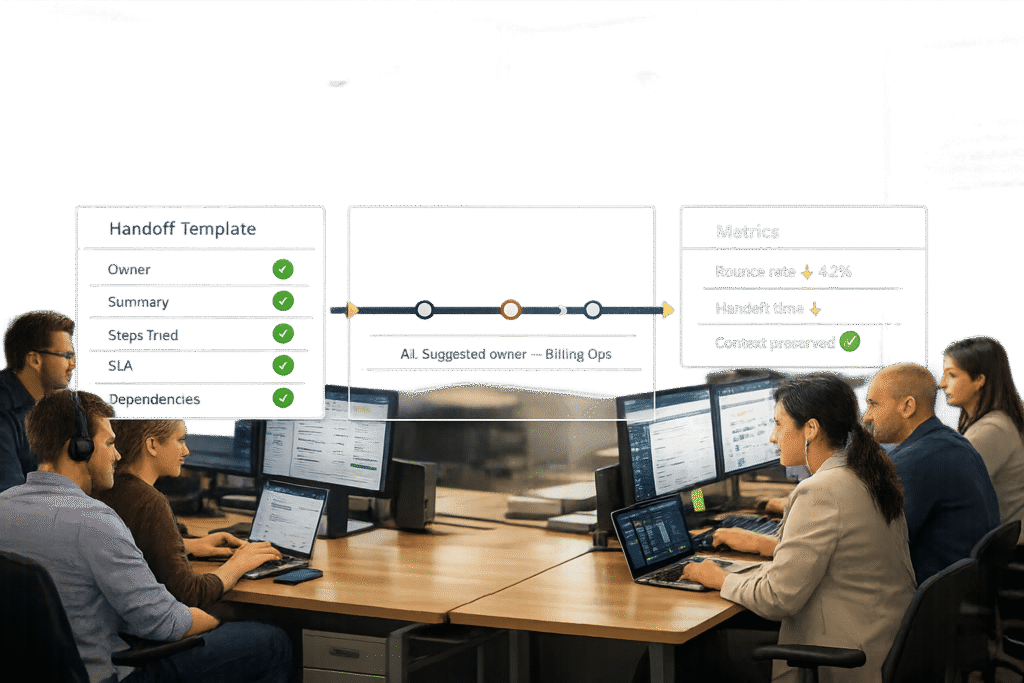
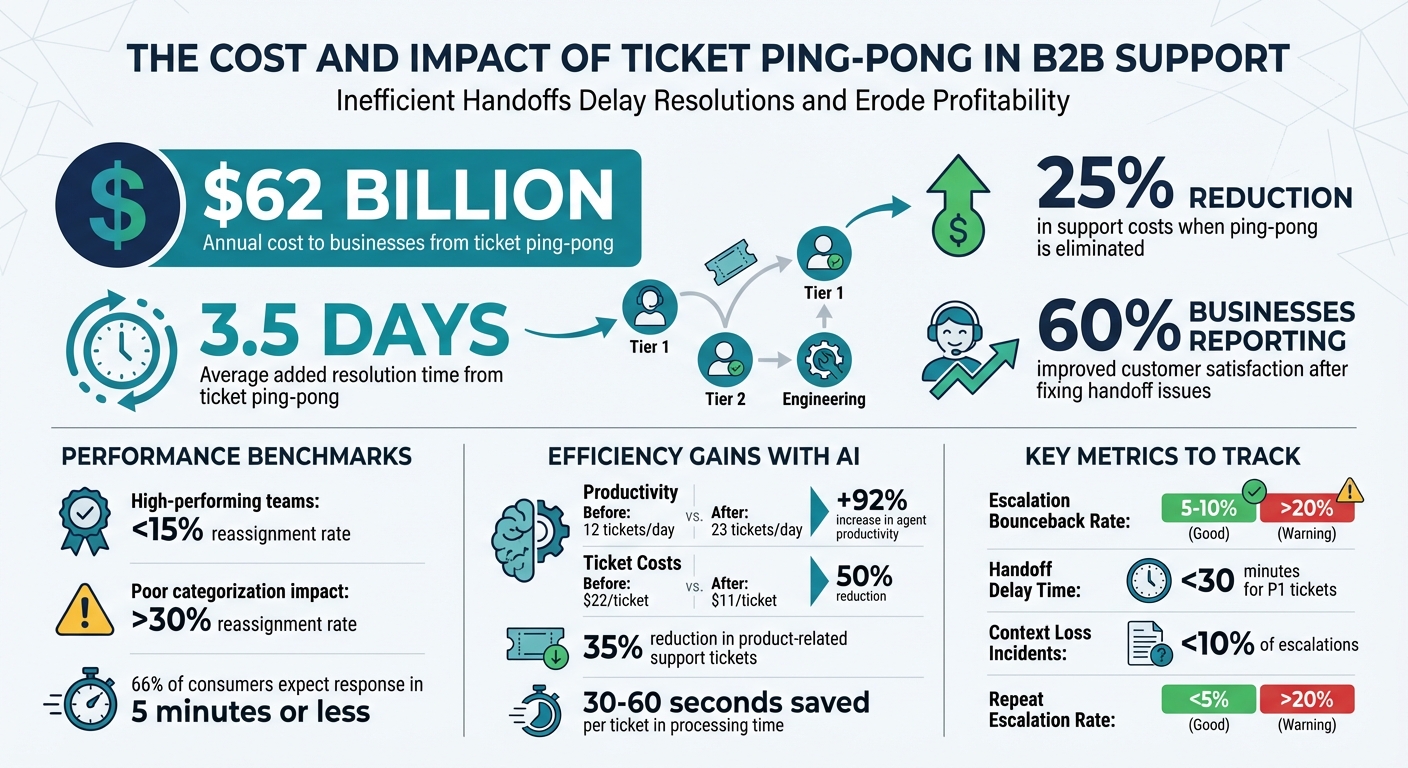
Ticket ping-pong happens when customer issues bounce between teams without resolution, leading to delays, frustration, and lost information. This is common in B2B support and can add an average of 3.5 days to resolution time, costing businesses $62 billion annually.
Here’s how you can prevent it:
- Define Clear Ownership: Use models like Total Contact Ownership to ensure one person is accountable for each ticket, even during escalations.
- Standardize Handoff Templates: Include critical details (e.g., issue history, attempted fixes) to ensure smooth transitions between teams.
- Leverage AI-powered ticket routing: AI-driven tools analyze ticket content to assign it to the right team or agent, reducing unnecessary transfers.
- Track Metrics: Monitor escalation bounceback rates, handoff delays, and context loss to identify and fix process gaps.
The Cost and Impact of Ticket Ping-Pong in B2B Support
What Causes Ticket Ping-Pong and Why It Matters
Common Triggers of Ticket Ping-Pong
Ticket ping-pong often stems from deeper issues within support workflows and system setups.
One major factor is schema mismatches. This happens when tickets move between systems – like from a helpdesk to an engineering team’s tracker – and critical details are lost because the receiving system doesn’t have equivalent fields. Richie Aharonian, Head of Customer Experience & Revenue Operations at Unito, explains:
Every handoff is a compression point. Information gets compressed into whatever the receiving system can accept. Everything else either gets summarized manually in a comment or simply disappears.
For example, a field like "Customer Impact" in a CRM might not exist in the engineering team’s system. This forces teams to ask questions that were already answered earlier, creating unnecessary delays and confusion.
Poor initial categorization is another common issue. When customers select the wrong category or when less experienced agents misroute tickets, they often end up in the wrong queue. This leads to tickets bouncing between teams until someone figures out the correct owner.
Ambiguity around ownership also contributes to the problem. When a ticket is transferred, the new owner might not be clearly notified, while the previous owner assumes their responsibility has ended. This lack of clarity often results in teams passing complex tickets back and forth instead of resolving them.
Lastly, limited technical visibility forces unnecessary escalations. Agents without access to key integration data may escalate issues to engineering teams, even when it’s not needed. As Libby Stengel, VP of Customer Success at Prismatic, puts it:
Your support team and your tech partner’s support team each claims the problem isn’t on their end. The customer is stuck, frustrated, thinking, ‘I just want my integration to work!’.
Addressing these root causes is essential to improving support workflows and reducing ticket ping-pong.
The Impact on B2B Support Operations
These technical and process challenges can wreak havoc on B2B support operations. For one, they significantly increase resolution times. While high-performing teams keep reassignment rates below 15%, poor categorization alone can push that number to over 30%. Each reassignment adds idle time as new agents sift through ticket histories and try to piece together the issue’s context.
This inefficiency can also lead to more frequent SLA breaches. Tickets stuck in the wrong queue or left unassigned due to unclear ownership often miss deadlines. Some teams even experience the "watermelon effect", where dashboards show green SLA metrics, but customers remain dissatisfied because tickets are closed prematurely or with unhelpful responses.
The financial toll is hard to ignore. Streamlining help desk operations to eliminate ping-pong can slash support costs by 25%, and 60% of businesses report improved customer satisfaction after fixing handoff issues. On the flip side, wasted time becomes a major drain: specialized engineers end up triaging problems that frontline agents could handle, and agents may spend up to 20 minutes reconstructing fragmented ticket histories.
In B2B settings, where trust and relationships are critical, forcing customers to repeatedly explain their issues to different teams can severely damage the partnership. With 66% of consumers expecting a response in five minutes or less, every unnecessary handoff chips away at their confidence in your service.
sbb-itb-e60d259
3 Rules to Automate Ticket Routing
How to Create Clear Handoff Rules
Streamline ticket transfers and eliminate unnecessary back-and-forth by setting up clear handoff rules. These rules ensure accountability, maintain context, and make transitions between teams seamless.
Defining Ownership and Accountability
Assigning ticket ownership at every stage prevents confusion and ensures responsibility. The Total Contact Ownership model, for example, keeps the original agent as the primary customer contact, even when specialists are brought in. This avoids the "hot potato" effect where customers feel lost about who’s handling their issue.
To prevent agents from cherry-picking tickets, use push routing systems like round-robin or capacity-based assignments. Wolseley Canada, for instance, implemented automated routing in Supportbench under Customer Service Manager Eilis Byrnes. They managed 7,000 to 8,000 monthly emails while maintaining clear visibility into agent performance. Byrnes highlighted the benefits:
The ticketing system assisted us in resolving instances that were long overdue and in providing the staff with a smooth platform experience.
Require immediate confirmation when a ticket is transferred to a new team. Ideally, someone should claim it within 2 to 4 hours. If no one picks it up, the system should either escalate the ticket or flag it as "blocked" and send it back to the original team.
Standardizing Handoff Protocols
Once ownership is clear, standardize the handoff process to ensure no context is lost.
Develop a handoff specification template for each team boundary. This template should outline what triggers a handoff, the required information (like attachments or troubleshooting history), and how context is preserved through field mappings. For tickets transferring between different tools, automation can append structured context blocks to the ticket description when direct mappings aren’t possible.
Every handoff should include the "5 Whys" framework to provide comprehensive details:
- Who: User and their VIP status
- What: Service or asset affected
- Where: Environment or location
- When: When the issue started versus when it was reported
- Why: Error codes or logs
This approach ensures the next agent doesn’t have to start from scratch.
Track timestamps for escalations, acknowledgments, and active work. Regularly audit a small sample of delayed tickets (5 to 10 per month) to identify and address any context gaps.
Escalation Paths and SLA Management
Escalations should follow a priority matrix based on Impact and Urgency, not on who’s shouting the loudest:
- P1 (Critical): Enterprise-wide outage with no workaround
- P4 (Low): Minor bug with no immediate productivity impact
Set SLA alerts at 75% of the deadline to allow time for final actions. Use "stop the clock" statuses like "Pending User" or "Waiting for Vendor" to pause SLA timers when the ticket is waiting on someone else.
Include fallback paths in your routing logic. If the primary team is unavailable or over capacity, tickets should automatically reroute to secondary queues or overflow triggers.
For complex issues spanning multiple domains, consider Intelligent Swarming instead of the traditional L1/L2/L3 escalation model. This method brings experts together in a shared channel to collaborate on the ticket, reducing the risk of losing context during transfers.
Using AI and Automation for Better Ticket Routing
AI-driven ticket routing eliminates the guesswork that often leads to frustrating back-and-forth transfers, commonly known as "ticket ping-pong." By leveraging Natural Language Processing (NLP), these systems can interpret the intent behind tickets more effectively than traditional keyword-based methods. This shift from rigid "IF-THEN" rules to context-aware analysis ensures tickets are routed to the right team the first time, cutting down on unnecessary delays.
AI Tools for Ticket Triage and Categorization
Unlike traditional rule-based systems that depend on exact keywords, AI-based triage analyzes the entire ticket text to identify the intent. For instance, it can automatically classify tickets with intents like "Refund request" or "System outage", saving 30–60 seconds per ticket in processing time.
AI-powered routing also evaluates multiple factors at once, such as required technical expertise, language skills, current workload, and real-time agent availability. It even picks up on sentiment and urgency cues. For example, if a customer politely describes a production outage without explicitly labeling it as "urgent", the AI can detect the underlying sentiment and the pattern of rapid follow-up messages, escalating the ticket appropriately.
This advanced triage process sets the stage for predictive assignment, which further reduces manual interventions and unnecessary transfers.
Reducing Transfers with Predictive Assignment
Predictive assignment builds on the foundation of effective triage by aligning tickets with agents who have the right expertise. This process considers multiple variables, including the agent’s skills and capacity across various omnichannel channels – email, chat, and voice – to ensure a holistic view of availability.
To maintain accuracy, confidence thresholds can be configured so that only tickets with a high confidence level are auto-assigned. Tickets with lower confidence levels can be flagged for manual review. Additionally, using tags like "triage_trigger_fired" prevents routing loops by ensuring the logic doesn’t execute repeatedly on the same ticket.
Fallback routing is another essential component, directing tickets to secondary queues when primary teams are at capacity. Regularly monitoring reassignment rates – ideally on a monthly basis – can help identify issues in skill mappings or intent models if tickets are frequently transferred post-assignment.
| Routing Model | Mechanism | Best Use Case |
|---|---|---|
| Push (Omnichannel) | Assigns tickets based on availability, capacity, and skills | Large organizations needing high efficiency |
| Pull (Play Mode) | Agents are automatically served the next ticket in a view | Teams aiming to avoid "cherry-picking" |
| Predictive/AI | Matches ticket intent and sentiment to agent expertise | Technical support with specialized silos |
Handoff Templates and Tools to Reduce Confusion
Routing a ticket to the right team is only part of the solution – executing the handoff clearly is just as critical. Without structured templates, essential details can be lost, leading to redundant troubleshooting and delays. To avoid this, standardizing handoffs ensures that all vital context is preserved, making transitions between teams smoother and more efficient.
Handoff Email Template
A well-structured email template ensures that no key information is missed during a ticket transfer. It should include the following sections:
- Validated Facts: Confirm what’s already been checked, such as user authentication, network connectivity, or browser version.
- Diagnostic Results: Provide technical evidence, like error codes or browser console logs.
- Attempted Remediation: List all steps already taken, such as clearing the cache or testing different browsers.
- Working Hypothesis: Share the technician’s theory about the root cause.
- Business Context: Highlight the affected users or systems and the urgency, e.g., "Month-end close starts tomorrow."
- User Accessibility: Note the customer’s availability and preferred communication method, like Slack or email.
Make sure to set a clear update deadline, such as: "Update by Tuesday, 2/10/2026, at 2:00 PM EST".
"The escalation process works on paper because we assume information moves with tickets automatically. It fails in practice because information lives in contexts… and escalation is a boundary where context dies unless you actively preserve it." – Unito Editorial Team
Taking a few extra minutes to follow a structured template can save teams from unnecessary rework.
Ownership Transfer Checklist
To reduce confusion and ticket ping-pong during team transitions, use a checklist to verify that all required fields are complete and the troubleshooting history is well-documented. A good checklist should cover:
- Ticket ID
- Handoff Date (formatted as MM/DD/YYYY for U.S. operations)
- Originating Team
- Receiving Team
- Required Actions
- SLA Impact: Indicate whether the SLA clock is running, paused, or close to breaching.
| Handoff Component | Essential Details to Include |
|---|---|
| Information Requirements | Validated facts, diagnostic results, attempted remediation, and attachments. |
| Business Context | Affected users, specific systems down, and business impact (e.g., financial risk). |
| Ownership Transfer | New assignee, notification requirements, and SLA clock status. |
| State Synchronization | How updates flow between tools and status mapping. |
In June 2025, Wolseley Canada adopted Supportbench to handle 7,000 to 8,000 monthly support emails. By shifting from manual sorting to automated ticket routing based on case type and client profile, the company improved visibility into agent performance for senior leadership.
"The ticketing system assisted us in resolving instances that were long overdue and in providing the staff with a smooth platform experience." – Eilis Byrnes, Customer Service and Process Improvement Manager, Wolseley Canada
Internal Notes Template
Internal notes should provide a complete picture of the ticket’s context in a standardized format. Key sections include:
- Validated Facts: For example, user authentication confirmed and network connectivity verified.
- Diagnostic Results: For instance, a browser console shows a CORS error on domain xyz.
- Attempted Remediation: Steps like clearing the cache or testing a different browser.
- Working Hypothesis: Example: an SSO configuration issue after a weekend update.
- User Accessibility: Example: available 8:00 AM – 5:00 PM EST and prefers Slack.
Dynamic placeholders such as {{ticket.id}} or {{ticket.requester.first_name}} can automatically insert real-time data into templates. AI-generated summaries can also pull conversation transcripts and pass them as variables, offering immediate context during handoffs. Additionally, macros let agents apply standard responses and update multiple ticket properties – status, tags, assignment – with a single click, simplifying the process.
Quarterly audits can help identify broken links, outdated features, or deprecated terms. However, avoid sending raw templates; always personalize each handoff with the customer’s name and at least one sentence tailored to their specific issue or environment.
Tracking and Improving with Ping-Pong Metrics
Ticket ping-pong comes with hidden costs – delays, lost context, and repeated work. Unfortunately, standard support metrics often overlook these inefficiencies. To tackle this, you need to monitor specific metrics that highlight weaknesses in your escalation process. Paired with clear handoff protocols, these metrics can pinpoint where information transfer breaks down.
Key Metrics to Track
One critical metric is the Escalation Bounceback Rate, which shows how often tickets are sent back for clarification. A rate between 5% and 10% is ideal, but anything over 20% suggests issues with handoff procedures or intake forms. Another is Handoff Delay Time, which measures how long it takes for the receiving team to start working on a ticket after it’s escalated. For high-priority tickets, this delay should be under 30 minutes.
You should also track Context Loss Incidents, which occur when engineers have to ask for information that was already gathered. If more than 10% of escalated tickets require this, it signals serious gaps in your handoff process. Lastly, the Repeat Escalation Rate highlights tickets tied to previous cases of the same issue, indicating that initial resolutions didn’t address the root cause.
| Metric | What It Reveals | Target Benchmark |
|---|---|---|
| Bounceback Rate | Effectiveness of triage and handoff templates | 5–10% (Good); >20% (Warning) |
| Handoff Delay | Efficiency of routing and notifications | <30 mins for P1 tickets |
| Context Loss | Failures in information sharing or tool integration | <10% of escalations |
| Repeat Escalation | Quality of issue resolution | <5% (Good); >20% (Warning) |
"Your escalation problems are structural, not performance-based. You need metrics that expose breakpoints – the moments when information gets lost, when priority gets mistranslated, when updates don’t reach the other system." – Richie Aharonian, Head of Customer Experience & Revenue Operations, Unito
To improve, align these metrics with standardized handoff templates. For example, define an "In Transfer" status to treat handoffs as measurable states with timestamps for Escalated Time, Claimed Time, and Started Time. Separating "Time to Escalate" from "Handoff Delay" can also help you distinguish between agent decision-making issues and system routing failures.
These metrics lay the groundwork for leveraging AI tools to uncover inefficiencies and streamline processes.
Using AI-driven dashboards for Insights
Tracking is just the start – AI dashboards turn these metrics into actionable insights. These tools provide real-time visibility into agent availability and workloads, helping to avoid routing tickets to already overburdened team members. Intelligent triage powered by Natural Language Processing (NLP) can analyze ticket language, intent, and sentiment, ensuring tickets reach the right specialist immediately and reducing unnecessary transfers.
A great example comes from Wolseley Canada, which handled 7,000–8,000 support emails monthly in 2024-2025. By adopting Supportbench for automated routing based on ticket type and client profiles, the company gained real-time performance insights. This shift empowered agents to resolve long-standing issues and gave leadership a clear view of escalations.
Dashboards also help track reassignment frequency, flagging tickets that change hands too often – an indicator of lost context between teams. AI can even implement sentiment-based routing, sending tickets with negative sentiment or urgent keywords like "outage" directly to senior tiers, bypassing unnecessary frontline steps. Regularly auditing field mapping ensures critical details like "Customer Impact" transfer seamlessly between systems. With better data flow, some organizations have reduced product-related support tickets by as much as 35%.
Conclusion: Solving Ticket Ping-Pong for Better Support Outcomes
Ticket ping-pong – where customer issues bounce between teams without resolution – is a costly problem for B2B support, draining an estimated $62 billion annually. Tackling this issue requires a combination of three key strategies: setting clear handoff rules to establish accountability, using standardized templates to maintain essential context, and leveraging AI-powered routing to cut down on unnecessary transfers.
When these approaches are applied together, they not only make handoffs smoother but also improve overall efficiency. For example, AI-driven ticketing systems have been shown to increase agent productivity by 92% (from handling 12 tickets per day to 23) and reduce ticket costs by half (from $22 to $11).
The secret lies in treating every handoff as an opportunity to transfer complete and accurate information. Each ticket should include a detailed record of actions taken and observations noted. This ensures that no context is lost, paving the way for better support outcomes.
To get started, examine your current processes to identify where handoffs are breaking down and causing delays, such as failing to meet dynamic SLAs. Map out fields to prevent missing information, use AI tools to intelligently triage tickets as they come in, and enable automatic status updates between teams through bidirectional synchronization. These steps can dramatically lower misrouting rates and transform your support operations.
FAQs
How does AI help prevent tickets from bouncing between teams?
AI simplifies ticket routing by using natural language processing (NLP) and machine learning to quickly analyze and categorize incoming tickets. This ensures tickets are directed to the appropriate team or agent right away, cutting down on delays and avoiding the confusion that comes with misrouting.
By grasping the context of each ticket, AI can identify urgent issues, recommend next steps, and even handle escalations automatically. This not only enhances accountability and teamwork but also speeds up resolutions, resulting in a smoother and more satisfying customer experience.
What makes a good handoff template for support tickets?
A well-designed handoff template is key to ensuring seamless transitions between teams. It should include essential details and clear instructions to keep everyone on the same page. For example, providing context – like customer information, issue history, and the ticket’s current status – gives the receiving team the background they need to hit the ground running.
The template should also clearly outline next steps. This means specifying required actions, escalation points, and expected outcomes to prevent any confusion or delays. Clarity here can make a significant difference in avoiding bottlenecks.
To boost accountability, the template should highlight assigned responsibilities. This includes naming the team or individual responsible for the ticket and adding timestamps to track when the handoff took place. Incorporating standardized fields and predefined communication templates can further streamline the process, ensuring consistency across teams.
By including these elements, the handoff template minimizes inefficiencies, speeds up resolution times, and promotes better teamwork – especially in fast-paced, AI-supported workflows.
What is ticket ping-pong, and how does it affect customer satisfaction and business costs?
Ticket ping-pong occurs when support tickets bounce back and forth between teams without being resolved. This not only causes frustration for customers, who face longer wait times and may need to repeat details, but it also drives up business costs. Inefficiencies, increased support volumes, and reduced agent productivity are just some of the challenges it creates.
Tackling ticket ping-pong head-on can help businesses cut down on delays, boost team accountability, and deliver a smoother customer experience – all while keeping operational costs in check.
Related Blog Posts
- How do you manage backlog aging and prevent “zombie tickets”?
- How do you set up case ownership rules for shared inboxes and avoid “unowned tickets”?
- How do you build a support staffing model for time zones and coverage (follow-the-sun)?
- How do you structure support for partners/resellers (and avoid double-ticketing)?