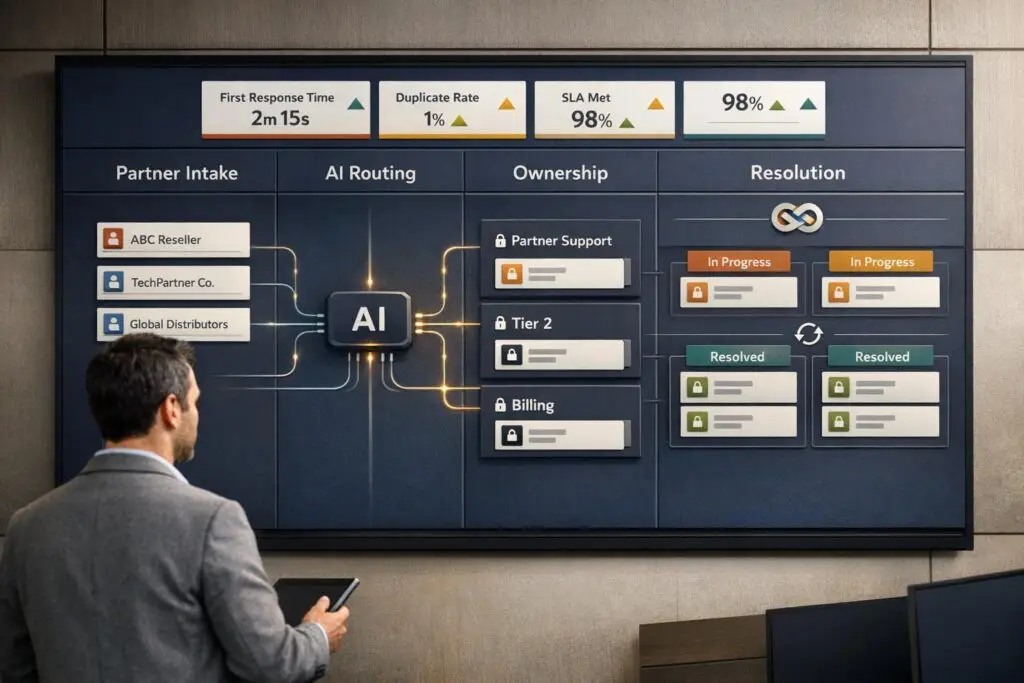
Structuring support for partners and resellers is tricky. Without clear processes, issues like duplicate tickets, lost context, and delayed resolutions can arise. This wastes time, frustrates teams, and weakens customer relationships. Here’s how to fix it:
- Define ticket ownership: Assign clear responsibility at every stage to avoid confusion.
- Role-based access: Control who sees what to prevent accidental data exposure or duplicate tickets.
- Automated routing: Use AI to direct tickets to the right team and merge duplicates early.
- Escalation protocols: Standardize handoffs with clear documentation and triggers.
- Real-time syncing: Keep ticket statuses and updates aligned across systems.
- Partner portals: Use permission-based tools to streamline communication and data sharing.
- Monitor metrics: Track reassignment rates, ticket reopen trends, and partner feedback to identify inefficiencies.
These steps improve efficiency, reduce double-ticketing, and strengthen partner collaboration. The key is combining clear rules, automation, and ongoing monitoring.
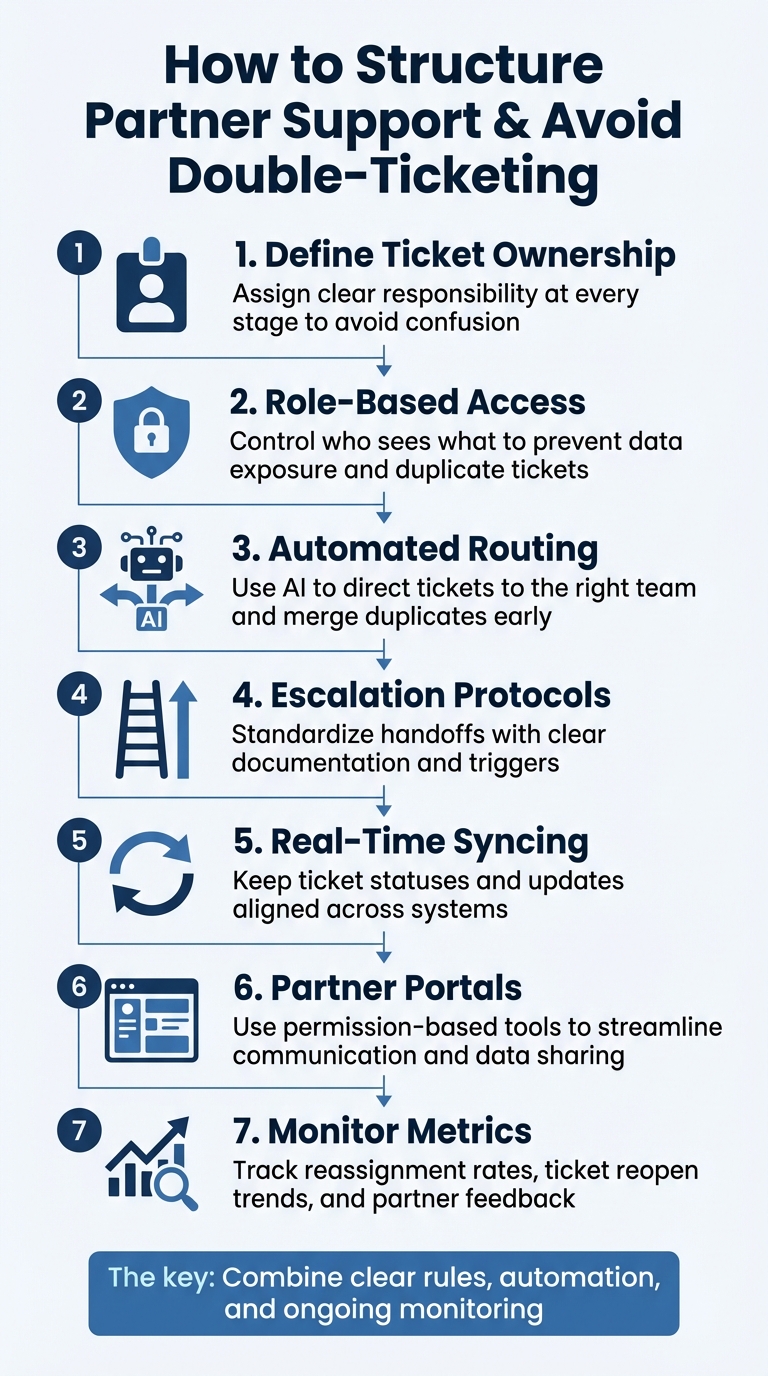
7-Step Framework for Structuring Partner Support and Preventing Double-Ticketing
Set Clear Ticket Ownership Rules
Ambiguity in support handoffs can lead to wasted effort and slower response times. To address this, it’s essential to define who owns each ticket at any given time. Without clear ownership, teams risk duplicating work or delaying resolutions. A good starting point is assigning primary ownership based on partner type. For instance, in Microsoft’s Cloud Solution Provider (CSP) model, direct bill partners handle customer relationships directly, while indirect resellers must work through their indirect providers to assist customers. This tiered system ensures there’s no confusion about who takes the lead.
When tickets move between vendor and partner systems, clear sender/receiver protocols help maintain accountability. The sender – the one initiating the ticket – sets the terms for ticket sharing, including whether the receiver can contact the end customer directly. This approach prevents situations where both parties unintentionally contact the customer or, worse, leave them without a response.
Assign Tickets Based on Roles
After establishing ownership rules, assigning tickets based on roles ensures they reach the right people without delay. Use lookup fields to tag each ticket with its designated stakeholder, such as "Account Manager" or "Support Manager." Automated routing systems can then direct technical issues to the most qualified and available agents, factoring in workload and expertise. This minimizes unnecessary back-and-forth and ensures complex problems are handled by the right team member immediately.
For example, Payfirma, a payment processing company, managed 800 to 1,000 monthly support tickets with just four agents by using automated workflows and clear visibility into cases. Their system routed login issues to Level 1 support and server outages to Level 3 without manual intervention, eliminating delays caused by manual triage.
Manage Escalations and Ownership Transfers
Escalations are another area where structure is key. To avoid losing important context, require standardized handoff documentation when transferring tickets. This documentation should include a summary of troubleshooting steps, logs, and any client expectations. Escalation triggers, such as escalating from Level 1 to Level 2 after two hours of inactivity, ensure tickets don’t stall while teams decide who should handle them.
When tickets are shared across platforms, real-time syncing of status and comments between systems is critical. For instance, if a partner marks a ticket as resolved, that update should reflect in the vendor’s system automatically. Permission levels should also be clearly defined. For example:
- "Public & Private Comments + Sync Status": Allows the receiver full ownership to communicate with the customer and resolve the ticket.
- "Private Comments Only": Limits the receiver to internal notes while the sender retains overall control.
To avoid last-minute handoffs during shift changes, implement a "time-left guard" that only assigns tickets to agents with at least 60 minutes remaining in their shift. This ensures tickets are handled without unnecessary delays.
Control Access and Visibility by Role
Once ownership rules are set, the next step is managing stakeholder visibility. Without proper access controls, partners might unintentionally view sensitive customer data or create duplicate tickets. The key is implementing role-based access using the "least-privileged" principle, which ensures users only have the permissions they absolutely need.
Start by creating user accounts and assigning roles based on specific programs or workspaces. For instance, a Helpdesk Agent might gain access to customer subscription details and billing issues, while a Sales Agent would focus on product pricing and order management – without overstepping into unrelated areas. Different partners require tailored access. For example, a dealer handling sales doesn’t need the diagnostic workflows essential to a service technician.
Next, we’ll outline how to design portals and segment data to maintain these controls.
Design Partner Portals with Permission Controls
Partner portals should incorporate dynamic filtering to limit record visibility based on the user’s role and organization. For example, lookup relationship fields with built-in filters can ensure a "Related Asset" field only displays assets tied to that partner’s customers. This minimizes the risk of accidental data exposure.
Explicit ticket-sharing agreements further clarify boundaries. Permissions like "private comments only" allow partners to add internal notes without involving the end customer, while "public and private" permissions enable full collaboration, including customer communication. In October 2025, Payfirma, a payment processor, streamlined operations by integrating intelligent workflows with their CRM. This allowed their four-agent team to link contacts to parent companies, giving them a complete view of account relationships. As a result, they managed 800 to 1,000 monthly tickets while cutting resolution times by 50%.
Once the portal is set up, segment data carefully to enable secure collaboration across teams.
Segment Data for Secure Collaboration
With roles and portal permissions in place, data segmentation adds another layer of control. Location-scoped roles can restrict access to specific branches or regions, while organization-level roles grant broader administrative capabilities. Tie ticket visibility to CRM logic so partners only see tickets linked to their assigned customer accounts. This ensures they work exclusively on relevant issues.
Real-time visibility is essential. When partners can automatically view open tickets for their accounts, they’re less likely to submit duplicates for the same issue. To keep access aligned with current job functions, audit role assignments every three to six months. Keep in mind that updates to roles in some enterprise systems may take up to an hour to take effect, so plan any changes accordingly.
| Role Type | Primary Use Case | Key Access Rights |
|---|---|---|
| Helpdesk Agent | Technical Support | Search customers, resolve billing/subscription issues |
| Sales Agent | Sales/Provisioning | Add customers, manage orders, view product pricing |
| Admin Agent | CSP/Reseller Support | Full customer lifecycle, manage subscriptions, view billing |
| Incentives Admin | Financial Management | Manage tax/payout profiles, review revenue insights |
Prevent and Merge Duplicate Tickets
With clearly defined access rules in place, AI can step in to prevent overlaps by merging similar tickets. When both partners and internal teams submit tickets for the same issue, agents often waste time reconciling these duplicates instead of focusing on problem-solving. By leveraging AI-powered detection and intelligent routing, these inefficiencies are eliminated as duplicates are flagged right at the point of entry. Here’s how AI helps reduce duplicate tickets and streamlines the process.
Use AI to Detect and Merge Duplicates
AI-driven Intelligent Triage identifies ticket intent, language, and sentiment as soon as a ticket is submitted. This enables the system to group and categorize related requests before any human agent gets involved. For example, if three partners report the same product defect within an hour, AI can recognize their connection based on shared keywords, product IDs, or serial numbers.
Entity detection plays a big role here, extracting details like order numbers and product lines using regex. These details are then auto-filled into custom fields, ensuring precise routing workflows. To avoid errors, always set a confidence threshold (e.g., "Intent confidence is High") to reduce false positives when automating partner communications. Additionally, configure triggers with tags like triage_trigger_fired to ensure AI-based processing only runs once per ticket.
Important Note: Tickets shared under partner ticket-sharing agreements cannot be merged with others, so accurate initial routing becomes even more critical.
Route Tickets to the Right Team
Once duplicates are detected, intelligent routing assigns tickets to the appropriate team without delay. AI uses detected intent to direct tickets to the right groups. For instance, tickets tagged with a "Refund" intent are sent to the billing team, while those marked "Technical Issue" go to Tier 2 support. Sentiment-based routing helps escalate tickets labeled "Negative" or "Very Negative" to senior partner managers, preventing small frustrations from escalating into larger issues.
In June 2025, Eilis Byrnes, Customer Service and Process Improvement Manager at Wolseley Canada, tackled a backlog of 7,000 to 8,000 monthly support emails by implementing automated ticket routing. This system categorized cases based on type and client profiles, centralized management, resolved overdue issues, and gave leadership better visibility into agent performance and workload.
"The ticketing system assisted us in resolving instances that were long overdue and in providing the staff with a smooth platform experience."
To ensure no ticket goes unresolved, set up primary and secondary queues with fallback groups for situations where the primary team is unavailable. Use workload-based assignment to consider agent availability and workload limits, preventing overburdening of skilled agents. Additionally, configure auto-reassignment for tickets reopened or assigned to agents marked "away".
sbb-itb-e60d259
Create Clear Communication Protocols
Clear communication protocols are essential for keeping teams aligned and avoiding missteps, especially when multiple organizations are involved in resolving customer issues. Without these protocols, conflicting messages can lead to confusion and erode trust. Establishing well-defined communication channels ensures everyone is on the same page and that information flows smoothly between parties.
Use Dedicated Channels
Ticket-sharing agreements are a powerful way to synchronize support efforts. They allow vendors and partners to see the same ticket statuses, custom fields, and comments in real time. To maintain clarity, choose appropriate visibility levels – for example, use "Public & Private comments with status sync" for customer-facing updates and "Private comments only" for internal discussions.
Centralized partner portals streamline communication by combining tools like messaging systems, forums, and announcements. Real-time collaboration tools further enhance this setup, enabling teams to @mention colleagues, add internal notes, and receive instant updates through platforms like Slack or email. This approach creates a transparent workflow, turning support interactions into a collaborative experience.
To simplify data management, integrate custom forms with your CRM, allowing partner submissions to auto-populate into the correct fields. You can also set up automatic triggers to notify partners when a ticket’s status changes or when new comments are added. These measures ensure that everyone stays informed and that escalation processes run smoothly.
Define Escalation Paths
Clear escalation paths are the next step in ensuring issues are resolved quickly and effectively. A shared escalation matrix can document when and how issues are passed up the chain, who handles them, and the expected response times. For instance, Tier 1 reseller agents might handle general queries using a vendor’s knowledge base, while technical bugs or billing issues are escalated to Tier 2 specialists. Critical problems, such as outages or security risks, are directed to Tier 3 vendor engineers, who provide real-time updates.
To avoid delays during escalations, require specific details like ticket numbers and email examples instead of vague descriptions. This prevents vendor teams from wasting time searching for information. For more complex issues, domain-specific routing can direct tickets to the right specialist – like a payments expert – even if they’re not next in the hierarchy. Additionally, AI tools can be configured to recognize keywords such as "delayed" or "outage", automatically flagging tickets for high-priority escalation across all involved organizations.
Monitor and Improve Support Operations
Once you’ve established clear ownership and role-based routing, the next step is consistent monitoring to keep your support operations running smoothly. Pay attention to key metrics that help you spot issues like double-ticketing early on. For example, tracking the "Update via" field can show whether tickets are being updated through ticket-sharing agreements or standard channels, helping you identify potential inefficiencies. Similarly, high reassignment counts or tickets stuck in "waiting" states for too long often point to unclear ownership, which can lead to duplicate work.
To go beyond surface-level monitoring, use analytics to dig into deeper inefficiencies. Metrics like CSAT, CES, and QA scores can reveal where processes are breaking down. Review comment threads for phrases like "following up", "can you clarify", or "what is the status" – these often signal communication gaps. When done right, automated routing can significantly cut down on backlog and make your support system more efficient.
Find and Fix Double-Ticketing Patterns
A good starting point to address double-ticketing is conducting a field mapping audit. Look for missing fields like "Customer Impact" or "Affected Users", and implement bidirectional state synchronization, such as mapping "On Hold" to "Blocked", to avoid unnecessary back-and-forth communication.
AI tools can also help by tracking reassignment rates and resolution trends. If reassignment rates are high, it might be time to revisit your routing logic or refine how intent is classified. Set thresholds for automated actions – only allowing high-confidence matches to proceed automatically – and create fallback paths that send tickets to a human supervisor when needed. These steps will help you fine-tune your processes and reduce inefficiencies before they escalate.
Collect Partner Feedback Regularly
Feedback from partners is invaluable for improving your support operations. Use tools like Zigpoll or Typeform to survey partners immediately after resolving their tickets. Combine CSAT and CES scores with open-ended feedback to identify recurring problems. Additionally, periodic email check-ins can provide broader insights into the overall health of your partnerships.
Integrate this feedback into your strategy by recognizing and rewarding agents with consistently high CSAT scores, assigning them to handle high-value partner tickets. Keep an eye on ticket reopen and escalation rates to uncover the root causes of recurring issues. Use common feedback themes to update FAQs and instructional materials, reducing the volume of future support requests. AI-driven sentiment analysis can also help gauge partner satisfaction, allowing you to anticipate their needs more effectively.
"The ability to identify the customer’s intent is probably one of the best things we’ve seen. I can go into the platform and see, at a glance, exactly what people are contacting us about at this very moment and whether they are happy or sad".
_ – Lucy Hussey, Customer Service Manager at Motel_
Conclusion
Effective partner support hinges on three core elements: clear ownership, smart automation, and continuous monitoring. Setting up formal ticket-sharing agreements and defining ownership at every stage ensures there’s no confusion or double-ticketing along the way. Plus, giving partners real-time visibility into ticket progress helps cut down on duplicate requests.
Automation, particularly through AI-powered routing and triage tools, plays a key role in scaling support operations. These tools can slash response times by up to 80% and handle as much as 30–40% of B2B support tasks independently. When you combine automation with skilled human oversight, your team can deliver faster and more accurate resolutions.
Monitoring critical metrics like reassignment rates, ticket reopen trends, and escalation patterns is essential for identifying and addressing process issues. Partner feedback – whether through CSAT scores or open-ended comments – offers valuable insights for improving workflows and updating documentation. Recurring complaints often reveal areas where enhanced self-service options can reduce ticket volume.
Forward-thinking companies treat partner support as an evolving process that demands regular fine-tuning. By emphasizing clear ticket ownership and leveraging AI-driven automation, support teams can respond more effectively and adapt to changing needs. Establish clear SLAs for different partner tiers, automate routine processes, and create feedback loops to promote ongoing improvements. This structured approach not only reduces duplicate tickets but also strengthens partnerships over time.
FAQs
How does AI help reduce duplicate support tickets?
AI helps cut down on duplicate support tickets by analyzing the intent, language, and sentiment behind each submission. It identifies similar issues across multiple tickets and combines them into one, reducing redundancy and keeping workflows smoother.
On top of that, AI-powered tools can handle repetitive or unnecessary requests by offering instant, relevant solutions to common problems. This approach not only minimizes double-ticketing but also boosts efficiency and speeds up response times for support teams.
How does role-based access improve partner and reseller support?
Role-based access plays a key role in improving efficiency, security, and accountability for partner and reseller support. By limiting each user’s access to only the tools and information they need for their role, it minimizes the chances of accidental data exposure or unauthorized changes. This focused approach also helps meet security standards more effectively.
On top of that, role-based access simplifies workflows by automating ticket routing and escalation based on predefined roles. For instance, tickets can be automatically directed to the correct support tier (like Level 1 or Level 2) or team, reducing confusion and avoiding duplicate tickets. This system not only speeds up response times but also ensures the right people handle the right issues, creating a more organized and scalable support process.
Why is real-time syncing crucial for managing support tickets?
Real-time syncing plays a key role in managing tickets effectively. It ensures that updates – like changes in ticket status, new comments, or shifts in ownership – are immediately visible to all systems and stakeholders involved. This prevents the creation of duplicate tickets, simplifies workflows, and promotes smoother teamwork across different groups.
By aligning everyone with the latest information, real-time syncing cuts down on confusion, reduces delays, and helps uphold accountability. The result? A more efficient and streamlined support process for partners and resellers.
Related Blog Posts
- How to Manage Customer Support Across Multiple Products with Different Complexity Levels
- How do you prevent duplicate tickets and “email thread chaos” in customer support?
- How do you decide what belongs in Support vs Customer Success?
- How do you set up case ownership rules for shared inboxes and avoid “unowned tickets”?