Every day, customer support teams struggle with duplicate tickets and messy email threads, leading to missed messages, delayed responses, and frustrated customers. For example, in June 2025, Wolseley Canada processed 7,000–8,000 emails manually each month, resulting in inefficiencies. Businesses lose $1.6 trillion annually to poor customer support, and nearly half of customers expect responses within 4 hours.
The main causes? Slow responses, manual triage, fragmented systems, and outdated email threading methods. Customers often resend requests or use multiple channels, creating duplicate tickets. Poor email threading – due to subject line changes, CC replies, or missing metadata – further complicates workflows.
How to fix it:
- Manual methods: Set up clear email rules, custom fields, and workflows to track and merge tickets. Use ticket IDs in subject lines and define clear escalation paths.
- AI solutions: AI tools identify duplicates, analyze intent, and merge tickets automatically. They can also summarize long threads, highlight critical information, and prioritize urgent issues.
Implementing these strategies reduces chaos, improves response times, and boosts customer satisfaction while saving agents time.
Why Duplicate Tickets and Email Thread Chaos Happen
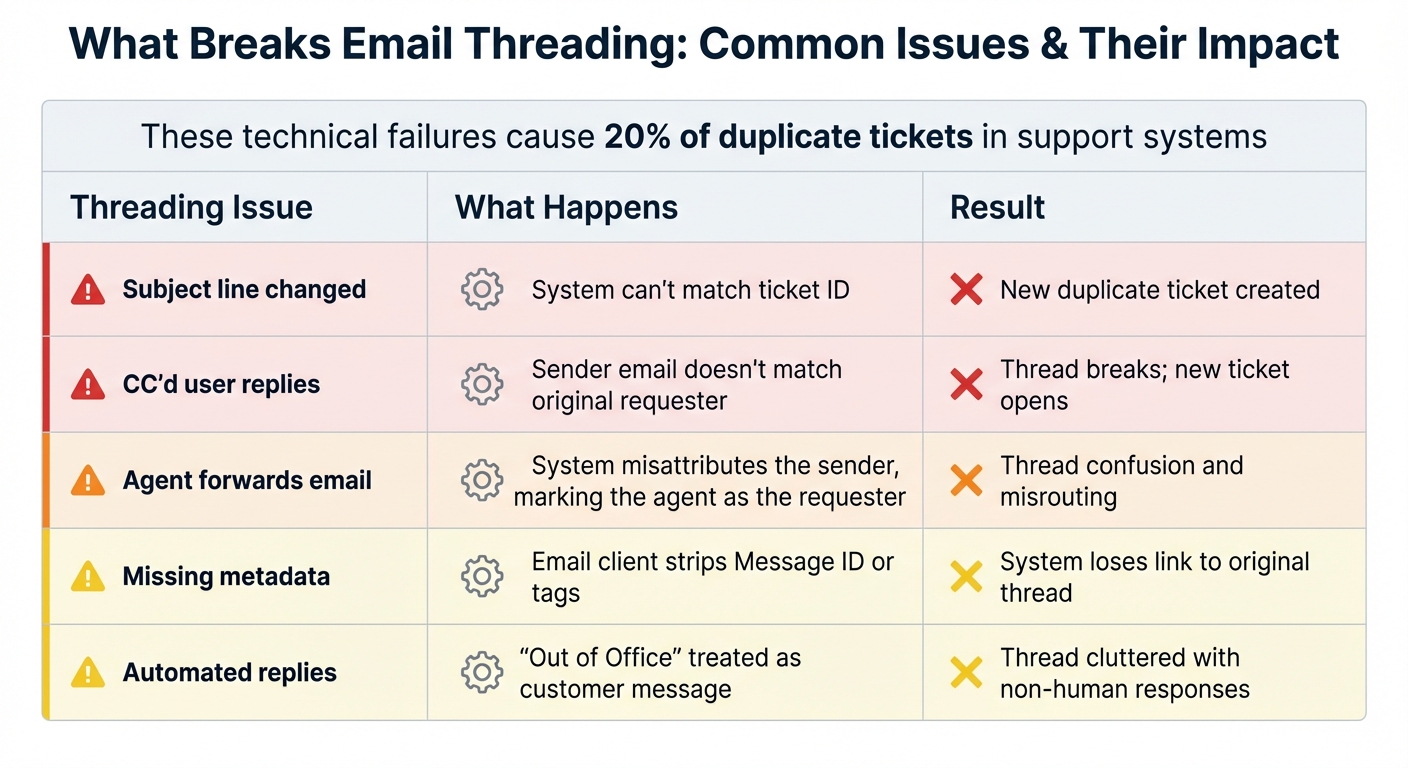
Email Threading Issues: Causes and Consequences in Customer Support
To tackle duplicate tickets and email thread issues, it’s crucial to understand what causes them in the first place. These underlying problems often pave the way for chaos, but identifying them is the first step toward effective solutions – whether manual or AI-driven. Here’s a closer look at the most common culprits.
Common Causes of Duplicate Tickets
One major cause? Slow response times. When customers don’t hear back quickly, they often panic and reach out through multiple channels – email, chat, or even phone – creating duplicate tickets. This not only frustrates customers but also eats up agents’ time and bloats your backlog.
Another issue is manual triage bottlenecks. When agents have to manually review and assign every incoming request, delays and inconsistencies are almost guaranteed. High email volumes only make things worse, especially if workflows aren’t clearly defined or teams lack visibility into performance. Missed messages lead to delayed responses, and frustrated customers send follow-ups, compounding the problem with even more duplicate tickets.
Fragmented communication channels also play a big role. Without a unified system, a single customer issue might generate multiple tickets across different platforms. For example, a customer could email support, message on chat, and call your hotline – all for the same problem. Without proper integration, your system won’t recognize these interactions as belonging to the same person or issue.
Lastly, rule-based systems often fall short. These systems rely on basic keyword filters to route tickets, which can lead to errors. For instance, an email mentioning "payment" might get sent to the billing team, even if the real issue is a technical glitch during checkout. The ticket gets transferred, the thread breaks, and the customer ends up waiting even longer for a resolution.
What Breaks Email Threading
Email threading depends on technical markers like Message IDs, ticket numbers in subject lines, and sender validation. If any of these fail, your system may lose track of the conversation and create a new ticket instead of continuing the existing thread.
Subject line changes are a frequent culprit. When a customer or agent edits the subject line in a reply, many systems can’t match the email to the original ticket. Similarly, if a CC’d user or someone on a distribution list responds, the system may treat their email as a new conversation because it doesn’t match the original requester’s address.
Manual forwarding creates similar confusion. If an agent forwards an email from their personal inbox to the support system without proper setup, the system might mistakenly identify the agent as the requester, breaking the thread entirely.
Even automated replies can wreak havoc. If your system doesn’t filter out auto-responses like "Out of Office" messages, it may interpret them as new customer interactions, further cluttering your inbox.
| Threading Issue | What Happens | Result |
|---|---|---|
| Subject line changed | System can’t match ticket ID | New duplicate ticket created |
| CC’d user replies | Sender email doesn’t match original requester | Thread breaks; new ticket opens |
| Agent forwards email | System misattributes the sender, marking the agent as the requester | Thread confusion and misrouting |
| Missing metadata | Email client strips Message ID or tags | System loses link to original thread |
| Automated replies | "Out of Office" treated as customer message | Thread cluttered with non-human responses |
Next, we’ll dive into manual strategies to address these challenges effectively.
Manual Methods to Reduce Duplicates and Thread Confusion
Your team can cut down on duplicate tickets and thread errors with straightforward manual configurations. While these methods require some initial setup, they create a solid system that helps prevent confusion before it even starts.
Configure Email Settings and Notifications
Start by using dedicated support email addresses (like billing@yourcompany.com) to ensure requests are routed correctly. This simple step reduces ticket duplication and misrouting.
Enable wildcard address handling to capture emails sent to slightly misspelled addresses (e.g., "biling@" instead of "billing@"). This prevents customer messages from slipping through the cracks and stops them from resending the same request.
Set up precise forwarding rules. When forwarding customer emails, ensure the system attributes the message to the original sender. Without this, threads can break, and attribution becomes messy.
"Unless you have a very small support team, we recommend deactivating the Notify all agents of received request trigger because not all of your agents need or want an email notification every time a new ticket is created." – Anton de Young, Zendesk
Turn off global notifications for new tickets. Alerting every agent about every request often leads to duplicate responses, wasted effort, and disjointed conversations.
Once these settings are in place, you’ll have a strong foundation for organizing tickets with custom tracking fields.
Use Custom Fields to Track and Merge Tickets
Add a custom text field for unique identifiers like order numbers, invoice IDs, or serial numbers. If customers include these details when submitting tickets, agents can quickly search for existing tickets with the same identifier and merge them manually.
Categorize tickets with drop-down fields for common issues like billing, technical problems, or account questions. These fields can auto-generate tags, making it easier to filter tickets and identify duplicates.
Create custom views to group tickets by fields like "Order ID" or "Transaction Number." This way, agents can see all related tickets in one place, streamlining the process of manually merging duplicates.
Set Clear Agent Workflows and Email Handling Rules
Standardize ticket statuses – such as Open, Pending, In Progress, and Resolved – to provide a clear visual pipeline. This helps avoid overlooked or duplicated tickets.
Include ticket IDs (e.g., [#{{ticket.id}}]) in reply subject lines. This ensures thread continuity, even if the customer’s email client modifies header information.
Use a dedicated escalation email list for urgent issues. This ensures high-priority requests bypass general queues and are resolved faster.
Implement threading intervals to define how long a ticket remains "re-openable" before a follow-up creates a new ticket. For email, a 24- to 48-hour window works well, though shorter intervals may be better for channels like social media.
These practices not only simplify your support system but also set the stage for integrating AI tools to further automate deduplication and thread management.
How AI Prevents Duplicates and Manages Email Threads
AI has transformed how email threads and duplicate tickets are handled, moving beyond manual methods to create a system that works in real time. By automating these processes, it reduces the need for manual effort, saving time and improving efficiency. Let’s explore how AI achieves this.
AI-Powered Ticket Deduplication and Auto-Prioritization
AI goes beyond just matching keywords – it uses natural language processing (NLP) to understand the intent and tone behind customer messages. This allows it to distinguish between requests that may sound similar but require different responses. For example, AI can identify unique details like order IDs, serial numbers, or product names. If a customer mentions an order number in a new email, the system can quickly flag it as a potential duplicate by searching existing tickets for matches.
When the system detects a high-confidence match (e.g., 95%), it suggests merging the tickets. For cases where confidence is lower, it flags them for manual review. This intelligent triage process not only saves 30–60 seconds per ticket but can also reduce the overall ticket volume by up to 20%, with an accuracy rate of 98%.
AI doesn’t stop at deduplication. It also prioritizes tickets by analyzing intent and sentiment. For instance, if a customer says, "My account is suspended and I need access immediately", the system automatically tags the issue as urgent and routes it to the right team – no manual input required.
AI Thread Summaries and Activity Organization
Long email threads can be a nightmare to navigate, especially when multiple teams are involved. AI simplifies this by generating short, two-sentence summaries that capture the essence of the conversation. This allows agents to quickly grasp the situation without having to sift through every single message.
AI also highlights critical details within threads, such as product names, order numbers, and tracking IDs, often using visual cues to make these elements stand out. This makes it easier for agents to locate key information at a glance. Advanced systems even account for common misspellings, matching words based on initial characters or minimum word lengths.
Sentiment analysis adds another layer of clarity. Threads are automatically tagged with sentiment indicators – positive, neutral, or negative – helping agents prioritize tickets from frustrated customers who may need immediate attention.
"The insights coming in through AI give us the chance to be better customer service agents and provide a better customer experience."
On average, AI-driven thread organization saves 45 seconds per ticket compared to manual methods, making it a powerful tool for improving response times.
Predictive Detection of Duplicate Tickets and Thread Issues
AI doesn’t just fix problems as they arise – it predicts them. By analyzing historical and real-time data, it identifies patterns that suggest a duplicate ticket might soon be created. For example, if a customer sends a follow-up email about the same issue before receiving a response, AI can merge the new message with the existing ticket or flag it for review.
Predictive routing takes this a step further. AI considers factors like agent workload, specialization, and past performance to ensure each ticket is sent to the right team on the first try. This reduces the chaos of multiple transfers and prevents customers from having to repeat themselves.
AI systems also improve over time. By learning from resolved and merged tickets, the algorithms continuously refine their accuracy without needing manual updates.
"With triage tools, you can build AI models to predict future tickets and solve customer questions faster."
sbb-itb-e60d259
How to Implement a Solution in Your Support Team
Putting these solutions into practice requires careful planning. The aim is to analyze your current email and ticketing systems, introduce AI-powered tools, and train your team to use them effectively – all while keeping daily operations running smoothly.
Step 1: Review Your Current Email Setup and Ticket Workflows
Before adding any new tools, it’s important to pinpoint where issues are happening. Start by auditing your existing triggers, groups, tags, and views. Look for areas that cause ticket bottlenecks or mislabel priorities. Also, examine key metrics like daily ticket volume, agent-to-ticket ratios, and average resolution times.
Clearly define what severity and priority mean for your team. For example, a website outage should take precedence over something like a broken hyperlink. Base these definitions on factors like urgency, customer spending, Service Level Agreements (SLAs), and the overall impact of the issue. This clarity will later help when configuring AI systems for routing.
Additionally, analyze ticket transfer rates and any SLA breaches. This will highlight where manual processes are falling short and where AI can provide the fastest improvements.
Once you’ve mapped out your workflows, you’ll be ready to implement AI tools to address inefficiencies.
Step 2: Set Up AI Deduplication and Threading Tools
With your audit complete, the next step is to introduce AI tools that streamline ticket management. While manual configurations can handle basic needs, AI takes automation to the next level by managing deduplication and threading with greater precision.
Start with simple rule-based automations, then move to context-aware triage, and finally, implement fully AI-powered models.
Configure the AI to identify key details like product names, order IDs, or customer account types within email threads. These details can automatically populate custom fields and trigger specific workflows. For deduplication, set a high confidence threshold – like 95% – so the AI only acts automatically when it’s highly certain. Anything below that threshold can be flagged for human review. This approach minimizes errors while still automating most cases.
Introduce continuous learning loops to improve the AI over time. Resolved ticket data should feed back into the system to refine its routing and deduplication logic without requiring constant manual updates. Also, standardize incoming data formats – use ISO format for dates (YYYY-MM-DD) and validate data to avoid workflow errors caused by unexpected formats.
Step 3: Train Your Team and Track Results
Even the most advanced AI tools are only as effective as the people using them. Proper training ensures your team can fully benefit from these tools.
Present AI as a resource to handle repetitive tasks, freeing up agents to focus on more complex issues. This perspective shift is critical, especially as 82% of service reps report rising customer demands. Agents should see AI as a way to reduce their workload, not as a threat to their roles.
Organize training sessions where agents can practice reviewing AI-generated summaries, validating duplicate ticket suggestions, and overriding routing decisions when necessary. Assign agents to specific problem categories, such as technical issues versus billing inquiries, to make workflows more efficient. Test AI capabilities in a controlled environment to ensure it accurately identifies intents and key details before going live.
Finally, monitor KPIs like ticket transfer rates, customer satisfaction (CSAT) scores, and agent feedback. Hold regular team meetings to gather insights on workflow challenges and adjust the AI settings based on real-world experiences.
"It’s great that we’ve created something our agents love. They’re not worried about their jobs going away; they see Forethought as their teammate so they can focus on enhancing the experience for our members." – Emily Pearce, Senior Director of Global Customer Care
Tracking Results and Improving Over Time
Once you’ve rolled out AI tools and trained your team, the next step is all about keeping tabs on performance. Simply launching these tools isn’t enough – you need clear metrics to see if your deduplication and email threading solutions are actually making a difference. Without measurable data, you’re essentially flying blind.
Metrics to Measure Success
Start by focusing on a few key performance indicators (KPIs) that directly show whether your efforts are reducing duplicate tickets and messy email threads. One big one? Ticket resolution time. If agents are spending less time dealing with duplicates or navigating disorganized threads, you should see faster resolutions. Another important metric is ticket touches – how many back-and-forth interactions are needed before resolving an issue. A high number of touches often signals that threads are fragmented or missing context.
You’ll also want to keep an eye on your duplicate ticket rate by tracking how many duplicates are flagged, merged, or closed each week. A declining rate here is a clear sign that your AI deduplication is doing its job. Beyond that, monitor metrics like deflection rate, SLA adherence, and CSAT scores to ensure efficiency gains aren’t coming at the expense of customer satisfaction.
| Metric | Purpose | Success Indicator |
|---|---|---|
| Resolution Time | Measures speed of support | Decrease in average time to solve |
| Ticket Touches | Measures thread efficiency | Fewer interactions per resolution |
| Duplicate Rate | Measures deduplication success | Lower percentage of merged tickets |
| CSAT Score | Measures customer happiness | Increase in positive feedback |
| SLA Adherence | Measures process reliability | Higher percentage of met deadlines |
Refine Your Workflows Based on Data
Once you’ve gathered data from your metrics, use it to fine-tune your workflows. For example, if duplicate tickets are still slipping through, dig into the numbers to see why. Are certain types of tickets consistently causing issues? If so, it might be time to adjust your AI’s training data or add more context to your workflows. Regularly audit how tickets are routed – if they’re bouncing between agents or queues too often, your routing logic might need tweaking.
Another area to watch is AI confidence levels. If the system frequently flags tickets for manual review, it could mean your AI isn’t confident enough in its decisions. Low confidence scores for specific ticket types are a signal to update your training data or refine your rules. And don’t forget to schedule audits whenever there are big changes – like new product launches, shifts in support hours, or team restructuring. What worked a few months ago might not fit your current needs.
Agent feedback is also a goldmine for catching edge cases where AI might struggle. These insights can help you refine metadata, tags, and triggers to better align with real-world scenarios. A good rule of thumb? Let AI handle about 80% of routine tasks like basic deduplication and routing, while leaving the trickier 20% for your team to tackle.
"The insights coming in through AI give us the chance to be better customer service agents and provide a better customer experience." – Billy Abrams, Executive Vice President of Distribution, Medline
To keep everything running smoothly, set up a multi-tiered review cycle. This could include weekly check-ins to make quick adjustments, monthly reviews to dig into recurring issues, and quarterly strategy sessions to align AI performance with your business goals. By consistently analyzing and refining your system, you’ll ensure your support operations stay efficient while delivering a seamless experience for your customers.
FAQs
How can AI help speed up response times in customer support?
AI has the power to drastically cut response times by automating essential tasks such as ticket triage, routing, and prioritization. This means customer inquiries are sent to the right team or agent immediately, eliminating the delays that come with manual processes.
On top of that, AI-driven tools like chatbots or automated email systems can handle common questions instantly. This frees up agents to tackle more complicated issues that require a human touch. By simplifying workflows and reducing repetitive tasks, AI allows customer support teams to address problems faster and with greater efficiency.
What causes duplicate tickets and email chaos in customer support?
Duplicate tickets and email overload are common headaches in customer support, often caused by gaps in automation, poor ticket routing, and communication mishaps. For instance, when email-to-ticket systems aren’t configured correctly, customers might resend emails if they don’t get timely updates. This can lead to multiple tickets being created for the same issue.
Another frequent issue is inefficient ticket triage and routing. If related inquiries aren’t grouped together, agents may unknowingly work on the same problem in isolation. This not only wastes time but also leads to inconsistent resolutions. On top of that, unclear follow-up processes can confuse customers, prompting them to open new tickets instead of updating existing ones, which only adds to the chaos.
The good news? Modern AI-powered tools can step in to fix these problems. They can automatically detect and merge duplicate tickets, improve the accuracy of ticket routing, and streamline communication processes, keeping your support system organized and efficient.
What are some manual strategies to reduce email thread chaos in customer support?
Sometimes, the simplest methods can have a big impact. Manual strategies are a great way to bring order to messy email threads by establishing clear workflows and consistent communication habits.
Take ticket triaging, for example. When support teams manually sort and prioritize incoming requests, they can ensure that each issue lands in the hands of the right person or team. This not only prevents duplicate tickets from clogging up the system but also avoids the frustration of multiple agents unknowingly working on the same problem.
Another helpful tactic? Using standardized response templates and macros. These tools make it easier to deliver consistent, clear replies while cutting down on repetitive or conflicting messages in lengthy email chains. It’s like giving your team a shared playbook to keep everyone on the same page.
Manually keeping an eye on ongoing conversations can also pay off. This allows teams to spot overlapping issues, merge related threads, and maintain a more streamlined flow of communication. While automation plays a crucial role in many workflows, these hands-on approaches lay the groundwork for clear and efficient communication, especially when dealing with complex cases or high-demand periods.