Managing backlog aging and avoiding zombie tickets is all about improving visibility, prioritization, and automation in your support workflows. Zombie tickets – unresolved cases stuck in limbo – can hurt customer satisfaction, breach SLAs, and frustrate teams. Here’s how to tackle these challenges effectively:
- Track ticket age metrics: Monitor metrics like ticket age, time since last update, and backlog volume by status to identify aging tickets early.
- Automate prioritization: Use AI tools to rank tickets based on urgency, sentiment, and customer value, ensuring critical issues are addressed first.
- Streamline triage: Automate ticket categorization and routing to reduce delays and manual errors.
- Predict escalations: Leverage AI to detect tickets at risk of escalating and intervene before problems grow.
- Audit backlogs: Regularly clean up stagnant tickets, close duplicates, and assign clear ownership to unresolved cases.
- Use dynamic SLAs: Adjust deadlines based on ticket type, sentiment, and customer importance to keep workflows efficient.
- Promote self-service: Deploy AI-powered tools like chatbots and knowledge bases to handle repetitive queries and reduce ticket volume.
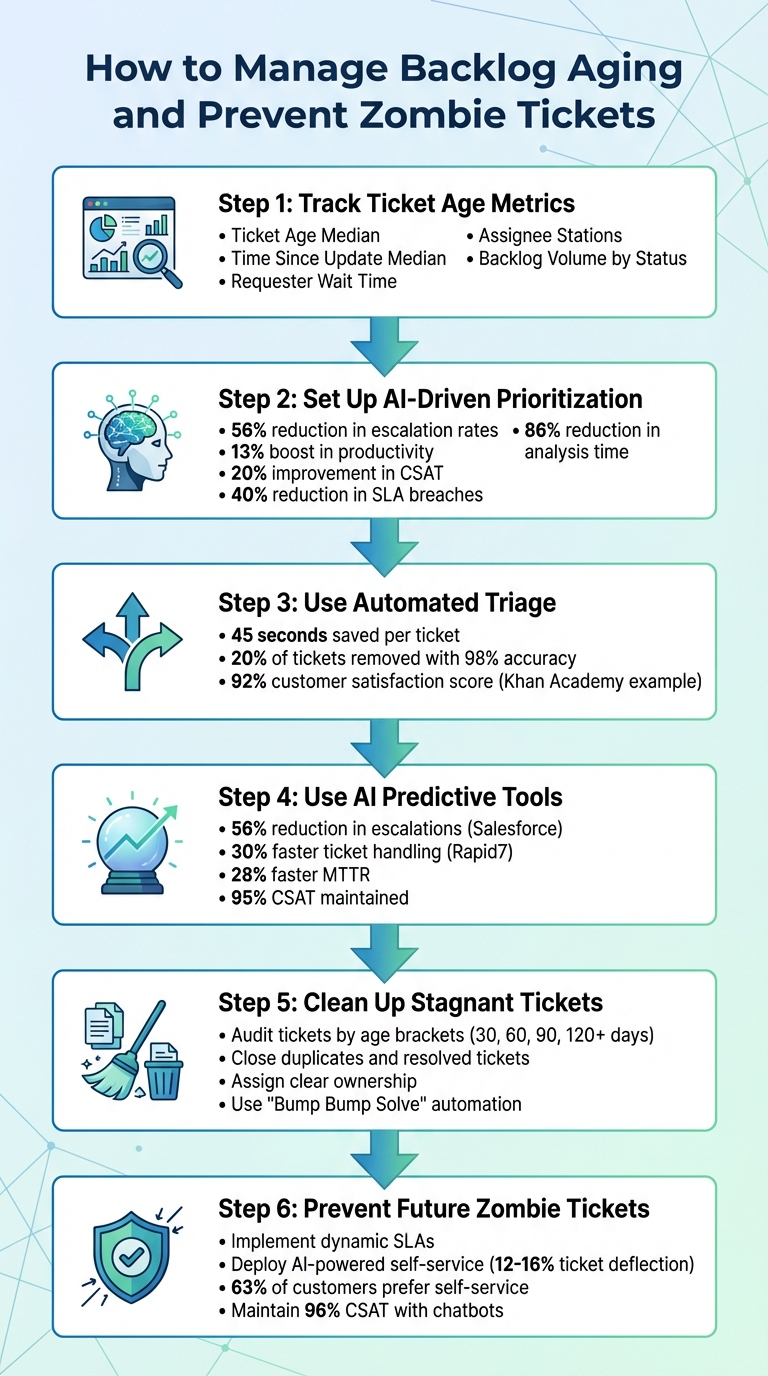
6-Step Process to Manage Backlog Aging and Prevent Zombie Tickets
How to Reduce a Backlog of Tickets: IT Problem Solving Skills
What Are Backlog Aging and Zombie Tickets?
Let’s dive into two key concepts that highlight common support challenges: backlog aging and zombie tickets.
Backlog aging refers to how long support tickets remain unresolved. In B2B support, this is a frequent issue because cases often involve complex technical matters that demand specialized knowledge, coordination across time zones, and detailed troubleshooting.
Zombie tickets, on the other hand, represent a more entrenched problem. These are aged tickets stuck in a loop of inaction – passed between teams, assigned to individuals unable to resolve them, or tied to issues that are no longer relevant. IT Service Management Expert Ignacio Graglia describes them as:
This includes all the incidents or requests that should have been sorted out months (if not years) ago, but for a variety of reasons, they are still active and not resolved.
These stagnant tickets not only waste resources but also pile up over time, making the workload harder to manage.
How Backlog Aging Affects Your Support Operations
The effects of backlog aging go beyond having a long list of unresolved tickets. In B2B environments, unchecked backlogs strain resources and contribute directly to burnout. In fact, more than 50% of workers reported experiencing burnout in 2021, a problem that often leads to high turnover among support engineers.
A large backlog can also obscure critical issues. For instance, after a product update introduces a bug, an overloaded queue might delay identifying the problem until customers start leaving. Ryan Radcliff, Director of Product Marketing at SupportLogic, explains:
If your support backlog is massive, the insights you can pull from tickets quickly become the diamonds in the rough.
Additionally, manual triage becomes slower and more prone to mistakes when backlogs grow. Without automated tools, agents may misjudge ticket urgency or fail to understand customer needs, causing further delays. For B2B clients with strict deadlines or high-stakes requirements, these delays can damage trust and satisfaction. The ripple effects include missed SLA targets, longer Mean Time to Resolution (MTTR), and more frequent escalations.
Recognizing these consequences underscores the importance of addressing backlog aging. But to tackle the issue, it’s crucial to understand the systemic problems that lead to zombie tickets.
Why Zombie Tickets Keep Appearing
Zombie tickets don’t just happen – they stem from deeper workflow issues. One major factor is poor prioritization. Many teams process tickets in the order they’re received, which means complex cases often get pushed aside when urgent, high-impact incidents arise. Over time, lower-priority tickets are left unresolved indefinitely.
Another issue is unclear ownership. When tickets are passed between teams without a clear assignee, no one takes responsibility for resolving them.
Resource limitations add to the problem. B2B support teams often lack the training or tools needed to handle challenging technical cases, leading to ticket stagnation. Additionally, some customers become unresponsive after submitting a request, leaving tickets lingering in the system for months.
Solving these issues starts with gaining visibility into ticket age. By tracking how long tickets remain unresolved, teams can spot aging backlogs early and prevent them from spiraling out of control. The next step is implementing strategies to address these root causes effectively.
Step 1: Track Ticket Age Metrics to Find Aging Backlogs
If you want to tackle backlog issues, the first step is getting a clear view of how long tickets are sitting unresolved. Without tracking ticket age metrics, backlogs can sneak up on you, damaging customer relationships or causing missed SLA deadlines before you even realize there’s a problem.
For B2B teams, this means diving into detailed metrics that show where tickets get stuck, how long customers are waiting, and which cases are being passed around without anyone taking ownership. Tracking these numbers is the key to stepping in before things spiral out of control.
Which Metrics to Monitor
Here are the key metrics you should keep an eye on:
- Ticket Age Median: This measures the time elapsed since a ticket was created. If the median starts climbing, it’s a sign your backlog might be growing.
- Time Since Update Median: Tracks how long it’s been since the last activity on an unresolved ticket. Tickets that go too long without updates are at risk of becoming stagnant.
- Requester Wait Time: Calculates the total time a ticket spends in statuses like New, Open, or On-hold. Long wait times can frustrate your B2B clients and hurt customer retention.
- Assignee Stations: Shows how many agents or groups have handled a ticket. A high number here often points to tickets being bounced around without clear ownership, which can delay resolution.
- Backlog Volume by Status: Breaks down where tickets are piling up – whether in New, Open, Pending, or On-hold statuses. This helps you identify bottlenecks and decide if you need process changes, like automated reminders or closing unresponsive cases.
How to Use Reporting Dashboards
Dashboards are your best friend when it comes to visualizing and managing backlogs. Use bracketed age reporting to group tickets by how long they’ve been sitting (e.g., 1–3 days, 3–7 days, over 7 days). This helps you spot outliers that need immediate attention.
Snapshot analysis is another powerful tool. By capturing daily snapshots of your unsolved ticket backlog, you can track trends over time. This historical data reveals whether backlogs are growing or shrinking and can even highlight seasonal patterns.
To get a full picture, cross-reference your backlog volume with ticket age and first reply time. As Rob Stack from Zendesk‘s documentation team puts it:
Ticket backlog volume cross-referenced with ticket age and first reply time… provides insight into your incoming ticket volume and how well you keep up.
A large backlog isn’t always a crisis – if your throughput is high, you might still be on top of things. But if tickets are aging and first reply times are creeping up, that’s a red flag signaling workflow issues that need immediate attention.
Use dashboard filters to dig deeper. Sort reports by brand, group, channel, or priority to quickly find problem areas. Real-time SLA monitoring is also crucial for catching tickets close to breaching their deadlines – typically those with less than 15 minutes left before an SLA violation. These tickets should be your top priority.
Modern AI-powered platforms make this process even smoother. Dashboards often have customizable views that don’t require IT support, and you can set up automated alerts for when metrics exceed thresholds. This ensures small issues are addressed before they turn into full-blown crises.
With proper visibility in place, you’re ready to use AI tools to prioritize and resolve tickets more effectively.
Step 2: Set Up AI-Driven Ticket Prioritization
Once you’ve started tracking ticket age metrics, the next step is to focus on prioritizing tickets that have the biggest impact. Sorting tickets manually just doesn’t cut it in a B2B support environment, especially when you’re juggling hundreds of cases with varying urgency, customer importance, and business consequences.
AI-driven prioritization moves beyond the old "first-in, first-out" model by using intelligent scoring. This system evaluates multiple factors at once and automatically highlights the most critical cases that demand immediate attention. The result? Critical issues don’t get stuck in the backlog while less urgent ones are resolved. It’s a practical way to lay the groundwork for smarter, automated ticket management in future steps.
Here’s what the numbers say: AI-driven ticket prioritization has been shown to cut escalation rates by 56%, boost productivity by 13%, improve CSAT by 20%, and reduce SLA breaches by 40%.
How Automated Ticket Scoring Works
AI scoring engines rely on natural language processing (NLP) and neural networks to dig into the actual content of customer tickets. These systems analyze messages to pick up on intent, sentiment, and tone, identifying signs like frustration or phrases such as "thinking of switching providers."
The system assigns a "Needs Attention" score to flag tickets at risk of escalating. For instance, high-priority tickets – like those from VIP customers or containing urgent keywords – are automatically moved to the top of the queue. When combined with metrics you’re already tracking, this scoring creates a real-time, comprehensive view of ticket health.
Chris Todd, Director of Support Quality & Service Enablement at Snowflake, describes the tool’s impact:
My team and my managers see SupportLogic as their cockpit, I’m flying a plane. This is the cockpit.
The time savings are substantial: AI-assisted prioritization can reduce analysis time by 86%, cutting what used to take 9–13 hours down to just 1–2 hours. Instead of manually sorting through tickets, agents can focus on resolving them faster and more efficiently.
AI doesn’t stop at initial scoring – it continuously monitors tickets in real time. As new messages arrive or deadlines approach, the system updates risk scores. For example, if a customer’s sentiment shifts from neutral to frustrated, the AI can trigger proactive actions, like escalating the case to a senior agent or scheduling a callback, well before an SLA breach occurs.
This refined prioritization also feeds into deadline management. That’s where dynamic SLAs come into play.
Using Dynamic SLAs to Adjust Deadlines
Static SLAs often fall short in the B2B world, where ticket urgency can vary dramatically. Dynamic SLAs use AI to adjust deadlines based on factors like account importance, sentiment, product type, and even renewal timelines. For example, a billing issue from a key account nearing renewal might get a tighter SLA, while a minor feature request from a free-tier user might have more flexibility. The system can even recognize complex tickets and extend deadlines when needed.
Companies like Basware have embraced this approach, and the results speak for themselves. After shifting to an AI-based scoring model, 72% of their strategic customers reported improved sentiment, and escalations dropped by 80%. Similarly, Coveo, after implementing AI prioritization in mid-2022, achieved a 53% reduction in Mean Time to Resolution (MTTR).
Katherine Sullivan, SVP of Customer Success at Salesforce, highlights the value of this proactive approach:
Whenever we witness a surge in negative sentiment, our team springs into coordinated action, and the outcomes we achieve are consistently on target.
Dynamic SLAs not only fine-tune deadlines but also prevent tickets from falling through the cracks. The system flags cases nearing their deadlines, ensuring they get prioritized before breaching. This keeps your team focused on what matters most and avoids the problem of "zombie tickets" lingering in the queue.
Step 3: Use Automated Triage and Bulk Processing
Once you’ve implemented AI-driven prioritization, the next step is automating ticket categorization to keep workflows running smoothly. Relying on manual triage often slows things down – agents spend too much time sorting and routing tickets. In B2B environments that deal with hundreds of complex cases daily, this can lead to misrouted tickets, slower response times, and a backlog that just keeps growing.
Automated triage steps in to solve this. With natural language processing (NLP), the system can instantly identify a ticket’s intent and customer sentiment as soon as it arrives. For example, phrases like "thinking of canceling" or "need a refund" trigger the system to flag these tickets for urgent attention. From there, tickets are routed to the right team based on factors like language, complexity, and agent expertise. This eliminates unnecessary handoffs that can cause delays and frustration. On average, support teams using AI-powered triage save 45 seconds per ticket compared to manual processes. Once tickets are sorted, the next step is to process them efficiently in bulk.
Why Automated Triage Makes a Difference
AI-based triage doesn’t just skim the surface – it dives into the content of customer messages to understand both the context and tone. For instance, if a customer writes, "I’ve been waiting three weeks for a response", the system picks up on the urgency and assigns it a "Needs Attention" score.
It can also handle simple tasks before an agent even gets involved. Say someone submits a billing inquiry but forgets to include an order number. The AI can automatically respond, requesting the missing details. This reduces unnecessary back-and-forth, increasing the chances of resolving the issue on the first try.
Take Khan Academy, for example. The online education platform uses automated triage to prioritize support tickets and assign them to the most qualified agents. This system has helped them maintain a 92% customer satisfaction score. Similarly, Medline, which processes over 800,000 tickets annually, has seen the benefits. Billy Abrams, Executive Vice President of Distribution at Medline, shared:
The insights coming in through AI give us the chance to be better customer service agents and provide a better customer experience.
Automated triage also helps clean up your backlog. It can identify duplicate tickets, spam, or poorly categorized cases, allowing teams to focus on what really matters. In fact, AI systems can remove 20% of tickets in a queue with 98% accuracy, cutting down on unnecessary clutter.
How Bulk Actions Save Time
Once you’ve categorized tickets properly, bulk actions can speed up resolution by tackling similar issues in one go. This is especially useful for repetitive inquiries. For example, if 50 customers ask about the same product feature, you can use bulk actions to send a consistent, high-quality response to all of them at once. Just be sure to personalize the message slightly with macros so it doesn’t feel robotic.
Time-based automations are another way to handle inactive tickets. The "Bump Bump Solve" method is a great example. Here’s how it works: the system sends a first reminder after 4 days of no activity, a second reminder at 6 days, and then closes the ticket at 7 days if there’s still no response. For sensitive cases, you can use a "dont_bump" tag to exclude certain tickets from being closed automatically.
Peek, a travel activity company, used automation to manage seasonal spikes in support requests. Tasks that used to take four to five hours were reduced to just five minutes by automating resource allocation.
For backlogs of over 1,000 tickets, API endpoints can help process updates more efficiently than traditional UI-based bulk actions. This method allows you to close or archive tickets at scale without overwhelming your team or system.
sbb-itb-e60d259
Step 4: Use AI Predictive Tools to Prevent Escalations
After automating triage, the next step is to use AI to anticipate and prevent ticket escalations. Traditional customer support workflows typically respond only after frustration levels rise. Predictive AI takes a different approach – constantly monitoring active tickets and identifying those most at risk of escalating, allowing teams to intervene before problems spiral out of control. By combining this predictive capability with automated triage, you can address potential issues early and maintain smoother operations.
How AI Predicts Escalation Risk
AI models evaluate a variety of real-time factors to calculate a risk score for each ticket. These factors include changes in sentiment (like a shift from neutral to frustrated), delays in response times, and patterns such as a ticket requiring five or more replies without resolution. The system also scans for specific red-flag phrases, like "considering alternatives", "refund", or "API integration error", to refine its risk analysis further.
The results speak for themselves. For example, Salesforce implemented predictive tools that analyze ticket content and alert teams to intervene, reducing escalation rates by 56%. Similarly, Rapid7 adopted an AI-driven system paired with an "Ask Mosaic first" policy, which sped up ticket handling by 30%, increased agent capacity by 35%, and maintained a 95% customer satisfaction score (CSAT).
Beyond identifying high-risk tickets, these AI systems automatically route them to the best-suited agents. By evaluating ticket complexity and matching it with agent expertise and availability, the system ensures quicker resolutions. This proactive routing also prevents tickets from getting stuck in queues for extended periods, avoiding the dreaded "black box" effect.
Getting Resolution Suggestions from AI
When dealing with high-risk tickets, AI can provide immediate resolution suggestions using Retrieval-Augmented Generation (RAG). This method pulls relevant information from internal knowledge bases like past cases, Slack discussions, or Confluence documents. For instance, if a customer reports a billing error, the AI might locate a similar case, summarize how it was resolved, and suggest actionable steps.
This capability eliminates the need for agents to manually sift through data, saving significant time. AI can reduce manual escalation analysis time by 86%, cutting it down from 9–13 hours to just 1–2 hours. It also speeds up Mean Time to Resolution (MTTR) by 28% and lowers escalation rates by 32%.
For the best results, make sure your AI platform has access to all relevant data sources. The more context the system has, the better its recommendations will be. Additionally, set up automatic triggers to add internal notes to tickets that meet specific risk thresholds – like unresolved tickets with multiple agent replies. This ensures agents receive the guidance they need to resolve issues swiftly and effectively.
Step 5: Clean Up Stagnant Tickets and Assign Ownership
Once you’ve automated triage, it’s time to tackle the backlog, starting with stagnant tickets. After identifying and sorting high-risk tickets, focus on clearing out older, unresolved ones. This requires a structured audit and assigning clear ownership to ensure no ticket is left unattended.
How to Audit Your Backlog
Begin by generating reports that highlight unresolved tickets, average resolution times, and ticket age. Sort tickets into age brackets – 30, 60, 90, and 120+ days – using a ticket aging formula. This breakdown gives you a clear picture of how severe your backlog is and where to start.
Next, identify tickets that can be resolved quickly. Look for cases like:
- Tickets that are already resolved but not officially closed
- Duplicates
- Tickets tied to retired processes or disbanded teams
- Poorly categorized tickets that need reclassification
Close these immediately to lighten the load. For very old tickets, reach out to customers to confirm if the issue is still relevant.
Focus on tickets with expired SLAs and high-priority problems, such as login errors. Also, take note of systemic issues, like tickets that have been reassigned multiple times or delayed due to being labeled low priority. These patterns often point to deeper routing or process inefficiencies.
Once the audit is complete, reassign tickets strategically to ensure accountability and prevent further delays.
Reassigning Tickets and Setting Priorities
Use the audit findings to assign clear ownership for every ticket. Consider forming a dedicated backlog team to handle aged tickets. This ensures the backlog doesn’t get neglected in favor of newer, easier requests and helps alleviate the mental strain on your team. As Mathew Patterson from Help Scout explains:
One truth about working in customer service is that how you feel about the support queue does make a difference. Even if the job itself is just answering one customer at a time, seeing an abnormally large queue can take a toll.
Leverage intelligent routing to reassign tickets based on factors like agent skill sets, time zones, and current workloads. This reduces the chances of tickets bouncing between teams without resolution. Assigning a specific owner to each ticket ensures accountability and avoids duplicate efforts.
For tickets stuck waiting on customer responses, implement "Bump Bump Solve" automation. Set your system to send two reminders to the customer. If there’s no response within 48 hours of the second reminder, close the ticket automatically. This prevents tickets from lingering indefinitely in a "Pending" status and inflating your backlog numbers unnecessarily.
Step 6: Prevent Future Zombie Tickets with Dynamic SLAs and Self-Service
Once you’ve cleaned up your backlog, the next step is making sure zombie tickets don’t reappear. Achieving this requires a two-part strategy: dynamic SLAs that adjust to ticket statuses and self-service AI that reduces ticket volume before issues even reach your team.
How Dynamic SLAs Keep Tickets Moving
Traditional SLAs often fail because they count inactive periods, which leads to false breaches and undermines confidence in the metrics. Dynamic SLAs, powered by AI, solve this issue by pausing SLA timers when tickets are in "Pending" or "Waiting on Customer" status.
To make this work, configure SLA timers to run only when tickets are actionable – during "Assigned" or "Open" states. Add alerts at 25%, 50%, and 75% of the active SLA time to ensure your team stays on top of actionable tickets.
Introduce Periodic Update metrics to show ongoing agent activity, even for cases that take time to resolve. Internal notes can count toward these updates, which is especially helpful for complex B2B cases where agents are working behind the scenes. As Ritu John from Hiver explains:
If waiting states don’t pause the clock, SLAs end up tracking delays your team cannot control, which quickly erodes trust in the metric.
You can also implement Group SLAs, sometimes called Operational Level Agreements, to track how long tickets spend with different internal teams. This approach prevents tickets from stalling during handoffs between departments, a common issue in B2B setups involving multiple specialized teams.
By combining adaptive SLAs with earlier AI-driven prioritization methods, you can ensure your ticket queue stays active and manageable.
Cutting Down Ticket Volume with Self-Service AI
Dynamic SLAs are great for managing active tickets, but self-service AI helps reduce ticket volume before it even hits your queue. AI-powered self-service tools handle repetitive requests, cutting down on the number of tickets agents need to process. Research shows that 63% of customers prefer finding answers online before reaching out to support, and AI-driven self-service can deflect between 12% and 16% of ticket volume.
Deploy AI chatbots that integrate with your CRM, billing, and help desk systems. These bots can provide instant, personalized answers to common questions, like shipping updates or account details, without requiring agent involvement. For example, Baleària‘s travel chatbot significantly reduced routine ticket creation while maintaining a 96% customer satisfaction score.
AI can also help identify gaps in your knowledge base by analyzing ticket trends, then automatically drafting or updating articles to fill those gaps. Reviewing resolved tickets for one-touch solutions – issues solved in a single interaction – can provide additional topics for self-service content. Adding multilingual support ensures customers worldwide can resolve issues in their preferred language.
To keep your backlog clean, implement "Bump Bump Solve" automation, which closes unresponsive tickets after two reminders. This prevents tickets from lingering indefinitely in "Pending" status while keeping your SLA metrics accurate.
AI-Native Tools for Managing Backlogs in B2B Support
If you’re looking to refine how you handle backlogs, AI-native platforms offer a game-changing approach. Building on earlier strategies like AI-driven prioritization and triage, these platforms bring a deeper, more nuanced understanding to the table. Unlike traditional rule-based systems, which can struggle when customers describe problems in unexpected ways, AI-native tools leverage Natural Language Processing (NLP) to interpret the true meaning and sentiment behind every support request – no matter how it’s worded. This opens the door to a range of advanced features that improve both efficiency and accuracy.
What AI-Native Platforms Bring to the Table
AI-native tools excel at context-aware prioritization. They don’t just scan for keywords – they analyze the full context. For instance, a subject line might seem like a minor query, but the email body could reveal a major outage. AI-native solutions catch these subtleties, ensuring tickets are routed correctly. They also enhance escalation predictions by analyzing broader contextual data, cutting manual analysis time by 86% and reducing escalation rates by 32%.
These platforms also take intelligent triage and routing to the next level. Tickets are assigned based on agent skills, language proficiency, and workload, eliminating the inefficiencies of back-and-forth ticket transfers. Long-standing tickets? AI tools can summarize them concisely, making it easier for managers to audit and identify patterns in aging tickets. A practical example: In June 2025, Wolseley Canada adopted Supportbench to handle 7,000–8,000 monthly support emails. By automating ticket routing based on case type and client profile, Eilis Byrnes, the Customer Service and Process Improvement Manager, and her team cleared overdue cases and gained real-time insights into SLA compliance.
Why B2B Support Teams Should Embrace AI-Native Tools
These advanced features are a must-have for B2B support teams, where the stakes are often higher. Complex products, high-value contracts, and lengthy resolution cycles demand tools that go beyond traditional systems. AI-native platforms integrate seamlessly with CRM data, ensuring that a "Premier" client with a critical issue gets immediate attention, even if their ticket was initially miscategorized. They also enable autonomous workflows, where AI agents can operate across systems like CRM and billing to resolve Tier-1 issues without human input. Analysts predict that by 2029, AI agents will independently handle up to 80% of routine support cases.
Proactive support is becoming the standard in B2B. AI-native tools monitor tickets in real time, boosting customer satisfaction (CSAT) for high-risk cases by 18% through early intervention. With 76% of customers now expecting instant, personalized responses, these platforms help teams meet those demands while keeping costs down and preventing backlogs from spiraling out of control.
Conclusion
Keeping backlog aging under control and avoiding zombie tickets requires a combination of the right tools and effective processes. Moving away from reactive, first-in-first-out ticket handling to AI-powered prioritization – based on factors like sentiment, urgency, and escalation risk – can completely shift the way support teams operate. When you can pinpoint which tickets need attention before customers escalate, you’re tackling problems head-on. This approach creates a solid foundation for better ownership and proactive management across your support workflows.
Accountability is just as important as automation. Every ticket should have a designated owner to avoid duplicate efforts and ensure someone is responsible for its resolution. Automated workflows, such as "Bump Bump Solve" reminders that close inactive tickets after 48 hours, streamline this process. Regular backlog audits, like "Ticket Smashes" or crisis committees, also help teams focus on quick wins, such as clearing duplicates or bulk-resolving recurring issues.
The impact of AI-driven tools speaks for itself. Salesforce cut escalation rates by 56% using AI sentiment analysis. Certinia improved time-to-resolution by 28% with real-time prioritization. Databricks reduced SLA misses by 40% thanks to proactive alerts. These results highlight how AI-native platforms can turn unstructured customer communications into actionable insights.
For B2B support teams handling complex products, high-value contracts, and extended resolution cycles, tools like Supportbench offer critical features: real-time workload visibility, sentiment tracking, and predictive escalation alerts. Unlike legacy systems with costly add-ons and fragmented setups, these platforms provide a seamless, integrated solution. With 90% of customers expecting immediate responses and only 15% of agents feeling satisfied with their workload, adopting AI-native solutions isn’t just helpful – it’s necessary.
FAQs
What causes unresolved tickets, or ‘zombie tickets,’ in support operations?
Zombie tickets – those unresolved cases that seem to haunt support backlogs – often stem from poor prioritization, manual workflows, and a lack of automation. When tickets aren’t routed or escalated properly, they can pile up, especially in environments dealing with high volumes or intricate issues.
One major culprit is the absence of AI-powered tools like automated triage, sentiment analysis, or escalation prediction. These tools can help flag and address tickets before they spiral out of control. Without them, teams risk missing critical chances to resolve issues quickly, which can lead to growing backlogs and wasted resources.
Focusing on better visibility into older tickets and adopting automation can help support teams tackle zombie tickets and keep performance metrics on track.
How does AI help prioritize tickets and speed up resolutions?
AI tools simplify ticket management by automating essential tasks like triage and prioritization. They can evaluate ticket data – considering factors like urgency, complexity, and even customer sentiment – to ensure issues are sent to the right teams. This means critical cases get immediate attention while routine ones are handled efficiently.
By automating repetitive tasks, such as assigning tickets or sending basic responses, AI allows support agents to focus their energy on solving more challenging problems.
Another advantage is AI’s ability to spot trends in historical data and customer behavior. This enables teams to predict potential escalations and address issues proactively, often before they become major headaches. The result? Faster resolutions, improved workflows, and a smoother experience for customers overall.
How can B2B support teams effectively manage backlog aging and avoid unresolved tickets?
Managing backlog aging and preventing unresolved tickets – often referred to as "zombie tickets" – requires a thoughtful strategy and effective tools. One key step is to consistently monitor open tickets and focus on those that risk becoming stagnant. Leveraging AI-powered workflows can make a big difference here. Tools like automated triage, escalation prediction, and sentiment analysis help flag high-priority or aging cases, enabling teams to address them quickly.
Automation is another game-changer. By implementing rules to escalate or resolve tickets after a set time frame, you can ensure no ticket slips through the cracks. This not only reduces the need for manual intervention but also speeds up resolution times and enhances customer satisfaction. When B2B support teams combine proactive management with AI and automation, they can keep their backlog under control while delivering fast, reliable support.