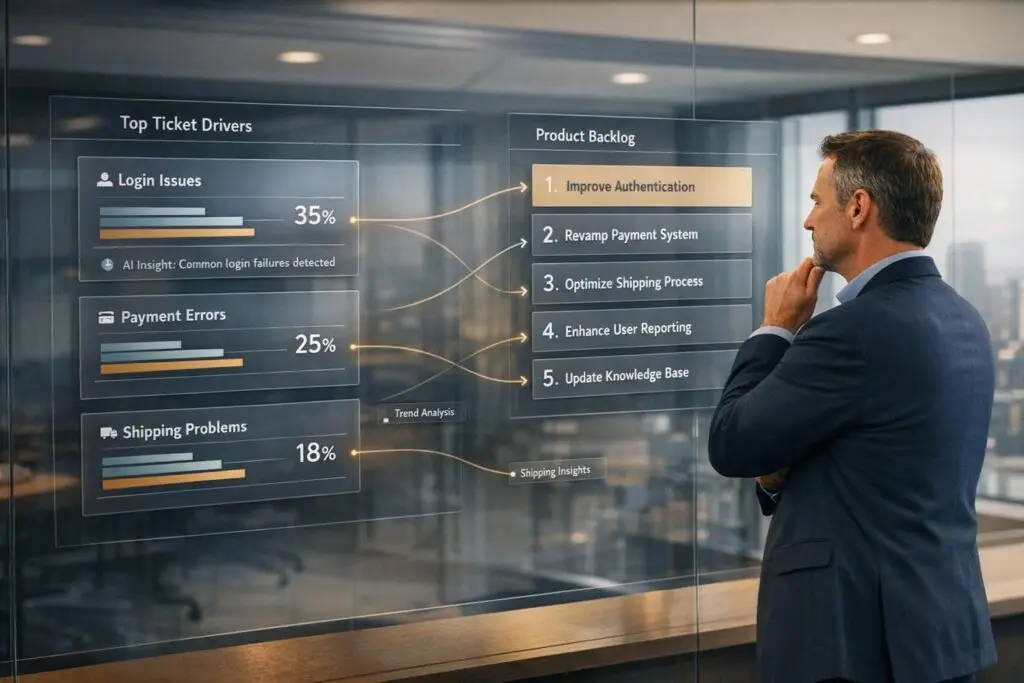
Every support ticket is a clue to improving your product. By identifying recurring issues (ticket drivers), you can transform customer pain points into actionable tasks for your product team. This approach reduces ticket volume, improves user experience, and saves time for your support team.
Here’s how to do it:
- Identify ticket drivers: Automate data extraction to find recurring themes in support tickets. Use tools like custom fields, SQL queries, and AI for categorization.
- Analyze key metrics: Focus on ticket volume, resolution time, reopen rates, and sentiment scores to understand the impact of each issue.
- Prioritize effectively: Rank issues by factors like customer impact, urgency, and revenue. Use data to back up decisions.
- Turn insights into backlog items: Write clear problem statements, collaborate with product teams, and track recurring issues to ensure alignment.
- Leverage AI: Automate tasks like ticket tagging, summarization, and prioritization to save time and improve accuracy.
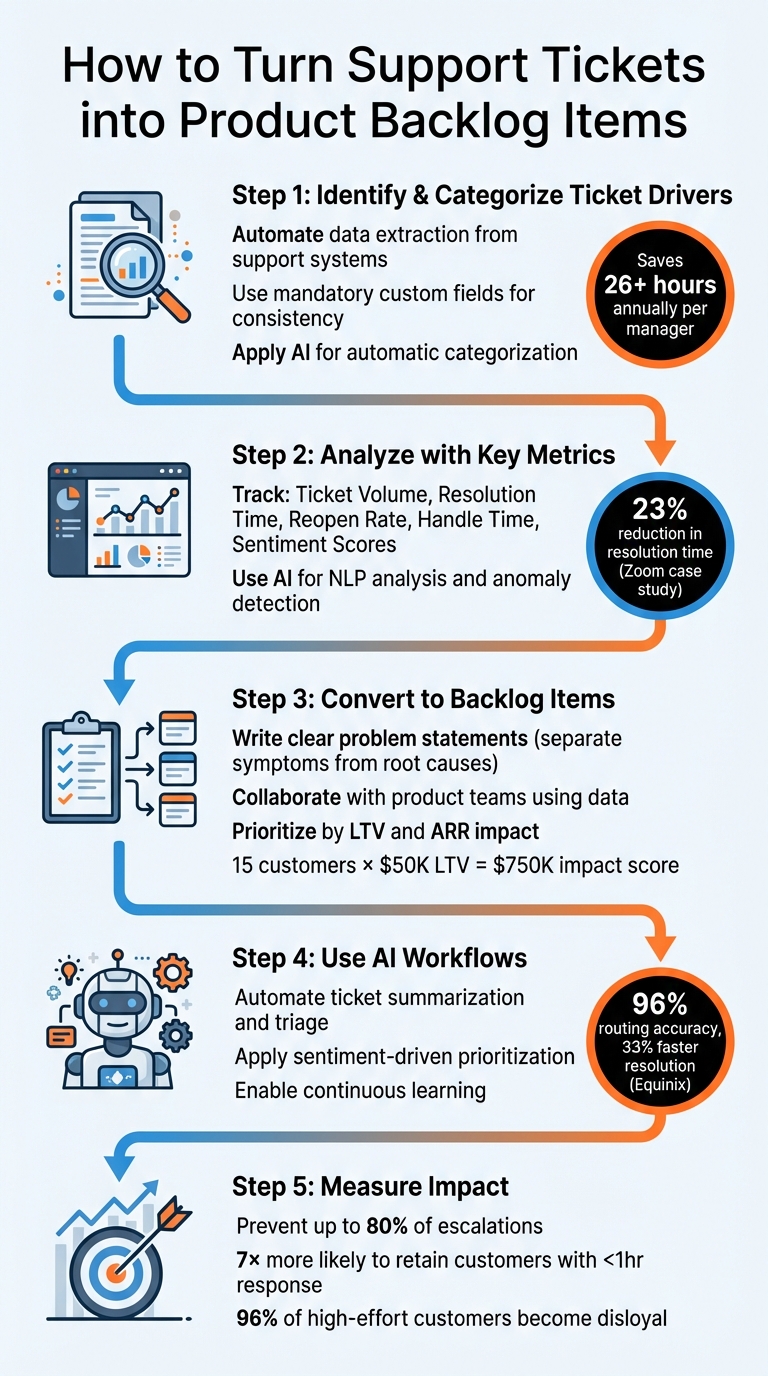
5-Step Process to Transform Support Tickets into Product Backlog Items
How to Extract Requirements from Support Tickets Using AI with Copilot4DevOps
Step 1: Identify and Categorize Ticket Drivers
Transforming support tickets into actionable product priorities begins with automating data extraction. Many support teams still rely on manual processes, like exporting data to spreadsheets – a time sink that can cost a single manager over 26 hours annually before any meaningful analysis even starts. Instead, automate this step and enrich the data with information from CRM systems, product analytics, and billing tools. This enriched dataset reveals not just what customers are asking, but also who is asking and why it matters for your business. The first step? Extract the necessary data from your support system.
Extract Data from Your Support System
To gather structured data, start by implementing mandatory custom fields that agents must complete when closing tickets. For example, a required "Issue Type" or "About" dropdown ensures consistency and reduces reliance on free-text inputs. Then, review historical ticket logs to identify recurring issues that agents are already handling manually – these patterns highlight your biggest ticket drivers. Use SQL queries to combine data from tickets, customer_context, and product_context tables. This approach creates a detailed view that includes metrics like resolution time, customer tier, MRR, feature name, and error type. The result? Ticket data that’s ready to drive actionable insights.
Group Tickets by Common Themes
Categorizing tickets effectively requires teamwork. As Jenny Dempsey points out, collaboration across teams ensures a more comprehensive understanding of the data. For SaaS companies, common high-level categories include User Education, Technical Issues, Usability Issues, Feature Requests, and Billing. Keep your top-level categories limited to fewer than 20, and avoid vague labels like "Other" or "Packaging" – these often become catch-alls that dilute the quality of your data. Once the initial manual grouping is complete, AI can step in to refine and enhance categorization accuracy.
Use AI for Automatic Categorization
AI tools, powered by Natural Language Processing, can analyze context and emotion in addition to keywords. This ensures consistent categorization across all tickets, including historical ones. AI-driven classification also speeds up response times by 45% through instant ticket routing. Gemma Johnson, Head of Customer Success, shares:
"Prodsight increased our understanding of customer pain points through analysis of support data without any manual effort from the support team".
AI systems continuously learn from agent feedback, improving accuracy over time while freeing your team to focus on resolving issues rather than sorting tickets. With your ticket data now organized and enriched, you’re ready to dive into key metrics and start prioritizing product improvements.
Step 2: Analyze Ticket Drivers with Key Metrics
Once you’ve categorized your tickets, the next step is to assess their actual impact. It’s not just about how many tickets you have – sometimes even a small number can highlight issues that are draining resources or frustrating customers. The goal? Pinpoint the ticket drivers that are taking the biggest toll on customer satisfaction, operational efficiency, and revenue.
Key Metrics to Track
Start by examining Ticket Volume by Category to identify the most frequent trouble spots. If you notice a high number of tickets tied to specific "About" or "Product Area" fields, it could indicate systemic issues like product flaws or usability challenges.
Next, track Resolution Time, both for the first response and the time it takes to fully resolve an issue. Long times here often signal deeper problems, like complex technical issues or gaps in your internal documentation.
A high Reopen Rate is another red flag – it suggests that agents are applying quick fixes without addressing the real problem. Meanwhile, One-Touch Resolution Rate can help identify issues that might be better handled through self-service options rather than adding them to your product backlog.
Don’t forget to measure Handle Time, which reflects the actual minutes agents spend working on tickets. Comparing this metric across categories can help you find "time-sink" drivers – issues that consume a lot of resources even if their volume isn’t particularly high.
Finally, incorporate Sentiment Scores from AI-driven analysis. These scores can reveal hidden risks, like customer frustration or potential churn, buried in unstructured ticket data. Together, these metrics provide a solid foundation for leveraging AI to gain deeper insights.
Use AI Tools for Deeper Analysis
AI tools can take your analysis to the next level. For example, Natural Language Processing (NLP) can extract common themes and emotional cues from customer interactions, whether they come from call transcripts, emails, or chat logs. Predictive models can highlight customers at risk of leaving by analyzing their behavior patterns before they explicitly say they’re unhappy.
Anomaly detection tools are also invaluable – they monitor real-time metric deviations and alert you to sudden spikes in specific categories before they spiral into bigger problems. For instance, between 2019 and 2024, Zoom used AI-powered sentiment analysis and predictive modeling to process millions of support tickets, achieving a 23% reduction in ticket resolution time and a 12% drop in customer complaints.
Another powerful feature is topic clustering, which groups similar tickets into categories like "API integration" or "billing errors" without requiring manual tagging.
"Powerful analytics tools equipped with artificial intelligence (AI) and natural language processing (NLP) can process high volumes of multi-channel customer data to uncover hidden opportunities".
Volodymyr Zhukov, CEO and Founder of IngestAI. With these AI-driven insights, you can make smarter decisions about which issues to tackle first.
Rank Drivers by Impact
To prioritize effectively, use a weighted scoring model that takes multiple factors into account. For example, you might assign 35% weight to Impact (how many customers are affected), 25% to Urgency (how immediately it blocks work), 20% to Customer Value (e.g., revenue tier), 10% to SLA Risk (how close you are to breaching service agreements), and 10% to Sentiment (customer frustration levels).
Avoid simple first-in, first-out queues. Instead, let AI help you stack-rank tickets based on scores like "Needs Attention" or "Churn Risk". Comparing metrics like volume, CSAT impact, and handle time will help you zero in on the drivers that are most costly to ignore.
Finally, set up alerts for sudden spikes. A 20-30% increase in tickets for a specific category often points to a new bug or a failed product update. With this approach, your support data becomes a proactive tool for improving your product and operations.
sbb-itb-e60d259
Step 3: Convert Ticket Drivers into Product Backlog Items
After ranking your ticket drivers by impact, the next step is turning those insights into actionable items for your product team. The key is to clearly define problems, collaborate effectively, and back up your priorities with data.
Write Clear Problem Statements
Make sure to separate symptoms from root causes. For instance, a ticket labeled "UI/UX Question" (e.g., "How do I export my data?") highlights a documentation gap. On the other hand, a "UI/UX Issue" (e.g., "I tried to export, but the button didn’t work") signals the need for a product fix.
To write effective problem statements, avoid vague feedback. Instead, help customers articulate their needs as outcomes: "I wish [Feature X] behaved in [Way Y] so that I could accomplish [Goal Z]". For example, instead of saying, "customers are confused about billing", a clearer statement would be: "customers want a line-item breakdown of charges on their invoice to reconcile expenses without contacting support."
Train your support team to ask questions like: "What specific improvement do you need?" or "How important is this to you on a scale of 1-10?" This approach turns anecdotal complaints into prioritized backlog items.
"To make a case for changing a feature, I had to accurately describe the problem and demonstrate the impact it had on users." – Amy Breedon-Jones, Customer Champion, Zapier
Once you’ve clarified the problems, it’s time to collaborate with your product team.
Work with Product Teams
Collaboration works best when it’s grounded in data. Product teams need specifics: how many customers are affected? How often does this issue come up? A vague statement like "a lot of people are complaining" won’t cut it. For example, at Zapier, Amy Breedon-Jones successfully advocated for renaming a new feature from "Automatic Groups" to "Dynamic Groups" because support knew customers already used the original term for something else. This simple change avoided confusion and reduced future support workload.
Consider embedding a member of the support team within product teams or inviting them to regular check-ins. Support staff bring valuable insights into how users interact with the product, including the language they use and the workarounds they rely on. They can also serve as a "customer lens" during QA testing, catching potential issues that might otherwise slip through.
A shared tracking document, like a centralized spreadsheet or dashboard, can help record recurring issues. This becomes your go-to resource for assigning development tasks and cross-referencing themes with existing backlog items.
With these clear, data-driven problem statements and solid collaboration in place, you’re ready to tackle prioritization.
Prioritize Backlog Items with Data
To prioritize effectively, calculate the monetary impact of each feature request. Multiply the number of requests by the average Lifetime Value (LTV) of the customers making them. For example, if 15 customers with an average LTV of $50,000 are asking for API rate limit visibility, that request carries a $750,000 impact score.
You can also map issues to Annual Recurring Revenue (ARR) by considering both negative sentiment and account value. For instance, a -40 sentiment score from a $500,000 account should take priority over the same score from a $5,000 account.
Using a Priority Matrix that weighs Impact and Urgency can help sort through competing priorities. Additionally, flag accounts with no support interactions for 60+ days – this "radio silence" might signal disengagement rather than satisfaction and could require proactive outreach.
| Feedback Category | Action Required |
|---|---|
| UI/UX Questions | Update documentation or offer training. |
| UI/UX Issues | Address design or functionality gaps. |
| Bugs | Assign to engineering for fixes. |
Finally, monitor sentiment trends over a 30-day period instead of focusing on isolated interactions. This approach allows you to spot declining relationships before they escalate into major problems. With these strategies, your product backlog evolves into a powerful tool for reducing support workload and keeping customers happy.
Step 4: Use AI Workflows to Speed Up the Process
After creating a process to turn ticket drivers into backlog items, AI workflows can help cut down on manual work at every step. These platforms automate tasks like reading, tagging, and summarizing tickets, allowing your team to focus on solving issues. Building on earlier steps, these AI tools bridge the gap between support data and product updates.
AI-Powered Ticket Summarization
AI-driven summarization takes the earlier categorization process a step further by simplifying issue handoffs. It reduces the "context tax" – the time agents and managers spend piecing together case details – by generating summaries for the initial inquiry, current state, and full case closure. These summaries make triage and handoffs much smoother.
- Initial Inquiry Summaries capture the customer’s original request, ensuring accurate triage and routing.
- Current State Summaries highlight key details like unresolved issues, the last action taken, and next steps, which are especially useful during shift changes or escalations to Tier 2.
- Full Case Closure Summaries document the entire lifecycle of a case, from diagnostics to resolution, and help keep knowledge base articles up to date.
For instance, Equinix used AI-powered ticket triage to achieve 96% routing accuracy and resolve 82% of tickets automatically. This led to a 33% decrease in resolution time and saved 4 hours of manual work per agent daily, all while maintaining a 96% customer satisfaction score.
Automate Triage and Prioritization
AI platforms equipped with Natural Language Processing (NLP) can analyze ticket content and automatically apply tags like "Billing", "Bug", or "Feature Request" without needing pre-set rules. Sentiment-driven prioritization identifies frustration signals – such as "considering alternatives" or "need a refund" – and moves these tickets to the top of the queue or backlog.
Instead of processing tickets in the order they’re submitted, AI assigns "Needs Attention" scores based on factors like case history, customer value, and churn risk. This ensures critical issues are consistently brought to the product team’s attention. To train the AI effectively, start by providing 100 manually categorized historical feature requests so it can learn your specific taxonomy and challenges.
Continuous Learning and Improvement
As your process evolves, AI systems with continuous learning capabilities improve every stage, from summarization to prioritization. Unlike static rule-based models, continuous learning AI adapts as it processes new data. Each resolved ticket or agent correction updates the model, making it better at categorizing, prioritizing, and routing future tickets. This prevents "model drift", where the AI becomes less aligned with current workflows.
Advanced tools can even identify emerging patterns or unknown issues without predefined labels. For example, they might detect a specific app crash linked to a recent update before it becomes a widespread problem. Over time, the AI can spot knowledge gaps and update documentation to help reduce recurring issues.
"Continuous learning ensures models stay current, correcting outdated assumptions and adapting to emerging patterns as conditions shift." – Andy Thurai, Field CTO, Splunk
To make the most of continuous learning, set up a feedback loop where agents can adjust AI-generated tags or summaries. These corrections refine the model, improving how well it aligns with your backlog over time.
Conclusion
Turning ticket drivers into actionable product backlog items shifts your approach from putting out fires to solving problems proactively. By using support data and key metrics, you gain a clearer understanding of what’s frustrating your customers and can focus development efforts on the fixes that matter most. This process not only sharpens your product priorities but also creates a measurable impact on your business.
The results speak for themselves. Identifying patterns early can prevent up to 80% of escalations, and companies that respond within the first hour are 7 times more likely to retain customers. Tackling root causes also reduces customer effort – a critical factor in loyalty. In fact, 96% of customers who face high-effort interactions become disloyal.
AI-powered platforms like Supportbench make this process even smoother. Features like automated ticket tagging, sentiment analysis, and summarization provide export-ready insights and predictive CSAT/CES scores, empowering teams to make data-driven product improvements without the manual delays that often hinder collaboration between support and product teams.
"Measuring customer service is not just about tracking numbers – it is about understanding the experiences behind those numbers and making meaningful improvements." – Eric Klimuk, Founder and CTO, Supportbench
FAQs
How can AI help streamline support ticket categorization?
AI tools can transform how support ticket categorization is handled by processing vast amounts of ticket data to identify patterns and classify issues with precision. This automation cuts down on manual sorting, saving time and reducing the risk of human mistakes.
With AI, support teams can quickly spot recurring problems, prioritize urgent matters, and route tickets to the appropriate teams. This streamlines operations and ensures that customer concerns are addressed more efficiently, improving the overall support experience.
What are the key metrics to focus on when analyzing ticket drivers?
When digging into ticket drivers, pay attention to metrics that highlight the frequency of recurring problems, the severity or impact of those issues, and how often they come up. These insights are essential for uncovering root causes and deciding what should take priority in the product backlog.
Spotting trends in customer inquiries allows you to tackle deeper issues, enhance the overall customer experience, and strengthen the partnership between support and product teams. This approach ensures your actions are guided by data and aligned with key business goals.
How can I identify key ticket drivers and prioritize them for the product backlog?
To effectively manage your product backlog, start by diving into your support data. Look for recurring issues and dig into their root causes. Pay close attention to problems that affect a large number of customers or create bottlenecks in your operations. Leveraging AI-driven tools can make this process easier by analyzing customer feedback and support interactions, helping you zero in on the features or fixes that could have the biggest impact on customer satisfaction and operational efficiency.
Once you’ve pinpointed the key drivers, work closely with your product team to turn these insights into actionable backlog items. This collaboration ensures that support and product development are on the same page, tackling the most pressing issues and improving the overall customer experience in a meaningful way.