



When it comes to Salesforce integration, choosing the right helpdesk depends on your team’s needs. Here’s the breakdown:
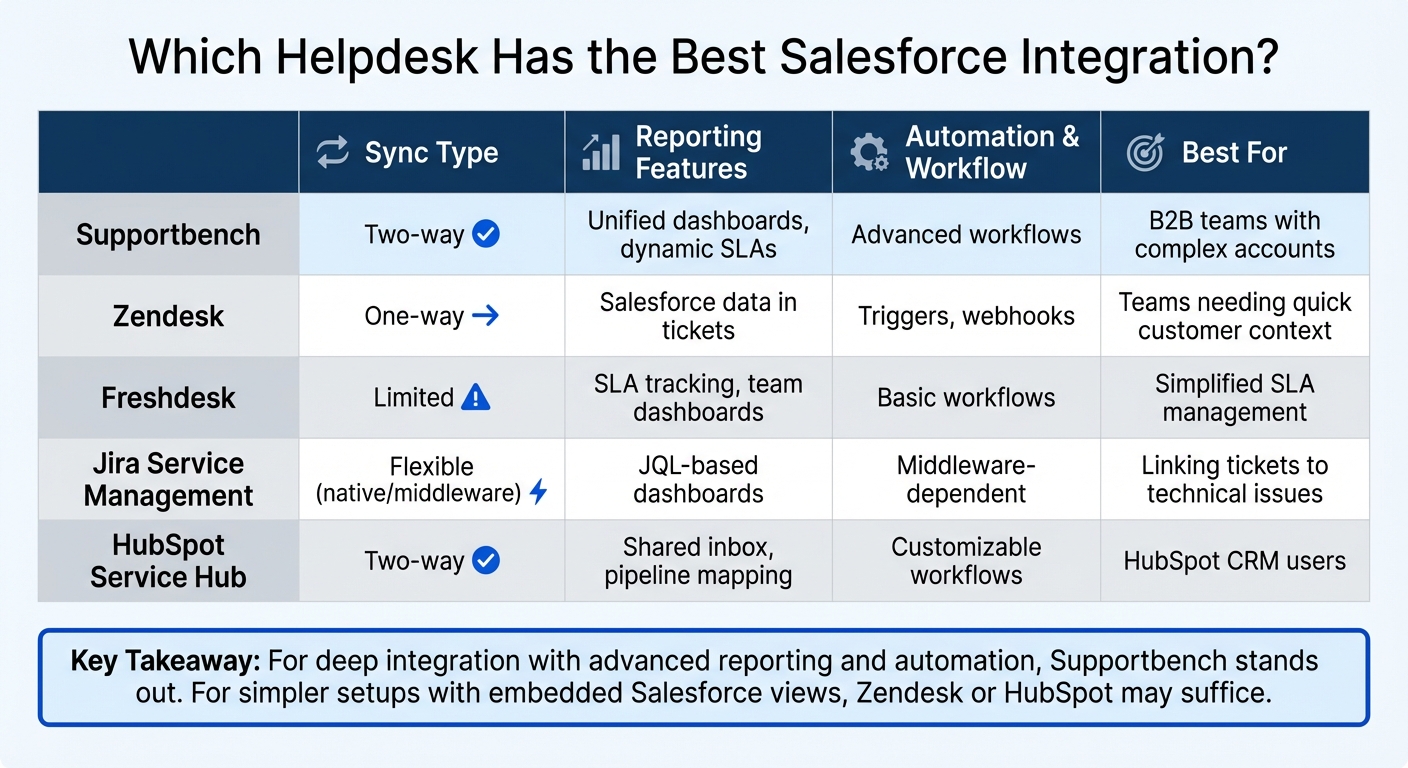
- Supportbench: Best for advanced workflows and unified reporting. Offers two-way sync, dynamic SLAs, and robust automation tools. Ideal for B2B teams managing complex accounts.
- Zendesk: Focuses on embedding Salesforce data into tickets. Uses one-way sync but lacks bi-directional updates for closed tickets and attachments. Suitable for teams prioritizing quick customer context.
- Freshdesk: Simplifies SLA tracking and dashboard management. Integration mainly displays Salesforce data within Freshdesk but lacks deeper sync capabilities.
- Jira Service Management: Offers flexibility with native connectors or middleware for two-way sync. Works well for linking tickets to technical issues but may require additional tools for advanced workflows.
- HubSpot Service Hub: Provides seamless two-way sync for key Salesforce data. Works best for teams already using HubSpot’s ecosystem, though advanced custom mapping requires additional subscriptions.
Key takeaway: If you need deep integration with advanced reporting and automation, Supportbench stands out. For simpler setups with embedded Salesforce views, Zendesk or HubSpot may suffice.
Quick Comparison
| Platform | Sync Type | Reporting Features | Automation & Workflow | Best For |
|---|---|---|---|---|
| Supportbench | Two-way | Unified dashboards, dynamic SLAs | Advanced workflows | B2B teams with complex accounts |
| Zendesk | One-way | Salesforce data in tickets | Triggers, webhooks | Teams needing quick customer context |
| Freshdesk | Limited | SLA tracking, team dashboards | Basic workflows | Simplified SLA management |
| Jira Service Management | Flexible (native/middleware) | JQL-based dashboards | Middleware-dependent | Linking tickets to technical issues |
| HubSpot Service Hub | Two-way | Shared inbox, pipeline mapping | Customizable workflows | HubSpot CRM users |
Evaluate your priorities – whether it’s automation, reporting, or ease of use – and test integrations in a Salesforce sandbox to avoid issues.
Salesforce Integration Comparison: Top 5 Helpdesk Platforms
1. Supportbench Salesforce Integration
Integration Approach
Supportbench offers a two-way connection with Salesforce, ensuring that support and sales data stay in sync. This direct integration allows teams to manage support cases while keeping customer records and account details updated across both platforms. By making CRM data accessible within the support workflow – and vice versa – Supportbench creates a seamless flow of information. This foundation enables advanced sync, reporting, automation, and security features, which are detailed below.
Sync Capabilities
The platform supports both real-time and scheduled synchronization of key Salesforce objects, including accounts, contacts, cases, and select custom objects. This ensures support agents have a complete view of the customer, covering deal stages, contract details, licensing information, renewal dates, and account tier specifics. When agents update case statuses or add notes, this two-way sync ensures the information is reflected in Salesforce, keeping sales and customer success teams informed and aligned.
Reporting & Visibility
Supportbench consolidates Salesforce data into unified dashboards, providing a complete customer view alongside integrated SLA tracking. This tracking dynamically factors in sales metrics, such as upcoming renewals or high-value customer flags, to prioritize responses. With this integration, leadership gains a clear picture of customer health without needing to combine reports from separate tools manually.
Automation & Workflow Support
Supportbench’s workflow engine leverages Salesforce data to automate actions. For instance, if a high-value customer submits a support ticket close to their renewal date, the platform can automatically escalate the case and assign it to a senior agent. This type of automation eliminates the need for manual triage and ensures that support teams consistently deliver timely, informed service based on real-time sales insights.
Security & Permissions
The platform aligns with Salesforce’s role-based security models, ensuring that customer data access is strictly controlled. This is particularly beneficial for organizations with stringent access requirements or multi-brand operations where different teams handle distinct product lines. Supportbench employs OAuth for secure authentication and supports SSO/SAML configurations, providing secure and auditable access to sensitive CRM data.
With Supportbench’s integration capabilities outlined, the next sections will explore how other helpdesk platforms connect with Salesforce.
2. Zendesk Salesforce Integration
Integration Approach
Zendesk focuses on creating a smooth connection between sales and support teams, relying on a one-way sync for specific data types. The platform uses a native connector powered by public APIs to link with Salesforce. This connection is established through a package installation that enables ticket-to-case syncing. All integration settings, such as data flows, field mappings, and sync rules, are managed within the Zendesk Admin Center, providing a centralized hub for control.
Sync Capabilities
The integration primarily uses a one-way sync approach. Salesforce acts as the source for Accounts, Contacts, and Leads, while Zendesk sends its tickets to Salesforce as Cases. Any updates to mapped fields in Salesforce automatically sync back to Zendesk Organizations and Users. On the flip side, Zendesk tickets syncing to Salesforce Cases ensures that sales teams can access support activity directly within their CRM. Admins can refine this sync process by applying filters based on conditional rules.
For teams needing real-time data without increasing Salesforce storage costs, Zendesk provides a "Ticket View" feature. This allows Salesforce users to view live Zendesk ticket data directly within their CRM, without storing it in Salesforce.
Reporting & Visibility
With Zendesk tickets syncing into Salesforce as Case objects, teams can leverage Salesforce’s built-in reporting tools to analyze support data alongside sales performance metrics. Sales reps can interact with tickets – viewing, editing, and even creating them – straight from Account, Contact, Lead, or Opportunity pages. Meanwhile, support agents gain access to CRM data, including custom objects and customer profiles, through the Zendesk ticket sidebar.
A great example of this integration’s impact comes from Catapult Sports in 2024. By connecting Salesforce and Zendesk, they achieved a 50% reduction in first reply time and a 21% decrease in full resolution time.
"By connecting Salesforce to Zendesk, we get a complete view of the customer journey. It enables our support and sales teams to collaborate effectively and deliver personalized experiences." – Thomas Powers, VP of Operations Product Support, Catapult Sports
Automation & Workflow Support
Zendesk’s automation tools take efficiency to the next level by streamlining support processes. Features like triggers and webhooks automate ticket syncing based on field updates. Additionally, the no-code Action Builder allows teams to create complex workflows across platforms. For instance, tickets from high-value customers can be automatically reassigned to specialized support teams based on subscription levels or service entitlements in Salesforce.
Ideagen is a notable success story here. By utilizing this tightly integrated system, they saw a 20% improvement in customer satisfaction (CSAT) and a 25% boost in SLA adherence in 2024.
"We’re a Salesforce business, so all of our sales data is in there… We needed tightly coupled integration and that knocked a couple of platforms off the list really quickly." – Dave Stott, Customer Development Manager, Ideagen
Security & Permissions
The integration uses OAuth for authentication and requires specific Salesforce API permissions, including Streaming API and PushTopic access. To ensure stable connectivity, organizations must disable Proof Key for Code Exchange (PKCE). This setup aligns with Salesforce’s API and role-based permission standards, ensuring a secure integration process.
However, one operational caveat is worth noting: if the Zendesk admin who initially set up the integration loses their admin role, the integration will stop working. A current admin must reconnect it to restore functionality. Additionally, Zendesk’s security model prevents syncing a Salesforce contact to a Zendesk user if the user is already an agent or admin in Zendesk.
This integration is compatible with Salesforce Performance, Unlimited, Enterprise, and Developer Editions (Professional Edition users need to purchase the API add-on). It supports all major Zendesk Suite and Support plans.
3. Freshdesk Salesforce Integration
Integration Approach
The technical specifics of this integration – whether it’s fully native or relies on intermediary tools – aren’t entirely clear. However, admins can set up field mappings and adjust sync settings directly within the Freshdesk admin panel. Once configured, the integration ensures that Salesforce data is accessible to improve customer support interactions.
Sync Capabilities
This integration primarily focuses on displaying Salesforce data within Freshdesk. For support agents, this means they can view relevant Salesforce details right alongside support tickets, making it easier to provide informed assistance. That said, specifics about which Salesforce objects are supported or how often the data syncs remain somewhat vague.
Reporting & Visibility
Freshdesk offers customizable Team Dashboards that allow supervisors to track performance trends and monitor live workloads. These dashboards use real-time widgets, with data updates delayed by no more than 30 seconds. By integrating Salesforce data, Freshdesk simplifies reporting, combining ticket statuses with sales metrics for a more comprehensive view.
For businesses using multiple Freshworks tools, the Unified Platform provides a shared customer data hub and centralized reporting dashboards. This consolidated view can pave the way for streamlined workflows and improved operational insights.
Automation & Workflow Support
Freshdesk uses Salesforce data to power automated workflows. For example, administrators can set up color-coded thresholds on dashboard scorecards to flag critical metrics, such as response times or ticket volumes, helping teams respond promptly. Managers can also use the dashboard’s "Announcements" feature to share updates or team goals directly within the workspace.
For more advanced workflows that span multiple platforms, additional audit tools are available through third-party integrations, adding another layer of functionality to the system.
4. Jira Service Management Salesforce Integration
Integration Approach
Jira Service Management offers flexibility when it comes to integration, giving teams the option to use either native connectors or third-party middleware platforms. Native connectors focus on UI-level ticket management, while middleware solutions enable more advanced, two-way data synchronization. This flexibility allows teams to tailor syncing, reporting, and automation features to their specific needs.
Middleware platforms address different use cases. For instance, Unito specializes in real-time updates for comments, assignees, and attachments, while also preventing duplicates and infinite loops. On the other hand, Zapier uses a "trigger and action" model, connecting JSM to over 8,000 apps. This no-code platform simplifies automating repetitive tasks, with most users setting up workflows in under six minutes.
Sync Capabilities
With native JSM integration, Salesforce Accounts sync as Organizations, Contacts as Customers, and Products and Entitlements are also brought into the system. This gives agents direct access to CRM data within work items. However, for more complex workflows or full bi-directional synchronization, middleware tools are often necessary. Unito delivers seamless two-way syncing, covering fields, comments, and attachments. Zapier, meanwhile, uses triggers like creating a Salesforce Lead when a JSM ticket is closed, offering instant or polling-based updates.
Reporting & Visibility
Jira Service Management provides a clear view of Salesforce customer and organization data by displaying CRM details directly within tickets. Its reporting capabilities allow teams to use Jira Query Language (JQL) to filter and analyze Salesforce-synced data. Custom reports can then be consolidated into dashboards for a high-level overview of team performance. Additionally, JSM supports SLA tracking based on customer tiers from Salesforce – like "Gold" or "Silver" entitlements – helping teams monitor service levels more effectively.
Automation & Workflow Support
Automation plays a key role in streamlining workflows, and JSM takes it a step further with middleware integrations. Zapier’s visual workflow builder and AI-driven automation tools can extract and summarize data between JSM and Salesforce. Unito, on the other hand, allows users to set rules for syncing specific data points, such as particular Jira issues or Salesforce opportunities. These tools are widely used in enterprise environments to simplify complex processes.
Security & Permissions
Security is a top priority for middleware platforms. Unito holds SOC 2 Type 2 certification, while Zapier complies with SOC 2 and GDPR standards, offering full audit trails and customizable controls. These measures ensure that sensitive customer data remains protected across both systems, making the integration reliable and secure for enterprise use. With these robust security features, JSM proves to be a strong choice for organizations handling critical data.
sbb-itb-e60d259
5. HubSpot Service Hub Salesforce Integration
Integration Approach
HubSpot Service Hub offers a built-in integration with Salesforce, providing automatic two-way synchronization without the need for third-party tools. This integration is available for users on the Professional and Enterprise tiers of Service Hub and was last updated on November 19, 2025. The app is free to install but requires active subscriptions for both HubSpot and Salesforce to function properly. This native integration makes setup straightforward, eliminating the hassle of managing external middleware while ensuring real-time data flow between the two systems.
Sync Capabilities
The integration supports bi-directional syncing for key objects like Contacts, Companies, Deals (Opportunities), and Tickets (Cases). HubSpot tickets sync seamlessly with Salesforce cases, and administrators can customize sync rules for each mapped field. Options include two-way sync, HubSpot-preferred, or Salesforce-preferred, depending on the team’s needs. If there’s a conflict during syncing, the "Resolve Sync Conflict Rule" allows users to decide which system’s data should take precedence.
Additionally, the integration ensures association syncing, meaning a contact linked to a case in Salesforce will remain connected to the corresponding ticket in HubSpot. Tasks and notes update in real time, so any changes made in HubSpot instantly appear in Salesforce. This reliable syncing ensures smooth collaboration and enables unified reporting and customer data visibility.
Reporting & Visibility
With consistent data syncing in place, Service Hub provides a shared inbox that connects support channels to CRM records. This gives support reps complete customer context from Salesforce while managing tickets. Teams can create custom dashboards that combine data from both systems, tracking metrics like ticket resolution times alongside Salesforce account tiers or opportunity stages. The integration also includes pipeline mapping, allowing Salesforce case workflows to align directly with HubSpot ticket pipelines. This keeps the status of cases and tickets consistent across both support and sales teams.
Automation & Workflow Support
The integration supports automated workflows that streamline ticket routing and lead capture from HubSpot’s marketing or support interactions. Updates such as notes or escalations are reflected in Salesforce instantly. These workflows also gather customer sentiment data, helping ensure smooth handoffs between support and sales teams.
Security & Permissions
HubSpot Service Hub ensures secure data management as part of its integration strategy. Custom field mapping requires a Data Hub Starter subscription or higher, while default mappings are included in the Professional and Enterprise tiers. Administrators have control over deletion rules, deciding whether a HubSpot ticket should be removed when its corresponding Salesforce case is deleted or left as is. The "continual sync" feature ensures that changes made in either system are automatically updated across both platforms, maintaining consistency without manual intervention. This approach ensures data accuracy and seamless collaboration between teams.
Strengths and Weaknesses
Evaluating integration methods can help identify challenges and avoid expensive implementation errors.
Supportbench takes a balanced approach by integrating Salesforce as an equal partner. It syncs contacts, accounts, opportunities, and cases, enabling unified reporting where support metrics can sit alongside account tiers or renewal dates. Dynamic SLAs adjust to events like renewals, ensuring a smooth customer experience. Built for B2B teams managing complex, account-based support, Supportbench might be more advanced than necessary for teams handling high-volume, transactional support cases.
Zendesk uses one-way syncs instead of a fully bi-directional setup. Data flows from Salesforce to Zendesk – where accounts are converted into organizations and contacts into users – and tickets sync back to Salesforce as cases. The Unified Agent Workspace integrates Salesforce data directly into tickets, reducing the need for constant context switching. However, closed tickets and attachments don’t sync back to Salesforce, and Zendesk requires unique email addresses and organization names for accurate record mapping. These limitations can restrict reporting capabilities and workflow automation.
Freshdesk and Jira Service Management rely on connector apps instead of deeply integrated systems. This difference affects priorities: Freshdesk emphasizes SLA tracking and agent workload management, while Jira Service Management excels at linking tickets to technical issues for smoother handoffs.
HubSpot Service Hub uses its native CRM to deliver seamless Salesforce integration. It offers bi-directional sync for contacts, companies, deals, and tickets, with customizable rules (e.g., two-way, HubSpot-preferred, or Salesforce-preferred). Associations between records stay intact across systems, and a shared inbox provides full customer context during ticket handling. For advanced custom field mapping, teams need a Data Hub Starter subscription or higher, which adds costs for those requiring tailored setups. It’s particularly suited for teams already invested in HubSpot’s broader CRM ecosystem.
The main trade-off across these platforms lies in sync architecture versus reporting capabilities. Zendesk and HubSpot focus on making the agent experience seamless by embedding Salesforce data directly into their interfaces. On the other hand, Supportbench prioritizes unified reporting and workflow automation, treating Salesforce and its platform as equals. These differences highlight the need to match integration depth with your team’s specific support and sales needs.
Conclusion
Selecting the right integration comes down to understanding your unique operational needs. Our analysis of workflow automation, sync capabilities, reporting, and security shows that the best choice depends heavily on your support and sales setup. For teams needing advanced workflow automation and combined reporting – like viewing support metrics alongside account tiers and renewal dates – a bi-directional sync that treats both systems equally is essential. On the other hand, if your team mostly requires quick customer context while working tickets, a simpler one-way sync paired with an embedded Salesforce view might do the job.
When narrowing down vendors, focus on the Salesforce objects you need to sync, the frequency of updates, and whether custom fields are supported. Amelia Ochodnicky, Distinguished Strategic Solution Engineer at Salesforce, highlights the importance of system reliability:
"When you’re in front of a customer and you need to instill confidence… You need to be able to use the live system the way that it’s meant to be used".
Use this as a guideline to test each platform thoroughly. Schedule demos that specifically address your custom Salesforce objects and workflows. During these sessions, confirm how accounts map to organizations, check field-type compatibility, and ensure the system meets your security and compliance standards. Always test in a Salesforce sandbox environment before going live to avoid costly issues like duplicate records or field mapping errors. Disable auto-creation during testing to ensure accurate syncing.
The right integration should streamline manual tasks, reduce unnecessary context switching, and equip your team with the insights needed for quicker, more tailored support. Take the time to validate these features during your evaluation process to make an informed decision.
FAQs
What’s the difference between one-way and two-way Salesforce integrations?
The key distinction between one-way and two-way Salesforce integrations lies in the direction of data flow between systems.
One-way integrations move data in a single direction – either from Salesforce to another system or from the external system to Salesforce. For instance, you might sync Salesforce account data to a helpdesk’s organizations. However, any updates made in the helpdesk wouldn’t sync back to Salesforce. This type of integration is straightforward and works well when you only need to share data without altering the source system.
Two-way integrations, in contrast, enable data to sync back and forth between systems. Changes made in one platform are automatically reflected in the other. This ensures both systems remain aligned and up-to-date. Such integrations are especially useful for teams like sales and support, where real-time collaboration and visibility into shared accounts or tickets are essential.
The choice between these options depends on your specific requirements: one-way sync is ideal for basic data sharing, while two-way sync is better suited for workflows that demand real-time updates and consistency across platforms.
How do I choose the right helpdesk integration for Salesforce?
Choosing the right helpdesk integration for Salesforce starts with understanding your team’s specific needs and workflows. One key decision is whether you require a bi-directional sync – where data flows seamlessly between systems – or if a one-way sync will do the job. For instance, a bi-directional sync is perfect if both your Support and Sales teams need up-to-the-minute access to customer interactions.
It’s also crucial to pinpoint which Salesforce objects and data fields you need to sync. This could include accounts, contacts, cases, or opportunities. Features like field-level mapping and relationship intelligence – such as linking related contacts or organizing account hierarchies – are especially valuable for B2B teams or companies managing multiple divisions or brands.
Lastly, take a close look at the integration’s reporting, automation, and security features. Does it provide unified dashboards, SLA tracking, and workflow automation? Are there robust security options like OAuth, SSO, and role-based permissions to safeguard sensitive information? By matching these features to your operational goals, you can confidently narrow down your options and test platforms to find the best fit for your organization.
What challenges should I expect when using middleware for Salesforce integration?
Using middleware for Salesforce integration comes with its own set of challenges that demand thoughtful planning and execution. One of the key issues is managing API limits. Middleware depends heavily on Salesforce API calls, which are often subject to usage quotas. If these limits are exceeded, it can lead to throttling or failed data transfers, making it crucial to monitor and optimize API usage.
Another hurdle is data mapping and transformation, particularly when working with varying data formats or object structures. Misconfigured mappings can lead to mismatched data, errors, or even duplicate records, which can complicate data management efforts. Ensuring accurate and consistent mappings is critical to avoid these pitfalls.
Maintaining security and authentication across integrated systems is equally important. Middleware must handle sensitive protocols like OAuth or Single Sign-On (SSO) securely while adhering to strict access policies, such as granting only the minimum permissions necessary to perform its tasks.
Lastly, error handling and conflict resolution can be particularly challenging in environments with high data volumes. Middleware solutions need robust retry mechanisms and effective conflict management strategies to maintain data integrity and ensure smooth operations. While middleware offers flexibility, addressing these challenges head-on is key to building a reliable and secure integration.






