


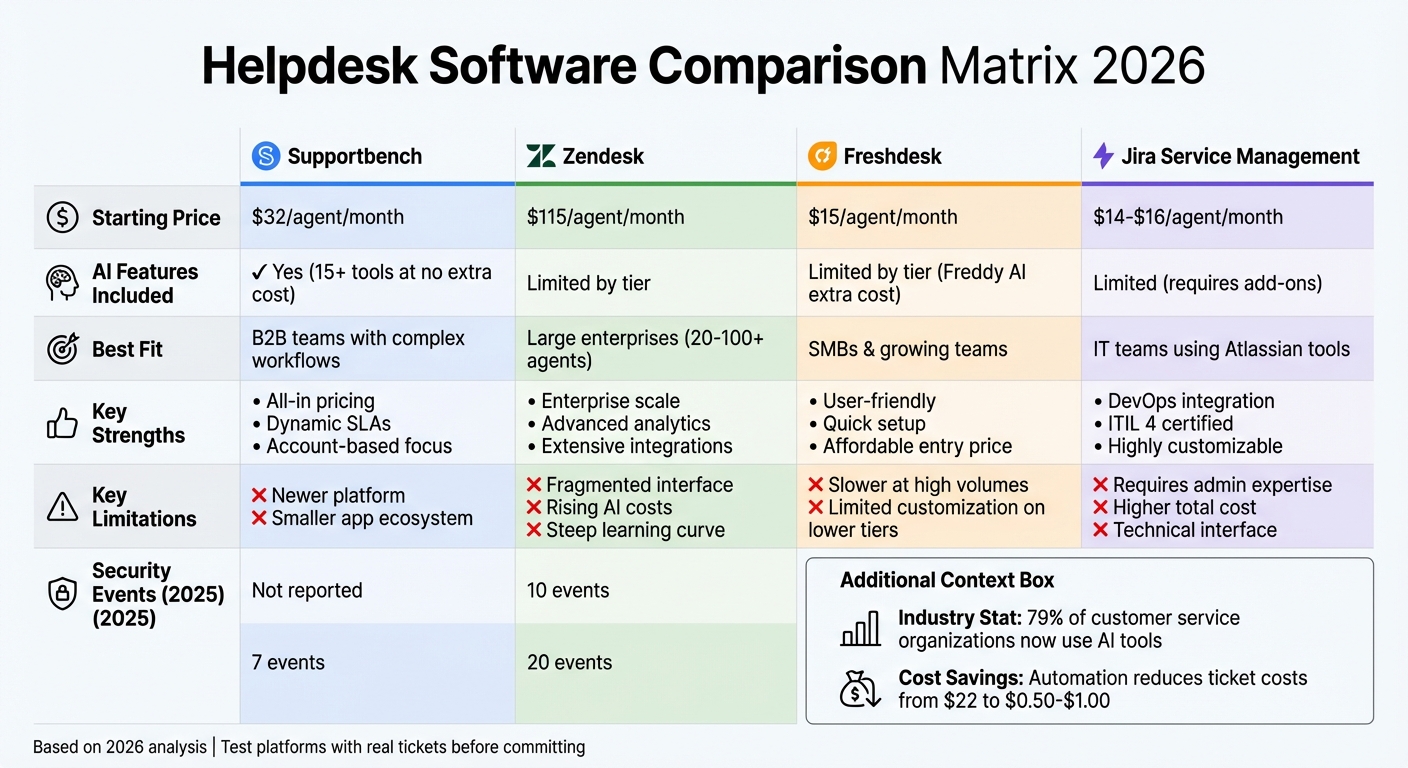
In 2026, choosing the right helpdesk software is tougher than ever. Vendors often add AI tags to basic features or hide essentials behind costly tiers. Security is now a top priority, with 73 vulnerabilities reported by leading platforms in 2025. Integration depth, AI capabilities, and pricing transparency are key factors to consider. Here’s a quick breakdown of four major platforms:
- Supportbench: Affordable ($32/agent/month), includes AI tools at no extra cost, ideal for B2B workflows.
- Zendesk: Enterprise-focused, strong multi-channel support, starts at $115/agent/month but gets expensive with hidden premium costs.
- Freshdesk: Budget-friendly ($15/agent/month), great for SMBs, but limited customization at lower tiers.
- Jira Service Management: Best for IT teams, integrates with Atlassian tools, but requires admin expertise and add-ons.
Quick Comparison
| Platform | Starting Price | AI Features Included | Best Fit |
|---|---|---|---|
| Supportbench | $32/agent/month | Yes | B2B teams with complex workflows |
| Zendesk | $115/agent/month | Limited by tier | Large enterprises |
| Freshdesk | $15/agent/month | Limited by tier | SMBs |
| Jira Service Management | $14–$16/agent/month | Limited by add-ons | IT teams using Atlassian tools |
Each platform has its strengths and trade-offs. Define your needs – security, AI, or integration – and test tools with real cases before committing.
Helpdesk Software Comparison 2026: Pricing, Features & Best Fit
7 Best Helpdesk Software & Ticketing Systems for 2025 (Ranked by Best Use Cases)
1. Supportbench
Supportbench stands out in our comparison matrix for its clear pricing, multi-channel support, and built-in AI features. Designed specifically for modern B2B support teams, it offers a cost-effective platform where AI tools are seamlessly integrated at no extra charge. This is especially relevant in 2026, when 79% of customer service organizations are using AI tools, yet many are still paying hefty premiums for features that should come standard.
Transparent Pricing Without Surprises
Supportbench offers straightforward pricing, starting at $32 per agent per month. Unlike other platforms, it doesn’t restrict essential features behind premium tiers or add surprise costs as your team expands. Every user, whether part of a small five-person team or a 100-person operation, gets access to the same AI tools, workflow engine, and reporting dashboards. To make the platform even more accessible, it provides discounted rates for startups and non-profits. This pricing model ensures that teams don’t have to compromise between affordability and functionality.
Multi-Channel Support Simplified
Supportbench centralizes communication across channels with tools like an Outlook-style email editor, which allows direct image pasting and consolidates all email addresses into one place. A website widget enhances customer experience by enabling users to browse the knowledge base and submit tickets without leaving your site. Role-based security ensures that customers only access content relevant to them, adding an extra layer of control.
Tailored Workflows for Better Customer Experiences
The platform’s workflow customization is a standout feature. Dynamic SLAs adapt automatically based on case context – tightening response times, for instance, when a customer is nearing renewal. The workflow engine helps teams design tailored customer experiences, while escalation management simplifies the process of directing cases to the right person. This includes tracking multi-level escalations, adding notes, de-escalating cases when appropriate, and categorizing them for better reporting. These tools work hand-in-hand with AI features to streamline case management.
Built-In AI Features
Supportbench includes over 15 AI-driven tools at no extra cost. These tools automate ticket categorization and routing, suggest replies for agents, and summarize long account-based conversations. AI-powered predictive metrics like CSAT (Customer Satisfaction) and CES (Customer Effort Score) are displayed directly in the case list, offering insights into customer satisfaction before surveys are even completed. The platform also tracks first contact resolution (FCR), a notoriously tricky metric to measure. Additionally, AI generates knowledge base articles using case histories, complete with summaries, subject lines, and keywords. Sentiment analysis and churn prediction help B2B teams safeguard both revenue and customer retention.
Seamless Integrations and Data Syncing
Supportbench excels in integration capabilities. Its Salesforce synchronization pulls key data points – such as licensing, renewals, and account health – into a single view. The platform also includes an easy-to-use API for custom integrations, while datatables allow teams to enrich customer records with additional details like training completion, login credentials, or infrastructure specifics. Notes from customer success managers (CSMs) appear in pre-response popups, giving agents the full context they need for every interaction. These integrations go beyond basic data sharing, enabling agents to take direct action from the helpdesk itself.
2. Zendesk
Zendesk stands out as a preferred choice for enterprises, particularly for teams handling high-volume support across various channels. Its multi-channel functionality consolidates customer interactions from email, chat, phone, and social media into a unified profile, ensuring seamless experiences for users. With a solid 4.4/5 rating on G2 from 2,323 reviews, Zendesk is well-suited for teams ranging from 20 to over 100 agents, making it a strong contender when choosing between SMB and enterprise helpdesks. Its widespread use reflects its robust features and pricing model, which we’ll explore below.
Total Cost and Pricing Transparency
Zendesk’s pricing starts at $115 per agent per month (billed annually) for the Suite Growth plan, increasing to $149 for Suite Professional, with Enterprise plans starting at $169+. While the predictable per-agent pricing model is helpful for budgeting, it can get costly as the team size grows, especially since standard tiers lack automatic volume discounts. Customer Support Expert Lucas Clark highlights this challenge:
"Zendesk’s subscription plans are quite expensive, which may be challenging for startups and small businesses".
Additional costs can arise for teams needing advanced configurations, custom fields, or specialized administrative tools, which are typically tied to higher-tier plans. Furthermore, some of the most advanced AI features are only available in these premium tiers.
Multi-Channel Support
Zendesk is designed to handle the complexities of large-scale support operations, including multi-brand routing and workflows tailored for enterprise needs. However, some users have noted that its interface can feel clunky or outdated compared to newer competitors. Many of its advanced AI-driven tools are also locked behind higher-priced plans. Despite these drawbacks, the platform’s multi-channel capabilities remain a key strength for businesses aiming to streamline customer interactions.
AI Capabilities
Zendesk incorporates AI tools to enhance agent productivity. These tools can analyze incoming tickets, suggest appropriate categories, and provide response templates, helping teams respond more efficiently. AI-powered summarization allows agents to quickly understand ticket histories, with some organizations reporting up to a 75% reduction in response times. These features make Zendesk a powerful option for teams looking to optimize their workflows.
Integrations and Data Sync
Zendesk supports a wide range of integrations tailored for enterprise environments, ensuring operational efficiency in today’s demanding helpdesk landscape. It connects seamlessly with major CRM systems, although the depth of synchronization often depends on the plan tier. For B2B teams that rely on detailed account data from platforms like Salesforce or ERP solutions, setting up and maintaining these integrations may require technical expertise and ongoing attention to ensure smooth data flow.
3. Freshdesk
Freshdesk is a popular choice for small to mid-sized teams, offering a user-friendly platform with a quick setup process. It has earned a solid 4.5/5 rating on Capterra, based on 2,125 reviews. Many organizations appreciate its straightforward interface, but as teams grow or demand more advanced customization, Freshdesk’s limitations become apparent. While it provides essential support features, it lacks the depth of more advanced tools. Data Analyst Kaley White shared her perspective:
"Freshdesk made ticket handling far surpasses a basic support email… but even with the higher plans, Freshdesk is best for smaller organizations".
Let’s take a closer look at Freshdesk’s pricing structure and its key features.
Total Cost and Pricing Transparency
Freshdesk offers a free plan for up to two agents, making it an attractive option for smaller teams. Paid plans start at $15 per agent per month (billed annually) under the Growth plan, and go up to $49 per agent per month for the Pro plan. While the base pricing seems manageable, costs can climb quickly with add-ons. Features like advanced AI tools, workflow automation, and multi-channel support are either locked behind higher-tier plans or require additional purchases. For small teams, keeping an eye on these extras is crucial to avoid unexpected expenses.
Multi-Channel Support
One of Freshdesk’s strengths is its ability to unify support across multiple channels. It integrates email, chat, social media, and phone interactions into a single interface, which works well for teams managing moderate ticket volumes. The Freshdesk Omni package combines ticketing with Freshcaller (voice) and Freshchat (messaging), offering a seamless omnichannel experience. However, users have reported challenges when managing large ticket volumes or generating detailed reports. Additionally, for B2B teams that need deep CRM integration, syncing data with older systems can be cumbersome.
Workflow Customization
Freshdesk includes basic automation tools to streamline workflows, such as ticket routing and task automation. However, the level of customization available depends heavily on the pricing tier. Lower-priced plans offer limited flexibility, while advanced workflows and account-specific support require higher-tier subscriptions or additional purchases. Some users have noted that setting up custom configurations to align with internal processes can be both time-consuming and technically demanding.
AI Capabilities
Freshdesk also incorporates AI through its Freddy AI system, which assists with chatbot interactions, ticket field predictions, canned response suggestions, and ticket trend insights. Valentyna, VP of Customer Support at Ever-Help, highlighted its value:
"Freshdesk’s Freddy AI chatbot can take on your routine questions too, freeing human agents for more complex issues".
While Freddy AI is helpful for handling repetitive tasks, advanced AI features like Freddy AI Agent and AI Copilot come with additional costs beyond the standard subscription. This means the actual expense of leveraging these AI capabilities can be higher than initially expected.
sbb-itb-e60d259
4. Jira Service Management
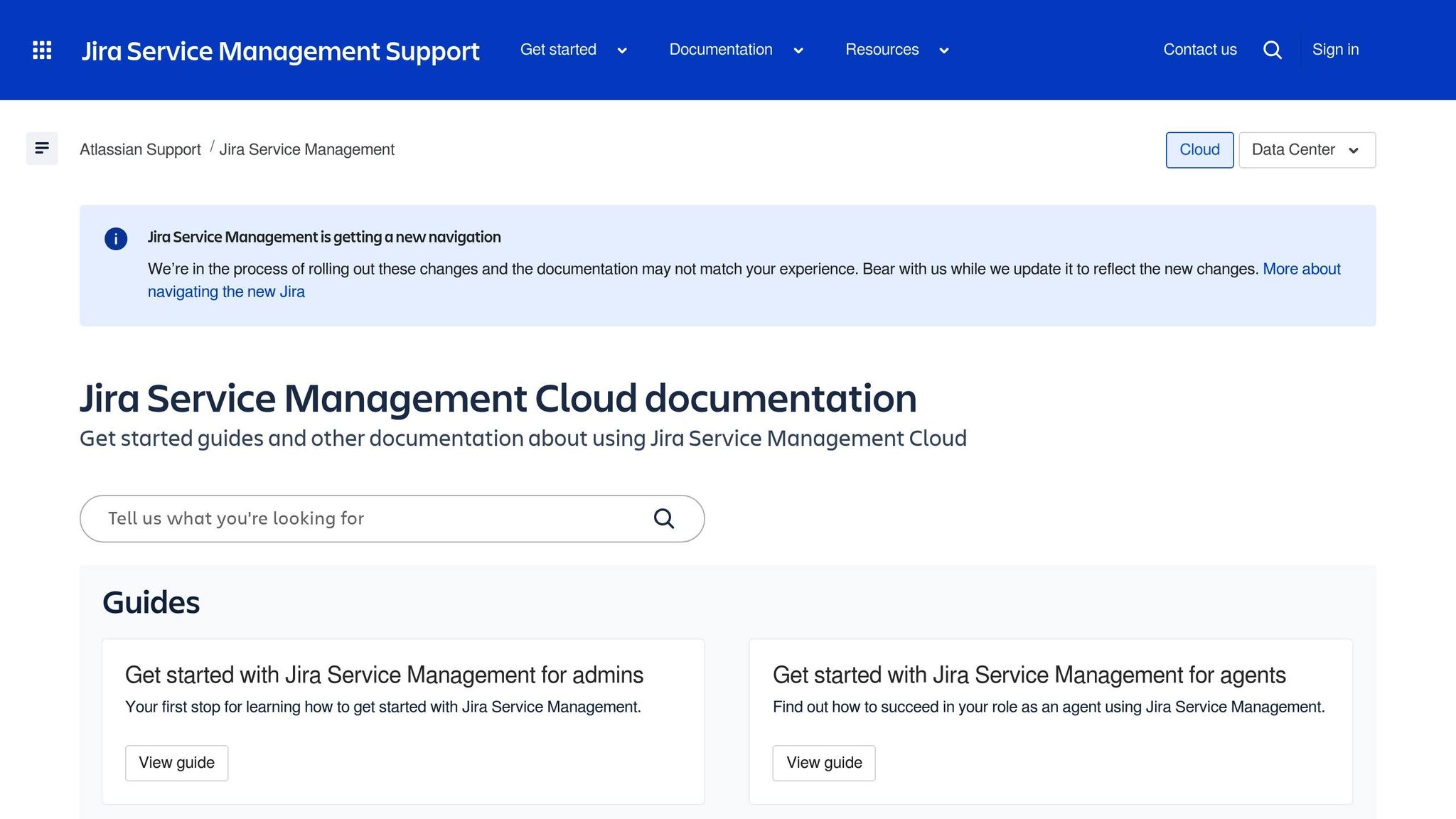
Jira Service Management is designed specifically for IT teams operating within the Atlassian ecosystem. It boasts ratings of 4.5/5 on Software Advice and 4.2/5 on G2, with users highlighting its strong DevOps integration and ITIL 4 certification for incident, problem, and change management practices. This platform really shines when your support operations overlap with development workflows – especially if you’re already using tools like Jira Software, Bitbucket, or Confluence. That said, its technical setup might require dedicated administrators to manage effectively.
Total Cost and Pricing Transparency
The pricing for Jira Service Management’s Premium plan ranges from $14 to $16 per agent per month when billed annually, while Enterprise-level pricing is available only through custom quotes. However, costs can rise quickly due to necessary add-ons and administrative requirements. The Atlassian Marketplace, while offering flexibility, often leads to additional expenses for third-party plugins. Key features such as asset management, change calendars, and advanced analytics are only available in the Premium or Enterprise tiers, so it’s important to account for these needs when planning your budget. This pricing structure aligns with the platform’s extensive customization capabilities, which are explored further below.
Workflow Customization
Jira Service Management stands out for its ability to customize workflows to meet IT-specific needs. It allows for tailored request types, multi-stage approval processes, and escalation management paths. For IT service management tasks, especially those requiring ITIL 4-certified practices, the platform integrates seamlessly with Jira Software, making it ideal for managing incidents, problems, and change requests across technical teams. However, as noted in Giva Vendor Analysis:
"The platform’s flexibility often results in complexity. Configuration, workflow design, and plugin management can be time-consuming, especially for teams without dedicated Jira administrators".
For B2B support scenarios, the interface may feel overly technical for non-IT teams, and additional tools might be needed to create a more user-friendly portal for external customers.
AI Capabilities
While Jira Service Management excels in workflow automation through custom rules and triggers, its AI capabilities are relatively limited. It lacks built-in features like AI-driven summaries, QA scoring, or automatic knowledge base generation. Instead, the platform leans heavily on its Marketplace, which offers over 5,000 add-ons and integrations to address feature gaps. This approach works well for teams comfortable building their own solution stack, but it does require ongoing management and can add to the overall cost.
Integrations and Data Sync
Jira Service Management integrates deeply with other Atlassian tools, making it a natural choice for teams already embedded in the ecosystem. It connects seamlessly with Slack, Microsoft Teams, Confluence, and Bitbucket. For larger enterprises, it also bridges diverse systems like ServiceNow and integrates with business intelligence tools such as Power BI, Tableau, and Looker via REST API connectors. However, integrating non-Atlassian tools might require custom development or third-party middleware. If your organization relies heavily on Atlassian products, Jira Service Management fits in effortlessly. Otherwise, be prepared for potential integration challenges and additional development work.
Strengths and Weaknesses
To help you weigh your options, here’s a breakdown of each platform’s strengths and weaknesses in practical scenarios. The table below provides a clear summary of trade-offs to assist in your decision-making process.
| Platform | Key Strengths | Key Limitations | Best Fit |
|---|---|---|---|
| Supportbench | All-in pricing with AI included from the start; designed for B2B workflows with account-based focus; dynamic SLAs tied to renewal status; easy setup without IT support; predictive CSAT and CES scoring; unified platform avoids add-on costs | Relatively new to the market compared to established competitors; smaller ecosystem for third-party apps | B2B teams handling high-touch accounts, multi-department workflows, and renewal-driven relationships |
| Zendesk | Scales well for large enterprises with thousands of agents; advanced analytics and reporting; extensive third-party integrations; strong omnichannel support | Fragmented interfaces across products; increasing AI-related costs; rigid licensing structure; steep learning curve for advanced customizations | Enterprises with high-volume support needs and dedicated admin teams |
| Freshdesk | User-friendly interface with minimal training needed; Freddy AI automates triage and provides conversation summaries; ticket merging for related issues; affordable starting price at $15/month | Slower performance at high ticket volumes; limited customization on lower pricing tiers; separate app interfaces can cause context switching; offshore support response times have faced criticism | Growing SMBs seeking balanced features without enterprise-level complexity |
| Jira Service Management | Seamless DevOps integration within Atlassian’s ecosystem; ITIL 4 certified for incident and change management; highly customizable workflows for technical teams; strong connections with Jira Software and Confluence | Requires dedicated administrators; higher total cost due to reliance on Marketplace apps; interface may feel too technical for non-IT teams; reported 20 security events to CISA as of October 2025 | IT service desks integrated with Atlassian workflows and technical support aligned with development operations |
Cost considerations: Handling tickets manually costs around $22 per ticket, but automation can cut this down to $0.50–$1.00. Pricing structures can vary widely, and hidden fees for add-ons may affect the platform’s overall value.
Account visibility: Supportbench offers a unique advantage by tracking interactions across entire companies and departments, rather than just individual users. This is especially helpful for accounts involving multiple stakeholders like procurement, IT, and end users. Other platforms often require workarounds or higher-tier plans to gain similar visibility.
AI-related costs: With 79% of customer service teams adopting generative AI, it’s worth noting that some platforms charge extra for AI features. Supportbench, however, includes built-in AI capabilities like predictive CSAT and CES scoring, first-contact resolution detection, and knowledge base article generation without additional fees.
Security factors: For industries with strict regulations, security is a top priority. As of October 2025, Jira reported 20 security events to CISA, Zendesk reported 10, and Freshdesk reported 7. Healthcare organizations requiring HIPAA compliance often face higher costs for enterprise tiers with Zendesk and Freshdesk, while some platforms designed for regulated industries include these protections as standard.
These insights will guide the final recommendations for your shortlist.
Conclusion
Selecting the right helpdesk platform starts with aligning your specific support needs to the platform’s main cost factors. As outlined in the matrix, different support motions call for different solutions. Each platform varies in how it handles account-based visibility, AI pricing transparency, and operational workflows.
For B2B teams focused on high-touch accounts with complex, multi-department workflows and renewal-heavy relationships, Supportbench stands out. It offers account-level insights, dynamic SLAs tailored to customer lifecycle stages, and predictive tools for CSAT and CES scoring. Plus, it avoids hidden AI fees, additional workflow costs, and complicated IT setups.
For large enterprises requiring robust integrations, Zendesk can be a strong contender, though its fragmented interface and rising AI expenses are worth noting. SMBs looking for a balance between features and affordability might lean toward Freshdesk, which provides an easy-to-use experience – though lower-tier plans come with feature limitations. Meanwhile, IT service desks embedded in Atlassian workflows may benefit from Jira Service Management due to its deep DevOps integration, albeit with higher configuration complexity and costs.
The landscape is evolving quickly – 79% of customer service organizations have already adopted generative AI. By 2026, investments in this technology are expected to reduce the need for support agents by 20–30%. Platforms that include AI capabilities as part of their standard offering, rather than charging extra, often deliver better long-term ROI. These differences underscore the tradeoffs discussed throughout this piece.
To make the best decision, start by clearly defining your support motion. Use the matrix to narrow down 3–5 tools that align with your needs and test them with real tickets before committing. This structured approach will help you choose the platform that aligns best with your goals.
FAQs
How does Supportbench provide transparent pricing compared to other helpdesk platforms?
Supportbench stands out with its transparent pricing, ensuring businesses know exactly what they’re paying for – no hidden fees, no surprise charges. Unlike other platforms that often rely on seat-based pricing or tack on extra costs for essentials like AI tools or integrations, Supportbench includes these features as part of its standard package.
This straightforward approach allows businesses to plan their helpdesk budgets with confidence, free from the fear of unexpected expenses. By offering all-inclusive pricing, Supportbench lets teams focus on growth without worrying about costs spiraling out of control.
What AI features does Supportbench offer at no additional cost?
Supportbench offers AI-powered tools that boost efficiency and simplify support tasks – at no additional cost. These features include automated ticket tagging, AI-generated knowledge bases, and smart search functionality to help teams locate the right information faster. Designed to save time and minimize manual work, these tools are seamlessly integrated into the platform, with no hidden charges.
How does Supportbench improve customer support through integrations?
Supportbench transforms customer support operations by providing integration capabilities that connect effortlessly with key tools like CRMs, ERPs, SSO platforms, and product usage analytics. These connections allow customer data to move smoothly between systems, giving teams access to a complete picture of customer accounts without the hassle of manual data entry.
By aligning with existing workflows and tools, Supportbench reduces operational headaches, enhances team collaboration, and ensures real-time updates across platforms. The result? Faster response times, more personalized interactions, and streamlined ticket resolution – a practical solution for today’s multi-team support setups.






