



Integration sprawl happens when businesses manage too many disconnected tools – like CRMs, chatbots, and analytics platforms – leading to inefficiencies, higher costs, and frustrated teams. Here’s how to regain control:
- Map your tools: List every system, integration, and data flow. Identify unused tools (52.7% of SaaS licenses often go unused).
- Create an integration catalog: Document each tool’s purpose, connection type, and ownership to simplify management.
- Prioritize critical integrations: Focus on connections that directly impact operations or customer experience.
- Switch to a hub-and-spoke model: Reduce complexity by routing all integrations through a central hub.
- Standardize data and workflows: Align data formats and processes across systems to prevent errors.
- Leverage AI: Automate mapping, monitor integration health, and predict failures to reduce manual effort.
- Govern effectively: Assign ownership, track costs, and establish approval processes for new tools.
What Is API Sprawl, and What Can You Do About It? with Bill Doerrfeld
sbb-itb-e60d259
Map and Measure Your Current Integrations
Before making changes to your support stack, take the time to map out every tool, connection, and data flow. Skipping this step and immediately adding new solutions can lead to even more integration chaos.
List All Tools and Data Flows
Begin by creating a comprehensive list of all the systems your support team relies on. This includes ticketing platforms, CRMs, billing tools, knowledge bases, monitoring dashboards, and even unofficial "shadow tools" – those free-tier apps that team members use without formal approval [1].
For each tool, document the following:
- Connection method: Is it a native connector, REST API, or webhook?
- Data flow direction: Is it one-way or two-way?
- Synced fields: For example, does it sync ticket IDs with incident IDs?
- Sync frequency: How often does the data update?
This level of detail is crucial for identifying potential errors early on [2].
"Every connection between two tools needs someone to build it, maintain it, and fix it when one vendor pushes an update that breaks the other’s API." – Josh Solomon, Mosaic AI [1]
Also, review login data to see who is actively using each tool. With 52.7% of purchased SaaS licenses sitting unused [1], you might find tools that are technically integrated but barely used. These unused systems could be draining resources without offering any real value.
To keep everything organized, consolidate this information into a central integration catalog.
Build an Integration Catalog
After listing all your tools and connections, compile the information into a shared document that your support, IT, and operations teams can access. This catalog should include not just what is connected, but also why it’s connected and who is responsible for maintaining it.
Each entry should include:
- The business objective: Why does this integration exist? For example, "to surface CRM account data in tickets and reduce agent lookup time."
- Connection type: Native connector, REST API, webhook, or two-way sync.
- Authentication method: OAuth 2.0, API key, SAML, etc.
- Rate limits: Maximum allowed calls (e.g., per 24 hours).
- API version: The specific version being used (e.g., v60.0).
- Ownership: The person or team responsible for maintenance and credential updates [3][4].
Here’s an example of how you can structure this catalog:
| Catalog Field | Description | Purpose |
|---|---|---|
| Business Objective | The specific goal the integration serves | Impact Assessment |
| Integration Type | Native, REST API, Webhook, or Two-way sync | Maintenance Planning |
| Auth Method | OAuth 2.0, API Key, SAML, or mTLS | Security & Rotation |
| Rate Limits | Maximum allowed calls (e.g., per 24 hours) | Performance Monitoring |
| Data Direction | One-way or Bidirectional | Data Integrity |
| API Version | The pinned version (e.g., v60.0) | Deprecation Tracking |
| Ownership | Department or individual responsible | Governance |
Assigning a clear owner for each integration ensures that issues – like expired credentials – don’t go unnoticed for weeks [2].
Once your catalog is complete, you can evaluate each integration’s importance to your operations.
Sort Integrations by Business Impact
Now that you’ve documented everything, rank your integrations based on their impact on your business. For example, a connection that feeds real-time account status into your ticketing system is far more critical than one that syncs weekly usage reports. This helps you decide where to focus maintenance efforts and which integrations to retire.
Consider these factors when assessing each integration:
- Potential damage from failure: How much disruption would a failure cause?
- Maintenance effort required: How much work does it take to keep it running?
Real-time, customer-facing integrations that handle sensitive data or are tied to service level agreements should be treated as critical. On the other hand, low-usage connections used for internal reporting might be candidates for consolidation or removal. Also, flag any integrations that have been inactive for 30 days as potential issues [2].
"The individual integrations work fine. But the system of managing them doesn’t scale." – Inovaflow [4]
This prioritization often reveals hidden problems: redundant connections, unused tools, or integrations quietly failing in the background. Identifying these issues is a key step toward optimizing your support stack.
Design an Integration Architecture That Scales
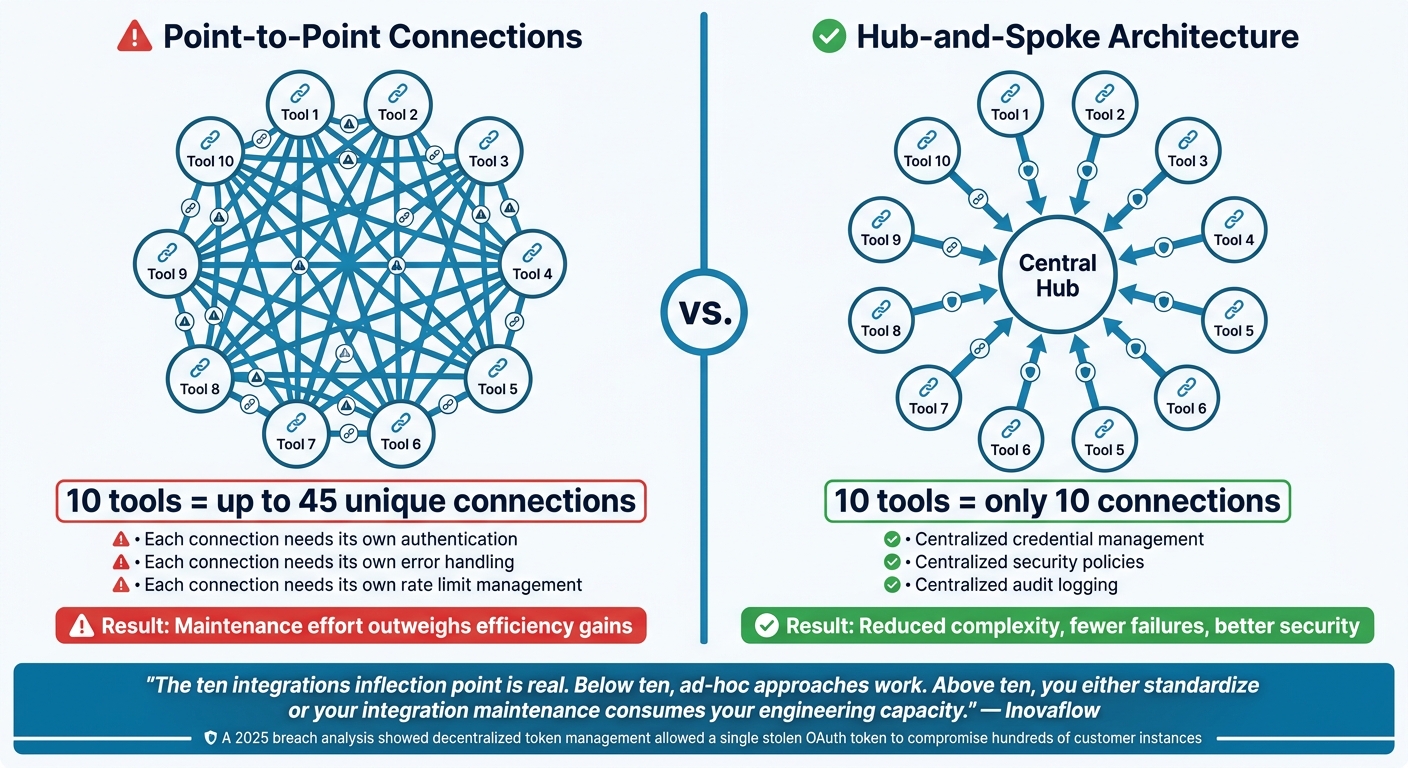
Point-to-Point vs. Hub-and-Spoke: Integration Architecture Compared
Once you’ve mapped and ranked your integrations, it’s time to rethink how they connect. Many teams start with direct, system-to-system links. While this works for smaller setups, it becomes chaotic as your tools and systems grow. A scalable architecture is key to supporting AI-powered operations without constant maintenance headaches.
Replace Point-to-Point Connections with a Hub-and-Spoke Model
Using your integration catalog as a guide, restructure your architecture for better scalability and security.
Point-to-point connections might seem straightforward at first, but they quickly become overwhelming. Every time you add a new tool, you need to create multiple direct links to other systems it interacts with. For instance, 10 tools can require up to 45 unique connections, each needing its own authentication, error handling, and rate limits. By the time you hit 15 integrations, the maintenance effort can outweigh the efficiency gained from automation [2].
A hub-and-spoke model simplifies this. Instead of creating dozens of direct links, all data flows through a central hub. With this setup, 10 tools only need 10 connections – one per tool, all routed through the hub. This approach centralizes credential management, security policies, and audit logging, significantly reducing the risk of system failures [4].
"The ‘ten integrations’ inflection point is real. Below ten, ad-hoc approaches work. Above ten, you either standardize or your integration maintenance consumes your engineering capacity." – Inovaflow [4]
Centralized authentication also enhances security. A 2025 analysis of the Salesloft Drift breach revealed how decentralized token management allowed a single stolen OAuth token to compromise hundreds of customer instances [4]. A centralized hub minimizes these vulnerabilities by keeping credentials and access tightly controlled.
Standardize Your Data Models
Even with a centralized hub, inconsistent data formats can disrupt integrations. For example, one platform might store dates as MM/DD/YYYY while another uses Unix timestamps. Similarly, one system might label a support request as a "case", while another calls it a "ticket." These differences can lead to frustrating mapping errors that are hard to catch and fix.
The solution? Create a shared data schema for core objects like customers, cases, SLAs, and account statuses. Enforce this schema across all integrations. Instead of writing custom code for every connection, use JSON configuration files to define field mappings, transformation rules, and filter criteria [4]. When a vendor updates their API, you simply adjust the configuration file rather than rewriting code.
This method also prevents configuration drift – where small, undocumented changes made by team members cause integrations to deviate from their intended behavior over time [5]. Standardized templates and a clear approval process ensure consistency and reliability.
Set Up Your Stack for AI-Driven Support
A well-organized integration architecture doesn’t just reduce maintenance – it also lays the groundwork for AI-powered support. Tools like predictive CSAT scoring, first-contact resolution detection, and automated case prioritization rely on clean, unified data. If customer information is spread across multiple disconnected systems, inaccuracies can lead to unreliable AI outputs [1].
"When your tools talk to each other, your support strategy works smarter. Supportbench gives you everything you need to make that happen, securely, at scale, and without unnecessary complexity." – Nooshin Alibhai, CEO, Supportbench [3]
Centralizing your data creates a single source of truth, ensuring your AI models deliver accurate and actionable insights.
Standardize Workflows and Data Before Connecting Systems
To build a scalable architecture, you need consistent workflows and unified data definitions before diving into system integrations. Without this alignment, integrations can easily break down, causing more headaches than solutions.
Define Consistent Workflows Across Teams
One common misstep is rushing to connect systems like Salesforce, Zendesk, and Jira before clearly defining the processes they support. Mustafa Bayramoglu, Founder of CorePiper, highlights this issue:
"The most common integration mistake is connecting Salesforce, Zendesk, and Jira first and defining the logic second. This produces a set of flows that technically syncs data but enforces no meaningful process." [8]
To avoid this, start by identifying 3–5 key case types that require frequent coordination across platforms – examples might include escalations, billing disputes, or onboarding tasks. For each case type, outline the desired outcome, expected resolution time, and which system is responsible for the final result. For instance, if a paid invoice needs to appear in the accounting system within 5 minutes of confirmation, make that a clear requirement [9]. These explicit "business contracts" eliminate ambiguity and set measurable standards for testing.
Another critical step is establishing a system-of-record hierarchy. This means deciding which platform serves as the authoritative source for specific types of data. For example, Jira might handle technical resolution details, while your CRM manages business account records. Without such a hierarchy, you risk multiple systems updating the same field, leading to conflicting data [8].
Agree on Shared Data Definitions
Inconsistent data definitions can quietly wreak havoc on integrations. For instance, one team might label an issue as "Priority 1", while another calls it "Severity Critical." These mismatched definitions can lead to mapping errors and miscommunications.
To avoid this, treat your data like a product – complete with a formal contract. Justin from ThinkBot Agency advises:
"Integrations break less when you treat data as a product with a contract." [9]
Document key details like system ownership of each field, acceptable values, and rules for resolving conflicts (e.g., using a "last-write-wins" rule with timestamps or locking certain fields to their source system). Also, limit synchronization to only the most critical fields – focus on the 5–10 fields your teams actually use, rather than syncing every available CRM field. This keeps load times manageable and reduces maintenance complexity [7].
Even with strict data contracts, inconsistencies can creep in. That’s where AI can step in to help.
Use AI to Normalize Data Automatically
Once workflows and data are standardized, AI can take your integration game to the next level by maintaining data quality over time. Modern AI tools can automatically normalize data by categorizing tickets, removing duplicates, routing cases, and summarizing interactions [1][10]. Instead of relying solely on rigid field mappings, AI uses semantic understanding to link related fields – like recognizing that "Company" in your CRM and "Customer" in your ERP refer to the same thing [10].
"AI workflows… can understand context from multiple systems simultaneously. They can make intelligent decisions when data is incomplete or conflicting." – Garrett Fritz, Partner & CTO, metacto [10]
AI also addresses knowledge gaps in real time. For example, if an agent resolves an issue using an undocumented workaround, AI can flag it and suggest adding it to the knowledge base. This ensures your data stays aligned even as processes evolve [1].
Use AI to Automate and Monitor Your Integrations
With standardized workflows and a centralized integration structure, AI is now stepping in to handle the heavy lifting – automating mapping and keeping an eye on system health. When you’re juggling 10+ systems, maintaining smooth operations without constant manual intervention just isn’t practical anymore.
Automate Integration Mapping with AI
Manually mapping fields is a time sink for engineers. AI tools now analyze raw data and suggest field mappings automatically using declarative JSON-based configurations. This shift doesn’t just save time; it also reduces technical debt by moving integration logic away from hardcoded, provider-specific scripts:
"Moving integration logic from hardcoded provider-specific code to declarative data configurations is the only pattern that actually reduces technical debt at scale." – Truto Blog [6]
By eliminating the need for constant maintenance, AI-powered mapping frees up engineering resources for more impactful projects [6].
Once mapping is automated, the next priority is ensuring those integrations remain functional and reliable.
Monitor Integration Health in Real Time
APIs evolve, tokens expire, and fields can get renamed. The real issue isn’t the failure itself – it’s when failures go unnoticed. Undetected issues can disrupt data syncs, leaving teams with outdated or inaccurate information [5].
AI monitoring helps by normalizing errors across systems into standardized categories like auth_failure, rate_limited, or schema_change. This makes it easier for teams to respond quickly with a single runbook, no matter the platform. Centralized metrics to track include sync success rates, timestamps of the last successful sync, data latency, and error rates by category [4].
"Good integration observability isn’t about capturing everything – it’s about answering three questions quickly: Is the integration working? If not, what’s broken? How long has it been broken?" – Inovaflow [4]
This real-time observability ensures you’re not just aware of failures but also equipped to act on them immediately.
Predict and Prevent Integration Failures
Real-time monitoring is great for catching issues, but predictive AI takes it a step further by preventing problems before they arise. For instance, one frequent but avoidable issue is exceeding API rate limits during peak times. In enterprise CRM systems, 40–60% of the daily API budget is often consumed by mid-morning due to inefficient sync jobs [11]. AI-driven connectors address this by syncing only modified records and pausing extractions as the API budget approaches its limit [11].
The same proactive approach applies to authentication. Instead of waiting for OAuth tokens to fail with a 401 error, predictive systems refresh tokens 5–10 minutes before expiration [4]. For teams managing 20+ integrations, such measures are not just helpful – they’re essential. Maintaining a single custom API integration can cost between $50,000 and $150,000 annually, meaning a company with 20 integrations could easily spend over $1 million per year [6]. Predictive AI helps keep these costs under control by minimizing disruptions and reducing maintenance demands.
Govern Your Integrations for Long-Term Control
While predictive AI helps prevent failures, maintaining control over your integration stack requires accountability. Automation plays a role in mapping and monitoring, but governance ensures responsibilities are clear and costs stay manageable. With strong integration mapping and automation in place, governance becomes the key to keeping these systems effective over time.
Assign Ownership and Set Clear Policies
Every integration needs someone responsible for its upkeep – whether that’s someone from Support, IT, or Operations. Without a designated owner, critical tasks like updating APIs, renewing credentials, or addressing issues often fall through the cracks, leading to disruptions that impact customers.
"Integration governance allows your IT team to manage the way integrations are built, maintained, and deprecated. But as more people have access… governance falls apart without a predefined framework." – Unito [5]
Ownership isn’t enough on its own – you also need a clear process for approving new tools. A shift-left governance model ensures that any new SaaS purchase undergoes an API maturity and security review before it’s integrated into your stack [12]. To maintain control, centralize credential management with tools like AWS Secrets Manager, which provide consistent oversight [4].
Track Costs and Cut Redundant Tools
The cost of your integration stack goes far beyond license fees. When you factor in engineering time, training, and productivity losses from constant tool-switching, the expenses add up quickly. For example, a team of 20 agents loses around 1,300 hours annually just from toggling between different tools [1].
Instead of relying solely on license counts, review login data to identify underused tools. Many organizations find that a significant number of licenses sit idle [1]. Fragmented systems not only waste resources but also lead to total costs that are up to 36% higher compared to unified platforms [13].
Consolidating your tools onto a platform like Supportbench can reduce these inefficiencies. By minimizing the number of integrations, you’ll cut down on maintenance, credential management, and unexpected engineering work.
Use AI to Measure Integration Impact on Customer Outcomes
Governance isn’t just about reducing costs – it’s also about understanding how integrations affect your customers. AI can help bridge the gap between technical performance and customer outcomes by linking integration failures to metrics like CSAT scores and SLA breaches [1][4].
"The costliest problem – and the one that’s the hardest to measure – is data drift." – Josh Solomon, Mosaic AI [1]
When an integration fails to sync properly, agents end up working with outdated information. This leads to duplicate efforts, incorrect answers, and unhappy customers – problems that often go unnoticed until the damage is done. AI-powered tools can highlight these issues in real time, helping your team focus on fixing the integrations that are directly impacting customers. By tracking metrics like data latency and sync success rates for each integration, you’ll have a clear way to decide which issues to prioritize – and which tools to eliminate altogether.
Conclusion: How to Keep Your Support Stack Under Control
Integration sprawl doesn’t happen overnight – it creeps in until managing tools and connections becomes a bigger task than supporting customers. But the good news? It’s entirely avoidable with the right strategy.
Start by gaining complete visibility into all your tools, data flows, and redundant connections. From there, shift to a hub-and-spoke architecture. This approach replaces fragile, point-to-point links, standardizes data definitions, and leverages AI to automate processes like mapping and monitoring. Considering that 95% of enterprise IT leaders face challenges integrating data across systems [6], this isn’t just a rare issue – it’s the norm for most B2B support teams. A streamlined architecture like this lays the foundation for better governance.
Once your architecture is scalable, governance is the key to keeping things under control. Without clear ownership, cost management, and approval policies for new tools, even the most carefully designed setup can spiral into chaos. Teams that treat integration management as an ongoing priority are the ones that avoid falling back into disarray.
"Integration platforms rarely fail at a few integrations; they fail as they scale." – Unito [5]
Supportbench simplifies things by combining ticketing, knowledge management, AI assist, and analytics into a single platform. This eliminates the need for the 8–12 separate tools most B2B support teams juggle today [1]. Fewer integrations mean less maintenance, fewer silent failures, and more time to focus on what matters most – your customers.
FAQs
What counts as “integration sprawl” in support ops?
Integration sprawl in support operations happens when organizations rely on too many disconnected or overlapping tools. This creates inefficiencies, drives up maintenance costs, scatters customer data across platforms, and forces agents to constantly switch contexts. The outcome? Increased operational complexity that disrupts overall efficiency.
When should we move to a hub-and-spoke integration model?
When managing over 10 integrations, switching to a hub-and-spoke model can make a big difference. As the number of integrations grows, so does the complexity of maintaining them and the operational overhead involved. This model simplifies things by centralizing API management tasks, such as authentication, logging, and error handling. The result? Lower technical debt and reduced costs.
In fact, it’s worth considering this model even earlier – when you have around 5–8 integrations. Doing so can help you avoid the chaos of unmanageable complexity as your system continues to grow.
How do we choose a system of record for shared customer data?
To streamline your operations and improve efficiency, choose a platform that brings all customer data together in one place. Look for a system with a single, unified interface that simplifies access to information. Prioritize platforms with built-in AI tools and real-time updates to ensure your data stays accurate and removes any silos.
Additionally, ensure the platform supports native CRM integration. This eliminates the need for complicated APIs, making workflows smoother and more efficient. By doing so, your teams can save time, reduce expenses, and focus on delivering a better experience for your customers.






