


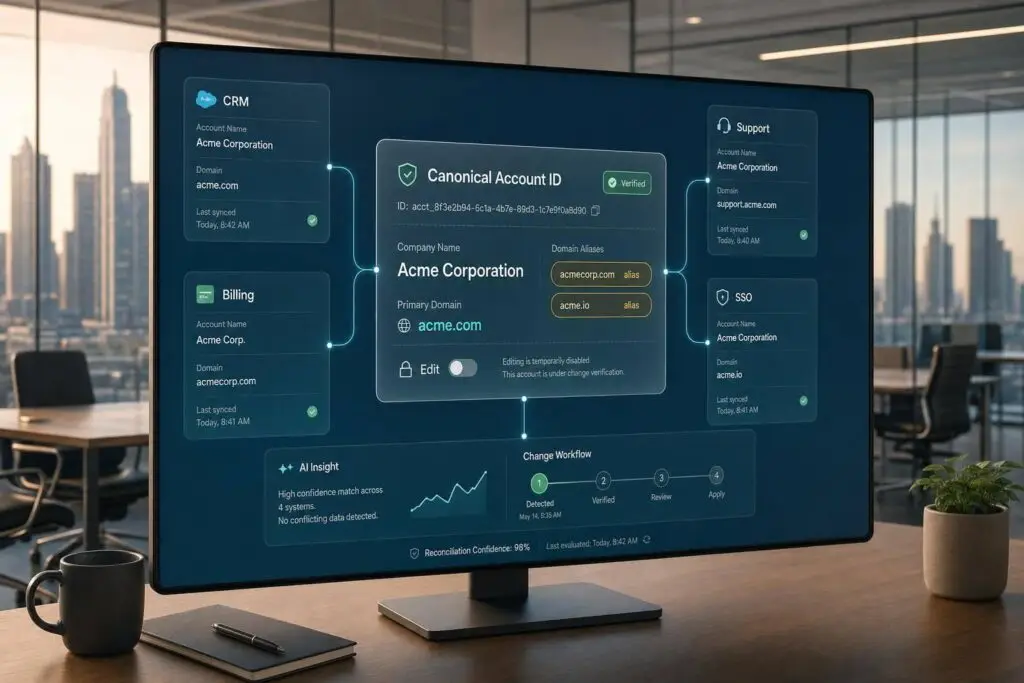
A company rename can split one customer into two accounts fast. If you want to avoid broken SLAs, lost ticket history, and bad reporting, I’d do three things first: pick one stable account ID, verify the old and new records across CRM, billing, support, and SSO, and keep old domains as aliases after the change.
Here’s the short version:
- I would treat company names as labels, not identity keys
- I would match records with stable IDs first: CRM account ID, billing/customer ID, contract ID, or tenant ID
- I would check whether the rename is only a brand/domain change or a legal entity change
- I would freeze edits for 15–30 minutes before changing live records
- I would update systems in a set order so tickets, billing, and access stay linked
- I would merge only when the legal entity and contract stay the same
- I would link or keep records separate for acquisitions, spin-offs, or unclear domain cases
- I would audit every change with old IDs, new IDs, approver, timestamp, and reason
- I would watch post-change drift, such as duplicate accounts, orphan orgs, and sync failures
One number stands out: bad CRM data can cost up to 25% of potential revenue. So this is not just a support cleanup task. It affects renewals, routing, reporting, and billing too.
If I were setting the process, I’d keep it simple: one canonical ID, human approval before merges, and old identifiers that still resolve to the surviving account.
Build a customer identity model before making any changes
Before you rename or merge anything, map out the fields that define a customer across your stack. If you skip that step, every change turns into manual guesswork. And that’s when ticket history, entitlements, SLAs, and reporting start drifting away from the same customer after a rename or domain change.
Choose the primary customer ID and matching fields
Don’t use a company name as your primary key. It just isn’t stable enough to stop duplicate records or bad merges. Two unrelated companies can share the same name, which means name-based matching can pull separate accounts together and skew reporting. [4]
Instead, tie identity to stable fields like a CRM Account ID, Billing Customer ID, Contract ID, or Tenant ID. Then use verified domains as a second check, alongside contact email domains. Tax or regulatory IDs can also help confirm the legal entity. [4][3]
Here’s the safest order to lean on:
| Field Type | Stability | Reliability for Matching |
|---|---|---|
| Internal Account ID | High | Canonical (best) |
| Billing / Contract ID | High | Strong secondary link |
| Tax / Regulatory ID | High | Excellent for legal entity verification |
| Verified Domain | Medium | Good for automated ticket routing |
| Company Name | Low | Unreliable (name collision risk) |
| Email Address | Low | Risky (shared inboxes, personal domains) |
Use these fields in the same order across every system. That way, each tool resolves the same customer the same way instead of making its own call.
One practical rule: block personal email domains like yahoo.com or protonmail.com from automated account-matching logic. If those domains stay in the flow, unrelated users can end up tied to the same account. [3]
Set source-of-truth rules
Give each field one home system. CRM should own account identity and ownership. Billing should own subscription and invoice data. The help desk should own ticket history and routing metadata. Identity systems should own login and access records. Everywhere else, those owned fields should be read-only. When records conflict, resolve them in this order: stored customer ID, external ID, then normalized domain. [2][3]
With those source-of-truth rules in place, AI can flag mismatches without changing records by itself.
Use AI-assisted matching with human approval
Use AI to spot likely duplicates and suggest merges, but keep approval with a human before any account changes. That review-first setup keeps AI in a suggestion role. It can build a match list for review, while a person approves safe updates and sends unclear cases to manual review. Any merge that affects support continuity or billing continuity should be approved by a human only. [2][3]
Once the identity model is in place, check each old-and-new record pair against source systems before you merge anything.
sbb-itb-e60d259
Verify whether old and new records belong to the same customer
Once the identity model is set, check the old and new records against your source systems before you touch production data. Use the canonical key and those source systems to confirm the match before any merge.
Run a cross-system verification checklist
Begin with a billing snapshot: subscription IDs, renewal dates, unpaid invoices, and tax details [1]. Then compare stable IDs across CRM, support, billing, and SSO – internal user IDs, organization IDs, billing account IDs, contract IDs, subscription records, and identity tenant IDs [1][3].
When those IDs line up, that’s a strong sign both records point to the same customer. If they don’t, stop there and send the case for extra review.
Next, confirm the change with a customer-authorized contact. Ask for backup such as a contract amendment, purchase order, or formal notice of name change [1]. No documentation? Escalate before any merge.
Also check the account website against the email domains used by attached contacts [4]. If the website is branch.io and the contacts use @branch.io, treat that as a clean match [4]. If the domains don’t match, pause and dig in before merging [4].
Separate safe changes from cases that need extra approval
Some changes are fairly low risk. A rebrand with the same legal entity, billing account, and contract usually falls into that bucket. A new domain is also often safe if it isn’t already tied to another org, and a redirect from the old domain to the new one is a helpful confirming signal [5].
Other cases need extra approval. That includes a legal entity change, like an acquisition with a new parent company, or a spin-off where products and users split across entities. Shared or unclear domains, or anything that looks like a shared-name collision, should be blocked for manual review [4].
Use the decision table below to decide who owns the next step and what approval path applies.
Use a decision table to assign approval and ownership
| Observed Change | Required Checks | Outcome | Approval Owner |
|---|---|---|---|
| Rebrand (same legal entity) | Verify tax ID and billing account; check stable IDs | Same account | Support Lead |
| Domain change (unique) | Confirm new domain is not attached to another org; check for no existing external ID | Same account | Ops Manager |
| Acquisition (new entity) | Review contract amendment and purchase order; check for different tax IDs or billing owners | Link only | Finance / Legal |
| Spin-off / divestiture | Identify which products and users stay or move; verify new SSO tenant | Link only | Security / Legal |
| Shared or ambiguous domain | Review primary contacts; check for shared-name collision | Blocked | Security / Ops |
| Duplicate (manual entry error) | Apply tie-break rule: billing/contracts, then most recent login, then earlier-created record | Same account | Support Agent |
Log every merge or link with the old and new IDs, approver name, timestamp, business reason, and support ticket number [1].
Before the merge, freeze both records for 15–30 minutes so new edits don’t create mismatches [1].
Reconcile records across support, CRM, billing, and identity without breaking continuity
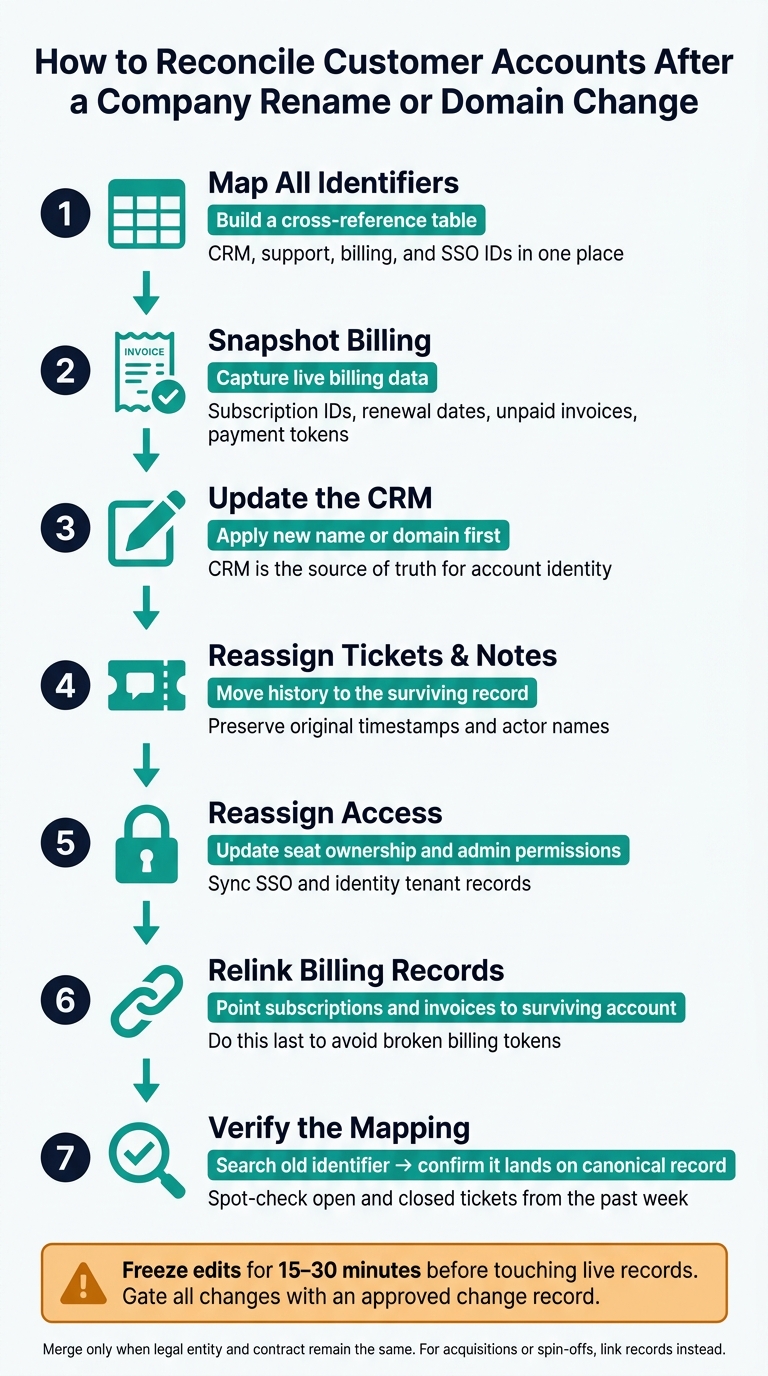
How to Reconcile Customer Accounts After a Company Rename or Domain Change
After approval, run a quick drift check for orphan records, domain mismatches, and duplicate IDs. Then freeze edits and pause any automations tied to the old account ID before you touch live records. That helps you avoid breaking ticket history, entitlements, SLAs, or reporting. And before any ID changes happen, use the cross-reference table as your source of truth.
Update systems in the correct order
Store the CRM Account ID in the support organization external_id so renames and domain changes don’t break the link [3][2]. After that, move through the systems in this order:
- Map all identifiers first. Build one cross-reference table for CRM, support, billing, and SSO IDs.
- Snapshot billing next. Capture live subscription IDs, renewal dates, unpaid invoices, and payment tokens before profile data changes.
- Update the CRM with the new name or domain first.
- Reassign tickets and notes to the surviving record.
- Reassign access by updating seat ownership and admin permissions.
- Relink billing records last, so subscriptions and invoices point to the surviving account.
- Verify the mapping by searching for the old identifier and making sure it lands on the canonical record.
Once the IDs are mapped, use the lightest action that keeps billing and reporting intact.
Decide when to merge, link, or keep accounts separate
Use the legal entity and the contract to decide whether to merge, link, or keep accounts separate.
| Action | Data Behavior | Risk Level | Common Use Case |
|---|---|---|---|
| Merge | All history, tickets, and billing combine into one surviving ID. | High – irreversible; can break billing tokens if not pre-checked. | Same legal entity and contract; duplicate cleanup from imports. |
| Link | Both records stay separate but share parent-child visibility. | Low – preserves distinct billing and reporting lines. | Parent-subsidiary relationships where billing remains separate. |
| Keep Separate | No data sharing; records remain entirely distinct. | Minimal – no risk of data collision. | Spin-offs; genuinely distinct entities that happen to share a name. |
If you do merge, keep the record with the most trusted ID and the broadest set of working connections. In most cases, that’s the one tied to a signed contract or an active billing account. Leave original timestamps and actor names alone. Historical events should stay as they happened, not be rewritten to match the canonical account. Add a merge note to the primary record with both old and new IDs, the reason for the change, the approver’s name, and the timestamp [1].
Preserve Supportbench history, SLAs, and AI context after a change
In Supportbench, keep the existing organization in place so ticket history, SLA logic, and AI context remain attached. Add the new domain for inbound matching, and keep the old domain as an alias. That way, email still coming from an @oldco.com address routes to the unified account instead of spinning up a new orphan record [1][4].
Then run a short set of checks. Spot-check active cases and recently closed cases to make sure the unified account view looks right. Confirm that queue ownership, dynamic SLA management, and AI case summaries still point to the surviving record. Also check that predictive CSAT and predictive CES reflect one unified timeline instead of a split view across old and new records. If those signals pull from fractured history, agents lose context, and the predictions become less useful. Once those checks pass, add duplicate controls and audit logs to help keep the record clean.
"The clean integration is the one you can audit six months later." – FoundryOps [3]
Prevent duplicates and confirm the reconciliation worked
Add duplicate controls, audit logs, and rollback steps
Once the merge is approved, move from reconciliation to drift control. Lock the canonical customer ID, keep old domains as aliases, and stop new records from being created from retired identifiers.
Each change should have a full audit log tied to one shared change record. That record should connect the event across CRM, support, and billing. Before you run any merge, export a full snapshot of both records, including identifiers, open tickets, invoices, and subscriptions. That gives you a clean rollback point if something goes sideways.
During the merge window, freeze edits for 15 to 30 minutes. Gate the change with an approved change record, and keep the old record as an alias so late tickets and account lookups still resolve to the surviving account. [1][2][5]
Monitor key metrics after a reconciliation event
After rollout, confirm that retired identifiers still point to one canonical record. Search every retired identifier, including the old account ID, old email, old billing ID, and old domain alias, and make sure each one lands on the surviving record. Then spot-check a few open and closed tickets from the previous week to confirm the full timeline appears under the surviving account. [1]
Track the signals most likely to show drift and duplicate-handling problems:
| Metric | What It Tells You |
|---|---|
| Duplicate account count | Whether new records are still being created for the same customer |
| Orphan organizations | Whether records are missing a CRM key |
| Domain mismatches | Whether contact and account identities have drifted |
| Duplicate or missed sync events | Whether a webhook or sync is still using an old identifier |
| Post-merge correction rate | How often teams need to clean up the reconciliation after it is applied |
| Manual merge time per week | Whether the process is getting more efficient over time |
Check the logs for the first hour after rollout, then review them again later the same day. That simple habit helps teams catch problems early. Keep auditing for identity drift so small mistakes don’t spread into reporting or routing.
Conclusion: The checks that reduce escalations and reporting errors
A company rename or domain change turns into a support problem when the records behind it stay unresolved. Anchor each account to a stable canonical ID, validate changes across support, CRM, billing, and identity before touching live records, and keep old domains as aliases until late-arriving activity settles. That way, history stays intact, reporting stays trustworthy, and escalations stay manageable. [1][5]
FAQs
How do I tell a rebrand from a legal entity change?
Treat a rebrand as account identity continuity. Treat a legal entity change as a possible identity break.
Start with the deterministic anchors: stored external IDs, verified work email domains, normalized domains, and billing or ERP account IDs. If those durable keys match, you’re usually dealing with the same account, even if the name or domain changed. In that case, reconcile the name or domain only.
If the external IDs or billing identifiers don’t match, that’s a different story. The same goes for domain mismatches or orphan orgs. Those are signs you should review the case as a legal entity change.
When should I merge accounts instead of linking them?
Merge accounts when you’ve confirmed that duplicate records point to the same commercial entity and you need one clean view for reporting, billing, and support. This often comes up after acquisitions or rebrands, when multiple records start muddying the picture.
Use linking when the entities are still legally or operationally separate. That includes parent-child relationships, subsidiaries, or regional branches that need their own entitlement or reporting tracking.
How long should I keep the old domain as an alias?
Keep the old domain as an alias for as long as you need it for communication and identity checks. At the same time, shift toward one canonical domain so your data doesn’t end up split across multiple records over time.
During that overlap period, continue accepting support requests through the old domain and connect them to the new primary account record. Watch for any traffic that still comes through the old domain, then retire it once usage drops. That helps cut down on duplicate records and domain collisions.
Related Blog Posts
- Mapping Complex Organizational Structures (Parent/Child Accounts) in Support
- How to manage aliases and reply-from addresses safely
- How to preserve customer identity mapping across systems
- How to handle duplicate contacts and accounts during migrations
Evaluating help desks for a B2B team?
Supportbench is all-inclusive from $32 per agent per month, with migration and onboarding included. See pricing or book a 20-minute demo.






