



If your CRM, billing tool, help desk, and product database don’t share the same customer IDs, your team will route tickets wrong, miss entitlements, and waste hours fixing records by hand.
I’d boil the fix down to this: pick one canonical account ID, one canonical contact ID, and one relationship record, then make every system map back to them. After that, I’d set field ownership, use exact-match rules first, send fuzzy cases to review, and track drift every week.
Here’s the full article in one quick view:
- Start with a canonical record, not sync rules
- Separate account identity from contact identity
- Use an ID mapping table across CRM, billing, support, product, and warehouse systems
- Audit at least 50 records across 2+ systems
- If field agreement is under 90%, you already have identity conflict
- Use deterministic matching first; it often handles 60% to 75% of clean records
- Use AI-assisted review for the remaining 25% to 40%
- A two-step match flow can reach 94% high-confidence matches, versus 68% for exact-match-only setups
- Set one owner per field so stale syncs don’t overwrite known data
- Use field-level timestamps, not whole-record timestamps
- For merges, keep retired IDs in an alias table
- For splits, move ticket history and billing links on purpose
- Send shared inboxes, duplicate external IDs, and domain conflicts to an exception queue
- Review identity drift weekly with metrics like duplicate ID rate, missing link rate, and ticket-org mismatch rate
One number stands out: teams can spend up to 6 hours per week reconciling customer data across systems. To me, that’s the clearest sign that identity mapping is not just a data issue – it affects support speed, reporting, and customer trust every day.
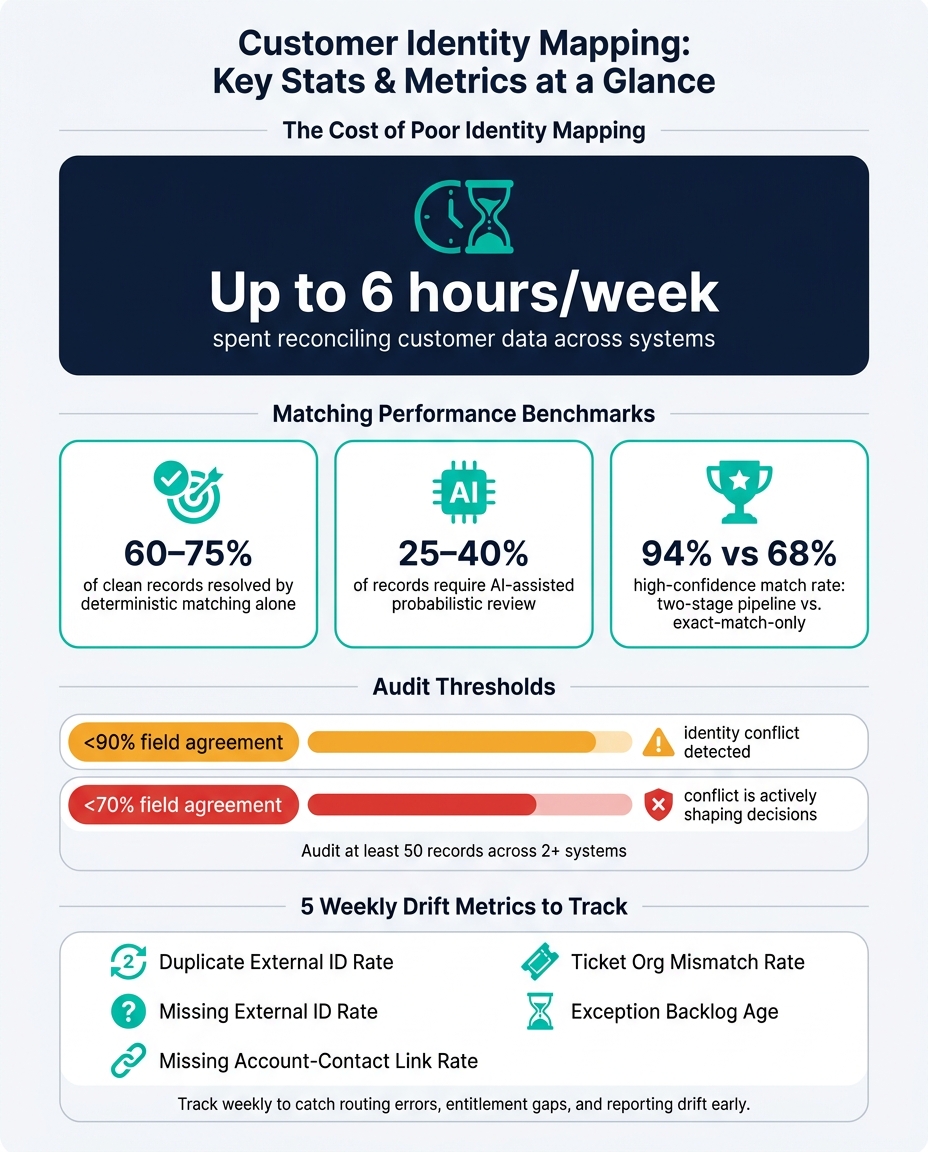
Customer Identity Mapping: Key Stats & Metrics at a Glance
Identity mapping basics
Start with the three IDs every system needs to share. Customer identity mapping means keeping one canonical customer record across CRM, help desk, billing, product, chat, and warehouse systems, so tickets, entitlements, and account context stay connected to the right customer.
The main split here is account identity versus contact identity. An account is the company – the commercial entity that owns the contract and SLA tier. A contact is the individual person who sends emails or opens tickets. For contact matching, use a verified work email. Personal inboxes can create false links.
Canonical account ID, contact ID, and relationship records
Once the problem is clear, map the IDs that need to stay in sync. A working identity model has three layers:
- Master account ID – the company anchor; every system points to this to show which business a record belongs to
- Master contact ID – the person anchor; links an individual to their verified work email and external system key
- Relationship record – connects a contact to the right account, subsidiary, workspace, and entitlement
That relationship record does a lot of heavy lifting. It keeps tickets, entitlements, and escalations tied to the right company and the right person. Without it, subsidiaries and shared contacts can throw off routing and entitlement checks.
Systems that hold competing versions of customer identity
No single system holds the whole customer record. Each platform has its own internal key, and those keys don’t line up on their own. One account might connect from a CRM to a help desk, billing platform, product workspace, and data warehouse through one ID map – but that only happens if the map is built and maintained on purpose.
Without a mapping layer, every integration can send data to the wrong place. Use an ID mapping table to translate each system’s record into the canonical account, contact, and workspace IDs.
Next, audit the fields behind those IDs and set the matching rules that control them.
sbb-itb-e60d259
Audit identity fields and set canonical ID rules
Before you change workflows, pull a sample of 50 customer records that show up in at least two systems. Then compare the fields that control routing, billing, and support. That’s how you make sure tickets, entitlements, and account history stay tied to the right customer.
If agreement across those records is below 90%, your systems are already in conflict. If it drops below 70%, that conflict is shaping decisions[4]. Start with the fields that decide whether records match or split.
Audit the fields that drive matching and routing
Deterministic identifiers are the safest place to start. That includes stored system IDs, external IDs, verified work email, and normalized phone numbers. You can match on those with confidence.
Company name and personal email are a different story. Use them for manual review, not as your main match keys. Before matching, clean up domain formatting, email casing, and company naming[9].
Your audit should cover this minimum field set:
- Contact level: verified work email, optional external ID
- Account level: domain and/or external account ID from billing or ERP
- Linkage fields: ticket ID, status, priority, timestamps, requester, and organization
Treat email, phone, and subscription status as separate change streams.
Those are the fields your canonical ID rules should rest on.
Set the master ID, external ID mapping, and precedence rules
Use the audit to assign one canonical account ID and one canonical contact ID. Then map every other system back to those anchors.
In most stacks, the CRM owns identity, lifecycle stage, and contact relationships. Billing owns subscription status, payment status, MRR, and renewal dates. The support platform owns ticket history, SLA status, and support-only entitlements.
| System | Record Type | Primary ID | Owns This Data |
|---|---|---|---|
| CRM | Account | CRM Account ID | Identity, Ownership, Lifecycle Stage |
| CRM | Contact | CRM Contact ID | Contact Data, Relationship Owner |
| Billing | Customer / Subscription | Billing Customer ID | Plan Status, Payment Status, MRR, Renewal Date |
| Support Platform | Organization | Support Org ID | Support Entitlements, Ticket History, SLA Status |
| Support Platform | User | Support User ID | Support Role, Ticket Requester |
| Product System | User / Tenant | Product User ID | Feature Adoption, Last Login, Onboarding Status |
| Data Warehouse | Unified Profile | Canonical Master ID | Historical Analytics, Identity Graph |
When systems disagree, precedence rules pick the winner, not write time. Each ownership, lifecycle, and reporting field needs one owner[5]. And skip null source values so blank fields never overwrite known data[3].
Use deterministic matching first, then AI-assisted review
Run deterministic matching first. Exact-key matching on stored system IDs, external IDs, and verified email or domain usually covers 60% to 75% of clean records[1].
Then handle what’s left. For the remaining 25% to 40%, a two-stage pipeline – deterministic first, then probabilistic – can push your high-confidence match rate to 94%, compared with 68% for deterministic-only approaches[1].
Use AI-assisted matching to flag borderline cases for human approval, especially matches in the 70% to 85% range[1]. Resolve identity at ingestion, not at query time[7]. That way, agents and automation read one resolved customer context instead of trying to reconcile records on the fly[7].
Once matching is stable, define how merges, splits, and exceptions write back.
Handle merges, splits, sync rules, and exceptions
The real test starts when records collide, split apart, or slowly drift out of sync. Mergers, subsidiaries, rebrands, and bad syncs can put real stress on the identity model you just set up. The rules below help keep that model in one piece.
Merge duplicates without losing ticket history or entitlements
The main danger in a merge is simple: you lose history, entitlements, or ownership links. Say a Salesforce account, a Zendesk org, and a Stripe customer all refer to the same business. At some point, those records may need to collapse into one canonical record. Before you merge anything, list every system ID tied to both records: CRM IDs, help desk user IDs, billing customer numbers, subscription IDs, and internal user IDs. That mapping table is your safety net if a downstream system loses track of the relationship [10].
Use this merge order: history, access, then billing references [10].
And one rule matters more than most: Never rewrite old events to match the surviving account. Add a merge note instead. That note should record the retired ID, the surviving ID, the reason for the merge, and the approver’s name [10]. Then store the retired ID in an alias table so any lookup using the old identifier still points to the right record [10].
Keep retired IDs active in the alias table until every downstream system resolves them the right way.
Split records cleanly for subsidiaries, rebrands, or shared contacts
Splits get messy fast. When one record stands in for more than one legal or operating entity, you need to separate the history before sync rules rewrite it. This is harder than a merge because history has to move to the right entity, not just to a new ID. A parent company, a subsidiary, and a shared inbox can look like one customer at first glance. Billing or entitlement data often shows that they are not.
For a split, each entity needs:
- Its own canonical account ID
- Its own billing link to the right subscription
- Its own contact relationships, re-parented to the right account
Historical tickets and other child objects should move with the entity they belong to so context and attribution stay intact. Shared contacts should map to the account tied to the correct product instance or billing contract [6][9][10].
The key rule here is blunt: don’t just change the email or account name. Move specific ticket or case history and billing links to the new IDs on purpose [10]. And when you split, mark old mapping rows as inactive instead of deleting them. That keeps the forensic trail in place [8].
Set field-level write rules and exception workflows
Not every system should be allowed to write every field. If you skip ownership rules, stale syncs will overwrite the data you trust most.
Use the canonical account or contact ID as the anchor. From there, limit writes based on field ownership. This is a practical setup for common data types [11].
| Data Category | Owner System | Conflict Rule |
|---|---|---|
| Contact identity (name, email) | CRM | CRM always wins |
| Subscription status | Billing | Billing always wins |
| Support ticket history | Help desk | Additive only – never overwrite |
| Purchase and contract history | Billing / ERP | Billing always wins |
Use field-level timestamps, not whole-record timestamps, when resolving conflicts [12]. A record updated five minutes ago might still contain an email address that hasn’t changed in two years. Field-level freshness catches that problem. Whole-record timestamps don’t.
For sync decisions, the method should match the level of risk and certainty.
| Method | Speed | Risk | Cost | Use |
|---|---|---|---|---|
| Automated sync | Real-time | High if rules are weak | Low | High-confidence deterministic matches (exact ID or email) [6][10] |
| Manual reconciliation | Slow | Low | High | Complex splits, high-value accounts, or fuzzy matches [6][10] |
| Exception queues | Moderate | Controlled | Moderate | Ambiguous matches, shared domains, or conflicting source data [2][9] |
If something looks ambiguous, don’t let the system guess. Shared inboxes like info@company.com, duplicate external IDs, or domain collisions should go straight to an exception queue [5][9]. Auto-merge only when you have an exact ID match or a verified-email match. Tag automated writes with sync_bot or last_modified_by so you don’t end up with sync loops [11].
Once these rules are live, track drift and reconcile exceptions every week.
Verify identity quality and put it to work in Supportbench
Track the metrics that reveal identity drift
Identity drift tends to creep in as schemas, integrations, and ownership rules shift across CRM, help desk, billing, product, and warehouse systems. If you wait until tickets start landing with the wrong team or entitlements stop lining up, you’re already behind. Track it every week so you can catch problems early.
Focus on these five metrics:
| Metric | What It Signals | Operational Risk |
|---|---|---|
| Duplicate external ID rate | Two orgs sharing the same external ID | Split ticket history, inflated customer counts |
| Missing external ID rate | Accounts without a resolved master ID | Fragmented history and reporting drift |
| Missing account-contact link rate | Contacts or users without the expected account membership | Broken escalation paths, entitlement visibility gaps |
| Ticket org mismatch rate | Ticket org ID differs from the resolved requester org | Wrong-team routing, privacy risk |
| Exception backlog age | How long unresolved identity issues remain in queue | Signals decaying data quality and integration health |
Also, track false positives and false negatives as separate numbers. False positives create the privacy risk. False negatives create the service risk [7].
Those metrics should feed the weekly reconciliation queue, so the team works the accounts and records most likely to cause trouble.
Run a weekly reconciliation workflow with AI assistance
A weekly audit should do a few specific things: validate reference data, scan orgs and users for drift, review exceptions_by_account.csv by master CRM account, check relationship breaks on high-value accounts, apply only reviewed fixes with a confirmed plan hash, and archive apply_receipt.json for audit traceability [5]. Never apply bulk fixes without a dry run first. Before changing live data, recheck preconditions against the current system state [2].
exceptions_by_account.csv is useful for a simple reason: it groups identity issues by master CRM account. That makes triage faster because Support Ops can spot which accounts have blockers and which rows are safe to apply [2][5].
AI can help here, but it shouldn’t be the final decision-maker when identity conflicts are still unresolved. Use it to pull prior-case context, summarize recent activity, and make review less tedious before an agent approves a match or fix. Confidence scoring can automate only high-certainty fixes, send borderline cases to review, and require more identifiers when a case falls below the cutoff [7][1].
Conclusion: the rules that keep customer identity intact
When drift is kept in check, the support team can rely on one customer record across every system. That gives Supportbench one customer view: the right account, contact, entitlement, and escalation history in every system – with fewer routing mistakes, cleaner reporting, and intact entitlement history as systems change.
FAQs
How do I choose the right canonical customer ID?
Pick one system of record – usually your CRM – as the main source of truth for account and contact identity. If you’re working with a smaller setup, use one stable ID across systems, like an account ID or a dedicated external ID. Once things start to grow, a centralized mapping table helps keep system-specific IDs separate from the core entity.
For matching, start with deterministic methods and stick to high-confidence keys like a verified email, company domain, or permanent system ID. Fuzzy matching has its place, but it’s better used as a second check or for manual review. Identity resolution should happen at ingestion, before records make their way to AI agents or reporting tools.
When should a record go to manual review instead of auto-matching?
Send records to manual review when a match isn’t clear, when signals conflict, or when confidence is low.
That usually includes cases like:
- shared-domain collisions
- duplicate external IDs
- membership mismatches
- medium-confidence probabilistic scores from 70 to 84
- more complicated reconciliation work, such as parent-subsidiary hierarchies or healthcare affiliates
These cases need a human check before you move ahead.
What should I do first if customer IDs already conflict across systems?
If customer IDs conflict across systems, don’t jump straight into fixing single records. Start with an audit so you can see how big the problem is and where it shows up.
Catalog every system that stores customer data. Then define the source of truth for each field. After that, run a dry run to group exceptions, isolate identity gaps, and check evidence such as domains and external IDs.
Only apply fixes once you have a clear resolution plan. That helps you avoid false merges.
Related Blog Posts
- How do you map Salesforce Case fields, Record Types, and Statuses to a new helpdesk?
- Mapping Complex Organizational Structures (Parent/Child Accounts) in Support
- How to map customer portal fields to internal ticket fields without breaking workflows
- How to keep historical CRM context when migrating support tools
Evaluating help desks for a B2B team?
Supportbench is all-inclusive from $32 per agent per month, with migration and onboarding included. See pricing or book a 20-minute demo.






