



You do not need to check every ticket before go-live. You need to check the right tickets.
If I were planning a support migration today, I’d use a risk-based sample: 5%–10% of closed historical tickets, 15%–25% of open or pending tickets, and 50%–100% of high-risk in-flight cases. For VIP or top-tier accounts, I’d review 100% of active tickets.
Here’s the short version:
- I’d split validation into historical, open, and in-flight tickets
- I’d group tickets by risk, such as SLA exposure, account tier, workflow depth, automation use, and channel/language
- I’d use a separate golden sample of 20–100 tickets for rule testing
- I’d review 5–10 tickets per language for multilingual queues
- I’d set defect limits before review starts:
- 0% for data loss, security issues, and routing failures
- Under 2% for SLA or field-map issues in core reports
- Under 5% for medium issues
- Under 10% for low-impact formatting issues
What matters most is simple: don’t rely on random sampling alone. If routing, automations, timestamps, attachments, notes, or SLA timers fail, agents will feel it on day one. So I’d size the sample by business risk, not by one flat percentage.
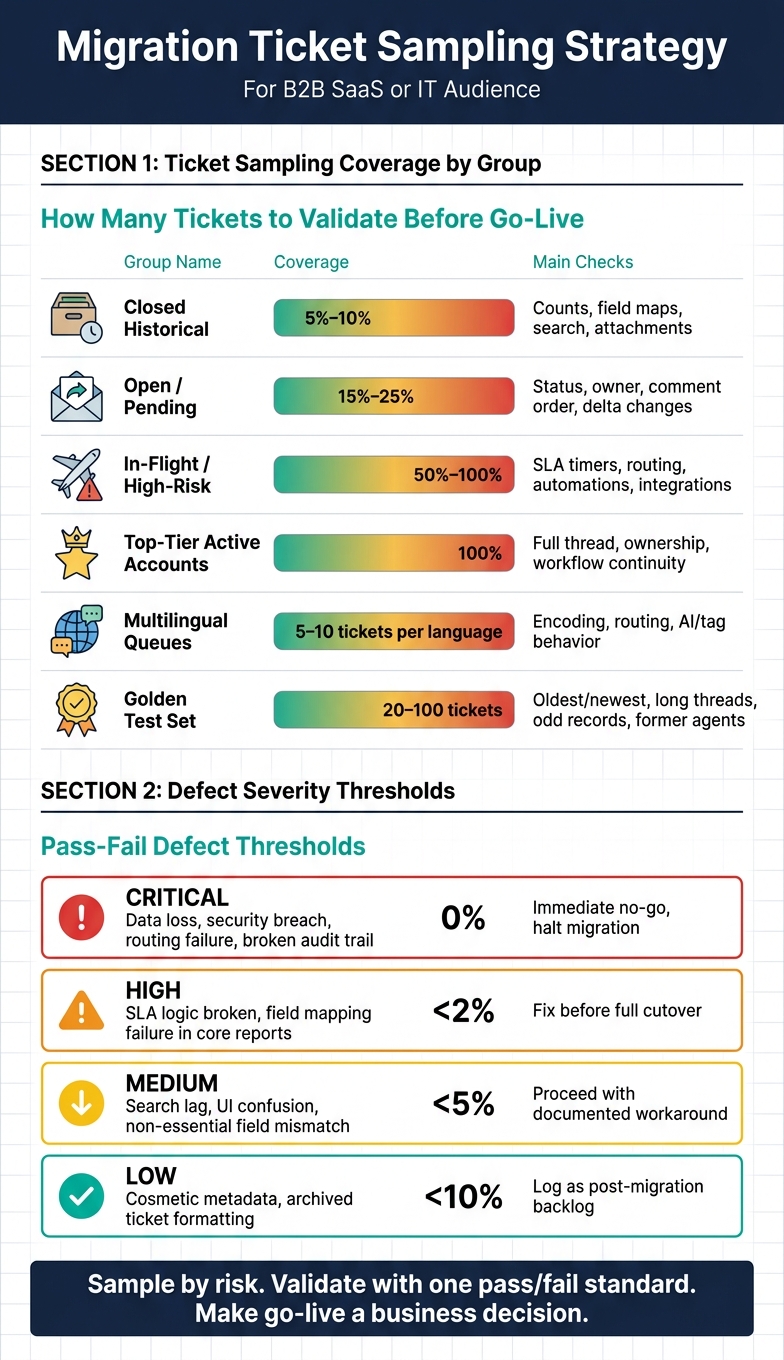
Migration Ticket Sampling Strategy: Sample Sizes & Defect Thresholds at a Glance
Quick comparison
| Ticket group | Suggested coverage | Main checks |
|---|---|---|
| Closed historical | 5%–10% | Counts, field maps, search, attachments |
| Open / pending | 15%–25% | Status, owner, comment order, delta changes |
| In-flight / high-risk | 50%–100% | SLA timers, routing, automations, integrations |
| Top-tier active accounts | 100% | Full thread, ownership, workflow continuity |
| Multilingual queues | 5–10 per language | Encoding, routing, AI/tag behavior |
| Golden test set | 20–100 tickets | Oldest/newest, long threads, odd records, former agents |
If I had to sum up the article in one line, it would be this: sample by risk, validate with one pass/fail standard, and make go-live a business decision, not just a data move.
sbb-itb-e60d259
Define the validation scope
Start by setting the scope. Historical, open, and in-flight tickets each need a different kind of review. That part matters up front, because the ticket type tells you how much checking each sample needs.
Separate historical, open, and in-flight tickets
Closed historical tickets help confirm reporting accuracy, searchability, and data completeness. They also support AI training data.
Open tickets changed during the delta window check whether delta sync is pulling changes the right way, and whether ownership and status mapping arrive in the new system as expected.
In-flight tickets are active cases expected to stay open during the migration weekend [3]. These are the highest-risk records. They test live workflow continuity, SLA state, and integrations at cutover.
Once the scope is clear, the next step is to rank tickets based on the risks most likely to break cutover.
Map the risk factors that affect sample coverage
Random sampling sounds neat on paper, but it often misses the tickets most likely to cause trouble. Coverage should be based on risk, not luck.
| Risk Factor | Why It Matters | Failure Risk |
|---|---|---|
| Account tier | VIP and large accounts often need full review of active in-flight cases | VIPs routed to general queues due to unmapped Customer Tier fields |
| SLA exposure | Tickets with active SLA timers must preserve escalation timing | High-priority tickets stalled because escalation triggers failed |
| Workflow complexity | Long threads, private notes, and state changes are harder to migrate cleanly | "Pending" tickets defaulting to "Closed", losing case context |
| Automation dependency | Records that trigger webhooks, macros, or third-party syncs need explicit testing | Silent failure of auto-assignment or broken cross-team workflows |
| Channel and language | Email, chat, and web forms behave differently across systems; multilingual tickets affect AI signal extraction | Routing failures or AI sentiment models missing urgency in non-English tickets |
Use these risk factors to sort tickets into validation buckets and set coverage based on risk. Those factors then feed the sample matrix, where tickets are grouped into validation buckets.
Build the sample matrix
Once you’ve mapped your risk factors, put them into a sample matrix. This matrix shows which ticket groups to review, how many to pull, and what each group needs to prove before go-live. The goal is simple: cover the ticket types most likely to break routing, mapping, SLA rules, or automation logic.
Start by turning those risk factors into buckets.
Group tickets into validation buckets
A validation bucket is a ticket segment that shares the same risk profile. You can define buckets by status, group, priority, channel, and date range so each meaningful ticket management workflow has its own category [3].
Here’s what that can look like in a B2B support operation:
| Validation Bucket | Queue / Workflow | Channel | Priority | Language | Customer Tier | Automation / SLA Dependency |
|---|---|---|---|---|---|---|
| Enterprise Escalations | Tier 3 / Technical | Chat / Phone | Urgent | English | Platinum / Strategic | Custom SLA, Manager Alert |
| Standard Email Cases | Tier 1 / General | Normal | Multilingual | Standard | Auto-responder, Tagging | |
| Renewal-Risk Accounts | Success / Billing | High | English | High-Value | CRM Sync, Renewal Trigger | |
| Multilingual Queues | Regional Support | Web Form | Normal | Thai / Tagalog | All Tiers | Language-based Routing |
| Automation-Heavy | Bot-to-Human | Chat / API | Low | English | All Tiers | AI Summary, Webhook Trigger |
| Closed Historical | Read-only / Closed | All | All | All | All | No active SLA; check attachments |
Each bucket should line up with the way it can fail. Chat tickets need checks for transcript integrity. Email cases need checks for threading and attachments. Automation-heavy flows need an end-to-end check from intake through closure [1][3].
After that, size each bucket based on volume and risk.
Give extra weight to rare but high-risk ticket types
Some ticket types are risky even if they don’t show up often. That usually includes enterprise escalations with custom SLA rules, long-running incidents, tickets linked to renewal-risk accounts, cases assigned to former agents or deleted users, and tickets with 50+ comments or large or unusual attachments [1][3].
For enterprise escalations, review 100% of active cases and at least 10% of historical records [3]. For renewal-risk accounts, review the full thread history for your highest-value accounts [3]. For multilingual queues, sample 5 to 10 tickets per language to catch translation, encoding, and routing issues [3].
Those buckets will drive sample sizes by risk level in the next step.
Set sample sizes by risk level
Once you’ve set your risk buckets, the next step is simple: decide how many tickets to review in each one. That number should reflect total volume, workflow complexity, and business impact – not one flat percentage applied across the board.
Use volume bands instead of one flat percentage
A flat percentage assumes every bucket carries the same level of risk. It doesn’t. A better approach is to use volume bands: review a larger share in smaller migrations, set minimum sample counts for each bucket, and increase coverage only where high-risk workflows call for it.
For pilot validation, sample 5% to 10% of tickets, matched to real data complexity. For rule testing, use a separate golden sample of 20 to 100 tickets that includes the oldest and newest records, long threads, attachments, and tickets from former agents [3].
Turn each risk level into a clear ticket count, then tie that bucket to a specific review focus.
| Risk Level | Ticket Category | Recommended Sample Size | What to Check |
|---|---|---|---|
| Low | Historical (Closed) | 5%–10% random sample | Record count integrity, basic field mapping, searchability, and attachment access [5][3] |
| Medium | Open / Pending | 15%–25% stratified sample | Comment order, attachment accessibility, agent assignments, and status transitions [1][3] |
| High | In-flight / High-Value | 50%–100% of specific edge cases; 100% for top-tier accounts | End-to-end customer journeys, dynamic SLA logic, complex branching workflows, and integration syncs [5][1] |
As volume grows, keep the sample representative. Add more coverage only when workflow risk, data risk, or account risk makes it worth the extra review.
Increase coverage for complex workflows, SLA risk, and large accounts
Some buckets need more attention from the start. If they involve branching workflows, custom fields, dynamic SLA logic, AI routing, or revenue-critical escalations, move them into a higher sampling tier [5][1].
High-value and VIP accounts should get the most coverage. If the risky tickets are limited in number, review 100% of them [5][1].
Use AI to select representative and outlier tickets faster
Manual selection has a blind spot: people tend to pick familiar cases and skip the odd ones. That’s where AI helps. It can group similar tickets, surface outliers, and flag mapping gaps and routing exceptions that a random sample may miss [5][2].
Use these sample counts to lock in the review checklist and pass-fail thresholds before the review begins.
Validate tickets and make the go-live decision
Use the sample matrix to run a short, repeatable QA pass on each bucket before you make the go-live call. The point isn’t just to see whether records moved. You need to confirm the workflow still works end to end. Routing, SLA timers, automations, permissions, and reporting all need to behave the way they should before go-live.
Check routing, field mappings, SLA logic, automations, and reporting
For each sampled ticket, check that custom field values are right, the ticket landed in the correct queue with the correct owner, and the Created/Updated timestamps stayed intact. Make sure conversation threads show up in chronological order, inline images are readable, attachments open and aren’t corrupted, and portal access plus Original Ticket ID visibility work as expected. Also verify that legacy statuses did not remap "Pending" or "Awaiting" to "Closed" or "Open."
Then go past the record itself. Confirm that SLA start, stop, and pause logic fires correctly. Check that escalation rules and automation triggers behave the way they should. Review webhook endpoints and email notifications to make sure dynamic fields like {{ticket.id}} and {{customer.name}} render with the new system values. Test role-based access control by logging in as an agent, lead, and admin. And make sure search indexing allows teams to find historical tickets.
Every validation bucket should be reviewed against the same pass-fail standard, so the go/no-go call stays consistent across all risk tiers.
Set pass-fail criteria and defect thresholds before review starts
Decide what counts as a defect, and how serious each defect type is, before anyone opens the first ticket. That keeps the go-live decision objective and easy to defend.
Use the same defect classes across every bucket so the go/no-go call does not shift from one team or risk tier to another.
"A staggering 83% of data migration projects either fail or exceed their budget. The reason is often a neglected final step: a thorough post-migration Quality Assurance (QA) process." – Gartner [4]
Set tighter thresholds for routing, SLA, security, and reporting issues than for cosmetic problems.
| Defect Severity | Defect Category | Acceptable Threshold | Required Response |
|---|---|---|---|
| Critical | Data loss, security breach, routing failure, broken audit trail | 0% | Immediate no-go: halt migration and trigger rollback or delay until fixed. |
| High | SLA logic broken, field mapping failure in core reports | <2% | Fix before full cutover; may proceed with limited scope if isolated. |
| Medium | Search lag, UI confusion, non-essential field mismatch | <5% | Proceed with documented workaround; resolve during the 4–6 week hypercare window. |
| Low | Cosmetic metadata, archived ticket formatting | <10% | Log as a post-migration backlog task. |
Critical and high defects map straight to the high-risk buckets defined earlier: enterprise escalations, in-flight tickets, and SLA-sensitive accounts. If one of those buckets fails, it should trigger the strictest response.
After review, assign one owner to each defect class and store evidence in a single QA tracker. If one bucket fails, teams can still sign off on the buckets that passed and delay only the failing scope. Approve billing while holding returns.
FAQs
How do I choose sample sizes for a small migration?
For a small migration, begin with a mixed sample that reflects what’s in your system, not a random batch. A pilot of about 20 tickets and 20 knowledge base articles is often enough to spot early mapping issues or formatting problems before they spread.
Make sure that sample includes tricky records and edge cases, such as:
- large attachments
- multi-level comments
- unusual custom fields
- inactive users
- legacy data formats
Before you run the test, disable notifications in the target environment. That helps you avoid accidental alerts while you check the results.
What should be in a golden ticket sample?
A golden ticket sample should be a curated, representative set of tickets that mirrors the messiness and depth of your actual data, not just a random batch.
Include:
- Edge cases: large attachments, inline images, long or multi-level threads, and unusual custom fields
- Operational variety: different time periods, statuses, priorities, channels, languages, account types, and long-running incidents
- QA data: 100+ manually reviewed tickets, plus legacy or inactive-user records
- Final checks: field accuracy, metadata integrity, and uncorrupted attachments
When should a failed bucket stop go-live?
A failed bucket should stop go-live when it exposes critical defects that put agent productivity, customer experience, or reporting accuracy at risk. Since migrations are operational projects, sign-off should happen by contact reason, not only at the global level.
If a workflow like billing or returns fails routing or SLA application, do not move forward with that category. Fix at least 80% of the issues found in pilot samples before scaling. Stop the rollout if critical thresholds are missed or data integrity is at risk.
Related Blog Posts
- How do you validate a Kayako migration (sampling, parity checks, and go-live readiness)?
- How do you migrate away from Jira Service Management without losing ticket history?
- How to migrate integrations when switching helpdesks
- How to clean and normalize data before a helpdesk migration
Evaluating help desks for a B2B team?
Supportbench is all-inclusive from $32 per agent per month, with migration and onboarding included. See pricing or book a 20-minute demo.






