



Bad account matching can do more harm than no matching at all. If you auto-link a ticket to the wrong company, your AI can pull the wrong history, route the case to the wrong owner through automated ticket routing, and expose private account data.
If I were setting this up, I’d keep the plan simple:
- Auto-link only high-confidence matches, like one verified domain tied to one account
- Block risky domains such as
gmail.com,yahoo.com, and disposable email services - Send edge cases to review, including subsidiaries, resellers, MSPs, contractors, and shared inboxes
- Clean CRM and support data first, so bad records do not feed bad matches
- Track error rates closely, with a false positive rate under 2% and routing accuracy at 95%+
- Use AI as a reviewer aid, not as the final decision-maker
The core idea is simple: rules first, automation second. I’d only let the system act on matches that are clear, documented, and easy to audit. Everything else should wait for a person.
| Area | What I’d do |
|---|---|
| Match logic | Use a fixed rule order based on trust |
| Domain data | Keep one verified primary domain plus approved aliases |
| Risk control | Maintain a denylist and block multi-account domains |
| Edge cases | Route unclear ownership to review |
| Rollout | Start with exact matches and sample 5% weekly for the first 90 days |
| Quality checks | Audit 50–100 records monthly and log every override |
In short, safe domain-based matching is less about automation and more about control. Once the rules, review paths, and audit logs are in place, you can move faster without losing accuracy.
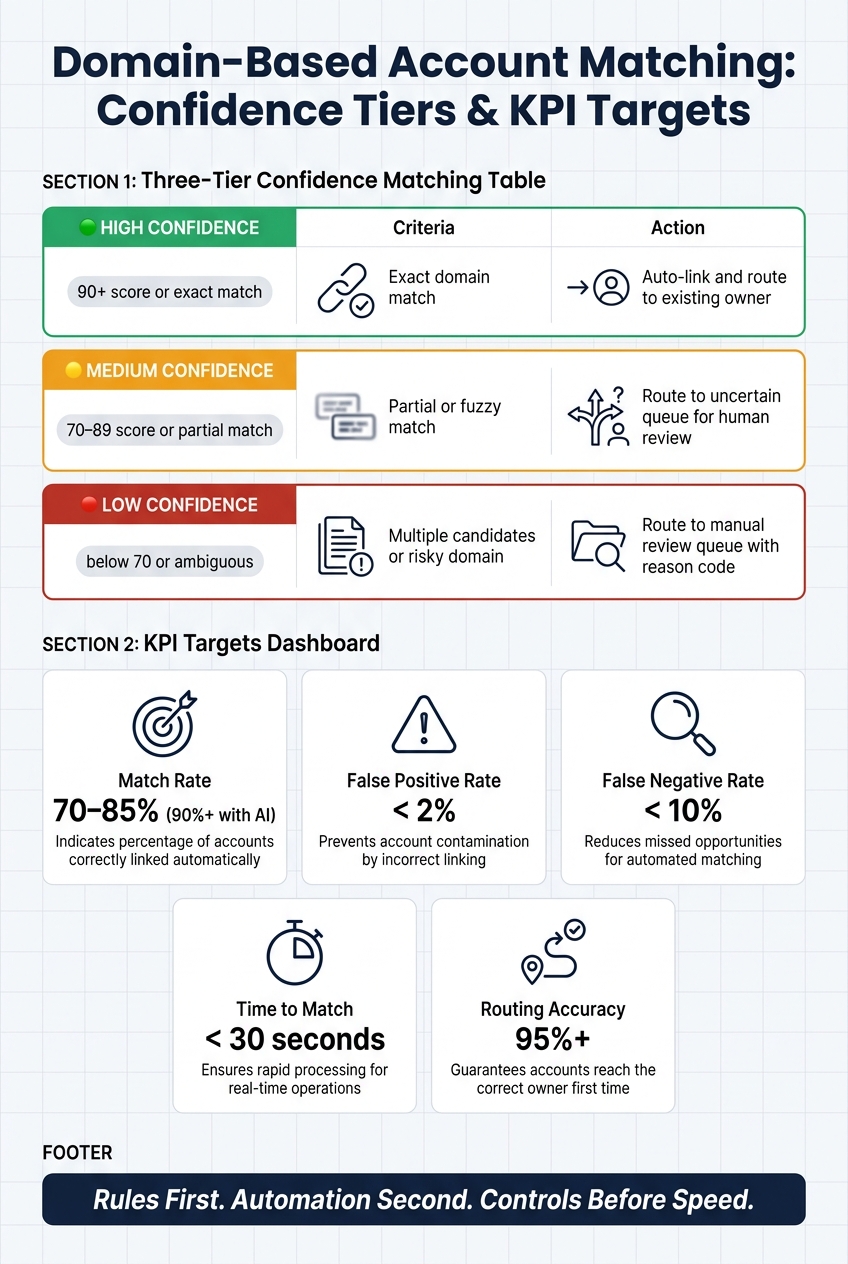
Domain-Based Account Matching: Confidence Tiers & KPI Targets
1. Build the matching model before you automate it
Define the matching model before you automate anything. That choice decides whether tickets, chats, and emails land in the right account context before an AI agent does a thing.
Define trusted data sources and a canonical domain list
Start by ranking signals based on trust. Put account identifiers first, verified corporate domains second, and use fuzzy enrichment only for review or tie-breaking [8][5][3].
The practical result is a canonical domain list. Each account should have one verified primary domain. Secondary domains from acquisitions or product brands should map as aliases to the parent account [3]. If one domain maps to more than one account, use a fixed tie-breaker order:
That canonical list then becomes the base for your confidence tiers and matching priority.
Create a rule hierarchy with confidence tiers
Use four outcomes. Exact unique domain matches or explicit subsidiary mappings should auto-link. Approved partner or reseller domains should go to human review. Everything else should move to the manual queue [3][8].
The big thing here is numbered rule priority. Weaker logic should never overtake a stronger match. Without that structure, teams can end up with fuzzy name matches overriding clean domain matches. That’s how merged unrelated accounts get created – separate companies shoved into one record because their names looked close [7].
Next comes the safety net: block domains that should never enter the matching flow.
Keep a denylist for domains that must never auto-match
Even a solid priority order falls apart without hard stops for unsafe domains. At a minimum, your denylist should include consumer mail providers (gmail.com, yahoo.com, hotmail.com, outlook.com, icloud.com), disposable email services, and any domain already tied to multiple unrelated accounts in your CRM [5][3][8].
When a domain hits the denylist, the system should skip domain matching and send the ticket to review or enrichment. It only takes one unblocked public domain to pollute account history and reporting.
"A wrong match is worse than no match." – Datalane [3]
sbb-itb-e60d259
2. Handle high-risk edge cases with explicit exceptions
A denylist and confidence tiers help. But edge cases are where domain matching tends to break once it hits production.
That’s why these exceptions should override the base rules, not add more ways to auto-link.
Shared domains, personal email addresses, and role-based mailboxes
Shared inboxes, role-based mailboxes, and unclear domains should not auto-link. Leave them unlinked or send them to manual review.
If a domain does not map to one verified account, keep the ticket unlinked and route it for review. For shared inboxes, enrich the requester first so you can look for a verified company signal before matching [4][5][6]. If domain matching still comes up short, use another verified signal that is already tied to the account, like a phone number or postal address [3].
AI can draft account-link suggestions for reviewers. It should not create the link itself.
Subsidiaries, regional brands, and parent-child account structures
Map subsidiary and regional brand domains directly. Don’t infer the parent account from the domain alone [3][4].
Store each approved domain in a single mapping table and assign it to either a child or parent account. If the mapping is unclear, send the ticket to review. Fuzzy name matching can help as a review signal, but it should not decide ownership on its own [3][5].
If the hierarchy is not documented, route the ticket to review instead of guessing the owner.
Resellers, MSPs, contractors, and temporary users
Intermediary requests need ownership rules, not domain assumptions.
These requests often come from intermediaries rather than end customers. If a company is both a customer and a reseller, assign the ticket based on the documented customer relationship, not the sender’s domain [5]. If an MSP, reseller, or partner submits a request for a client, link the ticket to the client account only when that relationship is documented [1][5].
For contractors, consultants, and other users with non-corporate email addresses, match the requester to a known contact record before assigning an account [1][9]. If the relationship is still unclear, keep it in manual review instead of auto-linking it to the wrong organization [1][3].
3. Roll out safely with workflows, review queues, and AI assistance
Clean account data and resolve domain conflicts first
After you’ve set your rules and exceptions, clean the data those rules will act on.
Start with account data, then switch on matching. Standardize company names by stripping legal suffixes, normalize domain fields by removing www. and trailing slashes, and fill in missing domains through enrichment [3][5]. After that, compare each account’s website domain with the email domains of the contacts already linked to it.
This cross-check between website domains, contact email domains, and current mappings helps expose merged or contaminated accounts before they damage your matching logic [7]. Skip this step, and your rules start day one on dirty data. That can lead to wrong-account context, bad routing, and privacy exposure.
Only after that should you turn on routing thresholds.
Set thresholds, routing paths, and manual review queues
Once the data is clean, set up your rules in layers. Exact domain matches should auto-link and route right away because they carry the highest confidence. Partial or fuzzy matches need a score before they go anywhere.
Here’s a simple three-tier setup:
| Confidence Level | Criteria | Action |
|---|---|---|
| High (90+ or exact match) | Exact domain match | Auto-link and route to the existing owner |
| Medium (70–89 or partial match) | Partial or fuzzy match | Route to an uncertain queue for human review |
| Low (below 70 or ambiguous) | Multiple candidates or risky domain | Route to a manual review queue with a reason code |
If more than one account matches a single domain, use deterministic tie-breakers. Prioritize the subsidiary, then the geographic match, then the most recent verified owner [5][3]. Don’t leave this to chance.
For the first 90 days after launch, review a random sample of 5% of auto-linked records each week. That gives you room to tune thresholds before you expand automation [8].
Use AI to assist reviewers
Use AI to help reviewers move faster, not to skip review.
It can summarize prior interactions, flag risky domains such as homonym traps, and surface likely ownership based on geography, account status, or recent activity [5][7].
Every AI suggestion should be logged for audit and marked as a suggestion. It also shouldn’t write any changes until a human confirms it [2][9]. One pattern works well here: preview and approve. The AI drafts a fix plan, the reviewer checks it, and only the approved version triggers the live update [2]. That cuts the risk of a stale or edited suggestion going live by mistake.
Clear issue codes also make triage much faster. If a match is blocked or uncertain, the system should say why. For example:
user_domain_ambiguous– domain maps to multiple candidatesorg_duplicate_external_id– multiple accounts share one ID
That way, reviewers can jump straight into the problem instead of piecing it together from scratch [9].
4. Measure match quality and keep tuning the system
Track the metrics that show both value and risk
Once matching is live, you need to watch one thing above all: is it making triage faster and routing more accurate without adding risk?
A small set of metrics gives you the clearest view of speed, coverage, and error rate.
Target a 70% to 85% match rate, with 90%+ possible when AI-assisted review and enrichment are in place [5]. If the false positive rate goes above 2%, treat that as a red flag. It means tickets are being attached to the wrong account, which can pollute account history [5]. Routing accuracy should hit 95% or better, so fewer than 1 in 20 matched tickets needs reassignment [5][8].
| KPI | Target | Why It Matters |
|---|---|---|
| Match Rate | 70–85% (90%+ with AI) [5] | Signals data health and coverage |
| False Positive Rate | < 2% [5] | Prevents account contamination |
| False Negative Rate | < 10% [5] | Reduces missed triage opportunities |
| Time to Match | < 30 seconds [5][8] | Protects SLA and first-response speed |
| Routing Accuracy | 95%+ [5][8] | Confirms ownership is correct |
A wrong match is a revenue risk, not just an admin mistake.
If performance drops month over month, the cause is often stale domain data or new segments that haven’t been added to the domain list yet [3].
Audit uncertain and corrected matches on a regular cadence
The audit queue shows you where the system is going off track. More specifically, it helps you spot which rule or exception is behind the errors showing up in your metrics.
After the launch period, move to a monthly sample of 50 to 100 records [8][5]. Tag each override so you can group repeat errors by cause [4][7]. That’s where the pattern starts to show. What looks like one-off cleanup often points to a rule that needs to change.
Use each audit cycle to adjust the denylist, domain mappings, or confidence thresholds.
Set governance for rule changes, approvals, and exception ownership
Once measurement is in place, ownership has to be clear. One team should tune the rules. Another should approve changes.
A workable setup puts a RevOps or Support Ops analyst in charge of day-to-day match quality, while the VP of Revenue Operations is accountable for threshold changes and exception approvals [8]. Think of matching rules like production support logic. They need named owners, approval steps, and a rollback path.
Permission controls should limit who can edit account-domain mappings or approve contractor and reseller links. Log every change with a date, author, and reason [3][5]. That history makes it much easier to trace a routing issue back to one rule update and undo it fast if needed.
Documented ownership keeps matching rules from turning into a single point of failure.
Conclusion: Safe matching improves speed only when controls come first
After the rules, exceptions, rollout, and audits, the takeaway is simple: controls come first. Safe matching works only when the rules, exceptions, and data controls are in place first. Teams that jump straight to automation usually learn this the hard way: tickets get routed to the wrong account, account histories get mixed up, and escalations land with the wrong owner.
The upside is clear: faster triage, cleaner ownership, safer escalations, and reporting you can trust. Once the foundation is set, expand in phases. Start with exact matches, then widen the scope only after error rates stay low.
Governance is what keeps match rules accurate, auditable, and safe to change. Named owners and regular audits help keep matching accurate over time. Put controls first. Speed comes after the matches are dependable.
FAQs
When should we avoid auto-linking by domain?
Avoid auto-linking by domain when confidence is low or the organization structure is ambiguous.
Skip auto-linking for public email domains like gmail.com or yahoo.com, shared domains, healthcare affiliates, and messy parent-subsidiary setups. If more than one account could be the right match, send it to manual review instead of picking one on its own. A bad link causes more harm than no link at all.
How do we handle subsidiaries and reseller domains?
Go beyond one-field domain matching. Keep an approved domain list for each account that includes secondary domains, regional versions, acquired brands, and subsidiary sites.
When one domain could match more than one entity, use tie-break rules that favor the specific subsidiary over the parent company, based on your account strategy. If those rules still don’t settle it, send the record to manual review and link contacts to the right subsidiary.
What should we audit after launch?
After launch, check the connection between your support system and CRM on a regular schedule. The goal is simple: catch identity drift before it turns into bad routing, messy records, or confused teams.
Run weekly checks for duplicate records and exact email matches. Then do monthly fuzzy-match audits for company name variants, address overlaps, and phone number inconsistencies. Think of it like basic maintenance – small checks now can save you from a much bigger cleanup later.
You’ll also want to review orphan organizations, domain mismatches, corrupted fields, and account hierarchy changes after mergers, acquisitions, or restructuring. Those changes can throw records out of sync fast if no one’s watching.
Track a few core metrics each month:
- Match rates
- Routing accuracy
- New duplicate volume
These numbers make it easier to spot trouble early and see whether data quality is getting better or slipping.
Related Blog Posts
- Mapping Complex Organizational Structures (Parent/Child Accounts) in Support
- How to preserve customer identity mapping across systems
- How to handle duplicate contacts and accounts during migrations
- How to reconcile accounts when customers rename their company or domain
Evaluating help desks for a B2B team?
Supportbench is all-inclusive from $32 per agent per month, with migration and onboarding included. See pricing or book a 20-minute demo.






