


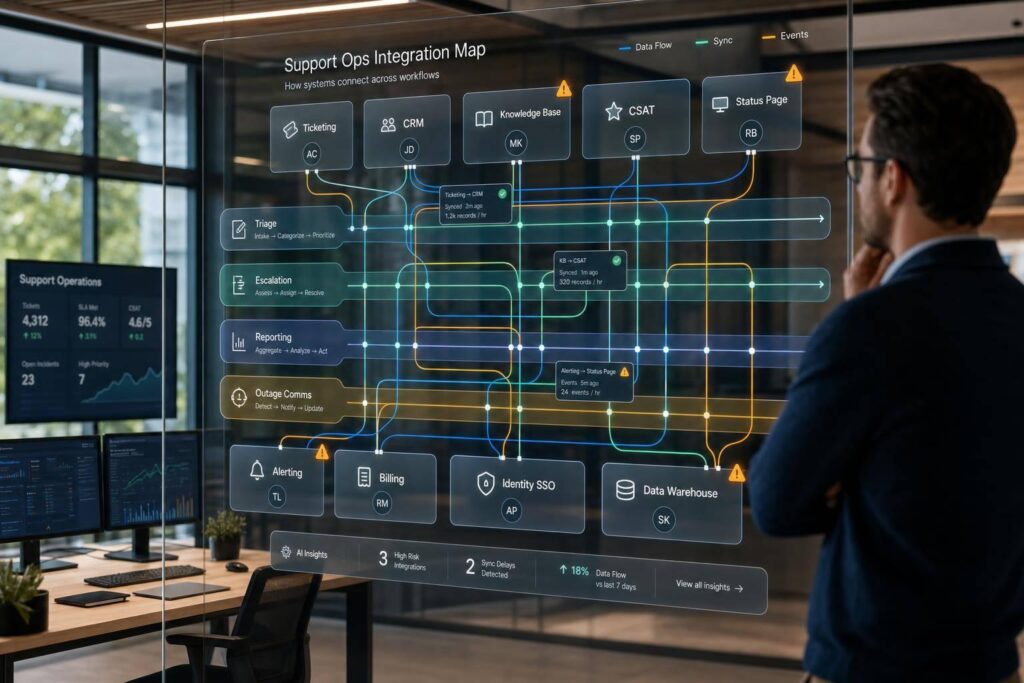
If you can’t point to what connects to what, you can’t see what breaks when support data stops moving.
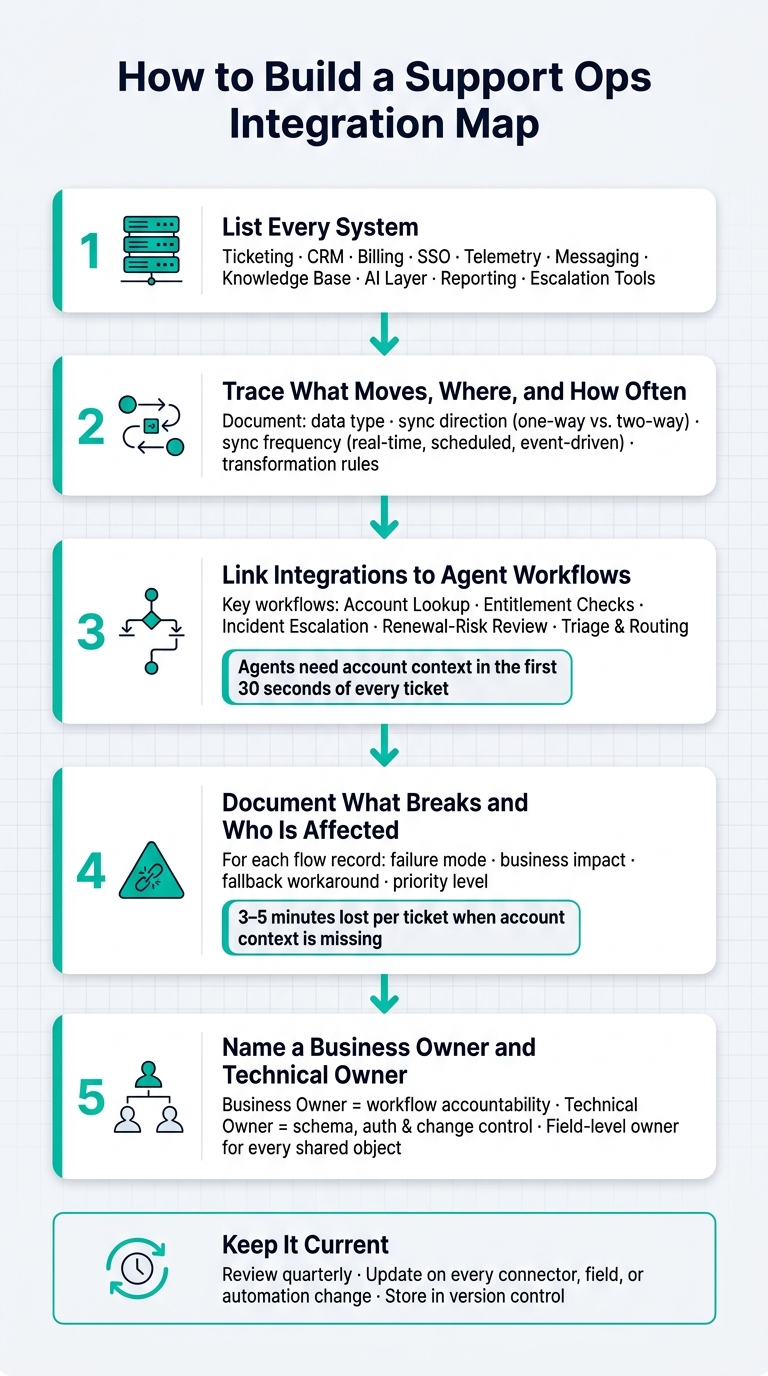
I’d boil this article down to five things: list every system, map every data flow, tie each flow to a support workflow, log the failure impact, and assign an owner for each connection. That matters because even a small sync issue can lead to wrong routing, stale billing status, duplicate work, and weak reporting.
Here’s the short version:
- Start with the full stack: ticketing, CRM, billing, SSO, telemetry, messaging, knowledge base, AI, reporting, and escalation tools
- Map each flow: what data moves, where it goes, how often it syncs, and whether it’s one-way or two-way
- Track the high-risk workflows: account lookup, entitlement checks, incident escalation, renewal-risk review, and triage
- Write down failure points: what breaks, who is affected, and what the fallback is
- Set ownership: one business owner and one technical owner for each connection
- Keep it current: review it on a set schedule, and update it when tools, fields, or automations change
A few points stand out. The article shows that agents often need account, contract, payment, and usage data in the first 30 seconds of a ticket. It also notes that manual CSV exports and side-process automations are often the first things to fail during a migration. And it gives direct examples of impact, like 3–5 minutes lost per ticket when account context is missing.
What I like here is that the map is not just a diagram. It’s a working reference for support, IT, engineering, finance, and CS. If I were building one, I’d keep the first version simple: systems, flows, owners, sync timing, and failure impact. Then I’d update it every time a new connector, rule, or field change goes live.
That’s the core idea of the piece: make the support stack visible enough that you can trace data, spot weak points, and fix problems before they hit customers.
How to Build a Support Ops Integration Map: 5-Step Framework
1. Build a complete inventory of the support stack
Before you map connections, list every system that touches support work. That includes the tools agents use every day and the flows running in the background that move data from one place to another.
If that inventory has holes, problems tend to show up fast: routing mistakes, duplicate entry, broken handoffs, and weak reporting. This inventory is your base layer for mapping data flow.
Define the map scope before you document tools
Start by setting clear boundaries. Decide where the map starts and where it stops. For most B2B support teams, that means every support-facing system and every automation layer that moves support data.
A simple way to set scope is to trace your top ticket drivers and write down each system used to solve them. This usually surfaces hidden dependencies, like manual CSV exports or one-off automation flows moving data between billing and support. Those undocumented flows are a major source of stack instability, so it helps to begin with live workflows instead of a static tool list [2][4].
Use these as trace paths:
- Account lookup
- Entitlement checks
- Incident escalation
- Renewal-risk review
Capture the metadata that makes the inventory usable
A list of system names won’t get you very far. For each system, record the details you’ll need when something breaks or when you’re planning a migration.
| System | Business Purpose | Owner | Upstream Inputs | Downstream Outputs | Connection Type | Source of Truth | Sync Frequency |
|---|---|---|---|---|---|---|---|
| Ticketing platform | Case management & SLAs | Support Ops | CRM, Billing, Product telemetry | Data warehouse, Chat | API / Webhooks | Ticket records | Real-time |
| CRM | Account / contract truth | Sales Ops | Marketing, Billing | Support, Warehouse | CDC / Reverse ETL | Account & contract data | Scheduled |
| Billing / ERP | Invoicing & entitlements | Finance | CRM, Product usage | Support, ERP | API / Webhooks | Payment & entitlement status | Real-time |
| Identity / SSO | Access & permissions | IT / Security | HR, CRM | Internal tools | SAML / SCIM | User permissions | Event-driven |
| Product telemetry | Usage signals & health scores | Product / Data | Event bus | Support, CRM | Event stream / API | Usage data | Real-time |
| Messaging | Internal coordination | Support Ops | Ticketing, escalation workflows | Support, Engineering | Native / API | – | Real-time |
| Knowledge base | Self-service & agent reference | Support Ops | Ticketing, AI layer | Customer portal, Agent UI | Native / API | Article content | On publish |
| QA / reporting | Performance & quality tracking | Support Ops | Ticketing, CRM | Leadership dashboards | ELT / Batch | – | Scheduled |
| Escalation tools | Engineering handoffs | Support and Engineering | Ticketing | Engineering tracker, Chat | Webhooks / API | – | Real-time |
| AI / workflow layer | Routing logic, summaries, QA scoring | Support Ops | Ticketing, KB, CRM | Ticket actions, recommendations | Native / API | – | Real-time |
Include AI and workflow layers, not just core systems
A lot of teams stop after listing the core systems. That’s where things go sideways.
The AI and workflow layers sitting on top of those systems, such as routing logic, case summaries, knowledge suggestions, QA scoring, automation rules, middleware, and no-code automation, can break a workflow just as easily as a failed API connection [7][6]. Routing rules, summaries, and QA scoring are dependencies. They are not just nice add-ons, and they should be documented the same way as any other system.
For each of these layers, note who owns it, what data it reads, what actions it triggers, and what fails if it goes down. Your inventory should also include the identity layer, manual exports and spreadsheets, and the chat-based escalation paths support teams depend on [3][6][8].
With that inventory in place, the next step is mapping how data moves between systems.
sbb-itb-e60d259
2. Map the data flows between systems
Once the inventory is done, trace every data flow. At this point, you know what’s in the stack. Now you need to map what each system sends, receives, and changes. A solid data flow map answers four questions for every connection: what data, which direction, how often, and how it changes before it reaches the next system. If you skip this step, failures get messy fast and are much harder to diagnose.
Document the records support teams actually rely on
The records that matter most in day-to-day support work are account identity, contract terms, service tiers, billing status, case history, internal SLA history, product usage events, incident references, sentiment signals, and renewal-risk signals. These are the fields agents use to resolve tickets fast.
The most practical way to document them is to design integrations around support context bundles instead of raw database dumps [1]. In plain English, don’t expose every field from your CRM or billing system just because you can. A bundle should show the smaller set of fields that drives support decisions: account identity, subscription status, last invoice, open bugs, and recent NPS scores. Give agents a short, stable set of current fields instead of giant record dumps.
Stable identifiers – Customer ID, Account ID, and Invoice ID – should anchor every flow. These keys let records line up across your CRM, billing system, and support platform without manual matching.
Separate real-time flows from manual and scheduled updates
Use real-time for entitlement checks and account lookups. Keep reporting on batch schedules. If entitlement checks are delayed, an agent might give premium support to a lapsed account or turn away a paying customer [1][5]. Reporting exports, on the other hand, can usually run nightly without causing trouble.
Manual or ad hoc syncs are often where things go off the rails. One-off automations and CSV exports tend to be undocumented, hard to trace, and the first things to break during a migration [4]. If a flow isn’t documented, it’s a liability.
Note field mappings, enrichment, and sync direction
Raw data rarely shows up in a format an agent can use right away. A billing system might store invoice status as a code like "grace_pd", which then needs to be translated into something clear, like "Grace Period," before it appears in the ticket sidebar [1]. The same problem comes up with product SKUs and severity codes. Document every place where a field is renamed, filtered, merged, or enriched before it lands in another system.
Sync direction matters just as much as field mapping. One-way enrichment is the safer default for support context because it gives agents the data they need without creating write conflicts in financial systems [1]. Bi-directional sync should be saved for narrow, controlled actions like updating a contact record or issuing a refund [1].
Document each recurring flow in a source-to-destination table:
| Source | Destination | Data Moved | Timing | Sync Direction | Transformation Rules |
|---|---|---|---|---|---|
| CRM | Support desk | Account ID, segment, ARR, owner | Real-time (API) | One-way | Map CRM Account ID to Support Org ID |
| Billing / ERP | Support desk | Invoice status, contract tier, payment delinquency | Real-time (webhook) | One-way | Normalize codes to "Paid", "Past Due", or "Grace Period" |
| Product telemetry | Support desk | Usage events, error logs, feature flags | Near real-time (event stream) | One-way | Aggregate raw events into readable signals |
| Support desk | Engineering | Ticket ID, severity, logs, incident reference | Event-driven | Two-way | Map support priority to engineering severity levels |
| Support desk | CRM / CSM tool | SLA breaches, case volume, sentiment scores | Scheduled (batch) | One-way | Aggregate case counts per account over 30 days |
| Billing / ERP | Data warehouse | Revenue history, churn events, refunds | Scheduled (batch ELT) | One-way | Flatten JSON into relational tables |
These flows are the dependencies to trace in the next step, especially where support work breaks when one connection fails. Next, map which support workflows depend on these flows and what breaks when they fail.
3. Trace dependencies, workflows, and failure points
The data flow table from the previous step shows what moves between systems. This step goes one layer deeper: tie each flow to the workflows agents depend on most. That shifts the map from what connects to what breaks.
Map the workflows that break when integrations fail
Start with the workflows that carry the most day-to-day risk: account lookup, entitlement checks, incident escalation, and renewal-risk visibility. Each one relies on several systems at once. And when one link fails, the workflow usually fails in its own messy way.
In the first 30 seconds, agents need customer identity, plan, payment status, and known issues.
If the CRM connection is down, the agent loses account context and has to hunt for it by hand. If billing data is out of date, the team can apply the wrong support tier or give premium support to an unpaid account. If the handoff to engineering drops context, the bug can sit there as a stalled ticket.
Record the business impact of each failure
Every failure has a cost you can point to. Incorrect entitlement checks lead to billing disputes and SLA breaches. Missing account context leads to repeat questions and manual lookup. Delayed escalations can turn fixable bugs into churn events. And when renewal-risk data never makes it into the CRM, CS leadership is left making retention calls without seeing which accounts are quietly slipping.
Map each workflow to the systems it depends on, then log the failure mode and fallback. The matrix below ties each workflow to an owner, failure impact, workaround, and priority:
| Workflow | Systems Involved | Owner | Failure Impact | Workaround | Priority |
|---|---|---|---|---|---|
| Account Lookup | CRM, Support Platform | Support Ops | Missing account context; 3–5 minutes wasted per ticket [6] | Manual search in CRM by email | High |
| Entitlement Check | Billing, Support Platform | RevOps | Incorrect SLA applied; support provided to unpaid accounts | Manual lookup in billing system | Critical |
| Incident Escalation | Support, Jira, Slack | Engineering | Delayed resolution; context loss on account tier and revenue at risk [7] | Manual Slack pings and pasted logs | High |
| Renewal-Risk Visibility | Usage, Billing, CRM | CS Ops | Churn blind spots; reporting gaps for leadership | Weekly manual CSV reconciliation | Medium |
| Triage & Routing | CRM, Support, AI Layer | Support Ops | Incorrect routing; delayed first-response time | Manual triage by lead agent | High |
Treat this matrix like a living document. When a new integration shows up, or an old one changes, ask one simple thing: which row in this table does it affect?
Find automation opportunities the map reveals
Once failure points are on the page, the same map starts showing where automation can remove manual work without adding risk.
Three fast wins usually stand out: routing and prioritization, risk alerts, and escalation summaries.
If CRM segment and billing status already flow into the support platform in real time, routing rules can send high-confidence tickets to the right queue automatically while leaving policy-sensitive cases with a person. That cuts manual triage work in a direct way.
If product telemetry shows feature usage dropping, or the billing system flags a payment failure, a workflow can surface that account before the CS team has to run a manual audit.
And during escalation, automated case summaries built from product logs can give engineering more context than a pasted Slack note. That means less back-and-forth and less agent effort.
The common thread is simple: these are low-friction, high-confidence automations that sit in the gap between two systems that are already connected. The map makes that gap easy to spot.
Those automations need clear owners to stay reliable.
4. Assign ownership and keep the map current
Assign a clear owner for every connection
Once you’ve mapped the failure points, assign owners so every connection has a clear response path.
Each connection should have two named owners:
- a business owner, who owns the workflow
- a technical owner, who owns schema changes, authentication, and change control
| Connection | Business Owner | Technical Owner | Primary system of record |
|---|---|---|---|
| CRM ↔ Support Platform | Support Ops | IT / Integrations | CRM (customer account) |
| Billing ↔ Support Platform | RevOps | IT / Integrations | ERP (invoice/payment) |
| Support Platform ↔ Jira | Engineering Lead | Engineering | Jira for technical resolution; Support Platform for customer-facing status |
| Product Telemetry ↔ CRM | CS Ops | Data / Analytics | Product Data Platform (usage/entitlement) |
You should also assign a field-level owner for every shared object. That way, if two systems show different values, there’s no debate about which one wins.
Set update rules for changes and migrations
The simplest way to keep the map accurate is to tie updates to the same change-control process you already use for the rest of the stack.
Treat the integration map like code. Store it in a version-controlled repository, tie updates to formal change requests, and require an integration-map update whenever a connector is added or a data retention policy changes [4]. That may sound strict, but it saves a lot of pain later.
If a migration is coming up, whether that’s a billing platform swap or an AI rollout, review the map first. It shows which downstream workflows are at risk before anyone touches the system.
A quarterly review cadence works well for most teams [4]. In practice, that gives Support Ops enough time to catch new automations, broken flows, and field-mapping drift before they start messing with reporting or escalations.
That’s how the map stays accurate as workflows, fields, and automations change.
Use the map as a decision tool, not a one-time diagram
Once the map is current and clearly owned, it becomes more than documentation. It starts helping with day-to-day decisions.
You can use it to spot where duplicate systems are doing the same job, where manual work still exists because two tools were never connected, and where one failed integration creates too much downstream risk.
That kind of visibility helps with decisions around automation priorities, tooling consolidation, and migration sequencing.
Use the map in release reviews, migrations, and incident postmortems so it stays current.
With ownership and update rules in place, the final step is defining the minimum map every Support Ops team should keep current.
Conclusion: The minimum map every Support Ops leader should maintain
You don’t need a perfect diagram. You need one that’s current. The best teams use the map as an operating tool, not a file that sits around as documentation.
At a minimum, keep a map of:
- every system
- every data flow
- every workflow dependency
- every owner
- every failure impact
That’s the minimum useful map.
This baseline matters because gaps in the map turn into gaps in execution.
Keeping the map up to date pays off fast. It can expose data silos, cut down tool hopping, and show where AI doesn’t have enough context to do its job well.
The same visibility can also lower risk when you change systems. Use the map before changes that affect account lookup, entitlement checks, escalation, or renewal-risk visibility so you can spot downstream risk before production changes start.
FAQs
How detailed should an integration map be?
An integration map needs enough detail to show how systems connect, how data moves, what depends on what, who owns each part, and where things can break. It shouldn’t stop at a simple diagram. It should help people make decisions.
Include details like what data moves, when it moves, how it moves, who depends on each workflow, and where automation or handoff risks show up.
What should I map first in Support Ops?
Start with the support workflows that matter most, and give agents the customer context they need up front: identity, account status, and recent activity.
First, map the connection between your helpdesk and CRM. Then connect billing data and product telemetry. That setup gives agents the context they need, cuts down on manual digging, and helps route cases to the right place with better accuracy.
How do I keep an integration map up to date?
Treat it as a living artifact.
Regularly audit and document system connections, data flows, and ownership. Keep diagrams and schemas versioned, and link them to change requests so the paper trail stays clear.
Monitor integrations for delivery latency, failure rates, and schema changes. Set alerts for failures or data drift so issues don’t sit quietly in the background.
Review documentation, diagrams, and change logs on a regular basis. Handle updates the same way you’d handle code changes: with version control, pull requests, diff previews, and approvals.






