When your support team hits 20+ engineers, inefficiencies often emerge: managers bogged down in admin tasks, tickets stuck in limbo, and engineers wasting time on repetitive work. Instead of hiring more frontline staff, it’s time to add a Support Operations (Ops) role. This role focuses on improving workflows, automating manual tasks, and ensuring your team runs smoothly.
Key Takeaways:
- When to hire: Look for signs like rising response times, manager burnout, or inefficiencies in tools and data handling.
- First priorities: Automate repetitive tasks, streamline workflows, and set up dashboards for tracking performance.
- 90-day plan: Start with quick fixes (SOPs, dashboards), then tackle deeper workflow gaps and introduce AI-driven tools for scaling.
Done right, this role can reduce manual work, improve team efficiency, and boost customer satisfaction – all while preventing burnout.
When to Hire Your First Support Ops Role
Signs It’s Time to Hire
One of the clearest signs you need a Support Ops hire is when your support managers spend more time fixing tools than guiding their teams. If they’re stuck creating manual reports, leading training sessions on disconnected systems, or pulling scattered data just to answer one executive question, it’s time to act.
Other red flags include hours wasted on manual triage, constant toggling between helpdesk and billing systems, or tracking SLAs in spreadsheets instead of automated tools. If complex tickets are causing workflow breakdowns or teams across time zones are delivering inconsistent service due to a lack of standardized processes, operational inefficiencies are holding you back.
Metrics often highlight the problem. Rising first response times, stretched resolution times, and declining CSAT scores – even with increased effort – point to a crumbling infrastructure, not a lack of effort.
Judith Platz, Chief Customer Officer at SupportLogic, explains: "An operations team is there to keep unnecessary stress away from the agents and let them focus on helping and retaining customers. If we’re not doing that, they’re going to leave".
The strain on your team becomes evident through overtime, burnout, and turnover. When your top engineers are consistently staying late to handle ticket volume or new hires struggle to onboard due to a lack of proper training, it’s clear that adding more frontline staff isn’t the solution. These warning signs emphasize why timing your first Support Ops hire is critical.
Risks of Hiring Too Early or Too Late
Getting the timing wrong can have serious consequences. Hiring a Support Ops professional too early can lead to inefficiencies. In smaller teams handling straightforward tickets, the new hire might end up doing basic tasks like training or even answering support queries, which undermines the strategic intent of the role.
On the flip side, waiting too long can make things worse. Leadership may end up stuck in "reactive mode", handling data entry and admin tasks instead of focusing on strategy. Compliance documentation, audit trails, and other critical tasks can fall by the wayside, while overworked engineers burn out and leave, taking key knowledge with them. Customers will notice too, with missed SLAs and slower resolutions impacting their experience.
Consider this: repeat customers spend 300% more than new ones, and 85% of decision-makers believe employee and customer experiences are closely linked. When your team is bogged down by manual work, both service quality and employee engagement suffer.
How to Audit Your Team’s Time Sinks
To avoid these pitfalls, start by tracking how your managers spend their time over two weeks. If more than 30% of their time is eaten up by operational tasks – like pulling reports, fixing tool issues, or manually routing tickets – instead of coaching their teams, it’s a sign you need dedicated Ops support.
Then, map the customer journey from ticket submission to resolution. Talk to your team to identify bottlenecks. Ask questions like: How many tools do agents switch between for one ticket? How long does manual tagging take? How often do agents search for information that’s already documented?
Use a simple forecasting model in a spreadsheet to track support questions per active customer and conversations handled per agent daily. This will help predict when your current setup will hit its limit. Document repetitive tasks – such as WISMO responses, ticket categorization, or SLA checks – as these are areas where automation could make a big difference and justify bringing in a Support Ops hire.
Finally, analyze your coverage patterns. Review support volume by hour and day. If your team is constantly scrambling because work hours don’t align with demand peaks, that’s a scheduling issue an Ops professional can resolve. Quantify wasted hours to calculate the potential ROI of adding a Support Ops role.
What the Role Should Own
First Priorities for Your Support Ops Hire
Your first Support Ops hire should focus on cutting out time-wasting tasks. Start by automating manual work like data entry, ticket categorization, and pre-approved responses. Building a self-service knowledge base can also reduce repetitive inquiries, giving your team more time to handle complex issues.
Next, improve your reporting systems. Create centralized dashboards to monitor key metrics like Customer Satisfaction (CSAT), First Response Time (FRT), and resolution time. Establish clear processes to ensure customer feedback is shared with product and engineering teams, so valuable insights don’t slip through the cracks.
Streamlining workflows is another essential step. Map out customer journeys to identify pain points, define clear Standard Operating Procedures (SOPs), and implement automated ticket routing based on agent expertise or sentiment. Make sure your helpdesk, CRM, and communication tools are fully integrated to avoid data silos. These improvements not only enhance efficiency but also set the stage for measurable performance gains.
For example, in July 2025, Blue Ocean, a BPO provider, collaborated with a global IT company to upgrade its customer service operations. With leadership from a Prosci-certified change management expert, the team automated key transactional tasks and improved tracking for high-value clients. Within just 60 days, the project reduced manual work by 22 hours per month and saved $25,000 per quarter.
"Creating a dedicated team allowed us to optimize our support processes, ensuring consistency and scalability", says Babu Jayaram, Head of Customer Success and Strategy at Qualaroo.
Support Engineer vs. Support Ops: Key Differences
It’s important to distinguish between Support Engineers and Support Ops. While Support Engineers focus on solving individual customer issues and technical troubleshooting, Support Ops takes a behind-the-scenes role. They collaborate with support teams, leadership, and product departments to improve tools, workflows, and overall efficiency. In short, Support Ops creates the environment that allows frontline teams to excel.
By separating these roles, support managers can focus more on team development and long-term strategies without being bogged down by the daily ticket load.
| Feature | Support Engineer | Support Ops |
|---|---|---|
| Primary Audience | External customers | Internal support team and leadership |
| Core Focus | Resolving individual tickets and technical issues | Optimizing workflows, tools, and processes |
| Key KPIs | CSAT, First Response Time, Resolution Time | SLA fulfillment, support cost per ticket, agent productivity |
| Impact | Direct customer satisfaction per interaction | Scalability, team efficiency, reduced agent burnout |
Clearly defining these roles is essential for building a scalable, AI-ready support system.
AI-Driven Tasks for Modern Support Ops
AI is reshaping Support Ops by taking traditional processes to the next level. A key responsibility of modern Support Ops is implementing intelligent routing and triage. This ensures incoming requests are automatically assigned based on customer intent, sentiment, and agent expertise, reducing manual effort while speeding up resolution times.
AI also helps with sentiment and anomaly detection, flagging high-risk cases or sudden ticket surges for proactive intervention. This means your team can address potential problems before they escalate.
In workforce management, AI can automate forecasting and activity tracking, ensuring agents are optimally scheduled during busy periods. Automated quality assurance tools review customer interactions at scale, providing actionable feedback without requiring manual audits.
"Now with our use of AI, with our use of data, and with our ability to get to more data than we ever have, it seems practical to have AI data scientists on the operations team", explains Judith Platz, Chief Customer Officer at SupportLogic.
Lastly, AI-powered content and response tools can assist agents by suggesting replies, summarizing lengthy ticket threads, and maintaining a consistent brand voice. These automation tools have a profound impact – 71% of support leaders plan to increase investment in them, and they’ve been shown to significantly improve CSAT scores.
How to Write the Job Description and Interview Candidates
Sample Job Description Template
When crafting a job description, focus on highlighting a mindset geared toward operational transformation rather than just technical expertise. Start by listing the required qualifications: at least 2–3 years of frontline customer service experience, a proven track record in improving business processes, and strong analytical skills for tracking key metrics like CSAT, NPS, and First Response Time. Additionally, include proficiency with customer service technology stacks, such as CRM systems, ticketing platforms, and workflow management tools, along with experience in integrating and automating support processes.
For preferred skills, mention familiarity with AI-driven tools (e.g., sentiment analysis, automated routing, agent assist), coding knowledge in JavaScript or HTML for custom integrations, and experience in B2B support settings. Since this role connects multiple teams – support, product, engineering, and leadership – emphasize the need for excellent cross-functional collaboration skills.
"Make long-term investments in your team now. That means hiring the key critical people: strategic thinkers, critical thinkers, transformation type of individuals, the people who are curious, the people who can manage projects effectively", says Judith Platz, Chief Customer Officer at SupportLogic.
Once you’ve nailed down the job description, shift your focus to designing an interview process that evaluates candidates’ practical problem-solving skills.
Interview Questions and Scoring Guide
Your interview process should uncover how candidates approach identifying and solving time-wasting inefficiencies. Start with behavioral questions like: "Describe your process for auditing ticket escalations to eliminate friction." Strong candidates will talk about mapping the current workflow, engaging with frontline staff for insights, and pinpointing delays during handoffs.
Another question to ask: "How do you decide which time sink to tackle first when everything feels urgent?" The best answers will reference using data to weigh the impact of each issue against the effort required to fix it.
For automation experience, ask: "Describe a time you automated a manual process. What was the specific outcome?" Candidates should provide measurable results, such as hours saved, cost reductions, or improvements in metrics like CSAT, to demonstrate their effectiveness.
To gauge AI knowledge, consider this question: "How would you evaluate whether an AI-powered routing tool is worth implementing?" Look for responses that touch on how the tool integrates with current systems, its scalability, and how they would measure accuracy improvements.
Finally, use a scorecard to evaluate candidates on key traits such as analytical thinking, technical expertise, change management, and curiosity. To go a step further, consider a practical test: ask finalists to perform a mini-audit of a sample workflow or organize a disorganized support queue. This hands-on task will give you a clear view of their problem-solving approach and how they handle real-world challenges.
sbb-itb-e60d259
The First 30/60/90 Days: What to Accomplish
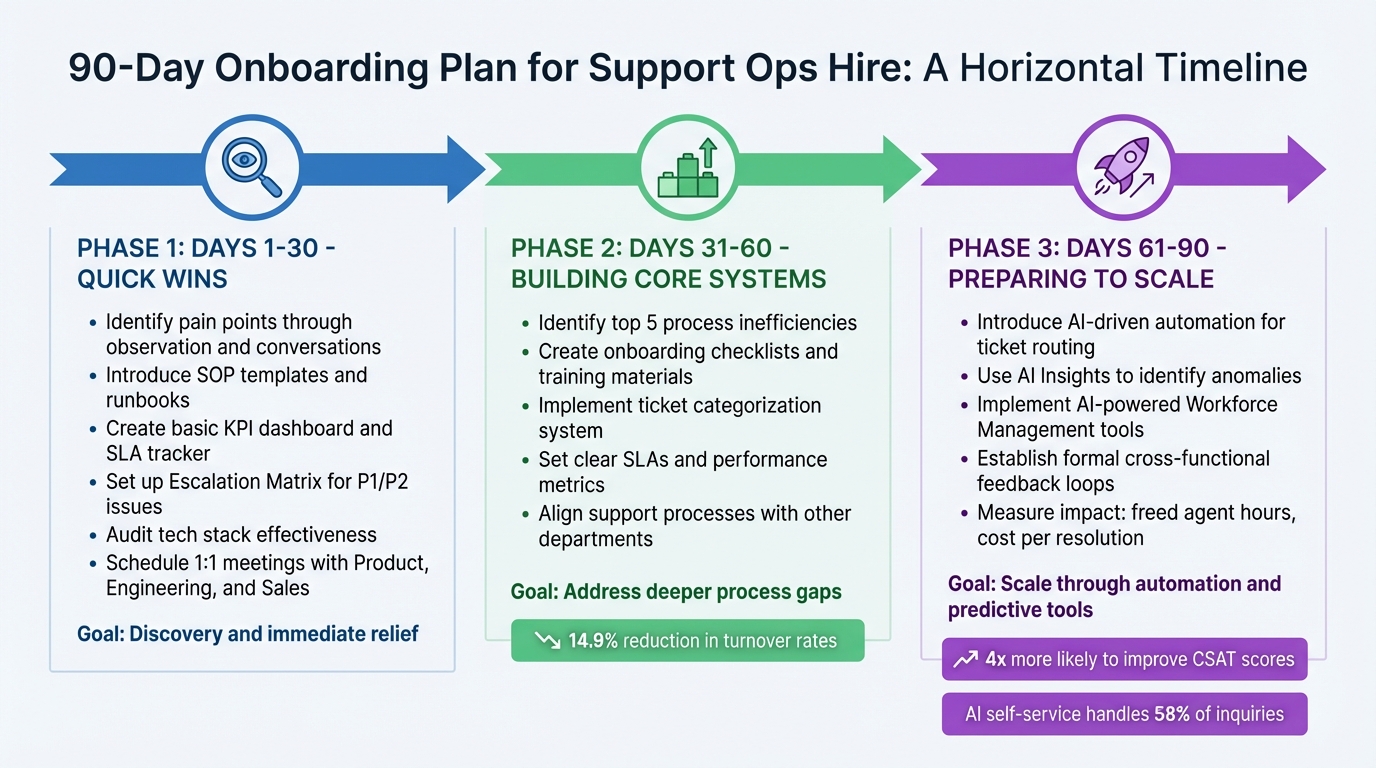
90-Day Support Ops Onboarding Plan: Quick Wins to Scalable Systems
Days 1-30: Quick Wins
The first month is all about discovery and tackling immediate challenges. Your new Support Ops hire should begin by identifying pain points through observation and direct conversations. Questions like, "What was your biggest time waster this past month?" can uncover areas where manual tasks are dragging productivity down.
Start with easy fixes that offer immediate relief. For example, introduce SOP templates and runbooks to reduce time spent on repetitive tasks. Create a basic KPI dashboard and SLA tracker to establish credibility with leadership. Additionally, setting up an Escalation Matrix for P1/P2 issues can streamline communication between support and engineering teams. These steps don’t require major system changes but can bring order to chaotic workflows.
Conduct an audit of your tech stack to ensure tools are being used effectively. Schedule 1:1 meetings with key stakeholders in Product, Engineering, and Sales to identify integration opportunities. This period is about observing, integrating, and laying the groundwork for long-term improvements.
By securing these quick wins and building relationships, your hire will be ready to formalize these early improvements in the next phase.
Days 31-60: Building Core Systems
In the second month, the focus shifts to addressing deeper process gaps. Your hire should pinpoint the top five process inefficiencies and craft strategies to address them. This is the time to formalize workflows by creating onboarding checklists, training materials, and a ticket categorization system for bugs, feature requests, and manual tasks.
Set clear SLAs and performance metrics to monitor progress objectively. Companies that implement continuous feedback loops at this stage often report a 14.9% reduction in turnover rates. Aligning support processes with other departments ensures that insights from support operations directly influence broader company goals.
With these core systems established, the next step is to prepare for scaling efforts using advanced tools and automation.
Days 61-90: Preparing to Scale
In the final phase, the focus turns to scaling operations through automation and predictive tools. Introduce AI-driven automation to handle complex workflows, such as automated ticket routing based on customer sentiment and urgency. This ensures that critical cases are prioritized effectively. Use AI Insights to identify anomalies, like sudden spikes in specific issues (e.g., "Login Issue" tags), and alert managers proactively.
Take advantage of AI-powered Workforce Management tools to forecast staffing needs during peak times. Establish a formal feedback loop by hosting regular cross-functional meetings where Support Ops shares analyzed data with teams like Product, Marketing, and Sales. Measure the impact using metrics like freed agent hours, cost per resolution, and how effectively customer feedback is implemented. Companies that adopt automation during this phase are four times more likely to see improvements in CSAT scores.
This structured approach sets the stage for long-term success, ensuring your Support Ops hire delivers value from day one while building a scalable foundation for the future.
Conclusion
Aligning your Support Ops role with clear priorities can transform a reactive approach into a proactive strategy. Creating this role not only saves time but also establishes scalable systems that grow with your organization. The best time to hire is when your managers are overwhelmed with operational tasks instead of leading their teams. Signs include longer response times, a lack of actionable data to demonstrate your team’s value, or findings from a time sink audit. For context, 76% of leaders report that tech stacks often create bottlenecks.
By following a structured 30/60/90-day plan, you can shift from firefighting daily issues to achieving strategic, long-term improvements. In the first 90 days, focus on quick wins and building a solid foundation. Start by addressing major time drains like manual reporting, inefficient ticket routing, and workflow bottlenecks. Then, establish standardized SOPs, clear SLAs, and an integrated tech stack. By day 90, your hire should be driving AI-powered automation to streamline workflows, predict escalations, manage staffing costs, and turn customer feedback into actionable product insights. AI-driven self-service, for example, can handle up to 58% of customer inquiries, freeing your frontline team to focus on enhancing customer experiences.
Modern Support Ops goes beyond maintaining systems – it’s about leveraging AI to build proactive, scalable processes.
"The best operations team is an operations team that’s focused on how to help support engineers and managers do their absolute best job", says Judith Platz, Chief Customer Officer at SupportLogic.
FAQs
How do I know when it’s time to hire a Support Operations role?
You’ll know it’s time to bring on a Support Operations role when your support team starts feeling bogged down by manual tasks, gaps in reporting, and inefficient workflows that hurt productivity. Some clear signs? Spending way too much time on repetitive processes, struggling to keep metrics accurate, or having a tough time getting tools to work together smoothly.
If your team is expanding – say, hitting around 20 support engineers – and these challenges are starting to affect how well your frontline team can perform, it’s probably the right moment to hire a Support Ops professional. Their main job will be to simplify operations, eliminate time-wasting tasks, and build scalable systems that can grow with your team.
How can AI improve the efficiency of a Support Operations team?
AI has the potential to supercharge the efficiency of Support Operations teams by taking over repetitive tasks, simplifying workflows, and ensuring more accurate data handling. For example, AI can manage time-intensive processes like ticket triage, routing, and escalation. This frees up support agents to concentrate on solving more complex and nuanced customer issues that require a human touch.
Beyond task automation, AI can pinpoint workflow bottlenecks and suggest process improvements. By reducing friction in daily operations, teams can achieve higher productivity with less effort.
AI-powered tools also offer real-time insights through advanced analytics and reporting. These tools help teams monitor performance metrics, customer sentiment, and operational inefficiencies. With this data at their fingertips, teams can make quicker decisions and continually refine their strategies.
Another major benefit? AI accelerates issue resolution by powering smarter knowledge bases and delivering predictive answers. This dramatically cuts down the time agents spend searching for information, allowing them to assist customers faster.
In short, AI enables Support Ops teams to scale efficiently, deliver better service, and manage costs – all without needing to expand the team.
What’s the difference between a Support Engineer and a Support Operations role?
Support Engineers and Support Operations professionals play distinct but interconnected roles within a support team.
Support Engineers are the go-to experts for resolving customer issues, especially when it comes to technical or complicated problems. They rely on their in-depth product knowledge to troubleshoot and deliver effective solutions. Essentially, they’re on the frontlines, ensuring customers receive timely help.
Support Operations (Support Ops), on the other hand, work behind the scenes to optimize how the support team operates. Their role involves streamlining workflows, reducing repetitive tasks, implementing tools and automations, and improving reporting systems. The aim? To ensure Support Engineers can focus more on solving customer issues without being bogged down by inefficiencies.
In essence, Support Engineers handle customer issues directly, while Support Ops build the systems that enable the entire team to work more efficiently. Together, they create a seamless support experience.