



If you match tickets to accounts by email domain alone, you will send some tickets to the wrong customer. In many B2B setups, domain-only matching covers about 70% of cases, which means the other 30% can still end up unmatched or tied to the wrong record.
I’d fix this in four steps:
- Map where the bad match starts: intake, CRM matching, routing, or agent triage
- Use stronger signals first: account ID, external ID, portal login, Slack workspace, then contact match
- Send weak matches to review: shared domains, Gmail/Outlook/Yahoo, MSP domains, and parent-company domains should not auto-assign on their own
- Clean CRM data often: bad domains, blank keys, orphan orgs, and parent-child gaps will keep causing errors if you don’t fix them
A few numbers stand out: misrouting can hit 15%–25% of incoming records, routing accuracy should stay at 95%+, and review rate should stay below 10% when rules are set well.
In plain terms: don’t let one domain decide account ownership. Use layered matching, score match confidence, route unclear cases into review, and keep CRM records clean so the same problem doesn’t keep coming back.
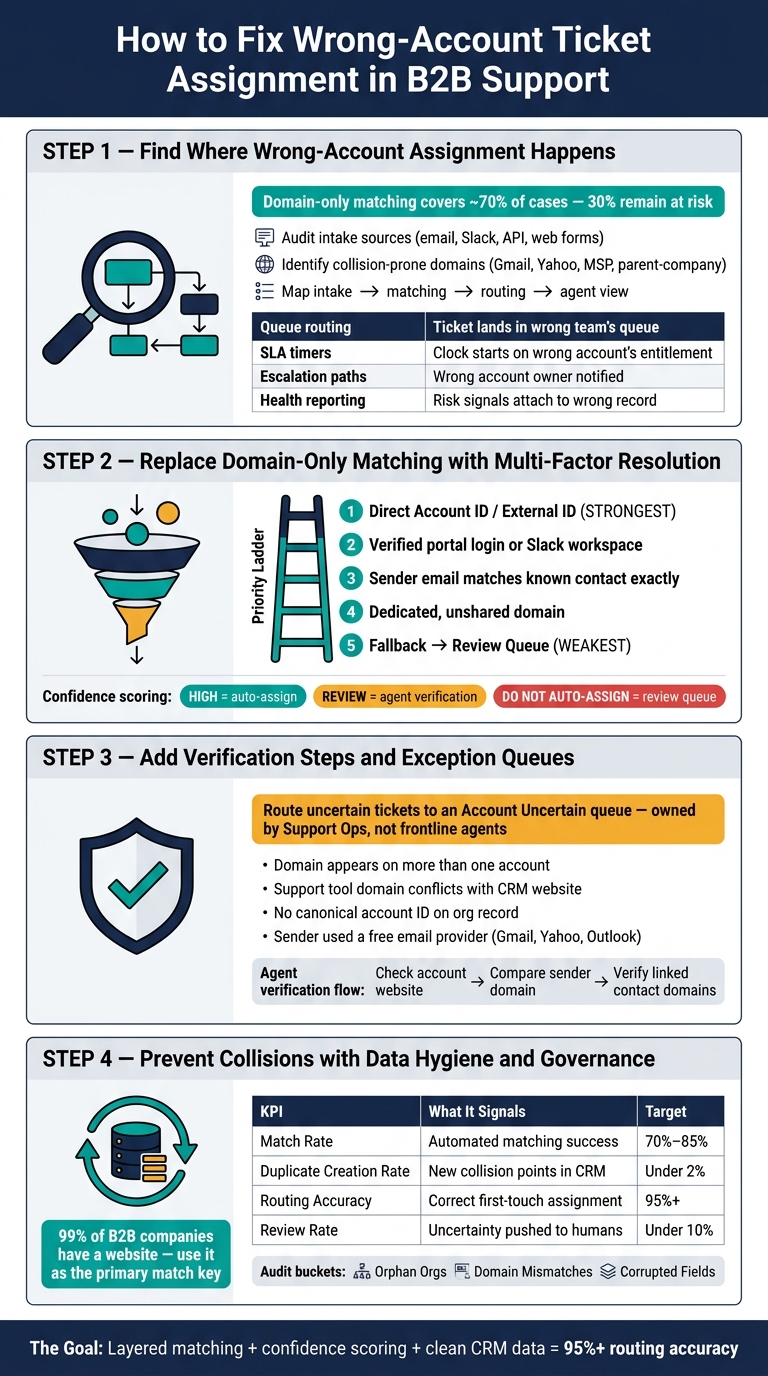
B2B Ticket Account Matching: 4-Step Framework to Prevent Domain Collisions
1. Find where wrong-account assignment happens in your support stack
Start by tracing where the bad link begins: intake, matching, routing, or escalation.
Audit your intake sources and current matching logic
List every ticket source – support inboxes, web forms, Slack, and APIs – and note the rule used to attach an account. In many setups, account mapping happens as soon as a ticket is created, often in a sequence like this: direct account ID first, then Slack channel association, then email domain matching, and then contact lookup [4].
API calls that pass an explicit accountId are usually the safest bet. Email-based intake that falls back to domain matching is where mix-ups tend to start [4]. If the organization external_id is blank or inconsistent, the system is likely falling back to domain matching even when a stronger CRM key exists [1].
Identify collision-prone domains and where they cause downstream failures
Pull a list of domains tied to more than one account in your CRM or support platform. Then add gmail.com, yahoo.com, and outlook.com, plus internal or shared service domains, MSP or reseller domains, and legacy domains from acquired brands. Those cover the parent/subsidiary, personal inbox, and managed-services cases most likely to cause a collision.
These domains don’t point cleanly to one customer account:
| Failure Point | What Goes Wrong |
|---|---|
| Queue routing | Ticket lands in the wrong team’s queue |
| SLA timers | Clock starts against the wrong account’s entitlement |
| Escalation paths | Wrong account owner gets notified, or no one does |
| Account-level health reporting | Activity and risk signals attach to the wrong record |
When a match is ambiguous, reject it and send the ticket for review [4].
Build a simple intake-to-routing flow for your operations review
Keep the flow simple: intake source → account match method → routing rule → agent view. Walk one ticket from each channel through that path and mark each step where the system could auto-link the wrong account.
A good place to start is a sample audit of 100 recent inbound tickets. Manually check how many matched the right account, how many matched the wrong one, and how many didn’t match at all [5]. Then group the errors by account instead of by individual ticket. That makes shared-domain collisions, orphan orgs, and corrupted CRM records much easier to spot [1].
Fix the highest-volume failure points first. Then use that map to decide where multi-factor matching should replace domain-only rules.
sbb-itb-e60d259
2. Replace domain-only matching with multi-factor account resolution
Once you see where matching falls apart, the fix is pretty simple: don’t let one signal – especially an email domain – decide account assignment on its own.
Use a matching hierarchy instead of a single rule
Use the collision map from the last section to apply stronger signals first. A good way to think about account matching is as a set of gates. Each gate stops collision-prone cases before they land on the wrong account.
The system should check the strongest signal first, then move down the list only if that signal isn’t available. A solid order looks like this:
- Direct Account ID or External ID – the most reliable signal; if it’s there, use it
- Verified portal login or verified Slack workspace membership – tied to a verified identity
- Sender address matches a known contact exactly – the sender’s email matches a contact record
- A dedicated, unshared domain – use this only when the domain is clearly tied to one account
- Fallback to review queue – if there’s no strong match, don’t guess
Do the match after enrichment and before routing, because routing depends on the match. The point is to automate when the evidence is strong, not to force automation onto every ticket.
Assign a confidence score to each ticket-account match
Not every match should be treated the same way. A ticket linked to a one-company corporate domain and a verified contact is not the same as a ticket sent from a Gmail address.
Rate each match as high, review, or do not auto-assign based on a few signals:
- whether the account ID or external ID is present
- whether the sender is a known contact
- whether the domain is shared across more than one organization
- whether the domain is a public email provider
High-confidence matches can auto-assign. Review matches should ask for agent verification. Do not auto-assign matches should go straight to a review queue instead.
That keeps automation fast while pushing weak matches to review.
Set clear rules for shared, personal, and internal domains
Shared MSP, parent-company, personal, and internal domains need their own rules because they’re the cases most likely to cause wrong-account assignment.
Unique customer domains with a clean CRM record and a known contact can support controlled automation. MSP and parent-company domains shared across multiple accounts need one more confirmation step before any assignment runs. Block personal providers like Gmail, Yahoo, and Outlook from auto-creating or auto-mapping accounts. Internal company domains should never map to a customer account at all.
Use multi-factor matching for more complex accounts, and keep manual review for the highest-risk cases. Low-confidence matches should move into the verification workflow in the next section.
3. Add verification steps, exception queues, and AI prompts
Route uncertain tickets into a dedicated review queue
When a match drops below the assignment threshold, send the ticket to an Account Uncertain queue instead of assigning it on its own. Give that queue a single owner and a short review SLA. Support Operations should own this work, not frontline agents. That split keeps identity-resolution tasks out of the normal support flow. Reconciliation and audit tasks should run nightly or weekly so the queue stays small and manageable [1].
Send a ticket to the queue when any of these apply:
- The sender’s domain shows up on more than one account
- The support tool’s domain conflicts with the CRM’s approved website
- The organization record does not include a canonical account ID
- The sender used a free email provider like Gmail or Yahoo
Give agents a fast verification workflow before their first reply
Once the queue catches the ticket, agents need a fast check before the first reply goes out. This is the last guardrail before the assignment becomes final. Check three signals against each other: the account’s registered website, the sender’s email domain, and the domains of contacts already linked to that account. If the account website and linked contact domains don’t match, flag it before the assignment is locked in [2].
Standardized prompts and macros help keep that sequence the same across agents. No guesswork. No one-off process.
Use AI to speed review, not to replace it
Use AI-powered ticket routing to surface the likely account, summarize recent activity, and flag mismatches for human review. For example, AI can spot when a ticket’s story doesn’t line up with the account profile and prompt the agent to verify before moving ahead. Add one more verification step for renewals, escalations, and churn-risk accounts.
The goal is simple: let AI cut verification time while keeping weak matches out of the wrong account.
4. Prevent collisions from returning with data hygiene and governance
Prevention is a constant job. New accounts, new domains, and new partners can bring the same collision problems back if governance falls behind. Once your review queues are in place, the next move is simple: stop the same collisions from showing up again. These controls help keep wrong-account assignments from coming back through new domains, acquisitions, and partner records.
Fix the CRM and account structures that confuse matching
As Germain Bourgeois of Delpha puts it:
"In the world of B2B data, the ‘Company Name’ is a liar." – Germain Bourgeois, Delpha [2]
Use the website domain as the main match key. It’s more dependable than company name, and 99% of B2B companies have a website [2]. Your CRM should store a standardized Account Domain field and use that field first when matching. Store the stable CRM key in the support system’s external_id field. Add clear parent-child fields so support sends tickets to the right account every time, instead of guessing based on similar names. And lock shared-domain block rules and generic email provider rules into CRM policy so new automations can’t override them [1].
You’ll also want to audit domain fields for bad entries. Things like URL slugs such as /accounts/northshore or placeholder values like tbc.com in domain fields can quietly break matching. Clean those out. Then compare each account website with the email domains tied to its contacts. If they don’t line up, flag the record before it turns into a misrouted ticket [2].
Track the KPIs that show whether your controls are working
These metrics tell you whether your rules are stopping drift instead of just catching the damage later. Common targets are a 70% to 85% match rate, under 2% duplicate creation, 95%+ routing accuracy, and under 10% review rate [3].
| KPI | What It Signals | Target |
|---|---|---|
| Match rate | How often automated matching succeeds | 70% to 85% |
| Duplicate creation rate | New collision points entering the CRM | Under 2% |
| Routing accuracy | Tickets correctly assigned on first touch | 95% or higher |
| Review rate | How much uncertainty is being pushed to humans | Under 10% |
Run nightly or weekly reconciliation between CRM and support data to keep the exception queue small [1]. When orphan organizations show up – support accounts with no matching CRM key – treat that as an early warning sign of identity drift. Orphan records often mean tickets are about to start attaching to the wrong account again [1].
It helps to sort audit findings into a few clear buckets:
- orphan orgs
- domain mismatches
- corrupted fields
That way, the right team can act on them. Support Ops should handle queue and routing issues, while RevOps should handle CRM record fixes [1].
Treat drift as a routing risk, not just a cleanup task.
Conclusion: Build account matching that is accurate, scalable, and low-overhead
Domain collisions are common in B2B support, especially when teams deal with shared, acquired, and parent-company domains. Shared, legacy, and personal domains all add wrong-account risk. And once a ticket gets tied to the wrong account at intake, the problem doesn’t stay there. It spills into routing, SLA tracking, and renewals.
That’s why domain-only assignment isn’t enough. You need layered resolution: start with strong identifiers, then use AI-assisted resolution when cases get messy. Add confidence scoring so the system only auto-assigns when the evidence is strong. That approach cuts misroutes and handles growth better than domain-only rules.
There’s a catch, though. This setup falls apart fast when CRM data drifts. Matching only works when your CRM stays clean: standardized domain fields, free-email suppression, and routine CRM-to-support reconciliation. Without that upkeep, routing rules slowly lose accuracy.
The strongest model is an AI-native support operation where intake, account context, routing, and agent guidance connect from the start. When identity is resolved at ingestion, agents get the right account context right away, spend less time double-checking accounts, and keep the exception queue small. That’s what keeps account matching accurate without piling on manual work. It also leads to faster routing, lower support overhead, and fewer wrong-account errors.
FAQs
How do I spot domain collisions in my current ticket flow?
Compare customer records across your CRM, ticketing, and billing systems to spot two common problems:
- The same email domain linked to more than one organization
- An organization using a domain that doesn’t match the approved CRM domain
Here’s the best way to handle it: use a two-stage pipeline.
First, match records with deterministic identifiers, like system IDs or external IDs. That gives you the cleanest matches and cuts down on guesswork.
Then send the exceptions to a review queue. That’s where a person can step in and check edge cases before they create routing mistakes.
It also helps to run regular scans for:
- Shared-domain collisions
- Duplicate external IDs
Those checks can stop ambiguous routing before it turns into a bigger mess.
Which signals should outrank email domain for account assignment?
Put deterministic, system-level identifiers first, not email domains. Stored system IDs – like external IDs from billing or ERP systems – should get the highest priority.
If those aren’t available, match using a verified work email or a normalized phone number next. Use domain matching only if those checks fail.
As for fuzzy company-name matching, keep it for manual review, not automatic assignment.
When should a ticket go to manual review instead of auto-assignment?
Send a ticket to manual review when automated matching is unclear or lands in a low-confidence range, usually below 70% to 85%.
Manual review is also needed when systems disagree on identity. The same goes for higher-risk cases, like shared-domain collisions, conflicting records, or unclear affiliate and subsidiary relationships. It should also happen when records are blocked because information is missing or the data may be corrupted.
Related Blog Posts
- How to prevent “ticket bouncing” between teams
- How to preserve customer identity mapping across systems
- How to handle duplicate contacts and accounts during migrations
- How to implement domain-based account matching safely
Evaluating help desks for a B2B team?
Supportbench is all-inclusive from $32 per agent per month, with migration and onboarding included. See pricing or book a 20-minute demo.






