Managing shared inboxes in B2B customer support can be challenging but is essential for maintaining strong client relationships. Here’s the key takeaway: Establish clear ownership, automated workflows, and leverage AI tools to handle complexity and scale efficiently.
Why Shared Inbox Management Matters:
- Multiple stakeholders in a single client organization often use the same email address (e.g.,
support@), leading to confusion. - 76% of B2B buyers expect companies to understand their needs across the organization.
- 80% of customers demand consistency across communication channels.
Common Issues:
- Unclear ownership leads to missed responses.
- Duplicate or conflicting replies frustrate customers.
- Basic inbox systems lack tools for tracking and prioritizing.
Solutions:
- Define Roles: Assign Inbox Owners, Triage Leads, and Responders for accountability.
- Set Rules: Use clear protocols like "claim before drafting" and explicit thread states (e.g., Assigned, In Progress).
- Leverage AI:
- Automate triage and routing for faster responses.
- Summarize threads and suggest replies to save time.
- Monitor sentiment and flag issues for escalation.
- Track Metrics: Focus on key KPIs like First Response Time, Resolution Time, and Reassignment Rate.
By implementing these strategies, teams can transform shared inbox chaos into a streamlined, customer-focused support system.
The 7 Best Shared Inbox Tools for Collaborative Email Management
sbb-itb-e60d259
Shared Inboxes in B2B Support: The Basics
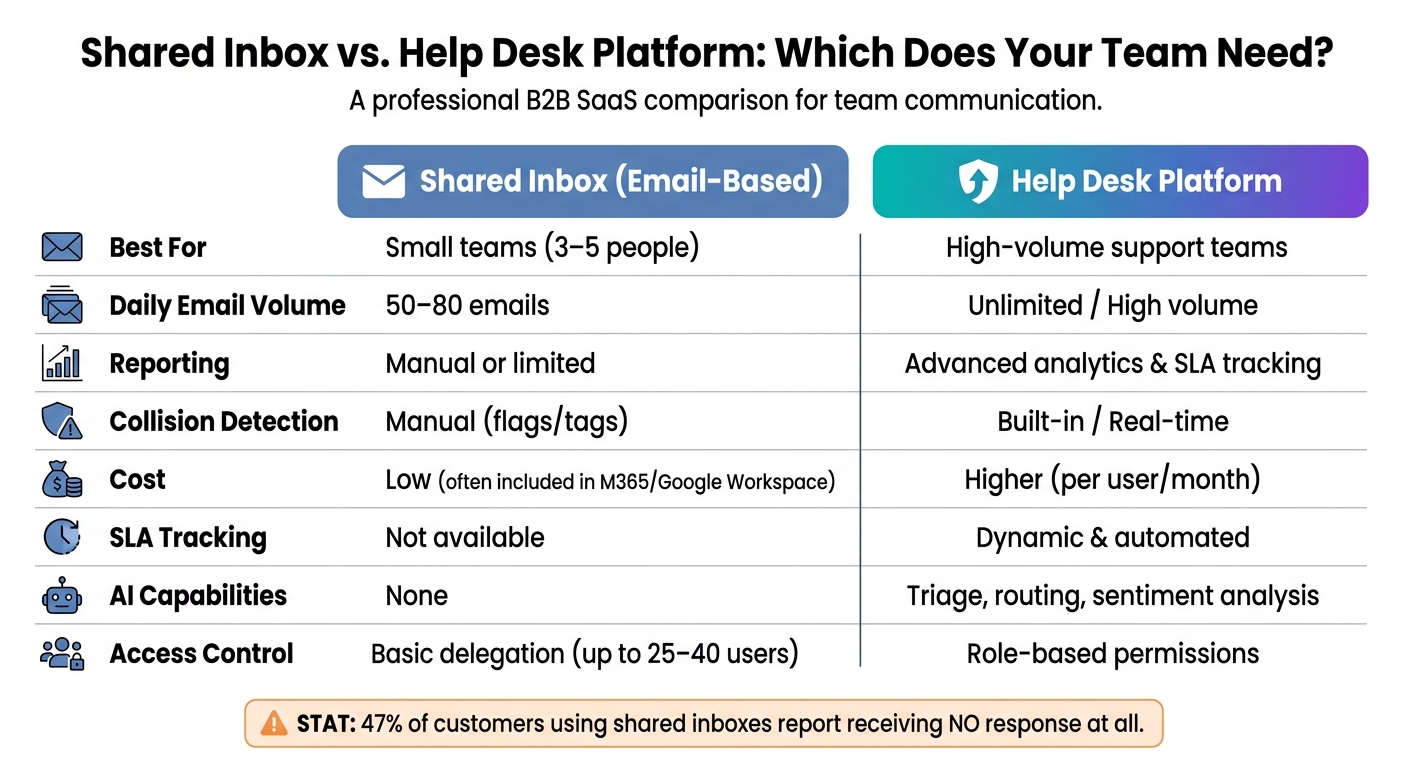
Shared Inbox vs. Help Desk Platform: Which Does Your Team Need?
What Are Shared Inboxes and How Do They Work?
A shared inbox is essentially a single email address, like support@company.com or billing@company.com, that multiple team members can access using their individual credentials. This setup helps centralize communication, avoiding the mess of shared passwords or endless email forwarding. With shared inboxes, the full conversation history stays intact, so if one team member steps away, another can seamlessly take over.
It’s important to differentiate shared inboxes from full ticketing systems. For example, Microsoft 365 allows up to 25 users to access a shared mailbox with a 50 GB storage cap, while Gmail delegation supports up to 40 users [3]. These options are great starting points for smaller teams but come with their own set of limitations. Understanding these basics is key to tackling the challenges of managing shared inboxes effectively.
Common Problems with Shared Inbox Management
While shared inboxes simplify access, they can create management headaches. One major issue is unclear ownership. When an email lands in the inbox and no one claims it, it becomes a free-for-all – and often, nobody takes responsibility. This can lead to missed responses, unhappy customers, and even breaches of service level agreements (SLAs).
Duplicate responses are another frequent issue. Without proper coordination, two team members might reply to the same email, sometimes with conflicting information. In fact, 23% of customers who interact with shared inboxes report receiving duplicate or contradictory replies, while an alarming 47% say they don’t get a response at all [4].
"A shared mailbox without management is just an email address with multiple viewers and no owner." – BusinessConnect [4]
Most shared inbox systems only track emails as "read" or "unread", which doesn’t provide enough context for effective management. To keep workflows running smoothly, teams need more detailed status tracking – like New, Assigned, In Progress, Waiting on Customer, and Resolved – to ensure no email gets overlooked.
When Shared Inboxes Are Not Enough
For small teams of three to five people handling 50–80 emails a day, shared inboxes can work just fine. But as email volume grows or SLA compliance dips below 80%, cracks start to show. If your team is constantly digging through threads to figure out response times, it’s a sign that your current setup isn’t cutting it.
In more complex B2B scenarios – involving multi-department escalations, tiered SLAs, or teams working across time zones – a basic shared email address just won’t do. These environments demand a more modern support CRM that combines shared inbox functionality with structured workflows, real-time collision detection, and built-in SLA tracking. These tools are designed to handle the challenges that shared inboxes can’t, a topic we’ll dive deeper into later.
| Feature | Shared Inbox (Email-based) | Help Desk Platform |
|---|---|---|
| Best For | Small teams (3–5 people) | High-volume support teams |
| Daily Volume | 50–80 emails | Unlimited / High volume |
| Reporting | Manual or limited | Advanced analytics & SLA tracking |
| Collision Detection | Manual (flags/tags) | Built-in / Real-time |
| Cost | Low (often included in M365/Google) | Higher (per user/month) |
Setting Up Governance and Ownership for Shared Inboxes
Without clear ownership, even the best-intentioned shared inbox can quickly descend into chaos. The solution? A solid governance framework that spells out who’s responsible for what, who has access, and how every message gets handled.
Defining Roles and Responsibilities
Accountability starts with clearly defined roles. Here’s how teams can structure responsibilities:
| Role | Primary Responsibility | Key Tasks |
|---|---|---|
| Inbox Owner | Oversees outcomes and governance, not daily replies | Monitor SLA performance, refine policies, manage permissions [3] |
| Triage Lead | Manages routing and queue organization | Categorize emails, assign owners, enforce the 30-minute triage rule [3][4] |
| Responder | Handles execution and resolution | Write replies, update thread statuses, escalate complex issues [3] |
In B2B settings, Responders often specialize. For instance, billing experts handle payment-related queries, while technical leads address complex product concerns [3][1].
"If everyone is responsible, then no one is truly responsible." – ClearFeed [2]
For teams of 3–8 members, rotating the Triage Lead role daily or per shift helps prevent burnout and ensures steady coverage [4][3].
Once roles are in place, managing access and setting operational rules are the next steps to ensure smooth operations.
Access Control and Security Best Practices
With roles assigned, securing access becomes essential to maintain accountability. Shared inboxes can pose security risks without proper management. The golden rule: never share a single password. Instead, rely on platform-native delegation tools like Microsoft 365’s member addition or Google Workspace’s delegation. This ensures every action is tied to an individual’s credentials. Keep in mind that in Microsoft 365, "Send As" permissions must be configured separately from "Full Access" permissions, or agents won’t be able to reply using the shared address [3].
To further enhance security:
- Require two-factor authentication (2FA) for all inbox users.
- Conduct regular access audits.
- Revoke access immediately during offboarding or role changes, following a formal checklist [3].
Rules of Engagement for Shared Inbox Use
Clear rules ensure emails don’t go unanswered or receive conflicting replies. To avoid the chaos of unassigned emails, enforce these key practices:
- 30-minute rule: Emails should be triaged within 30 minutes of arrival.
- "Claim before drafting" protocol: Agents must assign emails to themselves before composing replies [4][3].
Implementing explicit thread states like New, Assigned, In Progress, Waiting on Customer, and Resolved helps maintain clarity. At the end of each day, the Triage Lead should confirm that every email received has been assigned – no exceptions [4].
For escalations, create a clear path upfront. Routine issues stay with Responders, while anything involving legal terms, contract negotiations, or potential churn goes directly to the Inbox Owner. Document these escalation triggers in a standard operating procedure (SOP) to ensure consistency.
Building Workflows for Efficiency and Accountability
Once roles are clearly defined and access is secured, the next step is creating workflows that keep teams working together smoothly while ensuring no messages slip through the cracks.
Preventing Duplicate Responses and Clarifying Ownership
Streamlined workflows help eliminate confusion and redundancy. For instance, collision detection tools notify agents in real time if someone else is already drafting a reply, cutting down on duplicate responses by over 90% when paired with assignment workflows[1].
To further clarify ownership, teams can enforce a "claim before drafting" rule. This, combined with automated round-robin assignments, ensures that emails are evenly distributed and every ticket has a clear owner[1].
Setting SLAs and Prioritization Rules
Not all emails require the same urgency. For example, a renewal inquiry from a top-tier client is far more pressing than a basic product question from a new trial user. AI-powered ticket routing and prioritization uses signals like account value, issue severity, and keyword triggers to ensure critical tickets get addressed first[6].
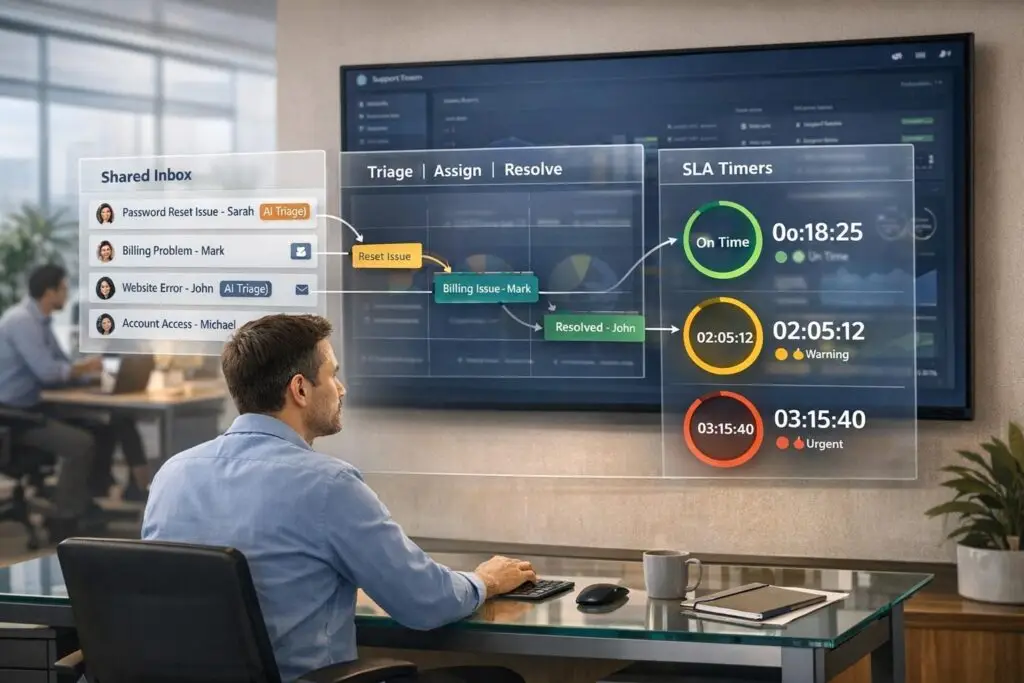
Dynamic SLAs (Service Level Agreements) take prioritization a step further by adapting deadlines based on the context of the case. Platforms like Supportbench allow SLA parameters to shift dynamically, ensuring response times are tailored to the situation rather than fixed. This matters because 73% of customers say that quick resolution is the most important aspect of good support[6]. SLA breach alerts also play a key role, flagging tickets nearing their deadline to the Triage Lead before they escalate.
By managing SLAs effectively, teams can maintain focus and deliver timely support.
Supporting Team Collaboration Within Shared Inboxes
Shared inboxes can become collaboration hubs with the right tools. Features like internal notes and @mentions let agents discuss complex issues privately without involving the customer[2]. Think of these notes as behind-the-scenes conversations attached directly to the ticket.
For tricky cases, shared drafts allow multiple agents to refine a response together before sending it out[1]. When cases are handed off between shifts or across time zones, the full conversation history – including internal notes – stays with the ticket[2]. This ensures the next agent has all the context they need, avoiding miscommunication or delays.
Even if initial discussions happen in Slack, recording final resolutions in the ticket’s internal notes strengthens accountability and keeps everything in one place[3]. This approach ensures nothing gets lost and the team stays aligned.
Using AI to Improve Shared Inbox Management
Strong workflows and clear ownership are essential, but AI takes shared inbox management to a whole new level. With the right tools, AI can handle tedious tasks like sorting, enhance agent confidence in responses, and even catch potential quality issues before they affect the customer.
AI-Powered Triage and Routing
AI builds on existing workflows to make operations smoother. Every email contains clues – such as urgency, tone, topic, or language – that determine how it should be handled. AI processes these clues instantly, identifying intent and sentiment, applying smart tags, and routing tickets automatically.
The results? AI-powered triage can speed up customer response times by up to 98% [9] and cut ticketing time in half [8]. It also ensures workloads are balanced by distributing emails evenly across team members [9]. For global teams, AI’s automatic language detection ensures inquiries are routed to agents fluent in the customer’s language, minimizing delays [9][10].
AI-Assisted Responses and Case Summaries
Once emails are routed effectively, AI steps in to improve response quality. It can summarize lengthy email threads, highlighting the issue, previous solutions, and current status. This is a game-changer for agents dealing with complex cases, as it eliminates the time spent sifting through long threads [9][10].
Supportbench takes this further by offering AI-generated case summaries at every stage – ticket intake, ongoing updates, and final resolution. These summaries, combined with suggested replies, free agents to focus on solving problems rather than administrative tasks. For a smooth rollout, consider starting with AI-assisted responses in draft mode, where agents can review and refine the AI’s suggestions before sending [10].
AI for Quality Assurance and Sentiment Tracking
Traditional quality assurance (QA) methods, which review only a small sample of tickets, often miss larger trends. AI solves this by analyzing every interaction for tone, empathy, and accuracy [7]. Supportbench’s AI-driven QA tools provide detailed scorecards for each agent, highlighting strengths and areas for improvement.
AI also predicts customer satisfaction (CSAT) and effort scores (CES) for every ticket, helping teams monitor sentiment in real time [7]. If the AI detects signs of escalating frustration, it flags the case for a senior agent or retention specialist to step in. This proactive approach not only improves agent performance but also strengthens the trust that’s critical for high-quality B2B support.
Measuring and Improving Shared Inbox Performance
Once you’ve set up AI-driven workflows, the next step is to measure their impact. Accurate tracking ensures these workflows are effective and highlights areas for improvement. To get there, focus on key metrics that reflect your shared inbox’s performance.
Key Metrics and KPIs to Track
Tracking the right metrics is essential. Start with First Response Time, which measures how quickly your team responds to customers, and Average Resolution Time, which focuses on how long it takes to fully resolve issues. But speed isn’t everything – other metrics provide deeper insights:
- Reassignment Rate: A high number here signals that tickets are being assigned to the wrong agents, indicating problems with your routing logic.
- Reopen Rate: This shows whether resolutions are sticking. Frequent reopenings often mean issues weren’t fully addressed the first time.
- AI Deflection Rate: This measures how many interactions AI resolves without needing human intervention.
Also, keep an eye on idle times in Blocked and Pending statuses. These can reveal bottlenecks slowing down your workflows.
| Metric | What It Tells You |
|---|---|
| Avg. First Response Time | Speed of initial human contact |
| Avg. Resolution Time | Active work time only |
| Reassignment Rate | Effectiveness of initial routing logic |
| Reopen Rate | How reliably issues are resolved |
| AI Deflection Rate | Volume of AI-resolved interactions |
These metrics provide the foundation for actionable insights, helping you identify what’s working and what needs attention.
Building Dashboards for Inbox Visibility
Dashboards bring these metrics to life, offering real-time insights into your team’s performance. A well-designed dashboard doesn’t just display data – it highlights what matters most. For example, combining real-time agent activity with SLA countdown timers ensures teams prioritize tickets nearing their deadlines.
Take Cisco Meraki as an example. By adopting a unified inbox approach, they managed over 10,000 monthly messages and cut their average email response time to just 15 minutes [11].
Supportbench offers customizable dashboards that let managers organize ticket volume by channel or topic – like billing, technical issues, or onboarding. This ensures resources are allocated based on actual demand, not guesswork. Paired with AI-driven sentiment tracking, these dashboards provide a clear view of customer satisfaction without requiring manual review of every interaction.
Before making changes, document your current performance. Record your first response times and resolution rates to establish a baseline. This way, you can measure the true impact of any workflow adjustments [11].
Running a Continuous Improvement Process
Dashboards and metrics are only useful if they lead to action. Regular reviews are key. Conduct monthly audits to identify categories with high reassignment rates and adjust routing rules accordingly. Update your quick-reply library based on the most effective responses from your agents to make future interactions smoother.
AI can take this process even further. For example, Supportbench’s automation engine learns from your team’s behavior, evolving tagging and prioritization rules as workflows change. This ensures your inbox setup stays in sync with your team’s needs.
Another way to improve is by feeding ticket trends into building a knowledge base. This proactive step can reduce future ticket volume by addressing common issues at their source [5].
"The hidden cost of fragmented customer communication is not just extra software. It is slower decisions, weaker ownership, more repeated work, and a support experience that feels less coordinated than the team actually is." – Inquirly [5]
Conclusion: Moving Beyond Basic Shared Inboxes
As your B2B support operation grows, it’s clear that basic shared inboxes can only take you so far. While they work well for smaller teams, they start to show cracks when the volume of accounts, stakeholders, and renewal-sensitive relationships increases. Those challenges we’ve discussed earlier? They’re clear signs that your current tools might be holding your team back.
The goal isn’t to pile on complexity – it’s to bring clarity. By turning every incoming request into a tracked ticket with a clear owner, defined SLA, and detailed customer context, your team can shift from reactive chaos to proactive, intentional support. This clarity becomes the backbone for integrating AI and taking your operations to the next level.
AI plays a key role in this evolution. Did you know that knowledge workers spend 60% of their time on "work about work" – things like searching for information, juggling apps, and piecing together context that should already be accessible [5]? Platforms that consolidate support history and automate workflows cut down this wasted time, allowing agents to focus on what really matters: solving customer issues faster.
The real leap happens when you move beyond just managing conversations. Platforms like Supportbench go far beyond a basic inbox by offering deep customer insights – everything from contracts and product usage to health scores and case history. They even provide dynamic SLAs that tighten when renewals are on the horizon. This shift transforms email management into an opportunity to build stronger, long-lasting customer relationships.
FAQs
When should we move from a shared inbox to a help desk platform?
If your team is managing over 500 tickets each month, has grown to more than five agents, or juggles multiple communication channels, it might be time to consider a help desk platform. Key indicators include increasing ticket complexity, overwhelming manual processes, or the need for structured workflows, SLA tracking, and in-depth reporting. With features like automation and multi-channel support, a help desk can streamline operations and handle high volumes more efficiently, making it easier to scale as your needs grow.
What thread statuses should we use in a shared inbox workflow?
To make shared inbox workflows more efficient, implement clear statuses that show ticket progress and ownership. Here are some commonly used options:
- Unassigned: New inquiries that haven’t been assigned yet.
- Assigned/In Progress: Indicates an agent is actively handling the ticket.
- Waiting for Response: Signals the need for input from the customer or another team.
- Resolved/Closed: Marks tickets that have been fully addressed.
Using these statuses helps ensure better visibility, accountability, and smoother workflow management.
Which AI automations deliver the biggest impact in shared inbox support?
AI automation has transformed shared inbox support by introducing tools like intelligent triage, automated routing, and AI-generated reply drafts. These features help streamline processes by efficiently prioritizing, categorizing, and directing tickets, which cuts down response times significantly.
Other helpful tools include AI-powered reply suggestions and sentiment-based triage, which handle repetitive tasks and identify urgent issues. This allows teams to dedicate their energy to more meaningful, high-priority customer interactions.
Related Blog Posts
- How do you manage multiple inboxes and prevent email thread chaos?
- Best “Email-Like” Interfaces in Enterprise Helpdesks
- When a shared inbox is enough (and when it absolutely isn’t) for B2B
- Support mailbox architecture: shared addresses vs per-team addresses
Evaluating help desks for a B2B team?
Supportbench is all-inclusive from $32 per agent per month, with migration and onboarding included. See pricing or book a 20-minute demo.