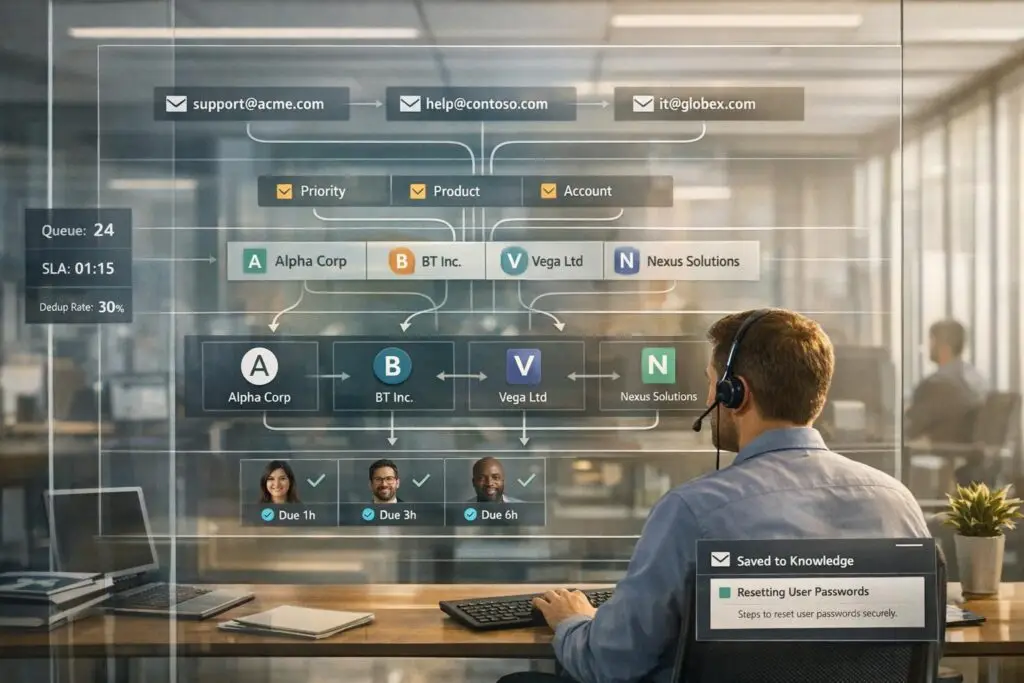
Managing support emails through distribution lists like support@company.com can quickly become chaotic as email volumes grow. Without a shared system, teams face issues like duplicate responses, missed emails, and lack of accountability. Here’s how to streamline the process:
- Link lists to accounts: Treat distribution lists as account-level contacts, not individuals. Use unique identifiers (e.g., ExternalDirectoryObjectId) to ensure consistency.
- Identify senders: Map individuals behind shared emails using tools like Azure AD for accurate engagement tracking.
- Automate triage: AI can summarize emails, detect duplicates, and prioritize cases based on urgency and context.
- Assign ownership: Ensure every case has a specific owner to avoid delays and confusion.
- Prevent reply collisions: Use live activity indicators to show who’s working on a case.
- Track metrics: Focus on key metrics like misroute rate, reassignment time, and auto-resolution rates to measure efficiency.
- Build a knowledge base: Use resolved cases to create reusable content for common issues.
Building a Clean Data Model for Distribution Lists
Properly recognizing distribution lists is key to avoiding fragmented case histories. Without a structured data model, emails from addresses like support@clientcompany.com could be mistakenly treated as unrelated, creating confusion and inefficiencies.
Mapping Distribution Lists to Customer Accounts
Think of a distribution list as a contact point for an entire account, not an individual. Link the email address of the list directly to the relevant customer account in your support system. This ensures that every case originating from that address is automatically tied to the correct organization.
To avoid mismatches caused by slight variations in email aliases, use a unique identifier like the ExternalDirectoryObjectId from Azure AD or Microsoft 365. This identifier anchors the distribution list to the appropriate account record, maintaining consistency. For teams handling multiple clients, keeping a master mapping file – such as a CSV that pairs each distribution list with its account ID – can simplify bulk updates and audits [1].
"Distribution lists/groups are not matching… you can match with the Object with the attribute ExternalDirectoryObjectId." – Quest Support [1]
Once the account-level mapping is in place, you can focus on identifying the specific individuals behind these lists to improve engagement tracking.
Identifying Individual Contacts Behind Distribution Lists
After linking distribution lists to accounts, the next step is to uncover the individuals behind shared email addresses like support@clientcompany.com. Often, these addresses represent teams rather than single users. Modern support platforms can expand distribution lists, revealing the individual members for more precise engagement tracking [2].
Integrating with an HRIS or directory service, such as Azure AD, can automate contact updates, ensuring your records stay current as team members change [2].
Standardizing Inbound Email Identities
With account mapping and individual identification in place, the final step is to standardize inbound email identities. This means consolidating all customer interactions under a single account, even if they come from multiple aliases like help@client.com, support@client.com, or info@client.com.
sbb-itb-e60d259
Using AI for Triage and Routing in Distribution List Support
Once you’ve standardized inbound email identities, the next hurdle is sorting through the avalanche of emails. Distribution lists can create chaos – multiple people replying, forwarding, or submitting slightly different versions of the same request. Without automation, your team can spend a huge chunk of time just figuring out what each email is about before they even begin resolving the issue. For support teams managing over 1,000 emails daily, manual triage can consume up to 30% of agent time [3]. Automating this process not only saves time but also lays the groundwork for more advanced AI-driven case enrichment.
Automating Case Summaries and Enrichment
AI simplifies this process by stripping away the clutter – like signatures, disclaimers, and quoted text – leaving only the core issue. From there, it identifies the intent (e.g., billing inquiry, technical issue, or complaint) and pulls out key details such as order numbers, invoice IDs, or product names. These details are then used to auto-fill case fields [3].
This is especially helpful for distribution list emails, where the sender’s original context is often buried. AI enrichment brings that context to the surface, so agents open cases with a clearer picture of the issue. It doesn’t stop there – AI can also score urgency by analyzing sentiment, keywords, and customer metadata like SLA tier or account value. This ensures that critical issues, like a production outage reported by a high-value customer, don’t get stuck behind routine invoice requests [3].
In addition to summarizing cases, AI plays a crucial role in avoiding duplicate tickets.
Detecting and Preventing Duplicate Cases
Distribution lists often lead to duplicate cases. For example, if five people from support@clientcompany.com forward the same outage report, your system might end up with five separate tickets for a single issue. AI tackles this problem with semantic similarity analysis, which compares the intent and context of emails – not just their subject lines or thread IDs.
Here’s how it works: emails with a similarity score of 90% or higher are merged automatically, while those with a score between 70% and 89% are flagged for review. Once duplicates are merged, AI generates a consolidated summary, so agents don’t have to sift through every thread to understand the issue. AI can also cluster emails by distribution list alias, running a semantic search for existing open cases from that address before creating a new ticket. This approach helps prevent ticket overload and keeps workflows efficient.
Smart Routing Based on Context and Priority
Routing emails from distribution lists is trickier than routing those from named individuals because the list itself offers little insight into urgency or ownership. AI steps in by categorizing cases (e.g., billing, technical) and assessing urgency, then combining this data with account metadata to calculate a priority score for routing [4].
Thanks to AI, the time it takes to route an email can drop from about 4 minutes to under 45 seconds per ticket, compared to manual processes [5]. For cases where the AI’s confidence level is below a set threshold – typically 75–80% – the email is flagged for a human lead to review, ensuring nothing is misrouted [4].
"A triage agent that silently drops emails is worse than no triage at all." – Samuel Chenard, Co-founder, LobsterMail [4]
Platforms like Supportbench integrate AI automation directly into workflows, handling tasks like case prioritization, intent detection, and auto-tagging without requiring additional tools or custom integrations. This means distribution list emails are classified and routed as soon as they arrive, keeping queues streamlined and agents focused on resolving cases rather than managing inbox chaos. These AI tools work hand-in-hand with earlier data modeling steps, creating a smooth process from email receipt to case resolution.
Clarifying Ownership and Collaboration for Distribution List Cases
AI-powered ticket routing has made it easier to direct cases to the right inbox, but it doesn’t automatically solve the problem of accountability. Sure, the email lands in the correct place, but who’s actually responsible for handling it? Take an email sent to support@clientcompany.com, for example. Without clear ownership, multiple agents might assume someone else has it covered. The result? Delayed resolutions and frustrated customers.
Assigning Clear Case Ownership
Every case tied to a distribution list needs a specific owner. If no one is explicitly responsible, accountability falls apart. As Happy Das, author at ClearFeed, aptly put it:
"If everyone is responsible, then no one is truly responsible." [6]
To avoid this, set up automatic assignment rules. These rules ensure cases are immediately assigned to the right agent based on factors like the distribution list alias, keywords, or account priority. For instance, platforms like Supportbench use routing logic to assign cases as soon as they’re received. This way, agents can focus on their queues without wading through a shared backlog.
Preventing Agent Reply Collisions
One common pitfall with shared inboxes is reply collisions – when multiple agents start drafting responses to the same ticket. Not only does this waste time, but it can also confuse customers if duplicate replies are sent.
Live activity indicators are a simple yet effective solution. These tools show when another agent is already working on a response, helping teams avoid overlap. Internal notes and @mentions are also invaluable for behind-the-scenes coordination. This keeps the customer-facing communication seamless while allowing agents to collaborate effectively on complex cases.
Managing Multi-Stakeholder Coordination
Distribution list cases often involve several people on the customer’s side – like a technical lead, finance contact, and manager – all included in the email thread. Keeping track of who’s who, what decisions have been made, and who needs to approve the next step can quickly become a headache.
To streamline this, log all approvals and decisions directly in the case record. Standardizing status labels such as "Waiting for Customer Approval", "Escalated", or "Pending Internal Review" creates a shared understanding of where the case stands. For high-priority addresses like ops@enterprise-client.com, define internal SLAs to ensure no ambiguity about response times.
AI reminders can also help by flagging cases that are at risk of stalling. These nudges ensure agents act before deadlines are missed, keeping cases moving forward without requiring constant manual oversight. Together, these strategies ensure smooth coordination, aligning support operations with the speed and precision that AI workflows promise.
Maintaining Case History, Reporting, and Knowledge from Distribution List Cases
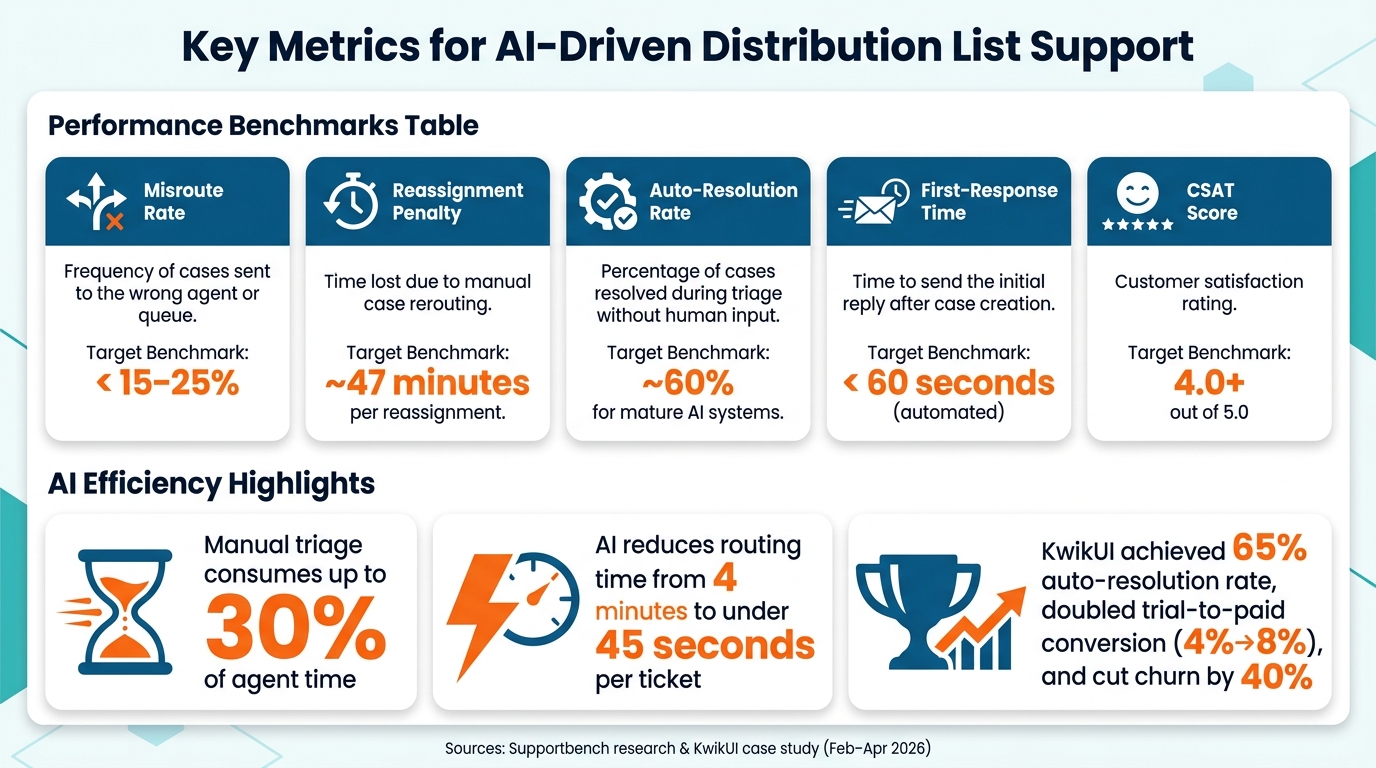
Key Metrics for AI-Driven Distribution List Support
Once you’ve established ownership and collaboration for distribution list cases, it’s crucial to ensure that the work remains accessible for future use. Long email threads with multiple participants can become a tangled mess, making them hard to review or learn from later without proper organization.
Building Summarized Case Histories
Distribution list threads often balloon into 30+ emails, creating major hurdles during case reviews. AI-driven summarization simplifies this process. When a case escalates from a distribution list, platforms can automatically generate a concise summary, including the original message, classification, and key responses. This means the next agent can quickly grasp the context without wading through endless emails.
Manual data tasks, like checking inboxes or transferring messages between systems, can eat up as much as 30% of employee time [8]. Automating the creation of case histories not only saves time but also ensures tidy records for future reference. These consolidated histories also make it easier to track performance metrics accurately.
Tracking Distribution List Support Metrics
Standard support metrics don’t always fit the complexities of distribution list cases. These cases often involve multiple senders, shared inboxes, and a higher risk of reassignment. The table below highlights some key metrics tailored to these situations:
| Metric | What It Measures | Target Benchmark |
|---|---|---|
| Misroute Rate | Frequency of cases sent to the wrong agent or queue | Below 15–25% [7] |
| Reassignment Penalty | Time lost due to manual case rerouting | ~47 minutes per reassignment [7] |
| Auto-Resolution Rate | Percentage of cases resolved during triage without human input | ~60% for mature AI systems [7] |
| First-Response Time | Time to send the initial reply after case creation | Under 60 seconds (automated) [8] |
| CSAT Score | Customer satisfaction rating for the support experience | 4.0+ out of 5.0 [8] |
These metrics help assess the efficiency of AI-driven workflows and highlight areas for improvement. Additionally, tracking sentiment changes can signal when to escalate cases proactively, especially if a customer’s tone becomes negative.
Turning Resolved Cases into Knowledgebase Content
Metrics and summaries don’t just improve workflows – they’re also a goldmine for building knowledgebase content. Resolved cases from distribution lists often contain valuable solutions, but many teams fail to document them. For example, when a technical lead and stakeholders resolve a tricky integration issue, the insights gained are often lost instead of being transformed into reusable knowledge.
AI tools make this process manageable. Platforms like Supportbench can analyze a resolved case’s full interaction history and automatically create a structured knowledgebase article, complete with subject, summary, and keywords. This approach reduces duplicate efforts and enhances the accuracy of automated responses. Focusing on your top 20 most common questions – like setup, billing, or integrations – can yield the biggest efficiency gains [8].
Here’s a success story: KwikUI, a SaaS platform with over 3,000 users, implemented this strategy between February and April 2026. By mapping frequent questions to knowledgebase articles and using AI for triage, they achieved a 65% auto-resolution rate. This not only doubled their trial-to-paid conversion rate (from 4% to 8%) but also cut churn by 40% [8].
One important tip: every automated response should include an option to connect with a human agent. A simple prompt like "Reply ‘no’ to connect with a person" ensures customers don’t feel stuck in a loop, which is essential for maintaining trust [8].
Conclusion: Best Practices for Supporting Distribution List Customers
Supporting distribution list customers doesn’t have to feel overwhelming. Teams that excel in this area rely on a structured foundation and let AI handle the repetitive, time-consuming tasks.
It all begins with email-to-ticket automation [9]. Without converting distribution list emails into structured cases, AI tools can’t effectively categorize, route, or summarize messages. Once this groundwork is laid, identity resolution and account mapping ensure every message is tied to the correct customer record, avoiding the pitfalls of dead-end aliases.
The real efficiency boost comes from features like intelligent duplicate detection, contextual routing, and agent collision prevention. These aren’t just helpful – they’re essential. In distribution list workflows, where multiple stakeholders might report the same issue within minutes, these tools keep things running smoothly instead of spiraling into confusion.
Equally important is clarity in ownership. Clear case assignments, paired with real-time collision alerts, prevent agents from overlapping efforts. And when cases are resolved, the benefits don’t stop there. AI-generated knowledge base articles turn those solutions into reusable resources, cutting down on future ticket volumes.
The most successful teams aren’t just focused on faster responses. They’re using AI to add context, eliminate redundancies, and create lasting value by building a knowledge base from every resolved case. That’s how you move from simply managing distribution list support to truly mastering it.
FAQs
How do I tie a distribution list to the right customer account?
To connect a distribution list to the right customer account, leverage account-based views and automation tools. Set up your system to identify email domains or specific patterns, allowing it to automatically link incoming requests to the correct account. This approach organizes tickets and interactions under a single organization, making management more seamless. By automating how customers are grouped, you’ll simplify the process, ensure accurate associations, and minimize errors when handling distribution lists.
How can we tell who actually sent an email from a shared address?
To figure out who actually sent an email from a shared address, you can use sender extraction tools. These tools are designed to identify the original sender hidden within the email content, ensuring replies go to the right person.
On top of that, shared inboxes with features like clear ownership and collision detection make it easier to see who has responded. This helps teams stay on top of sender activity and ensures accountability.
What’s the safest way to stop duplicate tickets from list emails?
To avoid duplicate tickets, steer clear of using distribution groups or email aliases as your support addresses. These can lead to routing problems and confusion. Instead, use dedicated forwarding addresses, verify them within your support system, and set up proper email forwarding rules.
For even better organization, consider creating unique support addresses for each customer or channel. This approach helps maintain clear ownership of tickets and minimizes the risk of duplicates. You can also implement automated workflows to ensure emails are handled accurately and processed only once.