Higher education support teams face predictable challenges tied to the academic calendar. Key issues include:
- Demand spikes: Support requests can increase up to 10x during registration and semester starts.
- Resource constraints: Many teams operate with flat staffing levels, even as 42% of IT leaders expect budget cuts for 2025–26.
- Access problems: Login and course access issues are common, especially during critical deadlines.
AI-driven tools can handle up to 80% of technical issues and 85% of policy-related questions, helping teams manage these peaks without adding staff. By aligning workflows with the academic calendar, using AI for demand forecasting, and automating routine tasks, institutions can maintain consistent support quality. The key is preparation – mapping demand cycles, refining workflows, and leveraging AI to streamline operations.
How Higher-Ed Support Actually Works
Higher-ed support operates in sync with the academic calendar, which serves as the backbone for every staffing plan, automation setup, and workflow. This predictable structure makes it possible to design effective AI-driven support systems tailored to the needs of students and staff.
Mapping Academic Calendars to Support Demand
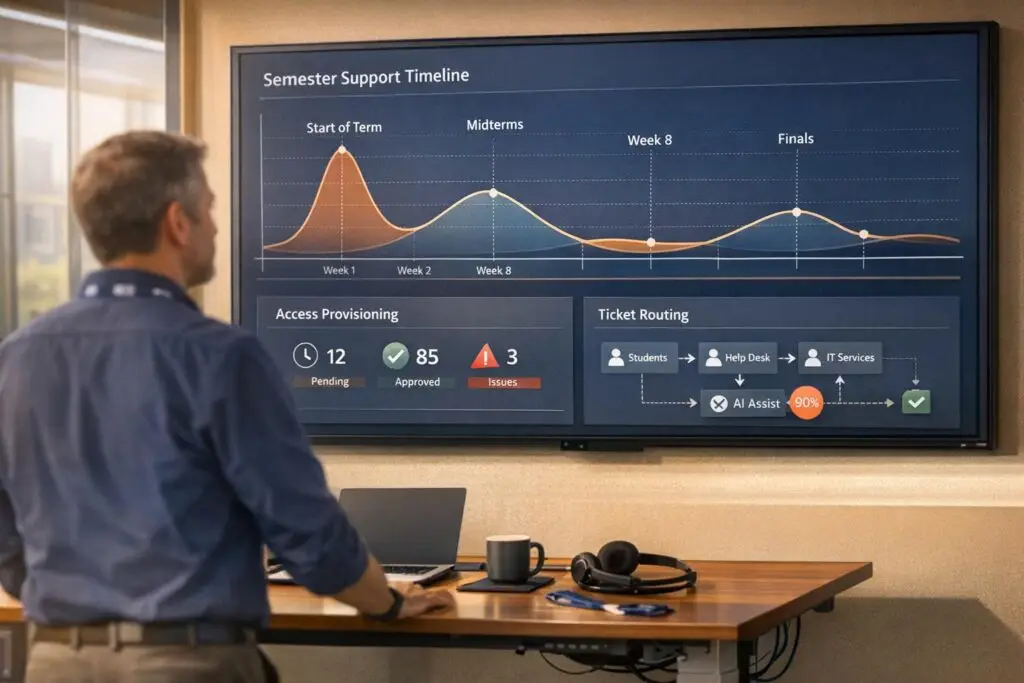
Support demand in higher education moves through four distinct phases: Calm mid-semester, Rising Wave before registration, Storm during registration and the start of classes, and Damage Control for resolving backlogs. Each phase comes with unique challenges and requires tailored responses.
For instance, enrollment and admissions inquiries spike 60–90 days before the term begins. Course access and technical issues dominate the first two weeks of the semester, while billing and financial aid questions peak around tuition due dates. These patterns are consistent enough to allow for strategic planning.
To manage this, create a 12-month demand calendar that aligns each phase with key dates. Highlight peak periods, activate automation triggers during the Storm phase (like a "Late Registration Appeal" category), and adjust staffing levels accordingly. This proactive approach helps your team move from crisis management to well-prepared execution.
Common Issue Categories in Higher-Ed Support
The majority of higher-ed support inquiries fall into a few recurring categories. Billing and financial aid questions make up the largest share at 25–30% of total volume, followed by enrollment and admissions at 20–25%, and course access and technical issues at 15–20%, which are most common in the first two weeks of the term [4].
| Issue Category | Typical Volume | When It Peaks |
|---|---|---|
| Billing & Financial Aid | 25–30% | Tuition due dates |
| Enrollment & Admissions | 20–25% | 60–90 days before term |
| Course Access & Tech | 15–20% | First 2 weeks of term |
| Academic Policy | 10–15% | Steady throughout term |
These categories often require input from multiple departments, which can lead to delays and frustration. For example, a financial aid question might involve the registrar, bursar, and academic advisor. Without automated support workflows, tickets can stall, and 44% of inquiries may go unanswered [6]. Defining which team handles each category – and how to escalate issues – reduces delays and improves the overall experience.
Organizing Institutions as Account Hierarchies in Your Support System
Higher-ed support caters to a diverse audience: current students, prospective students, parents, faculty, staff, and alumni. Each group has unique needs, access levels, and compliance requirements. Treating everyone the same can lead to operational inefficiencies and legal risks.
The solution is to adopt role-based account hierarchies, similar to how B2B platforms manage enterprise accounts. For example:
- A student account should provide access to course tools and financial aid status.
- A faculty account should prioritize course management and grading workflows.
- An alumni account should focus on transcripts and credential verification.
This structure also ensures FERPA compliance, as sensitive data like grades or financial aid details are only shared after proper identity verification.
"If your system treats a panicked January inquiry the same way it treats a casual October request, you’re losing leads and trust." – Halda [6]
sbb-itb-e60d259
Building AI-Driven Workflows for Semester Peaks
Once you’ve mapped out your academic calendar and established a clear account hierarchy, the next step is configuring AI-driven workflows to handle those inevitable demand surges during semester peaks. The difference between a team that thrives during enrollment week and one that struggles often comes down to how well their systems are set up in advance.
Setting Dynamic SLAs for Peak and Off-Peak Periods
Static SLA targets just don’t cut it when the demands of peak and off-peak periods are so different. A password reset request on a quiet October afternoon is a world apart from a course access issue on the first day of the spring semester. Dynamic SLAs allow you to tighten response times during critical periods and ease them during quieter times, ensuring your team focuses on what matters most.
For example, during tuition due dates, a billing dispute likely needs a faster response than the same issue filed in mid-November. When agent occupancy exceeds 85%, there’s no room for error – SLA breaches become almost inevitable [8].
"Every hour you under-schedule is an SLA breach waiting to happen." – MCP Analytics [7]
Supportbench’s dynamic SLA engine simplifies the process. It lets you set rules based on case context, customer priority, or calendar triggers, so your SLAs reflect real-world needs rather than one-size-fits-all standards.
Using AI to Forecast Demand and Plan Staffing
A surprising number of workforce management teams still rely on spreadsheets and gut feelings to plan staffing. That’s risky in higher education, where support volume can triple during enrollment or exam periods [3]. AI forecasting tools, using methods like ARIMA time series modeling, analyze historical data to identify patterns such as weekday cycles, seasonal peaks, and overall growth trends.
The result? A staffing plan you can actually defend. Instead of saying, “We might need more agents next semester,” you can confidently state: "Our model predicts an 18% increase in tickets in late August (95% CI: 12–24%), which means we’ll need 1.8 additional FTEs to maintain a 4-hour SLA." [7] That’s not a guess – it’s a business case. The math is simple: Required FTEs = (Total Ticket Volume × Average Handle Time) ÷ (Available Hours × Occupancy Rate) [8].
Here are two key considerations:
- Plan for the upper edge of your confidence interval to handle most scenarios without over-hiring for rare extremes [7].
- Account for ramp-up time for new hires. Fresh agents typically operate at only 50–60% productivity for their first three to six months [8]. That means hiring needs to happen well before the peak, not at the last minute.
Once staffing is sorted, the next focus is optimizing how cases are taken in and routed.
Structuring Case Intake and Routing
Unstructured case intake is a recipe for chaos during peak times. When students submit vague tickets, agents lose time figuring out the issue before they can even begin solving it. Structured intake forms that capture details like issue type, affected system, and urgency upfront allow AI to route cases correctly from the start. This eliminates delays caused by disorganized workflows.
AI-powered routing works best with a clear escalation model. For example:
- Simple issues like password resets or certificate downloads can be auto-resolved.
- Complex issues like access problems should escalate with full context attached.
- Sensitive matters like academic integrity concerns or disability accommodations should always go directly to a human [3].
Sentiment-based routing can add another layer of prioritization. If a student’s message indicates high stress – like mentioning an urgent assignment deadline – the system can bypass the standard queue entirely.
To ensure accuracy, test your AI routing in shadow mode for a week before a semester peak. The best time for this is during your highest-volume window: Tuesday mornings between 10:00 AM and 1:00 PM, which consistently account for 23.5% of weekly ticket volume [9]. This stress test will help you identify and fix any misrouting or knowledge gaps before the real surge hits.
Handling Access, Login, and Resource Issues at Scale
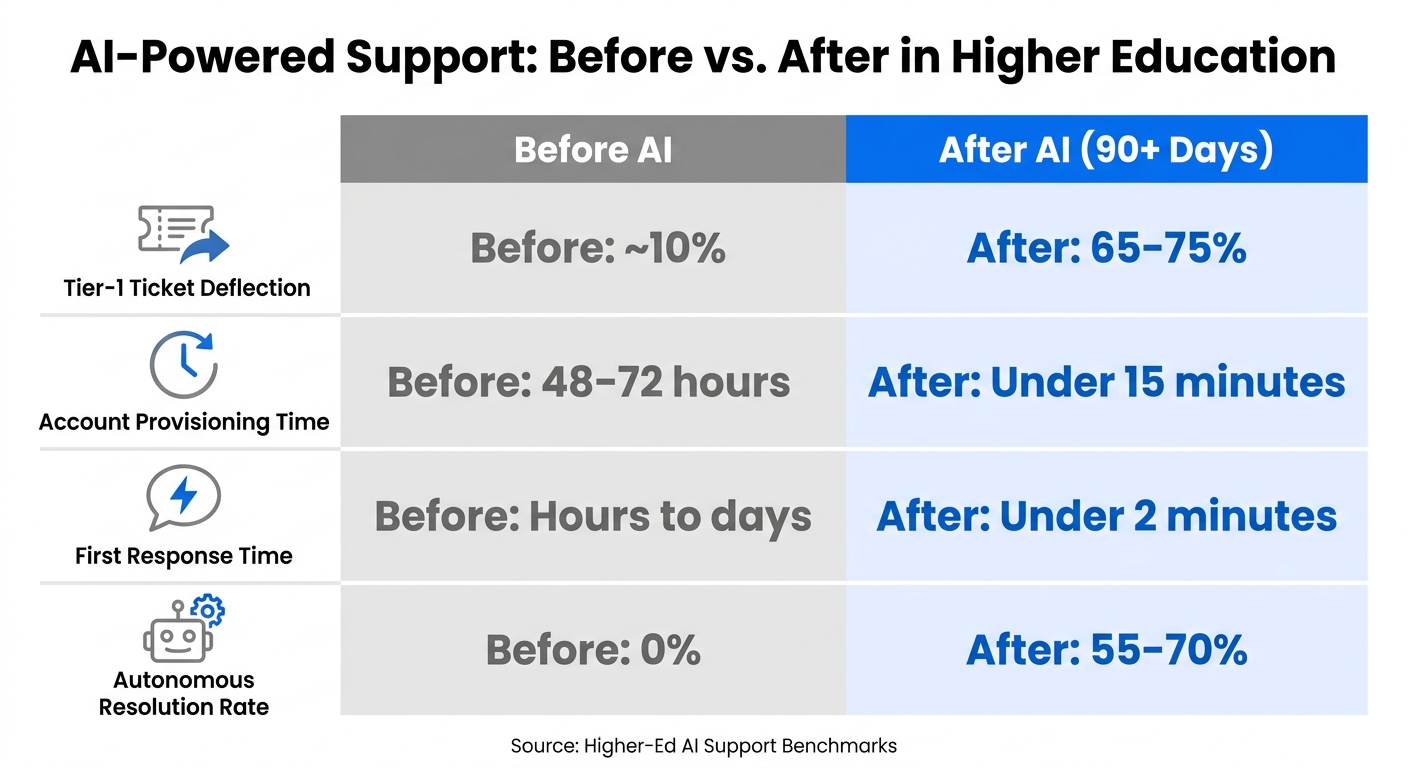
AI-Powered Support: Before vs. After in Higher Education
Access and login problems account for a large chunk of IT tickets in higher education. In fact, basic account-related questions make up 40–60% of these tickets [14]. If your team is still manually handling these issues, it’s likely eating up most of their time – but it doesn’t have to.
Building a Knowledge Base for Common Access Issues
To streamline support, start by creating a knowledge base using real ticket language from the past 90 days. Why? Students don’t typically describe their problems in technical terms like “authentication failure.” Instead, they say things like, “I can’t log in, and my assignment is due in an hour” [10]. By incorporating actual case history, your AI-assisted search and auto-responses will be far more accurate compared to relying solely on internal technical guides.
Once you’ve built this knowledge base, take it a step further: tag articles with course IDs and version numbers. This way, the AI can provide specific login instructions tailored to the system a student is using, rather than offering outdated or generic guidance [10].
"The mistake most teams make is dumping their entire knowledge base into the AI on day one and expecting magic. You’ll get hallucinated refund policies and wrong cohort dates." – Aiinak Team [10]
Personalization is equally important. A faculty member troubleshooting an LMS issue requires a different response than a first-year student struggling to find their course portal. Configuring your knowledge base to deliver role-specific answers ensures relevance and avoids potential security risks [11]. Tools like Supportbench make role-based permissions easy to implement, cutting down on IT workload while keeping the system secure. With this foundation, you’re ready to deploy AI-powered self-service solutions.
Setting Up AI-Powered Self-Service
Once your knowledge base is in place, connect it to self-service channels. An AI bot linked to your LMS (like Canvas or Moodle) and Student Information System (such as Banner or PeopleSoft) can verify enrollment status and resolve access issues in real time – without requiring human intervention [10][12]. This setup can drastically reduce resolution times. For example, instead of waiting two days for an account fix, students can have their issue resolved in under 15 minutes [14].
A great starting point is password resets, which are high-volume, straightforward tasks. Alabama State University provides a solid example. In June 2024, they deployed BlackBeltHelp Voice AI to manage 13,500 annual IT interactions. By September 2025, their Voice AI Password Reset Agent – integrated with QuickLaunch for identity verification – was live. The results? Password reset resolution rates jumped from 16% at launch to 40%, and by February 2026, the AI was handling 48% of all phone calls independently [13].
"Previously, agents handled password resets manually. Now the Voice AI handles them and agents are actually doing IT support." – Alabama State University IT Help Desk [13]
Before going live, it’s smart to run the bot in shadow mode for a week. This lets you test response accuracy and catch errors, like confusing “course access” (a login issue) with “course enrollment” (which might involve payment or permissions). Shadow testing ensures the bot addresses each issue with the right fix [3].
Speeding Up Case Resolution with AI Tools
For cases AI self-service can’t resolve, AI agent copilots can step in to speed up human intervention. These copilots pull essential context from the case, cutting down the time agents spend reviewing details. For example, Supportbench’s AI Agent-Copilot suggests logical next steps, so agents can focus on solving the problem rather than drafting responses.
AI tools can also prioritize tickets based on sentiment. For instance, if a student’s message shows high frustration – say, with a sentiment score below -0.3 – the system flags the ticket for immediate human review, regardless of the AI’s confidence in its solution [10]. During busy times, like the start of a semester, this ensures urgent issues are addressed quickly.
| Metric | Before AI | After AI (90+ Days) |
|---|---|---|
| Tier-1 Ticket Deflection | ~10% | 65–75% [14] |
| Account Provisioning Time | 48–72 hours | Under 15 minutes [14] |
| First Response Time | Hours to days | Under 2 minutes [10] |
| Autonomous Resolution Rate | 0% | 55–70% [10] |
Improving Support Operations Each Semester
Support teams in higher education rely on semester-specific data to refine their processes and adapt to new challenges. By combining these efforts with AI-driven workflows, they create a system of continuous improvement.
Tracking the Right Metrics for Higher-Ed Support
A handful of metrics directly impact the success of support operations, focusing on both student outcomes and efficiency. For routine inquiries, maintaining a 70–80% First Contact Resolution (FCR) rate is key. This ensures students receive answers without being redirected or needing to follow up [1]. Alongside FCR, it’s important to track the Autonomous Resolution Rate, which measures the percentage of cases resolved entirely by AI. Regularly auditing these metrics ensures that cases are genuinely resolved, not just closed prematurely [15].
Another critical metric is the Repeat Contact Rate over a seven-day period, which verifies the accuracy of resolutions. Tools like Supportbench’s AI First Contact Resolution detection simplify this process by analyzing case histories to confirm whether an issue was resolved during the initial interaction. These insights improve AI-based case routing and staffing decisions.
Lastly, historical trends in support requests offer valuable insights for preventing future surges in demand.
Using Past Data to Prevent Future Spikes
Support ticket patterns tend to follow predictable cycles. For example, enrollment-related questions spike about 60–90 days before the start of a term, billing concerns peak near tuition deadlines, and course access issues surge during the first two weeks of classes [4]. By analyzing these trends, institutions can align their resources with academic cycles, scaling up proactively rather than reacting to demand after it hits.
The University of California, Riverside provides a great example. In early 2026, CIO Matthew Gunkel led the implementation of an omnichannel contact center solution that uses AI to analyze past interactions. This system extracts keywords and summaries to help predict demand, optimize staffing, and even auto-trigger tickets when specific patterns emerge.
"AI will… actually make recommendations to us on when we should have people coming on [in the call center]." – Matthew Gunkel, CIO, University of California, Riverside [5]
With 42% of higher education technology leaders expecting IT budget cuts for the 2025–26 academic year [1], leveraging data to optimize staffing and resources is more critical than ever.
Keeping Your Knowledge Base Current with AI
In addition to tracking performance metrics and analyzing historical data, maintaining an up-to-date knowledge base is essential. A knowledge base that’s accurate at the start of the semester can quickly become outdated as new issues arise. AI tools can automatically identify and update outdated content based on evolving ticket trends. They also perform gap analyses to detect unanswered student questions, highlighting areas where agents rely on memory instead of documented guidelines [15].
Supportbench’s AI KB Article Creation feature simplifies this process. When a recurring issue is resolved, the system uses the interaction history to draft a knowledge base article, including the subject, summary, and keywords. This ensures the knowledge base evolves in real-time, reflecting actual student needs rather than idealized scenarios. Together, these practices create an agile, AI-powered support system tailored to higher education’s unique rhythms.
Conclusion: Getting Higher-Ed Support Ready for Every Semester
Higher-ed support often stumbles when it doesn’t match the ebb and flow of academic demand. As we’ve seen, predictable patterns – like enrollment surges, billing peaks, and course access spikes – require a proactive approach. The key lies in aligning support structures with these academic rhythms, shifting from reactive problem-solving to a well-organized, scalable system.
Start by mapping your academic calendar to anticipate busy periods. Then, implement adaptable AI workflows and review performance data each semester to identify and address gaps. Metrics such as First Contact Resolution can help pinpoint recurring issues early, and ensuring your AI understands the way students actually communicate – not just polished handbook language – can make a big difference in responsiveness and relevance.
By 2026, 92% of higher education institutions are expected to have adopted AI-driven support strategies [1]. But simply adopting AI isn’t enough. The real standout institutions are those that handle high-pressure times, like registration week, without falling into chaos. What sets them apart? A support model designed to reflect their specific demand patterns. It’s this proactive planning – not just AI implementation – that separates effective systems from those that buckle under pressure.
"The structural fix for registration week isn’t more people. It’s a support model built for the shape of demand your institution already has." – Verge AI [2]
Once you’ve established a strong strategy, having the right platform becomes the next critical step. Supportbench offers a comprehensive solution, including dynamic SLAs, AI-powered routing, automated knowledge base updates, and predictive CSAT – all for $32 per agent per month. No hidden costs or add-ons, just a straightforward tool to scale student support effectively.
FAQs
How do I build a 12-month support demand calendar?
To craft a reliable 12-month support demand calendar for higher education, start by analyzing 12 to 24 months of historical data. This should include ticket volume, types of issues, and timestamps. By doing so, you can uncover seasonal patterns, such as the sharp increase in demand (often 2x–3x) during semester starts.
Once trends are identified, distribute forecasts across the calendar year. Be sure to account for key factors like enrollment deadlines, system maintenance schedules, projected growth rates, and upcoming marketing initiatives.
Additionally, it’s wise to model various scenarios. For example, what would happen if demand surged by 3x or even 5x? These simulations can help you plan for staffing needs and implement effective AI-based solutions to handle increased ticket volumes efficiently.
What should AI handle vs. what must go to a human?
AI is best suited for managing high-volume, routine tasks that have clear and predictable solutions. Think of things like password resets, tracking orders, or basic account updates. These tasks benefit from AI’s ability to operate 24/7 and handle sudden spikes in demand without missing a beat.
On the other hand, humans excel in situations that are more complex, emotionally charged, or require a level of judgment and expertise. For example, resolving payment disputes or addressing VIP customer requests often demands creativity and a personal touch. In these cases, AI should smoothly transfer the conversation to a human agent, including the full conversation history, so customers don’t have to repeat themselves.
How do we stay FERPA-compliant with AI and self-service?
To align with FERPA regulations, prioritize governance and access control when using AI systems. Here’s how to approach it effectively:
- Use retrieval-based AI that relies on verified sources rather than sensitive student data. This reduces the risk of exposing protected information.
- Enforce secure student authentication to ensure only authorized individuals can access records.
- Implement role-based access controls, granting permissions based strictly on users’ responsibilities.
- Require Data Protection Agreements (DPAs) with vendors to prevent misuse of educational data.
Additionally, maintain tamper-evident audit logs to track changes and ensure accountability. Treat any AI-generated insights involving student information as protected records under FERPA. Finally, conduct quarterly reviews of permissions to identify and remove outdated access, minimizing unnecessary exposure of data.