


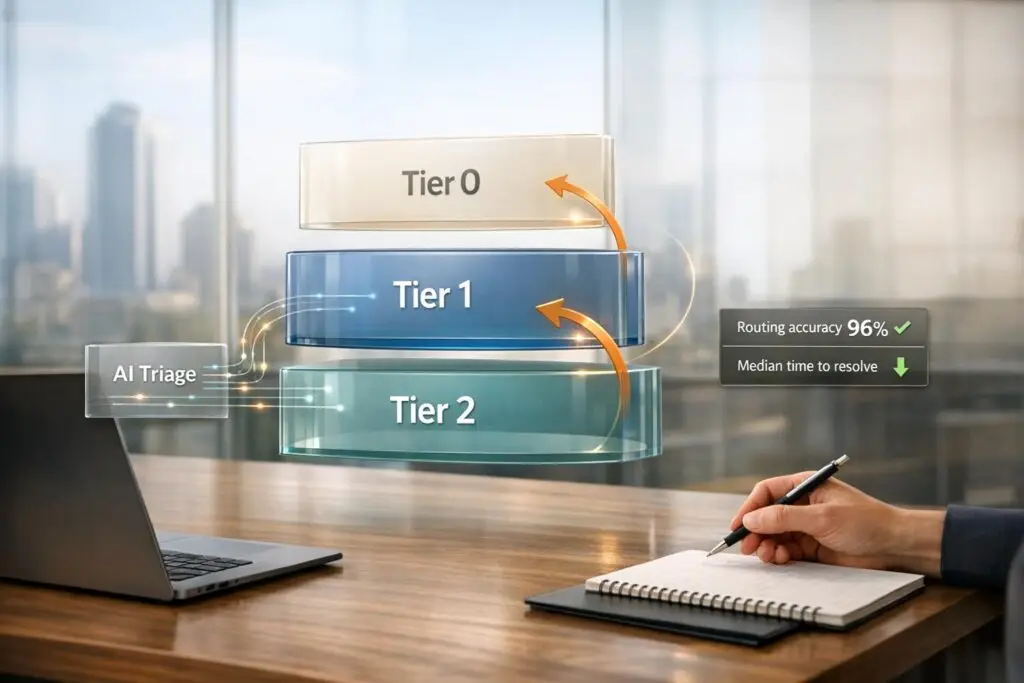
Here’s the gist:
- Define tiers by complexity and expertise: Typical levels include Tier 1 (basic issues), Tier 2 (specialist problems), Tier 3 (engineering fixes), and Tier 4 (critical incidents).
- Set clear escalation rules: Use measurable triggers like issue type, severity, or time in queue to decide when and where to escalate.
- Focus on seamless handoffs: Ensure every ticket includes a concise summary, troubleshooting steps, and customer impact details to avoid delays and confusion.
- Leverage AI tools: Automate triage, routing, and summaries to save time, but keep human oversight for sensitive cases.
- Track key metrics: Monitor repeat explanations, misrouting rates, and post-handoff satisfaction to identify and fix weak spots.
A well-structured model reduces ticket misrouting, improves resolution speed, and enhances customer satisfaction. Let’s dig into the details.
How to Organize A Tier 1, 2, 3 Customer Service Team
sbb-itb-e60d259
Support Levels and Handoff Basics
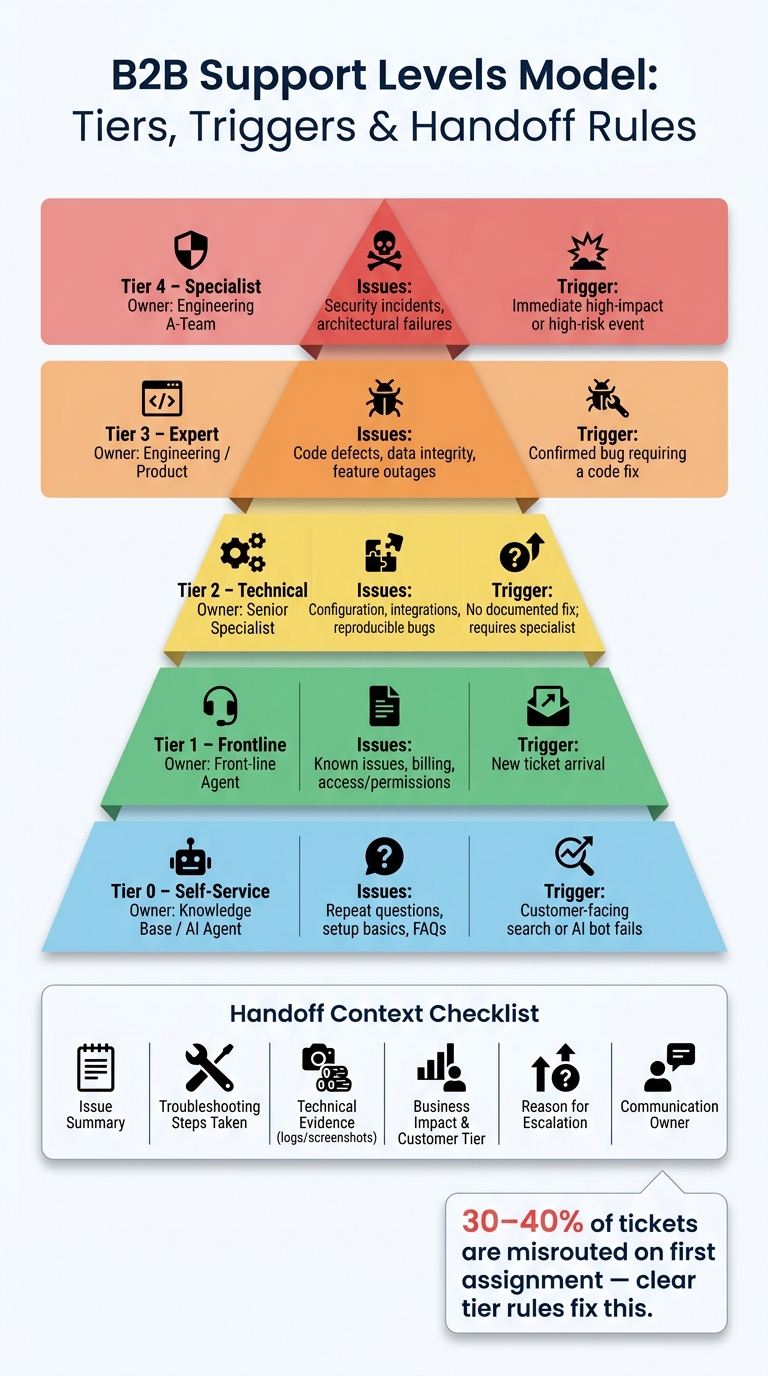
B2B Support Levels Model: Tiers, Triggers & Handoff Rules
What Are Support Levels?
Support levels are structured tiers designed to route customer issues to the right person based on case complexity, required expertise, and urgency. In B2B support, these tiers aren’t about ranking agents by seniority. Instead, they define clear boundaries of responsibility.
A typical model uses 3–4 tiers:
- Tier 1: Handles high-volume, straightforward requests like account access, billing inquiries, and common how-to questions.
- Tier 2: Focuses on more complex issues such as reproducible bugs or integration challenges, often requiring product-area specialists.
- Tier 3: Involves engineering teams for confirmed defects or data integrity problems.
- Tier 4: Tackles high-level concerns like architectural issues, security incidents, or major outages.
Keeping the tiers limited to four helps reduce friction and minimizes the risk of losing context during escalations.
A quick way to test whether your tiers are well-defined is the "one-sentence rule." If you can’t describe the boundary between two levels in a single sentence, it’s a sign they should be merged. Unclear boundaries often lead to ticket stagnation and slower resolutions.
Understanding these tiers is essential for grasping why many support models fail to work as intended.
Why Paper Models Break Down in Practice
Support models often fail because of vague escalation criteria. For example, instructions like "escalate if you’re unsure" can turn Tier 1 into a pass-through, overwhelming higher tiers with issues that could have been resolved earlier. In fact, misrouted tickets make up 30%–40% of first assignments at many companies, leading to longer resolution times [4].
Another common issue is confusing tiers with priority. Just because an issue is urgent doesn’t mean it belongs in Tier 3. Severity dictates how quickly you need to act, while the tier determines who should act. Mixing these two systems leads to routing confusion and delays.
There’s also the problem of knowledge silos. When Tier 2 or Tier 3 resolves an issue without documenting the solution, Tier 1 agents can’t learn from it. This creates a loop where the same type of ticket keeps escalating unnecessarily.
"A tier model only works when every layer has clear entry rules, exit rules, escalation criteria, and communication ownership." – William Westerlund, Suptask [2]
What Makes a Handoff Work
The shortcomings of paper models highlight the importance of effective handoffs. A good handoff depends on three critical factors: clear ownership, complete context transfer, and well-timed escalation.
When a ticket is handed off – for example, to engineering for a code fix – the support agent should still manage the customer relationship. Engineering works on the technical solution, while support keeps the customer updated. This ensures the customer doesn’t feel shuffled around without a single point of contact.
Context transfer is another area where handoffs often fail. A structured, 60-second handoff can save the next agent 10 minutes of redundant work [4]. Every handoff should answer four key questions:
- What’s the problem?
- What solutions have already been tried?
- What is specifically needed from the next tier?
- What’s the customer’s current emotional state or the business impact?
Embedding this process directly into your ticketing system ensures it becomes a standard practice rather than an optional step.
Timing is the final piece. Severity determines where a ticket starts and how quickly it should escalate if unresolved. Time spent in the queue acts as a backup mechanism, automatically moving tickets forward if they sit too long at any level. Together, these elements remove the guesswork from escalation decisions, keeping the process efficient and objective.
Matching Issue Types to Support Levels
How to Categorize Customer Requests
Customer requests come in all shapes and sizes, and treating them the same can overwhelm your team. The trick is to classify these requests based on two factors: complexity (how much expertise is required) and urgency (how quickly unresolved issues impact the business).
The best way to handle this is by using clear, measurable triggers rather than relying on instinct. Factors like issue type, customer tier, product area, and severity level provide consistent guidelines for agents. On the other hand, vague rules like "escalate if you’re unsure" leave too much room for interpretation, leading to inconsistent results.
"Severity sets the clock, and time enforces it." – Tina Grubisa, Head of Value Consulting, Mosaic AI [1]
This approach is straightforward: severity determines where an issue starts and how quickly it needs to move, while time-in-queue ensures that no ticket lingers too long without escalation. By categorizing issues systematically, you create a foundation for the routing rules we’ll discuss next.
Assigning Requests to the Right Level
Once an issue is categorized, the next step is to route it to the team best equipped to handle it – not just the next tier up. This is where functional routing becomes essential. For example, a billing dispute doesn’t need a senior engineer; it needs a billing expert. Sending the issue directly to the right specialist saves time and keeps higher-level teams focused on the problems they’re uniquely qualified to solve.
Two key rules make this process work smoothly. First, route based on roles, not individuals. Escalation paths should point to roles like "On-call API Engineer" or "Billing Specialist", ensuring continuity even when specific team members are unavailable [1]. Second, integrate these escalation paths directly into your ticketing system, so the correct route is the default action rather than a decision agents must make under pressure.
"A policy without a matrix is, frankly, just a set of good intentions. A matrix without a policy is a spreadsheet without authority. You need both." – Tina Grubisa, Head of Value Consulting, Mosaic AI [1]
For critical issues – like data loss, security breaches, or system-wide outages – bypass protocols should skip Tier 1 and Tier 2 entirely, routing the ticket directly to the right specialist. The table below illustrates how these principles apply to common issue types and their corresponding support levels.
A Table for Mapping Issues to Support Levels
This table provides a clear framework for aligning issue types with support levels. It highlights the triggers that determine the appropriate level and identifies the roles responsible for resolution at each stage.
| Support Level | Issue Types | Trigger / Criteria | Owner / Role |
|---|---|---|---|
| Tier 0: Self-Service | Repeat questions, setup basics, FAQs | Customer-facing search or AI bot | Knowledge Base / AI Agent |
| Tier 1: Frontline | Known issues, billing, access/permissions | New ticket arrival | Front-line Agent |
| Tier 2: Technical | Configuration, integrations, reproducible bugs | No documented fix; requires specialist | Senior Specialist |
| Tier 3: Expert | Code defects, data integrity, feature outages | Confirmed bug requiring a code fix | Engineering / Product |
| Tier 4: Specialist | Security incidents, architectural failures | Immediate high-impact or high-risk event | Engineering A-Team |
One takeaway from this table: Tier 0 is a crucial player. AI agents and a well-maintained knowledge base can handle a significant portion of incoming requests before they ever reach a human. For example, in early 2026, cybersecurity company Cynet implemented an AI-powered support platform that deflected 47% of Tier 1 tickets. This change boosted customer satisfaction (CSAT) from 79 to 93 points and nearly halved resolution times [1]. Achieving these results starts with correctly identifying what belongs at Tier 0.
Setting Handoff Rules and Context Requirements
Defining When a Handoff Should Happen
One of the clearest signs of a flawed handoff process is when agents escalate issues based on vague or inconsistent criteria. This often leads to unnecessary escalations, overwhelming higher-tier teams with problems that could have been resolved at the initial level.
"The fastest way to improve performance in your support organization is to reduce the mental gymnastics." – Tina Grubisa, Head of Value Consulting, Mosaic AI [1]
To avoid this, handoff triggers should be clear, measurable, and based on specific categories like functionality, severity, time, or contractual obligations:
- Functional: When an issue requires backend access or specialized expertise.
- Severity-based: For critical issues like data loss or security breaches, which must be escalated immediately to higher tiers.
- Time-based: For example, an unresolved enterprise ticket that remains open for more than 15 minutes might automatically escalate to Tier 2.
- Contractual: Specific cases like a billing dispute exceeding $1,000 should be routed directly to a billing expert [3].
What Context Must Travel With Every Handoff
When context is missing during a handoff, agents are forced to retrace steps, wasting time and frustrating customers. To avoid this, every handoff should include a structured context packet that moves with the ticket, regardless of the teams involved.
"Low-value work and rework is the unbudgeted cost center in every support organization." – Tina Grubisa, Head of Value Consulting, Mosaic AI [1]
At a minimum, this context packet should include six key elements [2]:
- A concise issue summary to provide a clear overview.
- A detailed list of troubleshooting steps already attempted to prevent duplication of effort.
- Technical evidence such as logs, screenshots, or steps to reproduce the issue.
- An assessment of the business impact, including the customer’s tier and the severity of the disruption.
- The specific reason for escalation, such as a confirmed bug or an SLA breach.
- A communication owner, who ensures the customer receives regular updates while the technical team works on the resolution.
It’s crucial to maintain a single point of contact for the customer. This support agent can simplify technical updates and ensure the customer remains informed [1][2]. By embedding these requirements into your ticketing system, you can streamline the escalation process and set the stage for AI-powered ticket routing and prioritization.
A Table for Standardizing Handoff Context
The table below outlines the minimum context required at each stage of the handoff process, ensuring that no critical information is missed.
| Handoff Stage | Primary Trigger | Required Context |
|---|---|---|
| Tier 0 → Tier 1 | Self-service fails or customer requests a human | User ID, search queries used, failed self-service path |
| Tier 1 → Tier 2 | Backend access needed, undocumented fix, or configuration conflict | Troubleshooting steps taken, account configuration details, screenshots, customer tier/SLA |
| Tier 2 → Tier 3 | Confirmed bug, systemic failure, or need for a code-level fix | System logs, reproduction steps, error codes, number of impacted users |
| Tier 3 → Tier 4 | Root cause lies in a third-party system or proprietary hardware | Evidence packet for vendor, internal diagnostic results, contractual authority details |
Using AI to Improve Handoff Processes
When combined with clear support levels and well-defined handoff rules, AI can make these processes faster and more precise.
AI for Triage and Routing
In many support operations, the real time-waster isn’t slow agents – it’s tickets being misrouted. These missteps force agents to repeatedly review and redirect issues before they can even begin addressing the problem.
Modern AI-powered triage acts as a decision-making layer. It identifies the customer’s intent, reviews account details, and analyzes sentiment signals. A confidence-based system then determines the next steps: requests with 90% or higher confidence can be auto-resolved or routed, while those below 70% are escalated directly to a human agent [6]. This approach ensures that complex or unclear cases are handled by people, keeping them out of the automated workflow.
Sentiment analysis takes routing a step further by identifying urgency or signs of customer frustration. If AI detects these signals, it can skip lower support tiers and send the case straight to a senior agent, reducing the chances of escalation. This method has been shown to cut resolution times by 28% and improve first-contact resolution by 19% [6].
Once triage is accurate, the next step is ensuring agents receive a clear and concise summary of the ticket.
AI-Generated Summaries for Faster Handoffs
AI-generated summaries simplify the transfer of context by automatically creating a one-sentence overview of the issue (Problem) and a recap of previous actions (What’s Been Done). By doing so, agents save an average of 10 minutes per ticket and reduce overall handling time by up to 25% [6]. Tools like Supportbench integrate these summaries throughout the ticket lifecycle – during case creation, after interactions, and at closure – ensuring agents always have the full picture.
"Most teams treat AI-to-human handoff as a routing problem. It’s not. It’s a context problem. If the agent doesn’t inherit the full story, the system has already failed, regardless of how accurate the routing logic is." – Radu Dumitrescu, Head of Presale & Digital Transformation, BlueTweak [5]
However, a complete handoff involves more than just AI summaries. The What’s Needed and Customer Context sections often require human input. Outgoing agents should outline specific next steps and include any emotional or situational details that AI might miss, such as noting if the customer is particularly upset or if this is their third attempt to resolve the issue.
Keeping AI in Check With Human Judgment
While automation can improve efficiency, human oversight is still essential. Certain sensitive cases – like cancellations, legal disputes, or high-value customer issues – should bypass AI entirely.
AI systems aren’t perfect; confidence scores can drift, and unusual cases can arise. It’s a good idea to set a firm CSAT threshold, such as flagging a 3-point drop in customer satisfaction as a signal to tighten confidence parameters [6]. Additionally, agents need an easy way to override automated routing when necessary. If overrides are too cumbersome, agents may avoid correcting misrouted tickets.
AI-generated summaries, while helpful, can sometimes leave out key details, such as specific identifiers or full customer statements. That’s why a confirmation step is crucial – receiving agents should review the full context to ensure no critical information is missing before engaging with the customer. This extra layer of human judgment ensures the process remains reliable and effective.
Tracking and Improving Handoff Quality
Once you’ve implemented AI-powered handoff processes, the next step is tracking key metrics to refine and enhance support efficiency. By evaluating these metrics, you can identify weak spots in the process and make targeted adjustments to improve outcomes.
Metrics That Measure Handoff Performance
One important metric is the repeat explanation rate – how often customers need to restate their issue after being transferred. If this rate is high, it signals gaps in the context provided during handoffs. For example, quarterly reviews have shown that 20%–40% of escalations could be resolved at lower tiers, highlighting inefficiencies that put unnecessary pressure on senior agents [7].
Another critical metric is the misrouting rate, where 30%–40% of initial assignments are sent to the wrong team, leading to longer resolution times [4]. Similarly, the override rate – how often agents disregard or revise AI recommendations – can indicate that the AI model needs retraining to better align with specific issue types, rather than suggesting a flaw in the agent’s judgment [7].
"The escalation path is what your system does when it is uncertain, which is the moment users are most exposed and trust is most at risk. That path should be designed, not discovered." – Tian Pan, Engineer-Founder [7]
Customer Experience Signals to Watch
Metrics like post-handoff CSAT (Customer Satisfaction) are particularly useful for understanding customer sentiment during escalations. This score focuses specifically on escalated cases, offering insight into whether customers feel a smooth transition or encounter friction during the process [7].
A high repeat contact rate – when tickets are reopened within 48 hours – often points to insufficient context transfer. This typically means the receiving agent didn’t have enough information to resolve the issue fully. Additionally, an escalation rate above 20% may indicate problems with AI calibration or reviewer capacity. For a well-functioning human-in-the-loop system, keeping escalation rates between 10% and 15% is ideal [8].
A Table Linking Metrics to Actions
| Metric | Warning Signal | Recommended Action |
|---|---|---|
| Repeat Explanation Rate | Customers re-explaining after transfer | Use structured handoff templates with fixed fields [4][7] |
| Unnecessary Escalation Rate | 20–40% of escalations could be avoided | Adjust AI confidence thresholds and expand Tier 1 knowledge base access [7] |
| Override Rate | Frequent rewriting of AI suggestions | Review and fine-tune training data for specific issue types [7] |
| Post-Handoff CSAT | Drop in scores after escalation | Audit handoff packages for missing context, including emotional details [7][8] |
| Repeat Contact Rate | Tickets reopened within 48 hours | Include verbatim transcripts and system metadata in handoff payloads [8] |
| Misrouting Rate | Over 30% of tickets require reassignment | Improve intent classification and routing logic to avoid general queues [4] |
Conclusion: Putting Your Support Levels Model Into Practice
A support levels model works best when it mirrors how your team operates in real life. The main idea is straightforward: only create a tier if the issue truly demands different skills or tools to resolve. As William Westerlund of Suptask explains, "The right model is the lightest structure that still sends the right issues to the right people." [2]
Start with a simple setup – Tier 0 for self-service, Tier 1 for frontline issues, and a clear escalation process – and expand only if ticket volume or complexity justifies it. While enterprise-level teams might require a Tier 4 for external vendors or partner-managed integrations, most teams can function well with fewer layers [2]. This minimalist approach aligns with your overall support strategy, ensuring escalations are handled efficiently.
Keep an eye on key metrics like escalation rates by issue type and reopen rates to spot gaps in your model. For the first 90 days, review your escalation matrix monthly; after that, move to quarterly reviews. Every Tier 2 or Tier 3 case resolved is a chance to improve your Tier 1 playbook or add a knowledge base article, reducing repeat issues [1][2].
As we’ve discussed, having a clear support levels model is crucial for smooth handoffs and better customer experiences. AI tools like triage, routing, and handoff summaries can make processes faster and smoother, but they rely on a solid foundation. A well-organized model allows AI to shine, speeding up and streamlining escalations, while a poorly structured one only amplifies inefficiencies. For complex or sensitive cases – or when context is unclear – human oversight remains essential. Build a system that you can regularly measure, tweak, and improve.
FAQs
How do I decide how many support tiers we actually need?
Take a close look at your current request patterns. Pay attention to volume, resolution times, and escalation points – these are key to spotting inefficiencies. By identifying where bottlenecks occur or where delays happen, you can start making meaningful adjustments.
Define clear roles and responsibilities for each tier of support. Make sure these tiers align with actual skill levels, so team members can work efficiently without being overwhelmed by tasks outside their expertise. Too many tiers? That could be a problem. Extra layers often create unnecessary complexity and slow down resolutions, frustrating both your team and your customers.
Keep your model flexible. As workflows evolve, so should your support structure. Regularly review and tweak your processes to ensure they remain simple, effective, and aligned with both your team’s strengths and your customers’ expectations.
What are the best triggers to escalate a ticket to the next tier?
The most effective triggers for escalating a ticket are based on clear, measurable conditions. Here are some examples:
- Need for backend access or advanced technical steps: When resolving the issue requires actions beyond the current support tier’s scope.
- Unaddressed error codes or issues: If the problem involves error codes or situations not covered by existing troubleshooting documentation.
- Systemic problems: Issues impacting multiple users or accounts, indicating a broader problem that needs immediate attention.
- Critical severity levels: Cases like major outages or other high-priority incidents that must be resolved within strict timeframes.
It’s best to steer clear of vague triggers like "if the agent feels stuck." Instead, rely on objective, well-defined criteria to ensure a smooth escalation process.
What should always be included in a handoff so the customer doesn’t repeat themselves?
To make sure customers don’t have to repeat themselves, always implement a structured transfer of context during handoffs. This should include:
- A full conversation transcript or a brief summary of key points.
- Details of actions taken and decisions made so far.
- Relevant customer information, such as contact details, account history, and emotional tone.
- Clear next steps or recommendations for the next agent.
Doing this helps maintain continuity and boosts the efficiency of support interactions.






