



Support teams using HappyFox often face challenges that waste time and create inefficiencies. Here’s a quick summary of the main problems and how to address them:
- Slow Ticket Routing: Manual processes lead to delays and errors. Solution: Use automated, skill-based routing to match tickets to the right agents faster.
- Fragmented Communication: Data silos force agents to search across systems, frustrating customers. Solution: Implement omnichannel support and integrate tools to centralize data.
- Generic Responses: Lack of personalization reduces customer satisfaction. Solution: Use AI tools for tailored responses and sentiment analysis.
- Scalability Issues: Manual workflows can’t keep up with growing ticket volumes. Solution: Automate repetitive tasks and maintain an evolving AI-powered knowledge base.
- Weak AI Features: Legacy AI systems are disconnected and inefficient. Solution: Upgrade to AI-native tools for smarter ticket handling and predictive insights.
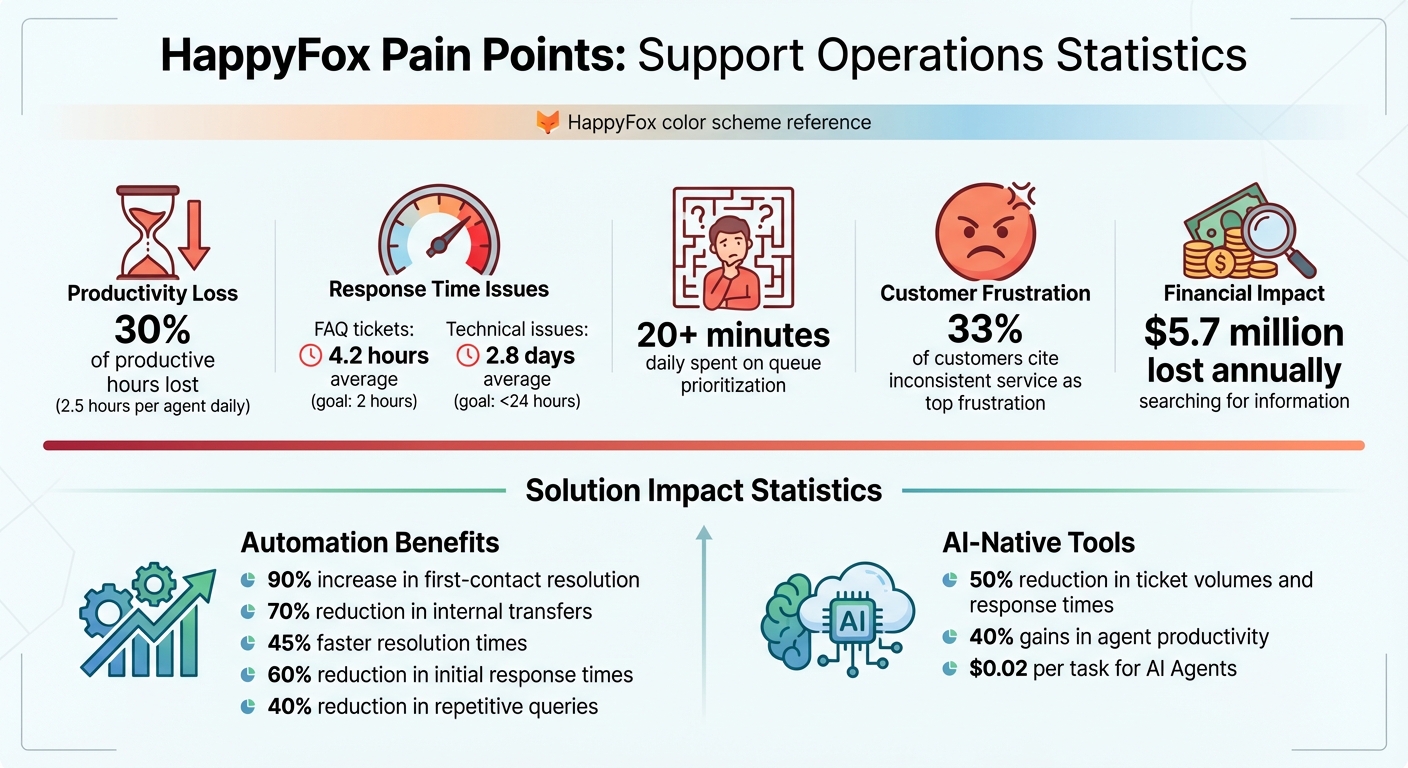
HappyFox Support Operations: Key Pain Points and Impact Statistics
1. Slow Response Times and Poor Ticket Routing
When tickets are unassigned or sent to the wrong team, it can seriously hurt SLA performance. Delays often occur because of round-robin assignments that don’t account for agent workload, gaps caused by offline agents, or the lack of urgency differentiation between critical and routine issues.
For instance, simple FAQ tickets should ideally be resolved within 2 hours, but the industry average sits at 4.2 hours. More complex technical issues? They take an average of 2.8 days, even though the goal should be less than 24 hours. These delays are often caused by mismatched skills and manual processes. Random ticket distribution, without considering expertise, leads to multiple handoffs before a ticket finally lands with the right person. Meanwhile, agents with undefined workload limits may become overwhelmed, while others remain underutilized.
Another issue is unclear ticket ownership, which causes tickets to bounce between teams. This becomes especially problematic during peak times, like Monday mornings, when a backlog of weekend tickets piles up. The result? Frustrated customers and friction within teams. Clearly, the current manual processes need a major overhaul to prevent these bottlenecks.
Switching to intelligent, automated routing can make a huge difference. By matching tickets to agents with the right expertise, first-contact resolution rates can increase by 90%, while internal transfers drop by 70%. Companies using smart routing systems also report 45% faster resolution times. For example, Darwinbox managed to cut its first response time by 66% after adopting such strategies.
To take this further, organizations can automate agent availability detection to ensure tickets go only to active agents. Setting per-agent ticket thresholds can prevent overload, while priority-based escalations ensure urgent issues are addressed immediately. These steps can transform ticket handling, making the process faster and more efficient.
sbb-itb-e60d259
1.1 Manual Routing and Prioritization Problems
Relying on manual ticket assignment is a recipe for inefficiency and frustration – for both support agents and customers. When teams use basic methods like round-robin distribution or manual sorting, they overlook crucial factors like agent expertise, workload balance, and availability. The result? Some agents are overwhelmed with tickets while others sit idle, waiting for tasks to come their way. This imbalance sets the stage for the dreaded "ticket ping-pong" problem.
The "ticket ping-pong" issue is more than just an annoyance. Without automated, skill-based routing, a simple billing question might bounce between multiple departments, requiring several back-and-forth emails before it lands with the right team. This back-and-forth wastes time, creates internal confusion, and leaves agents unclear about ticket ownership.
Decision fatigue adds to the delays. Agents spend over 20 minutes daily just trying to prioritize their queues. This inefficiency means everything starts to feel urgent – critical issues, like system outages, risk being buried under routine tasks like password resets. Tickets assigned to agents who are unavailable often miss SLA targets before anyone even notices them. Fixing these manual bottlenecks is essential for adopting AI-driven solutions that can streamline ticket routing.
The chaos of manual processing is especially clear on Monday mornings. Tickets that pile up over the weekend often overwhelm agents, creating backlogs that take days to clear. And as new tickets keep rolling in, agents fall further behind. This leads to a cycle of "firefighting", where teams scramble to handle urgent SLA breaches at the expense of other tasks – causing additional delays for other customers.
The data paints a stark picture: companies relying on manual routing deal with uneven ticket distribution, burned-out agents, and inconsistent support quality. Manual data entry makes things worse by introducing errors in ticket categorization and follow-ups. These aren’t small hiccups – they’re systemic problems that make it nearly impossible for support teams to scale effectively. It’s clear that automated, skill-based routing is the way forward, a solution we’ll explore in the next sections.
1.2 Automation Solutions for Faster Routing
Switching from manual to automated routing tackles the delays and internal helpdesk inefficiencies discussed earlier.
HappyFox’s Smart Rules simplify routing by automatically assigning tickets to the right agents based on their expertise, availability, and workload. This removes the hassle of manual ticket distribution.
In more complex support setups, skill-based routing is a game-changer. By creating a straightforward skill matrix with three levels – Basic, Proficient, Expert – and limiting it to 5–7 key skills, you can streamline the process. When tickets are paired with agents who have the right expertise, there’s a 90% chance of resolving the issue on the first contact. This reduces escalations and speeds up ticket closures.
For general inquiries where agents have similar skills, round-robin distribution ensures fair workload distribution. HappyFox offers three variations of this method:
- Basic round-robin: Assigns tickets sequentially.
- Active agent round-robin: Assigns tickets only to agents who are logged in.
- Load-balanced round-robin: Considers each agent’s current ticket volume, ensuring those handling complex issues aren’t overwhelmed with new assignments until their workload eases.
The load-balanced option stands out because it prevents overloading agents already managing time-intensive tasks.
"Smart Rules help automate a major chunk of the administrative duties of a support team… allowing them to focus more on providing quality customer support." – HappyFox Support
To set up automation, navigate to Automate >> Smart Rules, and configure conditions like ticket category, priority, or customer tags. Use throttle limits to cap the number of tickets an agent can handle at once. Also, enable the "Execute smart rule only once when conditions match" option to avoid repeated triggers on the same ticket. For optimal efficiency, consider a hybrid approach: use skill-based routing for technical escalations and round-robin for simpler requests.
2. Generic Customer Responses and Lack of Personalization
Support teams often struggle to deliver personalized interactions, especially in fast-paced, high-volume environments. The reliance on generic templates, while efficient, often lacks the necessary customer context to make interactions feel meaningful.
"Your ticket has been received – but what happens next matters most. Support teams handling hundreds of tickets daily struggle to make each interaction feel personal." – HappyFox Help Desk
Disconnected systems only add to the problem. Agents frequently waste time searching across multiple platforms for customer history, which disrupts the flow of support. On top of that, standalone chatbots without proper data integration force customers to repeat themselves – a frustrating experience for anyone. Manual data entry also eats into the time agents could spend crafting responses that feel more personalized.
The benefits of addressing these issues are clear. Companies that use AI copilots – tools designed to assist agents rather than replace them – report a 28% boost in Customer Satisfaction (CSAT) scores. These copilots provide instant access to customer history and offer tailored response suggestions, helping agents move beyond generic, one-size-fits-all templates.
Integrated chatbots take personalization a step further. When connected to a help desk and knowledge base, these tools ensure that customers don’t have to repeat their information during handoffs. If a chatbot escalates a conversation to a human agent, the full chat history transfers seamlessly. For common queries, agents can use canned responses with dynamic placeholders – like names, order numbers, or account IDs – allowing them to reply quickly while keeping the interaction personal.
Sentiment analysis is another game-changer. By detecting frustration in ticket text, it helps teams prioritize and route cases that need extra care and apply empathy-driven responses. Combined with data cleaning, which improves accuracy by 40%, these tools transform generic support into a more tailored and effective experience. When integrated with automated workflows, they also help streamline operations, making it easier to balance efficiency with a personal touch.
2.1 Why Responses Lack Consistency
Inconsistent replies often arise from fragmented customer data. When information is scattered across multiple systems – like CRM platforms, billing tools, or email threads – agents spend more time searching for details than solving problems. This can lead to two frustrating outcomes: agents either ask customers to repeat information or make guesses based on incomplete data. Neither approach leaves customers with a positive impression. This disjointed data structure paves the way for bigger problems, such as the "Knowledge Maze."
The "Knowledge Maze" refers to the chaos agents face when dealing with outdated or conflicting resources. If information is buried in poorly organized articles or outdated systems, agents are forced to spend extra time searching. This not only delays responses but also lowers the overall quality of support. Without a well-maintained and easy-to-navigate knowledge base, agents often resort to improvising – and that’s where consistency crumbles.
Disorganized canned responses add another layer to the problem. Many teams manage hundreds of templates, but without proper categorization, agents struggle to find the right one at the right time. They either waste valuable minutes scrolling through endless options or settle for a generic, ill-fitting response. The outcome? Delays and inconsistent levels of support.
Manual processes further complicate consistency. Without tools like automated workflows or interactive decision trees, agents often rely on their own judgment to troubleshoot similar issues. This leads to varied approaches for identical problems. Additionally, manual data entry increases the risk of errors in custom fields or follow-up tasks, creating ripple effects throughout the support team. These inefficiencies can drain up to 30% of productive time.
For global support teams, the challenges multiply. Language barriers and regional differences can cause major inconsistencies. Without multilingual knowledge bases or region-specific workflows, support quality can vary significantly across time zones. What resonates with customers in New York may not work for those in Tokyo – both linguistically and culturally.
2.2 Using AI for Personalized Responses
AI takes customer support to the next level by turning basic interactions into tailored, context-rich conversations. It does this by combining tools like sentiment analysis, customer history integration, and smart response suggestions. Together, these tools help agents move from guessing to delivering responses that align with a customer’s emotions and specific needs.
With real-time emotion detection, AI can identify feelings like frustration, urgency, or confusion. This allows agents to adjust their tone and approach instantly. For example, emotionally charged tickets can be flagged and sent to agents skilled in de-escalation. This is no small matter – 75% of consumers say their purchasing decisions are shaped more by customer experience than by advertising. Emotional intelligence, then, becomes a real edge in today’s competitive landscape.
AI also integrates customer history, so customers don’t have to repeat themselves. It pulls together past interactions, preferences, and unresolved issues, giving agents all the context they need upfront. This can cut initial response times by up to 60%. Plus, when agents spend less time searching for information, they can focus on solving problems – a shift that has been shown to boost CSAT scores by 28%.
Smart response suggestions are another game-changer. AI analyzes ticket content and recommends replies from your knowledge base, using advanced models to match the context. These aren’t cookie-cutter responses – they’re tailored with details like the customer’s name, order number, or account ID automatically added. Some AI tools even flag missing information in customer queries and suggest private notes for agents to follow up on.
For high ticket volumes, supervised mode offers a solid safety net. Agents can review and approve AI-generated responses before sending them out. This ensures that personalization stays accurate while still speeding up response times. It’s particularly helpful when onboarding new agents or tackling complex issues where quality control is critical.
3. Disconnected Communication and Data Silos
When customer data is scattered across different systems, agents lose valuable time piecing together fragmented customer histories, and customers often have to repeat their issues multiple times. This inefficiency disrupts service flow and drags out resolution times.
The problem lies in how disconnected systems handle information – or rather, how they don’t. Your CRM might store purchase histories, your billing software tracks payments, and your help desk manages tickets, but none of these platforms talk to each other. This forces agents to waste time searching for information instead of solving customer problems. It’s no surprise that 33% of customers cite inconsistent service as their top frustration, often caused by agents working with incomplete data depending on the communication channel used.
Take this real-world example: William Hammond, a Systems Analyst at North Country Healthcare, faced the challenge of coordinating across three hospitals and 13 departments. In 2026, his team implemented HappyFox Workflows integrated with Azure, which centralized communication across these previously siloed facilities. The results? They successfully processed over 500 employee onboardings without a single failure and saved around $100,000 annually by cutting out thousands of manual work hours.
The key to solving these inefficiencies is omnichannel support. By consolidating email, chat, phone, and social media into one unified interface, businesses can ensure conversation histories remain intact no matter how customers reach out. Adding bidirectional data sync through native integrations or APIs allows seamless data flow between your help desk and other essential tools like Salesforce, Shopify, or Jira. Companies that adopt ticket routing automation and integrated ownership tracking have even reported 70% fewer internal transfers.
For AI chatbots, integration is just as crucial. When connected to your knowledge base and help desk, chatbots can create tickets with full context and enable smooth transitions to live agents. This eliminates the need for customers to repeat themselves, ensuring a seamless and connected support experience. Whether it’s through automated routing or personalized AI responses, integrated communication creates consistent and efficient service outcomes.
3.1 Problems with Disconnected Communication Channels
When support channels function independently, agents encounter what’s known as the "Customer Context Gap." This forces them to spend time searching for scattered information while customers are left repeating themselves. The result? Support teams lose up to 30% of their productive hours – that’s nearly 2.5 hours per agent every single day.
The issue becomes even clearer when information fails to flow smoothly between channels. For instance, an email response might completely contradict details from a chat session or a social media interaction. As HappyFox Help Desk puts it:
"Email says one thing, chat history shows another, and our social media responses don’t align with either. How do we maintain consistent, quality support across all these channels?"
This lack of integration also leads to inefficiencies in manual tasks. Agents often have to manually create tickets after chats or repeatedly collect the same customer details. This not only increases the chance of errors but also slows down ticket resolution time.
Another challenge is that critical customer information ends up scattered across various systems. For example, your CRM might store purchase histories, your billing software tracks payments, and your help desk manages tickets. Without a centralized dashboard, agents are forced to juggle multiple tools just to handle one interaction. A unified dashboard solves this by consolidating customer data, streamlining workflows, and eliminating redundant efforts.
Fragmented systems also lead to duplicated work, miscommunications, and delayed responses. Without a centralized system, tracking a support request’s progress across email, phone, and internal messaging becomes chaotic. This creates confusion over ownership and drags out resolution times.
3.2 Solutions for Unified Communication and Data
Disconnected communication channels can be unified through omnichannel ticketing. This system transforms all customer requests – whether they come via email, web portals, phone calls, or walk-ins – into a single, centralized queue. This setup streamlines workflows and provides a complete view of customer interactions.
A 360-degree view is another key element, bringing together interaction history, asset tracking, and purchase data in one location. Instead of piecing together information from multiple systems, agents gain instant access to the full customer story as soon as they open a ticket. HappyFox’s AI Copilot takes this further by analyzing interactions across all channels, offering conversation summaries, AI sentiment analysis, and insights into the root causes of issues. Even if the customer switches channels, the context remains intact.
Breaking down data silos is equally important. Deep integrations connect different departments seamlessly. HappyFox supports over 50 native integrations, such as Salesforce, Jira, Slack, and Microsoft Teams, with bidirectional data synchronization. This means support agents can view sales conversations in the CRM, while developers can link tickets directly to tasks in Jira. For example, Dartmouth University adopted HappyFox in March 2025, and IT Operations Manager Justin Gere noted that the platform significantly reduced operational costs for their 6,700 students and 4,200 staff members.
"Transitioning to HappyFox was transformative, streamlining our workflow and expediting response times. We enthusiastically recommend HappyFox for asset and service management optimization." – Justin Gere, Manager of IT Operations, Dartmouth University
Effective team communication also plays a crucial role. Internal collaboration tools like Slack and Microsoft Teams allow teams to raise tickets and share updates directly through chat. HappyFox Workflows can automatically generate "child tickets" for other departments, such as HR or Finance, when their input is needed, ensuring smooth processes. This unified communication strategy enabled Darwinbox to reduce their first response time by 66% while managing a threefold increase in ticket volume.
4. Scalability Problems in Growing Support Teams
As support teams grow, ticket volumes often outpace the systems designed to manage them. This creates a significant strain on productivity. For instance, support agents lose nearly 30% of their productive hours – about 2.5 hours per agent every day – due to inefficient processes and tools. The problem becomes especially obvious during the dreaded "Monday Morning Avalanche" when weekend tickets flood the system, leaving agents scrambling to catch up and creating frustrating backlogs.
A growing team often struggles with "Ticket Ping-Pong", where unclear routing causes tickets to bounce between departments unnecessarily. Add to that the "Knowledge Maze", where outdated or conflicting information slows agents down, and the inefficiencies multiply as ticket volumes rise.
Another major hurdle is decision fatigue. Without automated triage systems, agents are stuck manually prioritizing tickets – a task that becomes unmanageable as the workload increases. Teams also face "SLA Panic", where urgent tickets nearing breach force last-minute re-prioritization, throwing workflows into chaos.
The solution? Automation and AI-driven tools. By implementing smart routing, organizations can see 70% fewer internal ticket transfers and a 45% improvement in resolution times. AI-powered ticket resolution can shrink initial response times by up to 60%, while intelligent knowledge management reduces repetitive queries by 40%. These results show how automation can transform support operations. For example, after adopting HappyFox, Darwinbox managed a 3x increase in ticket volume, reduced first response times by 66%, and deployed over 100 AI-suggested knowledge articles.
"The combination of user-friendliness and high customization which HappyFox provides has reaped us many benefits." – Joe Runciman, Accelerate Education
Scaling support isn’t just about handling more tickets – it’s about maintaining quality while growing. Teams need systems that can dynamically categorize, route, and prioritize tickets based on real-time factors like agent expertise and availability. Relying on outdated methods like round-robin assignments simply won’t cut it in today’s fast-paced support environments.
4.1 What Causes Scalability Constraints
Scalability challenges often arise when manual processes fail to keep up with growing ticket volumes. These processes, while manageable at smaller scales, become a major hurdle as demand increases, creating inefficiencies throughout the support workflow.
One of the biggest roadblocks is AI-powered ticket routing and prioritization. Without automation, agents spend countless hours categorizing, prioritizing, and routing tickets to the right teams. This often leads to "ticket ping-pong", where tickets bounce between departments, wasting valuable time and causing unnecessary friction. On top of that, repetitive tasks like updating custom fields, creating follow-up tasks, and linking tickets eat into agents’ time, increasing the risk of errors. Even selecting the right response template becomes a time drain, as agents sift through hundreds of canned responses. The result? A system that grinds to a halt under heavy demand. To put it into perspective, companies lose an average of $5.7 million annually just searching for or recreating existing information they can’t locate.
Another issue is static knowledge bases. These systems require constant manual updates to reflect product changes, which becomes unsustainable as a company grows. Agents spend hours hunting for elusive answers, and without tools like AI to analyze trends, teams struggle to identify recurring issues that lack proper documentation. This leads to a breakdown in self-service options, as customers lose faith in outdated or incomplete resources and turn to live agents instead – further increasing ticket volumes.
The solution? Automation. By automating these repetitive and time-consuming tasks, support operations can eliminate bottlenecks and scale efficiently. Addressing these manual inefficiencies is critical for maintaining a smooth and scalable support system.
4.2 Scalable Solutions for Growing Operations
To scale your operations effectively, start by automating repetitive tasks. Focus on ticket categorization, status updates, and follow-ups. Tools like HappyFox Workflows allow you to create multi-step automations without needing to code, while AI-driven triage can route tickets based on their content, sentiment, and customer history. For micro-tasks, AI agents like HappyFox Autopilot handle them efficiently, costing as little as $0.02 per task.
North Country Healthcare provides a great example of success with automation. By implementing Smart Rules across three hospitals and 13 departments, they achieved zero failures and saved an impressive $100,000 annually.
But automation is only part of the equation. A well-maintained knowledge base can significantly enhance scalability. Using AI, you can identify gaps in your documentation and fill them by converting resolved tickets into knowledge base articles. Darwinbox demonstrated the power of this approach, reducing first response times by 66% while managing triple the ticket volume. A strong knowledge base doesn’t just improve efficiency; it also empowers customers. Studies show that effective knowledge bases can deflect up to 70% of routine support tickets, and 67% of customers prefer self-service options over speaking to a representative.
To ensure these strategies lead to measurable improvements, monitor critical metrics like First Response Time (FRT), Average Handle Time (AHT), Customer Satisfaction (CSAT), First Contact Resolution (FCR), and Ticket Deflection. Set specific SLA rules for your team, such as a 24-hour response time for standard queries or a 1-hour resolution for critical issues. Automated alerts at 50%, 75%, and 90% of SLA thresholds can help you address potential problems before they escalate. Real-time dashboards can highlight bottlenecks, while predictive analytics assist in forecasting capacity needs.
"Transitioning to HappyFox was transformative, streamlining our workflow and expediting response times. With top-notch customer service, we enthusiastically recommend HappyFox for asset and service management optimization." – Justin Gere, Manager of IT Operations, Dartmouth University
5. Weak AI Capabilities and Innovation Gaps
As we move from discussing unified communication and scalable operations, it’s essential to address the limitations of older AI systems in B2B support. Legacy AI in HappyFox struggles to meet the growing demands of modern businesses. For instance, outdated chatbots often operate in isolation, requiring customers to repeat themselves and rely on pre-programmed responses. This makes handling complex, multi-step issues an uphill battle.
The core problem lies in the rigid, script-based logic of these legacy systems. They lack the natural language processing (NLP) required to understand context, sentiment, or intent. This gap often forces manual intervention, slowing response times and making it harder to identify recurring or systemic issues. Clearly, there’s a need for AI solutions that go beyond automation to intelligently analyze and resolve support interactions.
Modern AI tools are making strides in this area. For example, AI-assisted analysis can reduce initial response times by 60%, handle 70% of routine tasks, and cut down repetitive queries by 40%. In comparison, legacy systems often create data silos, fragmenting customer interactions and making the support process less efficient.
To tackle these challenges, HappyFox has introduced advanced AI solutions. HappyFox Autopilot offers a pay-as-you-go model at $0.02 per task, with $50 in free credits for the first 2,500 tasks. Additionally, their AI Suite provides tiered pricing: $14 per agent per month for the Standard plan (including 500 Agent Copilot interactions) and $39 per agent per month for the Enterprise plan (covering 10,000 interactions and AI Knowledge for up to 2,000 tickets per month). These tools mark a shift toward more context-aware AI agents capable of interpreting ticket content and AI-driven sentiment before taking action.
The AI Agent Marketplace also adds flexibility by allowing teams to deploy specialized agents for tasks like duplicate ticket detection or dispute analysis. A five-bar skill meter helps gauge task complexity. For added control, the Supervised Mode lets admins review AI decisions to ensure accuracy.
5.1 Problems with Legacy AI Features
Legacy AI in HappyFox operates, but it does so in isolation. These tools function independently and lack the ability to connect with your help desk data or share information across the broader support ecosystem. Imagine working with a team member who has no way to communicate with anyone else – it’s not very effective.
This isolation creates what’s often referred to as "disconnected conversations." For example, a customer might explain their issue to an AI chatbot, only to be transferred to a human agent and forced to repeat the entire story from scratch. Meanwhile, the interaction data from that chatbot remains separate from the customer’s central history. This lack of integration costs support teams up to 30% of their productive hours due to inefficiencies. It disrupts workflows and sets the stage for even larger integration challenges.
Another major drawback of legacy AI is its reliance on outdated presets. Instead of drawing from a dynamic, up-to-date knowledge base, legacy systems rely on static, pre-programmed responses. This means the AI might deliver outdated or incorrect answers, even if the knowledge base has been updated. On top of that, when the AI hands off a conversation to a human agent, it doesn’t automatically create a ticket. This forces agents to manually re-enter data, wasting time and energy. By comparison, organizations using fully integrated AI report 70% fewer internal transfers and resolve issues 45% faster than those relying on legacy systems.
The lack of seamless integration only adds to these problems. Without proper integration, agents are left juggling multiple systems and manually syncing information between them. In some cases, teams even have to rely on engineering support for costly automation to handle basic tasks. This inefficiency is especially frustrating when you consider that up to 80% of support tickets involve routine tasks that integrated AI could easily manage on its own.
The following section will dive into how modern AI solutions address these legacy shortcomings.
5.2 Moving to AI-Native Support Tools
AI-native platforms are changing the game by embedding intelligence directly into their core systems. Unlike older tools that simply add AI features on top of existing setups, these platforms are designed from the ground up with AI as a central component. This shift transforms every element – like ticket routing and knowledge management – into smarter, more efficient processes.
Take predictive analytics, for example. Instead of waiting for customers to report issues, AI-native tools analyze historical data to spot potential problems before they escalate. When a ticket is submitted, the system doesn’t just categorize it; it predicts the resolution path, recommends relevant knowledge articles, and flags risks like customer churn based on sentiment analysis. Companies leveraging these capabilities see impressive results: 60% faster initial response times and the ability to resolve up to 70% of routine queries without human involvement.
Automated triage also gets a serious upgrade with these platforms. Rather than relying on rigid rules, they use Natural Language Processing to understand the context and intent behind tickets. For instance, HappyFox’s AI Agents, known as Autopilot, act like virtual team members. They handle tasks such as updating custom fields, resolving delivery disputes, and identifying churn risks – all behind the scenes. At just $0.02 per completed task, these agents save an estimated 2–3 minutes per action, which adds up significantly across thousands of tickets.
Knowledge management is another area where AI-native systems shine. These tools don’t just search existing articles – they analyze ticket trends to spot gaps and even draft new content based on successful resolutions. This dynamic approach can cut repetitive queries by up to 40%, as the knowledge base continuously evolves without requiring manual updates. When human agents do step in, AI Copilot boosts their productivity by summarizing long ticket threads in real time and turning short notes into polished responses, increasing efficiency by up to 25%.
One of the biggest advantages of AI-native platforms is how seamlessly they integrate into workflows. Since AI is built directly into the system, tasks like ticket creation happen automatically with full context, and transitions between AI and human agents are smooth. These platforms also come with no-code workflow builders, allowing support teams to automate complex processes – like escalating tickets or merging duplicates – without needing help from engineering. The results speak for themselves: some organizations report 50% reductions in both ticket volumes and response times after adopting AI-native tools.
Conclusion: Fixing HappyFox Pain Points for Better Support Operations
Support teams can lose up to 30% of their productive hours – that’s about 2.5 hours per agent every day – due to outdated processes and tools. These inefficiencies make it harder to scale operations, respond promptly, and maintain consistent customer experiences. Issues like slow ticket routing and fragmented communication don’t just waste time; they create long-term problems that hiring more staff alone won’t fix.
The path forward is clear: start with automation, introduce context-aware routing, centralize customer data, and adopt AI-native tools. Companies that have embraced these strategies report impressive results, including 50% reductions in ticket volumes and response times and 40% gains in agent productivity. These numbers show that AI-powered workflows aren’t just theoretical – they’re already delivering measurable results for businesses.
Take a close look at your current setup. Are agents bogged down with manual tasks that AI could handle in seconds? Is your knowledge base actively deflecting tickets, or is it underutilized? If you’re managing over 1,000 tickets a month with delayed responses or experiencing agent burnout, it’s a sign that your tools might need an upgrade.
AI-native platforms offer a smarter way to scale. Tools like AI Copilot, AI Agents, and no-code workflow builders allow teams to handle more work without adding headcount. For example, AI Agents can complete tasks for as little as $0.02 per task, delivering immediate and measurable ROI. The real question isn’t whether to adopt these tools – it’s how quickly you can implement them to avoid damaging customer satisfaction and team morale.
Start small: automate a single high-volume task, like password resets or order status updates. Then, track the impact, refine the process, and expand automation to other areas. The most successful support teams won’t be the ones with the largest staff – they’ll be the ones that use AI to work smarter, respond faster, and grow sustainably.
FAQs
What should we automate first to cut response times fast?
To cut down response times effectively, begin by automating repetitive, high-volume tasks that often bog down ticket resolution. Prioritize automations like ticket routing, creating follow-up tasks, updating statuses, and sending standard responses. Tools powered by AI, such as chatbots, can instantly manage common questions, allowing support agents to concentrate on more complex problems. These measures help eliminate delays, reduce manual workload, and ensure greater precision, leading to quicker resolutions and smoother support operations.
How do we connect all channels into one customer history?
Integrating all your support channels into a unified customer history can make support feel smooth and personal. This means pulling together interactions from email, chat, phone, and social media into one cohesive timeline. With tools designed for multi-channel integration and automatic ticket merging, businesses can streamline communication, eliminate data silos, and give agents a full picture of customer interactions. The result? Consistent, context-rich support that feels tailored to each customer.
How can we prove AI is saving money and time?
To show how AI can cut costs and save time in support operations, focus on key metrics like shorter ticket resolution times, smaller backlogs, and reduced staffing expenses. Compare the performance of manual ticket handling processes with AI-driven automation to highlight savings in both labor and overall expenses. Additionally, track metrics like agent productivity and the success of self-service tools over time. These numbers provide clear proof of how AI boosts efficiency, lowers costs, and improves time management in support workflows.






