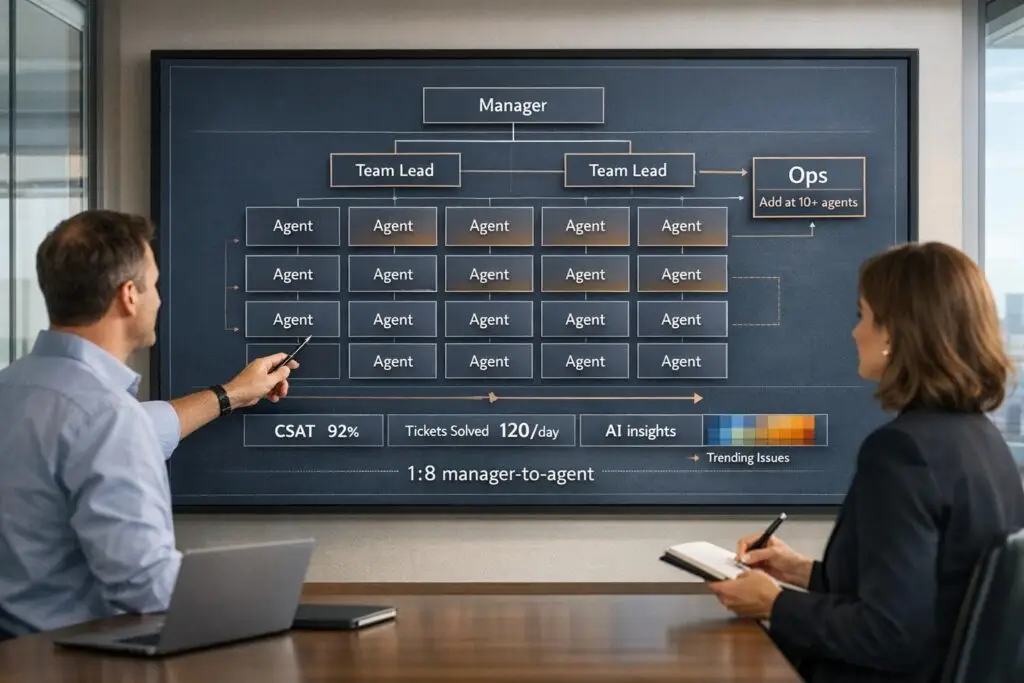
Building a scalable support team isn’t just about hiring more agents – it’s about structuring your team for growth while keeping costs in check. Here’s the core idea: focus on three key roles (frontline agents, team leads, and operations specialists), maintain balanced ratios at each growth stage, and integrate AI tools to handle repetitive tasks.
Key takeaways:
- Frontline Agents: Handle customer inquiries, divided into Tier 1 (basic issues), Tier 2 (technical troubleshooting), and Tier 3 (advanced problems).
- Team Leads: Manage 6–10 agents, ensuring SLAs are met and providing coaching.
- Operations Specialists: Manage tools, automation, and data analysis to improve efficiency.
- Ratios: Startups can begin with 2–3 agents and a combined lead/ops role. Larger teams (10+ agents) benefit from adding dedicated operations staff.
- AI Impact: AI can manage up to 80% of simple inquiries, reducing costs and allowing agents to focus on complex tasks.
Signs you need operations staff:
- Managers are overwhelmed with admin tasks.
- Metrics like CSAT, NPS, or resolution time are lagging.
- Agents face burnout due to inefficiencies.
Scaling your support team requires aligning roles, ratios, and tools to meet growing demands efficiently while maintaining quality service.
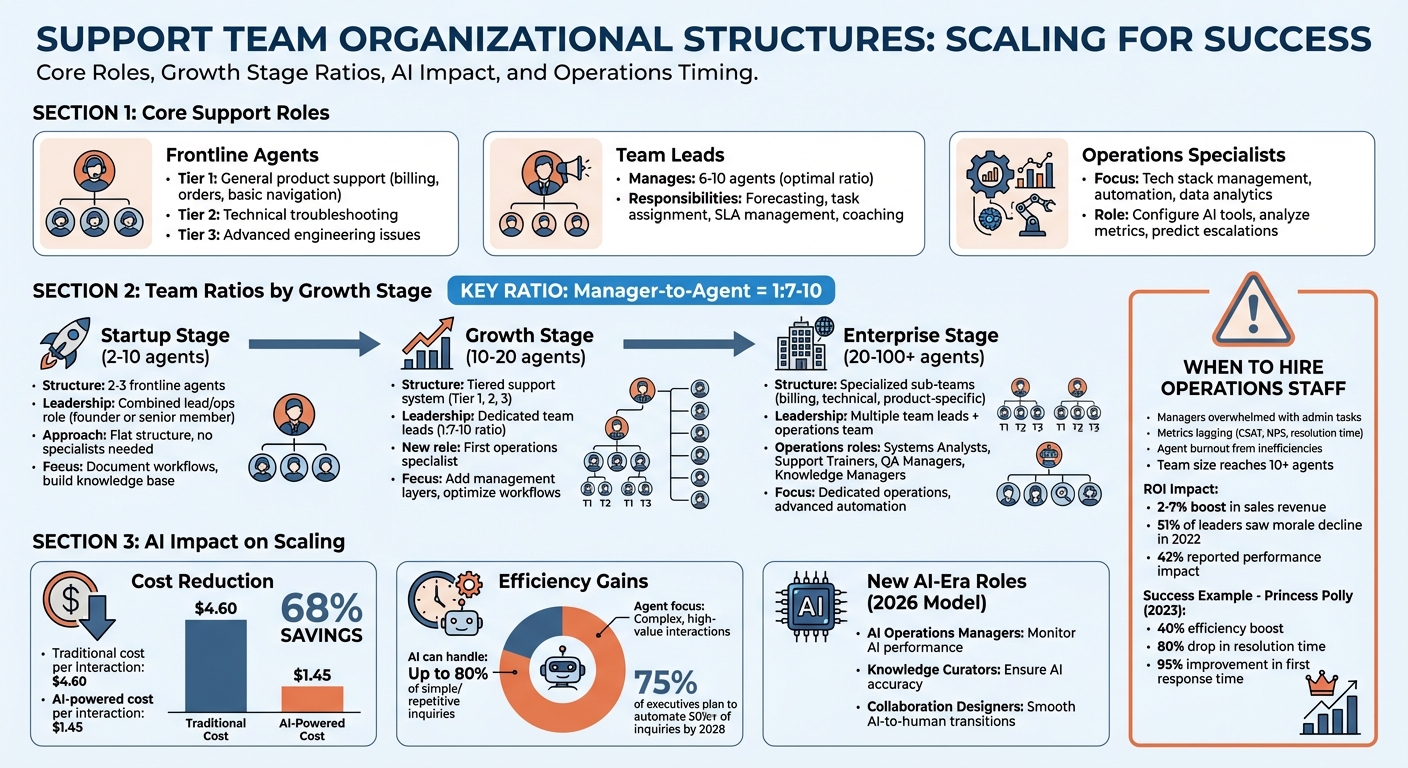
Support Team Structure and Ratios by Growth Stage
How to scale a customer service team
Key Roles in a Support Team
Building a support team that can grow alongside your business relies on three essential roles: frontline agents, team leads, and operations specialists. Each role contributes uniquely to the team’s ability to handle increasing demands without losing efficiency.
Frontline Support Agents
Frontline agents are the first point of contact for customers, and their responsibilities are typically divided into three tiers:
- Tier 1: Handles general product support like billing questions, order inquiries, and basic navigation.
- Tier 2: Focuses on technical troubleshooting.
- Tier 3: Tackles advanced engineering issues.
This tiered approach allows each group to concentrate on specific challenges. Tier 1 agents, in particular, need a deep understanding of the entire product suite since they address a wide range of issues. Beyond resolving problems, they gather valuable customer feedback to inform product improvements and help boost retention. In B2B contexts, their consultative interactions often directly impact customer loyalty and lifetime value.
However, even the fastest response times won’t deliver meaningful results if agents lack the tools or authority to resolve issues effectively.
Team Leads and Supervisors
Team leads act as the bridge between frontline agents and upper management. They focus on forecasting workloads, assigning tasks, and ensuring service level agreements (SLAs) are met. Typically, a team lead manages 6–10 agents, which strikes a balance between oversight and personalized coaching. When that ratio grows too large, it becomes harder for leaders to give agents the individual feedback and support they need to succeed.
"An operations team is there to keep unnecessary stress away from the agents and let them focus on helping and retaining customers." – Judith Platz, Chief Customer Officer, SupportLogic
Support Operations Specialists
Operations specialists focus on the behind-the-scenes systems that keep the support team running smoothly. They handle technology, automation, and data analytics to empower frontline agents. Their tasks include managing the tech stack, automating ticket routing, creating response templates for common issues, and analyzing performance metrics to uncover areas for improvement.
In teams that leverage AI, these specialists play an even more advanced role. They configure tools to route tickets based on customer sentiment, suggest real-time solutions to agents, and predict escalations before they happen. Think of them as "AI data scientists", using analytics to forecast workloads and measure the impact of support strategies.
For example, the Australian fashion brand Princess Polly revamped its support operations in 2023 by adopting automation and streamlining workflows. The result? A 40% boost in team efficiency, an 80% drop in resolution time, and a 95% improvement in first response time.
These well-defined roles lay the groundwork for creating balanced team ratios and scalable support structures, which will be explored further in the next section.
Team Ratios at Different Growth Stages
The right team ratio varies depending on your growth stage. A startup catering to a small customer base will require a much simpler structure than a large enterprise managing thousands of accounts. To build efficiently, match your team size with your support volume and the complexity of customer needs. Let’s break down how team ratios shift as companies grow.
Ratios for Small Teams
In the early days, simplicity is key. Startups often rely on flat structures where team members wear multiple hats. A typical setup might include 2–3 frontline agents managing customer requests, while a founder or senior team member doubles as the team lead and operations manager. This streamlined approach keeps things manageable at this scale.
Specialist roles aren’t necessary until you have about 10 agents. Until then, focus on maintaining a flat structure, documenting workflows, and building a knowledge base. These steps will make scaling smoother when the time comes.
Ratios for Larger Teams
As your team grows, the structure needs to adapt. Higher support volumes justify adding layers of management and specialized roles. For example, technical B2B products often benefit from a tiered support system:
- Tier 1: Handles general inquiries.
- Tier 2: Focuses on technical troubleshooting.
- Tier 3: Escalates issues requiring engineering-level expertise.
At this stage, bringing in operations specialists becomes valuable. These team members focus on managing workflows, maintaining tools, and analyzing performance data to optimize efficiency.
"Your support team’s structure entirely depends on your support volume".
As support demands increase, having well-coordinated systems is crucial to maintaining productivity and service quality.
How AI Changes Team Ratios
AI is reshaping how teams scale. With AI tools, a single agent can now handle thousands of interactions. This technology significantly reduces costs – cutting the average cost per interaction from $4.60 to $1.45, a 68% savings. For B2B teams, AI enables you to grow your customer base without a proportional increase in headcount.
AI excels at managing high-volume, low-complexity tasks like order tracking and FAQs, freeing your agents to focus on more complex, high-value interactions. By 2028, 75% of U.S. business executives plan to automate at least half of their customer service inquiries. Teams that adopt AI early will scale faster and more efficiently, staying ahead of competitors who stick to traditional models.
sbb-itb-e60d259
Org Chart Templates for B2B Support Teams
Your org chart will depend on your business model, team size, and how much you’ve embraced AI. Below are three team structures that are well-suited for modern B2B support teams. These models align with earlier discussions on roles and ratios, helping you scale in a structured way.
Tiered Support Structure
This traditional approach organizes teams based on expertise levels. Tier 1 handles high-volume, straightforward tasks like password resets or order status updates. Tier 2 takes on more technical troubleshooting and complex product issues. Tier 3 escalates the toughest challenges – like bugs or advanced problems – to product engineers.
This model works best when clear escalation paths allow specialists to focus on intricate tasks. To avoid bottlenecks, aim for a manager-to-agent ratio of 1:7–10. Once your team grows to 20–100 members, you might want to add specialized sub-teams for areas like billing, technical support, or product-specific issues.
"Aim for a ratio of 1 manager for every 7-10 employees to maintain a proper awareness of team and customer issues." – Tania Kefs, Head of Customer Support, Aircall
Operations-Focused Structure
If your team exceeds 20 agents, introducing dedicated operations roles can make a big difference. These roles include Systems Analysts (managing tools and integrations), Support Trainers (onboarding and upskilling agents), QA Managers (ensuring quality standards), and Knowledge Managers (keeping documentation updated).
By reducing administrative burdens, operations staff allow agents to focus on delivering great customer experiences. This is critical, as fewer than 30% of support agents feel empowered in their roles. The payoff? Companies that prioritize operations often see less agent burnout and better customer satisfaction.
"The best operations team is an operations team that’s fully focused, all the time, on how to help support engineers and managers do their absolute best job." – Judith Platz, Chief Customer Officer, SupportLogic
AI-Powered Team Structure
Looking ahead to 2026, this model replaces the traditional pyramid with a circular ecosystem. AI becomes the core, managing routine tasks like data collection and resolving up to 80% of repetitive Tier 1 inquiries. Human agents form an outer layer, stepping in only for high-stakes or emotionally complex situations.
This setup introduces new roles: AI Operations Managers (monitoring AI performance and preventing errors), Knowledge Curators (ensuring AI has accurate information), and Collaboration Designers (creating smooth AI-to-human transitions). Instead of building a large Tier 1 team, this model focuses on enhancing a smaller, highly skilled workforce. Tools like Supportbench’s predictive CSAT and automated workflows integrate seamlessly, helping teams proactively address issues before human intervention is needed.
"The ‘Pyramid’ is gone, replaced by a circular ecosystem where AI is the core engine of efficiency, and humans are the specialised pilots of the customer experience." – Devashish Mamgain, CEO, Kommunicate
When to Hire Support Operations Staff
Signs You Need Operations Staff
If your support managers are drowning in administrative tasks – like setting up tools, maintaining systems, or generating reports – instead of spending time coaching agents, it’s a clear sign you might need operations staff. Other red flags include workflows that can’t keep up with ticket volumes, unresolved system issues causing agent delays, and inconsistent processes across different time zones. Missing key metrics like CSAT, first response time, or NPS, along with high agent burnout, are also strong indicators.
To put things into perspective, in 2022, 51% of customer service leaders observed a decline in team morale, and 42% said it negatively impacted performance. If your team has hit 10 or more agents, it’s often a good time to consider bringing in your first operations specialist.
"As a support manager, it can be difficult to get off the ‘reactive support’ treadmill and focus on long-term optimization. That’s where CS Ops can help."
Spotting these warning signs is the first step toward deciding whether investing in operations staff makes sense.
Calculating the ROI of Operations Roles
To assess the return on hiring operations staff, compare their costs to the time saved by support managers and the efficiency improvements across your team. When managers aren’t bogged down with reports or tool configurations, they can focus on coaching agents, which helps reduce turnover and boosts performance.
Automation is another area where operations teams make a huge impact. Companies that embrace automation are four times more likely to see CSAT improvements. A great example is Flexport, which cut customer query resolution times by 50% in 2023 after their operations team introduced internal collaboration tools that reduced the need to switch between platforms.
Metrics to keep an eye on include:
- Tickets handled per agent
- Employee turnover rates
- Average resolution time
- CSAT and NPS scores
Take Princess Polly, an Australian fashion brand, as an example. After creating a dedicated operations team, they saw an 80% reduction in resolution time and a 95% improvement in first response time by focusing on metrics and feedback loops.
Operations staff also provide valuable insights that influence budget decisions and product development by analyzing real support trends. With 76% of support leaders saying their tech stack limits their team’s potential, having operations staff to audit tools and eliminate inefficiencies is crucial.
"The best operations team is an operations team that’s fully focused, all the time, on how to help support engineers and managers do their absolute best job."
- Judith Platz, Chief Customer Officer, SupportLogic
Conclusion
Creating a scalable support team structure means aligning your setup with your company’s growth phase and the complexity of your customers’ needs. Start by clearly defining roles: frontline agents handle tickets, team leads focus on coaching and guidance, and operations specialists ensure systems run efficiently. To keep things running smoothly, aim for a 1:7-10 manager-to-agent ratio – this gives managers enough time for strategic planning instead of constantly putting out fires.
AI integration takes this structure to the next level, improving efficiency and reshaping team dynamics. Many modern B2B support teams use AI to establish a "Tier 0" layer, where chatbots and self-service tools manage routine inquiries. This allows human agents to focus on more complex, high-value cases.
If your support managers are bogged down with administrative tasks like generating reports or configuring tools instead of coaching their teams, it’s time to bring in operations staff. Typically, this happens when your team grows to about 10 agents. The payoff is worth it – investing in support operations can lead to a 2% to 7% boost in sales revenue by enhancing the customer experience.
Modern tools can amplify these principles even further. Platforms like Supportbench integrate AI into case management, knowledge building, and operations, cutting costs and removing the need for complicated IT setups. Features such as AI-driven ticket summaries, predictive CSAT and CES scoring, and dynamic SLAs enable teams to work more efficiently while keeping both agents and customers satisfied.
The numbers don’t lie: an optimized support structure, built on the right mix of roles, ratios, and AI tools, can turn your support team into a powerful driver of business success instead of just another expense.
FAQs
When is the right time to hire support operations staff?
The ideal moment to bring on support operations staff is when your team starts hitting roadblocks that slow down efficiency or impact customer satisfaction. For instance, if your support agents are constantly pulled away from assisting customers to deal with workflows, troubleshoot tools, or manage internal logistics, it’s a strong signal that a dedicated operations role is overdue.
Another telltale sign? Struggling to handle an increase in customer inquiries without compromising service quality. As your customer base grows, keeping your support consistent and effective becomes harder without someone focused on refining processes, optimizing workflows, and enabling your frontline team to concentrate on customers.
Hiring support operations staff at this point helps ensure your team stays efficient, adaptable, and ready to deliver outstanding customer experiences as your business scales.
How can AI improve the efficiency of customer support teams?
AI helps customer support teams work more efficiently by taking over repetitive tasks, streamlining workflows, and aiding smarter decision-making. For example, it can manage ticket routing, suggest relevant knowledge base articles, and analyze customer sentiment. This frees up agents to concentrate on more complex issues that need a personal touch and human understanding.
On top of that, AI offers predictive insights and enables proactive support, allowing teams to tackle potential problems before they grow into bigger issues. It also improves collaboration through tools like Slack and Teams, ensuring smooth communication among team members. By cutting down on manual work and speeding up response times, AI helps support teams grow without sacrificing quality, all while keeping operational costs in check.
How can I tell if my support team needs to scale?
If your support team is struggling to keep up with increasing customer inquiries or resolving issues effectively, it might be time to expand. Common warning signs include slower response and resolution times, team members feeling overwhelmed, and a dip in customer satisfaction. You might also see workflow bottlenecks, frequent escalations, or inconsistent processes – clear signals that your current setup isn’t meeting demand.
Key metrics like first response time, resolution time, and customer satisfaction scores may also take a hit, highlighting that your team is stretched too thin. To address this, you could explore hiring additional team members, adjusting team structures, or bringing in specialized operational staff. Taking proactive steps early can help your team manage growth while streamlining workflows with modern, AI-driven tools.