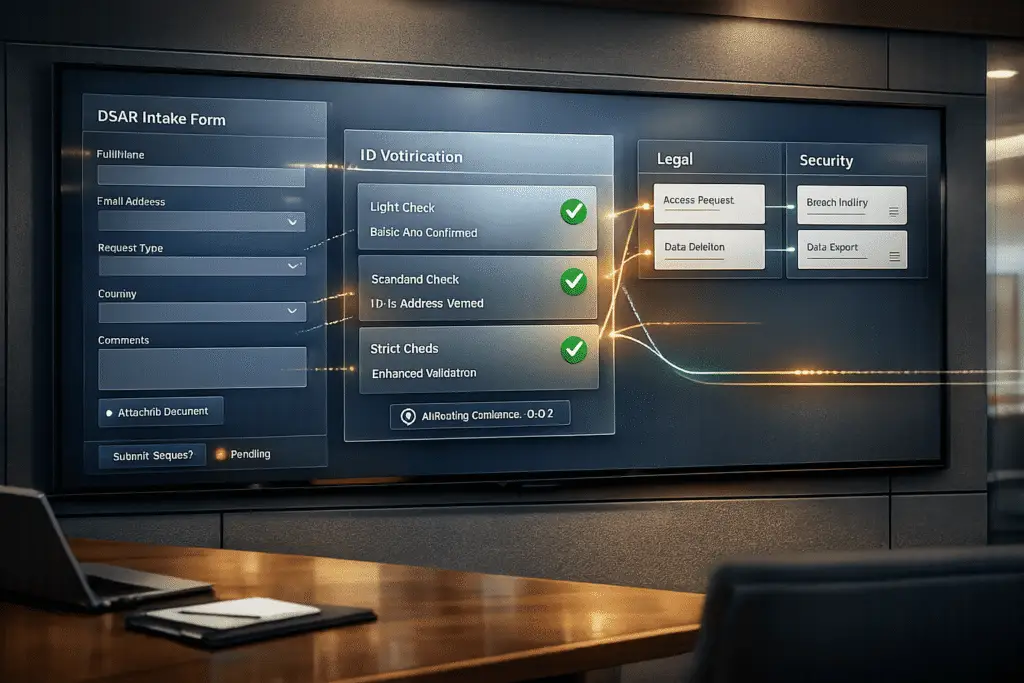
When handling Data Subject Access Requests (DSARs), time is critical – 30 days under GDPR and 45 days under CCPA. A well-designed DSAR intake form ensures requests are properly logged, routed, and resolved efficiently, avoiding fines and compliance risks. Here’s a quick breakdown:
- Why It Matters: Mishandled DSARs can lead to hefty fines (e.g., Uber’s €10 million penalty in 2024).
- Key Features:
- Structured Fields: Collect details like name, email, and request type.
- Predefined Categories: Use dropdowns (e.g., Access, Deletion) to streamline routing.
- Routing Logic: Direct requests to legal, security, or privacy teams based on type.
- Identity Verification: Tailor checks to the request’s risk level.
- Automation Advantage: AI-powered systems can classify, prioritize, and track requests, reducing manual errors and costs.
Efficient DSAR workflows save time, ensure compliance, and improve user trust. Let’s dive into how to build one.
Understanding DSAR Requirements and Routing Needs
What Is a DSAR Intake Form?
A DSAR intake form is essentially the starting point for handling data subject access requests (DSARs) within an organization. It gathers key details like the requester’s identity, the specific right they’re exercising, and enough context to verify their request and take action. Think of it as the front door to ensuring compliance.
Under U.S. privacy law, such as the CPRA, businesses must offer at least two ways for individuals to submit DSARs and confirm receipt within 10 business days. A well-structured intake form can automate these steps by logging timestamps and sending acknowledgment emails, ensuring everything stays on track [7][8].
"A well-designed DSAR intake form that requests the data subject’s full name, address, email address, and detailed information about the data subject’s request can materially improve timeliness and completeness." – Benjamin W. Perry, Shareholder, Ogletree Deakins [8]
To meet compliance, the form must cover all applicable rights, including access, deletion, correction, portability, opting out, and limiting the use of sensitive data [6][8]. Missing any of these could leave your organization exposed to potential compliance issues.
Once the intake form is set up, the next challenge is ensuring requests are routed to the right teams – this is where proper routing becomes critical.
Legal and Security Routing Explained
An intake form doesn’t just collect information; it also determines where each request should go. Not all DSARs are alike, and routing them incorrectly can lead to delays, inefficiencies, and even compliance risks. Legal teams typically handle complex issues like exemptions, redactions, and balancing tests for third-party data. On the other hand, security teams focus on identity verification and safeguarding against unauthorized access [10][11].
Take a deletion request, for example. Security teams might need to ensure data is fully removed from all systems. Meanwhile, a correction request could require legal or data operations teams to update records accurately. Misrouting these requests can slow down the process and increase the risk of noncompliance.
Timing is also critical. The statutory clock starts ticking as soon as any employee receives a DSAR – not just when it reaches the data protection officer or another designated handler.
"The clock starts when the request reaches any employee, not when it reaches the DPO or another employee tasked with dealing with SARs." – Andy Williamson, MBCS, Penby [11]
Key Outcomes of Correct Routing
Getting routing right has a direct impact on your organization’s efficiency, risk management, and compliance. Proper routing ensures requests are handled by the right teams, enabling timely responses and reducing the risk of errors. For instance, subject access requests made up about 45% of the 35,000 data protection complaints received by the ICO in 2022–23 [11], with many complaints tied to delays or mishandled responses.
From the user’s perspective, a streamlined process makes a big difference. Over half (53%) of people have abandoned privacy requests because the process was too complicated [9]. A well-routed, user-friendly form can help prevent this, improving both compliance and customer satisfaction.
Routing also enables a risk-based approach to identity verification. For example, a low-risk request from a known customer email might require minimal verification, while a request involving sensitive health or financial data could demand stricter checks [10]. Tailoring verification to the level of risk ensures the process stays secure without being unnecessarily burdensome.
sbb-itb-e60d259
Designing the DSAR Intake Form: Core Elements
Fields for Requester Identification and Context
A well-designed DSAR form starts by confirming the requester’s identity and purpose. At a minimum, you’ll want to collect essential details like full name, email address, date of birth, and physical address. These fields help differentiate between individuals with similar names and ensure the request is tied to the correct records in your systems.
Adding a Relationship to Organization field (e.g., current customer, former employee, applicant, contractor) can streamline internal processes. This allows the system to direct the request to the appropriate database – whether it’s a CRM, HR system, or applicant tracking tool. Additionally, a jurisdiction dropdown can pre-apply the correct response deadlines, saving time before a human even reviews the case.
Another helpful field is an account or reference number. Asking for this upfront can speed up backend lookups, reducing delays that could otherwise cut into the 45-day response window required under CCPA.
Once basic details are gathered, standardizing the types of requests is the next step to ensure efficient routing.
Request Type Categories and Dropdown Options
Avoid using free-text fields, which can lead to confusion and delays. Instead, implement dropdown menus with predefined request categories. This approach simplifies routing and ensures requests are directed to the right teams. Common categories might include:
| Request Category | Typical Action | Primary Team |
|---|---|---|
| Access / Export | Data retrieval from databases | IT / Privacy Ops |
| Erasure (Deletion) | Anonymization or deletion of PII | IT / Security |
| Rectification | Updating inaccurate records | Data Owner / HR |
| Portability | Providing data in a machine-readable format | IT / Privacy Ops |
| Security Incident | Investigating breaches or fraud | Security / Legal |
| Opt-Out (Do Not Sell/Share) | Updating suppression lists | Marketing / AdOps |
Adding a jurisdiction selector further ensures compliance with varying regulations. For example, GDPR requires responses within 30 days (extendable to 90 days for complex cases), while CCPA allows a 45-day window [2]. Misapplying the correct framework or leaving it unclear can result in noncompliance from the outset.
With standardized request categories in place, it’s time to address identity verification protocols.
Risk Indicators and Identity Verification Steps
Standardized fields and request types are only part of the equation – identity verification is equally critical. This step often trips up organizations, as they either overcomplicate the process or overlook it entirely, both of which can lead to serious issues.
"Most companies skip [identity verification], creating liability in both directions – refusing legitimate requests and complying with fraudulent ones." – Nonym [4]
A tiered approach works best, tailoring the level of verification to the request’s risk level. For routine requests from verified customers, a simple email OTP (one-time password) or verification link is usually enough. Once the requester confirms via their registered email, the SLA clock begins. For higher-risk requests – like those involving sensitive health or financial data – additional steps may be required. For example, you might ask the requester to confirm a known data point (e.g., date of birth) or answer a security question. Only in rare cases should you require an upload of a government-issued ID [1][2].
For requests submitted on someone else’s behalf, implement extra safeguards. Require independent email verification from both the data subject and their representative, and include a legal confirmation checkbox to document authorization [2].
Finally, configure the form so the regulatory deadline starts only after identity verification is complete. This is particularly important under GDPR, where the one-month response period is strictly enforced [4][13].
Operationalizing Subject Access Requests From Email Workflows to Automated SAR Portals
Setting Up AI-Powered Routing and Workflows
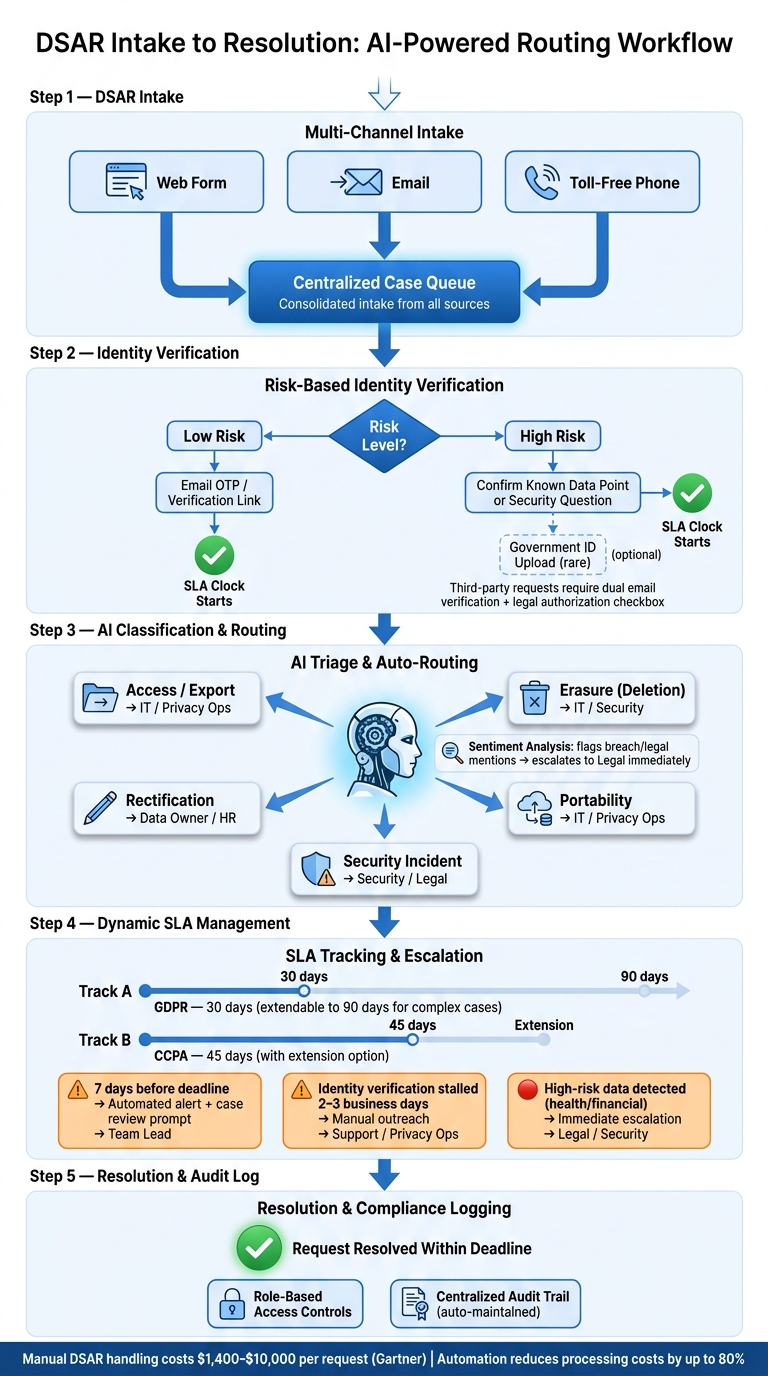
DSAR Intake to Resolution: Automated Routing Workflow
Centralizing DSAR Intake with Case Queues
Once form data is structured, the next step is ensuring each submission reaches the right destination automatically. Manually routing DSARs across scattered channels can lead to missed deadlines and compliance issues.
A centralized case queue solves this problem by collecting all submissions into one organized workspace. This setup creates role-based views for teams like legal, security, and privacy operations, cutting down on coordination headaches and simplifying the maintenance of audit trails. With this system in place, AI can step in to efficiently triage and assign cases.
AI Automation for Triage and Assignment
After setting up structured intake and a centralized queue, AI automation takes over to classify and prioritize requests with precision. Using intent detection, AI analyzes each submission and maps it to the appropriate request type – whether it’s access, erasure, rectification, or portability – then routes it directly to the correct team’s queue without requiring manual effort.
AI platforms do more than just classify requests. They analyze sentiment to identify high-risk cases early on [15]. For example, if a submission mentions a data breach, legal counsel, or a regulatory complaint, it can be flagged and escalated to legal immediately. Auto-tagging by topic and customer value further fine-tunes prioritization, ensuring urgent or high-stakes requests are addressed promptly [15].
"Manual DSAR handling costs $1,400–$10,000 per request." – Gartner [4]
When AI takes over tasks like classification, tagging, and initial routing, these costs can drop dramatically.
Dynamic SLA Management and Escalation
Accurate routing and classification are just the beginning – managing response deadlines is equally important. Timely identity verification plays a key role here, allowing the system to dynamically adjust SLAs to meet compliance requirements. For instance, GDPR mandates a response within 30 days of receipt (extendable to 90 days for complex cases) [1][10], while CCPA provides a 45-day window with the option of an extension [10][13]. Missing these deadlines is a common reason for regulatory complaints.
Dynamic SLA tracking ties the response timeline to the intake event – or, if identity verification is needed, to the moment verification is completed. Alerts are triggered 7 days before a deadline, giving teams enough time to act proactively. For complex requests – like those involving large data sets, multiple systems, or third-party representatives – AI can escalate the case to legal immediately, ensuring any necessary deadline extensions are requested within the first month [10].
| Trigger | Escalation Action | Team Notified |
|---|---|---|
| 7 days before deadline | Automated alert + case review prompt | Assigned team lead |
| Identity verification stalled (2–3 business days) | Manual outreach triggered | Support / Privacy Ops |
| High-risk data detected (health/financial) | Immediate escalation to legal review | Legal / Security |
This layered approach removes guesswork, ensuring every request is handled within compliance deadlines.
Avoiding Common Mistakes in DSAR Intake and Routing
Common Mistakes in DSAR Form Design
The design of DSAR forms can make or break the entire process. Over-reliance on free-text fields for request details often leads to inconsistent triage and delays in routing decisions. A better approach is to use structured dropdowns for request types – such as access, erasure, rectification, and portability – right from the start. This reduces ambiguity and speeds up the process. Another common issue is asking for too much verification data, like requiring a passport copy for a simple, low-risk access request. This not only creates unnecessary friction but also increases legal risks [10][3]. A more practical approach is proportional verification, such as sending a confirmation code to the requester’s registered email address. This method is both compliant and less likely to discourage legitimate users.
Single-channel intake is another frequent oversight. Some regulations mandate at least two submission methods, such as a web form and a toll-free number [3]. Relying on just one channel can prevent valid requests from ever reaching your workflow.
But the challenges don’t end with the form design. Operational workflows often present their own set of hurdles.
Workflow and Tracking Challenges in B2B DSAR Handling
Once a request is submitted, the focus shifts to tracking and coordination, and this is where many teams struggle. Shared inboxes and spreadsheets are still common tools for managing DSARs, but they quickly become problematic as the volume of requests grows.
"DSAR issues most often arise because requests aren’t logged properly, ownership isn’t clear, or the deadline isn’t tracked from the outset." – Annabelle Ilsley, Trust Keith [12]
Fragmented systems across legal, security, and privacy teams often lead to requests getting stuck in someone’s inbox while the compliance clock keeps ticking. Without a unified system, missed handoffs, unclear responsibilities, and a lack of centralized audit trails are almost inevitable. Another major issue is data-scoping. Since 80–90% of digital data is unstructured – think emails, chat logs, and PDFs – manual searches often fail to capture all relevant information. This can result in incomplete responses, opening the door to regulatory complaints [14].
Redaction is another critical area where mistakes happen. Accidentally including someone else’s personal information in a data bundle isn’t just a slip-up – it’s a data breach [10].
To tackle these operational challenges, AI-native platforms offer a more streamlined and secure solution.
How AI-Native Platforms Address These Gaps
AI-native platforms are designed to address these common pitfalls, ensuring smoother processes and better compliance.
| Common Mistake | Risk | How AI-Native Platforms Help |
|---|---|---|
| Free-text intake fields | Inconsistent triage, routing delays | Structured forms + AI intent classification [1][3] |
| Excessive ID requirements | Compliance violations, requester friction | Proportional verification based on data sensitivity [10][3] |
| Single-channel intake | Missed valid requests | Multi-channel intake unified into one queue [5][3] |
| Spreadsheet tracking | Inaccurate logging and missed deadlines | Centralized logs with automated deadline alerts [1][12] |
| Ignoring unstructured data | Incomplete, non-compliant responses | AI-powered search across emails, chats, and cloud files [14] |
| Missing third-party redaction | Accidental data breach | AI-assisted redaction workflows; reduces unauthorized disclosure risks [10][3] |
Platforms like Supportbench tackle these challenges by centralizing intake from multiple channels, using AI to classify and route requests, and maintaining a comprehensive audit log automatically. Role-based access controls ensure that only authorized team members handle sensitive data, minimizing internal risks. Additionally, dynamic SLA tracking and automated escalation features help maintain compliance under tight deadlines. Starting with well-structured forms and disciplined workflows ensures that your DSAR process can handle pressure while staying compliant.
Conclusion: Building a Compliant, Efficient DSAR Process
Creating a strong DSAR process starts with structured intake, smart routing, and centralized tracking. A well-designed DSAR intake form isn’t just a compliance tool – it’s a critical safeguard against fines, data breaches, and operational chaos. Teams that handle DSARs effectively often rely on three key elements: structured intake, automated routing, and centralized tracking.
Incorporating features like dropdown menus, proportional identity verification, and multi-channel submissions can help avoid delays. Automating the routing process eliminates manual steps, ensuring every request is promptly addressed. This automation classifies requests, assigns them to the right queues, and kicks off the compliance timeline immediately. With strict deadlines in place, there’s no room for requests to get lost in someone’s inbox. These efficient practices lead to a DSAR process that’s both agile and risk-aware.
"A streamlined DSAR workflow builds customer trust and reduces the operational burden and costs associated with manual data retrieval." – WatchDog Security [1]
The benefits go beyond compliance. Automation can reduce processing costs by as much as 80% [6], which is a game-changer for B2B teams managing increasing request volumes without adding staff.
Supportbench brings all these capabilities together in one platform tailored for B2B needs. With AI-powered triage, dynamic SLA management, role-based access controls, and centralized audit logging, your team can focus on resolving requests quickly and accurately. Pricing starts at $32 per agent per month, with no hidden fees or extra charges for compliance features.
FAQs
What fields should I include to verify identity without collecting too much data?
To confirm someone’s identity while keeping data collection to a minimum, request basic details like their full name and contact information (e.g., email address). For extra security, include questions about information only they would know, such as their date of birth or specific account identifiers. It’s important to strike a balance – verify their identity effectively without gathering more data than necessary, especially for low-risk requests where existing authentication methods might already be enough.
When does the DSAR deadline clock start if identity verification is required?
When a DSAR (Data Subject Access Request) is submitted, the countdown for the response period starts as soon as the request is received. However, if identity verification is required, the clock only begins ticking after the requester’s identity is confirmed. Typically, under GDPR, the response period is one calendar month from the start date. This process ensures both compliance with regulations and the secure handling of sensitive information.
How do I route DSARs to legal vs. security without manual triage?
To streamline Data Subject Access Request (DSAR) routing, start by designing an intake form that captures the essential details. This form should include fields for the type of request, relevant details, and any additional context to ensure accurate processing.
Next, use AI-driven workflows or predefined rules to analyze the keywords and context provided in the form. These workflows can automatically route requests to the appropriate team. For instance:
- Legal-related requests (like compliance or data deletion) are directed to the legal team.
- Security-related issues (such as data breaches) are sent to the security team.
Finally, integrate this intake form with your case management tools to create a fully automated and seamless process, eliminating the need for manual triage. This approach not only saves time but also ensures requests are handled by the right team promptly.