Managing GDPR/DSAR requests can feel overwhelming, but with the right process, it’s manageable. Here’s what you need to know:
- What is a DSAR? A Data Subject Access Request (DSAR) allows individuals to request access to their personal data. Under GDPR, companies have just 30 days to respond.
- Key Challenges: DSARs can be informal (like “Can I see my account history?”), making them hard to identify. Data is often scattered across systems, and delays risk fines or legal trouble.
- Why It Matters: Mishandling DSARs can lead to regulatory fines or even personal liability for staff. For example, Spotify was fined €5M in 2023 for failing to meet DSAR obligations.
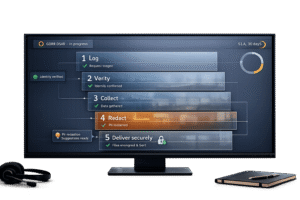
- Steps to Handle DSARs:
- Log and Acknowledge Requests: Start the process immediately.
- Verify Identity: Ensure the request is legitimate.
- Gather Data: Search all systems for relevant records.
- Review and Redact: Protect third-party information.
- Respond Securely: Use encryption or secure portals.
- AI Tools Can Help: AI can detect DSARs, streamline data collection, and assist with compliance, saving time and reducing costs.
Bottom Line: A clear workflow, proper tools, and team training are essential to handle DSARs efficiently and avoid chaos.
Understanding DSARs and Support’s Role
What Counts as a DSAR?
A DSAR (Data Subject Access Request) refers to various rights granted under GDPR, such as access, rectification, erasure, restriction, portability, and objection. Here’s a quick breakdown:
| DSAR Type | Legal Basis (GDPR) | What It Means in Practice |
|---|---|---|
| Access | Article 15 | The individual wants to know what personal data is being processed. |
| Rectification | Article 16 | A request to correct inaccurate or incomplete data. |
| Erasure | Article 17 | The "right to be forgotten" – deleting personal data entirely. |
| Restriction | Article 18 | Limiting how data is used without deleting it. |
| Portability | Article 20 | Delivering data in a structured, machine-readable format. |
| Objection | Article 21 | Stopping processing for specific purposes, like marketing. |
Sometimes, DSARs aren’t explicitly labeled as such. Even casual requests like "delete my account info" or "show me my data" can qualify as DSARs [3].
Now, let’s look at how these requests often surface in support workflows.
Where DSARs Show Up in Support
Customers tend to submit DSARs through whatever channel is most convenient – email, chat, or even social media [3]. This means that support teams are often the first to encounter these requests, not the compliance team or Data Protection Officer (DPO).
Here’s the critical part: the 30-day response window begins the moment any employee receives a DSAR, not when it gets to the legal or compliance team [1].
"The clock starts when the request reaches any employee, not when it reaches the DPO or another employee tasked with dealing with SARs." – Andy Williamson, MBCS, Penby [1]
Without a centralized tracking system, DSARs can get overlooked, sitting in inboxes for days. This is especially concerning given that subject access requests accounted for about 45% of the UK’s Information Commissioner’s Office (ICO) complaints in 2022–23, out of a total of 35,000 complaints [1]. By 2024–25, data protection complaints had risen to 42,315 [1].
Legal Obligations When Handling DSARs
Once a DSAR is identified, taking swift and structured action is non-negotiable. Here’s what must be done:
1. Identity Verification
Before releasing any data, confirm the requester’s identity in a way that matches the sensitivity of the information. As Boring DSAR warns [3]:
"Releasing data to the wrong person is a data breach – which is significantly worse than a late response."
2. Deadline Management
You have 30 days to provide a full response, though extensions are possible if the requester is informed promptly [5].
3. Third-Party Data Protection
If the requested data includes information about other individuals – such as customers or employees – redact it unless you have explicit consent to disclose it [3][6].
4. Audit Trail Documentation
Record every step of the process, from systems searched to search terms used and any redactions made. This documentation is essential in case a regulator questions the thoroughness of your response [3][5].
sbb-itb-e60d259
Maturing your GDPR compliance program: Data subject rights requests
Building a DSAR Workflow for Your Support Team
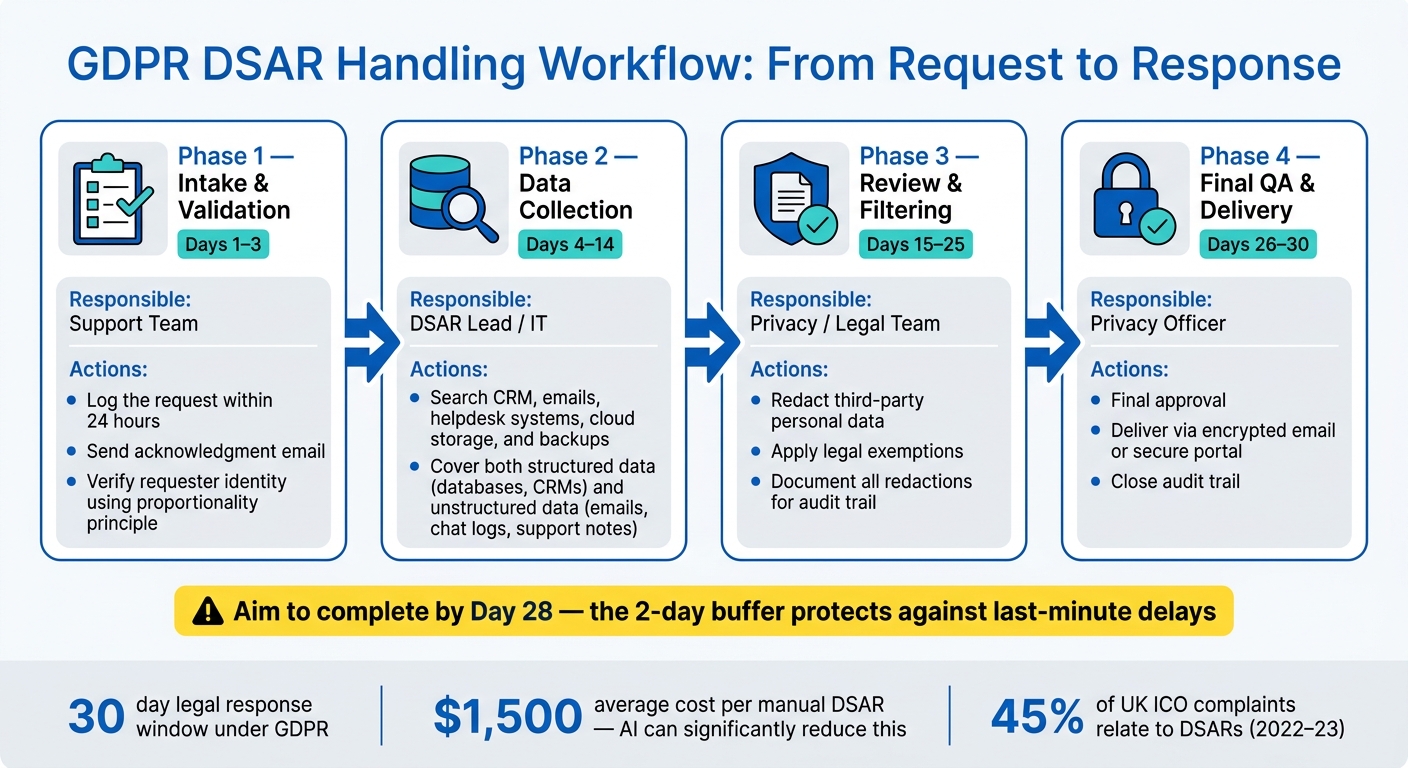
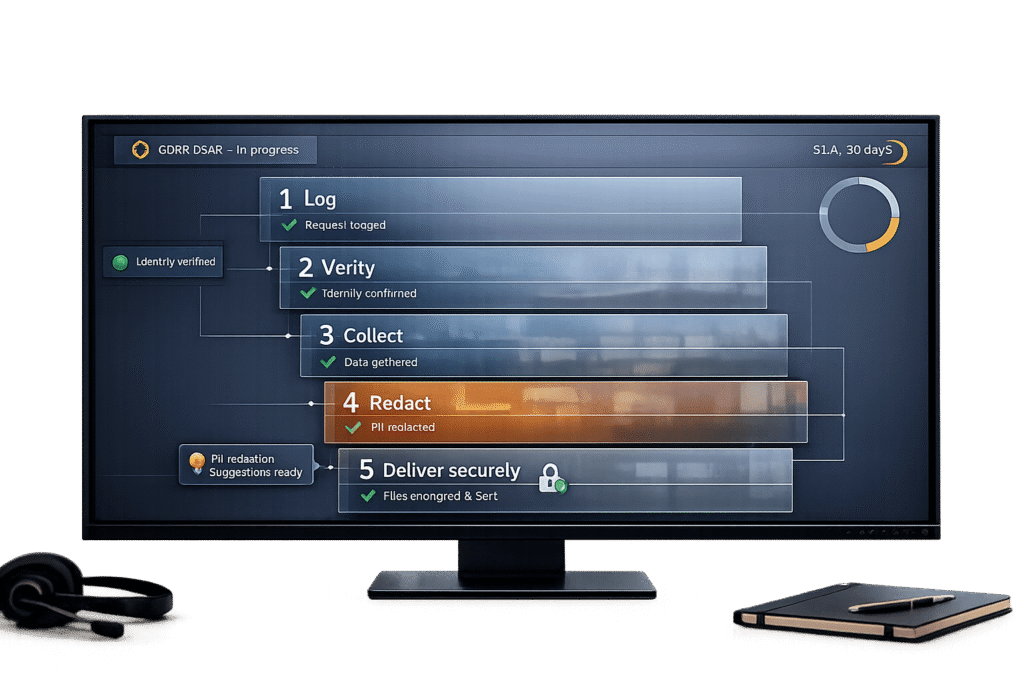
GDPR DSAR Handling Process: 5-Step Workflow for Support Teams
How to Structure a DSAR Process Step by Step
A well-organized DSAR process ensures every request follows a predictable path through key stages: intake, validation, data collection, review, and response. This structure helps prevent delays, missed steps, and compliance issues.
| Phase | Timeline | Primary Responsibility | Key Actions |
|---|---|---|---|
| Intake & Validation | Days 1–3 | Support Team | Log the request, send acknowledgment, verify identity |
| Data Collection | Days 4–14 | DSAR Lead / IT | Search CRM, emails, helpdesk systems, cloud storage, backups |
| Review & Filtering | Days 15–25 | Privacy/Legal Team | Redact third-party data and apply legal exemptions |
| Final QA & Delivery | Days 26–30 | Privacy Officer | Final approval, secure delivery, and close the audit trail |
To avoid last-minute issues, aim to complete the process by Day 28 rather than Day 30. This two-day buffer gives you breathing room for any unexpected delays in the final review [7]. Keep in mind that the 30-day clock starts the moment a request is received – not when it gets to your privacy team – so logging every request within 24 hours is essential [8].
When collecting data, make sure to search both structured data (like records from CRMs and databases) and unstructured data (such as emails, internal chat logs, and support notes). Missing even one source can lead to incomplete responses, which could raise red flags with regulators [6][4]. And when delivering the final response, always use encrypted email or a secure portal – sending sensitive information via standard email attachments is a no-go [6].
By sticking to these clear steps, you’re building a workflow that ensures accountability and keeps everything running smoothly.
Defining Roles and Responsibilities
Assigning clear roles is the best way to avoid missed deadlines. Every team member who might handle a DSAR should know how to identify it and where to escalate it.
Here’s how responsibilities can be divided:
- Support Agents: Handle the intake process, including logging the request, sending acknowledgment, and verifying the requester’s identity.
- DSAR Lead or Coordinator: Usually from operations or IT, this person oversees data collection, ensuring all relevant systems are searched.
- Legal or Privacy Team: Focuses on reviewing data for legal exemptions, approving redactions, and signing off on the final response.
This tiered approach ensures that tasks are handled by the right people, minimizing bottlenecks. It’s a system that aligns seamlessly with the broader DSAR workflow, keeping everything organized and efficient.
Now that roles are sorted, let’s talk about tools that make the process even smoother.
Using Templates and Runbooks to Stay Consistent
Consistency is key to managing DSARs efficiently while staying compliant. Templates and runbooks simplify the process, especially for support agents who may not handle DSARs regularly.
Here are some tools that can help standardize your workflow:
- Acknowledgment Template: Confirms receipt of the request and outlines the expected timeline.
- DSAR Tracking Log: Keeps track of requester details, verification status, and regulatory deadlines.
- Data Extraction Checklist: Lists every system that might contain personal data to ensure nothing is overlooked.
- Final QA Checklist: Confirms all steps – legal review, redactions, and formatting – are completed before the response is sent.
Storing these tools in a shared internal knowledge base ensures quick access, even during unexpected situations (like a DSAR landing late on a Friday afternoon).
For identity verification, follow the proportionality principle. For low-risk requests, verifying an email match from a registered account is often enough. For more sensitive cases, you might need additional details or, rarely, a photo ID. As the Information Commissioner’s Office (ICO) puts it:
"If you’re not sure the requester is who they say they are, you must check this quickly. You shouldn’t ask for formal ID unless it’s necessary and proportionate." – Information Commissioner’s Office (ICO) [7]
Overcomplicating verification creates unnecessary friction, slowing things down for both your team and the requester. Keep it simple, efficient, and proportional to the sensitivity of the data involved.
Using AI to Simplify DSAR Management
AI for detecting and routing DSAR requests
Handling Data Subject Access Requests (DSARs) can be tricky, especially when requests don’t follow formal phrasing. Rarely do people write, "I am submitting a Data Subject Access Request under Article 15 of the GDPR." Instead, you’ll see messages like, "Can you tell me what information you have on me?" or "I’d like to see my file." These informal requests can easily go unnoticed. As Andy Williamson of Penby explains:
"If the first person to see the request doesn’t recognise what it is, the organisation is already losing valuable time that it won’t get back." [1]
AI steps in to solve this problem by scanning incoming messages across all channels – email, web forms, chat, and even social media. It identifies DSAR intent, no matter how it’s worded. Once detected, the system automatically tags, prioritizes, logs the receipt date, and routes the request to the designated DSAR lead. This ensures the 30-day deadline starts as soon as an employee receives the request, not when it finally lands on the privacy officer’s desk [1] [3]. After routing, AI continues to assist agents throughout the process to ensure smooth handling.
AI as an Agent Co-Pilot During DSAR Handling
AI doesn’t just stop at detection and routing – it supports every step of the DSAR process. Tools like Supportbench offer an AI Agent Co-Pilot that simplifies workflows by pulling up relevant case histories, suggesting next steps, and even drafting acknowledgment letters or final responses. This ensures legal obligations are met without unnecessary delays.
Data discovery, one of the most time-intensive parts of DSAR processing, becomes far more efficient with AI. Enterprises handle an average of 957 DSARs annually [9], and AI can simultaneously search structured databases and unstructured sources like emails, internal notes, and chat logs. It compiles relevant data, flags sensitive content that may need redaction (e.g., third-party personal data), and logs the reasons for each redaction to maintain a thorough audit trail. Matt Davis from Osano highlights the value of this approach:
"Subject rights fulfillment is an excellent use case for automation. While it’s vital that a human remains in the loop to verify accuracy, automated subject rights solutions can significantly expedite the DSAR fulfillment workflow…" [2]
Considering that manual DSAR processing costs enterprises about $1,500 per request [9], AI co-pilots can significantly cut down on time and expenses by streamlining discovery, drafting, and review.
AI for Case Summaries and Compliance Reporting
Delivering a DSAR response isn’t just about providing the data – it’s about presenting it in a clear and organized way. Sending thousands of unstructured documents doesn’t meet compliance standards [1]. Instead, AI organizes data into concise, indexed reports, complete with plain-language cover letters that explain the sources and any withheld information.
AI-generated reports also give organizations a real-time overview of DSAR volume, deadline statuses, and workflow gaps. Automation reduces the need for engineering involvement in routine DSAR tasks by over 70% [9], allowing technical teams to focus on more critical projects. For instance, Bristol City Council faced an ICO enforcement notice in August 2025 after meeting statutory deadlines for only 42% of 961 requests over a year [1]. Proper documentation and timely responses are not just helpful – they’re mandatory.
Conclusion: Making DSAR Management Efficient and Compliant
Key Takeaways
The volume of DSAR requests is on the rise. These requests already make up about 34% of complaints to EU supervisory authorities [10]. With U.S. privacy laws like CCPA expanding, your support team will likely face even more requests in the future.
A structured approach can turn the challenge of meeting a 30-day deadline into a manageable process. As Dr. Thiébaut Devergranne, Founder of Legiscope, explains:
"Handling DSARs correctly is not optional – it is a legal obligation that carries significant enforcement consequences when mishandled." [10]
Failure to comply not only risks fines – up to €20 million or 4% of annual global turnover – but also damages your company’s reputation. Using automation tools can make compliance more efficient and reduce costs.
Take these insights and use them to strengthen your DSAR processes now.
Next Steps for Support Leaders
Start by auditing your DSAR process. Ask yourself: Can every team member identify an informal DSAR? Is there a centralized system for logging requests as soon as they come in? Do you have templates ready for acknowledgments, deadline extensions, and final responses?
If any of these pieces are missing, make them a priority. By following the workflow outlined earlier and leveraging AI tools, you can streamline your approach. Centralized management is key – 62% of organizations already use specialized software to handle DSARs [10]. AI-powered platforms like Supportbench provide tools for detecting requests, routing cases, assisting agents, and maintaining compliance reports. At $32 per agent per month, it’s a cost-effective solution for B2B teams aiming for enterprise-level efficiency without breaking the bank.
The focus should be on creating a repeatable, documented process that can adapt as your DSAR volume grows. Perfection isn’t required on day one – what matters is building a system that evolves with your needs.
FAQs
How can we identify DSARs in casual support messages?
DSARs (Data Subject Access Requests) don’t always come wrapped in formal legal jargon. They often show up in casual messages, like "What data do you have on me?" or "Can I see my information?" These requests might pop up in emails, chats, or support tickets, making them easy to overlook.
To handle these effectively, it’s crucial to have clear internal guidelines. These protocols should help your team identify informal requests related to data access, correction, or deletion, no matter which communication channel they come through. This ensures compliance and avoids missing important obligations.
What should we do if we can’t verify the requester quickly?
If you can’t immediately verify the identity of the requester, respond quickly to acknowledge their request and let them know verification is underway. Log the request, provide a clear timeline for when they can expect a response, and ask for any additional details if necessary. Should the verification process take longer than the legally required timeframe, make sure to document the delay, notify the requester, and explain that a full response will be provided once their identity is confirmed. Maintaining thorough records helps ensure compliance and minimizes any potential issues.
How do we deliver DSAR data securely without slowing support?
To ensure DSAR data is delivered securely and on time, it’s important to use automated workflows that simplify the processes of discovery, verification, and delivery across various systems. Unified APIs can significantly cut down on manual tasks while helping to meet compliance requirements. Incorporating automated identity verification methods and secure delivery channels adds an extra layer of protection for sensitive information. By organizing these steps into a well-structured process, support teams can stay compliant, avoid unnecessary disruptions, and maintain thorough regulatory audit trails.