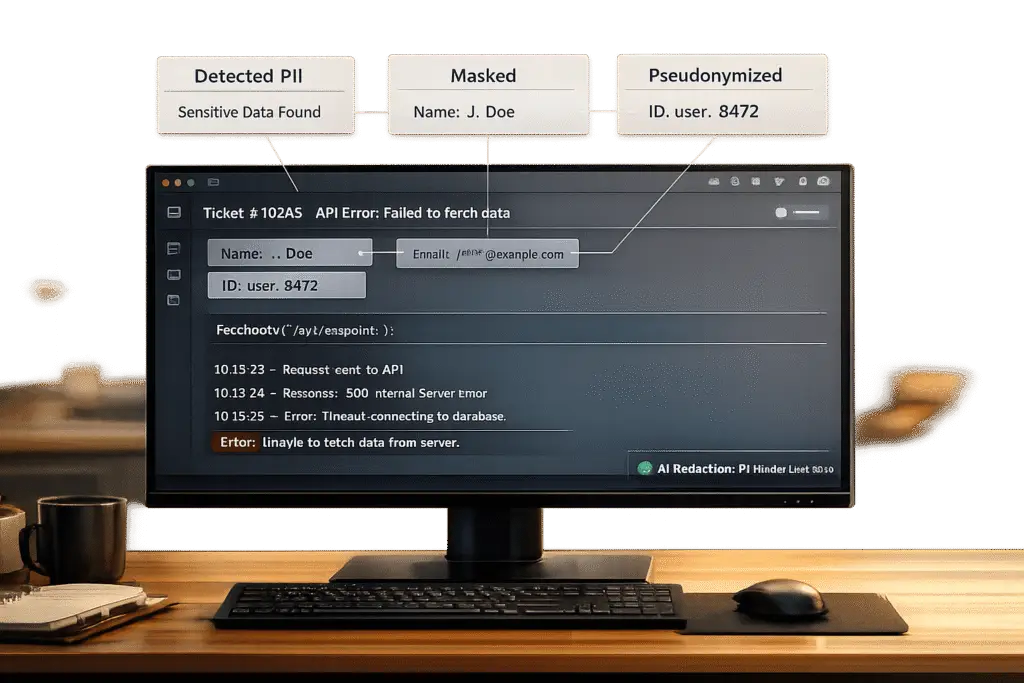
When handling support tickets, balancing privacy and functionality is critical. Personally Identifiable Information (PII) like names, emails, and API keys often appear in tickets, creating risks for compliance with GDPR, HIPAA, and CCPA. Mishandling this data can lead to hefty fines and security breaches. However, redacting PII without disrupting technical details is possible with the right strategies.
Key Takeaways:
- Identify PII: Map where sensitive data appears (e.g., emails, chat logs, metadata) and classify it by sensitivity and relevance.
- Redaction Methods: Use tailored techniques like masking, redaction, pseudonymization, and anonymization based on the data’s purpose.
- Automation with AI: Automate detection and redaction using AI tools like OpenAI‘s Privacy Filter, which achieves high accuracy and preserves context.
- Preserve Context: Use synthetic replacements or AI copilots to ensure redaction doesn’t compromise technical information.
- Monitor & Audit: Regularly review processes, measure effectiveness, and adapt to evolving legal requirements.
Protect Your Sensitive Data: PII Redaction with Microsoft Foundry and Azure AI Language Service

Mapping PII in Support Tickets
Before you can remove sensitive information, you first need to know where it exists in your ticket system. While this step isn’t overly complicated, it lays the groundwork for everything that follows.
Where PII Shows Up in Tickets
PII can appear in more places than you might think. In B2B support environments, it’s not just the subject line or the body of a ticket. Email threads, chat logs, attached files, inline code snippets, and even metadata fields – like IP addresses or browser fingerprints – can contain sensitive data. Customers often unknowingly paste credentials, account numbers, or configuration details into text fields.
A particularly tricky area is quasi-identifiers: data points such as order numbers, device IDs, timestamps, or geographic information. These might seem harmless individually but can identify a customer when combined with other data [1]. Quasi-identifiers often bypass basic redaction tools because they don’t match standard patterns like email addresses or phone numbers.
As Sam Pettiford, Founder of OpenRedaction, explains:
"Every unredacted minute increases exposure across caches, search indices, and notification systems." [1]
This is why adopting a "redact early" policy is critical. Scrubbing data as soon as it’s ingested – before it reaches search indexes or replication systems – is far more effective than cleaning it up later [1]. Knowing where PII resides allows you to categorize it effectively, which is the next step.
Grouping PII by Sensitivity and Use
After identifying where PII appears, the next step is to sort it into categories. This helps determine the best redaction method for each type. Not all PII carries the same level of risk, and some of it is essential for resolving tickets. Below is a breakdown of common PII categories, their sensitivity, relevance, and suggested redaction strategies:
| Category | Examples | Sensitivity | Technical Relevance | Redaction Strategy |
|---|---|---|---|---|
| Credentials | Passwords, API keys, tokens | Critical | None | Immediate redaction |
| Financial/Gov IDs | SSNs, credit card numbers | High | Low (verification only) | Tokenization or full redaction |
| Contact Info | Names, emails, phone numbers | Medium | High (account lookup) | Masking (e.g., j***@email.com) |
| Technical Context | Order IDs, device IDs, error codes | Low | Critical (log matching) | Keep intact |
Credentials and government IDs rarely play a role in resolving technical issues and should be redacted immediately upon ingestion [1]. On the other hand, contact information often serves operational purposes, like linking tickets to accounts, so masking (instead of full deletion) is usually the smarter approach [6].
Technical Details That Must Stay Intact
Redacting too much can cause its own problems. Essential troubleshooting details – like error codes, API paths, HTTP statuses, stack traces, configuration parameters, and session/request IDs – must remain intact. These details are often crucial for resolving issues. Using an allow-list approach can prevent unnecessary redaction of information like a 404 error code or a key database query string [1]. The goal is to produce a ticket free of personal data while retaining all the technical information needed to solve the problem.
Building a PII Redaction Strategy
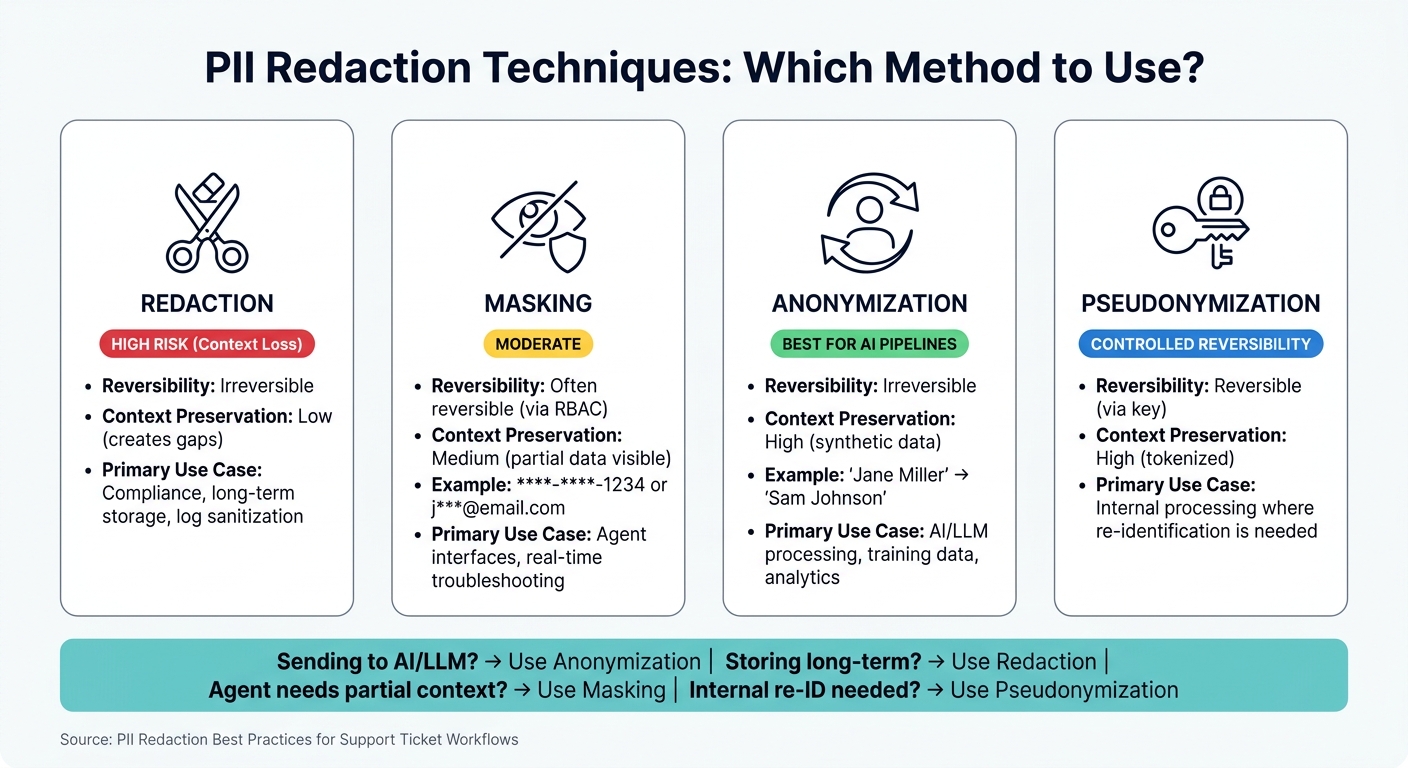
PII Redaction Techniques Compared: When to Use Each Method
Using your PII mapping as a foundation, you can create a repeatable redaction workflow. The key is to focus on collecting minimal data, redacting sensitive information as early as possible, and retaining it for the shortest time necessary [1]. This approach ensures compliance while maintaining critical technical details. Below, we’ll explore techniques, format-specific rules, and how to balance automation with manual review.
Redaction, Masking, and Anonymization: When to Use Each
Each of these techniques serves specific purposes in managing sensitive data within a ticket workflow:
- Redaction: This method permanently removes sensitive information. Since it’s irreversible, it’s best for long-term storage or sanitizing logs. However, it can leave gaps in the context of a record.
- Masking: Masking conceals parts of data (e.g., displaying
****-****-1234for a credit card number) while keeping its structure intact. This reversible method, often managed through role-based access controls (RBAC), works well in agent interfaces where some context is needed. - Anonymization: This technique replaces real data with synthetic, realistic substitutes (e.g., changing "Jane Miller" to "Sam Johnson"). It maintains the flow of information, making it ideal for sending data to AI models for analysis.
- Pseudonymization: This involves replacing data with tokens that can later be reversed using a key. It’s useful for internal processes where re-identification might be required.
| Technique | Reversibility | Context Preservation | Primary Use Case |
|---|---|---|---|
| Redaction | Irreversible | Low (creates gaps) | Compliance, long-term storage, log sanitization |
| Masking | Often reversible (via RBAC) | Medium (partial data) | Agent interfaces, real-time troubleshooting |
| Anonymization | Irreversible | High (synthetic data) | AI/LLM processing, training data, analytics |
| Pseudonymization | Reversible (via key) | High (tokenized) | Internal processing where re-identification is needed |
"Redaction removes PII values. Anonymization replaces them with realistic synthetic data. For LLM pipelines, redaction breaks context and doesn’t scale." – Rom C, Serial Entrepreneur [2]
Choosing the right technique depends on the data format and its intended use.
Redaction Rules for Different Data Formats
Different formats require tailored approaches to handle PII effectively:
- Text tickets: Use regular expressions for structured patterns like Social Security numbers or credit card numbers. Combine these with NLP models to identify conversational PII, such as names or addresses.
- Logs and code snippets: Implement an allow-list to preserve technical details like error codes, API paths, and session IDs, which are critical for troubleshooting.
- Screenshots and PDFs: Use OCR technology to convert images into text, identify regions containing PII, and redact those pixel areas before storage.
- Audio transcripts: After converting speech to text, run the output through a PII detection model to identify and redact sensitive information.
Be cautious with data exports (e.g., CSV or PDF files from helpdesk systems), as they can unintentionally expose PII outside your controlled environment. Always route such exports through a mandatory sanitization process.
Combining Automation with Manual Review
Automation is excellent for managing large volumes of data, but human oversight is essential for nuanced cases. To strike a balance, set AI confidence thresholds: automatically redact entities with confidence levels above 0.9, and flag lower-confidence cases for manual review. This approach minimizes both over-redaction, which can strip away useful context, and under-redaction, where ambiguous identifiers might slip through.
For sensitive cases – such as those involving financial, legal, or medical information – route tickets to a restricted queue before they enter the standard workflow. When manual redaction is required, agents should log the reason (e.g., "Redacted full card number accidentally pasted by user") to maintain an audit trail. Regularly sample both redacted and unredacted tickets to refine automated rules and improve detection accuracy over time.
sbb-itb-e60d259
Setting Up AI-Driven Redaction Workflows
Configuring AI to Detect PII in Tickets
Once you’ve outlined your redaction strategy, the next step is configuring an AI detection layer. Modern AI tools have evolved far beyond basic pattern matching. For instance, OpenAI’s Privacy Filter, launched in April 2026, uses bidirectional token classification to evaluate the surrounding context before determining whether a word is sensitive. This is especially valuable in support tickets, where the same string – like a name or number – might function as either a customer identifier or a harmless technical reference [7].
The Privacy Filter delivers an impressive F1 score ranging from 96% to 97.43% on PII-masking benchmarks, with precision at 94.04% and recall at 98.04% [7]. It also supports a context window of up to 128,000 tokens, making it capable of processing even lengthy ticket threads in one pass without losing coherence.
"Privacy Filter is built with deeper language and context awareness… It can better distinguish between information that should be preserved because it is public, and information that should be masked or redacted because it relates to a private individual." – OpenAI [7]
One often-overlooked step in configuring AI for PII detection is setting up custom entity synonyms. If your system uses internal terminology that could resemble personal identifiers, you can train the model to recognize these terms as technical references rather than sensitive information [4].
With the AI detection layer ready, the next move is automating redaction and sanitization to protect data in real time.
Automating Redaction and Sanitization
To secure sensitive data from the moment it enters your system, implement ingest-time redaction, which removes or masks PII before the data is indexed, replicated, or cached [1].
Here’s how a typical workflow might look: incoming tickets are passed through the AI detection layer, which flags entities with a confidence score above 0.9 for redaction. High-confidence matches are then processed based on specific policies:
- CharacterMask for credit card numbers and Social Security numbers.
- EntityMask for names and email addresses in technical threads.
- SyntheticReplacement for tickets that will be analyzed by a language model.
For structured CRM fields where sensitive data is already labeled, token-based masking ensures comprehensive protection without relying on AI inference [8]. By combining these methods, you create a robust system where AI handles unstructured text, and token masking secures predefined fields.
Using AI Copilot to Preserve Context
Automated redaction can sometimes disrupt the flow of a support ticket, making it harder for agents to understand the issue at hand. To address this, integrate an AI Copilot to maintain context while generating clear ticket summaries.
Supportbench‘s AI Copilot is tailored for this purpose. It reviews past cases, consults an internal knowledge base, and examines the current ticket history to provide relevant context – even when raw identifiers have been removed. Instead of forcing agents to piece together a redacted thread, the Copilot delivers a concise summary that outlines the issue, details the technical steps already taken, and suggests the next response. This approach has been shown to cut first response times by up to 90% and significantly increase the number of tickets each agent can handle daily by 80% [5].
SyntheticReplacement pairs especially well with Copilot workflows. By replacing real names and contact details with realistic stand-ins, the AI can interpret tickets naturally and create coherent, logical responses. This avoids the gaps that can occur with more disruptive redaction methods [4].
Keeping Redaction Accurate and Compliant Over Time
Common Redaction Mistakes and How to Avoid Them
Maintaining accurate redaction is an ongoing effort that goes well beyond the initial setup. Ensuring consistent accuracy not only protects sensitive data but also keeps you in line with changing legal standards.
Two common pitfalls often arise: cosmetic redaction and destructive redaction. Cosmetic redaction happens when text is simply covered with a black box without actually removing the underlying content. This means someone could easily retrieve the hidden text by copying and pasting. A real-world example? During the 2024 Epstein document release, over 900 pages had this flaw, making sensitive information accessible [9]. The solution? Always "flatten" redacted documents into a single-layer image, which removes the original text layer entirely.
On the other hand, destructive redaction removes a significant portion – up to 30%–40% – of searchable text [9]. This disrupts cross-references and breaks search indexes, which support agents rely on to troubleshoot effectively. A better approach is synthetic replacement, which swaps sensitive identifiers with realistic placeholders. This method keeps the document’s structure and grammar intact, preserving its usability while ensuring de-identification.
Another frequent issue is leaving personally identifiable information (PII) in metadata or storage layers. To address this, make sure PII is removed across all storage tiers. Fixing the ingestion pipeline when leaks occur is critical, as patching only affected records won’t solve the root problem [1].
To ensure progress, it’s crucial to monitor performance metrics consistently.
Measuring Redaction Effectiveness
The difference between a robust redaction program and one that merely looks good lies in tracking the right metrics. Below are key benchmarks to keep an eye on:
| Metric | Target | Impact |
|---|---|---|
| PII Detection Recall | ≥ 0.98 for SSN, PHI | Reduces the risk of data leaks [9] |
| Searchable Text Retention | ~100% (with synthetic replacement) | Maintains technical context for agents [9] |
| F1-Score | 96%–97.43% | Balances precision and recall effectively [7] |
| Latency | < 100ms at ingest; < 1s per page for SaaS | Prevents delays in support workflows [9] |
In addition to these metrics, conducting monthly sampling cycles is essential. Pull random batches of tickets and use regex searches to detect patterns like credit card BINs, email formats, or tax IDs. This helps catch operational drift – the gradual decline in AI detection accuracy as language evolves over time [1]. Tools like Supportbench’s reporting dashboards can highlight trends, enabling your team to address issues before they escalate into compliance risks.
"The most secure support platform is not the one with the hardest encryption, it is the one that retains the least data possible and can prove it continuously." – Sam Pettiford, Founder, OpenRedaction [1]
Aligning performance metrics with legal requirements strengthens your redaction strategy, making it both effective and compliant.
Adapting to Legal and Customer Requirements
Compliance is a moving target. Frameworks like HIPAA, PCI-DSS, GDPR, and the California Consumer Privacy Act all have distinct demands. On top of that, many enterprise clients impose their own contractual data-handling rules. The best approach? Per-client policy configuration. Define tailored detection rules for each regulatory or contractual context instead of relying on a one-size-fits-all policy, which often overprotects some accounts while underprotecting others [3]. Regular updates to these policies ensure your redaction practices stay effective as regulations evolve.
For industries under strict regulations, storing redaction logs in WORM (Write Once, Read Many) storage is essential. This creates a tamper-proof audit trail, satisfying external auditors and providing clear evidence of compliance. This is especially critical given that redaction failures across the US and EU resulted in over $270 million in fines by 2025 [9].
"A PII redaction policy written in a company wiki is not a control. It is a liability waiting to surface in your next HIPAA or GDPR audit." – Daniel Whitenack, Prediction Guard [10]
Lastly, integrate audit results with governance tools like OneTrust or Azure Purview. This ensures continuous oversight and makes it easier to provide documentation when regulators or enterprise clients request proof [1]. Redaction accuracy isn’t a one-and-done task – it requires ongoing effort and discipline to maintain.
Conclusion: Staying Compliant Without Slowing Down Support
Protecting sensitive information doesn’t have to mean choosing between compliance and efficiency. The strategies outlined here – like mapping PII during ingestion and leveraging context-aware AI for pseudonymization – show that you can achieve both.
At its core, the approach is straightforward: redact early, retain less, and audit often. By replacing sensitive details with consistent tokens (like ACCOUNT_1 or EMAIL_1), you can maintain technical context while safeguarding customer data. This method works hand-in-hand with regular audit practices, such as ticket sampling, to catch potential compliance issues before they escalate.
For long-term success, it’s essential to move beyond relying solely on policies and implement robust technical controls. Features like detailed audit logs and role-based access ensure that your system is prepared for audits and minimizes the risk of compliance gaps.
Fine-tuning AI models with domain-specific support data can significantly improve detection accuracy – from 54% to 96% [7]. This reduces missed identifiers and minimizes the need for manual intervention. By following the guide’s step-by-step framework – from identifying PII to deploying AI-driven workflows – support teams can efficiently manage sensitive information without compromising productivity.
Supportbench is designed to make this process seamless. Its AI Copilot, automation tools, role-based security, and reporting dashboards allow teams to manage PII effectively while staying focused on resolving tickets. And at $32 per agent per month with no feature restrictions, it’s a cost-effective solution for B2B teams looking for enterprise-level controls without added complexity.
With the right system in place, you can combine compliance with fast, efficient support.
FAQs
What’s the fastest way to start mapping PII in our ticket system?
The fastest approach is to use automated tools for detecting and redacting sensitive information right at the point of message ingestion or data entry. Set up pipelines with regex patterns or AI models to spot details like email addresses and phone numbers. Many platforms also support trigger-based automation, which can redact personal data during ticket creation or updates. For more advanced needs, AI-powered tools offer real-time, context-sensitive redaction, making it easier to stay compliant without requiring manual intervention.
How do we avoid redacting IDs and logs that engineers still need?
To protect sensitive data while maintaining usability for engineers, consider using reversible redaction. This method replaces Personally Identifiable Information (PII) with consistent tokens, allowing the context to remain intact for technical work. Pair this with pattern-based detection techniques, such as regular expressions (regex), to identify PII like emails or phone numbers. Then, apply manual or automated masking to redact this data effectively. This combination ensures sensitive information is safeguarded while retaining the critical details engineers need for troubleshooting.
How can we prove our redaction process is working during audits?
To show how well your redaction process works during audits, rely on audit logs generated by your redaction tools. These logs usually include details like timestamps, user actions, and specifics about the content that was redacted.
If you’re using AI-powered tools, make sure the logs also document detected PII (Personally Identifiable Information) entities and the corresponding redaction actions. Regularly reviewing and exporting these logs can serve as solid evidence of compliance and demonstrate that your redaction process is applied consistently.