

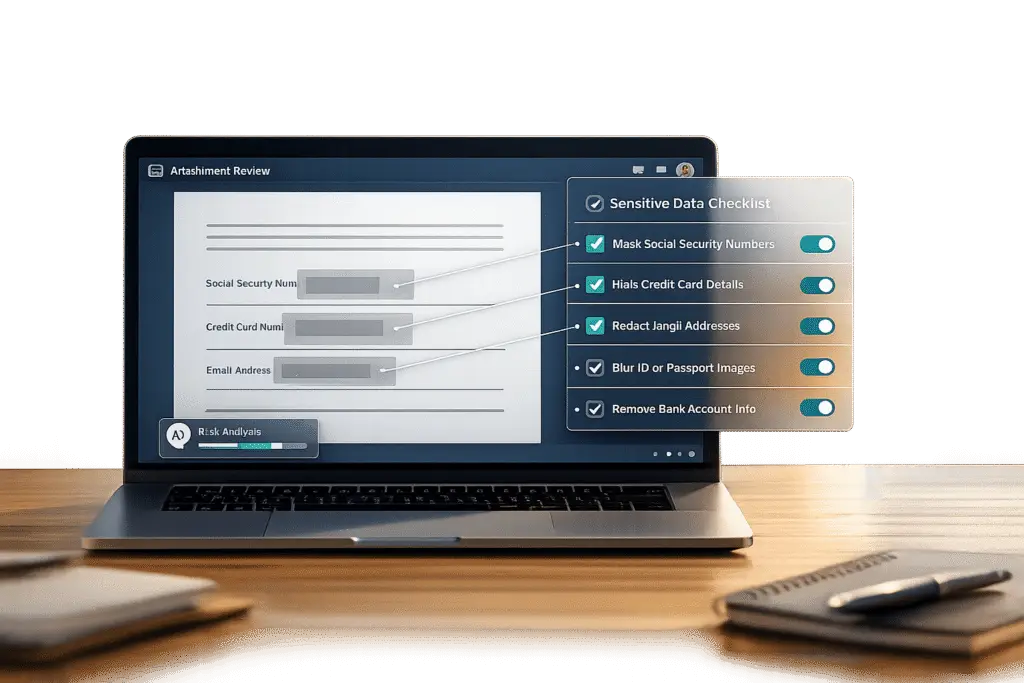
Every support team handles sensitive data daily – attachments like ID photos, financial documents, or medical records. Without clear processes, these files can lead to privacy risks and regulatory fines. Here’s how to create a checklist to protect customer data and stay compliant:
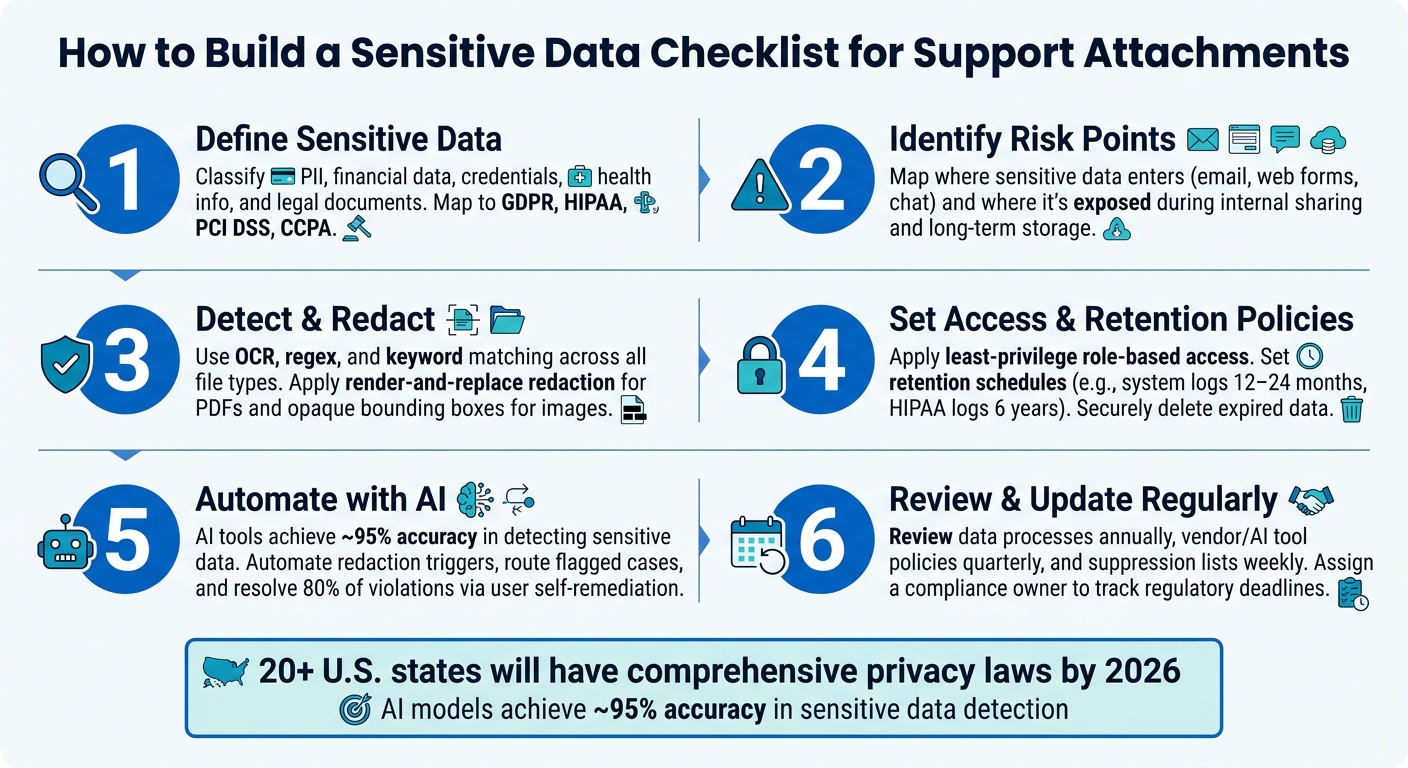
- Define sensitive data: Identify what qualifies as sensitive, such as PII, financial details, credentials, and health information. Match these to relevant compliance frameworks like GDPR, HIPAA, or PCI DSS.
- Spot risks in workflows: Sensitive data often enters via email, web forms, or chat. Risks increase during internal sharing and long-term storage without proper controls.
- Use detection tools: Combine OCR, regex, and keyword matching to identify sensitive information in attachments. Ensure tools support various file types.
- Implement redaction: Remove sensitive data from files before sharing. Use secure methods like replacing text or applying opaque coverage for images.
- Set policies: Create rules for data intake, retention, and access. For example, limit permissions, auto-delete old attachments, and log all actions for audits.
- Leverage AI: Automate detection, redaction, and enforcement. AI tools can process attachments faster and reduce errors.
- Stay updated: Regularly review your checklist to align with evolving regulations and emerging risks, such as new privacy laws or AI-related data issues.
Summary Table:
| Step | Key Action |
|---|---|
| Define Data | Classify sensitive data types and rules. |
| Identify Risks | Map risks in data entry and handling. |
| Detect & Redact | Use tools to remove sensitive info. |
| Set Policies | Limit access, retention, and sharing. |
| Automate with AI | Streamline detection and compliance. |
| Regular Updates | Review for new laws and risks. |
Sensitive Data Checklist for Support Attachments: 6-Step Process
Protect sensitive data with Azure AI Language PII Redaction
Understand and Define Sensitive Data in Support Attachments
To protect sensitive data effectively, the first step is knowing exactly what you’re dealing with. Many support teams skip this critical step, jumping straight to implementing controls without fully understanding what they aim to safeguard. However, proper data classification is the foundation for setting up technical controls, defining retention policies, and managing access permissions.
When data is clearly classified, it not only helps you implement appropriate technical measures but also makes it easier to identify and address risks within your support processes.
As Sam Pettiford, Founder of OpenRedaction, wisely states:
"The most secure support platform is not the one with the hardest encryption, it is the one that retains the least data possible and can prove it continuously." [5]
This philosophy only works if your team shares a clear and practical definition of what "sensitive" data means.
Common Types of Sensitive Data
Support attachments often arrive with no labels or indications of their content. For instance, a customer trying to resolve a billing issue might attach an invoice containing their Social Security Number, or a SaaS user reporting a bug might include an API key in a screenshot. Below are some common categories of sensitive data found in B2B support attachments, each requiring unique handling:
| Data Category | Common Examples in Support | Relevant Compliance Framework |
|---|---|---|
| PII (Personally Identifiable Information) | Full names, SSNs, dates of birth, home addresses | GDPR, CCPA/CPRA |
| Financial Data | Credit card numbers, IBANs, invoices, tax IDs | PCI DSS, GLBA |
| Credentials | Passwords, API keys, session tokens, OTPs | SOC 2, ISO 27001 |
| Health Data (PHI) | Diagnoses, symptoms, insurance IDs, clinical notes | HIPAA |
| Legal/Business Data | Signed contracts, NDAs, account references | GDPR, SOC 2 |
One particularly critical category is Sensitive Authentication Data (SAD). According to PCI DSS, data such as full magnetic stripe details or CVV codes must never be stored after authorization [2]. If a customer includes such information in an attachment, it should be deleted immediately – not just redacted.
Additionally, don’t overlook quasi-identifiers – data like order numbers, device IDs, or timestamps. While they may seem harmless individually, they can often be combined to re-identify individuals [5].
Industry-Specific Compliance Requirements
The compliance framework relevant to your industry determines much of your security strategy. Missteps here can lead to legal risks and increased operational complexity. For example, under PCI DSS, failing to identify cardholder data (CHD) can result in your entire infrastructure being considered "in scope" during an audit, which can increase costs and create additional challenges [2].
Here’s a breakdown of major compliance frameworks for U.S.-based support teams:
| Framework | Who It Covers | Key Requirement | Max Penalty |
|---|---|---|---|
| GDPR | EU residents’ data | Data Processing Agreement (DPA) | Up to 4% of global annual turnover [4] |
| HIPAA | U.S. healthcare (PHI) | Business Associate Agreement (BAA); Minimum Necessary Standard | Up to $2.1M per violation category/year [4] |
| CCPA/CPRA | California consumers | Right to delete/correct; encryption at rest | $750 per consumer per breach [4] |
| PCI DSS | Payment card data | Identification of CHD and SAD; no post-auth storage | Increased audit scope and fines [2] |
Under CCPA, encrypted or redacted data with secure keys can eliminate the private right of action for statutory damages [4]. This makes proactive redaction a practical financial safeguard, not just a recommended practice.
By 2025, 20 U.S. states are expected to have comprehensive privacy laws, with many aligning closely to GDPR standards [4]. If your support team serves customers across multiple states, it’s essential to adopt a compliance strategy that accounts for overlapping regulations.
With a clear understanding of sensitive data types and their regulatory implications, the next step is to map out how these data points flow through your support workflow. This ensures you can address risks at every stage.
Identify Risk Points in the Support Workflow
Once you’ve defined what qualifies as sensitive data, the next step is figuring out where in your support workflow this data is most at risk. Without a clear understanding of these exposure points, even the most detailed checklists can leave critical vulnerabilities unaddressed.
How Sensitive Data Enters the Support System
The most common – and often overlooked – way sensitive data enters a support system is through email. Many ticketing systems rely on email as their backbone, and as SupportBee explains:
"Most ticketing systems are tightly coupled with email… This means sensitive data is frequently transmitted back and forth in plaintext or weakly protected formats." [1]
For example, when customers face issues like failing an identity verification step or struggling with onboarding, they often resort to emailing support directly. In these cases, they may attach highly sensitive files, such as a photo of their driver’s license, a bank statement, or even screenshots containing API credentials [6]. Why? Because it’s the easiest option for them.
While email is the primary entry point for sensitive data, other channels like web form uploads, live chat, and third-party integrations also bring unique risks. However, email poses the greatest threat because data sent this way often lingers in uncontrolled locations – agent inboxes, mail server backups, or forwarding chains – even after the issue is resolved [1].
Once this data enters your system, the risks don’t end – they evolve.
Risks During Internal Handling and External Sharing
After a sensitive file is inside your system, it faces new dangers. Agents frequently forward entire ticket threads, including attachments, to colleagues, managers, or even third-party vendors. As SupportBee puts it, "the moment data leaves it via email, control is lost." [1]
The risk grows when access permissions are too broad. Limiting access to only those who truly need it is critical. Even without a security breach, granting unnecessary access can violate compliance standards like HIPAA’s Minimum Necessary Standard or GDPR’s data minimization principle.
Retention and Long-Term Storage Risks
The longer sensitive data is stored, the greater the risk. Attachments that were relevant two years ago often remain accessible because no one implemented a deletion policy. This leads to a massive backlog of unreviewed and unclassified files, making audits challenging and storage costs higher.
Prolonged storage introduces several issues, including unauthorized access and the inability to comply with deletion requests under laws like CCPA or GDPR. If you can’t locate and remove a customer’s data when they request it, you’re already out of compliance – no matter how secure your storage systems are. To address this, it’s essential to identify where sensitive files are stored, how long they’re kept, and who has access to them. These steps are critical for maintaining control and staying compliant.
Build a Checklist for Detection, Redaction, and Policy Enforcement
With risk points identified, the next step is creating a checklist to detect, sanitize, and enforce data policies. Tackling detection and redaction head-on helps reduce risks like uncontrolled internal forwarding and excessive long-term storage. Let’s break this process into three key areas: detection, redaction, and policy enforcement.
Detection and Screening Methods
Effective detection relies on a combination of tools like OCR, regex, and keyword matching:
- OCR (Optical Character Recognition): This is critical for identifying text in images or PDFs where the text isn’t machine-readable. Without OCR, scanned documents like a driver’s license or a bank statement could slip through undetected.
- Regex (regular expressions): Ideal for spotting structured data such as Social Security Numbers, credit card details, or phone numbers.
- Keyword matching: Useful for catching specific terms defined by your organization, such as "account password" or "routing number."
These methods work best when combined, as no single approach can cover every potential risk. Ensure your checklist addresses various file formats – Word documents, Excel sheets, PDFs, images, and even ZIP archives.
Set up thresholds to act only on high-confidence matches, and always re-scan redacted outputs before they leave the system. This step ensures that any missed text or bounding box errors are caught. [7][8]
Redaction and Pre-Forwarding Controls
Detection alone isn’t enough – redaction must follow. Before sharing or forwarding any file, sanitize it properly.
For PDFs, avoid using "black highlights" to obscure text; this only hides the data visually while leaving it accessible underneath. Instead, rely on a render-and-replace method that removes sensitive text entirely and generates a secure new file.
When dealing with images, use opaque bounding boxes with padding to cover sensitive data. Avoid blurring, as compression artifacts can sometimes reveal the underlying information. For plain text or chat messages, replace sensitive data with placeholders like [EMAIL] or [CARD NUMBER]. This keeps the context intact while protecting the data.
"A single unredacted screenshot in chat or a PDF with ‘black boxes’ that hide nothing beneath can be enough [to lose trust]." – Andy Ewing, Tech Writer [9]
Don’t forget metadata scrubbing. Files like photos and Office documents often carry hidden details – GPS locations, camera ownership information, or document revision histories – that standard redaction tools can miss. Make this step a default part of your redaction process. [9]
Enforcing Policies Across the Team
A checklist is only effective if it becomes part of your team’s daily workflow – not something buried in a shared document.
Embed secure upload links directly in agent email signatures and automated ticket acknowledgments. This encourages customers to use secure methods before sending sensitive files via email. Equip agents with canned responses and snippets so they can handle these situations consistently, without needing to improvise. [1] Training your team to redirect customers proactively – before sensitive data enters your system – is one of the most effective habits you can establish. [1]
Here’s a quick summary of key policy areas and enforcement methods:
| Policy Area | Enforcement Method | Key Benefit |
|---|---|---|
| Data Intake | Secure upload links in signatures and auto-responders | Prevents PII from entering plaintext email logs |
| Data Sanitization | AI-driven redaction triggers on inbound attachments | Ensures consistent PII removal without manual effort |
| Data Minimization | Automated attachment deletion schedules | Reduces long-term storage risks and costs |
| Accountability | Require audit logs for all redactions | Provides a verifiable trail for regulatory compliance |
This checklist provides a strong foundation for managing access, retention, and auditing in your support workflows.
sbb-itb-e60d259
Set Up Access, Retention, and Audit Controls
To make a sensitive data checklist truly effective, it needs strong access controls, clear retention policies, and thorough audit logs. These elements work together to minimize risks and ensure compliance.
Role-Based Access and Permissions
One of the best ways to limit exposure is by controlling who can access sensitive data. Using the principle of least privilege, ensure agents only have access to the information they need for specific tasks – nothing more. Define roles with specific permissions to enforce this. For example, a "Compliance Reviewer" might be allowed to view flagged attachments but not download them, while an "Account Access Worker" could have permissions limited to refund-related tasks.
"The strongest support organizations don’t rely on ‘please be careful’ guidance – they bake constraints into workflows, permissions, and data handling." – Everworker.ai [10]
The same approach applies to AI-assisted workflows. AI systems should operate under scoped service identities, revealing sensitive information only when absolutely necessary. Start with redacted data and progressively disclose details as needed, avoiding shared logins or overly broad permissions.
Retention Policies and Secure Deletion
Keeping data longer than required can create unnecessary risks. Over-retention doesn’t just increase your exposure – it can also lead to hefty fines under regulations like GDPR [11].
Your retention policy should strike a balance, setting both a minimum period to meet legal requirements and a maximum period to limit liability. For example:
| Data Type | Recommended Retention | Compliance Driver |
|---|---|---|
| System Logs | 12–24 months | SOC 2; ISO 27001; PCI DSS |
| HIPAA-Related Logs | 6 years | HIPAA Privacy Rule |
| Financial Transaction Logs | 7 years | Sarbanes-Oxley Act (SOX) |
| Customer PII | 2–7 years (varies) | GDPR; contractual obligations |
Once data reaches the end of its retention period, securely dispose of it based on its sensitivity. Highly sensitive files should be destroyed using cryptographic wiping or physical destruction – not just deleted. Each deletion event should be logged to provide verifiable proof of secure disposal [11].
Audit Logs and Access Tracking
Audit logs are your safety net, providing a detailed record of every interaction with sensitive data. Track actions like deletions, redactions, policy violations, and administrative overrides, linking them to specific user identities. Automated tagging (e.g., redacted_content) can make compliance reporting easier by reducing the need for manual reviews.
Set up real-time alerts for data loss prevention (DLP) policy violations. These alerts should go to a monitored channel, such as email, Slack, or a ticketing system, so your team can respond quickly. This ensures emerging risks are addressed promptly while maintaining a live record of incidents.
Use AI to Automate Sensitive Data Management
Managing sensitive data effectively is a critical part of any robust security strategy. While traditional controls help regulate data access and retention, AI takes it a step further by automating sensitive data management. With the increasing volume of support tickets, manual reviews often fall short, leaving room for errors and oversights. AI-powered tools address this challenge by detecting and redacting sensitive information faster and more consistently than manual processes ever could. These tools integrate seamlessly with modern, cost-conscious B2B support systems, enhancing both efficiency and security.
AI-Driven Detection and Redaction
Today’s AI detection tools are designed to handle a wide range of file types commonly encountered in support workflows. They can even scan within compressed files like ZIP, RAR, and TAR archives, ensuring that sensitive information buried deep inside folders doesn’t go unnoticed [7][12].
What sets modern AI systems apart is their ability to understand context. Unlike older DLP tools, which often miss 60–80% of sensitive data in SaaS environments [15], advanced AI models can distinguish between actual sensitive information – like a live API key – and harmless example strings. These systems reportedly achieve precision rates near 95% [15]. By configuring these tools to flag only high-confidence results, businesses can minimize false positives and reduce alert fatigue for their teams [7][8].
For structured data, such as CRM records, token-based masking ensures that raw PII fields are replaced with tokens before reaching the AI. This allows the AI to operate with meaningful context while safeguarding sensitive information. This approach is especially valuable when support transcripts are used to train generative AI models for tasks like summarization [13][16].
These advanced detection capabilities lay the groundwork for AI to revolutionize compliance enforcement in support operations.
Automated Workflow Enforcement
Once sensitive data is identified, the next step is automatic remediation. AI simplifies this process, acting as an extension of your sensitive data management checklist. A tiered approach works best: delete attachments first, redact sensitive text next, and finally mark comments as private [14]. This prioritization ensures the most critical exposures are addressed immediately, without requiring agents to make on-the-spot decisions.
AI can also enforce compliance rules by routing flagged cases to appropriate reviewers, blocking ticket forwarding until redactions are confirmed, and summarizing risk levels for agents. A particularly effective feature is the "Human Firewall" notification, which alerts users who trigger violations. This encourages self-remediation, such as deleting a sensitive attachment themselves. Remarkably, platforms using this method report that 80% of data violations are resolved by end-users, significantly easing the burden on compliance teams while maintaining accountability [15].
Keep Your Sensitive Data Checklist Current
Creating a checklist is just the first step – keeping it up-to-date is just as important to ensure your support operations stay secure and compliant.
An outdated checklist can become a liability as regulations, tools, and data flows evolve. FlyFone puts it bluntly:
"A checklist used once during setup and never reviewed again creates the illusion of compliance – not actual protection." [17]
Review Policies and Regulations on a Set Schedule
The regulatory landscape is shifting quickly. By March 2026, over 20 U.S. states have implemented comprehensive privacy laws, with Indiana, Kentucky, and Rhode Island joining the ranks. Each new law can introduce requirements that your existing checklist might not cover.
To stay ahead, establish a regular review schedule like this:
| Review Type | Recommended Frequency |
|---|---|
| Data management process & sensitive data inventory | Annually (minimum) |
| Privacy notices | Annually |
| Vendor and AI tool privacy policies | Quarterly |
| Internal opt-out and suppression lists | Weekly |
Vendor policies, in particular, need focused attention. Terms of service for AI and cloud tools can change without notice. As of April 2026, 49% of workers admit to using AI tools at work without employer approval [19]. If a vendor quietly enables features like "training on user content", it could expose your data. Your checklist should flag these risks before they escalate.
Scheduling regular reviews also creates a foundation for identifying new risks in your evolving support environment.
Track Emerging Risks and Data Trends
New risks often fly under the radar. For example, in February 2026, Judge Jed S. Rakoff of the Southern District of New York ruled in United States v. Heppner that 31 Claude AI chat sessions from a former CEO were admissible as evidence in federal court. This decision showed that AI-assisted conversations might not always be protected by attorney-client privilege [19]. Such rulings can change how you view data risks in AI-assisted support.
Sensitive data is also spreading into unexpected areas. Platforms like Slack, internal ticket notes, and collaboration tools outside the main help desk are becoming hotspots. Alarmingly, 38% of workers have shared sensitive work content with consumer AI assistants [19]. Your checklist should account for these less-monitored channels, not just formal attachment uploads.
Keeping your checklist current also means staying on top of compliance deadlines. For instance, the California Delete Act, effective August 1, 2026, mandates data brokers to process deletion requests within 45 days. Meanwhile, the EU AI Act, effective August 2, 2026, introduces transparency requirements for AI-generated content [18]. If your support operations interact with these areas, your checklist needs to reflect these changes.
These trends highlight the importance of accountability, which brings us to the next critical step.
Assign Clear Ownership for the Checklist
Without someone clearly responsible for the checklist, reviews can easily fall through the cracks. Assign a specific person or team – like a compliance lead, support operations manager, or a cross-functional group – and document their role explicitly.
This ownership should cover tasks like tracking regulatory deadlines, verifying tool functionality, and conducting necessary DPIAs for high-risk data projects. The 2026 Disney CCPA settlement is a cautionary tale here: the company faced a $2.75 million penalty for failing to provide compliant opt-out rights [18]. Non-functional privacy controls can have costly consequences, and having a designated owner ensures these issues are addressed promptly.
Conclusion: Making Data Security Part of How Support Operates
A sensitive data checklist isn’t just a one-time task – it’s a continuous effort. This guide has walked through the steps of identifying sensitive data, tracking how it enters your workflows, implementing detection and redaction measures, and assigning clear accountability. Each step builds on the last, creating a robust framework for secure operations.
At its core, the principle is simple:
"The most secure support platform is not the one with the hardest encryption, it is the one that retains the least data possible and can prove it continuously." – Sam Pettiford, Founder, OpenRedaction [5]
This means weaving data minimization, early redaction, and short retention periods into the fabric of your support system. For example, instead of relying on unstructured email threads, you can use secure upload links. Configure conversation logs to auto-delete after 30–90 days [5], and perform monthly ticket reviews to catch any personally identifiable information (PII) that slips through detection. This approach not only ensures compliance but also boosts operational efficiency.
As Nightfall AI explains, "The goal of DLP in customer support isn’t to slow down work – it’s to enable compliant, efficient customer service at scale." [3] With advanced AI models achieving nearly 95% accuracy in identifying sensitive data across tickets and attachments [3], agents can focus on resolving issues rather than spending time on manual reviews.
FAQs
What should we treat as “sensitive data” in support attachments?
Support attachments often include sensitive information like personally identifiable information (PII), credit card details, bank account numbers, government-issued IDs, health records, passwords, and other private identifiers. Handling this data securely is essential to protect privacy and ensure compliance with regulations. Always treat attachments as though they contain such information, and adhere to strict protocols for identifying, redacting, and securing the data.
What’s the safest way to handle ID photos or PDFs customers email in?
To manage ID photos or PDFs securely, it’s crucial to steer clear of storing or handling unencrypted attachments. Instead, adopt secure, AI-powered workflows. Tools like encrypted interception systems, automated detection of personally identifiable information (PII), and redaction software can help safeguard sensitive data. Encourage customers to use secure upload portals or encrypted communication channels rather than email for sharing such files. Additionally, ensure your support team is well-trained to guide customers toward these secure options, reducing the chances of data breaches and ensuring compliance with privacy standards.
How can we automate detection and redaction without slowing agents down?
AI-powered workflows work in real-time to detect and redact sensitive information automatically, without slowing down support agents. These systems integrate effortlessly with support platforms, using contextual analysis to identify sensitive data. This eliminates the need for manual reviews or outdated processes that can cause delays. By automating redactions as tickets are created or updated, these tools help maintain compliance while keeping agents efficient, ensuring operations run smoothly without interruptions.