
Zendesk costs can be far more than just the base subscription price. If you’re budgeting for Zendesk, here’s what you need to know:
- Core Licenses: Calculate the cost using the number of seats, plan tier (e.g., Suite Professional at $115/agent/month), and billing frequency (annual saves ~20% over monthly).
- Add-ons: Features like AI tools, advanced analytics, and extra storage can increase costs by 15–35%. Regularly audit to avoid paying for unused add-ons.
- Usage-Based Fees: AI resolutions ($1.50–$2.00 each), telephony (e.g., $0.01/min for transcription), and data storage overages can add up fast.
- Implementation: One-time setup costs like integrations, training, and data migration can be substantial.
- Internal Labor: Ongoing admin time for maintenance, configuration, and training should be factored in.
Key Formula
True Cost = (Core Licenses × Seats × Term) + Add-ons + Usage-Based Charges + Implementation + Internal Overhead
For example, a 30-agent team using AI, telephony, and incurring setup costs could spend over $137,000 in the first year. To avoid surprises, monitor usage, deactivate inactive seats, and review add-ons quarterly. Always calculate the total cost of ownership (TCO) before committing to renewals or alternatives.
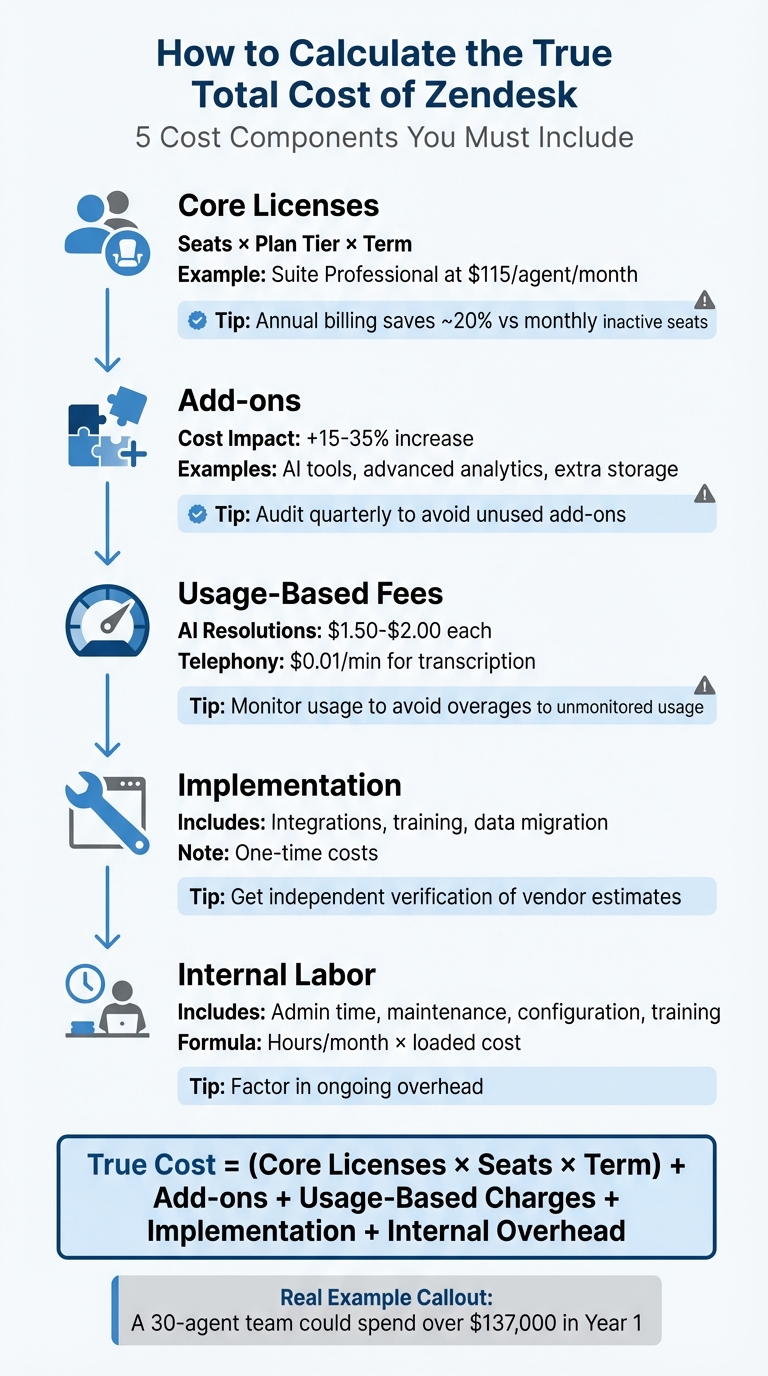
5-Step Framework to Calculate True Zendesk Total Cost of Ownership
The Total Cost Formula
To uncover the true cost of your investment, use this equation: True Cost = (Core Licenses × Seats × Term) + Add-ons + Usage-Based Charges + Implementation + Ongoing Admin/Ops Overhead. This approach goes beyond the surface-level per-agent-per-month rate, giving you a clearer picture of the full financial commitment.
Subscription fees are just the tip of the iceberg. Add-ons, usage-based charges, and internal labor can quickly inflate the total. For instance, unmonitored add-ons alone can increase costs by 15%–35%. Then, consider additional expenses like AI resolutions priced at $1.50–$2.00 each, telephony minutes, data storage overages, setup services, and the hours your operations team spends maintaining automations. These factors can add up fast.
Opting for annual billing can typically shave about 20% off your costs compared to monthly billing. Whether you’re locked into a 12-month contract or a multi-year deal, the formula remains effective – but only if you input accurate numbers. Be sure to account for projected seat growth, expected usage volumes, and realistic internal labor costs. Up next, we’ll break down each cost component to help you fine-tune your calculations.
TCO Checklist
Before you start crunching numbers, review these critical cost drivers. Overlooking even one could throw your budget off by thousands of dollars.
Keep an eye on these components:
- Seat growth and hygiene: Account for current active seats, anticipated hiring over the next 12–24 months, seasonal contractors, and inactive users who remain billable until manually removed. Inactive users alone can lead to 8%–12% in unnecessary charges.
- Plan tier requirements: Determine if features like sandboxes, HIPAA compliance, or custom roles force you into more expensive pricing tiers.
- Add-on ROI: Conduct quarterly reviews of tools like Copilot, Workforce Management, Quality Assurance, and Advanced AI usage to prevent "add-on creep", which typically leads to 10%–15% overspending.
- Messaging and AI volume: Forecast the number of automated resolutions and monthly active users.
- Voice usage: Include costs for monthly number fees, per-minute charges, and transcription fees, which often run around $0.01 per minute.
- Data and storage: Estimate file attachment volumes and data retention needs to avoid overage fees, especially under the upcoming 2025/2026 pricing tiers.
- Internal overhead: Factor in admin hours, developer time for API integrations, agent training, and workflow maintenance.
- Implementation: Include one-time consultant fees or internal labor costs for setup.
This checklist ensures you capture every expense – both the obvious ones on your invoice and the hidden costs that might not be immediately apparent. Later in the guide, we’ll apply this checklist to a detailed cost calculation example.
What’s Included in Total Cost
Your total investment falls into four main categories: licenses and seat costs, add-ons and advanced features, usage-based and variable fees, and implementation plus internal costs. Breaking these down will help you create a more accurate budget and avoid unexpected charges when it’s time to renew. Let’s take a closer look at each category to see how they factor into your total cost of ownership (TCO).
Licenses and Seat Costs
Seat licenses are your foundational expense. The formula to calculate this is simple: Annual Seat Cost = Σ(plan_price_per_seat × seat_count × 12). For example, if you have 25 agents on Suite Professional at $115 per agent per month, your yearly cost for seats alone comes to $34,500 before factoring in any additional features.
Getting the seat count right is critical. Full agent licenses are billed at the standard plan rate – for instance, $19/agent/month for Support Team or $169/agent/month for Suite Enterprise. It’s important to note that admin seats are not free, as they require a full-priced agent license. Suite plans and Support Professional/Enterprise tiers include light agents, who can view tickets and offer advice without being assigned work. However, standalone Support plans require the purchase of a "Collaboration" add-on to access this feature.
When estimating your seat needs, start with your current active users. Then, account for future hires over the next 12–24 months, as well as any seasonal or temporary staff. For enterprise customers, there’s also the option of "Agent Months", which allows you to add agents for shorter periods without committing to a full year.
"Zendesk bills per active seat, not per login. Dormant users stay billable until removed." – CloudNuro
To avoid unnecessary charges, deactivate seats for employees who leave or become inactive. Zendesk doesn’t automatically remove these users, so it’s up to you to manage this manually.
While seat licenses are the starting point, additional features can quickly increase your overall costs.
Add-ons and Advanced Features
Add-ons provide access to new features or increase capacity, such as extra storage or higher API limits. If left unchecked, these can raise your budget by 15%–35%.
Many features that were once separate add-ons – like Messaging, Voice, and Help Center – are now bundled into Suite plans. However, advanced versions of these features may still require separate purchases. For example, Suite plans include 1,000 Monthly Active Users (MAU) for Sunshine Conversations, but additional packs of 2,500 MAU cost $50/month. Similarly, Suite plans come with 100,000 generative searches per month, and exceeding that limit triggers the Generative Search Extender add-on.
Here are some commonly purchased add-ons:
- AI and automation tools: Copilot ($50/agent/month) and Automated Resolutions ($1.50–$2.00 per resolution).
- Workforce management tools: Options include Workforce Management ($25/agent/month), Quality Assurance ($35/agent/month), or the Workforce Engagement bundle ($50/agent/month).
- Security upgrades: Advanced Data Privacy and Protection ($50/agent/month) adds compliance and encryption features.
- Testing environments: Sandbox environments let you test configurations without affecting live systems.
- Integration and capacity boosts: For example, High Volume API increases API call limits to 2,500 requests per minute but requires at least 10 seats.
Before purchasing an add-on, check your Admin Center’s "Features" page to confirm whether it’s already included in your Suite plan. Overlooking this step can lead to redundant costs. For instance, one support team discovered they were paying $14/agent/month for Talk Partner Edition, even though it was already included in their Suite Professional plan. This oversight cost them $8,400 annually.
Once fixed costs are covered, you’ll also need to account for variable expenses tied to your team’s usage.
Usage-Based and Variable Fees
Variable fees are driven by usage and can include messaging conversations, bot interactions, API calls, and data storage.
For example, AI Automated Resolutions cost $1.50 per resolution for committed volumes or $2.00 per resolution on a pay-as-you-go basis. If your bots resolve 5,000 tickets per month at the committed rate, that’s $7,500 monthly – or $90,000 annually – on top of your seat licenses.
"Zendesk uses a value-based model for its AI resolutions… this model allows your costs to scale alongside your automation success." – Stevia Putri, eesel AI
Telephony is another variable cost. Local numbers in the US and Canada cost $1/month, while toll-free numbers are $2/month. Call minutes are billed based on the type and region, and transcription using Generative AI (available with the Copilot add-on) costs $0.01 per minute. For instance, if your team handles 10,000 call minutes monthly and transcribes half of them, you’d spend about $50 in transcription fees, plus any per-minute charges.
To estimate these costs, review your average usage over the past 3–6 months – such as messaging, bot resolutions, API calls, and storage – and factor in expected growth (typically 10%–30%).
Default data storage includes 10GB, plus an additional 50MB to 200MB per agent depending on your plan tier. Storage overages, especially from high-volume ticket attachments, can lead to extra charges under the 2025/2026 pricing structure. Regularly audit your storage usage to avoid surprises.
Implementation and Internal Costs
Implementation involves one-time expenses like setup, data migration, integrations (e.g., Salesforce, Jira, or telephony systems), custom field design, and training. These costs vary widely depending on the complexity of your setup, and vendor estimates often fall short – independent verification is a good idea.
Ongoing internal costs are another factor. Your support team will spend time maintaining automations, updating reports, managing integrations, and training new staff. For example, if an admin spends 15 hours per month on maintenance and has an annual loaded cost of $80,000, this translates to roughly $9,000 in annual internal overhead.
To calculate internal costs, use this formula: Hours/month × fully loaded cost (salary + benefits) = annual internal cost. Be sure to include time spent on configuration, API integrations, agent training, and maintaining workflows. You may also need additional tools for reporting, quality assurance, workforce management, or knowledge base functionality.
These internal and one-time costs round out the picture, giving you a complete breakdown of your total cost of ownership.
| Cost Component | Type | Key Drivers |
|---|---|---|
| Core Licenses | Fixed (Monthly/Annual) | Agent count, admin count, plan tier (Team vs. Enterprise) |
| AI Agents | Usage-Based | Number of Automated Resolutions ($1.50–$2.00 each) |
| Telephony (Talk) | Variable | Phone number fees, per-minute usage, transcription fees |
| Capacity Add-ons | Fixed/Tiered | Extra storage, high-volume API limits, additional WhatsApp numbers |
| Internal Labor | Indirect | Admin hours for configuration, training, and maintenance |
Example: Calculating Zendesk‘s Total Cost
Let’s break down a hypothetical scenario to understand the total cost of Zendesk for a mid-sized support team. In this case, the team starts with 30 full agents on Suite Professional ($115 per agent per month, billed annually). They plan to add 5 more agents midway through the year to handle seasonal demand, use AI bots to resolve 3,000 tickets monthly at $1.50 per resolution, operate Zendesk Talk with 2 toll-free numbers and 8,000 call minutes per month, face $25,000 in implementation costs, and have a support operations manager dedicating 20 hours monthly to platform maintenance at an annual salary of $75,000. Here’s how the Year 1 total cost is calculated.
Year 1 Cost Calculation
Core Licenses:
For the initial 30 agents, the cost is 30 × $115 × 12 = $41,400. Adding 5 agents mid-year incurs a full annual charge due to Zendesk’s policy of billing new seats at full-term rates. This adds 5 × $115 × 12 = $6,900. Combined, the total for core licenses is $48,300.
AI Automated Resolutions:
With 3,000 tickets resolved monthly at $1.50 per resolution, the monthly cost is 3,000 × $1.50 = $4,500. Over the year, this amounts to $54,000.
Telephony Costs:
For telephony, the team uses 2 toll-free numbers at $2 each per month, totaling 2 × $2 × 12 = $48 annually. Additionally, 8,000 call minutes per month at $0.02 per minute costs 8,000 × $0.02 = $160 monthly, or $1,920 annually. Combined, telephony costs total $1,968.
Implementation:
A one-time setup cost is $25,000.
Internal Overhead:
The support operations manager spends 20 hours per month on platform maintenance. At a fully loaded hourly rate of $36, this equates to 20 × $36 × 12 = $8,640 annually.
Year 1 Breakdown:
- Core Licenses: $48,300
- AI Resolutions: $54,000
- Telephony: $1,968
- Implementation (one-time): $25,000
- Internal Overhead: $8,640
- Year 1 Total: $137,908
Steady-State Annual Cost Calculation
Once the one-time implementation expense is excluded, the recurring annual cost becomes:
$48,300 + $54,000 + $1,968 + $8,640 = $112,908
If the team grows by 10% in Year 2, the cost would increase to:
$112,908 × 1.10 ≈ $124,199
This breakdown highlights the importance of distinguishing between one-time and recurring costs when evaluating the platform’s total cost of ownership.
sbb-itb-e60d259
How to Compare Zendesk vs Alternatives
When comparing Zendesk to its alternatives, it’s important to look beyond surface-level pricing. Avoid contrasting a basic plan with an enterprise package – focus on the total cost of ownership (TCO). A fair comparison includes all expenses, such as implementation, support, and any additional tools required. For instance, a platform that appears 30% cheaper might actually cost more if it requires $40,000 in custom integrations or lacks built-in telephony, forcing you to invest in third-party software.
Apples-to-Apples Checklist
To make an accurate comparison, ensure both platforms meet the same operational standards. Start by checking whether the alternative supports all required channels – email, chat, social, and voice. Some platforms advertise "omnichannel" capabilities but may only include email in their base tier.
Next, confirm that the alternative satisfies your SLA and security requirements, such as HIPAA compliance or advanced data privacy, which could be restricted to higher-priced tiers or add-ons.
Reporting is another crucial area. If your team relies on custom dashboards, layered SLAs, or entitlement rules, ensure the alternative provides similar analytics without needing an additional business intelligence tool. Also, verify that the platform integrates seamlessly with your existing tools – like Salesforce, Jira, telephony, or identity providers – without requiring extra middleware.
Finally, evaluate seat types and user access. If your current setup includes roles like light agents, collaborators, or read-only users, ensure the alternative offers equivalent roles at similar pricing. Some platforms charge full-seat rates for all users, which can increase costs by 10–12% when managing a large number of occasional contributors.
"Sales reps cannot be trusted advisors as their interests are not aligned with the software buyer." – Brightwork Research
This structured approach ensures you objectively measure TCO across platforms.
Negotiation and Renewal Preparation
If your renewal is approaching, start preparing at least 90 days in advance. Use this time to audit your platform’s actual usage – such as login frequency, ticket volume, and feature utilization. This data can help justify reducing seat counts or eliminating unused add-ons, potentially saving 15–22%.
Request a detailed, itemized breakdown of costs, separating core licenses, add-ons, and usage-based fees. This transparency can help you identify "shelfware" – features that remain active and billable even when your team no longer uses them. For example, in 2025, a healthcare organization discovered that 28% of its telephony seats were still active six months after switching providers, resulting in $19,600 in avoidable charges.
When negotiating long-term contracts, ask for a "flex clause" that allows for seat reductions over time. This protects you from paying for unneeded seats if your team shrinks or departments merge. Additionally, consolidating multiple departmental instances into a single enterprise agreement can unlock volume discounts of 20–25%.
To prevent costs from creeping up due to inactive users, automate seat deprovisioning by integrating your platform with HRIS or SSO tools. This ensures seats are deactivated automatically when employees leave. Incorporating these steps into your renewal strategy complements the TCO framework and helps keep costs under control.
Conclusion
Getting a clear picture of your total cost of ownership (TCO) requires factoring in every expense – from licensing fees to internal overhead. While license fees are just one piece of the puzzle, other costs like implementation, maintenance, internal administration, and usage-based charges can significantly impact your overall budget.
The TCO formula can serve as your guide. It accounts for everything, whether it’s the $1.50–$2.00 per AI resolution or the 8–12% cost leakage caused by inactive agents. This approach helps you budget more effectively and avoid unexpected renewal costs.
Keep an eye on often-overlooked cost drivers. These include growing seat counts, add-on features, variable charges (like Talk minutes and transcription, which can cost around $0.01 per minute), and the hours spent on internal administration. These factors can multiply as your team expands, so make sure they’re part of your budgeting process when evaluating renewal options.
When comparing platforms, make sure you’re looking at the full picture. Consider channel support, security, reporting, and seat types side by side. A lower base price might seem appealing but could mask additional costs for integrations or customizations. Start preparing for renewals at least 90 days in advance by analyzing your usage data, auditing what you’re paying for versus what you’re actually using, and negotiating with detailed, itemized transparency.
"The direct subscription or license cost of software is only a small fraction of the total cost of the software. This is usually called the TCO or total cost of ownership." – Brightwork Research
Accurate budgeting isn’t just about crunching numbers – it’s about understanding your full annual cost so you can plan, compare, and make smarter decisions.
FAQs
How can I reduce unnecessary costs when managing Zendesk add-ons?
To keep Zendesk add-on costs in check, start by evaluating your actual requirements and matching them with the features each add-on provides. For instance, options like AI tools, advanced analytics, or workforce management should only be considered if they solve specific operational issues. Avoid buying add-ons without a clear purpose or measurable benefit.
Be cautious of plan gating, where certain features are only available with a higher-tier plan or additional purchases. Regularly review your subscription to confirm you’re not paying for features you don’t use or for capacity you don’t need. Focus on aligning add-ons with your support objectives, and steer clear of over-purchasing.
Finally, monitor usage data and growth patterns to stay ahead of costs. If tools like AI or messaging remain within their included limits, you might be able to delay extra spending or negotiate better terms during renewal. A thoughtful, data-driven approach ensures add-ons provide real value instead of becoming unnecessary expenses.
What hidden costs should I consider when implementing Zendesk?
When using Zendesk, the expenses can extend far beyond the subscription fees, often catching teams off guard. One of the biggest factors? The internal effort needed to get everything up and running. This includes tasks like setting up workflows, migrating data, and integrating Zendesk with tools such as Salesforce or telephony systems. These steps can take a significant chunk of time from your IT or support teams.
Another area to consider is the cost of ongoing maintenance. Customizations – like automations, rules, and custom fields – don’t just set themselves up and run forever. They need regular updates and monitoring to keep things running smoothly. And then there’s training and change management, which are essential for ensuring the platform is adopted successfully. This means investing time in onboarding team members, creating guides or documentation, and resolving any hiccups that arise.
Lastly, plan limitations can sometimes force teams into manual workarounds. For example, tagging tickets or managing escalations manually can add to your operational workload. To get a realistic idea of these hidden costs, calculate the hours your team spends on these tasks and multiply that by their fully loaded salaries. This will give you a much clearer sense of the true cost of ownership.
How do usage-based fees affect my total Zendesk costs?
Usage-based fees can play a big role in shaping your overall Zendesk costs, as they bring in variable expenses tied to how much you actually use the platform. These charges often come from things like messaging conversations, bot interactions, API usage, and data storage or retention. Because these costs can change month to month, they’re not always easy to predict without careful planning.
To manage your budget better, take a look at your organization’s usage data from the past 3–6 months. Then, factor in some expected growth to anticipate future increases. This method can give you a clearer picture of potential costs and help you steer clear of unexpected spikes in your budget.