


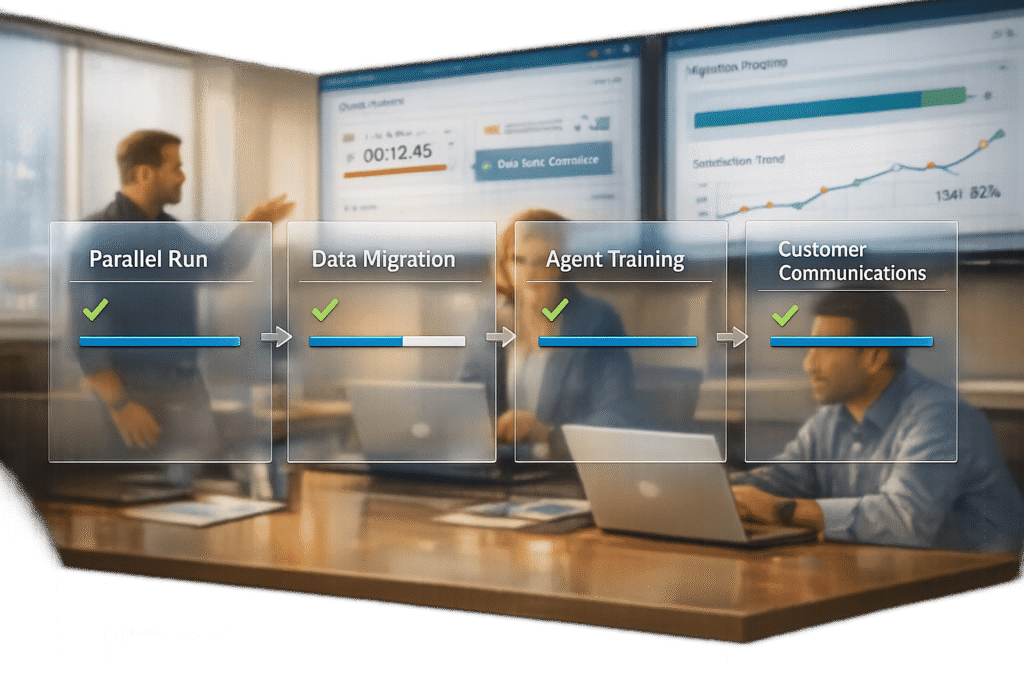
Switching to a new help desk platform like HappyFox can be challenging, but with the right plan, you can avoid data loss, service interruptions, and confusion. This guide breaks down the process into three key steps to ensure a smooth transition:
- Parallel Run: Test HappyFox alongside your current system to identify and fix issues before fully switching over.
- Team Training: Equip your agents with the skills to confidently handle new workflows and tools.
- Customer Communication: Keep customers informed to maintain trust and set clear expectations during the transition.
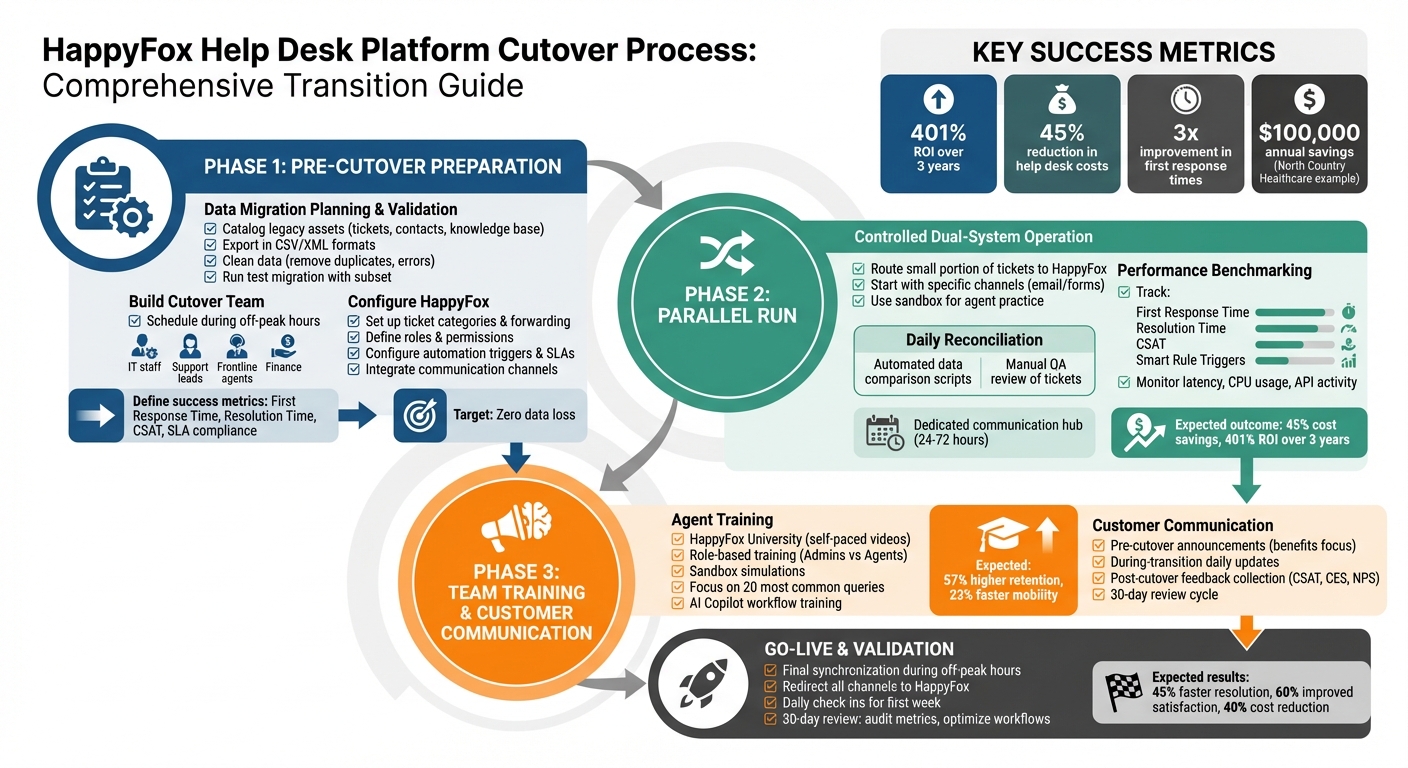
HappyFox Cutover Process: 3-Phase Implementation Checklist
Pre-Cutover Preparation: What to Do Before the Switch
Getting everything in order before the switch is crucial to prevent data loss and service disruptions, following best practices for implementing a new helpdesk. This stage sets the tone for your transition – whether it’s smooth sailing or plagued by issues like missing tickets, broken workflows, and frustrated agents.
Data Migration Planning and Validation
Start by cataloging your legacy assets: active tickets, historical records, customer contacts, knowledge base articles, and any custom fields or workflows. Export these in compatible formats like CSV or XML. Before moving forward, clean this data – remove duplicates, outdated entries, and formatting errors. Then, map the fields from your old system to HappyFox.
Run a test migration using a small, representative data subset. This trial helps catch potential issues like formatting errors, mismatched data, or system incompatibilities. Audit the exported files manually to ensure everything – tickets, customer details, and metadata – functions as expected in your HappyFox sandbox environment.
Plan the full data transfer during off-peak hours, such as weekends, to minimize disruptions. Have a rollback plan ready – like reactivating legacy access or email routing – just in case. HappyFox uses an SSL-enabled API to securely read data from your source system and push it into the platform without altering the original records.
Once your data is mapped and tested, you’re ready to configure HappyFox to match your daily workflows.
Configuring HappyFox for Daily Operations
Begin by setting up ticket categories and forwarding addresses to ensure requests are routed correctly from the start. Define roles like Admin and Regular Staff, assigning permissions based on your organizational structure.
Next, configure workflow automation triggers. For example, set triggers for actions like "Ticket Created" or "Ticket Updated", and apply filters based on status or category to ensure automations run only when needed. Establish service level agreements (SLAs) and automated escalation rules to maintain resolution standards and keep overdue tickets visible in real time. Integrate your communication channels – email, live chat, and voice – and sync with external tools like Salesforce, HubSpot, Jira, or Shopify to eliminate data silos.
Here’s a real-world example: In 2025, North Country Healthcare streamlined service management across 13 departments and three hospitals using HappyFox’s customizable workflows and Azure integration. Systems Analyst William Hammond led the charge, successfully processing over 500 employee onboardings without a single failure, saving the organization about $100,000 annually.
"We could craft our experiences around each of our departments so that the platform worked for them. Our ability to grow and change within our pricing tier was also something that was better than most of the other platforms out there."
- William Hammond, Systems Analyst, North Country Healthcare
Once your system settings align with your operations, it’s time to assemble your team and set measurable goals.
Building Your Cutover Team and Setting Success Metrics
Create a cross-functional team to handle the cutover. Include IT staff for technical setup and data migration, support leads for strategy, frontline agents for usability feedback, and finance representatives to manage contracts. If you’re on the Enterprise Pro plan, involve your HappyFox Customer Success Manager for additional support.
Define clear success metrics before the cutover begins. Metrics might include First Response Time, Resolution Time, Customer Satisfaction scores, and SLA compliance rates. Track "Smart Rule Metrics" to monitor how often automated workflows are triggered, and use this data to refine processes after the transition. A key benchmark is zero data loss – verify this with post-migration audits of tickets, customer records, and knowledge base articles.
During the first week after the cutover, hold daily check-ins to address any issues, such as missing features or interface confusion. Companies that execute this phase effectively have reported a threefold improvement in first response times and achieved a 401% ROI over three years.
With a solid team and clear goals, you’ll be well-prepared for the parallel run phase and the full transition.
sbb-itb-e60d259
Parallel Run: Testing HappyFox Alongside Your Current System
Running both HappyFox and your current system side by side for a short period ensures the platform is ready without risking disruptions. This method helps pinpoint workflow gaps, routing errors, and performance issues before fully transitioning.
Starting a Controlled Dual-System Operation
Once your pre-cutover setup is ready, start by operating both systems simultaneously to ensure smooth operations. Begin by routing a small portion of incoming tickets to HappyFox while your legacy system manages the rest. This gradual rollout allows agents to get comfortable with the new system without disrupting regular workflows. To simplify troubleshooting, start with specific channels – like email or contact forms – instead of handling all channels at once.
Before launching, confirm that all ticket sources are correctly linked to HappyFox. Double-check email integrations, embedded widgets, and contact forms to ensure requests are flowing as expected. Use the sandbox environment to let agents practice full ticket operations without affecting live data. If major issues arise during this phase, be ready to adjust your rollback plan, such as temporarily halting HappyFox ticket routing while keeping the legacy system fully operational.
Daily Reconciliation and Performance Tracking
During the parallel run, combine automated checks with manual quality assurance to catch any discrepancies. Use scripts to compare data across both systems – like ticket counts, contact details, and organization records. Additionally, have your QA team manually review a set of tickets to verify that fields, attachments, and timestamps align perfectly.
Set up a dedicated communication hub, such as a Slack or Microsoft Teams channel, for the first 24–72 hours of the dual operation. Include migration leads, IT professionals, support managers, and vendor representatives to address issues quickly. Encourage agents to report even minor issues, such as missing macros or clunky workflows, as they are often the first to notice operational inefficiencies. Keep track of these problems using a shared document or project board to assign ownership and resolve them promptly.
Benchmarking Against Key Performance Metrics
From day one, monitor critical metrics like First Response Time, Resolution Time, and CSAT scores to compare HappyFox’s performance with your legacy system. Leverage HappyFox BI dashboards to track SLA violations and escalation rules in real-time. This visibility allows you to address underperformance early.
| Metric to Track | Purpose during Parallel Run |
|---|---|
| First Response Time | Compare response efficiency between systems |
| Resolution Time | Determine if new workflows are slower than legacy processes |
| CSAT Scores | Ensure customer satisfaction remains unaffected |
| Smart Rule Triggers | Measure the effectiveness of automated workflows |
| Message Overlap | Identify routing errors or duplicate ticket creation |
Keep an eye on latency, CPU usage, and API activity in HappyFox dashboards. Have your tech team regularly review integration error logs to spot recurring issues. Organizations that execute this phase well have reported saving up to 45% on help desk costs and achieving a 401% ROI within three years. Once benchmarks are solid, the next step is preparing your team for the new workflows in the training phase.
Team Training: Preparing Agents to Use HappyFox
Even the smoothest transition can falter if your team isn’t ready to hit the ground running. Training isn’t just about learning the platform – it’s about building confidence, streamlining workflows, and ensuring agents can handle live tickets from day one. Companies that prioritize structured training report up to 57% higher retention rates and 23% faster internal mobility, both of which have a direct impact on your support efficiency. Once the basics are in place, shift focus to hands-on practice and integrating AI tools.
Platform Familiarization and Role-Based Training
Begin with HappyFox University, an integrated learning hub offering free, self-paced video lessons. Tailor course assignments to match specific roles. For instance, Help Desk Admins should dive into workflow automation and reporting, while Agents can start with core ticketing lessons like the "Working with Tickets" module.
Role-specific training customization is key. Supervisors should learn to navigate Business Intelligence (BI) dashboards to generate reports and monitor SLA compliance across enterprise support tools. Administrators, on the other hand, need hands-on experience with Smart Rules and Task Templates to standardize issue resolution. Poor task management can reduce IT support efficiency by 20-30%, so this training step is crucial.
Before diving into training, spend a week analyzing current agent interactions to pinpoint specific areas where they struggle. This ensures your sessions address real challenges instead of generic platform features.
Simulations and Proficiency Assessments
Practical experience is essential. Use HappyFox’s sandbox environment to simulate real-world scenarios, such as SLA escalations, handling complex ticket threads, or managing high-priority issues. Agents should also practice with AI Copilot, learning to summarize lengthy email threads, draft responses, and fine-tune tone adjustments before engaging with actual customers.
Structure training into four progressive levels: basic queries, simple troubleshooting, multi-step processes, and advanced problem-solving. Start by focusing on the 20 most common customer queries, which equips agents to handle the majority of tickets right from the go-live date. This focused approach builds confidence and ensures quick wins early on.
After each training phase, conduct proficiency assessments. Evaluate agents on their ability to navigate the platform, use AI tools effectively, and make sound decisions in scenario-based exercises. Monitor time-to-productivity, or how quickly agents reach 80% of their previous performance metrics on the new platform. Effective training and implementation can reduce resolution times by 45%. These assessments ensure your team is prepared for live operations.
Advanced AI Workflow Training and Certification
Training agents to collaborate with AI tools like Agent Copilot requires a shift in approach. Teach them to evaluate AI-generated suggestions, tailor responses, and recognize when human judgment should override automation. Create a decision tree to guide agents on when to rely on AI and when to lean on their own expertise or emotional intelligence.
Address any concerns about AI head-on. Show agents how AI can handle repetitive, routine tickets, freeing them to focus on more complex and nuanced cases. During the first month, hold weekly team reviews of AI-assisted interactions to identify improvement areas and establish feedback channels. Use a "Response Quality Score" to measure how effectively agents combine AI suggestions with a personal touch, ensuring responses are accurate and well-rounded.
Set up certification checkpoints where agents must demonstrate their mastery of AI workflows before advancing to the next training stage. This ensures consistent knowledge across the team and prevents any skill gaps that could disrupt operations post-cutover. Organizations that adopt this method have reported a 401% ROI over three years.
With thorough training in place, your team is ready to handle live operations and deliver seamless post-cutover performance.
Customer Communication: Keeping Customers Informed During the Transition
When you’re refining internal processes, keeping customers in the loop is just as important. Clear communication preserves trust and ensures a smooth transition. Nobody likes surprises – especially when it comes to platform changes. A sudden switch can shake customer confidence even more than technical hiccups. By proactively sharing updates, you can keep your team and customers aligned, making the entire process feel seamless. Framing the transition as an upgrade, not a disruption, often results in fewer support tickets and a smoother go-live experience.
Pre-Cutover Announcements and Setting Expectations
While your internal teams are preparing with parallel runs and training, it’s crucial to reassure customers with clear, upfront communication. Update all customer-facing platforms – like ticket submission portals, support emails, and login instructions – so users know what to expect. Clearly outline any new support channels or timelines.
Position the transition as a positive change by emphasizing benefits like quicker response times, easier self-service options, and upgraded AI-driven features. Schedule the switch during quieter business hours to minimize any service interruptions. Be honest about potential short-term delays during the go-live period – transparency builds trust.
Let customers know their historical data and active tickets are being securely migrated using SSL-enabled APIs. To streamline support, create a set of ready-to-use responses for agents to address migration-related questions quickly and consistently.
During-Transition Updates and Dual-Support Channels
Keep customers informed with daily updates throughout the transition. If you’re running parallel systems, explain that they might encounter duplicate tickets or communications temporarily. Provide clear instructions about which support channel to use for immediate assistance.
Consider launching short surveys during the first week to identify any user interface or feature issues early on, before they escalate. Start tracking response times and customer satisfaction (CSAT) scores immediately – waiting weeks for feedback could delay necessary adjustments. Use this period to highlight tools like AI-powered chatbots and refreshed knowledge base articles, which can handle repetitive questions and ease the load on your support team.
Post-Cutover Notifications and Feedback Collection
After the transition is complete, send a final announcement to confirm the switch and spotlight the new improvements available to customers. Use multiple feedback methods to gauge customer sentiment: CSAT for specific interactions, Customer Effort Score (CES) for usability, and Net Promoter Score (NPS) for overall satisfaction. Embed feedback forms directly into your self-service portal and agent tools to make it easy for customers to share their thoughts.
Combine survey results with data from ticket trends, resolution times, and portal usage to identify pain points. Set up a 30-day review cycle to analyze performance and feedback, making adjustments as needed. Encourage agents to document common post-cutover issues and turn them into permanent knowledge base resources. Lastly, keep a fallback option, like temporary access to the old system, ready to address any critical failures during the initial rollout. This ensures you’re prepared to handle any unexpected challenges while maintaining customer trust.
Go-Live and Post-Cutover Validation
Once the parallel run is complete and your team is fully trained, the next step – go-live – demands careful execution. A single overlooked integration can disrupt operations, so timing and precision are key. Schedule the final synchronization during off-peak hours, such as weekends or late evenings, to reduce service interruptions. This gives your team a buffer to handle any unexpected issues before business hours resume.
Final Synchronization and Channel Redirection
Direct all support channels – emails, contact forms, embedded widgets, and chat interfaces – straight to HappyFox. Double-check that all linked tools, like analytics dashboards, CRM systems, and SLA trackers, are functioning properly in the live environment. Enable SLA visibility so agents can easily spot overdue tickets and activate escalation rules when needed. Keep an eye out for duplicate tickets and missed communications, and work closely with IT to ensure rollback options are ready if critical problems arise. From day one, start monitoring key metrics like response times, resolution times, and customer satisfaction scores. This allows you to quickly identify and address any performance gaps.
Triage Protocol for Post-Cutover Issues
Set up automated workflows to handle ticket surges by escalating tickets based on context, merging duplicates, and responding efficiently to common queries. Conduct daily check-ins with agents to uncover any UI glitches or missing features. Make sure you can pause or restart data imports if synchronization errors occur. When implemented correctly, these measures can reduce resolution times by 45% and improve user satisfaction by 60%.
Once the system stabilizes, shift focus to a structured 30-day review to strengthen the performance improvements achieved during cutover.
30-Day Review and Optimization
In the first 30 days, audit critical metrics like resolution time, first contact resolution (FCR), SLA compliance, customer satisfaction (CSAT), and cost per ticket. This review not only confirms the success of your cutover strategy but also helps refine the benchmarks set earlier. Analyze ticket backlogs to identify repetitive inquiries, which often make up about 30% of incoming tickets. Address these by enhancing self-service options or automating responses. Use a targeted approach to build custom dashboards: focus on the three most frequent operational questions and create widgets that provide immediate answers.
Fine-tune ticket routing rules, escalation paths, and automation workflows based on actual performance data. Update your knowledge base to include solutions for common post-cutover issues, and use the "Save as Draft" feature to prepare seasonal content without affecting live articles. Organizations that follow this review process effectively can achieve a 40% reduction in operational costs and boost team productivity by 35%.
Conclusion
A structured cutover process is key to getting the most out of your HappyFox investment while keeping downtime at bay. With a well-executed migration, you could see up to a 401% ROI over three years and reduce help desk costs by as much as 45%. These impressive results come from careful planning, thorough training, and clear communication.
"A well-structured migration plan minimizes risks, maintains continuity, and sets the stage for success." – Eric Klimuk, Founder and CTO, Supportbench
The checklist provided in this article – covering everything from pre-cutover data validation and parallel runs to targeted training and customer outreach – ensures that your valuable customer data is preserved. Running systems in parallel helps identify issues like misrouted tickets or configuration errors before fully switching over, and scheduling the transition during off-peak hours reduces disruptions to ongoing operations.
These steps work together to create a seamless transition for both your team and your customers. Preparing your team is just as important. When they’re familiar with the new interface, automation tools, and AI-powered features ahead of time, they can immediately take advantage of these enhancements, cutting down on manual tasks and avoiding errors. Meanwhile, consistent communication with customers turns potential hiccups into opportunities to highlight service improvements, maintaining their trust and satisfaction.
FAQs
How long should a parallel run last?
A parallel run needs to last long enough to fully test the new system, give your team adequate training, and ensure everything operates smoothly. The timeline will vary based on how complex the transition is and the risks involved. Take the time to plan thoroughly so you can cover all critical aspects without feeling pressured to rush through it.
What’s the fastest way to train agents for go-live?
The quickest way to prepare agents for go-live is by implementing a structured onboarding plan. This plan should leverage existing documentation, well-defined workflows, and clear guidelines. Start by focusing on the essentials: key knowledge areas, process mapping, and safety protocols. Combine this with hands-on coaching and pilot testing to reinforce learning.
Additionally, tailor training to specific roles and provide detailed, written procedures. This approach helps agents adjust more efficiently, minimizes downtime, and ensures the transition is as seamless as possible.
What should customers be told before cutover?
When moving to a new support platform like HappyFox, it’s crucial to keep your customers in the loop about what to expect. Let them know upfront about any potential hiccups, such as temporary access issues or slower response times. If possible, share alternative ways they can reach you during this period to ensure they still feel supported.
Take this opportunity to highlight any new features or changes in how they’ll interact with support, focusing on how these updates will improve their overall experience. Reassure them that their satisfaction remains your top priority. Clear and proactive communication like this helps reduce confusion, sets realistic expectations, and builds trust during the transition.
Related Blog Posts
- Help Desk Migration Checklist: How to Switch Platforms Without Downtime
- How do you run a parallel cutover from Service Cloud (agents + customers + reporting)?
- Freshdesk migration checklist: timeline, risks, and rollout plan
- How do you map HappyFox categories, custom fields, and statuses to a new system?






