



Switching platforms without disruption is possible. A parallel cutover lets you run your old system (like Service Cloud) alongside the new one temporarily, ensuring smooth operations while you migrate data, test workflows, and train teams. This approach reduces risks and avoids downtime.
Here’s how to do it effectively:
- Sync systems: Use tools like APIs for real-time data updates between platforms.
- Train agents: Teach them to navigate both systems and handle dual workflows.
- Plan for issues: Set up rollback plans and test backups.
- Communicate with customers: Update portals and ensure consistent service.
- Validate data and reports: Compare metrics across systems to ensure accuracy.
With Salesforce retiring key features (like LiveAgent) by February 14, 2026, acting now ensures a smooth transition. A step-by-step approach keeps your business running while preparing for future growth.
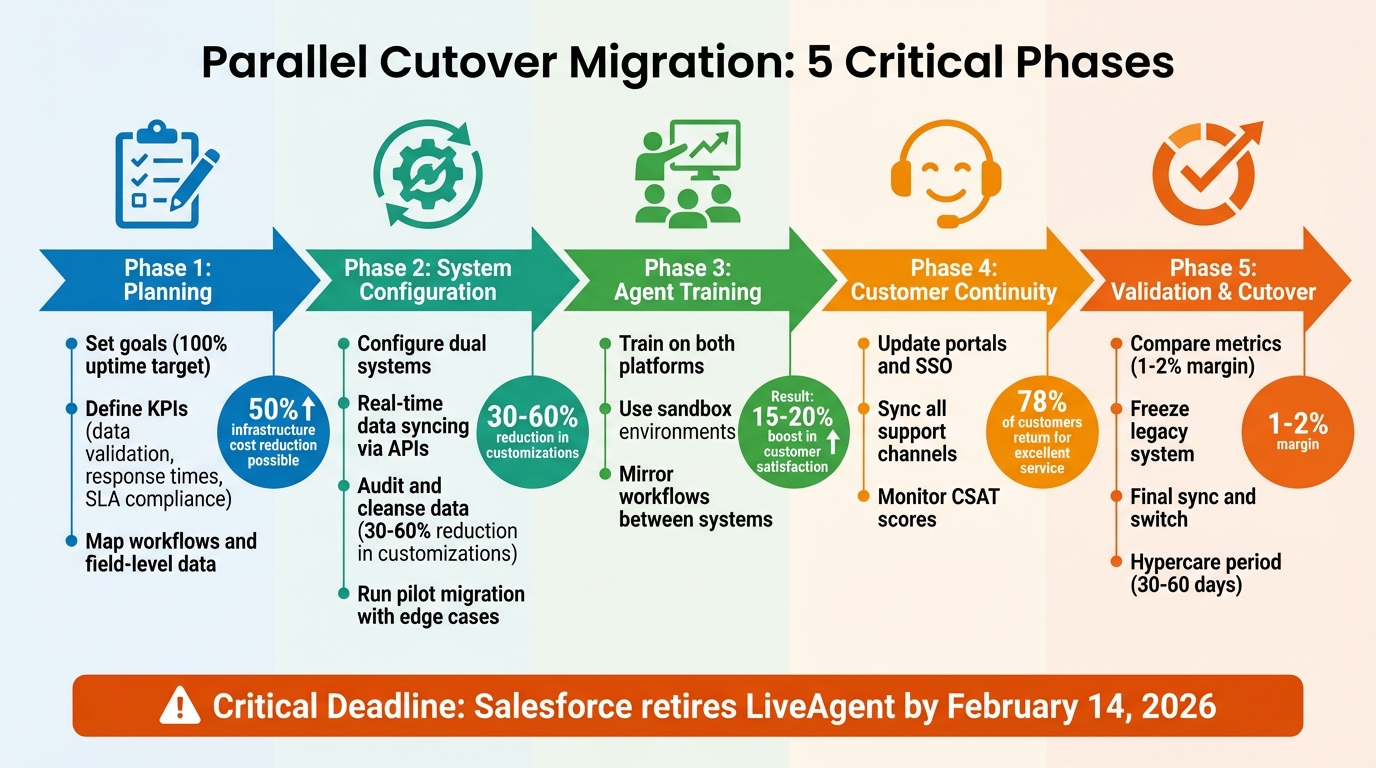
5-Phase Parallel Cutover Migration Process from Service Cloud
Planning Your Parallel Cutover
To ensure a smooth transition during your migration, meticulous planning is essential. This involves managing agents, customers, and reporting systems simultaneously. Your objective is to keep operations running without interruptions while transitioning to the new platform.
Set Your Goals and Success Metrics
Start by defining what success looks like. For example, aim for 100% uptime during business hours, safeguard the integrity of customer data, and ensure agents can resolve tickets without delays.
Identify key performance indicators (KPIs) to monitor throughout the process. Metrics like data validation – such as record counts and field mapping accuracy – will help confirm that data transfers correctly. Meanwhile, service efficiency metrics like response times and SLA compliance will reflect how well customer service holds up. For AI-powered platforms, keep an eye on deflection rates and containment percentages, which measure the proportion of cases resolved without human involvement.
"Understanding the ‘why’ of the switch should make your priorities for a new platform clearer – and put the scale of the switch in perspective." – Intercom
A great example comes from Rossi Residencial, a Brazilian construction company. In July 2025, they migrated four SAP environments to a cloud platform. By setting clear metrics and using phased rollouts with thorough validation, they achieved a zero-downtime migration – cutting infrastructure costs by 50% and avoiding any service interruptions.
Configure Dual Systems and Sync Your Data
Running both Service Cloud and your new platform simultaneously requires careful orchestration. Begin by mapping key workflows – document how tickets are routed, escalations are triggered, and automations are executed. This ensures that when you rebuild these processes in the new system, they function as intended.
Real-time data syncing is critical. Middleware or REST APIs can keep both platforms aligned, allowing agents to see consistent ticket updates no matter which system they use. Create a field-level mapping document to match source fields to their targets, including rules for handling date formats, currency codes, and naming conventions.
"Data migration is more than just copying files from one system to another – it’s a delicate, high-stakes process that can affect everything from day-to-day operations to long-term compliance." – Eric Klimuk, Founder and CTO, Supportbench
Before syncing, audit your data. Eliminate duplicates and outdated records – bringing unnecessary data into the new system can lead to complications down the line. Run a pilot migration with a smaller data set, including edge cases like inactive users or rare record types, to verify your mapping before scaling up.
Create Your Cutover Timeline
Develop a timeline that outlines every phase of the migration, complete with dates, milestones, and assigned responsibilities. A phased approach can help mitigate risks. For instance, you might migrate department by department (e.g., sales first, then support) or by pipeline (e.g., new business first, then renewals). This incremental strategy allows you to test and resolve issues while keeping operations steady.
Incorporate role-specific testing to confirm that processes like lead assignments, ticket handoffs, and updates work seamlessly. Schedule data migration tasks during off-peak hours to minimize disruptions to live customer support.
Establish a feedback loop from the start. Create a channel where agents can report issues, such as missing attachments or mislabeled fields, in real time. Finally, ensure you have a rollback plan. Your timeline should include the development and testing of scripts to reverse the migration if critical errors arise.
With a solid timeline in place, the next step is to prepare your agents for navigating and managing a dual-platform environment.
Supporting Agents During the Transition
Agents are the backbone of customer support, and managing two platforms simultaneously can increase their mental workload. To ease this transition while maintaining service quality, focus on structured training, consistent workflows, and clear contingency plans. With your timeline in place, the next step is helping agents effectively navigate both systems.
Train Agents to Use Both Platforms
Break training into small, manageable steps. Keri Higgins Bigelow from LivingHR, Inc. highlights the importance of communication: "Gather employee input early and often in any major technology change. They will readily adapt to the change when they see why the current platforms aren’t serving the needs of the business. Communicate the ‘why’ and the ‘how’ as much as possible to gain accelerated adoption".
Identify tech-savvy team members who can lead the way by testing the new system first and supporting their peers during the rollout. Use sandbox environments for safe practice, and schedule hands-on sessions during low-demand times. For flexibility, include options like recorded webinars so agents can learn at their own pace. A centralized knowledge base with searchable guides, call scripts, and troubleshooting steps for both platforms can also help reduce confusion.
Make sure agents understand how the new system benefits them directly – whether it’s simpler shift management, less manual data entry, or fairer scheduling. This clarity fosters buy-in and engagement. Companies that invest in strong training programs often see a 15-20% boost in customer satisfaction and can cut operational costs by 20% through improved efficiency.
Mirror Workflows and Track Performance
Consistency is key. Replicating existing workflows in the new platform helps agents maintain their rhythm. For example, Omni-Channel flows can create context-aware routing that directs tasks to the right agent or queue based on intent. This approach ensures continuity, aligning with the operational stability outlined in your transition plan.
To further streamline operations, implement state persistence to retain customer context during system handoffs. This ensures agents can access complete customer histories, no matter which platform they’re using. Supervisors can use tools like the Command Center for Service to monitor agent workloads, backlogs, and active cases across channels in real time.
Prepare for potential routing issues by setting up fallback queues to handle overflow or failed routing logic. Start small by migrating a limited number of cases – around 1,000 tickets – to test dependencies and validate configurations before scaling up. Train agents on the differences between the systems, such as transitioning from a ticket-based approach to more complex case ownership or queue-based models.
Create Backup Plans for System Issues
A backup plan is essential for handling critical issues. This plan should outline how to identify and re-enter transactions processed in the new system back into the legacy system to maintain data accuracy. As Velosio puts it: "A back-out plan is like insurance. You don’t want to ever use it, but if you need it, you’ll be happy you have it".
Keep the legacy Service Cloud in a read-only mode for a set period after the transition. This allows agents to reference historical data without risking conflicts. Develop temporary manual processes and set up a dedicated "war room" where agents can report problems and receive immediate support during system hiccups.
To prepare for unexpected failures, run crisis management drills simulating platform outages. These drills help agents practice switching back to the legacy system. Conduct multiple mock cutovers – ideally 2-3 – that mimic real production conditions. This approach can reduce actual cutover time by up to 40%. Introduce Go/No-Go checkpoints at critical stages to let leadership assess system health before moving forward.
Maintaining Customer Experience During the Cutover
Keeping customers happy during a system migration is all about ensuring they don’t feel the impact of the changes happening behind the scenes. After all, 78% of consumers are more likely to return to a brand if the service experience is excellent. Plus, even a small boost in customer retention – just 5% – can increase profits anywhere from 25% to 95%. Here’s how to keep things running smoothly during the transition.
Update Customer Portals and Communications
Start by migrating your most-used help articles first. Customers searching for answers shouldn’t encounter outdated content or dead links. Focus on the articles that address common questions, making sure they’re live on the new portal from day one. To avoid confusion, use domain mapping to redirect users from your old support site to the updated one seamlessly.
Plan the Single Sign-On (SSO) update carefully to prevent customer lockouts. When testing in sandbox environments, invalidate user email addresses to avoid accidental automated notifications during migration. On top of that, replicate your custom branding and CSS in advance so the look and feel of your new portal remains familiar – customers should feel like nothing has changed visually, even if the backend has.
Prepare your support team with clear, pre-written response templates that explain the migration. As Eric Klimuk, Founder and CTO of Supportbench, points out:
"A successful data migration isn’t just a technical achievement – it’s also a communication project. People are affected: employees, customers, and stakeholders".
Keep your messaging simple and focused on what matters most to customers: uninterrupted access to support and consistent service quality. This clarity should extend across every customer touchpoint.
Keep Support Channels Consistent
If agents are working across both old and new systems, ensure all customer-facing channels – emails, contact forms, and embedded widgets – are synced to the new platform while still monitoring the legacy system. This setup helps catch duplicate tickets or overlapping messages. Proper ticket routing is key to preventing customers from accidentally submitting the same request twice or receiving mixed responses.
To make things easier for customers, use pre-chat details and pre-chat entities to automatically transfer customer context between systems. This way, customers won’t need to repeat their information.
Ensure the data hierarchy remains intact during the migration so agents always have access to ticket comments, attachments, and timestamps, no matter which system they’re using. Features like AI-powered article suggestions in the new portal can help deflect cases and maintain service levels, even if response times temporarily slow due to the dual-system workload. For added reassurance, keep a read-only version of the old portal available for a set period, allowing customers to reference past interactions if needed.
Collect Customer Feedback and Make Changes
From day one of the parallel run, monitor key metrics like Customer Satisfaction (CSAT) scores, response times, and resolution times. This real-time tracking will help you quickly identify and address any issues.
Set up a dedicated feedback channel for customers to report problems like broken links, missing attachments, or confusing navigation. Address these issues immediately. During the pilot phase, use a feedback triage system to pinpoint usability gaps early, allowing you to fine-tune permissions, templates, and workflows before the full rollout.
After the migration, initiate a hypercare period. This means ramping up support resources to quickly resolve any lingering customer confusion or technical hiccups. This extra attention not only helps catch issues that testing might have missed but also reassures customers that their experience remains your top priority.
sbb-itb-e60d259
Checking Reporting and Data Accuracy
Once your parallel systems are up and running, it’s time to dive into validating your data and reports. This step is crucial – more than 80% of data migration projects run over schedule due to late-discovered issues. As Eric Klimuk, Founder and CTO of Supportbench, aptly puts it:
"Validation is your safety net – it confirms that everything moved as expected and continues to function correctly in the new system."
Catching discrepancies early can save you from expensive headaches down the road.
Compare Metrics Between Systems
After training your agents and syncing systems, the next priority is ensuring your data aligns perfectly across platforms. Start by generating identical reports from both systems for the same time frame. Look at total record counts for tickets, contacts, and organizations – this will help confirm that no data went missing during migration. Additionally, compare aggregate metrics like average resolution times or total deal amounts, aiming for a match within a 1–2% margin.
Automated checks are great, but don’t stop there. Have department heads and frontline agents manually review sample reports, paying close attention to date fields – especially when teams work across different time zones.
Verify Data Accuracy and Fix Differences
If you spot discrepancies, use External IDs to trace and compare records between the new and legacy systems. Run queries to identify orphaned records – like contacts without accounts or tickets missing customer links. Also, verify critical audit fields such as CreatedDate, ClosedDate, and LastModifiedById. If your new platform limits these fields, store the original values in custom fields instead. To avoid further inconsistencies, freeze changes in the legacy system before the final cutover and plan a delta migration for live data updates.
Getting this right now ensures a smoother transition when it’s time for the final cutover.
Set Up Reporting in the New Platform
Before going live, validate your dashboards and KPIs in a staging environment. Pull sample reports and get stakeholder approval to ensure everything looks and works as expected. During the data load, disable automated triggers and scheduled jobs to prevent skewed timestamps. Once the migration is complete, remove any time-based workflows to keep your reporting clean.
Taking these steps will help you avoid reporting hiccups and keep your support operations running smoothly during the transition.
Completing the Cutover and Monitoring Results
After careful planning, training, and data validation, the moment has arrived to make your new platform the primary system. This phase demands precise execution and close monitoring to ensure everything functions as intended.
Complete the Final System Switch
Begin by freezing all changes in Service Cloud to avoid data mismatches during the final sync. Migrate any remaining tickets, users, articles, and macros. Double-check record counts and ticket histories to confirm that connections between users, cases, and knowledge articles are intact, with no data loss.
Once the sync is complete, shift your support operations to the new platform. Closely monitor case flows, SLAs, and escalations in real time to quickly identify and resolve routing issues. Keep Service Cloud in read-only mode for a set period – typically 30 to 60 days – so agents can reference historical data if needed before licenses are canceled. This method ensures a safety net without risking conflicting records.
Track Performance After the Cutover
The first one to two weeks post-cutover, often called the hypercare phase, are critical. During this time, intensive monitoring is essential to catch and address any anomalies before they escalate. Set up real-time dashboards to track system health, productivity, and customer satisfaction. Create a dedicated feedback channel, like a Slack workspace or triage system, where agents can report issues such as broken links, missing attachments, or mislabeled fields. To ensure workflows are running smoothly, have agents simulate tasks like ticket handoffs and escalations.
Maintain detailed audit logs of all system actions and modifications during this period to simplify compliance checks and ensure accountability.
Prepare Rollback Plans if Needed
Even with the best preparation, migrations can encounter unexpected challenges. Eric Klimuk, Founder and CTO of Supportbench, emphasizes:
"No matter how prepared your team is, migrations can go sideways. That’s why every migration plan needs strong fallback mechanisms."
Develop and test rollback scripts before the cutover to ensure you can revert to the legacy system if necessary. Confirm the restorability of backups. If critical issues arise during hypercare, having a tested rollback plan means you can quickly return to Service Cloud while addressing the problem. Keep in mind that Salesforce plans to retire LiveAgent, Salesforce Chat, and Service Chat on February 14, 2026, so incorporate this timeline into your contingency planning.
Conclusion
Making a parallel cutover from Service Cloud is no small feat – it requires careful planning, thorough testing, and constant vigilance. As Eric Klimuk, Founder and CTO of Supportbench, aptly says:
"Switching platforms is a strategic move – one that should be guided by data, not frustration."
This guide lays out a clear path to ensure success, from defining measurable goals and syncing data to training your team and protecting the customer experience. For instance, organizations that focus on data cleansing before migration often see a 30% to 60% reduction in unnecessary customizations. Meanwhile, implementing real-time monitoring allows businesses to quickly address issues, maintaining service quality throughout the process.
Using an AI-native platform can make this transition significantly smoother. Instead of duplicating outdated workflows, these modern systems offer automated data mapping, intelligent case routing, and real-time dashboards, eliminating much of the manual effort. Beyond the migration, these platforms deliver ongoing advantages like automated SLA management, predictive CSAT scoring, and streamlined workflow improvements – all without adding extra staff or IT overhead.
With Salesforce set to retire LiveAgent, Salesforce Chat, and Embedded Chat by February 14, 2026, the clock is ticking. A well-executed parallel cutover not only ensures operational continuity but also positions your business for scalable growth. By embracing AI-native solutions, you can turn what might seem like a daunting migration into a strategic advantage.
FAQs
What are the risks of running a parallel cutover, and how can they be avoided?
Running a parallel cutover has its fair share of risks, including data loss, system downtime, workflow disruptions, and user confusion. These challenges can throw operations off track and cause frustration for both agents and customers.
To minimize these risks, planning is key. Start by creating a detailed cutover plan that outlines pre-migration checks, contingency measures, and clear timelines. Make sure to perform extensive testing in a controlled setting to spot and fix any potential problems before the actual cutover takes place. Additionally, keep communication open and transparent – let agents and customers know what to expect, any temporary changes they might encounter, and where they can go for support.
Adopting a phased approach – where you migrate and validate critical components step by step – can also help. This method allows for quick rollbacks if something goes wrong, keeping disruptions to a minimum. Detailed documentation and a well-organized migration plan are crucial to preserving data accuracy and ensuring workflows remain steady during the transition.
How can I ensure data accuracy during a migration from Service Cloud?
Ensuring data accuracy during a migration takes planning and attention to detail. Start by reviewing and cleaning your data thoroughly. Identify exactly what needs to be migrated – like customer details, support histories, and permissions – and ensure everything is accurate, complete, and free of duplicates or errors.
Set up a staging environment or sandbox to test the migration process. This step lets you validate data mappings, check workflows, and confirm that everything displays correctly in the new system without disrupting live operations. Automated tools can also be a big help, spotting discrepancies and maintaining data consistency.
After the migration, conduct audits to compare the original data with the migrated version. This ensures accuracy and confirms nothing was lost or altered. Taking these steps helps reduce errors, avoid data loss, and makes the transition smoother for both your team and your customers.
How can we ensure a smooth customer experience during a parallel cutover from Service Cloud?
To ensure everything goes smoothly for customers during a parallel cutover, start with detailed planning and rigorous testing. Run mock cutovers to simulate the process, spot potential risks, and confirm data accuracy. This reduces the likelihood of disruptions when the actual transition happens.
Clear and proactive communication is just as important. Let customers know about the upcoming transition ahead of time – explain what to expect, outline any potential impacts, and offer clear instructions on alternative support options if necessary. This transparency helps manage expectations and keeps frustration to a minimum.
During the cutover, keep a close eye on system performance and customer interactions. Be ready with contingency plans to quickly address any unexpected issues that arise. By combining thorough preparation, open communication, and active monitoring, you can ensure customers have a positive experience, even during major system changes.
Related Blog Posts
- A practical guide on how to Migrate From one Helpdesk to Another
- How do you migrate away from Zendesk without losing ticket history or customer data?
- Help Desk Migration Checklist: How to Switch Platforms Without Downtime
- How do you migrate from Salesforce Service Cloud to a helpdesk without losing case history?






