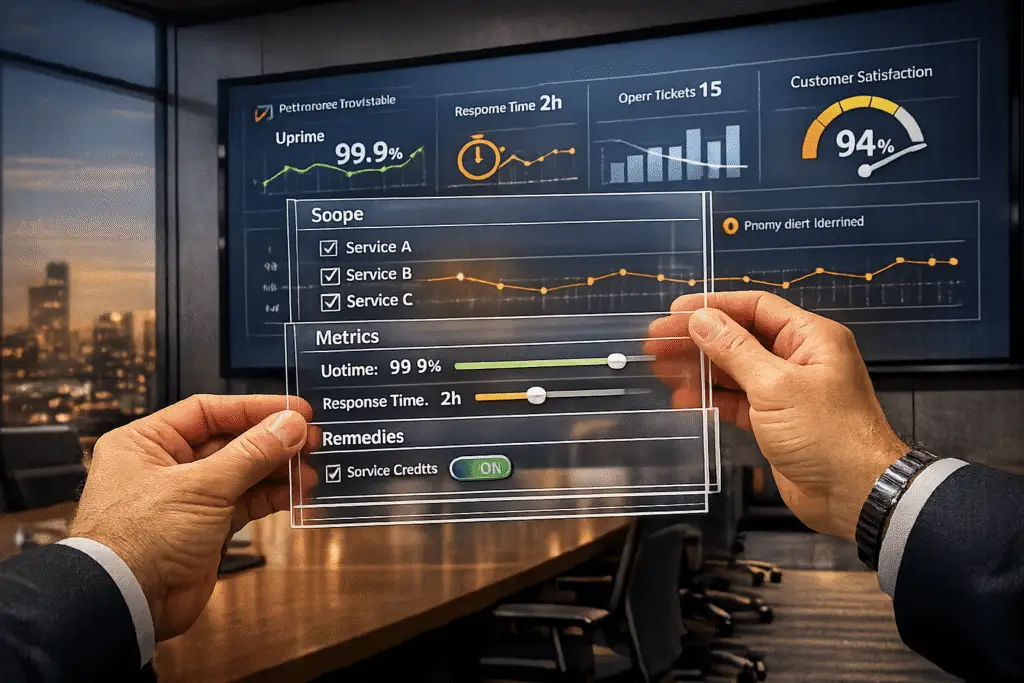
Customer-facing SLAs (Service Level Agreements) are essential for setting clear expectations with clients, defining service commitments, and holding teams accountable. But rigid SLAs can limit flexibility and strain your team. Here’s how to create SLAs that work for both your customers and your team:
- Define clear scope and terms: Specify what services you provide, operating hours, and exclusions. Include customer responsibilities to avoid misunderstandings.
- Set realistic commitments: Avoid overpromising. Use metrics like "Business Hours" and "Agent Work Time" to ensure fairness.
- Use measurable metrics: Follow the SMART framework (Specific, Measurable, Achievable, Relevant, Time-bound) and focus on metrics like First Reply Time and SLA Compliance Percentage.
- Build flexibility: Allow dynamic adjustments based on scenarios like ticket urgency or contract renewals. Include clear escalation and exception processes.
- Leverage AI tools: Automate SLA tracking, predict potential breaches, and use real-time dashboards to monitor performance.
- Handle breaches effectively: Define remedies like service credits and conduct root cause analyses to prevent future issues.
- Review and update regularly: Schedule quarterly or annual reviews to align SLAs with evolving customer needs and team capacity.
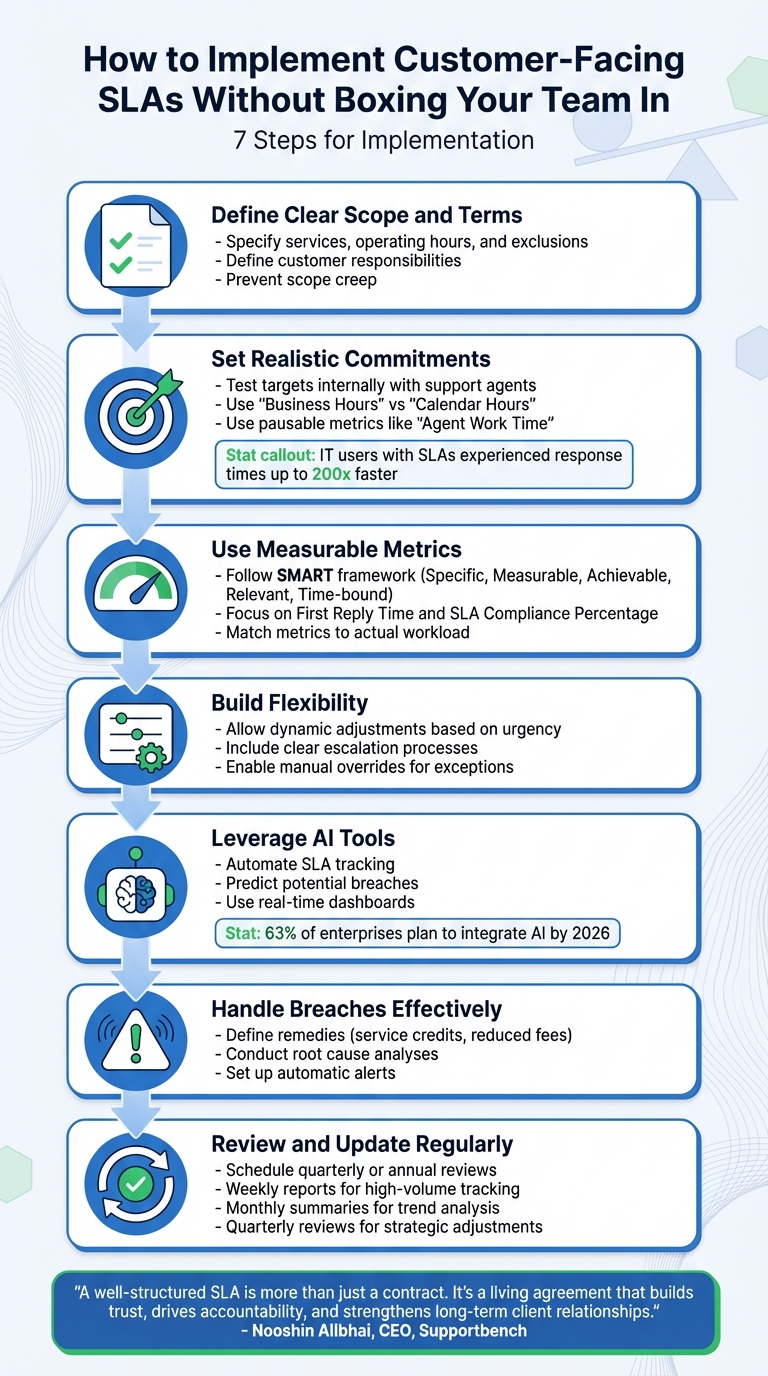
7-Step Framework for Implementing Customer-Facing SLAs Without Limiting Team Flexibility
How to Implement SLAs to Deliver Consistent Service Across Your Business
sbb-itb-e60d259
How to Define SLA Scope and Terms
A solid SLA starts with clear boundaries. You need to outline exactly what your team will handle, when they’ll be available, and what lies outside the agreement. This not only prevents scope creep but also shields your team from unrealistic demands. At the same time, it gives customers a transparent understanding of what they’re paying for. This clarity lays the groundwork for defining service specifics and priorities.
Specify What Services You’ll Provide
Be precise about what your team will and won’t do. Include details like operating hours (e.g., 24/7 or standard business hours), support channels (email, phone, chat), and exclusions, such as custom development work or third-party integrations. It’s equally important to define customer responsibilities, like providing timely system access or necessary resources. Without these details, customers might assume your team handles everything, which can lead to misunderstandings and frustration when expectations don’t align with reality.
Create Tiered Priority Levels for Different Issues
Not all support requests are created equal. Establish priority levels – such as Urgent, High, Normal, and Low – and assign specific response times to each. For instance, urgent issues might require a response within 10–15 minutes on a 24/7 schedule, whereas normal tickets could have a 24-hour response target during business hours. Organizing your SLA policies from the most restrictive to the least restrictive in your management system ensures that tickets are automatically assigned the correct policy. This helps your team focus on what’s most critical without treating every issue like an emergency.
Set Realistic Commitments Based on Team Capacity
Overpromising can erode trust faster than anything else. Test SLA targets internally to ensure they’re achievable, and involve your support agents in the process – they have the best understanding of what’s realistic. Use terms like "Business Hours" instead of "Calendar Hours" to avoid penalizing your team for tickets submitted after hours. Additionally, consider using pausable metrics like "Agent Work Time", which pauses the clock when a ticket is waiting on customer input. This ensures your team isn’t unfairly held responsible for delays beyond their control.
Avoid guarantees like 100% uptime or instant resolutions – they set your team up for failure. Instead, aim for realistic targets that align with your team’s capacity and workload patterns. Research shows that IT users with response-time SLAs experienced response times up to 200 times faster than those without SLAs. Even modest, achievable commitments can make a noticeable difference when they’re grounded in reality.
How to Set Realistic and Measurable SLA Metrics
Once you’ve defined the scope of your SLA, the next step is selecting metrics that align with your team’s capabilities while ensuring accountability. This approach allows you to set targets that push your team to excel without being unattainable.
Use SMART Metrics for SLA Targets
Your SLA metrics should follow the SMART framework: Specific, Measurable, Achievable, Relevant, and Time-bound. Avoid vague goals like "quick response times." Instead, clearly define each metric. For instance, First Reply Time should measure the time from ticket creation to the first public agent comment – not internal notes or automated responses. Similarly, metrics like Requester Wait Time (total time a ticket spends in New, Open, and On-hold statuses) reflect the customer’s waiting experience, while Agent Work Time (time spent in New and Open statuses) shows your team’s effort. Keeping it simple by focusing on one key resolution metric prevents confusion.
"What gets measured gets done. A recent study of IT users covered by response-time SLAs reported an average response time 200 times faster than their non-SLA counterparts."
- Sam Chandler, Customer Success Consultant, Zendesk
Make sure your metrics are tied to specific deadlines. For example, set a 10-minute response time for urgent issues and a 2-hour response time for high-priority tickets, specifying whether you’re measuring in business hours or calendar hours. For uptime guarantees, aim for realistic goals like 99.9% monthly uptime – setting a 100% target can lead to unattainable expectations and unnecessary stress for your team.
Match Metrics to Your Team’s Actual Workload
Beyond following SMART criteria, your SLA targets should reflect your team’s actual workload. Collaborate with your support agents to ensure the goals are realistic, especially during peak periods or when resources are stretched. This helps identify potential bottlenecks and ensures your SLA metrics are grounded in operational realities.
"It’s important not to force unrealistic customer expectations on the support team. An overambitious SLA with ridiculous requirements and benchmarks will lead to failure."
- Stella Inabo, Contributing Writer, Zendesk
Align your metrics with your business’s unique goals. For instance, a growing B2B company might focus on Ticket Deflection Ratio to handle increasing ticket volumes, while a retailer might prioritize First Reply Time during holiday seasons. Avoid evaluating agents solely based on ticket volume, as it may encourage rushed, lower-quality interactions. Using business hours as the foundation for SLA targets ensures fairness and avoids penalizing agents for issues outside their control, like weekend or holiday coverage.
Set Up Monitoring and Reporting Systems
Real-time monitoring tools are essential for staying on top of SLA compliance and identifying potential breaches before they occur. Use dashboards with features like a "Next SLA Breach" column and automated alerts to help your team proactively manage tickets.
Establish a reporting schedule to maintain accountability. For example:
- Weekly reports for high-volume ticket tracking
- Monthly summaries for trend analysis
- Quarterly reviews for strategic adjustments
Set clear deadlines for report submissions and follow-up discussions, such as delivering reports by the 5th of each month and holding review meetings on the 10th. Metrics like SLA Compliance Percentage provide a clear snapshot of your team’s overall service reliability.
"A well-structured SLA, paired with a clear reporting framework, is more than just a contract. It’s a living agreement that builds trust, drives accountability, and strengthens long-term client relationships."
- Nooshin Alibhai, Founder and CEO, Supportbench
Regular audits, conducted quarterly or annually, ensure your SLA metrics remain aligned with your evolving business goals and operational capacity. These reviews allow you to fine-tune metrics and workflows, keeping both customer satisfaction and team efficiency in balance. As your business scales or customer needs shift, revisiting and updating your SLA framework is essential to staying relevant and effective.
How to Build Flexibility into Your SLAs
To balance accountability with adaptability, SLA contracts need to reflect the realities of day-to-day operations. These agreements should evolve to meet changing conditions, such as upcoming renewals or unexpected ticket surges, while still ensuring measurable and transparent commitments. The key is to build systems that can adjust dynamically, enabling tailored changes, clear escalation paths, and AI-powered management tools.
Use Dynamic SLA Adjustments for Different Scenarios
Your SLAs shouldn’t rely on rigid, one-size-fits-all timelines. Instead, structure them to adapt based on specific business scenarios. For instance, response times might shift from 2 hours to 30 minutes for customers approaching contract renewal within 60 days. Similarly, resolution windows could be extended during planned maintenance periods. This kind of criteria-based customization allows adjustments based on factors like contract tier, license type, ticket urgency, or support level.
Modern platforms and AI tools take this further by recalibrating SLA priorities using real-time data, customer sentiment, and historical trends. By replacing static thresholds with dynamic baselines, SLAs can adjust to actual workloads and conditions, not just fixed timelines.
Define Clear Escalation and Exception Processes
Dynamic adjustments work best when paired with well-defined escalation protocols. Clearly outline who is responsible for unresolved issues at each escalation stage. For example, a ticket overdue by 4 hours might automatically escalate to a senior engineer and be flagged for immediate attention. Specify the communication tools – whether email, Slack, or phone – so your team knows exactly how to act as deadlines approach.
Include manual override options for situations that require a human touch. If a client experiences an unexpected delay, like a sick leave or project pause, your team should be able to adjust SLA timelines without disrupting the entire system. Monitor your Escalation Rate as a key metric – if it starts climbing, it may indicate that your SLA targets need revisiting. Plan regular reviews, either semi-annually or quarterly, to align performance goals with your team’s capacity and evolving customer demands.
Use AI to Manage SLAs Automatically
AI takes SLA management to the next level by predicting breaches and reallocating resources before issues arise. Instead of reacting after a breach, machine learning models can forecast potential problems hours in advance. This gives teams time to reroute tickets, increase support coverage, or notify senior staff before deadlines are missed.
AI also uses AI-driven sentiment analysis to reprioritize cases where frustration levels are high, even if the ticket’s standard priority is low. According to Gartner, 63% of enterprises plan to integrate AI into their contract compliance workflows by 2026. Implement automated remediation playbooks to outline exactly what actions to take when a breach is predicted – such as notifying a Slack channel, assigning extra agents, or reallocating resources.
"AI can transform every clause of an SLA into actionable, auto‑remedial logic."
How to Handle SLA Breaches and Conduct Reviews
Even with the most carefully crafted SLAs, breaches are inevitable. What truly matters is how you respond and review the situation to reinforce the partnership.
Define Remedies and Penalties for SLA Breaches
When an SLA breach occurs, it’s crucial to act quickly. Set up automatic alerts to notify supervisors and managers right away. Your contract should clearly outline the steps to address breaches. Common remedies include service credits (often a percentage of the monthly fee), reduced fees, or offering additional free support hours.
For instance, in August 2024, Google’s Cloud Storage Service SLA required customers to actively request service credits from their technical support team. Credits weren’t automatically applied, and Google could deny them if the customer had failed to meet their own obligations.
Understanding why the breach happened is just as important. Investigate root causes like resource limitations, communication breakdowns, technical errors, or inefficiencies. Take the example of a FinTech startup that faced an $8,000 penalty due to delayed monitoring. By adopting an AI-driven solution, they were able to predict breaches ahead of time, avoid penalties for three months, and cut down resolution times by 22%.
Once the breach is resolved and the root cause is identified, a formal review process is essential to prevent similar issues in the future.
Schedule Regular SLA Review Meetings
Regular reviews can turn your SLA from a static document into a dynamic management tool. Plan quarterly strategic reviews and monthly performance meetings with a focused agenda that includes missed targets, recurring problems, and alignment with business goals.
Nooshin Alibhai, Founder and CEO of Supportbench, emphasizes the importance of reporting in SLA management:
"Clear reporting is what turns an SLA from a static document into an active management tool. Without it, service commitments can drift out of alignment with actual performance."
These meetings should dive into key metrics like uptime, response times, and resolution times to identify any deviations. Use historical data to track patterns in recurring issues or services that consistently underperform. Additionally, gather input from both customers and support teams to uncover problems that might not show up in the metrics.
Evaluate whether the SLA targets still align with current business needs, technological advancements, and customer expectations. Document the outcomes of these reviews for future audits and revisions. Tools like automated reporting and real-time dashboards can provide accurate, up-to-date data to keep discussions focused and productive.
How to Use AI Tools for SLA Monitoring and Optimization
Once you’ve set flexible SLA parameters, AI tools can take your SLA management to the next level. Relying on manual tracking often leads to missed deadlines and overburdened teams. AI-powered platforms, however, transform SLA tracking into a proactive process, helping you avoid breaches while maintaining a balance between accountability and operational efficiency.
Track SLA Compliance with Real-Time Dashboards
Real-time dashboards provide live updates on SLA performance, letting you identify compliance risks as they happen instead of relying on delayed reports. These AI-driven dashboards automatically monitor key metrics like SLA compliance rates, average resolution times, and escalation trends – removing the need for manual tracking tasks.
Here’s an example: In August 2025, the University of Saskatchewan‘s IT department adopted real-time dashboards to manage their enterprise support system. They aimed for over 90% compliance on response times for various incidents, ranging from a 1-minute triage and 15-minute resolution for critical classroom issues to a 90-minute response and 4-hour resolution for major incidents. They also worked to keep ticket reopen rates below 3%.
Automate SLA Management with AI
While dashboards offer visibility, AI automation simplifies repetitive tasks. These systems can instantly categorize incoming tickets, assign them to the right agents based on urgency and skill, and adjust priorities dynamically based on customer sentiment. For instance, if a customer’s tone suggests frustration, the system can automatically prioritize their ticket – even if the SLA window hasn’t been breached yet.
AI platforms also provide Predictive CSAT (Customer Satisfaction) scores directly in the case list. This feature predicts whether a customer is likely to be satisfied with the resolution before they even submit feedback. Managers can then intervene in at-risk cases, preventing potential negative reviews.
Predict SLA Breaches with AI Analytics
AI analytics enable a preventative approach to SLA management. By analyzing factors like ticket volume, agent availability, and historical trends, the system predicts potential SLA violations. Alerts are sent to team leads when tickets reach 50% or 75% of their SLA time limit, giving them an opportunity to reassign resources or escalate issues before deadlines are missed.
"Supportbench allows real-time monitoring of ticket status and can notify team leads before an SLA is breached, allowing time for preventive action." – Nooshin Alibhai, Founder and CEO of Supportbench
Automated escalation workflows add another layer of efficiency. As deadlines approach, the system triggers escalation processes, notifies relevant team members, and logs events automatically. This ensures that no ticket is overlooked, even during hectic shifts or high-demand periods.
Common SLA Implementation Mistakes and How to Avoid Them
Even the best SLA strategies can fall apart if you miss some common pitfalls. Here’s how to sidestep these issues and keep your SLA effective and adaptable.
Setting Targets Your Team Can’t Meet
Promising what you can’t deliver – like 100% uptime or instant responses – without consulting your team sets you up for failure. Overpromising not only creates legal risks but also damages your credibility when those promises inevitably fall short. Unrealistic benchmarks quickly become liabilities.
"An overambitious SLA with ridiculous requirements and benchmarks will lead to failure." – Stella Inabo, Contributing Writer, Zendesk
To set realistic goals, leverage your support platform’s analytics. Look at your team’s average resolution times over the past six months. Then, add a buffer for unexpected spikes in workload or ticket complexity.
Another issue to watch for is conflicting KPIs. For example, if you evaluate agents on how many tickets they close per hour while also holding them to SLA standards like resolution time or customer satisfaction metrics, you’re creating a no-win scenario. This kind of conflict pushes agents to rush through tickets, leading to more back-and-forth and unhappy customers. Align your internal metrics with your SLA commitments to avoid this trap.
Writing Unclear SLA Terms
Even if your targets are reasonable, unclear language can render your SLA ineffective. Vague terms lead to misaligned expectations. For instance, does your SLA specify whether support includes on-site visits, phone support, or just email? If not, disputes over what’s covered are almost guaranteed. Ambiguity undermines the accountability your SLA is meant to establish.
Be specific. Clearly define service availability (e.g., business hours vs. 24/7), list excluded services, and outline any conditions that must be met for the SLA to apply. For example, if your response time depends on the customer providing system access, make that clear upfront.
Also, ensure your SLA explains how priorities are set. Many automated systems rely on a "Priority" field in tickets to trigger the correct SLA policy. If this field is left blank, the SLA might not apply at all. Spell out how you’ll classify issues and what criteria determine their priority.
Failing to Update SLAs Regularly
Even the most well-thought-out SLA can become irrelevant if it’s not updated regularly. Business needs shift – new services are introduced, team capacities change, and customer expectations evolve. A static SLA that doesn’t account for these changes will eventually fail. Outdated thresholds often lead to delayed breach notifications and missed penalties.
Schedule regular reviews of your SLA, at least annually or quarterly for high-priority accounts. Include both your support team and your customers in these reviews. Your agents can highlight targets that are no longer achievable due to staffing changes or increased ticket complexity. Meanwhile, customers can share whether the SLA still meets their needs. Use feedback from SLA breaches and incident reviews to refine targets and improve your remediation plans.
Additionally, audit your business rules and automations periodically. Triggers that worked a year ago might no longer align with your current workflows, leading to misapplied SLA policies or missed escalations. By keeping your SLA updated and relevant, you ensure it remains a powerful tool that reflects both customer expectations and your team’s capabilities.
Conclusion
Introducing customer-facing SLAs doesn’t have to mean locking yourself into rigid promises. The trick lies in balancing clear accountability with enough flexibility to adapt to real-world challenges, like staff changes, complex tickets, or client-caused delays.
Start by setting metrics that make sense for your team’s capacity. Use realistic goals and prioritize issues with a tiered system that adjusts dynamically based on urgency. Regular reviews – whether quarterly or annually – can help you fine-tune these targets, address recurring problems, and ensure your commitments stay relevant over time.
"A well-structured SLA, paired with a clear reporting framework, is more than just a contract. It’s a living agreement that builds trust, drives accountability, and strengthens long-term client relationships." – Nooshin Alibhai, Founder and CEO of Supportbench
Tools like Supportbench make managing SLAs easier by automating tracking, routing, and escalation. With real-time dashboards, your team gains instant insight into compliance risks, and predictive analytics can highlight tickets in danger of breaching their deadlines. This way, your team can focus on delivering outstanding service instead of juggling spreadsheets. By integrating SLA thresholds into automated workflows, you turn promises into measurable results – without overwhelming your support staff.
FAQs
How can we create customer-facing SLAs that stay flexible as business needs evolve?
To keep customer-facing SLAs flexible, consider leveraging dynamic SLA frameworks. These frameworks adjust in real-time based on factors like customer priorities, issue complexity, and urgency. Tools powered by AI can analyze these variables and automatically update response and resolution times. This approach allows your team to focus on critical tasks without being tied to rigid, one-size-fits-all targets.
It’s just as important to regularly review SLA metrics. Use performance data, team insights, and shifting business objectives to fine-tune SLA terms. This ensures they stay aligned with your operational capabilities and meet customer expectations. A proactive review process helps maintain strong service levels while supporting growth and agility.
By combining AI-driven automation with regular performance evaluations, you can develop SLAs that adapt as your business evolves – providing accountability while staying flexible.
How can I set realistic SLA targets that balance customer expectations and team flexibility?
To create SLA targets that are practical and manageable for your team, start by digging into your historical performance data and assessing your team’s workload capacity. This approach ensures your goals are realistic and align with what your team can deliver without compromising quality. Setting overly tight deadlines might seem ambitious, but it can lead to burnout or a drop in service standards.
You can also customize SLAs by considering factors like customer priority, issue urgency, and the overall business impact. For example, critical problems or requests from high-value clients might need quicker responses, while less urgent issues could allow for longer resolution times. Using AI tools for real-time tracking and forecasting can keep your team on schedule and help you adapt as needed. Make it a habit to review and adjust SLA targets based on performance data and customer feedback. This keeps your process efficient while ensuring your customers stay happy.
How can AI tools help manage SLAs and prevent breaches?
AI tools are reshaping SLA management by introducing real-time tracking, predictive analysis, and automated processes. These features let support teams monitor SLA performance around the clock, sending alerts if a potential breach is on the horizon. This means teams can step in early to resolve issues before they spiral out of control.
By digging into historical data, customer sentiment, and interaction trends, AI can spot risks ahead of time. This foresight helps teams tackle problems proactively. Plus, AI-powered SLAs can adapt on the fly – adjusting response and resolution times based on factors like how complex a case is or how urgent the customer’s need is. This keeps things flexible while ensuring accountability.
On top of that, AI takes over repetitive tasks like routing tickets and setting priorities, so critical cases get the attention they need without delay. This not only cuts down on SLA violations but also boosts efficiency, letting support teams consistently deliver top-notch service without overwhelming their staff.