


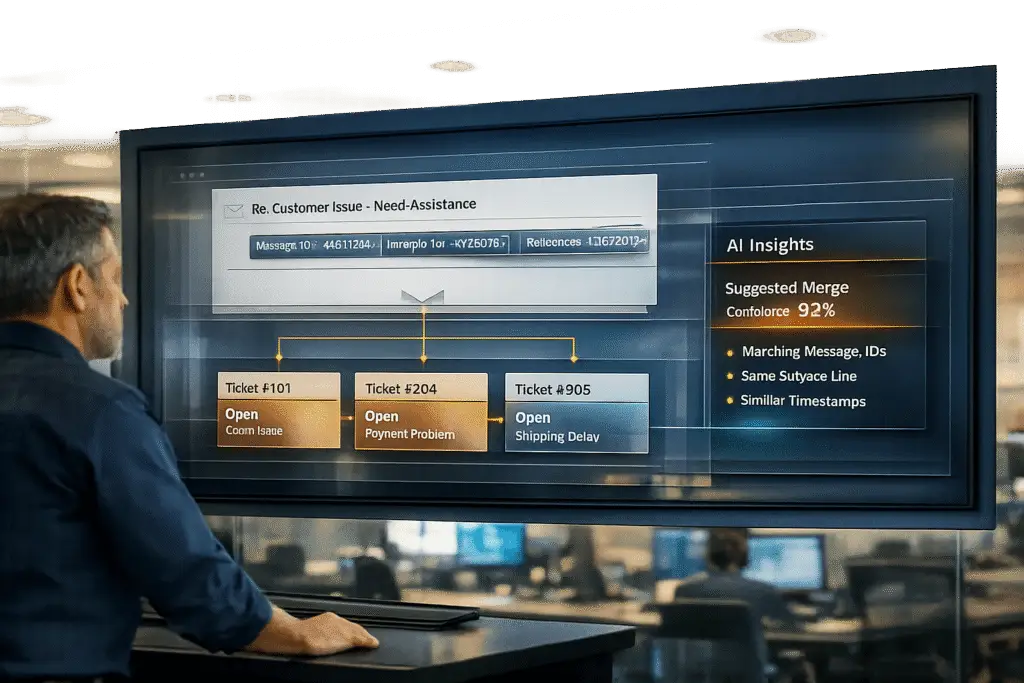
Email threading keeps conversations organized by linking replies to original tickets. When threading fails, ticket splits occur, creating fragmented conversations that waste time, disrupt workflows, and distort metrics like Resolution Time and CSAT, CES, and NPS.
Key causes of ticket splits include:
- Subject line changes: Customers altering subject lines or forwarding emails.
- Reply-all and new participants: External parties joining mid-thread.
- Multiple contacts per account: Duplicate tickets from multiple senders.
- System limitations: Older platforms struggle with long threads or forwarded emails.
- Agent errors: Forwarding instead of replying or neglecting to merge tickets.
To prevent splits:
- Standardize email workflows: Include ticket IDs in subject lines and configure headers like
Message-IDandReferencesproperly. - Train agents: Teach manual merging techniques and enforce clear guidelines.
- Optimize queue settings: Use customer IDs for routing and set time-based auto-split rules.
- Leverage AI: Use tools that analyze context and metadata to link related messages.
Talking Tech: How Does Email Threading Work
sbb-itb-e60d259
Why Email Threads Break: Common Causes of Ticket Splits
Ticket splits happen when technical or human factors disrupt the way support systems link email replies. Understanding these disruptions is key to maintaining smooth B2B support workflows. Here’s a closer look at what can break thread continuity.
Subject Line Changes
While modern systems rely on email headers to track conversations, they often fall back on subject lines as a backup. Problems arise when customers alter the subject line – removing a ticket ID like [#12345] or changing "Order Status" to "URGENT." This makes it harder for the system to connect the reply to the original ticket. Forwarding emails, instead of replying, adds to the issue by creating a new Message-ID, effectively breaking the thread.
Reply-All and External Party Issues
B2B support often involves multiple stakeholders, like account managers or billing contacts. When someone outside the original thread responds – such as a new external party – the system may create a separate ticket. This happens because systems use requester verification to block spam, and any sender not part of the original thread (or explicitly CC’d) is treated as a new entity. When external parties jump into conversations midstream, it can disrupt the flow and create unnecessary confusion.
Multiple Contacts Per Account
Enterprise accounts often involve multiple email addresses. For example, a customer might send inquiries to several support addresses at once or introduce a new contact midway through a conversation. This can lead to duplicate tickets, forcing agents to manually reconcile records and piece together fragmented conversations.
Outdated System Limitations
Older support platforms are particularly vulnerable to threading issues. For example, plaintext email mode removes HTML div tags, which serve as unique identifiers. Without these tags, the system relies on fragile subject line matching. Additionally, some email clients trim the References header after it exceeds about 10 Message-IDs, as recommended by RFC standards. This breaks the "family tree" that links replies. Systems unable to handle long threads or forwarded emails efficiently will continue to generate ticket splits as conversations grow more complex.
Agent and Process Mistakes
Even small errors by agents can fragment threads. For instance, forwarding an email instead of replying or neglecting to merge duplicate tickets can create disjointed records. Without clear guidelines – like always using "Reply" and adding stakeholders via CC – agents may unintentionally duplicate work, leading to overlapping responses and inefficiencies.
"A broken thread forces your team to become detectives, piecing together a conversation that should have been unified. This wastes time and increases the risk of providing incomplete or inaccurate support." – Mailo AI [3]
With around 376 billion emails sent daily [3], even minor threading issues can quickly escalate in high-volume B2B environments.
How Ticket Splits Affect Support Operations
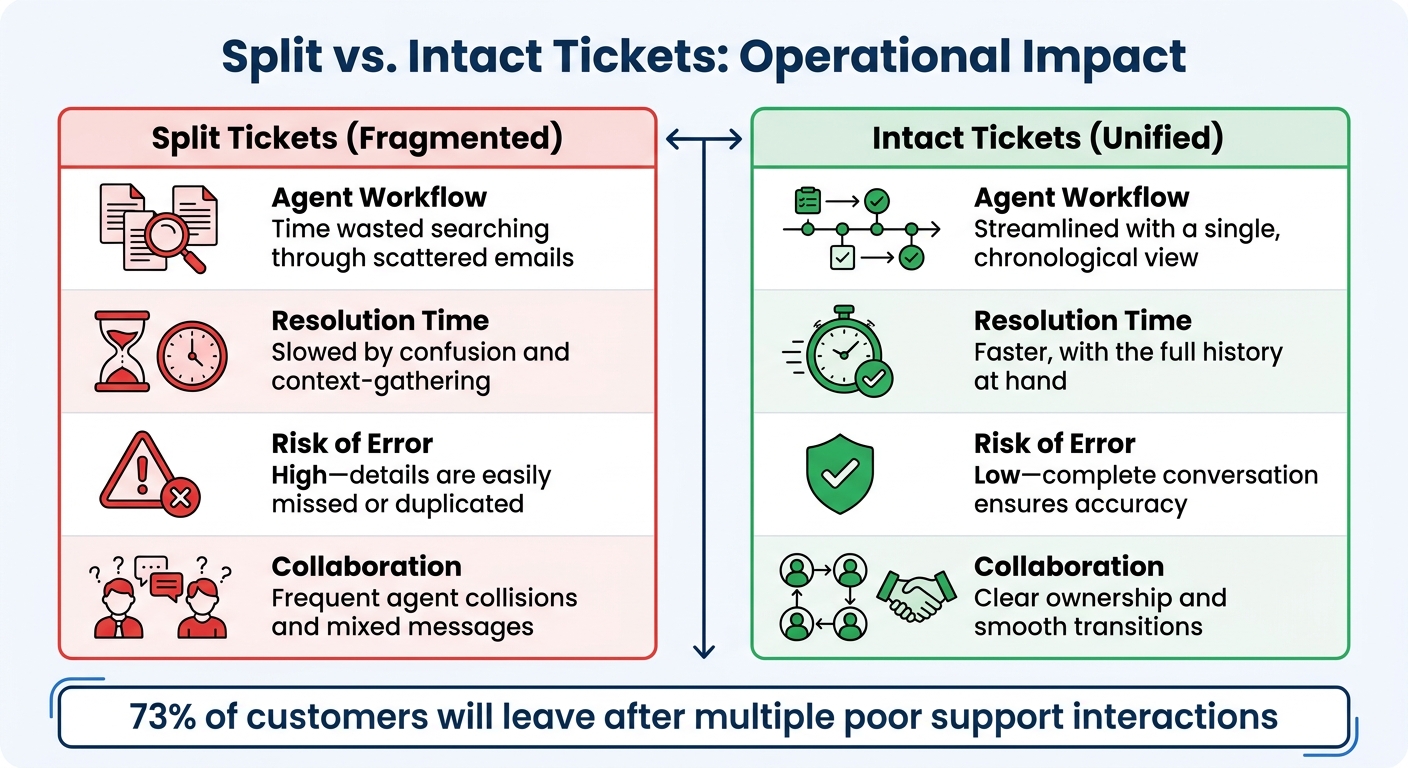
Impact of Split vs Intact Tickets on Support Operations
When email threads break apart, the consequences go well beyond a cluttered inbox. Split tickets create a ripple effect of operational headaches, slowing down your team and frustrating customers who expect smooth, uninterrupted service.
These issues quickly translate into significant challenges for support teams.
Workflow Problems in Complex Accounts
One of the first casualties of split tickets is agent productivity. Without a unified thread, support agents are forced to dig through multiple emails to piece together the context of an issue. This "detective work" eats up valuable time that could otherwise be spent solving problems.
Another common pitfall is agent collisions. When two team members unknowingly work on different parts of the same conversation, they can end up sending conflicting responses[3]. For customers, this lack of coordination can make your team seem unorganized – especially in B2B environments where relationship continuity is essential for renewals.
Split tickets also distort support metrics. For example, if a new issue reopens an old thread, it can artificially inflate resolution times. A simple request might look like it took weeks instead of hours to resolve[2]. On the flip side, scattering related messages across multiple tickets makes it tough to track contact reasons, resolutions, or team performance accurately[2].
The stakes are high: over half of consumers will switch to a competitor after just one bad support experience, and 73% will leave after multiple poor interactions[5]. When ticket splits force customers to repeat themselves or lead to inconsistent answers, the risk of losing their business grows dramatically.
Measuring the Impact: Intact vs. Split Tickets
The following table illustrates the stark differences between split and intact ticket handling:
| Metric | Split Tickets (Fragmented) | Intact Tickets (Unified) |
|---|---|---|
| Agent Workflow | Time wasted searching through scattered emails | Streamlined with a single, chronological view |
| Resolution Time | Slowed by confusion and context-gathering | Faster, with the full history at hand |
| Risk of Error | High – details are easily missed or duplicated | Low – complete conversation ensures accuracy |
| Collaboration | Frequent agent collisions and mixed messages | Clear ownership and smooth transitions |
Even a small number of threading failures can lead to hundreds of fragmented conversations in a busy support inbox. Each broken thread adds unnecessary friction, delays resolutions, and erodes customer trust. Ensuring ticket continuity is essential for keeping operations efficient and delivering a great customer experience.
How to Prevent Ticket Splits
Avoiding ticket splits can make your operations smoother and your metrics more accurate. You can achieve this by focusing on precise system configurations, establishing clear email standards, and providing agent performance metrics and training. These steps address threading issues that often lead to delays and data inconsistencies.
Setting Email Standards
Maintaining ticket continuity starts with how email threads are managed. Most modern ticketing platforms rely on three key email headers: Message-ID (a unique identifier), In-Reply-To (which points to the parent message), and References (which tracks the conversation chain)[4].
"If you set In-Reply-To and References correctly, your messages will thread properly across all major clients. If you skip them, you’re gambling on subject-line matching, which is inconsistent." – Samuel Chenard, Co-founder, LobsterMail[4]
To ensure consistency, configure your email templates to automatically include the Ticket ID in the subject line, using a format like [#{{ticket.id}}]. If you’re managing multiple helpdesks, add a unique prefix, such as [#CompanyPrefix12345][1].
For programmatically sent emails, always set the In-Reply-To header to the parent message’s Message-ID and append that ID to the References chain[4]. When dealing with conversations exceeding 10 messages, retain only the initial and most recent message IDs in the References header to avoid clutter[4].
Agent Training and Manual Merging
Agents play a critical role in resolving ticket splits. Training them to identify and manually merge split tickets is essential. A good approach is assisted merging, where the system flags potential duplicates but requires agent confirmation before merging[6].
"Because merges are irreversible, accuracy matters more than speed." – Lentil Labs[6]
Teach agents to carefully review ticket details before completing a merge since mistakes can’t be undone[6]. Establish clear guidelines for selecting the "parent" ticket – this is usually the oldest ticket or the one with the most recent activity – to maintain a consistent record[7][8]. Also, disable "public comment" options during the merging process to prevent automated emails that could confuse customers[6].
Regularly audit merged tickets to ensure unrelated issues weren’t combined by mistake[6]. Additionally, agents should be aware that replies to "Closed" or "Deleted" tickets often result in new tickets being created rather than appending to the original thread[9].
Once agents are equipped with these skills, you can further reduce ticket fragmentation by refining your queue configurations.
Improving Queue Configurations
Optimizing your queue setup can help prevent ticket splits before they happen. Instead of relying solely on email threading, consider routing tickets by customer ID or account. Configure your system to recognize replies from any email address associated with the same company or domain, not just the original requester[10].
Implement a time-based auto-split rule to create a new ticket if a customer replies after a set period, typically 10 days[2]. This ensures that unrelated issues don’t reopen old tickets and distort resolution metrics[2].
Set your queues to check for at least three key markers: the Ticket ID in the subject line, the Message-ID in the header, and a unique system identifier[10]. If you’re using IMAP, disable synchronization for secondary folders like "Important" or "All Mail" to prevent duplicate tickets caused by processing the same email multiple times[11].
Lastly, configure a "Return Path" in email headers to handle automated out-of-office replies as bounces, avoiding mail loops or unnecessary ticket creation[12]. For internal collaboration, use "Watchers" instead of CCs to keep agents informed without risking duplicate notifications or ticket splits[11].
AI Solutions for Thread Detection and Merging
Traditional threading systems often stumble when customers change email subjects, forward messages, or reply using different addresses. This is where AI steps in, analyzing content, sender details, and context to connect related messages seamlessly [3].
"AI identifies that an email with the subject ‘URGENT HELP’ is related to ‘Order #SH12345’ by analyzing sender details, body content, and metadata." – MAILO AI [3]
Using natural language processing (NLP), AI can understand the intent behind emails. For instance, it can link a message about "payment issues" to an ongoing thread about "invoice #4567", even if the subject line has been altered [3]. Additionally, advanced AI can handle multi-part messages, addressing separate issues within a single email without breaking them into multiple tickets [13].
How AI Identifies and Merges Threads
AI-powered threading goes beyond traditional keyword matching by using contextual understanding. Instead of relying solely on technical headers like Message-ID or In-Reply-To, AI evaluates the entire ticket, including the subject, body, attachments, and historical conversations [16]. It extracts key details like intent, urgency, error codes, device names, or account numbers to identify related tickets, even when phrasing varies [17][18].
"An AI agent handling email needs to understand the full thread context, identify which parts are new information versus quoted history, and respond appropriately to the latest message while accounting for the full conversation arc." – Fin (Intercom) [13]
AI employs confidence scoring to determine how to handle potential matches. For confidence scores above 85%, tickets are merged automatically [16]. Lower scores trigger a flag for human review, ensuring incorrect merges are avoided [16][18]. This "human-in-the-loop" approach strikes a balance between automation and accuracy, minimizing errors while handling the bulk of threading tasks.
During service outages or incidents, AI can cluster and route related tickets, enabling agents to send updates to all affected customers without manually searching for each case [17]. This prevents ticket queues from fragmenting and ensures consistent communication, reducing the risk of contradictory responses from multiple agents.
Supportbench‘s AI Features for Ticket Continuity
Supportbench offers AI-powered tools designed to maintain smooth ticket management without the need for costly add-ons. Features include:
- Auto-summarization: Summarizes email content and case history, giving agents a quick overview of the entire conversation, not just a list of emails [15].
- Auto-tagging and classification: Automatically organizes tickets by topic, urgency, or customer account, simplifying thread management [15].
- AI Co-Pilot: Assists agents by searching previous cases and knowledge bases, suggesting relevant solutions [15].
- Sentiment analysis: Detects customer emotions, prioritizing urgent issues to prevent escalation into fragmented tickets [15].
The platform also converts emails into support tickets automatically and integrates with tools like Salesforce and JIRA, ensuring that customer interactions across email, chat, and phone are consolidated into one view [15].
Implementation Steps and Results
To achieve smoother ticket management and operational improvements with AI:
- Enable auto-summarization and auto-tagging to provide agents with quick insights into past interactions and organize incoming tickets by topic or urgency [15].
- Centralize all support email addresses into a unified inbox to avoid "siloed" conversations [15].
- Audit and refine tag categories before training the AI to improve accuracy [16].
- Set confidence thresholds for AI decisions, escalating uncertain cases to human agents to maintain trust [16].
- Regularly review agent corrections and feed them back into the AI model to improve performance over time [16].
Real-world results highlight the impact of these strategies. In 2026, Mission Cloud used AI email agents to save 150 hours and achieve a 66% open rate through context-aware responses [14]. Reltio leveraged AI for account follow-ups, saving 1,098 hours of manual work and boosting their actionable sales pipeline by 20% [14]. Simpro improved conversation continuity, resulting in a 42% reply rate and a 126% increase in average deal size [14].
To measure success, track metrics like "Average Resolution Time" (which should decrease with better context) and "Replies per Ticket" (which should drop as issues are resolved faster). Mature AI systems can reduce first response times by 30% and cut manual triage work by up to 80% [16].
Conclusion
Email threading problems can throw a wrench into B2B support operations. When tickets split incorrectly, agents end up wasting hours piecing together context, and your KPIs no longer provide an accurate picture. Even a small delay in follow-ups can cause resolution times to balloon.
To address these challenges, adopting practical solutions is key. By combining consistent email practices with AI-powered thread management, you can maintain accurate metrics and deliver efficient service [1][2]. These strategies help ensure data integrity and make it easier to tag distinct issues for meaningful trend analysis.
AI plays a critical role by keeping threads intact, consolidating all customer interactions into a single, comprehensive record [3]. This not only eliminates the risk of agents overlapping on tasks but also provides a clear, chronological view of the conversation for every agent.
At its core, proper email threading lays the groundwork for scalable and cost-effective B2B support. Unified threads lead to better reporting, faster resolutions, and happier customers. Strengthening your email processes and integrating AI solutions today can help you achieve greater clarity, faster response times, and a higher level of customer satisfaction.
FAQs
How can I tell when a split ticket is happening?
To spot a split ticket, you’ll need to examine the email’s header data. A split happens when a reply generates a new ticket rather than staying within the original thread. Here’s what to look for:
- Threading markers: Check for missing or mismatched markers like
In-Reply-To,References, or unique identifiers such as a Ticket ID. - Incorrect or absent identifiers: If these markers are missing or don’t align properly, the system might mistakenly treat the reply as a brand-new ticket.
By reviewing these details, you can determine whether a split has occurred and address it accordingly.
What email header settings matter most for threading?
Email headers like References and In-Reply-To play a crucial role in maintaining proper threading in email conversations. These fields include message IDs that allow systems to connect replies to the correct tickets. Keeping these elements intact ensures smooth communication, avoids ticket splitting, and helps maintain seamless workflows in customer support.
How do I prevent wrong merges when using AI?
To prevent errors in merging within AI-driven customer support systems, it’s essential to use smarter merging strategies. These strategies should evaluate elements like the content of messages, timing, and patterns in user behavior. AI plays a key role by tracking context more effectively, picking up on subtle cues within conversations – something basic rule-based systems often miss. By blending AI capabilities with established rules, you can ensure related messages are grouped accurately, minimizing mistakes and preserving ticket continuity. This approach leads to a smoother and more reliable customer experience.
Related Blog Posts
- How do you prevent duplicate tickets and “email thread chaos” in customer support?
- How do you prevent duplicate tickets and merge threads without losing context?
- How do you preserve Freshdesk ticket threads so customers don’t lose context?
- How to keep email threading intact when migrating support tools
Evaluating help desks for a B2B team?
- Freshdesk vs Supportbench
- Jira Service Management vs Supportbench
- Salesforce Service Cloud vs Supportbench
Supportbench is all-inclusive from $32 per agent per month, with migration and onboarding included. See pricing or book a 20-minute demo.






